- ホーム
- Microsoft
- SC-300J - Microsoft Identity and Access Administrator (SC-300日本語版)
- Microsoft.SC-300J.v2026-10-14.q217
- 質問32
有効的なSC-300J問題集はJPNTest.com提供され、SC-300J試験に合格することに役に立ちます!JPNTest.comは今最新SC-300J試験問題集を提供します。JPNTest.com SC-300J試験問題集はもう更新されました。ここでSC-300J問題集のテストエンジンを手に入れます。
SC-300J問題集最新版のアクセス
「385問、30% ディスカウント、特別な割引コード:JPNshiken」
ホットスポットに関する質問
お客様は、Microsoft EntraテナントにリンクされたAzureサブスクリプションを所有しています。このテナントには、User1、User2、User3という名前の3人のユーザーが登録されています。
お客様は以下の表に示す機器をお持ちです。

次のような構成の仮想マシンをデプロイします。
- 名前: VM1
- リソースグループ: RG1
- オペレーティングシステム: Windows Server
- Microsoft Entra IDでログイン:有効
以下の表に示すAzureロールの割り当てがあります。

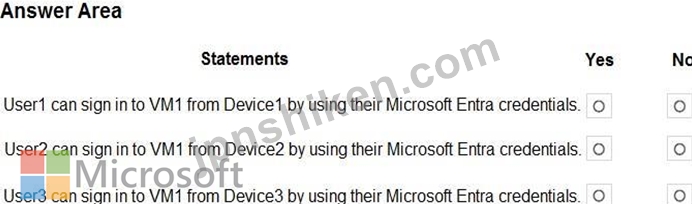
以下の各記述について、正しい場合は「はい」を選択してください。そうでない場合は「いいえ」を選択してください。
注:正解ごとに1ポイントが加算されます。
お客様は、Microsoft EntraテナントにリンクされたAzureサブスクリプションを所有しています。このテナントには、User1、User2、User3という名前の3人のユーザーが登録されています。
お客様は以下の表に示す機器をお持ちです。
次のような構成の仮想マシンをデプロイします。
- 名前: VM1
- リソースグループ: RG1
- オペレーティングシステム: Windows Server
- Microsoft Entra IDでログイン:有効
以下の表に示すAzureロールの割り当てがあります。
以下の各記述について、正しい場合は「はい」を選択してください。そうでない場合は「いいえ」を選択してください。
注:正解ごとに1ポイントが加算されます。
正解:

Explanation:
Box 1: No
User1 has the Virtual Machine Local User login role with scope RG1.
The role is not correct.
The Virtual Machine User Login role would be OK.
Box 2: Yes
User2 has a correct role: The Virtual Machine User Login role.
The Device is Windows 11, which is fine.
The Device does not have to been Entra joined or Entra registered.
Box 3: No
Not possible from an Android device.
Note:
Enable Microsoft Entra login for a Windows VM in Azure
To use Microsoft Entra login for a Windows VM in Azure, you must:
1. Enable the Microsoft Entra login option for the VM. [we can assume this has been configured]
2. Configure Azure role assignments for users who are authorized to sign in to the VM.
Reference:
https://learn.microsoft.com/en-us/entra/identity/devices/howto-vm-sign-in-azure-ad-windows
https://learn.microsoft.com/en-us/azure/virtual-desktop/azure-ad-joined-session-hosts

- 質問一覧「217問」
- 質問1 Azure Active Directory (Azure AD) テナントをお持ちです。 セ...
- 質問2 ホットスポットに関する質問 Azure ADテナントをお持ちです。 以...
- 質問3 ホットスポットに関する質問 お客様は、次の表に示すユーザーを
- 質問4 ホットスポットに関する質問 お客様は、以下の仮想マシンを含む ...
- 質問5 ホットスポットに関する質問 お客様は、以下の表に示すリソース
- 質問6 事例研究2 - Litware, Inc. 概要 Litware, Inc.は、Fabrikam, In...
- 質問7 シミュレーション 必要に応じて、以下のログイン情報を使用して
- 質問8 事例研究2 - Litware, Inc. 概要 Litware, Inc.は、Fabrikam, In...
- 質問9 お客様は、Site1 という名前の Microsoft SharePoint Online サ...
- 質問10 あなたはMicrosoft 365のサブスクリプションをお持ちです。 グロ...
- 質問11 クラウドベースのエンタープライズアプリを含むAzureActive Dire...
- 質問12 ホットスポットに関する質問 お客様は、以下の表に示すリソース
- 質問13 お客様は、以下の内容を含む Microsoft 365 サブスクリプション...
- 質問14 contoso.com という名前の Azure Active Directory (Azure AD) ...
- 質問15 あなたはPass4test Inc.のクラウド管理者であり、すべてのユーザ...
- 質問16 貴社は、contosri.com という名前の Azure Active Directory (Az...
- 質問17 ホットスポットに関する質問 お客様は、AU1とAU2という名前の2つ...
- 質問18 あなたはMicrosoft 365テナントをお持ちです。 全てのユーザーは...
- 質問19 お客様は、1,000人のユーザーを含むMicrosoft Entraテナントを所...
- 質問20 お客様はMicrosoft Entraテナントをお持ちです。 リスク検出レポ...
- 質問21 Microsoft 365 E5 サブスクリプションがあります。 ユーザーは、...
- 質問22 Azure AD テナントと App1 という名前の .NET Web アプリがあり...
- 質問23 あなたはMicrosoft 365テナントをお持ちです。 全ての利用者は携...
- 質問24 RG1 という名前のリソース グループと、User1、User2、User3、お...
- 質問25 新しい Azure AD テナントをデプロイする予定です。 テナントに...
- 質問26 contoso.com という名前の Microsoft Entra ID P2 テナントがあ...
- 質問27 ホットスポットに関する質問 Microsoft Entraテナントには、User...
- 質問28 注:この問題は、同じシナリオを提示する一連の問題の一部です。
- 質問29 Azure AD Privileged Identity Management (PIM) を使用する Azu...
- 質問30 お客様のMicrosoft Entraテナントには、以下の表に示すIDが含ま...
- 質問31 2,500人のユーザーにMicrosoft Office 365 Enterprise E3ライセ...
- 質問32 ホットスポットに関する質問 お客様は、Microsoft Entraテナント...
- 質問33 お客様は、以下の表に示すオブジェクトを含む Azure Active Dire...
- 質問34 事例研究1 - Contoso, Ltd 概要 Contoso, Ltd.は、モントリオー...
- 質問35 ホットスポットに関する質問 お客様のオンプレミスネットワーク
- 質問36 注:この質問は、同じシナリオを提示する一連の質問の一部です。
- 質問37 あなたはcontoso.comというSMTPアドレス空間を使用するMicrosoft...
- 質問38 ホットスポットに関する質問 お客様は、以下の表に示すキーコン
- 質問39 多要素認証(MFA)が適用され、セルフサービスパスワードリセット(...
- 質問40 シミュレーション 「全従業員」グループのメンバーが、Microsoft...
- 質問41 ホットスポットに関する質問 あなたはMicrosoft 365 E5のサブス...
- 質問42 Sub1という名前のAzureサブスクリプションがあり、その中にVM1と...
- 質問43 あなたはMicrosoft 365 E5のサブスクリプションをお持ちです。 R...
- 質問44 あなたはMicrosoft 365のサブスクリプションをお持ちです。 ユー...
- 質問45 ホットスポットに関する質問 Azure サブスクリプションには、RG1...
- 質問46 Azure AD Identity Protectionを使用するAzure Active Directory...
- 質問47 ホットスポットに関する質問 Sub1 という名前の Azure サブスク...
- 質問48 ホットスポットに関する質問 お客様はcontoso.comという名前のMi...
- 質問49 ホットスポットに関する質問 Sub1とSub2という名前の2つのAzure...
- 質問50 お客様は、storage1 という名前のストレージアカウントを含む Az...
- 質問51 注:この問題は、同じシナリオを提示する一連の問題の一部です。
- 質問52 Microsoft Entraテナントには、Package1という名前のアクセスパ...
- 質問53 User1 という名前のユーザーが Microsoft Defender for Cloud Ap...
- 質問54 注:この問題は、同じシナリオを提示する一連の問題の一部です。
- 質問55 事例研究1 - Contoso, Ltd 概要 Contoso, Ltd.は、モントリオー...
- 質問56 ユーザー「User1」を含むAzure ADテナントがあります。 ユーザー...
- 質問57 あなたはMicrosoft 365のサブスクリプションをお持ちです。 ユー...
- 質問58 ホットスポットに関する質問 お客様は、Set1とSet2という名前の2...
- 質問59 ホットスポットに関する質問 Sub1という名前のAzureサブスクリプ...
- 質問60 ホットスポットに関する質問 Sub1 という名前の Azure サブスク...
- 質問61 事例研究2 - Litware, Inc. 概要 Litware, Inc.は、Fabrikam, In...
- 質問62 お客様は、以下の表に示すユーザーを含む Azure Active Director...
- 質問63 VM1 という名前の仮想マシンと Vault1 という名前の Azure Key V...
- 質問64 シミュレーション アクセスパッケージの割り当てを通じてテナン
- 質問65 ユーザー「User1」と、リソースグループ「RG1」および「RG2」を...
- 質問66 事例研究2 - Litware, Inc. 概要 Litware, Inc.は、Fabrikam, In...
- 質問67 ドラッグアンドドロップ問題 あなたは、User1とUser2という名前...
- 質問68 ホットスポットに関する質問 contoso.com という名前の Azure Ac...
- 質問69 お客様は、Microsoft Entra Permissions Management にオンボー...
- 質問70 次の表に示すユーザーを含む Microsoft Entra テナントがありま...
- 質問71 シミュレーション Microsoft Entraテナントには、fabrikam.comド...
- 質問72 注:この問題は、同じシナリオを提示する一連の問題の一部です。
- 質問73 Microsoft Entraテナントをお持ちです。このテナントにFacebook...
- 質問74 注: この質問は、同じシナリオを示す一連の質問の一部です。この...
- 質問75 ホットスポットに関する質問 お客様のAzure ADテナントには、以...
- 質問76 ホットスポットに関する質問 お客様のMicrosoft Entraテナントに...
- 質問77 注:この問題は、同じシナリオを提示する一連の問題の一部です。
- 質問78 ホットスポットに関する質問 お客様は、以下の表に示すユーザー
- 質問79 ホットスポットに関する質問 お客様は、以下の表に示すユーザー
- 質問80 ホットスポットに関する質問 contoso.com という名前の Microsof...
- 質問81 Microsoft Entra テナントにリンクされた Azure サブスクリプシ...
- 質問82 Microsoft365テナントがあります。 サインインアクティビティレ...
- 質問83 あなたはMicrosoft 365 E5のサブスクリプションをお持ちです。 ...
- 質問84 ホットスポットに関する質問 Azure サブスクリプションには、Gro...
- 質問85 ホットスポットに関する質問 あなたは、Group1とGroup2という名...
- 質問86 ホットスポットに関する質問 Microsoft Entraテナントには、Remo...
- 質問87 ホットスポットに関する質問 お客様は、以下の表に示すユーザー
- 質問88 展示に示されているように、Azure Active Directory(Azure AD)...
- 質問89 新しい Microsoft 365 E5 テナントを作成します。 ユーザーが匿...
- 質問90 ホットスポットに関する質問 お客様のAzure Active Directory(Az...
- 質問91 Azure ADテナントをお持ちです。 ログイン失敗回数10回をロック...
- 質問92 ホットスポットに関する質問 お客様には、contoso.com と fabrik...
- 質問93 ホットスポットに関する質問 Server1という名前のオンプレミスサ...
- 質問94 あなたはAzureサブスクリプションをお持ちです。 あなたは、企業...
- 質問95 App1という名前のオンプレミスアプリケーションがあります。 お...
- 質問96 ドラッグアンドドロップ問題 お客様のネットワークには、Microso...
- 質問97 事例研究1 - Contoso, Ltd 概要 Contoso, Ltd.は、モントリオー...
- 質問98 ホットスポットに関する質問 contoso.com という名前の Microsof...
- 質問99 ホットスポットに関する質問 セキュリティの既定値が無効になっ
- 質問100 ホットスポットに関する質問 お客様は、Team1 という名前の Micr...
- 質問101 ホットスポットに関する質問 contoso.com という名前の Azure Ac...
- 質問102 ホットスポットに関する質問 既定のアプリ登録設定が設定された ...
- 質問103 Azure ADテナントをお持ちです。 ユーザーが認証済みの発行元か...
- 質問104 貴社は現在、業務手順全体を見直し、効率化を図る方法を模索して
- 質問105 ホットスポットに関する質問 お客様には、contoso.com と fabrik...
- 質問106 事例研究1 - Contoso, Ltd 概要 Contoso, Ltd.は、モントリオー...
- 質問107 ホットスポットに関する質問 あなたはAzureサブスクリプションを...
- 質問108 ホットスポットに関する質問 Azure Active Directory (Azure AD)...
- 質問109 ホットスポットに関する質問 お客様は、以下の表に示すリソース
- 質問110 シミュレーション 必要に応じて、以下のログイン情報を使用して
- 質問111 お客様のネットワークには、Azure Active Directory (Azure AD) ...
- 質問112 あなたはMicrosoft 365テナントをお持ちです。 現在、基本認証を...
- 質問113 お客様は、Microsoft Defender for Cloud Appsおよび条件付きア...
- 質問114 お客様はAzureサブスクリプションをお持ちです。そのサブスクリ...
- 質問115 Azure ADテナントをお持ちです。 App1という名前の新しいエンタ...
- 質問116 事例研究2 - Litware, Inc. 概要 Litware, Inc.は、Fabrikam, In...
- 質問117 事例研究2 - Litware, Inc. 概要 Litware, Inc.は、Fabrikam, In...
- 質問118 ホットスポットに関する質問 お客様のMicrosoft Entraテナントに...
- 質問119 お客様は、Microsoft Defender for Cloud AppsおよびYammerを使...
- 質問120 お客様は、以下の表に示すリソースを含む Azure サブスクリプシ...
- 質問121 あなたはAzureサブスクリプションをお持ちです。 権限を自動的に...
- 質問122 ホットスポットに関する質問 お客様は、Microsoft Entraテナント...
- 質問123 ホットスポットに関する質問 Sub1 という名前の Azure サブスク...
- 質問124 ドラッグアンドドロップ問題 お客様は、以下の表に示すリソース
- 質問125 貴社は、専用のセキュリティ情報イベント管理システムとしてMicr...
- 質問126 シミュレーション プロジェクト・ファルコン・グループのメンバ
- 質問127 お客様は、User1 という名前のユーザーを含む Microsoft 365 E5 ...
- 質問128 あなたはMicrosoft 365 E5サブスクリプションとAzureサブスクリ...
- 質問129 ケーススタディ3 - A Datum Corp 概要 A Datum Corporationはモ...
- 質問130 ホットスポットに関する質問 お客様はMicrosoft 36Sテナントをお...
- 質問131 貴社は、User1という名前のユーザーを含むAzure ADテナントを所...
- 質問132 Azure Active Directory(Azure AD)テナントがあります。 リス...
- 質問133 お客様のMicrosoft Entraテナントには、以下の表に示すユーザー...
- 質問134 SecAdmin1という名前のユーザーを含むAzureActive Directory(Az...
- 質問135 ホットスポットに関する質問 ユーザー「User1」を含むAzure Acti...
- 質問136 お客様のネットワークには、Microsoft 365 E5 サブスクリプショ...
- 質問137 contoso.com という名前の Microsoft Entra テナントがあり、そ...
- 質問138 注:この質問は、同じシナリオを提示する一連の質問の一部です。
- 質問139 あなたはMicrosoft 365のサブスクリプションをお持ちです。 Gate...
- 質問140 事例研究1 - Contoso, Ltd 概要 Contoso, Ltd.は、モントリオー...
- 質問141 Azure ADテナントをお持ちです。 テナントに多数の新しいアプリ...
- 質問142 シミュレーション 必要に応じて、以下のログイン情報を使用して
- 質問143 ホットスポットに関する質問 お客様は、Group1とGroup2という名...
- 質問144 App1という名前のAzureADエンタープライズアプリケーションを含...
- 質問145 あなたはMicrosoft 365のサブスクリプションをお持ちです。 あな...
- 質問146 貴社は、Microsoft 365 E5 の新しいサブスクリプションと、App1 ...
- 質問147 お客様は、fabrikam.comというドメイン名を使用するMicrosoft 36...
- 質問148 contoso.comのSMTPのアドレス空間を使用するMicrosoftExchange組...
- 質問149 次の表に示すユーザーを含む Azure AD テナントがあります。 (Ex...
- 質問150 ホットスポットに関する質問 お客様は、Site1 という名前の Micr...
- 質問151 お客様は、Microsoft Entra ID Premium ライセンスを使用する Mi...
- 質問152 シミュレーション 必要に応じて、以下のログイン情報を使用して
- 質問153 Azure Active Directory(Azure AD)テナントがあります。 過去...
- 質問154 あなたは、Automation1という名前のAzure Automationアカウント...
- 質問155 注:この問題は、同じシナリオを提示する一連の問題の一部です。
- 質問156 シミュレーション 必要に応じて、以下のログイン情報を使用して
- 質問157 注:この問題は、同じシナリオを提示する一連の問題の一部です。
- 質問158 ドラッグアンドドロップ問題 お客様のネットワークには、contoso...
- 質問159 ケーススタディ3 - A Datum Corp 概要 A Datum Corporationはモ...
- 質問160 あなたはcontoso.comというSMTPアドレス空間を使用するMicrosoft...
- 質問161 新しい Microsoft 365 テナントを構成して、既定のドメイン名と...
- 質問162 お客様はMicrosoft Entraテナントをお持ちです。 テナントへの管...
- 質問163 あなたはMicrosoft 365のサブスクリプションをお持ちです。 あな...
- 質問164 事例研究1 - Contoso, Ltd 概要 Contoso, Ltd.は、モントリオー...
- 質問165 ホットスポットに関する質問 お客様のネットワークには、Azure A...
- 質問166 ホットスポットに関する質問 次の表に示すグループを含む Azure ...
- 質問167 注: この質問は、同じシナリオを示す一連の質問の一部です。この...
- 質問168 ホットスポットに関する質問 お客様は、Microsoft Entra Permiss...
- 質問169 シミュレーション 必要に応じて、以下のログイン情報を使用して
- 質問170 お客様はMicrosoft Entraテナントをお持ちです。 アプリへのサイ...
- 質問171 ドラッグアンドドロップ問題 あなたは、User1、User2、User3とい...
- 質問172 Sub1 という名前の Azure サブスクリプションがあり、その中に R...
- 質問173 貴社では、ユーザーが社内アプリケーションにアクセスする前に、
- 質問174 ActiveDirectoryドメインに同期するAzureActive Directory(Azur...
- 質問175 あなたはMicrosoft 365 E5のサブスクリプションをお持ちです。 ...
- 質問176 お客様はAzure AD Premium P2テナントをお持ちです。 Log Analyt...
- 質問177 Sub1という名前のAzureサブスクリプションがあり、その中にUser1...
- 質問178 ユーザー「User1」を含むAzureサブスクリプションをお持ちです。...
- 質問179 Microsoft365テナントがあります。 Azure Active Directory(Azu...
- 質問180 ホットスポットに関する質問 貴社は、Microsoft Entra IDを使用...
- 質問181 ホットスポットに関する質問 Microsoft Entraテナントには、Grou...
- 質問182 contoso.com という名前の Azure AD テナントがあり、そこには次...
- 質問183 ユーザーが重大なサインインアラートをトリガーした場合にアクセ
- 質問184 2,500人のユーザーにMicrosoft Office 365 Enterprise E3ライセ...
- 質問185 ホットスポットに関する質問 contoso.com という名前の Azure Ac...
- 質問186 Microsoft365テナントがあります。 すべてのユーザーは携帯電話...
- 質問187 お客様は、Site1 という名前の Microsoft SharePoint Online サ...
- 質問188 注:この問題は、同じシナリオを提示する一連の問題の一部です。
- 質問189 ホットスポットに関する質問 お客様のMicrosoft Entraテナントに...
- 質問190 ホットスポットに関する質問 貴社はMicrosoft 365テナントを所有...
- 質問191 2,500人のユーザーにMicrosoft Office 365 Enterprise E3ライセ...
- 質問192 お客様は、User1 という名前のユーザーを含む Microsoft 365 E5 ...
- 質問193 ホットスポットに関する質問 お客様は、以下の表に示すグループ
- 質問194 ホットスポットに関する質問 お客様のネットワークには、contoso...
- 質問195 シミュレーション 必要に応じて、以下のログイン情報を使用して
- 質問196 ホットスポットに関する質問 お客様のMicrosoft 365テナントには...
- 質問197 ドラッグアンドドロップ問題 お客様のオンプレミスネットワーク
- 質問198 ドラッグアンドドロップ問題 お客様はMicrosoft Entraテナントを...
- 質問199 以下の表に示すAzureリソースが利用可能です。 (Exhibit) RG1の...
- 質問200 次の表に示すユーザーを含む Azure AD テナントがあります。 (Ex...
- 質問201 Microsoft Entraテナントには、User1という名前のユーザーが含ま...
- 質問202 ユーザー「User1」を含むAzureサブスクリプションをお持ちです。...
- 質問203 シミュレーション 「Bellevue」という名前のグループを作成し、...
- 質問204 Azure Active Directory (Azure AD) テナントをお持ちです。 HR ...
- 質問205 Microsoft Entra Permissions Management を使用する Sub1 とい...
- 質問206 ユーザー「User1」と「Vault1」という名前のAzureキーコンテナー...
- 質問207 ドラッグアンドドロップ問題 お客様はMicrosoft 365 E5サブスク...
- 質問208 条件付きアクセス ポリシーを使用する Azure Active Directory (...
- 質問209 お客様は、Microsoft Defender for Cloud Appsを使用するMicroso...
- 質問210 Microsoft365テナントがあります。 すべてのユーザーは、Windows...
- 質問211 ドラッグアンドドロップ問題 お客様はMicrosoft 365 E5テナント...
- 質問212 Microsoft Entraテナントには、User1、User2、User3という名前の...
- 質問213 ホットスポットに関する質問 Microsoft Entraテナントには、User...
- 質問214 ドラッグアンドドロップ問題 貴社は、Azureリソースへの管理者ア...
- 質問215 ホットスポットに関する質問 お客様は、Azure Active Directory ...
- 質問216 ホットスポットに関する質問 多要素認証(MFA)が有効になっている...
- 質問217 あなたはContoso, Ltd.という会社に勤務しており、その会社はcon...
