- ホーム
- Microsoft
- MB-310J - Microsoft Dynamics 365 Finance Functional Consultant (MB-310日本語版)
- Microsoft.MB-310J.v2026-02-17.q192
- 質問60
有効的なMB-310J問題集はJPNTest.com提供され、MB-310J試験に合格することに役に立ちます!JPNTest.comは今最新MB-310J試験問題集を提供します。JPNTest.com MB-310J試験問題集はもう更新されました。ここでMB-310J問題集のテストエンジンを手に入れます。
MB-310J問題集最新版のアクセス
「349問、30% ディスカウント、特別な割引コード:JPNshiken」
ある企業がMicrosoft Dynamics 365 Financeを使用しています。この企業は資産の1つを売却します。
システム内のこの資産を処分する必要があります。
どの取引タイプを使用する必要がありますか?
システム内のこの資産を処分する必要があります。
どの取引タイプを使用する必要がありますか?
正解:C
Dynamics 365 Finance, Dispose of a fixed asset as scrap
You can eliminate transactions for a fixed asset that was disposed of as scrap. The transaction types that can be eliminated include an asset's acquisition and accumulated depreciation transactions and other fixed asset transactions. Elimination of these transactions affects balance sheet accounts, such as acquisition adjustment, depreciation adjustment, revaluation, write-up, and write-down accounts.
Before you dispose of a fixed asset as scrap, you must create ledger accounts that are associated with:
the asset's acquisition value
depreciation for the current year
depreciation for previous years
the asset's NBV
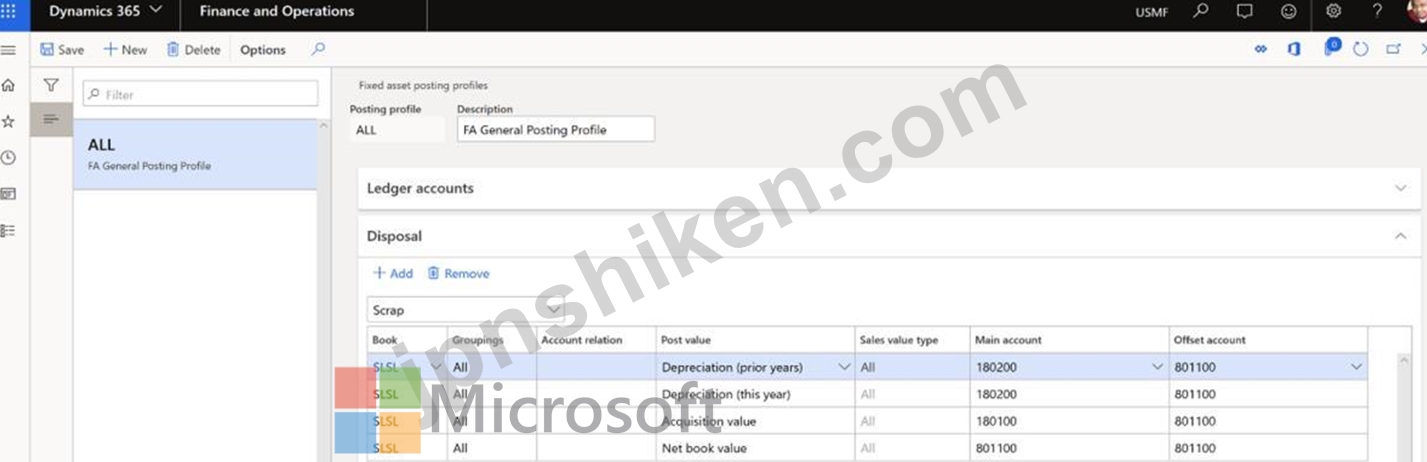
The fixed asset transaction types are listed on the Fixed assets posting profile page. Go to Fixed assets > Setup > Fixed asset posting profiles, and then, on the Disposal FastTab, select Scrap in the field above the grid. The following illustration shows the list of fixed asset transaction types on the Fixed asset posting profiles page.
Reference:
https://learn.microsoft.com/en-us/dynamics365/finance/fixed-assets/dispose-of-a-fixed-asset-as-scrap
You can eliminate transactions for a fixed asset that was disposed of as scrap. The transaction types that can be eliminated include an asset's acquisition and accumulated depreciation transactions and other fixed asset transactions. Elimination of these transactions affects balance sheet accounts, such as acquisition adjustment, depreciation adjustment, revaluation, write-up, and write-down accounts.
Before you dispose of a fixed asset as scrap, you must create ledger accounts that are associated with:
the asset's acquisition value
depreciation for the current year
depreciation for previous years
the asset's NBV
The fixed asset transaction types are listed on the Fixed assets posting profile page. Go to Fixed assets > Setup > Fixed asset posting profiles, and then, on the Disposal FastTab, select Scrap in the field above the grid. The following illustration shows the list of fixed asset transaction types on the Fixed asset posting profiles page.
Reference:
https://learn.microsoft.com/en-us/dynamics365/finance/fixed-assets/dispose-of-a-fixed-asset-as-scrap

- 質問一覧「192問」
- 質問1 Dynamics 365 Finance を実装しています。 補助元帳エントリは総...
- 質問2 顧客は Dynamics 365 Finance を使用して予算を管理します。 顧...
- 質問3 ホットスポットに関する質問 (Exhibit) ベンダーの支払い方法を...
- 質問4 ケーススタディ2 - マンソン 背景 マンソンズ・ピクルス・アンド...
- 質問5 ある会社では売掛金管理に Dynamics 365 Finance を使用していま...
- 質問6 ドラッグアンドドロップの質問 組織の予算を作成しています。 組...
- 質問7 ある会社では Microsoft Dynamics 365 Finance を使用しています...
- 質問8 ホットスポットに関する質問 ある企業は、ベンダーを利用して自
- 質問9 ある会社では Dynamics 365 Finance を使用しています。 会社は...
- 質問10 注: この質問は、同じシナリオを提示する一連の質問の一部です。...
- 質問11 あなたは Dynamics 365 Finance コンサルタントです。 現在のシ...
- 質問12 企業は、顧客から売上税を徴収して報告するように Dynamics 365 ...
- 質問13 ホットスポットに関する質問 Dynamics 365 Finance で仕入先の請...
- 質問14 注: この質問は、同じシナリオを提示する一連の質問の一部です。...
- 質問15 注: この質問は、同じシナリオを提示する一連の質問の一部です。...
- 質問16 あなたは Dynamics 365 Finance のコンサルタントです。配賦基準...
- 質問17 顧客は Dynamics 365 Finance の銀行調整機能を使用します。 顧...
- 質問18 ドラッグアンドドロップの質問 公共部門の組織では、転記された
- 質問19 注: この質問は、同じシナリオを提示する一連の質問の一部です。...
- 質問20 ケーススタディ6 - テイルスピン・トイズ 背景 Tailspin Toysは...
- 質問21 ホットスポットに関する質問 あるクライアントは、販売注文処理
- 質問22 ホットスポットに関する質問 ある会社に滞納している顧客がいる
- 質問23 Dynamics 365 Finance で予算コンポーネントを構成しています。 ...
- 質問24 ある企業は、Microsoft Dynamics 365 Finance を使用して顧客サ...
- 質問25 ホットスポットに関する質問 Dynamics 365 Finance を実装する予...
- 質問26 シミュレーション あなたは Contoso Entertainment System USA (...
- 質問27 ドラッグアンドドロップの質問 Dynamics 365 Finance を構成して...
- 質問28 Dynamics 365 Finance を導入しています。請求書検証ポリシーを3...
- 質問29 クライアントは、品目が追加された後、Dynamics 365 Finance が...
- 質問30 注: この質問は、同じシナリオを提示する一連の質問の一部です。...
- 質問31 ケーススタディ1 - フォースコーヒー 背景 フォースコーヒーはシ...
- 質問32 Dynamics 365 Finance の基本的な予算作成機能を設定します。予...
- 質問33 ドラッグアンドドロップの質問 ある会社では、Dynamics 365 Fina...
- 質問34 予算には、Humongous Insurance 従業員の年間生活費の増加のみが...
- 質問35 ある会社では Dynamics 365 Finance を使用しています。 当社で...
- 質問36 ケーススタディ4 - Adtum Corp 背景 First Up Consultantsは、ア...
- 質問37 Dynamics 365 Finance で回収プロセスを監視して、滞納している...
- 質問38 ある会社ではMicrosoft Dynamics 365 Financeを使用しています。...
- 質問39 シミュレーション あなたは Contoso Entertainment System USA (...
- 質問40 クライアントは売掛金管理に Dynamics 365 Finance を使用します...
- 質問41 ある企業は、Microsoft Dynamics 365 Finance を使用して固定資...
- 質問42 組織は、組織内の法人間に会社間会計を設定することを計画してい
- 質問43 ホットスポットに関する質問 ある会社では Dynamics 365 Finance...
- 質問44 ケーススタディ4 - Adtum Corp 背景 First Up Consultantsは、ア...
- 質問45 ドラッグアンドドロップの質問 あなたは、組織内で Dynamics 365...
- 質問46 外部ベンダーのベンダー コラボレーション セキュリティ ロール...
- 質問47 ホットスポットに関する質問 会社の予算予測を正確に表す予算計
- 質問48 ある会社では、Dynamics 365 Finance で経費管理を行っています...
- 質問49 従来のシステムから Dynamics 365 Finance にデータを移行してい...
- 質問50 ケーススタディ3 - アルペンスキーハウス 背景 アルパイン・スキ...
- 質問51 ある企業がDynamics 365 Financeを使用しています。この企業は米...
- 質問52 親会社の次年度の親予算を作成します。親会社は独自の法人として
- 質問53 ある企業は、数少ない工業用製造工場で空気清浄ユニットを製造し
- 質問54 ある会社では Dynamics 365 Finance を使用しています。 会社は...
- 質問55 Dynamics %5 Finance で回収プロセスを監視して、滞納している顧...
- 質問56 注: この質問は、同じシナリオを提示する一連の質問の一部です。...
- 質問57 ホットスポットに関する質問 Dynamics 365 Finance で会社の連結...
- 質問58 ケーススタディ6 - テイルスピン・トイズ 背景 Tailspin Toysは...
- 質問59 注: この質問は、同じシナリオを提示する一連の質問の一部です。...
- 質問60 ある企業がMicrosoft Dynamics 365 Financeを使用しています。こ...
- 質問61 注: この質問は、同じシナリオを提示する一連の質問の一部です。...
- 質問62 注: この質問は、同じシナリオを提示する一連の質問の一部です。...
- 質問63 企業は、認識基準を使用して、発生ごとに収益を配分することを計
- 質問64 キャッシュフローレポートを設定する必要があります。 実行すべ
- 質問65 複数の銀行口座を持つ会社の自動銀行調整機能を構成しています。
- 質問66 ドラッグアンドドロップの質問 ある企業は Dynamics 365 Finance...
- 質問67 ケーススタディ4 - Adtum Corp 背景 First Up Consultantsは、ア...
- 質問68 注: この質問は、同じシナリオを提示する一連の質問の一部です。...
- 質問69 シミュレーション あなたは、Contoso Group (GLCO) という法人の...
- 質問70 ドラッグアンドドロップの質問 あなたはDynamics 365 Financeの...
- 質問71 ケーススタディ4 - Adtum Corp 背景 First Up Consultantsは、ア...
- 質問72 シミュレーション あなたは Contoso Entertainment System USA (...
- 質問73 ホットスポットに関する質問 Microsoft Dynamics 365 Finance を...
- 質問74 ケーススタディ3 - アルペンスキーハウス 背景 アルパイン・スキ...
- 質問75 ケーススタディ2 - マンソン 背景 マンソンズ・ピクルス・アンド...
- 質問76 ある会社では Dynamics 365 Finance を使用しています。 当社は...
- 質問77 ある企業が Dynamics 365 Finance を導入しました。 当社は、フ...
- 質問78 ホットスポットに関する質問 クライアントは Dynamics 365 Finan...
- 質問79 ケーススタディ5 - ファーストアップコンサルタント 背景 First ...
- 質問80 ホットスポットに関する質問 ある企業が Dynamics 365 Finance ...
- 質問81 注: この質問は、同じシナリオを提示する一連の質問の一部です。...
- 質問82 注: この質問は、同じシナリオを提示する一連の質問の一部です。...
- 質問83 注: この質問は、同じシナリオを提示する一連の質問の一部です。...
- 質問84 クライアントは、Dynamics 365 Finance の標準試算表を使用しま...
- 質問85 ある会社では、Dynamics 365 Finance を使用して予算を管理して...
- 質問86 ホットスポットに関する質問 ある企業は、Dynamics 365 Finance ...
- 質問87 ケーススタディ7 - アドベンチャーワークスサイクル 背景 Advent...
- 質問88 Dynamics 365 Finance をコンターしています。 すべての販売取引...
- 質問89 ドラッグアンドドロップの質問 ある企業はDynamics 365 Finance...
- 質問90 ドラッグアンドドロップの質問 コンピュータ機器を販売する会社
- 質問91 あなたは売掛金管理者です。 ある顧客に対し、2段階の督促状によ...
- 質問92 ある会社では Dynamics 365 Finance を使用しています。 顧客請...
- 質問93 あなたはある会社の財務マネージャーとして働いています。その会
- 質問94 ある会社では Dynamics 365 Finance を使用しています。 同社の...
- 質問95 ある企業は、プロジェクトの請求と経費を管理するために Dynamic...
- 質問96 シミュレーション あなたは Contoso Entertainment System USA (...
- 質問97 注: この質問は、同じシナリオを提示する一連の質問の一部です。...
- 質問98 ある企業は、Dynamics 365 Finance に基本的な予算作成機能を実...
- 質問99 ある企業は、請求スケジュールの管理にDynamics 365 Financeを使...
- 質問100 ケーススタディ7 - アドベンチャーワークスサイクル 背景 Advent...
- 質問101 ある企業が固定資産管理のためにMicrosoft Dynamics 365 Finance...
- 質問102 ある会社では Dynamics 365 Finance を使用しています。 すべて...
- 質問103 Dynamics 365 Finance 環境の固定資産モジュールを構成していま...
- 質問104 ある企業は Dynamics 365 Finance を使用する予定です。 基本的...
- 質問105 ある会社では Dynamics 365 Finance を使用しています。 同社は...
- 質問106 注: この質問は、同じシナリオを提示する一連の質問の一部です。...
- 質問107 注: この質問は、同じシナリオを提示する一連の質問の一部です。...
- 質問108 ある企業は、Microsoft Dynamics 365 Finance を使用して固定資...
- 質問109 注: この質問は、同じシナリオを提示する一連の質問の一部です。...
- 質問110 注: この質問は、同じシナリオを提示する一連の質問の一部です。...
- 質問111 ホットスポットに関する質問 Dynamics 365 Finance でメインアカ...
- 質問112 ケーススタディ6 - テイルスピン・トイズ 背景 Tailspin Toysは...
- 質問113 ある会社のコントローラーには、標準の総勘定元帳ジャーナルを入
- 質問114 ホットスポットに関する質問 企業は工業生産計画のためのユニッ
- 質問115 ケーススタディ6 - テイルスピン・トイズ 背景 Tailspin Toysは...
- 質問116 Dynamics 365 Finance でアカウント構造と高度なルールを構成し...
- 質問117 Dynamics 365 Finance を構成しています。 すべての販売取引に対...
- 質問118 ケーススタディ4 - Adtum Corp 背景 First Up Consultantsは、ア...
- 質問119 ドラッグアンドドロップの質問 企業は予算編成プロセスのために
- 質問120 ある会社では Microsoft Dynamics 365 Finance を使用しています...
- 質問121 あなたはある会社の財務マネージャーとして働いています。その会
- 質問122 ホットスポットに関する質問 民間部門のクライアントは、調達プ
- 質問123 ある企業が Dynamics 365 Finance に基本的な予算作成機能を実装...
- 質問124 ケーススタディ1 - フォースコーヒー 背景 フォースコーヒーはシ...
- 質問125 ケーススタディ5 - ファーストアップコンサルタント 背景 First ...
- 質問126 ケーススタディ5 - ファーストアップコンサルタント 背景 First ...
- 質問127 Dynamics 365 Finance を実装しています。 ベンダーに対して電子...
- 質問128 ケーススタディ1 - フォースコーヒー 背景 フォースコーヒーはシ...
- 質問129 Dynamics 365Finance環境の固定資産モジュールを構成しています...
- 質問130 ドラッグアンドドロップの質問 ある企業は、定期的な契約の請求
- 質問131 ホットスポットに関する質問 運送会社は、定期的な契約の請求に ...
- 質問132 組織が Dynamics 365 Finance にアップグレードしています。 組...
- 質問133 新しい予算計画プロセスを設定し、有効化します。次に、総勘定元
- 質問134 あなたの会社では、請求書照合情報を書類に記載することを義務付
- 質問135 ドラッグアンドドロップの質問 ある会社では、Dynamics 365 Fina...
- 質問136 ドラッグアンドドロップの質問 Dynamics 365 Finance 実装で顧客...
- 質問137 財務期間のクローズワークスペースを開くと、タスクの 1 つの横...
- 質問138 ホットスポットに関する質問 あなたはある組織の購買マネージャ
- 質問139 あなたの会社では Dynamics 365 Finance を使用しています。 す...
- 質問140 注: この質問は、同じシナリオを提示する一連の質問の一部です。...
- 質問141 ある会社のコントローラーには、標準の総勘定元帳ジャーナルを入
- 質問142 ある多国籍企業は米国に本社を置き、カナダとスペインに子会社を
- 質問143 ある企業は Dynamics 365 Finance の基本的な予算作成機能を使用...
- 質問144 ケーススタディ4 - Adtum Corp 背景 First Up Consultantsは、ア...
- 質問145 顧客は Dynamics 365 Finance の売上税機能を使用します。 顧客...
- 質問146 ケーススタディ4 - Adtum Corp 背景 First Up Consultantsは、ア...
- 質問147 注: この質問は、同じシナリオを提示する一連の質問の一部です。...
- 質問148 為替レートの手動入力は中止する必要があります。為替レートは、
- 質問149 ある企業は、同じ法人に属する複数の部門で Dynamics 365 Financ...
- 質問150 ある会社が年間予算を完成させる準備をしています。 同社は、予
- 質問151 ドラッグアンドドロップの質問 ある会社では Dynamics 365 Finan...
- 質問152 注: この質問は、同じシナリオを提示する一連の質問の一部です。...
- 質問153 ある会社では Dynamics 365 Finance を使用しています。 買掛金...
- 質問154 ケーススタディ5 - ファーストアップコンサルタント 背景 First ...
- 質問155 ホットスポットに関する質問 支払い対象となる請求書を示す支払
- 質問156 顧客の財務報告会計カレンダーを設定する必要があります。 何を
- 質問157 ある会社では Dynamics 365 Finance を使用しています。 会社で...
- 質問158 ある企業はMicrosoft Dynamics 365 Financeを使用しています。こ...
- 質問159 ドラッグアンドドロップの質問 あなたは公共部門の組織のコント
- 質問160 企業は、認識基準を使用して、発生ごとに収益を配分することを計
- 質問161 Microsoft Dynamics 365 Finance を使用しています 固定資産を取...
- 質問162 注: この質問は、同じシナリオを提示する一連の質問の一部です。...
- 質問163 JAX 売上税グループには、次の税コードが含まれます。 - ジャク...
- 質問164 ドラッグアンドドロップの質問 ある企業は、サブスクリプション
- 質問165 ドラッグアンドドロップの質問 ある組織が月額制のサービスサブ
- 質問166 ホットスポットに関する質問 Dynamics 365 Finance でメインアカ...
- 質問167 クライアントは Dynamics 365 Finance の予算計画プロセスを使用...
- 質問168 ある企業は、買掛金処理に Dynamics 365 Finance を使用していま...
- 質問169 ある企業が Dynamics 365 Finance を導入しました。 当社は3つの...
- 質問170 ドラッグアンドドロップの質問 非製造業組織の製品または活動に
- 質問171 注: この質問は、同じシナリオを提示する一連の質問の一部です。...
- 質問172 ドラッグアンドドロップの質問 あるクライアントは、Dynamics 36...
- 質問173 ホットスポットに関する質問 Dynamics 365 Finance の実装を管理...
- 質問174 ケーススタディ7 - アドベンチャーワークスサイクル 背景 Advent...
- 質問175 ドラッグアンドドロップの質問 Dynamics 365 Finance を実装して...
- 質問176 Dynamics 365 Finance の為替レート プロバイダーが構成されまし...
- 質問177 法人は、米国内の複数の州に場所と顧客を持っています。 課税対
- 質問178 年度末までに元帳残高を調整する必要があります。この目標を達成
- 質問179 注: この質問は、同じシナリオを提示する一連の質問の一部です。...
- 質問180 注: この質問は、同じシナリオを提示する一連の質問の一部です。...
- 質問181 ドラッグアンドドロップの質問 顧客は請求書検証ポリシーを実装
- 質問182 ケーブルおよびインターネット会社が Dynamics 365 Finance を導...
- 質問183 ケーススタディ3 - アルペンスキーハウス 背景 アルパイン・スキ...
- 質問184 ドラッグアンドドロップの質問 ある会社では経費管理に Dynamics...
- 質問185 ホットスポットに関する質問 ある会社ではDynamics 365 Finance...
- 質問186 ホットスポットに関する質問 ある企業は、貸借対照表勘定10000~...
- 質問187 Microsoft Dynamics 365 Finance で収益認識の再配分処理を構成...
- 質問188 注: この質問は、同じシナリオを提示する一連の質問の一部です。...
- 質問189 注: この質問は、同じシナリオを提示する一連の質問の一部です。...
- 質問190 ケーススタディ2 - マンソン 背景 マンソンズ・ピクルス・アンド...
- 質問191 外部ベンダーのベンダーコラボレーションセキュリティロールを構
- 質問192 ホットスポットに関する質問 ある企業は、Microsoft Dynamics 36...
