- ホーム
- Microsoft
- AZ-800J - Administering Windows Server Hybrid Core Infrastructure (AZ-800日本語版)
- Microsoft.AZ-800J.v2025-11-14.q151
- 質問110
有効的なAZ-800J問題集はJPNTest.com提供され、AZ-800J試験に合格することに役に立ちます!JPNTest.comは今最新AZ-800J試験問題集を提供します。JPNTest.com AZ-800J試験問題集はもう更新されました。ここでAZ-800J問題集のテストエンジンを手に入れます。
AZ-800J問題集最新版のアクセス
「342問、30% ディスカウント、特別な割引コード:JPNshiken」
シミュレーション
192.168.2.0 ~ 192.168.2.255 の IP アドレス範囲に関連付けられた、Site2 という名前の Active Directory ドメイン サービス (AD DS) サイトを作成する必要があります。
このタスクを完了するには、必要なコンピューターにサインインします。
192.168.2.0 ~ 192.168.2.255 の IP アドレス範囲に関連付けられた、Site2 という名前の Active Directory ドメイン サービス (AD DS) サイトを作成する必要があります。
このタスクを完了するには、必要なコンピューターにサインインします。
正解:
Phase 1: Creating a new site
Step 1: Navigate to Server Manager > Tools > Active Directory Sites and Services Step 2: In the Active Directory Sites and Service window, right-click Sites and select New Site
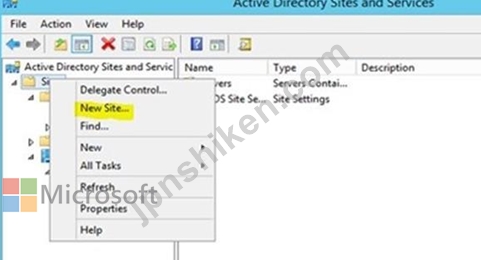
Step 3: Enter Site2 in the Name box

Step 4: Select the DEFAULTIPSITELINK and click OK.
Step 5: Click OK to complete the site creation
Phase 2: Create subnet
Step 6: In the Active Directory Sites and Services MMC, right-click Subnets and select New Subnet...

Step 7: In the New Object - subnet window, type 192.168.2.0/24
Step 8: In the Select a site object for this prefix option select Site2 and click OK
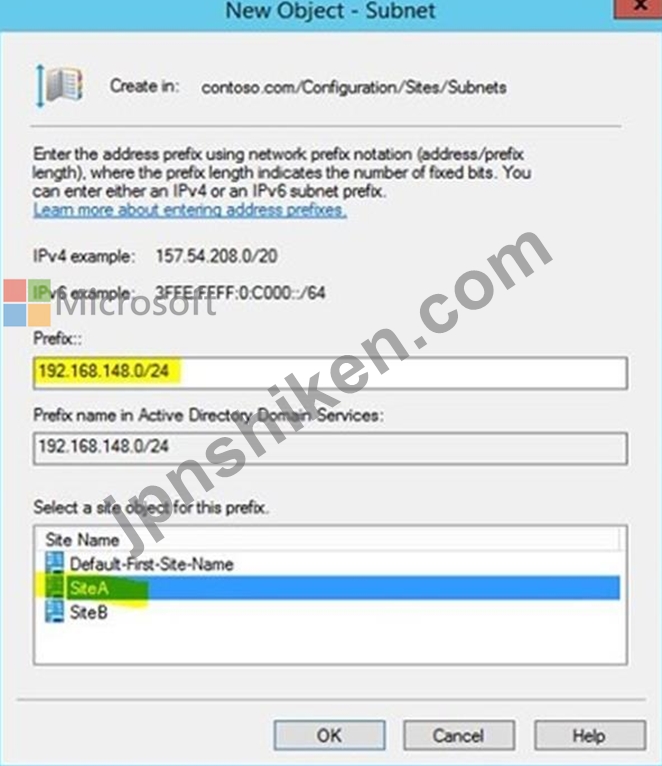
Step 1: Navigate to Server Manager > Tools > Active Directory Sites and Services Step 2: In the Active Directory Sites and Service window, right-click Sites and select New Site
Step 3: Enter Site2 in the Name box
Step 4: Select the DEFAULTIPSITELINK and click OK.
Step 5: Click OK to complete the site creation
Phase 2: Create subnet
Step 6: In the Active Directory Sites and Services MMC, right-click Subnets and select New Subnet...
Step 7: In the New Object - subnet window, type 192.168.2.0/24
Step 8: In the Select a site object for this prefix option select Site2 and click OK

- 質問一覧「151問」
- 質問1 ホットスポットに関する質問 Sub1 という Azure サブスクリプシ...
- 質問2 DNSサーバー上にゾーンを作成する際には、それがプライマリゾー...
- 質問3 ホットスポットに関する質問 ネットワークには、adatum.com とい...
- 質問4 Azure Active Directory (Azure AD) テナントと同期するオンプレ...
- 質問5 既にデプロイ済みのVMの構成を変更するには、Azure VM拡張機能を...
- 質問6 ネットワークには Active Domain Services (AD DS) フォレストが...
- 質問7 Windows Server を実行し、DHCP サーバーの役割がインストールさ...
- 質問8 VM1 Ilia! という名前の Azure 仮想マシンがあり、プライベート ...
- 質問9 友人の一人が、本番環境やパフォーマンス重視のワークロードにど
- 質問10 Server1 という名前の Windows Server コンテナー ホストがあり...
- 質問11 ネットワークにはActive Directoryドメインサービス(AD DS)フ...
- 質問12 Windows Server を実行するファイル サーバーが 5 台あります。 ...
- 質問13 ホットスポットに関する質問 Hyper-V サーバーロールがインスト...
- 質問14 ホットスポットに関する質問 オンプレミスネットワークにはServe...
- 質問15 Azure AD Connect を使用して Azure AD と同期する、contoso.com...
- 質問16 ホットスポットに関する質問 オンプレミスネットワークには、con...
- 質問17 ホットスポットに関する質問 ネットワークには、contoso.com と...
- 質問18 ドラッグアンドドロップの質問 Windows Server を実行し、Hyper-...
- 質問19 ケーススタディ3 - ADatum Corporation 概要 会社情報 ADatum Co...
- 質問20 ケーススタディ3 - ADatum Corporation 概要 会社情報 ADatum Co...
- 質問21 ドラッグアンドドロップの質問 Windows Server を実行する Serve...
- 質問22 ドラッグアンドドロップの質問 contoso.com という名前の単一ド...
- 質問23 注: この問題は、同じシナリオを提示する一連の問題の一部です。...
- 質問24 シミュレーション MemberServers という名前のグループにのみ適...
- 質問25 Azure AD Connect Health 内で電子メール通知などの設定を変更で...
- 質問26 ホットスポットに関する質問 ネットワークには、contoso.com と...
- 質問27 オンプレミスの Active Directory Domain Services (AD DS) ドメ...
- 質問28 ネットワーク管理アプリケーションを実行する Server1 という名...
- 質問29 ネットワークにはActive Directoryドメインサービス(AD DS)フ...
- 質問30 シミュレーション 実行中の仮想マシンをダウンタイムなしで SRV1...
- 質問31 ホットスポットに関する質問 ネットワークには、contoso.com と...
- 質問32 注: この問題は、同じシナリオを提示する一連の問題の一部です。...
- 質問33 ホットスポットに関する質問 Windows Server を実行し、ファイル...
- 質問34 注: この問題は、同じシナリオを提示する一連の問題の一部です。...
- 質問35 ケーススタディ3 - ADatum Corporation 概要 会社情報 ADatum Co...
- 質問36 ネットワークには、contoso.com という名前の Active Directory ...
- 質問37 ケーススタディ2 - Contoso社 概要 Contoso 社はシアトルに本社...
- 質問38 ドラッグアンドドロップの質問 Windows Server を実行する Serve...
- 質問39 Active Directory ドメイン サービス (AD DS) ドメインがありま...
- 質問40 ホットスポットに関する質問 ネットワークには、contoso.com と...
- 質問41 Windows Server を実行する Server1 という名前のサーバーがあり...
- 質問42 注: この質問は、同じシナリオを提示する一連の質問の一部です。...
- 質問43 Server1 という名前の Windows Server コンテナー ホストと imag...
- 質問44 シミュレーション SRV1 から IP アドレスを取得するすべての DHC...
- 質問45 ネットワークにはActive Directoryドメインサービス(AD DS)ド...
- 質問46 シミュレーション share1 という名前の Azure ファイル共有がオ...
- 質問47 Contoso社のIT部門は、オンプレミス環境に新しいバージョンのMS ...
- 質問48 ホットスポットに関する質問 次の表に示す仮想マシンを含む Azur...
- 質問49 シミュレーション SRV1 上のscope1という名前のDHCPスコープがク...
- 質問50 Windows Server を実行し、DHCP サーバー ロールがインストール...
- 質問51 ネットワークには Active Directory ドメイン サービス (AD DS) ...
- 質問52 VNet に仮想マシンをいくつか追加する必要があり、その際にター...
- 質問53 ネットワークにはActive Directoryドメインサービス(AD DS)ド...
- 質問54 あなたは最近、Carla社に管理者として入社しました。チームリー...
- 質問55 ホットスポットに関する質問 次の表に示すメンバー サーバーが含...
- 質問56 ホットスポットに関する質問 ネットワークには、contoso.com と...
- 質問57 ホットスポットに関する質問 Windows Server を実行し、C、D、E ...
- 質問58 ホットスポットに関する質問 ネットワークには、次の表に示すド
- 質問59 ホットスポットに関する質問 ネットワークには、contoso.com と...
- 質問60 Windows Server 2022 を実行し、次の表に示すネットワーク アダ...
- 質問61 Azure AD と同期するオンプレミスの Active Directory ドメイン ...
- 質問62 ホットスポットに関する質問 Windows Server を実行する Server1...
- 質問63 ケーススタディ1 - Fabrikam, Inc 概要 Fabrikam, Inc は、ニュ...
- 質問64 Server1 というサーバーで Windows Server 2019 が実行され、Con...
- 質問65 注: この質問は、同じシナリオを提示する一連の質問の一部です。...
- 質問66 シミュレーション DC2 が contoso.com のスキーマ マスターであ...
- 質問67 ケーススタディ2 - Contoso社 概要 Contoso 社はシアトルに本社...
- 質問68 シミュレーション gMSA1 という名前のグループ管理サービス アカ...
- 質問69 シミュレーション Azureファイル共有を同期するには、SRV1を登録...
- 質問70 Azure Active Directory (Azure AD) テナントと同期するオンプレ...
- 質問71 ケーススタディ1 - Fabrikam, Inc 概要 Fabrikam, Inc は、ニュ...
- 質問72 Azure サブスクリプションがあります。このサブスクリプションに...
- 質問73 ドラッグアンドドロップの質問 Windows Server を実行し、Hyper ...
- 質問74 ホットスポットに関する質問 ネットワークには、contoso.com と...
- 質問75 Windows Server を実行する Server1 というサーバーがあります。...
- 質問76 シミュレーション Azure File Sync を使用して、SRV1 上の C:\ap...
- 質問77 あなたの会社には本店と支社があります。2 つのオフィスは、WAN ...
- 質問78 ネットワークには、contoso.com という単一ドメインの Active Di...
- 質問79 シミュレーション Server Admins という組織単位 (OU) 内のユー...
- 質問80 ホットスポットに関する質問 Azure サブスクリプションをお持ち...
- 質問81 ドラッグアンドドロップの質問 Server1 という名前のサーバーが...
- 質問82 ケーススタディ2 - Contoso社 概要 Contoso 社はシアトルに本社...
- 質問83 Server1 という名前のファイル サーバーを含む Active Directory...
- 質問84 ネットワークにはActive Directoryドメインサービス(AD DS)ド...
- 質問85 ネットワークには、複数サイトの Active Directory ドメイン サ...
- 質問86 ホットスポットに関する質問 Server1 という名前の Windows Serv...
- 質問87 あなたは管理者であり、AD DSパーティションを作成および管理す...
- 質問88 ホットスポットに関する質問 単一のディスクを持つ Server1 とい...
- 質問89 ケーススタディ3 - ADatum Corporation 概要 会社情報 ADatum Co...
- 質問90 注: このセクションには、同じシナリオと問題を扱う1つ以上の質...
- 質問91 Windows Server を実行する Server1 というサーバーがあります。...
- 質問92 シミュレーション グループ管理サービス アカウント (gMSA) を作...
- 質問93 ネットワークには、contoso.com という Active Directory ドメイ...
- 質問94 ホットスポットに関する質問 Azure Active Directory Domain Ser...
- 質問95 ネットワークにはActive Directoryドメインサービス(AD DS)ド...
- 質問96 シミュレーション DC1にfabrikam.comという新しいプライマリDNS...
- 質問97 オンプレミス ネットワークの IP アドレス範囲は 10.0.0.0/23 で...
- 質問98 注: この質問は、同じシナリオを提示する一連の質問の一部です。...
- 質問99 ケーススタディ2 - Contoso社 概要 Contoso 社はシアトルに本社...
- 質問100 ホットスポットに関する質問 ネットワークには、contoso.com と...
- 質問101 ケーススタディ1 - Fabrikam, Inc 概要 Fabrikam, Inc は、ニュ...
- 質問102 Windows Server を実行し、次の構成を持つ VM1 という名前の Azu...
- 質問103 ホットスポットに関する質問 あなたの会社には、WAN リンクを使...
- 質問104 ケーススタディ2 - Contoso社 概要 Contoso 社はシアトルに本社...
- 質問105 ホットスポットに関する質問 オンプレミス ネットワークには、Ac...
- 質問106 Windows Server を実行し、DNS サーバー ロールを持つ DNS1 とい...
- 質問107 ネットワークには、contoso.com という名前の Active Directory ...
- 質問108 注: この質問は、同じシナリオを提示する一連の質問の一部です。...
- 質問109 ホットスポットに関する質問 ネットワークにはActive Directory...
- 質問110 シミュレーション 192.168.2.0 ~ 192.168.2.255 の IP アドレス...
- 質問111 ネットワークには、Active Directory ドメイン サービス (AD DS)...
- 質問112 シミュレーション SRV1 の C:\app というフォルダーにコピーされ...
- 質問113 ドラッグアンドドロップの質問 ネットワークにはcontoso.comとい...
- 質問114 ホットスポットに関する質問 ユーザー設定のみを含む GPO1 とい...
- 質問115 シミュレーション 次の UNC パスを使用して、SRV1 の Marketing ...
- 質問116 ホットスポットに関する質問 Azure File Sync を使用して、Serve...
- 質問117 Windows Server を実行する SVR1、SVR2、SVR3 という名前のオン...
- 質問118 Windows Server を実行し、UserData という名前の共有フォルダー...
- 質問119 ホットスポットに関する質問 ネットワークには、contoso.com と...
- 質問120 Hyper-V サーバーの役割がインストールされている 2 つのサーバ...
- 質問121 注: この質問は、同じシナリオを提示する一連の質問の一部です。...
- 質問122 ホットスポットに関する質問 ネットワークには、Azure AD テナン...
- 質問123 ネットワークには Active Directory ドメイン サービス (AD DS) ...
- 質問124 注: この質問は、同じシナリオを提示する一連の質問の一部です。...
- 質問125 既存のサーバーファームのメンバーホストを廃止する任務を負って
- 質問126 ネットワークにはActive Directoryドメインサービス(AD DS)ド...
- 質問127 次の資料に示すように、VM1 という名前の仮想マシンを含む Azure...
- 質問128 Azure サブスクリプションがあります。このサブスクリプションに...
- 質問129 ホットスポットに関する質問 オンプレミスネットワークには、単
- 質問130 ネットワークはfabrikam.comというADドメインで構成されています...
- 質問131 ホットスポットに関する質問 ネットワークには、contoso.com と...
- 質問132 ドラッグアンドドロップの質問 ネットワークには、contoso.com ...
- 質問133 ネットワークにはActive Directoryドメインサービス(AD DS)フ...
- 質問134 ケーススタディ1 - Fabrikam, Inc 概要 Fabrikam, Inc は、ニュ...
- 質問135 ケーススタディ1 - Fabrikam, Inc 概要 Fabrikam, Inc は、ニュ...
- 質問136 ネットワークには、contoso.com という Active Directory ドメイ...
- 質問137 注: この質問は、同じシナリオを提示する一連の質問の一部です。...
- 質問138 Windows Server を実行する VM1 という名前の Azure 仮想マシン...
- 質問139 ホットスポットに関する質問 ネットワークには、Microsoft Entra...
- 質問140 ケーススタディ3 - ADatum Corporation 概要 会社情報 ADatum Co...
- 質問141 ドラッグアンドドロップの質問 Azureサブスクリプションをお持ち...
- 質問142 Azureサブスクリプションをお持ちです。このサブスクリプション...
- 質問143 あなたは最近入社しました。ニカさんとあなたは、管理者としてAc...
- 質問144 注: このセクションには、同じシナリオと問題を扱う1つ以上の質...
- 質問145 ネットワークにはActive Directoryドメインサービス(AD DS)ド...
- 質問146 Windows Server を実行し、次の表に示すフォルダーを含むオンプ...
- 質問147 ネットワークにはActive Directoryドメインサービス(AD DS)フ...
- 質問148 次の表に示すドライブを含む VM1 という名前の Azure 仮想マシン...
- 質問149 ネットワークには Active Directory ドメイン サービス (AD DS) ...
- 質問150 ホットスポットに関する質問 Windows Server 2022 を実行し、コ...
- 質問151 Contoso 社の IT スタッフは、社内クライアントと社外クライアン...
