- ホーム
- Microsoft
- AZ-400 - Designing and Implementing Microsoft DevOps Solutions
- Microsoft.AZ-400.v2026-02-02.q289
- 質問160
有効的なAZ-400問題集はJPNTest.com提供され、AZ-400試験に合格することに役に立ちます!JPNTest.comは今最新AZ-400試験問題集を提供します。JPNTest.com AZ-400試験問題集はもう更新されました。ここでAZ-400問題集のテストエンジンを手に入れます。
AZ-400問題集最新版のアクセス
「639問、30% ディスカウント、特別な割引コード:JPNshiken」
Group7 のコンピューターに対して Azure Automation を構成する必要があります。
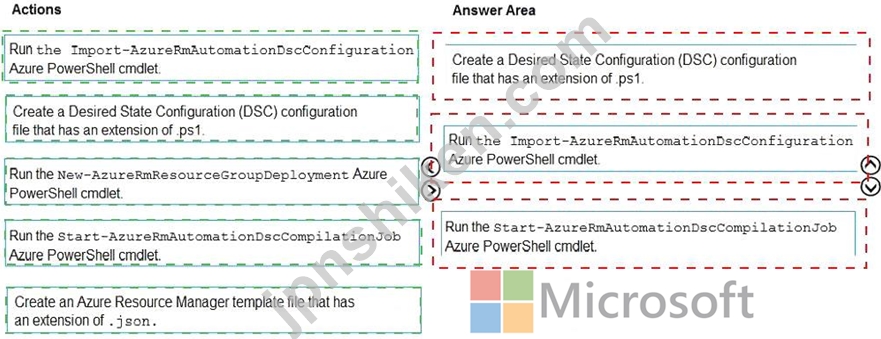
順番に実行する必要がある 3 つのアクションはどれですか。回答するには、適切なアクションをアクション リストから回答領域に移動し、正しい順序に並べます。

順番に実行する必要がある 3 つのアクションはどれですか。回答するには、適切なアクションをアクション リストから回答領域に移動し、正しい順序に並べます。
正解:
Explanation:
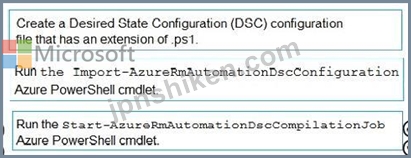
手順 1: 拡張子が .ps1 の Desired State Configuration (DSC) 構成ファイルを作成します。
手順2: Import-AzureRmAutomationDscConfiguration Azure PowerShellコマンドレットを実行します。Import-AzureRmAutomationDscConfigurationコマンドレットは、APS Desired State Configuration (DSC)構成をAzure Automationにインポートします。単一のDSC構成を含むAPSスクリプトのパスを指定します。
例:
PS C:\>Import-AzureRmAutomationDscConfiguration -AutomationAccountName "Contoso17"- ResourceGroupName "ResourceGroup01" -SourcePath "C:\DSC\client.ps1" -Force このコマンドは、client.ps1 というファイル内の DSC 構成を Automation アカウント Contoso17 にインポートします。このコマンドでは Force パラメーターを指定します。既存の DSC 構成が存在する場合は、このコマンドによって置き換えられます。
手順 3: Start-AzureRmAutomationDscCompilationJob Azure Powershell コマンドレットを実行します。Start-AzureRmAutomationDscCompilationJob コマンドレットは、Azure Automation で APS Desired State Configuration (DSC) 構成をコンパイルします。
参考文献:
https://docs.microsoft.com/en-us/powershell/module/azurerm.automation/import- azurermautomationdscconfiguration
https://docs.microsoft.com/en-us/powershell/module/azurerm.automation/start- azurermautomationdsccompilationjob

- 質問一覧「289問」
- 質問1 Your team uses Azure Pipelines to deploy applications. You n...
- 質問2 あなたの会社では、次のエンドポイントにアプリケーションを展開
- 質問3 Azure DevOps に Project1 という名前のプロジェクトがあり、Azu...
- 質問4 ソース管理には GitHub を使用します。 機密データを含むファイ...
- 質問5 あなたの会社には4つのプロジェクトがあります。各プロジェクト
- 質問6 db1 という名前の Azure SQL データベースを使用するアプリがい...
- 質問7 GitHub でリリースを最終決定しています。 リリースには次のラベ...
- 質問8 あなたの会社では Team Foundation Server 2013 (TFS 2013) を使...
- 質問9 Azure DevOps にプライベート プロジェクトがあり、User1 と Use...
- 質問10 Azure DevOps には、Teams 展示に示されているように 3 つのチー...
- 質問11 You have an Azure Kubernetes Service (AKS) cluster. You need...
- 質問12 You have the Azure DevOps pipeline shown in the following ex...
- 質問13 多くのパッケージ フィードを使用する Azure DevOps プロジェク...
- 質問14 QUESTION NO: 261.NET Core アプリケーションを含む イメージを...
- 質問15 You have several Azure virtual machines that run Windows Ser...
- 質問16 You have an Azure Pipelines pipeline named Pipeline1 that ha...
- 質問17 あなたの会社では、Get ソース管理に Azure DevOps を使用してい...
- 質問18 ホームページのページ読み込みパフォーマンスに基づいてトリガー
- 質問19 あなたの会社では、開発者がオープンソース ライブラリを導入す
- 質問20 Azure DevOps にプロジェクトがあります。 Template1.yml という...
- 質問21 You are defining release strategies for two applications as ...
- 質問22 az400-9940427-main という Azure Web アプリに「MAX_ITEMS」と...
- 質問23 az400-9940427-main という Azure Web アプリに「MAX_ITEMS」と...
- 質問24 あなたの会社には4つのプロジェクトがあります。各プロジェクト
- 質問25 You have an Azure virtual machine named VM1 that runs Linux....
- 質問26 投資計画枯渇スイートのリリース保持ポリシーをどのように合意す
- 質問27 Azure DevOps で Project2 のコード フロー戦略を実装する必要が...
- 質問28 You have an Azure Kubernetes Service (AKS) pod. You need to ...
- 質問29 あなたの会社では Git ソースコード リポジトリを使用しています...
- 質問30 Azure DevOps に Contoso App というプロジェクトがあり、このプ...
- 質問31 Azure Monitor を使用し、Log Analytics ワークスペースを含む A...
- 質問32 次の要件を持つ Azure Data Factory インスタンスをデプロイする...
- 質問33 シミュレーション D:\Deploy.json という名前のテンプレートを D...
- 質問34 Azure Kubernetes Service (AKS) クラスターがあります。 Azure ...
- 質問35 あなたの会社では、次のエンドポイントにアプリケーションを展開
- 質問36 You have an Azure subscription that contains the resources s...
- 質問37 投資計画枯渇スイートのリリース保持ポリシーをどのように合意す
- 質問38 あなたの会社では、Azure Application Insights を使用して、ユ...
- 質問39 Azure パイプラインを使用してビルド成果物を公開する予定です。...
- 質問40 Your company is concerned that when developers introduce ope...
- 質問41 Note: This question is part of a series of questions that pr...
- 質問42 az400-9940427-main という Azure Web アプリのピーク平均応答時...
- 質問43 SIMULATION You need to ensure that an Azure web app named az...
- 質問44 Your company has a project in Azure DevOps. You plan to crea...
- 質問45 GitHub リポジトリを使用するオープンソース ソリューションを開...
- 質問46 az400-9940427-main という名前の Azure Application Insights ...
- 質問47 あなたの会社では、App1 という複雑なアプリのソース コード管理...
- 質問48 repo1 という名前の GitHub リポジトリがあります。 repo1 を re...
- 質問49 Azure DevOps にリリース パイプラインを含むプロジェクトがあり...
- 質問50 あなたの会社には Azure DevOps のプロジェクトがあります。 Azu...
- 質問51 Your company uses Azure DevOps for Git source control. You h...
- 質問52 チームの開発プロセスのセキュリティを強化する必要があります。
- 質問53 投資計画アプリケーション スイートのリリース保持ポリシーをど
- 質問54 あなたの会社では、App1 という複雑なアプリのソース コード管理...
- 質問55 Azure DevOps にプロジェクトがあります。 Template1.yml という...
- 質問56 あなたの会社では、ビルドにクラウドホスト型の Jenkins を使用...
- 質問57 Azure Pipelines を使用して、プロジェクトのビルドとデプロイメ...
- 質問58 You are developing an application. The application source ha...
- 質問59 次の要件を持つ新しいプロジェクトを Azure DevOps にデプロイす...
- 質問60 Azure Automation State Configuration を使用して仮想マシンの...
- 質問61 Azure Kubernetes Service (AKS) を使用して、Docker Trusted Re...
- 質問62 仮想マシン構成の継続的な一貫性を管理するには、Azure Automati...
- 質問63 Azure Monitor を使用し、Log Analytics ワークスペースを含む A...
- 質問64 How should you complete the code to initialize App Center in...
- 質問65 You have a protect in Azure DevOps. You need to associate an...
- 質問66 NuGet パッケージを作成しています。 パッケージを開発チームに...
- 質問67 Azure DevOps ビルド パイプラインを構成します。 ホストされた...
- 質問68 Azure DevOps に継続的インテグレーション/継続的デプロイメント...
- 質問69 あなたの会社では、Azure DevOps を使用してインフラストラクチ...
- 質問70 You need to implement the code flow strategy for Project2 in...
- 質問71 注: この質問は、同じシナリオを提示する一連の質問の一部です。...
- 質問72 図に示すように、Azure DevOps でリリース パイプラインを構成し...
- 質問73 このセクションで質問に回答した後は、そのセクションに戻ること
- 質問74 App1 の認証を設定する必要があります。ソリューションは計画さ...
- 質問75 投資計画アプリケーション スイートの開発者グループとチーム リ...
- 質問76 次の表に示すように、Azure DevOps の 3 つのプロジェクトに対し...
- 質問77 Azure DevOps を使用して iOS アプリケーションを開発しています...
- 質問78 RBAC 対応の Azure Kubermets Service (AKS) 実装があり、AKS 実...
- 質問79 You need to implement Project4. What should you do first?...
- 質問80 Azure Kubernetes Service (AKS) ポッドがあります。 次のアクシ...
- 質問81 あなたの会社には Azure DevOps のプロジェクトがあります。 Azu...
- 質問82 計画された変更をサポートするには、既存の DevOps ツールを置き...
- 質問83 ビルド パイプラインの管理には Azure Pipelines を使用します。...
- 質問84 .NET Core アプリケーションを含むイメージを作成する予定です。...
- 質問85 Azure DevOps のプロジェクトで、複数のパブリックフィードのパ...
- 質問86 Azure DevOps にリリースパイプラインを含むプロジェクトがあり...
- 質問87 現在、DevOps プロセスの一環として JIRA、Jenkins、Octopus を...
- 質問88 投資計画アプリケーション スイートのビルド エージェントとリリ...
- 質問89 org1 という名前の GitHub 組織と Tenant1 という名前の Azure ...
- 質問90 Pool7 内のコンピューターに対して Azure Automation を構成する...
- 質問91 repo1 という名前の Azure Repos リポジトリがあります。 repo1 ...
- 質問92 複数のサーバーでホストされている App1 という名前の Web アプ...
- 質問93 Contoso という名前の Azure DevOps 組織と Azure サブスクリプ...
- 質問94 ソースコード リポジトリとして GitHub Enterprise Server を使...
- 質問95 次の図に示すように、Azure DevOps リリース パイプラインがあり...
- 質問96 Web アプリの Azure Application Insights と共有サービス プラ...
- 質問97 Azure DevOps に Project1 という名前のプロジェクトがあり、こ...
- 質問98 あなたの会社では、次のエンドポイントにアプリケーションを展開
- 質問99 Contoso という名前の Azure DevOps 組織があります。 Windows S...
- 質問100 Contoso という名前の Azure DevOps 組織があります。 Windows S...
- 質問101 You have an Azure subscription. The subscription contains vi...
- 質問102 Azure Artifacts を使用して、Node.js アプリケーションのパッケ...
- 質問103 チームの開発プロセスのセキュリティを強化する必要があります。
- 質問104 タスク3 Project1のデフォルトのプロジェクトチーム用に、「Dash...
- 質問105 投資計画アプリケーション スイートのリリース パイプラインにコ...
- 質問106 GitHub でリリースを最終決定しています。 リリースには次のラベ...
- 質問107 VM1のアラートを設定する必要があります。ソリューションは技術...
- 質問108 You need to configure an Azure web app named az400-9940427-m...
- 質問109 You have a build pipeline in Azure Pipelines. You create a S...
- 質問110 あなたの会社では、Azure DevOps を使用してインフラストラクチ...
- 質問111 次の表に示すように、 2 つのアプリケーションのリリース戦略を...
- 質問112 You need to recommend a solution for deploying charts by usi...
- 質問113 Note: This question is part of a series of questions that pr...
- 質問114 Windows Server を実行する Azure 仮想マシンのベースライン メ...
- 質問115 Project6を実装する必要があります。 どの 3 つのアクションを順...
- 質問116 次の図に示すように、Azure Monitor でアラート ルールを作成し...
- 質問117 az400-9940427-main という名前の Azure Web アプリが、システム...
- 質問118 You have an Azure function hosted in an App Service plan nam...
- 質問119 You need to configure Azure Pipelines to control App2 builds...
- 質問120 Extra beam Fusion SIEM と Azure クラウド プラットフォームを...
- 質問121 共有コードを見つけて分離する必要があります。共有コードは一連
- 質問122 Azure Pipelines を使用して、Appl というアプリをビルドおよび...
- 質問123 app.contoso.com というカスタム ドメインを持つ App1 という名...
- 質問124 Azure DevOps に Contoso App というプロジェクトがあり、このプ...
- 質問125 あなたの会社では新しい Web アプリケーションを構築しています...
- 質問126 Windows Server を実行する Azure 仮想マシンにインターネット ...
- 質問127 Your company plans to deploy an application to the following...
- 質問128 会社には、Subscription1 という名前の Azure サブスクリプショ...
- 質問129 Azure DevOps で Project2 のコード フロー戦略を実装する必要が...
- 質問130 You have an Azure subscription that uses Azure Monitor and c...
- 質問131 署名されたイメージを az4009940427acr1 という名前の Azure Con...
- 質問132 Azure Monitor の Application Insights を使用してログデータを...
- 質問133 あなたの会社では Team Foundation Server 2013 (TFS 2013) を使...
- 質問134 ビルド パイプラインを含む Azure DevOps プロジェクトがありま...
- 質問135 注: この質問は、同じシナリオを提示する一連の質問の一部です。...
- 質問136 (Exhibit)
- 質問137 RG1 という名前のリソース グループを含む Azure サブスクリプシ...
- 質問138 Windows Server 2019 を実行し、Desired State Configuration (D...
- 質問139 会社には、Subscription1 という名前の Azure サブスクリプショ...
- 質問140 Azure Repos で新しい Git リポジトリの設定を構成しています。 ...
- 質問141 VM1 という名前の仮想マシンのブート診断を保存するには、RG1lod...
- 質問142 You are creating a container for an ASP.NET Core app. You ne...
- 質問143 KV1 という名前の Azure キー コンテナーと 3 つの Web サーバー...
- 質問144 大規模なエンタープライズ アプリケーションの Git リポジトリを...
- 質問145 repo1 という名前の Azure Repos Git リポジトリがあります。 SS...
- 質問146 ソースコード リポジトリとして GitHub Enterprise Server を使...
- 質問147 投資計画アプリケーション スイートにはどのような分岐戦略を推
- 質問148 You plan to implement a CI/CD strategy for an Azure Web App ...
- 質問149 You have several Azure Active Directory (Azure AD) accounts....
- 質問150 次の表に示すリソースを含む Azure サブスクリプションがありま...
- 質問151 Extra beam Fusion SIEM と Azure クラウド プラットフォームを...
- 質問152 署名されたイメージを az4009940427acr1 という名前の Azure Con...
- 質問153 投資計画アプリケーション スイートのビルド エージェントとリリ...
- 質問154 Group7 のコンピューターに対して Azure Automation を構成する...
- 質問155 Azure DevOps のダッシュボードにプロジェクト メトリックを推奨...
- 質問156 az400-9940427-main という名前の Azure Web アプリが、システム...
- 質問157 図に示すように、Azure DevOps でリリース パイプラインを構成し...
- 質問158 図に示すように、Azure DevOps でリリース パイプラインを構成し...
- 質問159 複数のサーバーでホストされている App1 という名前の Web アプ...
- 質問160 Group7 のコンピューターに対して Azure Automation を構成する...
- 質問161 You manage build and release pipelines by using Azure DevOps...
- 質問162 RBAC 対応の Azure Kubermets Service (AKS) 実装があり、AKS 実...
- 質問163 ビルド パイプラインを含む Azure DevOps プロジェクトがありま...
- 質問164 Azure DevOps で Project2 のコード フロー戦略を実装する必要が...
- 質問165 あなたの会社では Git ソースコード リポジトリを使用しています...
- 質問166 org1 という名前の GitHub 組織と Tenant1 という名前の Azure ...
- 質問167 Azure Pipelines で使用する YAML テンプレートを設計しています...
- 質問168 You need to ensure that an Azure web app named az400-9940427...
- 質問169 VM1 という名前の仮想マシンのブート診断を保存するには、RG1lod...
- 質問170 Contoso という名前の Azure DevOps 組織があります。 Windows S...
- 質問171 You have a project in Azure DevOps named Contoso App that co...
- 質問172 あなたの会社ではインシデント管理に Service Now を使用してい...
- 質問173 あなたの会社では、3 つのモバイル アプリケーション スイートを...
- 質問174 ソースコードとデプロイメントを管理するには、GitHub Enterpris...
- 質問175 org1 という名前の GitHub 組織と Tenant1 という名前の Azure ...
- 質問176 あなたの会社には Azure サブスクリプションがあります。 会社で...
- 質問177 あなたの会社には Azure DevOps のプロジェクトがあります。 Azu...
- 質問178 Azure Monitor の Application Insights を使用してログ データ...
- 質問179 Azure AD ユーザー アカウントを作成する Runbook を展開する予...
- 質問180 アプリケーションをホストするには、Azure Kubernetes Service (...
- 質問181 ビルド パイプラインを含む Azure DevOps プロジェクトがありま...
- 質問182 シミュレーション VM1 という名前の仮想マシンのブート診断を保...
- 質問183 Azure DevOps デプロイ パイプラインを構成しています。デプロイ...
- 質問184 複数の Azure パイプラインを含む Azure サブスクリプションがあ...
- 質問185 注: この質問は、同じシナリオを提示する一連の質問の一部です。...
- 質問186 RBAC 対応の Azure Kubermets Service (AKS) 実装があり、AKS 実...
- 質問187 Azure DevOps を使用して、App1 という名前のアプリのビルドとデ...
- 質問188 You need to recommend project metrics for dashboards in Azur...
- 質問189 Azure Kubernetes Service (AKS) クラスターのデプロイファイル...
- 質問190 2 つの Azure リージョンでホストされる Web サイトをデプロイす...
- 質問191 You need to configure the alert for VM1. The solution must m...
- 質問192 Note: This question is part of a series of questions that pr...
- 質問193 DRAG DROP You need to use Azure Automation State Configurati...
- 質問194 現在、DevOps プロセスの一環として JIRA、Jenkins、Octopus を...
- 質問195 Azure DevOps に Contoso App というプロジェクトがあり、このプ...
- 質問196 ソースコード リポジトリとして GitHub Enterprise Server を使...
- 質問197 ASP.NET Core アプリ用のコンテナーを作成しています。 イメージ...
- 質問198 You need to configure the alert for VM1. The solution must m...
- 質問199 You are implementing a package management solution for a Nod...
- 質問200 You have an Azure Kubermets Service (AKS) implementation tha...
- 質問201 You have an Azure Kubermets Service (AKS) implementation tha...
- 質問202 Azure DevOps デプロイ パイプラインを構成しています。デプロイ...
- 質問203 Azure DevOps ビルド パイプラインを構成します。 ホストされた...
- 質問204 Azure DevOps のダッシュボードにプロジェクト メトリックを推奨...
- 質問205 You need to execute inline testing of an Azure DevOps pipeli...
- 質問206 アプリケーションを開発中です。アプリケーションのソースには複
- 質問207 You need to recommend a procedure to implement the build age...
- 質問208 ビルド パイプラインを含む Azure DevOps プロジェクトがありま...
- 質問209 3社の顧客向けのプロジェクトを計画しています。各顧客の作業項
- 質問210 ソース管理には Get を使用します。 リポジトリのパフォーマンス...
- 質問211 あなたのチームはアジャイル開発アプローチを採用しています。
- 質問212 次の表に示すアプリ用の YAML ベースの Azure パイプラインを設...
- 質問213 Group7 のコンピューターに対して Azure Automation を構成する...
- 質問214 アプリケーション ビルド プロセスの一環として、GitHub にある ...
- 質問215 ビルド パイプラインを含む Azure DevOps プロジェクトがありま...
- 質問216 Azure DevOps でプロジェクトを作成する予定です。複数の開発者...
- 質問217 計画された変更をサポートするには、既存の DevOps ツールを置き...
- 質問218 あなたの会社では、App1 という複雑なアプリのソース コード管理...
- 質問219 あなたの会社では Web アプリケーションを作成します。 アプリケ...
- 質問220 Note: This question is part of a series of questions that pr...
- 質問221 Project4を実装する必要があります。 まず何をすべきでしょうか?...
- 質問222 あなたの会社では新しい Web アプリケーションを構築しています...
- 質問223 Azure DevOps を使用してビルド パイプラインとリリース パイプ...
- 質問224 プライベート GitHub リポジトリがあります。 Azure Boards でリ...
- 質問225 あなたの会社には、Azure DevOps に Project1 という名前のプロ...
- 質問226 You have a GitHub organization named org1 and an Azure tenan...
- 質問227 あなたの会社では、Azure DevOps で新しいアプリケーションのプ...
- 質問228 あなたの会社には、サードパーティのパブリック クラウドで Linu...
- 質問229 注: この質問は、同じシナリオを提示する一連の質問の一部です。...
- 質問230 RBAC が有効になっている Azure Kubernetes Service (AKS) クラ...
- 質問231 Azure Repos で新しい Git リポジトリの設定を構成しています。 ...
- 質問232 大規模なエンタープライズ アプリケーションの Git リポジトリを...
- 質問233 App1 というアプリがあります。Workspace 1 という Log Analytic...
- 質問234 VM1のアラートを設定する必要があります。ソリューションは技術...
- 質問235 Azure DevOps には、Teams 展示に示されているように 3 つのチー...
- 質問236 Azure DevOps に Contoso App というプロジェクトがあり、このプ...
- 質問237 あなたの会社では、3 つのモバイル アプリケーション スイートを...
- 質問238 Azure DevOps で Project2 のコード フロー戦略を実装する必要が...
- 質問239 あなたの会社では Team Foundation Server 2013 (TFS 2013) を使...
- 質問240 会社には、Subscription1 という名前の Azure サブスクリプショ...
- 質問241 転送要件を満たすには、Azure DevOps エージェント プールへのア...
- 質問242 You have an Azure DevOps organization named Contoso. You nee...
- 質問243 次の表に示すように、 2 つのアプリケーションのリリース戦略を...
- 質問244 Azure DevOps プロジェクトがあります。 Azure Resource Manager...
- 質問245 You have an Azure DevOps pipeline that is used to deploy a N...
- 質問246 You have a project Azure DevOps. You plan to create a build ...
- 質問247 Azure Kubernetes Service (AKS) クラスターがあります。 Azure ...
- 質問248 Azure DevOps でプロジェクトのセキュリティ検証戦略を設計して...
- 質問249 ソースコードリポジトリとして GitHub を使用しています。 commi...
- 質問250 あなたの会社では、Git ソース管理に Azure DevOps を使用してい...
- 質問251 Contoso RG と Contoso Dev という 2 つのリソース グループ、Co...
- 質問252 あなたの会社では、Azure DevOps を使用してインフラストラクチ...
- 質問253 Azure Pipelines を使用して、WebApp1 という名前の Azure Web ...
- 質問254 As part of your application build process, you need to deplo...
- 質問255 az400-11566895-kv という名前の Azure Key Vault に保存されて...
- 質問256 アプリのソースコードを含む GitHub リポジトリがあります。 ソ...
- 質問257 You need to deploy Internet Information Services (IIS) to an...
- 質問258 仮想マシン構成の継続的な一貫性を管理するには、Azure Automati...
- 質問259 次の図に示すような Azure DevOps パイプラインがあります。 (Ex...
- 質問260 Azure パイプラインを使用してビルド成果物を公開する予定です。...
- 質問261 次の表に示すアプリ用のYAMLベースのAzureパイプラインを設計し...
- 質問262 Azure Application Insights を使用して、Azure Web アプリの正...
- 質問263 Azure Pipelines を使用して、アプリのビルドとデプロイメントを...
- 質問264 You need to execute inline testing of an Azure DevOps pipeli...
- 質問265 Azure DevOps を使用して、ビルド パイプラインとデプロイ パイ...
- 質問266 Azure DevOps でプロジェクトのセキュリティ検証戦略を設計して...
- 質問267 Project1 のビルド エージェントを実装するための手順を推奨する...
- 質問268 ソース管理には Get を使用します。 ファイルを削除し、変更をコ...
- 質問269 az400-11566895-main という名前の Azure Web アプリに対して CI...
- 質問270 You use Get for source control. You delete a file, commit th...
- 質問271 次の図に示すように、Azure DevOps リリース パイプラインがあり...
- 質問272 Azure DevOps に Contoso App というプロジェクトがあり、このプ...
- 質問273 Azure DevOps にリリースパイプラインを含むプロジェクトがあり...
- 質問274 Azure DevOps プロジェクトがあります。 Azure Resource Manager...
- 質問275 GitHub リポジトリを使用するオープンソース ソリューションを開...
- 質問276 az40010480345acr1 という名前のリポジトリが dotnetapp という...
- 質問277 RBAC 対応クラスターで、Helm と Title を使用してチャートを Az...
- 質問278 あなたの会社には Azure DevOps のプロジェクトがあります。 Azu...
- 質問279 Azure DevOps で Project2 のコード フロー戦略を実装する必要が...
- 質問280 注: この質問は、同じシナリオを提示する一連の質問の一部です。...
- 質問281 HOTSPOT You are using PowerShell to administer Azure Log Ana...
- 質問282 You have an application named App1 that has a custom domain ...
- 質問283 あなたの会社では、ソース管理にGitHubを使用しています。GitHub...
- 質問284 org1 という名前の GitHub 組織と Tenant1 という名前の Azure ...
- 質問285 あなたの会社では、Git ソース管理に Azure DevOps を使用してい...
- 質問286 You have a GitHub organization that contains three users nam...
- 質問287 Azure Artifacts を使用して、Node.js アプリケーションのパッケ...
- 質問288 投資計画アプリケーション スイートにはどのような分岐戦略を推
- 質問289 RBAC 対応の Azure Kubermets Service (AKS) 実装があり、AKS 実...

