- ホーム
- Microsoft
- SC-100J - Microsoft Cybersecurity Architect (SC-100日本語版)
- Microsoft.SC-100J.v2025-11-01.q145
- 質問41
有効的なSC-100J問題集はJPNTest.com提供され、SC-100J試験に合格することに役に立ちます!JPNTest.comは今最新SC-100J試験問題集を提供します。JPNTest.com SC-100J試験問題集はもう更新されました。ここでSC-100J問題集のテストエンジンを手に入れます。
SC-100J問題集最新版のアクセス
「325問、30% ディスカウント、特別な割引コード:JPNshiken」
ホットスポットに関する質問
Sub1、Sub2、Sub3、Sub4 という 4 つの Azure サブスクリプションがあります。各サブスクリプションには、Microsoft 365 サブスクリプションにリンクされた固有の Microsoft Entra テナントがあります。Sub1 には User1 というユーザーが含まれています。
Microsoft Sentinel を実装する予定です。
Microsoft Sentinel を使用して、User1 が Microsoft Entra ID イベントと Sub2、Sub3、Sub4 の Microsoft 365 イベントを監視できるようにする必要があります。
ソリューションでは管理上の労力を最小限に抑える必要があります。
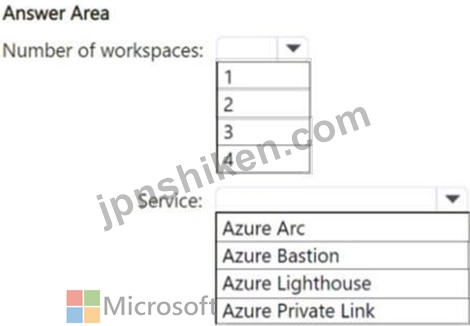
作成する必要がある Microsoft Sentinel ワークスペースの最小数と、使用する必要がある Azure サービスは何ですか? 回答するには、回答領域で適切なオプションを選択してください。
注意: 正しい選択ごとに 1 ポイントが付与されます。
Sub1、Sub2、Sub3、Sub4 という 4 つの Azure サブスクリプションがあります。各サブスクリプションには、Microsoft 365 サブスクリプションにリンクされた固有の Microsoft Entra テナントがあります。Sub1 には User1 というユーザーが含まれています。
Microsoft Sentinel を実装する予定です。
Microsoft Sentinel を使用して、User1 が Microsoft Entra ID イベントと Sub2、Sub3、Sub4 の Microsoft 365 イベントを監視できるようにする必要があります。
ソリューションでは管理上の労力を最小限に抑える必要があります。
作成する必要がある Microsoft Sentinel ワークスペースの最小数と、使用する必要がある Azure サービスは何ですか? 回答するには、回答領域で適切なオプションを選択してください。
注意: 正しい選択ごとに 1 ポイントが付与されます。
正解:
Explanation:
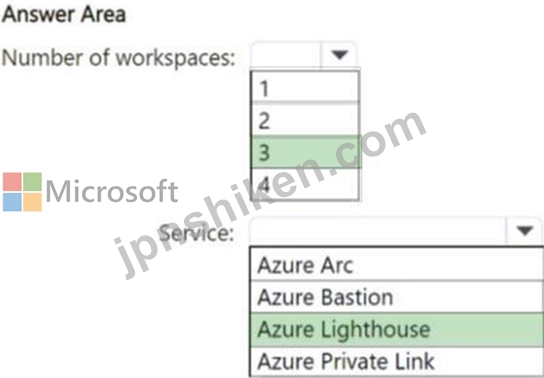
Box 1: 3
Number of workspace
One for Sub2, one for Sub3, and one for Sub4.
Note: Extend Microsoft Sentinel across workspaces and tenants
When you onboard Microsoft Sentinel, your first step is to select your Log Analytics workspace.
While you can get the full benefit of the Microsoft Sentinel experience with a single workspace, in some cases, you might want to extend your workspace to query and analyze your data across workspaces and tenants.
Box 2: Azure Lighthouse
Service
Manage workspaces across tenants using Azure Lighthouse
As mentioned above, in many scenarios, the different Log Analytics workspaces enabled for Microsoft Sentinels can be located in different Microsoft Entra tenants. You can use Azure Lighthouse to extend all cross-workspace activities across tenant boundaries, allowing users in your managing tenant to work on workspaces across all tenants.
Once Azure Lighthouse is onboarded, use the directory + subscription selector on the Azure portal to select all the subscriptions containing workspaces you want to manage, in order to ensure that they'll all be available in the different workspace selectors in the portal.
When using Azure Lighthouse, it's recommended to create a group for each Microsoft Sentinel role and delegate permissions from each tenant to those groups.
Reference:
https://learn.microsoft.com/en-us/azure/sentinel/extend-sentinel-across-workspaces-tenants
https://learn.microsoft.com/en-us/azure/sentinel/multiple-tenants-service-providers

- 質問一覧「145問」
- 質問1 ケーススタディ 2 - Litware 社 概要 Litware, Inc.は、ニューヨ...
- 質問2 あなたの会社は、展示に示されているように、Azure App Service ...
- 質問3 Azure サブスクリプション、Amazon Web Services (AWS) サブスク...
- 質問4 ホットスポットに関する質問 Azure サブスクリプションをお持ち...
- 質問5 組織ではオンプレミスの VM を Azure に移行するプロセスにあり...
- 質問6 Windows Server を実行し、DB1 という名前の Microsoft SQL Serv...
- 質問7 Microsoft 365 サブスクリプションをお持ちです。 Microsoft サ...
- 質問8 ホットスポットに関する質問 Microsoft 365 E5 サブスクリプショ...
- 質問9 ホットスポットに関する質問 Microsoft クラウド環境では、Micro...
- 質問10 あなたの会社にはオンプレミスの Microsoft SQL Server データベ...
- 質問11 Microsoft 365 テナントがあります。 会社では、Azure AD テナン...
- 質問12 あなたは Azure ソリューション アーキテクトであり、組織にはオ...
- 質問13 あなたは、ゼロ トラスト フレームワークに基づいてセキュリティ...
- 質問14 あなたは、Azure にオンボードされたコンテナー化されたアプリケ...
- 質問15 Microsoft 365 サブスクリプションと Azure サブスクリプション...
- 質問16 ホットスポットに関する質問 ネットワークにはオンプレミスの Ac...
- 質問17 Microsoft 365 E5 サブスクリプションをお持ちです。 機密データ...
- 質問18 あなたの会社は、Microsoft セキュリティのベスト プラクティス...
- 質問19 Microsoft 365 サブスクリプションと Azure サブスクリプション...
- 質問20 あなたの会社は Microsoft 365 E5 サブスクリプションを持ってい...
- 質問21 リスク分析を行う際に、資産の損失の割合を測定するものは何です
- 質問22 注: この問題は、同じシナリオを提示する一連の問題の一部です。...
- 質問23 Microsoft Defender for Cloud が有効になっている Azure サブス...
- 質問24 貴社では、遠隔地の水処理施設でIoTフローバルブを使用していま...
- 質問25 あなたの会社は、Azure 向け Microsoft Cloud Adoption Framewor...
- 質問26 ネットワークには、Domain1 という名前の Active Directory ドメ...
- 質問27 あなたの会社は、Microsoft Cloud Adoption Framework for Azure...
- 質問28 Microsoft 365 E5 サブスクリプションと Azure サブスクリプショ...
- 質問29 Azure サブスクリプションをお持ちです。 会社には、リソースを...
- 質問30 あなたの会社にはハイブリッド クラウド インフラストラクチャが...
- 質問31 ケーススタディ 2 - Litware 社 概要 Litware, Inc.は、ニューヨ...
- 質問32 Microsoft 365 テナントには、5,000 人のユーザーと 5,000 台の ...
- 質問33 ホットスポットに関する質問 あなたの会社にはニューヨークとロ
- 質問34 Microsoft 365 サブスクリプションをお持ちです。 Azure サブス...
- 質問35 あなたの会社は、新しい Azure App Service Web アプリを開発し...
- 質問36 ホットスポットに関する質問 Microsoft 365 サブスクリプション...
- 質問37 ホットスポットに関する質問 あなたの会社では、Microsoft Defen...
- 質問38 注: この問題は、同じシナリオを提示する一連の問題の一部です。...
- 質問39 ケーススタディ 2 - Litware 社 概要 Litware, Inc.は、ニューヨ...
- 質問40 あなたの会社は Microsoft 365 E5 サブスクリプションを持ってい...
- 質問41 ホットスポットに関する質問 Sub1、Sub2、Sub3、Sub4 という 4 ...
- 質問42 ケーススタディ 2 - Litware 社 概要 Litware, Inc.は、ニューヨ...
- 質問43 ホットスポットに関する質問 App1 という名前の Azure App Servi...
- 質問44 ホットスポットに関する質問 貴社ではAzureへのデータ移行を進め...
- 質問45 ドラッグアンドドロップの質問 Site1 という名前の Microsoft Sh...
- 質問46 Azure サブスクリプション、Amazon Web Services (AWS) サブスク...
- 質問47 あなたの会社には、Splunk と Microsoft Sentinel を使用するサ...
- 質問48 ホットスポットに関する質問 Microsoft Entraテナントがあります...
- 質問49 ホットスポットに関する質問 VNet1という名前の仮想ネットワーク...
- 質問50 会社では、すべてのオンプレミスのワークロードを Azure と Micr...
- 質問51 注: この問題は、同じシナリオを提示する一連の問題の一部です。...
- 質問52 あなたの会社はビッグ データ ソリューションを Azure に移行し...
- 質問53 ケーススタディ1 - Fabrikam, Inc 概要 Fabrikam, Inc. は、ニュ...
- 質問54 あなたはクラウド セキュリティ エンジニアであり、最近 Azure ...
- 質問55 ケーススタディ 2 - Litware 社 概要 Litware, Inc.は、ニューヨ...
- 質問56 ホットスポットに関する質問 Azure サブスクリプションと Amazon...
- 質問57 ホットスポットに関する質問 ハイブリッド クラウド インフラス...
- 質問58 ホットスポットに関する質問 Tenant1、Tenant2、Tenant3 という...
- 質問59 次の図に示すように、顧客は Azure を使用して、外部ユーザーが...
- 質問60 Microsoft 365 サブスクリプションと Azure サブスクリプション...
- 質問61 あなたの会社は、Azure App Service Web アプリとして実行される...
- 質問62 Microsoft セキュリティのベスト プラクティスに従ったランサム...
- 質問63 Global Secure Access クライアントが展開されているオンプレミ...
- 質問64 あなたの会社には、オンプレミスの Active Directory ドメイン ...
- 質問65 ホットスポットに関する質問 あなたの会社には、コンテナー化さ
- 質問66 Active Directory ドメイン サービス (AD DS) ドメインと同期す...
- 質問67 複数の Azure Data Lake Storage アカウントを含む Azure サブス...
- 質問68 ホットスポットに関する質問 セキュリティ アクセス戦略のセキュ...
- 質問69 注: この問題は、同じシナリオを提示する一連の問題の一部です。...
- 質問70 ケーススタディ 2 - Litware 社 概要 Litware, Inc.は、ニューヨ...
- 質問71 Microsoft Entra テナントにリンクされた Azure サブスクリプシ...
- 質問72 ホットスポットに関する質問 Azure サブスクリプションとオンプ...
- 質問73 Microsoft セキュリティのベスト プラクティスに従ったランサム...
- 質問74 1,000 人のユーザーを含む Microsoft 365 サブスクリプションが...
- 質問75 あなたは、新しい Azure 環境のセキュリティ標準を設計していま...
- 質問76 ドラッグアンドドロップの質問 パススルー認証が有効になってい
- 質問77 ドラッグアンドドロップの質問 RG1 という名前のリソース グルー...
- 質問78 ホットスポットに関する質問 顧客情報が含まれる DB1 という名前...
- 質問79 あなたは、ある組織のAzureランディングゾーン設計のセキュリテ...
- 質問80 ホットスポットに関する質問 Windows Server を実行する Server1...
- 質問81 Linux ノードをホストする Azure Kubernetes Service (AKS) クラ...
- 質問82 Group1 と Group2 という 2 つのグループを含む Microsoft 365 ...
- 質問83 管理者に仮想マシンへの安全なリモート アクセスを提供するソリ
- 質問84 ホットスポットに関する質問 Microsoft 365 サブスクリプション...
- 質問85 ドラッグアンドドロップの質問 ゼロトラスト・セキュリティの実
- 質問86 注: この問題は、同じシナリオを提示する一連の問題の一部です。...
- 質問87 複数のネットワーク セキュリティ グループ (NSG)、複数の仮想マ...
- 質問88 Azureサブスクリプションをお持ちです。このサブスクリプション...
- 質問89 ホットスポットに関する質問 複数の Azure サブスクリプションへ...
- 質問90 ホットスポットに関する質問 Microsoft Exchange Online を使用...
- 質問91 Azure 展開では、Microsoft クラウド セキュリティ ベンチマーク...
- 質問92 あなたの会社には、シアトル、シカゴ、ニューヨーク市にオンプレ
- 質問93 Azure Pipelines を Azure Repos と共に使用して、Azure へのア...
- 質問94 ホットスポットに関する質問 あなたの会社は、Azure を使用して...
- 質問95 あなたの会社にはハイブリッド クラウド インフラストラクチャが...
- 質問96 ホットスポットに関する質問 クライアントは、カスタムビルドの
- 質問97 Microsoft 365 サブスクリプションと Azure サブスクリプション...
- 質問98 あなたはある組織のセキュリティアナリストです。会社では最近、
- 質問99 顧客には、Microsoft 365 E5 サブスクリプションと Azure サブス...
- 質問100 ホットスポットに関する質問 Microsoft 365 E5 サブスクリプショ...
- 質問101 展示に示されているように、Microsoft Defender for Cloud でセ...
- 質問102 あなたの会社は、次の図に示すアーキテクチャを持つサーバーレス
- 質問103 ホットスポットに関する質問 4つのAzureリージョンにApp Service...
- 質問104 会社には、Microsoft Defender for Cloud の強化されたセキュリ...
- 質問105 次の表に示す Azure 仮想マシン スケール セットを含む Azure サ...
- 質問106 Azure Cosmos DB Core (SQL) API アカウントのセキュリティ要件...
- 質問107 ホットスポットに関する質問 Windows Server、Red Hat Enterpris...
- 質問108 Microsoft Entra テナントがあります。テナントには、Global Sec...
- 質問109 ホットスポットに関する質問 VM1 と VM2 という 2 つの仮想マシ...
- 質問110 あなたはセキュリティ オペレーション センター チームの責任者...
- 質問111 Azure サブスクリプションをお持ちです。 Microsoft Cloud Adopt...
- 質問112 オンプレミスネットワークには、Active Directory ドメインサー...
- 質問113 顧客はゼロ トラスト モデルに従い、企業アプリケーションへのア...
- 質問114 Microsoft 365 テナントを所有しています。会社では、App1 とい...
- 質問115 ホットスポットに関する質問 100 台の仮想マシンを含む Azure サ...
- 質問116 ケーススタディ1 - Fabrikam, Inc 概要 Fabrikam, Inc. は、ニュ...
- 質問117 ホットスポットに関する質問 Microsoft 365 サブスクリプション...
- 質問118 ホットスポットに関する質問 Azure App Service アプリを含む Az...
- 質問119 あなたの会社にはオンプレミスの Microsoft SQL Server データベ...
- 質問120 ホットスポットに関する質問 Microsoft Purview、SharePoint Onl...
- 質問121 ホットスポットに関する質問 仮想デスクトップ インフラストラク...
- 質問122 クラウドベースの SaaS (Software as a Service) ソリューション...
- 質問123 あなたの会社は、Azure Storage アカウントを使用して BLOB スト...
- 質問124 あなたの会社は、Azure Active Directory (Azure AD) B2C を使用...
- 質問125 ホットスポットに関する質問 Azure サブスクリプションをお持ち...
- 質問126 会社には Microsoft 365 E5 サブスクリプションがあります。 同...
- 質問127 ドラッグアンドドロップの質問 Microsoft 365 サブスクリプショ...
- 質問128 ホットスポットに関する質問 Azure サブスクリプションをお持ち...
- 質問129 ホットスポットに関する質問 クラウドのみの環境向けのセキュリ
- 質問130 会社には、Microsoft Defender for Cloud の強化されたセキュリ...
- 質問131 ホットスポットに関する質問 Site1 という名前のオンプレミス デ...
- 質問132 Azure サブスクリプションをお持ちです。このサブスクリプション...
- 質問133 Azure、Amazon Web Services (AWS)、Google Cloud Platform (GCP...
- 質問134 オンプレミスネットワークには、Active Directory ドメインサー...
- 質問135 あなたの会社は Azure の導入を最終決定し、Microsoft Defender ...
- 質問136 注: この質問は、同じシナリオを示す一連の質問の一部です。この...
- 質問137 ホットスポットに関する質問Azure サブスクリプションをお持ちで...
- 質問138 Microsoft 365 テナントには、5,000 人のユーザーと 5,000 台の ...
- 質問139 会社には、Microsoft Defender for Cloud の強化されたセキュリ...
- 質問140 ホットスポットに関する質問 MSW1 という名前の Microsoft Senti...
- 質問141 Azureサブスクリプションをお持ちです。このサブスクリプション...
- 質問142 Microsoft 365 E5 サブスクリプションをお持ちです。 あなたは、...
- 質問143 ホットスポットに関する質問 次の表に示すリソースを含む Azure ...
- 質問144 contoso.com という Microsoft Entra テナントがあり、Microsoft...
- 質問145 注: この質問は、同じシナリオを示す一連の質問の一部です。この...
