sales という名前の Parquet ファイルが含まれる storage! という名前の Azure Data Lake Storage Gen2 アカウントがあります。
寄木細工。
Workspace1 という名前のワークスペースを含む Fabric テナントがあります。
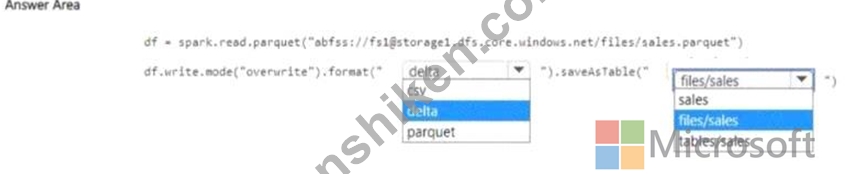
Workspace1 のノートブックを使用して、ファイルの内容をデフォルトのレイクハウスにロードする必要があります。このソリューションでは、その内容がレイクハウス エクスプローラーに「Sales」というテーブルとして自動的に表示されるようにする必要があります。
コードをどのように完成させるべきですか? 回答するには、回答エリアで適切なオプションを選択してください。
注意: 正しい選択ごとに 1 ポイントが付与されます。
寄木細工。
Workspace1 という名前のワークスペースを含む Fabric テナントがあります。
Workspace1 のノートブックを使用して、ファイルの内容をデフォルトのレイクハウスにロードする必要があります。このソリューションでは、その内容がレイクハウス エクスプローラーに「Sales」というテーブルとして自動的に表示されるようにする必要があります。
コードをどのように完成させるべきですか? 回答するには、回答エリアで適切なオプションを選択してください。
注意: 正しい選択ごとに 1 ポイントが付与されます。



