- ホーム
- Microsoft
- DP-600J - Implementing Analytics Solutions Using Microsoft Fabric (DP-600日本語版)
- Microsoft.DP-600J.v2025-11-24.q71
- 質問9
有効的なDP-600J問題集はJPNTest.com提供され、DP-600J試験に合格することに役に立ちます!JPNTest.comは今最新DP-600J試験問題集を提供します。JPNTest.com DP-600J試験問題集はもう更新されました。ここでDP-600J問題集のテストエンジンを手に入れます。
DP-600J問題集最新版のアクセス
「212問、30% ディスカウント、特別な割引コード:JPNshiken」
Fabric テナントがあります。
次の表に示すユーザーに対して OneLake セキュリティを構成する必要があります。

ソリューションは最小権限の原則に従う必要があります。
各ユーザーにはどのような権限を割り当てる必要がありますか? 回答するには、回答領域で適切なオプションを選択してください。
注意: 正しい選択ごとに 1 ポイントが付与されます。

次の表に示すユーザーに対して OneLake セキュリティを構成する必要があります。
ソリューションは最小権限の原則に従う必要があります。
各ユーザーにはどのような権限を割り当てる必要がありますか? 回答するには、回答領域で適切なオプションを選択してください。
注意: 正しい選択ごとに 1 ポイントが付与されます。
正解:
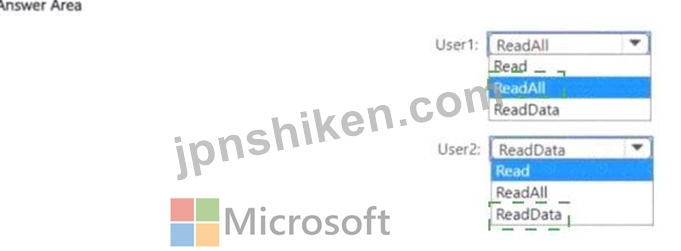
Explanation:

You need to configure OneLake security for two users with the following requirements:
User1: Read all the Spark data
User2: Read all the SQL endpoint data
The available permissions are: Read, ReadAll, and ReadData.
Understanding the permissions:
Read # Grants access to metadata but not the data itself.
ReadData # Grants access to query data through SQL endpoints (SQL-based access).
ReadAll # Grants access to read data across all engines (including Spark and SQL endpoints).
Applying least privilege principle:
User1 (Spark access): Needs to read all the Spark data # Assign ReadAll because Spark requires this permission to access data in OneLake.
User2 (SQL endpoint access): Needs to read SQL endpoint data only # Assign ReadData, as this grants access to SQL endpoints without over-provisioning Spark access.
Final Answer:
User1: ReadAll
User2: ReadData
References:
Microsoft Fabric OneLake permissions
Fabric Lakehouse & SQL Endpoint security

- 質問一覧「71問」
- 質問1 WH1というウェアハウスを含むFabricテナントがあります。WH1に対...
- 質問2 sales という名前の Parquet ファイルが含まれる storage! とい...
- 質問3 DW1 という倉庫と LH1 というレイクハウスを含む Fabric テナン...
- 質問4 DW1 というデータ ウェアハウスを含む Fabric テナントがありま...
- 質問5 Workspace1 というワークスペースを含む Fabric テナントがあり...
- 質問6 価格グループの分類に関する問題を解決する必要があります。 T-S...
- 質問7 Workspace1 というワークスペースと User1 というユーザーを含む...
- 質問8 2 つのレイクハウスを含む Fabric テナントがあります。 レイク...
- 質問9 Fabric テナントがあります。 次の表に示すユーザーに対して One...
- 質問10 Woritspace1 と Workspace2 という 2 つのワークスペースを含む ...
- 質問11 Microsoft Power Bl Desktop でレポートとセマンティック モデル...
- 質問12 Fabric テナント tha1 には Lakehouse1 というテイクハウスが含...
- 質問13 Dataflow Gen2 クエリを含む Fabric ワークスペースがあります。...
- 質問14 レイクハウスを含むFabricテナントがあります。ビジュアルクエリ...
- 質問15 OneLakeにParquetファイルとして保存された顧客離脱データを含む...
- 質問16 Fabricテナントに、Report 1というMicrosoft Power BIレポートが...
- 質問17 倉庫を含む Fabric テナントがあります。 顧客ディメンションを...
- 質問18 Workspace^ という名前のワークスペースを含む Fabric テナント...
- 質問19 Fabric ウェアハウスに、Customers と Products という 2 つのデ...
- 質問20 Lakehouse1 という名前のレイクハウスを含む Fabric テナントが...
- 質問21 Workspacel という名前の Fabric ワークスペースがあり、そこに...
- 質問22 テナントを PoC に備えるためのソリューションを推奨する必要が...
- 質問23 注: このセクションには、同じシナリオと問題を扱う1つ以上の質...
- 質問24 あなたは、Lakehouse1 という名前のレイクハウスを含む Fabric ...
- 質問25 ローカル コンピューター上のフォルダーにソース データがありま...
- 質問26 Workspace1 という名前のワークスペースを含む Fabric テナント...
- 質問27 Stage.Customersというテーブルを含むデータウェアハウスがあり...
- 質問28 definition.pbir という名前のファイルを含む Microsoft Power B...
- 質問29 Fabric ノートブック内のデータを分析しています。 df という名...
- 質問30 CSV ファイルには次のフィールドを持つソース データがあります...
- 質問31 オンライン販売部門の注文テーブルを更新する必要があります。ソ
- 質問32 Workspace1 という名前のワークスペースを含む Fabric テナント...
- 質問33 Fabricテナントをお持ちの場合 Pipeline1 というデータパイプラ...
- 質問34 Lakehouse1 という名前のレイクハウスを含む Fabric テナントが...
- 質問35 倉庫を含む Fabric テナントがあります。 一日に何度も。すべて...
- 質問36 fabric テナントに lakehouse1 という名前のレイクハウスが含ま...
- 質問37 研究部門のワークスペースをグループ化するためのソリューション
- 質問38 デフォルトの Spark スターター プールとランタイム バージョン ...
- 質問39 Tenant! という名前の Fabric テナントがあり、そこには Lakehou...
- 質問40 セマンティックモデルを含むFabricテナントがあります。モデルに...
- 質問41 タイプ 1 のゆっくりと変化するディメンション (SCD) のデータ読...
- 質問42 bucketl という名前の Amazon Simple Storage Service (Amazon S...
- 質問43 注: このセクションには、同じシナリオと問題を扱う1つ以上の質...
- 質問44 Microsoft Power Bl セマンティック モデルがあります。 モデル...
- 質問45 LH1 という名前のレイクハウスを含む Fabric テナントがあります...
- 質問46 全体的な満足度の平均スコアを計算するには、DAX メジャーを作成...
- 質問47 Workspace1 という名前のワークスペースを含む Fabric テナント...
- 質問48 Power Query エディターに、Order_Date と Shipping_Date という...
- 質問49 AnalyticsPOCワークスペース内のデータストアに権限を割り当てる...
- 質問50 データ ウェアハウスを含む Fabric テナントがあります。 大規模...
- 質問51 Report 1 という名前の Microsoft Power Bl レポートを含む Fabr...
- 質問52 Fabricテナントにmodel1というセマンティックモデルが含まれてい...
- 質問53 Fabric ワークスペースに登録された機械学習モデルを含む Fabric...
- 質問54 倉庫を含む Fabric テナントがあります。ウェアハウスは行レベル...
- 質問55 Workspace1 という名前の Fabric ワークスペースがあり、そこに...
- 質問56 データ パイプラインを含むファブリック テナントがあります。 ...
- 質問57 研究部門のセマンティック モデルの計算グループを実装するには
- 質問58 Warehousel という名前の Fabric ウェアハウスがあり、そこには ...
- 質問59 AnalyticsPOC ワークスペースではどのタイプのデータ ストアを推...
- 質問60 OneLakeに30個のCSVファイルを含むFabricテナントがあります。フ...
- 質問61 definition.pbir という名前のファイルを含む Microsoft Power B...
- 質問62 Workspace1 という名前のファブリック ワークスペースがあり、こ...
- 質問63 OneLake に新しいセマンティック モデルを含む Fabric テナント...
- 質問64 データストアに日付ディメンションを実装する必要があります。ソ
- 質問65 注: この問題は、同じシナリオを提示する一連の問題の一部です。...
- 質問66 fabric テナントに lakehouse1 という名前のレイクハウスが含ま...
- 質問67 Warehouse! という名前のウェアハウスを含む Fabric テナントが...
- 質問68 Model 1というセマンティックモデルがあります。Model 1には、す...
- 質問69 Workspace1 という名前の Fabric ワークスペースと Azure SQL デ...
- 質問70 Workspace という名前のワークスペースを含む Fabric テナントが...
- 質問71 Workspace1 という名前の Fabric ワークスペースがあり、そこに...
