- ホーム
- Microsoft
- AZ-305J - Designing Microsoft Azure Infrastructure Solutions (AZ-305日本語版)
- Microsoft.AZ-305J.v2026-02-21.q211
- 質問164
有効的なAZ-305J問題集はJPNTest.com提供され、AZ-305J試験に合格することに役に立ちます!JPNTest.comは今最新AZ-305J試験問題集を提供します。JPNTest.com AZ-305J試験問題集はもう更新されました。ここでAZ-305J問題集のテストエンジンを手に入れます。
AZ-305J問題集最新版のアクセス
「374問、30% ディスカウント、特別な割引コード:JPNshiken」
ホットスポットに関する質問
次の表に示す Azure リソースがあります。
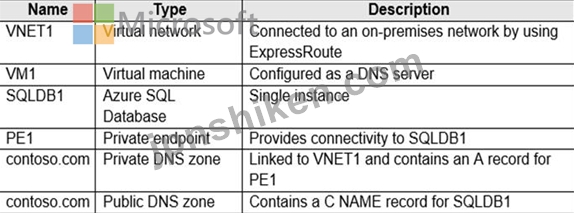
PE1 を介して SQLDB1 へのオンプレミス ネットワーク接続を提供するソリューションを設計する必要があります。
名前解決をどのように構成すればよいですか? 回答するには、回答領域で適切なオプションを選択してください。
注意: 正しい選択ごとに 1 ポイントが付与されます。

次の表に示す Azure リソースがあります。
PE1 を介して SQLDB1 へのオンプレミス ネットワーク接続を提供するソリューションを設計する必要があります。
名前解決をどのように構成すればよいですか? 回答するには、回答領域で適切なオプションを選択してください。
注意: 正しい選択ごとに 1 ポイントが付与されます。
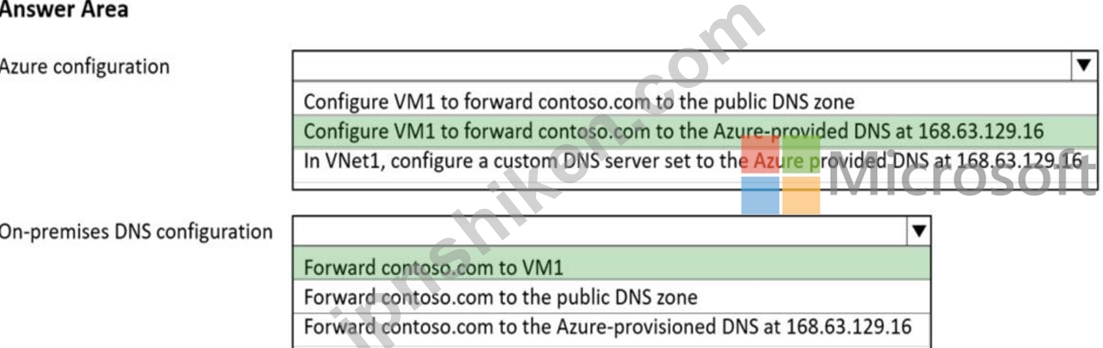
正解:
Explanation:
Box 1: Configure VM1 to forward contoso.com to the Azure-provided DNS at 168.63.129.16 VNET default configuration is to use azure DNS, need to convert VM1 to a DNS forwarder.
Box 2: Forward contoso.com to VM1
Forward to the DNS server VM1.
Note: You can use the following options to configure your DNS settings for private endpoints:
* Use the host file (only recommended for testing). You can use the host file on a virtual machine to override the DNS.
* Use a private DNS zone. You can use private DNS zones to override the DNS resolution for a private endpoint. A private DNS zone can be linked to your virtual network to resolve specific domains.
* Use your DNS forwarder (optional). You can use your DNS forwarder to override the DNS resolution for a private link resource. Create a DNS forwarding rule to use a private DNS zone on your DNS server hosted in a virtual network.
Reference:
https://docs.microsoft.com/en-us/azure/private-link/private-endpoint-dns

- 質問一覧「211問」
- 質問1 Application1 という名前のカスタム アプリケーションが含まれる...
- 質問2 オンプレミスの Active Directory ドメインと同期する Azure Act...
- 質問3 Azure サブスクリプション内のすべての新しい Azure Resource Ma...
- 質問4 contoso.com という Azure Active Directory (Azure AD) テナン...
- 質問5 複数のAzureリージョンに複数のインスタンスを持つAzureAppServi...
- 質問6 ホットスポットに関する質問 貴社はニューヨーク、シドニー、パ
- 質問7 ドラッグアンドドロップの質問 次の構成を含むインフラストラク
- 質問8 ホットスポットに関する質問 次の表に示すオブジェクトを含む RG...
- 質問9 ユーザー向けのコンテンツを集約するアプリケーションを設計して
- 質問10 ケーススタディ2 - Fabrikam, Inc 概要 Fabrikam, Inc.は、ヨー...
- 質問11 ホットスポットに関する質問 Azure でホストされ、Azure Monitor...
- 質問12 Azureサブスクリプションへのリソースのデプロイを自動化するこ...
- 質問13 1,000 個のリソースを含む Azure サブスクリプションがあります...
- 質問14 ケーススタディ2 - Fabrikam, Inc 概要 Fabrikam, Inc.は、ヨー...
- 質問15 ある企業がAzureへのアプリケーションの導入を計画しています。...
- 質問16 Contoso 社という会社には、Microsoft 365 および Azure サブス...
- 質問17 注: この問題は、同じシナリオを提示する一連の問題の一部です。...
- 質問18 KV1 という名前の Azure キー コンテナーを含む Azure サブスク...
- 質問19 ドラッグアンドドロップの質問 オンプレミス環境からAzureにデー...
- 質問20 ドラッグアンドドロップの質問 ユーザーの作成とロールの割り当
- 質問21 あなたの会社には世界中に 50 の事業部があります。事業部は、現...
- 質問22 ホットスポットに関する質問 オンプレミスネットワークには、Act...
- 質問23 Azure Cosmos DB を使用して複数の国からの売上を集計するアプリ...
- 質問24 ドラッグアンドドロップの質問 Azure サブスクリプションをお持...
- 質問25 3 つの Azure リージョンのリソースを含む Azure サブスクリプシ...
- 質問26 ホットスポットに関する質問 Azure サブスクリプションは 5 つあ...
- 質問27 ホットスポットに関する質問 Contoso, Ltd. という会社には、次...
- 質問28 ホットスポットに関する質問 App1 という名前の Azure Web アプ...
- 質問29 Azure サブスクリプションをお持ちです。 Azure リージョンの単...
- 質問30 AzureWebアプリの2つのインスタンスをデプロイします。1つのイン...
- 質問31 ドラッグアンドドロップの質問 あなたの会社には、Azure 仮想マ...
- 質問32 注:この質問は、同じシナリオを提示する一連の質問の一部です。
- 質問33 ホットスポットに関する質問 Azure サブスクリプションをお持ち...
- 質問34 貴社には次の表に示す部門があります。 (Exhibit) Sub1には、App...
- 質問35 ドラッグアンドドロップの質問 Site1 というオンプレミスデータ...
- 質問36 ホットスポットに関する質問 Prod と Dev という 2 つの Azure ...
- 質問37 ケーススタディ2 - Fabrikam, Inc 概要 Fabrikam, Inc.は、ヨー...
- 質問38 貴社には次の表に示す部門があります。 (Exhibit) Sub1には、App...
- 質問39 Azure Blob Storage にパフォーマンス データを書き込むデバイス...
- 質問40 ホットスポットに関する質問 次の表に示すリソースを含む Azure ...
- 質問41 次の要件を満たす、可用性の高い Azure SQL データベースを設計...
- 質問42 ケーススタディ1 - Litware 既存の環境 Azure環境 Litware には...
- 質問43 ストレージソリューションを計画しています。ソリューションは以
- 質問44 貴社には次の表に示す部門があります。 (Exhibit) Sub1には、App...
- 質問45 ホットスポットに関する質問 次の表に示す Azure 上の SQL サー...
- 質問46 Azure Active Directory (Azure AD) テナントがあります。 Azure...
- 質問47 ホットスポットに関する質問 オンプレミス ネットワークには、50...
- 質問48 ホットスポットに関する質問 ファイル共有をホストするAzureスト...
- 質問49 Azureサブスクリプションをお持ちです。このサブスクリプション...
- 質問50 マネージド ディスクを使用する複数の仮想マシンを含む Azure サ...
- 質問51 注: この質問は、同じシナリオを示す一連の質問の一部です。この...
- 質問52 DB1 という名前のオンプレミスの Microsoft SQL Server データベ...
- 質問53 ホットスポットに関する質問 ハイブリッド Azure Active Directo...
- 質問54 app1data という名前の Azure Blob Storage コンテナーを使用す...
- 質問55 ホットスポットに関する質問 Azure サブスクリプションをお持ち...
- 質問56 Azure仮想マシン上にSQLServerがあります。データベースは、バッ...
- 質問57 ミッションクリティカルなアプリケーションの記録用のストレージ
- 質問58 オンプレミスのストレージ ソリューションがあります。 ソリュー...
- 質問59 ホットスポットに関する質問 機密データ用のAzure Storageソリュ...
- 質問60 ホットスポットに関する質問 次の表に示すリソースがあります。 ...
- 質問61 ケーススタディ3 - Contoso 既存環境: 技術環境 オンプレミス ネ...
- 質問62 ホットスポットに関する質問 Azure サブスクリプションをお持ち...
- 質問63 次の表に示すリソースを含む Azure サブスクリプションがありま...
- 質問64 ある企業は、Azure Web App サービスを使用して Web アプリケー...
- 質問65 ある企業は、オンプレミスからクラウドにワークロードを移行した
- 質問66 あなたの会社には、プレミアムアプリサービスプランを介して実行
- 質問67 ある企業では、Azure サブスクリプションに 10 台の仮想マシンの...
- 質問68 ホットスポットに関する質問 複数のストレージ アカウントを含む...
- 質問69 オンプレミス ネットワークと Azure サブスクリプションがあり、...
- 質問70 6,000人のユーザーが休暇申請を検証するために使用するアプリケ...
- 質問71 ホットスポットに関する質問 Azure Linux 仮想マシンを使用して...
- 質問72 AzureSQLデータベースを含むAzureサブスクリプションがあります...
- 質問73 ホットスポットに関する質問 次の機能を実装する Azure ポリシー...
- 質問74 ホットスポットに関する質問 オンプレミスネットワークには、Act...
- 質問75 ホットスポットに関する質問 貴社には次の表に示す部門がありま
- 質問76 ホットスポットに関する質問 システム割り当てマネージド ID を...
- 質問77 SQLデータベースソリューションを設計しています。このソリュー...
- 質問78 ホットスポットに関する質問 Azure Active Directory (Azure AD)...
- 質問79 50 個のデータベースをホストする、SQL1 という名前のオンプレミ...
- 質問80 ホットスポットに関する質問 複数のエンタープライズ アプリを含...
- 質問81 ドラッグアンドドロップの質問 あなたの会社では、社内のオンプ
- 質問82 個人情報(Pll)を格納するAzureSQLデータベースを展開すること...
- 質問83 ケーススタディ2 - Fabrikam, Inc 概要 Fabrikam, Inc.は、ヨー...
- 質問84 次の要件を満たすデータ ストレージ ソリューションを推奨する必...
- 質問85 複数のAzureクラウドサービスを含み、トランザクションのさまざ...
- 質問86 ホットスポットに関する質問 Azure Synapse と Azure Data Lake ...
- 質問87 ホットスポットに関する質問 Azure Key Vault を使用してデータ...
- 質問88 ホットスポットに関する質問 複数のオンプレミス Microsoft SQL ...
- 質問89 ホットスポットに関する質問 会社で Azure App Service Web アプ...
- 質問90 次の要件を満たすソリューションを推奨する必要があります。 - ...
- 質問91 ある企業では、アプリケーションのWebアクセスログをAzure Blob...
- 質問92 ホットスポットに関する質問 複数の Azure SQL Database インス...
- 質問93 DB1 と DB2 という 2 つのオンプレミスの Microsoft SQL Server ...
- 質問94 ある企業は、一連のアプリケーションを一連の Azure Kubernetes ...
- 質問95 ドラッグアンドドロップの質問 DB1 という名前の 500 TB のオン...
- 質問96 ケーススタディ3 - Contoso 既存環境: 技術環境 オンプレミス ネ...
- 質問97 DB1 という名前のオンプレミスの Microsoft SQL Server 2016 デ...
- 質問98 会社には、次の表に示すオンプレミスの Microsoft SQL Server デ...
- 質問99 ホットスポットに関する質問 Azure サブスクリプションをお持ち...
- 質問100 注: このセクションには、同じシナリオと問題を扱う1つ以上の質...
- 質問101 ホットスポットに関する質問 Azure Active Directory (Azure AD)...
- 質問102 ファイル共有をホストするネットワーク接続ストレージデバイスが
- 質問103 米国西部 Azure リージョンに KeyVault1 という名前の Azure キ...
- 質問104 Azure Kubernetes Service(AKS)クラスターで実行されるコンテ...
- 質問105 高さマップ データから 3D ジオメトリを計算するソリューション...
- 質問106 サーバー側レンダリングを必要としない 100 個の React ベースの...
- 質問107 App1 という名前の多層アプリと、SQL1 という名前の Azure SQL ...
- 質問108 ドラッグアンドドロップの質問 ある企業は、ワークロードをクラ
- 質問109 ホットスポットに関する質問 Azureサブスクリプションをお持ちで...
- 質問110 ホットスポットに関する質問 Azure サブスクリプションをお持ち...
- 質問111 ある会社がAzureにストレージアカウントを設定しました。ストレ...
- 質問112 ホットスポットに関する質問 2 TB のデータ ファイルを保存する...
- 質問113 ドラッグアンドドロップの質問 172.16.0.0/16 の IP アドレス空...
- 質問114 ホットスポットに関する質問 オンプレミスのデータセンターとAzu...
- 質問115 会社のデータエンジニアリングソリューションを設計する必要があ
- 質問116 50,000台のIoTデバイスを含むAzureIoTHubソリューションを計画し...
- 質問117 ホットスポットに関する質問 AG1 という名前の Always On 可用性...
- 質問118 contoso.com という名前の Microsoft Entra テナントがあります...
- 質問119 注: この問題は、同じシナリオを提示する一連の問題の一部です。...
- 質問120 ホットスポットに関する質問 Azure Batch を使用して Linux ノー...
- 質問121 あなたの会社は、米国、ヨーロッパ、アジア、オーストラリアにオ
- 質問122 ホットスポットに関する質問 SQL1 という名前のオンプレミスの M...
- 質問123 複数の Azure サブスクリプションを含むランディング ゾーンがあ...
- 質問124 多数のサブスクリプションを含む大規模な Azure 環境を設計して...
- 質問125 オンプレミスの MySQL データベースを Azure Database for MySQL...
- 質問126 ケーススタディ2 - Fabrikam, Inc 概要 Fabrikam, Inc.は、ヨー...
- 質問127 50,000 台の IoT デバイスを含む Azure IoT Hub ソリューション...
- 質問128 複数のデータベースからデータを利用するオンプレミスアプリケー
- 質問129 ホットスポットに関する質問 MG1 という名前の管理グループを含...
- 質問130 貴社は北米とヨーロッパにオフィスを構えています。 Azure への...
- 質問131 ホットスポットに関する質問 Azure サブスクリプションをお持ち...
- 質問132 ホットスポットに関する質問 Azure サブスクリプションをお持ち...
- 質問133 WindowsVirtualDesktopテナントを含むAzureサブスクリプションが...
- 質問134 ホットスポットに関する質問 ASP1 という名前の Azure App Servi...
- 質問135 ホットスポットに関する質問 Azure SQL をデータベース プラット...
- 質問136 米国東部のみで事業を展開するA社は、クラウドへの移行によりイ
- 質問137 貴社には次の表に示す部門があります。 (Exhibit) Sub1には、App...
- 質問138 ホットスポットに関する質問 次の表に示すように、複数のインス
- 質問139 企業は、アプリケーション用にAzureで作成されたデータストアを...
- 質問140 ホットスポットに関する質問 Azure サブスクリプションをお持ち...
- 質問141 ホットスポットに関する質問 DB1 という名前のオンプレミスの Mi...
- 質問142 注:この質問は、同じシナリオを提示する一連の質問の一部です。
- 質問143 ドラッグアンドドロップの質問 Azure サブスクリプションをお持...
- 質問144 ケーススタディ1 - Litware 既存の環境 Azure環境 Litware には...
- 質問145 ケーススタディ1 - Litware 既存の環境 Azure環境 Litware には...
- 質問146 ある企業は、アプリケーション データに Azure SQL Managed Inst...
- 質問147 あるチームは、Resource Manager テンプレートを使用して Azure ...
- 質問148 注:この質問は、同じシナリオを提示する一連の質問の一部です。
- 質問149 ストレージアカウントを含むAzureサブスクリプションがあります...
- 質問150 Oracle データベースを使用する、App1 という名前のオンプレミス...
- 質問151 ホットスポットに関する質問 Azure サブスクリプションには、sto...
- 質問152 注: この問題は、同じシナリオを提示する一連の問題の一部です。...
- 質問153 ホットスポットに関する質問 機密データ用のAzure Storageソリュ...
- 質問154 注: この問題は、同じシナリオを提示する一連の問題の一部です。...
- 質問155 ドラッグアンドドロップの質問 172.16.0.0/16 の IP アドレス空...
- 質問156 ホットスポットに関する質問 Ubuntu を実行する Azure 仮想マシ...
- 質問157 ホットスポットに関する質問 Azure サブスクリプションをお持ち...
- 質問158 複数のサイトにわたる何千ものセンサーを監視する App1 という名...
- 質問159 次の要件を満たす、可用性の高い Azure SQL データベースを設計...
- 質問160 ホットスポットに関する質問 10万人のユーザーに展開されている...
- 質問161 次の表に示すリソースを含む Azure サブスクリプションがありま...
- 質問162 ホットスポットに関する質問 ファイル共有をホストするAzureスト...
- 質問163 ホットスポットに関する質問 Azure RBAC ロールの割り当てを実装...
- 質問164 ホットスポットに関する質問 次の表に示す Azure リソースがあり...
- 質問165 ホットスポットに関する質問 Azure Virtual Machines に SQL Ser...
- 質問166 ホットスポットに関する質問 複数の Azure サブスクリプションが...
- 質問167 ホットスポットに関する質問 Azure でホストされる 2 つのアプリ...
- 質問168 AKS1 という名前の Azure Kubernetes Service (AKS) インスタン...
- 質問169 10 個の Web アプリを含む Azure サブスクリプションがあります...
- 質問170 ケーススタディ2 - Fabrikam, Inc 概要 Fabrikam, Inc.は、ヨー...
- 質問171 注:この質問は、同じシナリオを提示する一連の質問の一部です。
- 質問172 ホットスポットに関する質問 会社では、複数の Linux および Win...
- 質問173 ホットスポットに関する質問 5 つの Azure 仮想マシンへの要求を...
- 質問174 ホットスポットに関する質問 管理グループには6つのAzureサブス...
- 質問175 ホットスポットに関する質問 Azure App Service Web アプリを設...
- 質問176 何年もの間、AzureBlobストレージにデータを保存することを計画...
- 質問177 ケーススタディ1 - Litware 既存の環境 Azure環境 Litware には...
- 質問178 Server1 という名前の Azure Database for MySQL フレキシブル ...
- 質問179 ホットスポットに関する質問 Azure サブスクリプションをお持ち...
- 質問180 dv1 という名前の Microsoft Dataverse インスタンスと db1 とい...
- 質問181 Azureサブスクリプションがあります。 開発者にAzure仮想マシン...
- 質問182 注: この問題は、同じシナリオを提示する一連の問題の一部です。...
- 質問183 ホットスポットに関する質問 オンプレミスのデータセンターには
- 質問184 注:この質問は、同じシナリオを提示する一連の質問の一部です。
- 質問185 ホットスポットに関する質問 監査と静的分析のために、アクティ
- 質問186 次の表に示すリソースがあります。 (Exhibit) CDB1 は、継続的に...
- 質問187 Azure サブスクリプション内のすべての新しい Azure Resource Ma...
- 質問188 ホットスポットに関する質問 Microsoft Entra テナントがあり、M...
- 質問189 App1 という名前のサードパーティ製アプリ サービス アプリを含...
- 質問190 ケーススタディ1 - Litware 既存の環境 Azure環境 Litware には...
- 質問191 Contoso、Ltdという名前の会社は、HTTPトリガーを持ついくつかの...
- 質問192 10個のオンプレミスSQLServerデータベースを宛先として使用する...
- 質問193 Azure サブスクリプションをお持ちです。 複数のデータベースに...
- 質問194 App1をAzureに移行する予定です。ソリューションは、認証と承認...
- 質問195 ケーススタディ3 - Contoso 既存環境: 技術環境 オンプレミス ネ...
- 質問196 ケーススタディ3 - Contoso 既存環境: 技術環境 オンプレミス ネ...
- 質問197 Azure サブスクリプションをお持ちです。 すべての新しいリソー...
- 質問198 複数のAzureクラウドサービスを含み、トランザクションのさまざ...
- 質問199 組織には複数の Azure Cosmos DB アカウントがあり、アプリケー...
- 質問200 store1 という名前の Azure Blob Storage アカウントを含む Azur...
- 質問201 複数のAzureリージョンで複数の書き込み可能なレプリカをホスト...
- 質問202 会社には複数のリソース グループを含む Azure サブスクリプショ...
- 質問203 ケーススタディ2 - Fabrikam, Inc 概要 Fabrikam, Inc.は、ヨー...
- 質問204 Azure サブスクリプションをお持ちです。 次の内容を含む監視ソ...
- 質問205 ホットスポットに関する質問 オンプレミスネットワークには、Act...
- 質問206 ホットスポットに関する質問 次の表に示すリソースを含む Azure ...
- 質問207 オンプレミス ネットワークと Azure サブスクリプションがあり、...
- 質問208 注:この質問は、同じシナリオを提示する一連の質問の一部です。
- 質問209 注: このセクションには、同じシナリオと問題を扱う1つ以上の質...
- 質問210 10TBのオンプレミスデータファイルをAzureにアーカイブすること...
- 質問211 ドラッグアンドドロップの質問 オンプレミスネットワークには、V...
