- ホーム
- Microsoft
- AZ-204J - Developing Solutions for Microsoft Azure (AZ-204日本語版)
- Microsoft.AZ-204J.v2026-08-22.q322
- 質問278
有効的なAZ-204J問題集はJPNTest.com提供され、AZ-204J試験に合格することに役に立ちます!JPNTest.comは今最新AZ-204J試験問題集を提供します。JPNTest.com AZ-204J試験問題集はもう更新されました。ここでAZ-204J問題集のテストエンジンを手に入れます。
AZ-204J問題集最新版のアクセス
「655問、30% ディスカウント、特別な割引コード:JPNshiken」
ドラッグアンドドロップ問題
あなたは自律走行輸送システム向けのソフトウェアソリューションを開発しています。このソリューションは、大規模なデータセットとAzure Batch処理を使用して、車両群全体のナビゲーション設定をシミュレーションします。
Azure Batch 上にソリューション用のコンピューティング ノードを作成する必要があります。
あなたはどうすべきでしょうか?
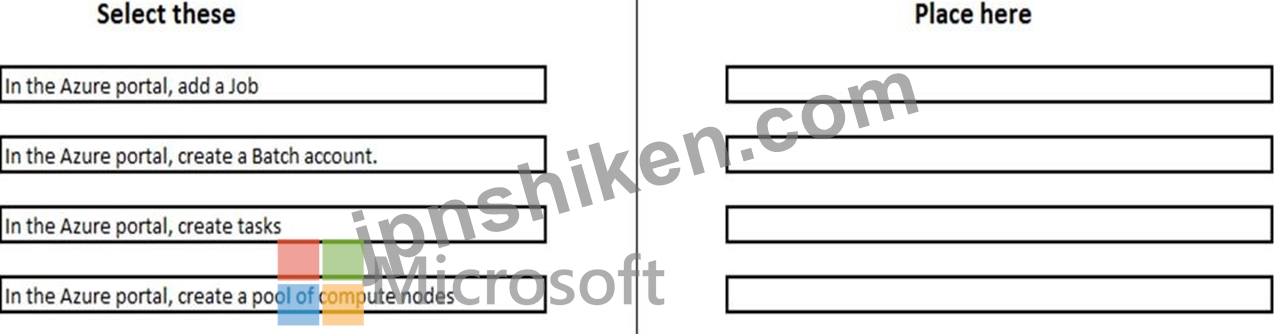
あなたは自律走行輸送システム向けのソフトウェアソリューションを開発しています。このソリューションは、大規模なデータセットとAzure Batch処理を使用して、車両群全体のナビゲーション設定をシミュレーションします。
Azure Batch 上にソリューション用のコンピューティング ノードを作成する必要があります。
あなたはどうすべきでしょうか?
正解:

Explanation:
With the Azure Portal:
Step 1: In the Azure portal, create a Batch account.
First we create a batch account.
Step 2: In the Azure portal, create a pool of compute nodes Now that you have a Batch account, create a sample pool of Windows compute nodes for test purposes.
Step 3: In the Azure portal, add a Job.
Now that you have a pool, create a job to run on it. A Batch job is a logical group for one or more tasks. A job includes settings common to the tasks, such as priority and the pool to run tasks on.
Initially the job has no tasks.
Step 4: In the Azure portal, create tasks
Now create sample tasks to run in the job. Typically you create multiple tasks that Batch queues and distributes to run on the compute nodes.
References:
https://docs.microsoft.com/en-us/azure/batch/quick-create-portal

- 質問一覧「322問」
- 質問1 ドラッグアンドドロップ問題 あなたはREST Webサービスを開発し...
- 質問2 Azure Tableストレージを使用して、アプリケーションの顧客情報...
- 質問3 ケーススタディ10 - 4回目のコーヒー 背景 フォースコーヒーは、...
- 質問4 ホットスポットに関する質問 あなたは、可用性ゾーン内の Azure ...
- 質問5 ドラッグアンドドロップ問題 あなたは、Azure Blob GPv1 Premium...
- 質問6 ホットスポットに関する質問 食品配達の料金支払いに使用されるW...
- 質問7 ホットスポットに関する質問 オンプレミス環境内に、社内専用の ...
- 質問8 注:この問題は、同じシナリオを提示する一連の問題の一部です。
- 質問9 ホットスポットに関する質問 あなたは、Service Busキューに含ま...
- 質問10 事例研究7 - Proseware, Inc. 背景 あなたはProseware社の開発者...
- 質問11 ある企業が、既存のオンプレミス環境にあるサードパーティ製ウェ
- 質問12 事例研究3 - シティ・パワー&ライト 背景 City Power & Lig...
- 質問13 注:この問題は、同じシナリオを提示する一連の問題の一部です。
- 質問14 ある組織がAzure Cosmos DBを導入する。 アイテムが作成、更新、...
- 質問15 事例研究3 - シティ・パワー&ライト 背景 City Power & Lig...
- 質問16 あなたは、Microsoft Entraテナントと連携するアプリケーション...
- 質問17 ケーススタディ10 - 4回目のコーヒー 背景 フォースコーヒーは、...
- 質問18 注:この問題は、全く同じ設定を描いた複数の問題の中に含まれて
- 質問19 事例研究8 - VanArsdel, Ltd 背景 VanArsdel, Ltd.は、グローバ...
- 質問20 Azure Database for MySQLインスタンスに接続するASP.NET Coreア...
- 質問21 注:この問題は、同じシナリオを提示する一連の問題の一部です。
- 質問22 注:この質問は、同じシナリオを提示する一連の質問の一部です。
- 質問23 ドラッグアンドドロップ問題 言語理解インテリジェンスサービス(...
- 質問24 Application Insights SDKをソリューションに統合することで、AS...
- 質問25 事例研究7 - Proseware, Inc. 背景 あなたはProseware社の開発者...
- 質問26 ホットスポットに関する質問 image1 という名前のコンテナイメー...
- 質問27 注:この質問は、同じシナリオを提示する一連の質問の一部です。
- 質問28 注:この質問は、同じシナリオを提示する一連の質問の一部です。
- 質問29 ホットスポットに関する質問 あなたは、Azure Storage を使用し...
- 質問30 ドラッグアンドドロップ問題 あなたは、医療従事者が自身の情報
- 質問31 Azure Batchジョブを作成して実行するためのコードを記述してい...
- 質問32 事例研究1 - Litware Inc. 背景 あなたは、従業員の経費管理ソリ...
- 質問33 ホットスポットに関する質問 あなたは、世界中の地震データへの
- 質問34 ホットスポットに関する質問 Azure Cache for Redis インスタン...
- 質問35 注:この質問は、同じシナリオを提示する一連の質問の一部です。
- 質問36 ホットスポットに関する質問 あなたは、Azure Blobストレージに...
- 質問37 お客様は、Azure API Management マネージド Web サービスをクラ...
- 質問38 ホットスポットに関する質問 コンテナを使用して、Python Webサ...
- 質問39 あなたは、いくつかの Azure API Management (APIM) でホストさ...
- 質問40 ドラッグアンドドロップ問題 あなたはAzure Container Appsを使...
- 質問41 Application Insights SDKをソリューションに統合することで、AS...
- 質問42 注:この質問は、同じシナリオを提示する一連の質問の一部です。
- 質問43 Java RESTful APIを開発してAzure App Serviceにデプロイします...
- 質問44 注:この質問は、同じシナリオを提示する一連の質問の一部です。
- 質問45 Insights1 というワークスペースベースの Azure Application Ins...
- 質問46 Azure仮想マシンでホストされる多層アプリケーションを設計して...
- 質問47 GPU リソースを使用してレンダリング プロセスを最適化するイメ...
- 質問48 事例研究6 - コントソ社 背景 概要 あなたはContoso, Ltd.の開発...
- 質問49 事例研究4 - ベスト・フォー・ユー・オーガニックス 背景 Best f...
- 質問50 ドラッグアンドドロップ問題 あなたは、観光業界向けに予約管理
- 質問51 注:この問題は、同じシナリオを提示する一連の問題の一部です。
- 質問52 ケーススタディ10 - 4回目のコーヒー 背景 フォースコーヒーは、...
- 質問53 事例研究1 - Litware Inc. 背景 あなたは、従業員の経費管理ソリ...
- 質問54 ホットスポットに関する質問 Azure API Management (APIM) でホ...
- 質問55 ユーザーの写真に対して画像解析を行い、識別されたオブジェクト
- 質問56 ホットスポットに関する質問 あなたはAzureテクノロジーを使用し...
- 質問57 事例研究6 - コントソ社 背景 概要 あなたはContoso, Ltd.の開発...
- 質問58 注:この問題は、同じシナリオを提示する一連の問題の一部です。
- 質問59 ホットスポットに関する質問 ASP.NET WebアプリをAzure App Serv...
- 質問60 ホットスポットに関する質問 ある企業は、カスタムドメイン名を
- 質問61 あなたは、Azureサービスクラスターにデプロイする複数のマイク...
- 質問62 ホットスポットに関する質問 あなたは、2つのDockerコンテナを含...
- 質問63 注:この問題は、同じシナリオを提示する一連の問題の一部です。
- 質問64 queue1 という名前の Azure Queue Storage があります。 あなた...
- 質問65 ドラッグアンドドロップ問題 あなたは、Azure Blob Storageコン...
- 質問66 ホットスポットに関する質問 あなたはAzure Storageと通信する.N...
- 質問67 ホットスポットに関する質問 あなたはレストランのレビューサイ
- 質問68 ホットスポットに関する質問 あなたは、工具会社向けのトレーニ
- 質問69 ドラッグアンドドロップ問題 外部パートナーに天気予報データを
- 質問70 システム割り当てマネージドIDが有効になっているAzure仮想マシ...
- 質問71 事例研究6 - コントソ社 背景 概要 あなたはContoso, Ltd.の開発...
- 質問72 注:この問題は、同じシナリオを提示する一連の問題の一部です。
- 質問73 開発チームがアプリケーションを開発中です。このアプリケーショ
- 質問74 ドラッグアンドドロップ問題 Fourth Coffeeは、Docker上で動作す...
- 質問75 注:この問題は、同じシナリオを提示する一連の問題の一部です。
- 質問76 Azure Time Series Insights を使用して IoT ソリューションを作...
- 質問77 関数にはいくつのトリガーが必要ですか?
- 質問78 ホットスポットに関する質問 C#で記述されたApp1という名前のAzu...
- 質問79 あなたは自律走行輸送システム向けのソフトウェアソリューション
- 質問80 注: この問題は、同じシナリオを提示する一連の問題の一部です。...
- 質問81 AzureWebアプリとして実行されるWebアプリケーションを開発して...
- 質問82 あなたは、グローバルに分散されたデータを複数の Azure Blob St...
- 質問83 ワークフローにおけるオーケストレーター機能の役割を最も適切に
- 質問84 事例研究5 - ワイドワールドインポーターズ 背景 Wide World Imp...
- 質問85 ドラッグアンドドロップ問題 あなたは複数の既存のロジックアプ
- 質問86 ドラッグアンドドロップ問題 このWebサービスは、eコマースパー...
- 質問87 ホットスポットに関する質問 Azure Service Bus のトピックがあ...
- 質問88 事例研究1 - Litware Inc. 背景 あなたは、従業員の経費管理ソリ...
- 質問89 お客様は、世界中の顧客サイトから画像ファイルをアップロードす
- 質問90 事例研究2 - コホ・ワイナリー LabelMakerアプリ Coho Wineryは...
- 質問91 ある企業は世界中で製品を販売し、多言語での顧客サービスを提供
- 質問92 Sub1 という名前の Azure サブスクリプションがあり、そこには R...
- 質問93 ホットスポットに関する質問 以下のPowerShellスクリプトを作成...
- 質問94 ホットスポットに関する質問 あなたは、Azure Webアプリとして動...
- 質問95 ホットスポットに関する質問 ある企業がNode.jsウェブアプリを開...
- 質問96 あなたは、地理空間データをAzure Cosmos DBに保存するAPIを使用...
- 質問97 複数の Azure Functions を使用してサーバーレス アプリケーショ...
- 質問98 事例研究3 - シティ・パワー&ライト 背景 City Power & Lig...
- 質問99 組織はAzureでWebアプリをホストします。組織がAzureMonitorを使...
- 質問100 あなたは、データをキーと値のペアとして保存するSaaSアプリケー...
- 質問101 事例研究8 - VanArsdel, Ltd 背景 VanArsdel, Ltd.は、グローバ...
- 質問102 ドラッグアンドドロップ問題 あなたは、contoso.com という名前...
- 質問103 あなたは、Azure Container Apps を使用するマイクロサービスベ...
- 質問104 ドラッグアンドドロップ問題 あなたはAzure Cosmos DB for NoSQL...
- 質問105 あなたの会社は、AzureSQLDatabaseのデータを使用するApp1という...
- 質問106 ホットスポットに関する質問 あなたはAzure Webアプリを開発して...
- 質問107 ユーザーが写真やビデオを Azure ストレージにアップロードでき...
- 質問108 注:この質問は、同じシナリオを提示する一連の質問の一部です。
- 質問109 あなたは、顧客が独立系の宿泊施設提供者を検索できる.NET Core ...
- 質問110 Application Insights SDKをソリューションに統合することで、AS...
- 質問111 ホットスポットに関する質問 企業向けの従量課金ホスティングプ
- 質問112 ホットスポットに関する質問 ある組織がBLOBストレージアカウン...
- 質問113 あなたは、車両ローンを管理するためのAzure Durable Functions...
- 質問114 ホットスポットに関する質問 あなたは、Microsoft Graph が別の...
- 質問115 事例研究4 - ベスト・フォー・ユー・オーガニックス 背景 Best f...
- 質問116 事例研究9 - マンソンズ・ピクルス・アンド・プリザーブズ・ファ...
- 質問117 貴社はAzureのサブスクリプションを保有しています。 Azure Reso...
- 質問118 あなたは企業向けにアプリケーションを開発しています。そして、
- 質問119 ドラッグアンドドロップ問題 App1という名前のAzure App Service...
- 質問120 ドラッグアンドドロップ問題 あなたは、一般公開されているニュ
- 質問121 事例研究8 - VanArsdel, Ltd 背景 VanArsdel, Ltd.は、グローバ...
- 質問122 ケーススタディ10 - 4回目のコーヒー 背景 フォースコーヒーは、...
- 質問123 ドラッグアンドドロップ問題 あなたは、世界中に点在する数千の
- 質問124 AzureStorageキューからリクエストを受信するデータ処理アプリケ...
- 質問125 ホットスポットに関する質問 あなたは、Event Gridを使用して他...
- 質問126 1日の終わりのレポート(または小売店。すべてのストアは毎日午
- 質問127 あなたは、多数のウェブサービスを提供するSaaS企業の開発者です...
- 質問128 MicrosoftIDプラットフォームを使用してユーザーとリソースを認...
- 質問129 APIをAPI管理にデプロイします クライアント証明書を使用して、A...
- 質問130 事例研究2 - コホ・ワイナリー LabelMakerアプリ Coho Wineryは...
- 質問131 あなたは、Azure API Management (APIM) でホストされている複数...
- 質問132 事例研究5 - ワイドワールドインポーターズ 背景 Wide World Imp...
- 質問133 ドラッグアンドドロップ問題 あなたはAzure Functionsアプリを開...
- 質問134 事例研究2 - コホ・ワイナリー LabelMakerアプリ Coho Wineryは...
- 質問135 Azure Container App をデプロイする予定です。 コンテナアプリ...
- 質問136 事例研究1 - Litware Inc. 背景 あなたは、従業員の経費管理ソリ...
- 質問137 事例研究7 - Proseware, Inc. 背景 あなたはProseware社の開発者...
- 質問138 あなたの会社には、次のオペレーティングシステムに基づくいくつ
- 質問139 あなたは、Azure Key Vaultに保存されているキーを使用するアプ...
- 質問140 事例研究9 - マンソンズ・ピクルス・アンド・プリザーブズ・ファ...
- 質問141 ホットスポットに関する質問 あなたは、Azure App Configuration...
- 質問142 ホットスポットに関する質問 サードパーティシステムから取得し
- 質問143 ホットスポットに関する質問 あなたは、数百万枚の画像をAzure B...
- 質問144 注:この問題は、同じシナリオを提示する一連の問題の一部です。
- 質問145 ドラッグアンドドロップ問題 コンテナ化されたASP.NET Coreアプ...
- 質問146 事例研究2 - コホ・ワイナリー LabelMakerアプリ Coho Wineryは...
- 質問147 ドラッグアンドドロップ問題 Azure Cosmos DB をデータストレー...
- 質問148 注:この質問は、同じシナリオを提示する一連の質問の一部です。
- 質問149 ドラッグアンドドロップ問題 account1という名前のAzure Cosmos ...
- 質問150 コンサルタントは、4社の顧客向けにWebアプリケーションをAzure ...
- 質問151 事例研究8 - VanArsdel, Ltd 背景 VanArsdel, Ltd.は、グローバ...
- 質問152 ある企業が交通監視システムを開発している。このシステムは4つ
- 質問153 ホットスポットに関する質問 あなたは、6つの高速道路沿いの交通...
- 質問154 ホットスポットに関する質問 あなたは、ユーザーおよびリソース
- 質問155 ドラッグアンドドロップ問題 あなたはIoTソリューションを開発し...
- 質問156 あなたは、複数のAzureリージョンにデプロイされるCosmos DBソリ...
- 質問157 あなたは、queue1 という名前のキューを含む Azure Queue Storag...
- 質問158 事例研究2 - コホ・ワイナリー LabelMakerアプリ Coho Wineryは...
- 質問159 ホットスポットに関する質問 Azure Service Bus の名前空間に、T...
- 質問160 ホットスポットに関する質問 あなたは、Azure Blobストレージア...
- 質問161 ドラッグアンドドロップ問題 Sub1という名前のAzureサブスクリプ...
- 質問162 事例研究2 - コホ・ワイナリー LabelMakerアプリ Coho Wineryは...
- 質問163 ドラッグアンドドロップ問題 Azure Function App を呼び出す Azu...
- 質問164 ホットスポットに関する質問 お客様のオンプレミスWebサーバー上...
- 質問165 ホットスポットに関する質問 ある企業がゲームプラットフォーム
- 質問166 開発チーム「PNX」がアプリケーションを開発している。 アプリケ...
- 質問167 システム割り当てマネージドIDが有効になっているAzure仮想マシ...
- 質問168 ドラッグアンドドロップ問題 運用環境の Azure App Service に W...
- 質問169 ホットスポットに関する質問 Azure App Service でホストされる ...
- 質問170 ホットスポットに関する質問 Azure App Service に Web アプリを...
- 質問171 ドラッグアンドドロップ問題 storage1 という名前の Azure スト...
- 質問172 AI1 という名前の Application Insights リソースと、App1 とい...
- 質問173 あなたは、ストレージソリューションの日常的なデータクリーンア
- 質問174 注:この質問は、同じシナリオを提示する一連の質問の一部です。
- 質問175 ドラッグアンドドロップ問題 あなたはserviceA、serviceB、servi...
- 質問176 注:この質問は、同じシナリオを提示する一連の質問の一部です。
- 質問177 ホットスポットに関する質問 あなたはHTTPトリガーを使用したAzu...
- 質問178 あなたは、仕事を探しているミュージシャンをユーザーが見つける
- 質問179 ドラッグアンドドロップ問題 あなたは、account1 という名前の N...
- 質問180 PowerShell を使用して Azure キー コンテナーを作成しています...
- 質問181 注:この質問は、同じシナリオを提示する一連の質問の一部です。
- 質問182 開発チームがアプリケーションを開発しています。このアプリケー
- 質問183 ドラッグアンドドロップ問題 あなたはWebアプリケーションを開発...
- 質問184 コンテナ内で実行されるAzure Webアプリを管理しています。この...
- 質問185 ある企業が、スマート冷蔵庫が温度情報を中央拠点に送信できるソ
- 質問186 ドラッグアンドドロップ問題 Azure App Service Web App for Con...
- 質問187 注:この問題は、同じシナリオを提示する一連の問題の一部です。
- 質問188 あなたは、内部サービス、外部サービス、そしてアプリケーション
- 質問189 ASP.NET Coreアプリケーションを開発する必要があります。このア...
- 質問190 注:この問題は、同じシナリオを提示する一連の問題の一部です。
- 質問191 ドラッグアンドドロップ問題 あなたは、ContosoAppという名前のA...
- 質問192 ある企業が、スマート冷蔵庫が温度情報を中央拠点に送信できるソ
- 質問193 ドラッグアンドドロップ問題 Microsoft Azure App Service の We...
- 質問194 公開されているニュースAPIのゲートウェイソリューションを開発...
- 質問195 Azure App Service RESTAPIを開発しています。 APIは、Azure App...
- 質問196 ホットスポットに関する質問 あなたは、process.exeという名前の...
- 質問197 事例研究7 - Proseware, Inc. 背景 あなたはProseware社の開発者...
- 質問198 ドラッグアンドドロップ問題 あなたはAzureサブスクリプションを...
- 質問199 注:この質問は、同じシナリオを提示する一連の質問の一部です。
- 質問200 開発チーム「XRP」がアプリケーションを開発している。 アプリケ...
- 質問201 事例研究3 - シティ・パワー&ライト 背景 City Power & Lig...
- 質問202 システム割り当てマネージドIDが有効になっているAzure仮想マシ...
- 質問203 ドラッグアンドドロップ問題 Azure Kubernetes Service (AKS) ク...
- 質問204 注:この問題は、同じシナリオを提示する一連の問題の一部です。
- 質問205 事例研究7 - Proseware, Inc. 背景 あなたはProseware社の開発者...
- 質問206 Azure Functionsでバインディングを使用してデータソースとデー...
- 質問207 注:この問題は、同じシナリオを提示する一連の問題の一部です。
- 質問208 注:この問題は、同じシナリオを提示する一連の問題の一部です。
- 質問209 事例研究7 - Proseware, Inc. 背景 あなたはProseware社の開発者...
- 質問210 ホットスポットに関する質問 ある会社は国際的な旅行予約管理サ
- 質問211 あなたは、App1 という名前の Azure App Service Web アプリと、...
- 質問212 ホットスポットに関する質問 ある会社が一連のモバイルゲームを
- 質問213 あなたは自社の開発者です。 既存のロジックアプリの定義を更新
- 質問214 チームがAzure Searchサービスにインデックスを作成しました。イ...
- 質問215 事例研究5 - ワイドワールドインポーターズ 背景 Wide World Imp...
- 質問216 Azure App Service の Web アプリをデプロイします。Azure Activ...
- 質問217 注:この問題は、同じシナリオを提示する一連の問題の一部です。
- 質問218 事例研究1 - Litware Inc. 背景 あなたは、従業員の経費管理ソリ...
- 質問219 事例研究7 - Proseware, Inc. 背景 あなたはProseware社の開発者...
- 質問220 ドラッグアンドドロップ問題 Azure Blobストレージを使用するア...
- 質問221 ドラッグアンドドロップ問題 あなたはアプリケーションを開発し
- 質問222 開発チームは、Azure Table Storageと連携するアプリケーション...
- 質問223 ホットスポットに関する質問 ある企業がJavaウェブアプリケーシ...
- 質問224 ホットスポットに関する質問 あなたは、組織内のチームに関連す
- 質問225 企業は、Azure Service Busを使用して、パブリッシュサブスクラ...
- 質問226 事例研究9 - マンソンズ・ピクルス・アンド・プリザーブズ・ファ...
- 質問227 ドラッグアンドドロップ問題 あなたはマイクロサービスソリュー
- 質問228 あなたはAzure Service Busを利用するアプリケーションを開発し...
- 質問229 ドラッグアンドドロップ問題 あなたは、オンプレミスのハードウ
- 質問230 ホットスポットに関する質問 あなたは、Microsoft Graph API を...
- 質問231 ホットスポットに関する質問 あなたは、プレイヤーが単語を表す
- 質問232 ある企業が、スマート冷蔵庫に接続するためのIoTソリューション...
- 質問233 マイクロサービスベースのアプリケーションをAzureにデプロイす...
- 質問234 事例研究9 - マンソンズ・ピクルス・アンド・プリザーブズ・ファ...
- 質問235 AzureFrontDoorを使用するASP.NETCoreWebサイトを開発しています...
- 質問236 あなたは、プレミアムティアのAzure Event Hubsを使用して追跡イ...
- 質問237 注:この質問は、同じシナリオを提示する一連の質問の一部です。
- 質問238 ホットスポットに関する質問 ある企業が、他の企業が顧客を管理
- 質問239 あるチームが、AzureのKubernetesクラスターにデプロイする必要...
- 質問240 事例研究8 - VanArsdel, Ltd 背景 VanArsdel, Ltd.は、グローバ...
- 質問241 ドラッグアンドドロップ問題 あなたはAzure Blobストレージを使...
- 質問242 事例研究8 - VanArsdel, Ltd 背景 VanArsdel, Ltd.は、グローバ...
- 質問243 注: この問題は、同じシナリオを提示する一連の問題の一部です。...
- 質問244 ドラッグアンドドロップ問題 オンプレミスのファイルシステムと ...
- 質問245 ホットスポットに関する質問 あなたはAzure Functionsアプリを開...
- 質問246 貴社は、Azure ADに参加済みのデバイスから管理するAzure Kubern...
- 質問247 Webアプリケーションを開発してAzureAppServiceにデプロイします...
- 質問248 耐久性のある機能とは何ですか?
- 質問249 あなたは企業向けユーザーポータルを開発しています。 ポータル
- 質問250 ドラッグアンドドロップ問題 複数の Azure リソースをデプロイす...
- 質問251 Azure Search サービスにおいて、チーム「XPN」がインデックスを...
- 質問252 事例研究6 - コントソ社 背景 概要 あなたはContoso, Ltd.の開発...
- 質問253 貨物船の出荷情報を管理するアプリケーションを開発しています。
- 質問254 チーム「X」がAzure Searchサービスにインデックスを作成しまし...
- 質問255 注:この質問は、同じシナリオを提示する一連の質問の一部です。
- 質問256 あなたはAzureソリューションを開発します。 .NET APIを使用して...
- 質問257 ホットスポットに関する質問 あなたはAzure Front Doorサービス...
- 質問258 ホットスポットに関する質問 Azure Functions Core Toolsを使用...
- 質問259 ケーススタディ10 - 4回目のコーヒー 背景 フォースコーヒーは、...
- 質問260 ドラッグアンドドロップ問題 Azure Container Registry (ACR) イ...
- 質問261 あなたは大手スナック菓子メーカー向けのロイヤルティプログラム
- 質問262 事例研究8 - VanArsdel, Ltd 背景 VanArsdel, Ltd.は、グローバ...
- 質問263 事例研究8 - VanArsdel, Ltd 背景 VanArsdel, Ltd.は、グローバ...
- 質問264 Azure Cosmos DB for NoSQLデータベースを作成します。 Azure Co...
- 質問265 ホットスポットに関する質問 あなたはaccount1という名前のAzure...
- 質問266 事例研究7 - Proseware, Inc. 背景 あなたはProseware社の開発者...
- 質問267 AppServicePlanで実行されるAzureFunctionアプリを開発していま...
- 質問268 事例研究9 - マンソンズ・ピクルス・アンド・プリザーブズ・ファ...
- 質問269 ドラッグアンドドロップ問題 あなたはAzureソリューションを開発...
- 質問270 ドラッグアンドドロップ問題 注文処理システムを実装しています
- 質問271 ワークスペースベースのAzure Application Insightsリソース「In...
- 質問272 注:この質問は、同じシナリオを提示する一連の質問の一部です。
- 質問273 ホットスポットに関する質問 Azure Event Hubs SDK を使用してソ...
- 質問274 ドラッグアンドドロップ問題 Javaアプリケーションを開発し、Azu...
- 質問275 ドラッグアンドドロップ問題 まず、Azureサブスクリプションを作...
- 質問276 あなたは、マルチパーティション化されたAzure Cosmos DBデータ...
- 質問277 あなたはeコマースWebアプリを開発しています。 Azure Key Vault...
- 質問278 ドラッグアンドドロップ問題 あなたは自律走行輸送システム向け
- 質問279 あなたは、Azure Container Apps を使用するマイクロサービスベ...
- 質問280 ホットスポットに関する質問 あなたは、ユーザーの入力に基づい
- 質問281 ドラッグアンドドロップ問題 あなたはアプリケーションを開発し
- 質問282 注:この問題は、同じシナリオを提示する一連の問題の一部です。
- 質問283 あなたは、エンコードされた地理座標を含むWebリクエストを受信...
- 質問284 あなたは、App1 という名前の Azure App Service Web アプリと、...
- 質問285 注:この質問は、同じシナリオを提示する一連の質問の一部です。
- 質問286 ケーススタディ10 - 4回目のコーヒー 背景 フォースコーヒーは、...
- 質問287 Azure Webアプリケーションファイアウォール(WAF)によって保護...
- 質問288 AzureBlobコンテナーにアップロードされた画像を処理するAzureFu...
- 質問289 あなたはASP.NET Core Web APIウェブサービスを開発しています。...
- 質問290 あなたは、App1 という名前の Azure App Service Web アプリと、...
- 質問291 事例研究1 - Litware Inc. 背景 あなたは、従業員の経費管理ソリ...
- 質問292 あなたは音声認識機能を備えたホームオートメーション制御ロボッ
- 質問293 事例研究5 - ワイドワールドインポーターズ 背景 Wide World Imp...
- 質問294 ホットスポットに関する質問 あなたはContoso, Ltd.で働いていま...
- 質問295 あなたは、ある企業向けにAzure Container Apps上で動作するマイ...
- 質問296 あなたは新しいAzureサブスクリプションを取得しました。従業員...
- 質問297 あなたは多くのWebサービスを提供するSaaS企業の開発者です。 会...
- 質問298 注:この質問は、同じシナリオを提示する一連の質問の一部です。
- 質問299 週末に開催される子供向けキャンプの直前空き枠を販売するWebア...
- 質問300 ドラッグアンドドロップ問題 あなたは、Azure Storageを使用する...
- 質問301 ある企業が注文処理システムを導入しています。注文情報はAzure ...
- 質問302 ホットスポットに関する質問 複数の Azure Service Bus キューを...
- 質問303 注:この問題は、同じシナリオを提示する一連の問題の一部です。
- 質問304 注:この問題は、同じシナリオを提示する一連の問題の一部です。
- 質問305 ホットスポットに関する質問 あなたはSMSを利用したテストソリュ...
- 質問306 注:この問題は、同じシナリオを提示する一連の問題の一部です。
- 質問307 ホットスポットに関する質問 Linux 上の App Service に Web ア...
- 質問308 事例研究1 - Litware Inc. 背景 あなたは、従業員の経費管理ソリ...
- 質問309 ある企業がAzure Service Busを使用してパブリッシュ/サブスクラ...
- 質問310 ケーススタディ10 - 4回目のコーヒー 背景 フォースコーヒーは、...
- 質問311 事例研究5 - ワイドワールドインポーターズ 背景 Wide World Imp...
- 質問312 あなたは在庫追跡ソリューションを開発しています。このソリュー
- 質問313 大手小売企業は、オンラインストアと実店舗を運営しています。同
- 質問314 Azure App Service に Web アプリを開発してデプロイします。Azu...
- 質問315 注:この質問は、同じシナリオを提示する一連の質問の一部です。
- 質問316 データストレージにAzure Blobストレージを使用するWebサイトを...
- 質問317 ホットスポットに関する質問 Azure Function App を開発していま...
- 質問318 ホットスポットに関する質問 あなたはモバイルアプリケーション
- 質問319 事例研究6 - コントソ社 背景 概要 あなたはContoso, Ltd.の開発...
- 質問320 事例研究4 - ベスト・フォー・ユー・オーガニックス 背景 Best f...
- 質問321 合併後のカメラ会社では、レンズの品質管理手順にどの技術を採用
- 質問322 事例研究2 - コホ・ワイナリー LabelMakerアプリ Coho Wineryは...
