- ホーム
- Microsoft
- AZ-104J - Microsoft Azure Administrator (AZ-104日本語版)
- Microsoft.AZ-104J.v2025-10-13.q379
- 質問194
有効的なAZ-104J問題集はJPNTest.com提供され、AZ-104J試験に合格することに役に立ちます!JPNTest.comは今最新AZ-104J試験問題集を提供します。JPNTest.com AZ-104J試験問題集はもう更新されました。ここでAZ-104J問題集のテストエンジンを手に入れます。
AZ-104J問題集最新版のアクセス
「832問、30% ディスカウント、特別な割引コード:JPNshiken」
ホットスポットに関する質問
Azure サブスクリプションをお持ちです。
File1.bicep という名前の次のファイルを展開する予定です。
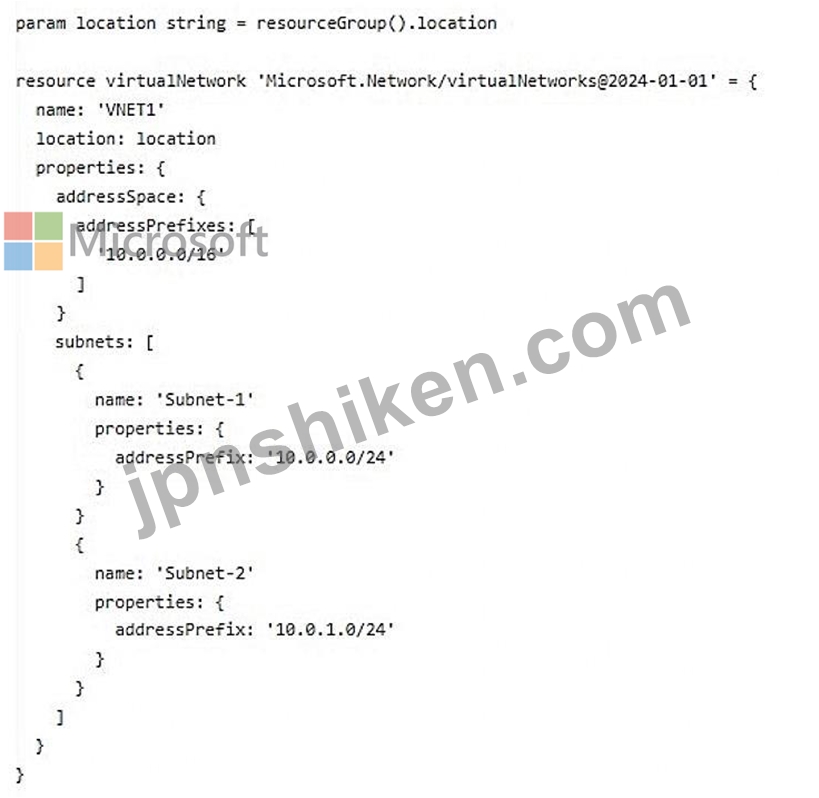
以下の各文について、正しい場合は「はい」を選択してください。そうでない場合は「いいえ」を選択してください。
注意: 正しい選択ごとに 1 ポイントが付与されます。

Azure サブスクリプションをお持ちです。
File1.bicep という名前の次のファイルを展開する予定です。
以下の各文について、正しい場合は「はい」を選択してください。そうでない場合は「いいえ」を選択してください。
注意: 正しい選択ごとに 1 ポイントが付与されます。
正解:

Explanation:
Box 1: No
The name of the virtual network is set to VNET1.
The location of the virtual network will be the same as the location of the resource group.
Box 2: Yes
Configure subnets by using the subnets property
Virtual networks contain subnets, which are logical groups of IP addresses within the virtual network. There are two ways to define subnets in Bicep: by using the subnets property on the virtual network resource, and by creating a child resource with type Microsoft.Network/virtualNetworks/subnets.
Box 3: No
Note: Although both approaches enable you to define and create your subnets, there is an important difference. When you define subnets by using child resources, the first time your Bicep file is deployed, the virtual network is deployed. Then, after the virtual network deployment is complete, each subnet is deployed. This sequencing occurs because Azure Resource Manager deploys each individual resource separately.
Reference:
https://learn.microsoft.com/en-us/azure/azure-resource-manager/bicep/scenarios-virtual-networks

- 質問一覧「379問」
- 質問1 ドラッグアンドドロップの質問 VM1 という名前の仮想マシンを含...
- 質問2 注: この問題は、同じシナリオを提示する一連の問題の一部です。...
- 質問3 シミュレーション 概要 試験の次のセクションはラボです。このセ...
- 質問4 ホットスポットに関する質問 Sync1 という同期グループがあり、...
- 質問5 ホットスポットに関する質問 次のリソース グループを含む Subsc...
- 質問6 storage1 という名前のストレージ アカウントを含む Azure サブ...
- 質問7 VM1という名前のAzure仮想マシンを含むAzureサブスクリプション...
- 質問8 ケーススタディ1 - Humongous Insurance 概要 Humongous Insuran...
- 質問9 ケーススタディ6 - ADatum Corporation 概要 ADatum Corporation...
- 質問10 ホットスポットに関する質問 VM1 という名前の Azure 仮想マシン...
- 質問11 ホットスポットに関する質問 次の表に示すリソースを含む Azure ...
- 質問12 VM1 と VM2 という 2 つの Azure 仮想マシンがあります。また、R...
- 質問13 会社には、Recovery Services コンテナーが含まれる Azure サブ...
- 質問14 ホットスポットに関する質問 Azure サブスクリプションをお持ち...
- 質問15 VNet1 という仮想ネットワークを含む、Subscription1 という Azu...
- 質問16 オンプレミスのデータセンターと Azure サブスクリプションがあ...
- 質問17 VNet1 という名前の仮想ネットワークを含む Azure サブスクリプ...
- 質問18 Azure Active Directory(Azure AD)テナントがあります。 Azure...
- 質問19 RG1 という名前のリソース グループと VNet1 という名前の仮想ネ...
- 質問20 注: この問題は、同じシナリオを提示する一連の問題の一部です。...
- 質問21 VM1 と VM2 という 2 つの Azure 仮想マシン上で実行される App1...
- 質問22 ある企業では、Azure に次の仮想ネットワークが定義されています...
- 質問23 ホットスポットに関する質問 次の図に示すように、Azure ストレ...
- 質問24 ホットスポットに関する質問 次の表に示すリソースを含む Azure ...
- 質問25 ケーススタディ1 - Humongous Insurance 概要 Humongous Insuran...
- 質問26 VNet1 と VNet2 という名前の 2 つのピアリングされた仮想ネット...
- 質問27 次の表に示すリソースを含む Azure サブスクリプションがありま...
- 質問28 会社には Azure Active Directory (Azure AD) サブスクリプショ...
- 質問29 注: この問題は、同じシナリオを提示する一連の問題の一部です。...
- 質問30 仮想ネットワーク サブネットに 5 台の仮想マシンを展開する予定...
- 質問31 ケーススタディ2 - Contoso社 概要 Contoso, Ltd.は世界中にオフ...
- 質問32 注: この質問は、同一の設定を示す複数の質問に含まれています。...
- 質問33 ケーススタディ1 - Humongous Insurance 概要 Humongous Insuran...
- 質問34 次の表に示すストレージ アカウントを含む、Subscription1 とい...
- 質問35 ホットスポットに関する質問 仮想マシン スケール セットを含む ...
- 質問36 P2v2 価格レベルを使用する AdatumASP1 という名前の Azure App ...
- 質問37 次の表に示すリソースを含む Azure サブスクリプションがありま...
- 質問38 注: この問題は、同じシナリオを提示する一連の問題の一部です。...
- 質問39 Azure サブスクリプションをお持ちです。 Template.json という...
- 質問40 ホットスポットに関する質問 次の図に示すネットワーク プロファ...
- 質問41 ホットスポットに関する質問 次の表のリソースを含む Azure サブ...
- 質問42 Azure サブスクリプションをお持ちです。 App1 という名前のアプ...
- 質問43 注: この質問は、同じシナリオを提示する一連の質問の一部です。...
- 質問44 storageacct1234 という名前のストレージ アカウントと、User1 ...
- 質問45 会社にはMicrosoft Azureでホストされた仮想マシン(VM)があり...
- 質問46 Subscription1 という名前の Azure サブスクリプションがありま...
- 質問47 Sub1 と Sub2 という名前の 2 つの Azure サブスクリプションが...
- 質問48 次の表に示す Azure 仮想マシンがあります。 (Exhibit) VM1 と V...
- 質問49 VM1、VM2、VM3 という 3 つの仮想マシンを含む Azure サブスクリ...
- 質問50 ケーススタディ4 - ADatum 概要 ADatum Corporationは、ニューヨ...
- 質問51 注: この問題は、同じシナリオを提示する一連の問題の一部です。...
- 質問52 次の表のリソースを含む Azure サブスクリプションがあります。 ...
- 質問53 Azure サブスクリプションをお持ちです。 コンテナをデプロイす...
- 質問54 注:この質問は、同じシナリオを提示する一連の質問の一部です。
- 質問55 注: この質問は、同一の設定を示す複数の質問に含まれています。...
- 質問56 注:この質問は、同じシナリオを提示する一連の質問の一部です。
- 質問57 注: この質問は、同一の設定を示す複数の質問に含まれています。...
- 質問58 ホットスポットに関する質問 サブスクリプションIDがc276fc76-で...
- 質問59 App1 という名前の Azure App Service をホストする Azure App S...
- 質問60 Azure サブスクリプションがあります。このサブスクリプションに...
- 質問61 ホットスポットに関する質問 次の表に示すユーザーを含む、conto...
- 質問62 Azure Resource Manager テンプレートを使用して、仮想マシン ス...
- 質問63 ホットスポットに関する質問 WebApp1 という名前の Azure Web ア...
- 質問64 ユーザーにビデオコンテンツをストリーミングする、App1 という...
- 質問65 IT管理者がAzureにpass4test-appというWebアプリをセットアップ...
- 質問66 Subscription1 という名前の Azure サブスクリプションがありま...
- 質問67 ホットスポットに関する質問 Scale1 という名前の仮想マシン ス...
- 質問68 ケーススタディ3 - Contoso社 概要 Contoso 社は、モントリオー...
- 質問69 注: この質問は、同一の設定を示す複数の質問に含まれています。...
- 質問70 注: この質問は、同じシナリオを提示する一連の質問の一部です。...
- 質問71 Azure Resource Manager テンプレートを使用して、仮想マシン ス...
- 質問72 ホットスポットに関する質問 次の表に示すリソースを含む Azure ...
- 質問73 ホットスポットに関する質問 Azure サブスクリプションをお持ち...
- 質問74 ドラッグアンドドロップの質問 初期ドメイン名を持つ Azure Acti...
- 質問75 注: この問題は、同じシナリオを提示する一連の問題の一部です。...
- 質問76 オンプレミス ネットワークには VPN ゲートウェイが含まれていま...
- 質問77 Azure サブスクリプションをお持ちです。 storage1 という名前の...
- 質問78 Subscription1 と Subscription2 という 2 つのサブスクリプショ...
- 質問79 次の表に示すリソース グループを含む、Subscription1 という名...
- 質問80 VM1 という名前の Azure 仮想マシンと、Vault1 という名前の Azu...
- 質問81 dbserver1 という名前のデータベース サーバーが含まれるオンプ...
- 質問82 ホットスポットに関する質問 次の表に示す BLOB コンテナーを含...
- 質問83 注: この問題は、同じシナリオを提示する一連の問題の一部です。...
- 質問84 ホットスポットに関する質問 次の表に示す Azure 仮想マシンを含...
- 質問85 あなたの会社には、Subscription1という名前のAzureサブスクリプ...
- 質問86 Azureサブスクリプションに、storage1というストレージアカウン...
- 質問87 ホットスポットに関する質問 次の図に示すように、contoso2023 ...
- 質問88 Azure 仮想マシンをデプロイするために使用される、Template1 と...
- 質問89 ケーススタディ1 - Humongous Insurance 概要 Humongous Insuran...
- 質問90 Azure Resource Manager テンプレートを使用して、仮想マシン ス...
- 質問91 Subscription1 という名前の Azure サブスクリプションがありま...
- 質問92 ホットスポットに関する質問 ASP1 という Azure App Service プ...
- 質問93 App1 という名前の Azure App Services Web アプリがあります。 ...
- 質問94 次の表に示すリソースを含む Azure サブスクリプションがありま...
- 質問95 次の表に示すユーザーを含む、adatum.com という名前の Azure Ac...
- 質問96 ケーススタディ2 - Contoso社 概要 Contoso, Ltd.は世界中にオフ...
- 質問97 ホットスポットに関する質問 RG1 という名前のリソース グループ...
- 質問98 注: この質問は、同一の設定を示す複数の質問に含まれています。...
- 質問99 基本的な Azure Active Directory (Azure AD) テナントに関連付...
- 質問100 ドラッグアンドドロップの質問 AS1 という名前の可用性セットが...
- 質問101 ケーススタディ4 - ADatum 概要 ADatum Corporationは、ニューヨ...
- 質問102 Azureサブスクリプションに、storageという名前のストレージアカ...
- 質問103 ホットスポットに関する質問 Sub1 という名前の Azure サブスク...
- 質問104 会社には Subscription1 という名前の Azure サブスクリプション...
- 質問105 次の表に示すリソースが含まれる Subscription1 という名前の Az...
- 質問106 Subscription1 という名前の Azure サブスクリプションがありま...
- 質問107 ホットスポットに関する質問 VM1 という名前の仮想マシンを含む ...
- 質問108 Azure サブスクリプションをお持ちです。 Azure 仮想マシンが 10...
- 質問109 ドラッグアンドドロップの質問 Sub1 という名前の Azure サブス...
- 質問110 ホットスポットに関する質問 次の表に示すリソース グループを含...
- 質問111 Azure サブスクリプションをお持ちです。 次の要件を満たすカス...
- 質問112 ホットスポットに関する質問 Azure リージョン East US 2 に Azu...
- 質問113 ホットスポットに関する質問 次の表に示すユーザーを含む Micros...
- 質問114 ホットスポットに関する質問 次の表に示すコンテナー イメージを...
- 質問115 注: この問題は、同じシナリオを提示する一連の問題の一部です。...
- 質問116 ケーススタディ5 - Contoso社 概要 概要 Contoso 社は、モントリ...
- 質問117 会社の Azure サブスクリプションには、Windows Server 2016 を...
- 質問118 Azure ストレージ アカウントを作成します。 ストレージ アカウ...
- 質問119 ドラッグアンドドロップの質問 VM1 と VM2 という名前の 2 つの ...
- 質問120 注: この問題は、同じシナリオを提示する一連の問題の一部です。...
- 質問121 ある企業は、Azure Site Recovery を使用してオンプレミスのサー...
- 質問122 Windows Server 2019 を実行する VM1 という名前の Azure 仮想マ...
- 質問123 ドラッグアンドドロップの質問 多数の仮想マシン(VM)をデプロ...
- 質問124 ホットスポットに関する質問 次の表に示す仮想ネットワークを含
- 質問125 Vault1 という名前の Recovery Services コンテナーを含む Azure...
- 質問126 次の Azure Resource Manager (ARM) テンプレートを開発して、リ...
- 質問127 storage1 という名前のストレージ アカウントを含む Azure サブ...
- 質問128 ホットスポットに関する質問 次の表に示す App Service プランを...
- 質問129 注: この質問は、同一の設定を示す複数の質問に含まれています。...
- 質問130 ケーススタディ6 - ADatum Corporation 概要 ADatum Corporation...
- 質問131 contosostorage という名前の Azure ストレージ アカウントを作...
- 質問132 ケーススタディ1 - Humongous Insurance 概要 Humongous Insuran...
- 質問133 注: この問題は、同じシナリオを提示する一連の問題の一部です。...
- 質問134 ケーススタディ5 - Contoso社 概要 概要 Contoso 社は、モントリ...
- 質問135 次の表に示すパブリック IP アドレスを使用する Azure サブスク...
- 質問136 ホットスポットに関する質問 WebApp1 という名前の Azure App Se...
- 質問137 次の表に示す仮想ネットワークを含む Azure サブスクリプション...
- 質問138 ホットスポットに関する質問 User1 という名前のユーザーと、次...
- 質問139 次の図に示す構成を持つ VNet2 という名前の仮想ネットワークが...
- 質問140 ホットスポットに関する質問 storage1 というストレージ アカウ...
- 質問141 Azureサブスクリプションには、10個のネットワーク セキュリティ...
- 質問142 storage1 という名前のストレージ アカウントを含む Azure サブ...
- 質問143 Microsoft 365 テナントと、contoso.com という名前の Azure Act...
- 質問144 注: この問題は、同じシナリオを提示する一連の問題の一部です。...
- 質問145 注: この質問は、同じシナリオを示す一連の質問の一部です。この...
- 質問146 注:この質問は、同じシナリオを提示する一連の質問の一部です。
- 質問147 Azureサブスクリプションがあります。 ユーザーは、ホームまたは...
- 質問148 ドラッグアンドドロップの質問 Azure Backup によって保護されて...
- 質問149 Azureストレージアカウントを含むAzureサブスクリプションがあり...
- 質問150 注: この質問は、同一の設定を示す複数の質問に含まれています。...
- 質問151 Azure Service Bus があります。 メッセージの先入れ先出し (FIF...
- 質問152 Subscription1 という名前の Azure サブスクリプションがありま...
- 質問153 ドラッグアンドドロップの質問 test-migration という名前のリソ...
- 質問154 ホットスポットに関する質問 storage1 という Azure ストレージ ...
- 質問155 App1 という名前の Azure ロジック アプリがあります。App1 は、...
- 質問156 会社の Azure サブスクリプションには、Windows Server 2016 を...
- 質問157 注: この問題は、同じシナリオを提示する一連の問題の一部です。...
- 質問158 ホットスポットに関する質問 次のカスタム ロールベース アクセ...
- 質問159 ホットスポットに関する質問 次の表に示す Azure 仮想マシンを含...
- 質問160 ホットスポットに関する質問 次の図に示すストレージ アカウント...
- 質問161 注: この質問は、同じシナリオを示す一連の質問の一部です。この...
- 質問162 ホットスポットに関する質問 次の表に示す仮想ネットワークを含
- 質問163 注:この質問は、同じシナリオを提示する一連の質問の一部です。
- 質問164 次の図に示すような Azure ポリシーがあります。 (Exhibit) この...
- 質問165 ホットスポットに関する質問 Azure Blob Storage と Azure File ...
- 質問166 次の表に示すリソースを含む Azure サブスクリプションがありま...
- 質問167 Subscription1 という名前の Azure サブスクリプションがありま...
- 質問168 注: この問題は、同じシナリオを提示する一連の問題の一部です。...
- 質問169 Azure サブスクリプションをお持ちです。 サブスクリプション内...
- 質問170 ケーススタディ4 - ADatum 概要 ADatum Corporationは、ニューヨ...
- 質問171 ホットスポットに関する質問 Subscription1 という名前の Azure ...
- 質問172 ホットスポットに関する質問 次の図に示すような App Service プ...
- 質問173 ホットスポットに関する質問 VM1 という名前の仮想マシンと acco...
- 質問174 ドラッグアンドドロップの質問 次のリソースを含む Azure サブス...
- 質問175 Windows Server 2008 R2 物理サーバーが 5 台あります。これらの...
- 質問176 次の表に示すリソースを含む Azure サブスクリプションがありま...
- 質問177 Workspace1 という名前の Azure Log Analytics ワークスペースが...
- 質問178 webapp1 という名前の Azure Web アプリ上で実行される App1 と...
- 質問179 ホットスポットに関する質問 RG1 という名前のリソース グループ...
- 質問180 シミュレーション 概要 試験の次のセクションはラボです。このセ...
- 質問181 Azure Resource Manager テンプレートを使用して、仮想マシン ス...
- 質問182 ドラッグアンドドロップの質問 10 台の Azure 仮想マシンを Azur...
- 質問183 次の表のリソースを含む Azure サブスクリプションがあります。 ...
- 質問184 次の表に示すリソースを含む Azure サブスクリプションがありま...
- 質問185 注: この質問 6 は、同じシナリオを提示する一連の質問の一部で...
- 質問186 注:この質問は、同じシナリオを提示する一連の質問の一部です。
- 質問187 ホットスポットに関する質問 次の表に示す Azure コンテナー レ...
- 質問188 会社にはpass4test.comというActive Directoryフォレストがあり...
- 質問189 ホットスポットに関する質問 次の Azure ファイル共有を含む Azu...
- 質問190 あなたは、adatum.com という名前の Azure Active Directory (Az...
- 質問191 会社には Azure Active Directory (Azure AD) サブスクリプショ...
- 質問192 ホットスポットに関する質問 次の表に示すリソースを含む Azure ...
- 質問193 Azure Event Grid に接続するためのカスタム Azure 関数アプリを...
- 質問194 ホットスポットに関する質問 Azure サブスクリプションをお持ち...
- 質問195 次の表に示すデバイスを含む Azure サブスクリプションがありま...
- 質問196 ホットスポットに関する質問 次の表に示すクォータを含む、Subsc...
- 質問197 シミュレーション 概要 試験の次のセクションはラボです。このセ...
- 質問198 VNET1 という名前の仮想ネットワークを含む Azure サブスクリプ...
- 質問199 ストレージ アカウントを含む Azure サブスクリプションがありま...
- 質問200 ケーススタディ3 - Contoso社 概要 Contoso 社は、モントリオー...
- 質問201 Azure Resource Manager テンプレートを使用して、仮想マシン ス...
- 質問202 ケーススタディ5 - Contoso社 概要 概要 Contoso 社は、モントリ...
- 質問203 図に示すように、VNet1 という名前の仮想ネットワークがあります...
- 質問204 ホットスポットに関する質問 次の表に示すリソースが含まれる Su...
- 質問205 ホットスポットに関する質問 VNET1、VNET2、VNET3 という名前の ...
- 質問206 注: この問題は、同じシナリオを提示する一連の問題の一部です。...
- 質問207 注: この問題は、同じシナリオを提示する一連の問題の一部です。...
- 質問208 ホットスポットに関する質問 ネットワークにはオンプレミスの Ac...
- 質問209 RG1 という名前のリソース グループを含む Azure サブスクリプシ...
- 質問210 ホットスポットに関する質問 Azure サブスクリプションをお持ち...
- 質問211 ホットスポットに関する質問 Azure サブスクリプションをお持ち...
- 質問212 Azure Active Directory (Azure AD) テナントがあります。 すべ...
- 質問213 注: この問題は、同じシナリオを提示する一連の問題の一部です。...
- 質問214 Web 開発者は、Azure Web アプリとしてデプロイする予定の Web ...
- 質問215 Azure Active Directory (AD) Privileged Identity Management ...
- 質問216 20 台の仮想マシン、NSG1 という名前のネットワーク セキュリテ...
- 質問217 IT管理者がAzureにpass4test-appというWebアプリをセットアップ...
- 質問218 ホットスポットに関する質問 診断ログが有効になっていて、Log A...
- 質問219 注: この問題は、同じシナリオを提示する一連の問題の一部です。...
- 質問220 注: この問題は、同じシナリオを提示する一連の問題の一部です。...
- 質問221 ホットスポットに関する質問 次の Azure Resource Manager (ARM)...
- 質問222 会社には Azure サブスクリプションがあり、Azure に次の仮想ネ...
- 質問223 100 台の仮想マシンを含む Azure サブスクリプションがあります...
- 質問224 ホットスポットに関する質問 Subscription1 という名前の Azure ...
- 質問225 ホットスポットに関する質問 次の表に示すサブスクリプションに
- 質問226 ホットスポットに関する質問 複数の仮想マシンと Workspace1 と...
- 質問227 オンプレミスネットワークには、Share1という名前のSMB共有が含...
- 質問228 次の表に示す Azure 仮想ネットワークがあります。 (Exhibit) VN...
- 質問229 Azureサブスクリプションに、storage1というストレージアカウン...
- 質問230 次の表に示すリソースを含む Azure サブスクリプションがありま...
- 質問231 ホットスポットに関する質問 contoso2023 というストレージ アカ...
- 質問232 VM1 という名前の Azure 仮想マシンがあります。 Azure Backup ...
- 質問233 オンプレミスネットワークには、Azure Active Directory (Azure ...
- 質問234 contoso.onmicrosoft.com という Azure Active Directory (Azure...
- 質問235 Azure Resource Manager テンプレートを使用して、仮想マシン ス...
- 質問236 VNet1 という名前の仮想ネットワークが含まれる Subscription1 ...
- 質問237 contosocloud.onmicrosoft.com という名前の Azure Active Direc...
- 質問238 ホットスポットに関する質問 storage1 という名前のストレージ ...
- 質問239 VM1 という名前の仮想マシンと KV1 という名前の Azure キー コ...
- 質問240 ある企業は現在Azureサブスクリプションを保有しており、そのサ...
- 質問241 ホットスポットに関する質問 Cluster1 という名前の Azure Kuber...
- 質問242 ホットスポットに関する質問 Azureサブスクリプションには、stor...
- 質問243 シミュレーション 概要 試験の次のセクションはラボです。このセ...
- 質問244 次の表に示す仮想ネットワークを含む Azure サブスクリプション...
- 質問245 注: この質問は、同一の設定を示す複数の質問に含まれています。...
- 質問246 App1 という名前の Azure App Service をホストする ASP1 という...
- 質問247 注: この問題は、同じシナリオを提示する一連の問題の一部です。...
- 質問248 米国西部、米国中部、米国東部の Azure リージョンに Web アプリ...
- 質問249 ホットスポットに関する質問 次の表に示すストレージ アカウント...
- 質問250 注: この質問は、同一の設定を示す複数の質問に含まれています。...
- 質問251 注:この質問は、同じシナリオを提示する一連の質問の一部です。
- 質問252 次の表に示すAzure Webアプリを作成する予定です。 (Exhibit) We...
- 質問253 Azure サブスクリプションがあります。サブスクリプションには、...
- 質問254 注: この問題は、同じシナリオを提示する一連の問題の一部です。...
- 質問255 ホットスポットに関する質問 Azure サブスクリプションをお持ち...
- 質問256 次の表に示すリソースが含まれる AZPT1 という名前の Azure サブ...
- 質問257 シミュレーション 概要 試験の次のセクションはラボです。このセ...
- 質問258 ホットスポットに関する質問 contoso.com という名前の Microsof...
- 質問259 注:この質問は、同じシナリオを提示する一連の質問の一部です。
- 質問260 次の表に示すリソースを含む Azure サブスクリプションがありま...
- 質問261 ドラッグアンドドロップの質問 ストレージ アカウントを含む Azu...
- 質問262 注: この問題は、同じシナリオを提示する一連の問題の一部です。...
- 質問263 ホットスポットに関する質問 storage1 という名前の Azure スト...
- 質問264 注: この問題は、同じシナリオを提示する一連の問題の一部です。...
- 質問265 ホットスポットに関する質問 AKS1 という名前の Azure Kubernete...
- 質問266 ホットスポットに関する質問 Azure サブスクリプションをお持ち...
- 質問267 注: この問題は、同じシナリオを提示する一連の問題の一部です。...
- 質問268 ホットスポットに関する質問 次の表に示すユーザーを含む Azure ...
- 質問269 DB1 という名前の Azure SQL データベースを含む Azure サブスク...
- 質問270 Azure サブスクリプションをお持ちです。 複数のポッドを含む Az...
- 質問271 100 個の Azure サブスクリプションがあります。すべてのサブス...
- 質問272 ケーススタディ3 - Contoso社 概要 Contoso 社は、モントリオー...
- 質問273 ホットスポットに関する質問 次の表に示す Azure 仮想マシンがあ...
- 質問274 会社には複数の部門があり、各部門には多数の仮想マシン(VM)が...
- 質問275 Azure サブスクリプションをお持ちです。 cont1 という名前の Az...
- 質問276 Workspace1 という名前の Azure Log Analytics ワークスペースが...
- 質問277 ホットスポットに関する質問 次の表に示すグループを含む、adatu...
- 質問278 VM1 と VM2 という名前の 2 つの Azure 仮想マシンがあります。 ...
- 質問279 container1 という名前の BLOB コンテナーが含まれる storage1 ...
- 質問280 複数の SQL Server データベースをホストする Azure Windows Ser...
- 質問281 注: この問題は、同じシナリオを提示する一連の問題の一部です。...
- 質問282 ホットスポットに関する質問 次の表に示すパブリック ロード バ...
- 質問283 注: この問題は、同じシナリオを提示する一連の問題の一部です。...
- 質問284 Azure サブスクリプションをお持ちです。 次の設定を持つ新しい ...
- 質問285 ケーススタディ4 - ADatum 概要 ADatum Corporationは、ニューヨ...
- 質問286 注: この問題は、同じシナリオを提示する一連の問題の一部です。...
- 質問287 Subscription1 と Subscription2 という 2 つのサブスクリプショ...
- 質問288 ホットスポットに関する質問 Azure Resource Manager テンプレー...
- 質問289 ホットスポットに関する質問 AAD1 という名前の Azure Active Di...
- 質問290 VM1 と VM2 という名前の 2 つの仮想マシンを含む Azure サブス...
- 質問291 ホットスポットに関する質問 Azureサブスクリプションがあり、そ...
- 質問292 ケーススタディ6 - ADatum Corporation 概要 ADatum Corporation...
- 質問293 ホットスポットに関する質問 Subscription1 という名前の Azure ...
- 質問294 Windows Server Datacenter イメージを使用する仮想マシン スケ...
- 質問295 ローカル冗長ストレージ (LRS) を使用する、storage1 という名前...
- 質問296 ある企業はAzureサブスクリプションを保有しており、オンプレミ...
- 質問297 Azure 仮想マシンを 3 つの Azure リージョンにデプロイします。...
- 質問298 Azure サブスクリプションをお持ちです。すべてのユーザーで多要...
- 質問299 8 台の仮想マシンと次の表に示すリソースを含む Azure サブスク...
- 質問300 ケーススタディ6 - ADatum Corporation 概要 ADatum Corporation...
- 質問301 次の表に示すグループを含む Azure AD テナントがあります。 (Ex...
- 質問302 複数の Windows Server および Ubuntu Linux 仮想マシン (VM) が...
- 質問303 ホットスポットに関する質問 Azure サブスクリプションをお持ち...
- 質問304 次の表に示すリソースを含む Azure サブスクリプションがありま...
- 質問305 ホットスポットに関する質問 次の表のリソースを含む Azure サブ...
- 質問306 VMware vSphere オンプレミス インフラストラクチャは 600 台の...
- 質問307 北ヨーロッパ Azure リージョンに storage1 という名前のストレ...
- 質問308 ドラッグアンドドロップの質問 会社には、同じ仮想ネットワーク
- 質問309 注: この問題は、同じシナリオを提示する一連の問題の一部です。...
- 質問310 ホットスポットに関する質問 次の表に示すように、2 つの Azure ...
- 質問311 ホットスポットに関する質問 次の表に示すリソース グループを含...
- 質問312 Group1 という名前のコンテナー グループを含む Azure サブスク...
- 質問313 次の表に示すストレージ アカウントを含む Azure サブスクリプシ...
- 質問314 次の図に示すように構成される VM1 という名前の Azure 仮想マシ...
- 質問315 ドラッグアンドドロップの質問 VNet1 という名前の仮想ネットワ...
- 質問316 ホットスポットに関する質問 User1 という名前の Azure AD ユー...
- 質問317 注: この問題は、同じシナリオを提示する一連の問題の一部です。...
- 質問318 ホットスポットに関する質問 次の図に示すように、Azure Kuberne...
- 質問319 Azure 仮想マシンを 3 つの Azure リージョンにデプロイします。...
- 質問320 ホットスポットに関する質問 Azure AD テナントがあります。 フ...
- 質問321 ホットスポットに関する質問 App1 と App2 という 2 つの Azure ...
- 質問322 注: この問題は、同じシナリオを提示する一連の問題の一部です。...
- 質問323 AKS1 という名前の Azure Kubernetes Service (AKS) クラスター...
- 質問324 次の表に示すリソースを含む Azure サブスクリプションがありま...
- 質問325 ホットスポットに関する質問 次の図に示す構成を持つ VNet1 とい...
- 質問326 ドラッグアンドドロップの質問 仮想マシン名 VM1 を含む Azure ...
- 質問327 Azure サブスクリプションは 15 個あります。 Group1 という名前...
- 質問328 D:\Folder1 という名前のフォルダーを含むオンプレミス サーバー...
- 質問329 ホットスポットに関する質問 Subscription1 という名前の新しい ...
- 質問330 ケーススタディ5 - Contoso社 概要 概要 Contoso 社は、モントリ...
- 質問331 注: この問題は、同じシナリオを提示する一連の問題の一部です。...
- 質問332 次の表に示す Azure 仮想ネットワークがあります。 (Exhibit) VN...
- 質問333 RG1 と RG2 という名前の 2 つのリソース グループを含む Azure ...
- 質問334 ホットスポットに関する質問 Azure AD テナントにリンクされた A...
- 質問335 TestRG という名前のリソース グループを含む Azure サブスクリ...
- 質問336 RG1 という名前のリソース グループを含む Azure サブスクリプシ...
- 質問337 次の表に示すストレージ アカウントを含む Azure サブスクリプシ...
- 質問338 ホットスポットに関する質問 contoso.com という Azure Active D...
- 質問339 注: この問題は、同じシナリオを提示する一連の問題の一部です。...
- 質問340 ホットスポットに関する質問 次の図に示すように、WEBPROD-AS-US...
- 質問341 ホットスポットに関する質問 Azure AD テナントにリンクされてい...
- 質問342 次の表のリソースを含む Azure サブスクリプションがあります。 ...
- 質問343 注: この質問は、同一の設定を示す複数の質問に含まれています。...
- 質問344 Azure サブスクリプションをお持ちです。 次の表に示すリソース...
- 質問345 VM1 という名前の Azure 仮想マシンをバックアップする予定です...
- 質問346 VNet1 という名前の仮想ネットワークを含む Azure サブスクリプ...
- 質問347 ホットスポットに関する質問 Subscription1 という名前の Azure ...
- 質問348 複数のユーザーがアクセスする 5,000 個の BLOB を含む Azure ス...
- 質問349 ドラッグアンドドロップの質問 Azure ファイル共有を含む Azure ...
- 質問350 ドラッグアンドドロップの質問 次の表に示すストレージ アカウン...
- 質問351 ケーススタディ3 - Contoso社 概要 Contoso 社は、モントリオー...
- 質問352 あなたは会社のAzure管理者として働いています。以下の要件を満...
- 質問353 ホットスポットに関する質問 新しい Azure Active Directory (Az...
- 質問354 注: この問題は、同じシナリオを提示する一連の問題の一部です。...
- 質問355 Sub1 と Sub2 という名前の 2 つの Azure サブスクリプションが...
- 質問356 Workspace1 という名前の Azure Log Analytics ワークスペースが...
- 質問357 ホットスポットに関する質問 次の表に示す仮想ネットワークを含
- 質問358 ホットスポットに関する質問 次の表に示すユーザーを含む contos...
- 質問359 ホットスポットに関する質問 contoso101 と contoso102 という名...
- 質問360 複数の Azure Web アプリをホストする AdatumASP1 という名前の ...
- 質問361 ホットスポットに関する質問 次の図に示すカスタム ロールを構成...
- 質問362 注: この問題は、同じシナリオを提示する一連の問題の一部です。...
- 質問363 注: この問題は、同じシナリオを提示する一連の問題の一部です。...
- 質問364 ホットスポットに関する質問 Subscription1 という名前の Azure ...
- 質問365 ホットスポットに関する質問 次の図に示す Azure リソースがあり...
- 質問366 VNet1、VNet2、VNet3 という名前の 3 つの仮想ネットワークを含...
- 質問367 次の表に示すリソースを含む Azure サブスクリプションがありま...
- 質問368 Azure AD Privileged Identity Management が構成された Azure A...
- 質問369 App1 という名前の Azure App Service Web アプリがあります。 A...
- 質問370 storage1 という名前の Azure ストレージ アカウントに対して Az...
- 質問371 ホットスポットに関する質問 Azureサブスクリプションをお持ちで...
- 質問372 次の表に示すグループを含む、adatum.com という名前の Azure AD...
- 質問373 注:この質問は、同じシナリオを提示する一連の質問の一部です。
- 質問374 ホットスポットに関する質問 User1 という名前のユーザーを含む ...
- 質問375 テストに使用する VM1 という名前の Azure 仮想マシンがあります...
- 質問376 App1という名前の分散型オンプレミスアプリをAzureサブスクリプ...
- 質問377 ドラッグアンドドロップの質問 SQL1 という名前の Microsoft SQL...
- 質問378 5 つのインスタンスを含む Azure 仮想マシン スケール セットを...
- 質問379 Subscription1 という名前の Azure サブスクリプションと、Micro...
