- ホーム
- Microsoft
- AZ-104J - Microsoft Azure Administrator (AZ-104日本語版)
- Microsoft.AZ-104J.v2025-10-13.q379
- 質問272
有効的なAZ-104J問題集はJPNTest.com提供され、AZ-104J試験に合格することに役に立ちます!JPNTest.comは今最新AZ-104J試験問題集を提供します。JPNTest.com AZ-104J試験問題集はもう更新されました。ここでAZ-104J問題集のテストエンジンを手に入れます。
AZ-104J問題集最新版のアクセス
「832問、30% ディスカウント、特別な割引コード:JPNshiken」
ケーススタディ3 - Contoso社
概要
Contoso 社は、モントリオールに本社を置き、シアトルとニューヨークに支社を持つコンサルティング会社です。
モントリオールオフィスには2,000人の従業員がいます。シアトルオフィスには1,000人の従業員がいます。ニューヨークオフィスには200人の従業員がいます。
Contoso が使用するすべてのリソースはオンプレミスでホストされます。
Contoso は新しい Azure サブスクリプションを作成します。Azure Active Directory (Azure AD) テナントは contoso.onmicrosoft.com というドメインを使用します。テナントは P1 の価格帯を使用します。
既存の環境
ネットワークにはcontoso.comという名前のActive Directoryフォレストが含まれています。すべてのドメインコントローラーはDNSサーバーとして構成されており、contoso.comのDNSゾーンをホストしています。
Contoso には、財務、人事、営業、研究、情報技術の各部門があります。各部門には組織単位 (OU) があり、そこにはそれぞれの部門のすべてのアカウントが含まれています。すべてのユーザーアカウントには、それぞれの部門の部門属性が設定されています。新しいユーザーが頻繁に追加されます。
Contoso.com には User1 という名前のユーザーが含まれています。
すべてのオフィスはプライベートリンクを使用して接続します。
Contoso はモントリオールとシアトルのオフィスにデータセンターを構えています。各データセンターには、VPN デバイスとして構成できるファイアウォールが設置されています。
すべてのインフラストラクチャ サーバーは仮想化されています。
仮想化環境には、次の表に示すサーバーが含まれています。

Contoso は、App1 と App2 という 2 つの Web アプリケーションを使用しています。各 Web アプリケーションの各インスタンスには 1 GB のメモリが必要です。
Azure サブスクリプションには、次の表のリソースが含まれています。
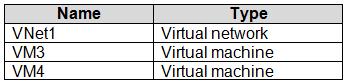
ネットワーク セキュリティ チームは、複数のネットワーク セキュリティ グループ (NSG) を実装します。
計画された変更
Contoso は次の変更を実装する予定です。
- Azure ExpressRoute をモントリオール オフィスに展開します。
- Server1 および Server2 でホストされている仮想マシンを Azure に移行します。
- オンプレミスの Active Directory を Azure Active Directory に同期する
(Azure AD)。
- App1とApp2をWebApp1とWebApp2という名前の2つのAzure Webアプリに移行します。
Webアプリ2。
技術要件
Contoso は次の技術要件を満たす必要があります。
- WebApp1がインスタンスの数を自動的に調整できることを確認する
負荷に基づいて最大 5 つのインスタンスまで拡張できます。
- VM3 が TCP ポート 8080 経由でモントリオール オフィスのアプリケーション サーバーへの送信接続を確立できることを確認します。
- ルーティング情報が自動的に交換されるようにする
Azure とモントリオール オフィスのルーター。
- Azure Multi-Factor Authentication (MFA) をユーザーに確実に適用する
財務部門のみ。
- webapp2.azurewebsites.net にアクセスできることを確認します。
名前 app2.contoso.com
- ニューヨークオフィスをインターネット経由でVNet1に接続します。
暗号化された接続。
- VM4の設定が変更されたときに電子メールメッセージを送信するワークフローを作成します。
変更されます。
- Reader に基づいた Role1 というカスタム Azure ロールを作成します。
役割。
- 可能な限りコストを最小限に抑えます。
ホットスポットに関する質問
ニューヨークオフィスの接続要件を満たす必要があります。
どうすればいいでしょうか? 回答するには、回答エリアで適切なオプションを選択してください。
注意: 正しい選択ごとに 1 ポイントが付与されます。

概要
Contoso 社は、モントリオールに本社を置き、シアトルとニューヨークに支社を持つコンサルティング会社です。
モントリオールオフィスには2,000人の従業員がいます。シアトルオフィスには1,000人の従業員がいます。ニューヨークオフィスには200人の従業員がいます。
Contoso が使用するすべてのリソースはオンプレミスでホストされます。
Contoso は新しい Azure サブスクリプションを作成します。Azure Active Directory (Azure AD) テナントは contoso.onmicrosoft.com というドメインを使用します。テナントは P1 の価格帯を使用します。
既存の環境
ネットワークにはcontoso.comという名前のActive Directoryフォレストが含まれています。すべてのドメインコントローラーはDNSサーバーとして構成されており、contoso.comのDNSゾーンをホストしています。
Contoso には、財務、人事、営業、研究、情報技術の各部門があります。各部門には組織単位 (OU) があり、そこにはそれぞれの部門のすべてのアカウントが含まれています。すべてのユーザーアカウントには、それぞれの部門の部門属性が設定されています。新しいユーザーが頻繁に追加されます。
Contoso.com には User1 という名前のユーザーが含まれています。
すべてのオフィスはプライベートリンクを使用して接続します。
Contoso はモントリオールとシアトルのオフィスにデータセンターを構えています。各データセンターには、VPN デバイスとして構成できるファイアウォールが設置されています。
すべてのインフラストラクチャ サーバーは仮想化されています。
仮想化環境には、次の表に示すサーバーが含まれています。
Contoso は、App1 と App2 という 2 つの Web アプリケーションを使用しています。各 Web アプリケーションの各インスタンスには 1 GB のメモリが必要です。
Azure サブスクリプションには、次の表のリソースが含まれています。
ネットワーク セキュリティ チームは、複数のネットワーク セキュリティ グループ (NSG) を実装します。
計画された変更
Contoso は次の変更を実装する予定です。
- Azure ExpressRoute をモントリオール オフィスに展開します。
- Server1 および Server2 でホストされている仮想マシンを Azure に移行します。
- オンプレミスの Active Directory を Azure Active Directory に同期する
(Azure AD)。
- App1とApp2をWebApp1とWebApp2という名前の2つのAzure Webアプリに移行します。
Webアプリ2。
技術要件
Contoso は次の技術要件を満たす必要があります。
- WebApp1がインスタンスの数を自動的に調整できることを確認する
負荷に基づいて最大 5 つのインスタンスまで拡張できます。
- VM3 が TCP ポート 8080 経由でモントリオール オフィスのアプリケーション サーバーへの送信接続を確立できることを確認します。
- ルーティング情報が自動的に交換されるようにする
Azure とモントリオール オフィスのルーター。
- Azure Multi-Factor Authentication (MFA) をユーザーに確実に適用する
財務部門のみ。
- webapp2.azurewebsites.net にアクセスできることを確認します。
名前 app2.contoso.com
- ニューヨークオフィスをインターネット経由でVNet1に接続します。
暗号化された接続。
- VM4の設定が変更されたときに電子メールメッセージを送信するワークフローを作成します。
変更されます。
- Reader に基づいた Role1 というカスタム Azure ロールを作成します。
役割。
- 可能な限りコストを最小限に抑えます。
ホットスポットに関する質問
ニューヨークオフィスの接続要件を満たす必要があります。
どうすればいいでしょうか? 回答するには、回答エリアで適切なオプションを選択してください。
注意: 正しい選択ごとに 1 ポイントが付与されます。
正解:

Explanation:
Box 1: Create a virtual network gateway and a local network gateway.
Azure VPN gateway. The VPN gateway service enables you to connect the VNet to the on- premises network through a VPN appliance. For more information, see Connect an on-premises network to a Microsoft Azure virtual network. The VPN gateway includes the following elements:
- Virtual network gateway. A resource that provides a virtual VPN appliance for the VNet. It is responsible for routing traffic from the on-premises network to the VNet.
- Local network gateway. An abstraction of the on-premises VPN appliance. Network traffic from the cloud application to the on-premises network is routed through this gateway.
- Connection. The connection has properties that specify the connection type (IPSec) and the key shared with the on-premises VPN appliance to encrypt traffic.
- Gateway subnet. The virtual network gateway is held in its own subnet, which is subject to various requirements, described in the Recommendations section below.
Box 2: Configure a site-to-site VPN connection
On premises create a site-to-site connection for the virtual network gateway and the local network gateway.

Scenario: Connect the New York office to VNet1 over the Internet by using an encrypted connection.
Incorrect Answers:
Azure ExpressRoute: Established between your network and Azure, through an ExpressRoute partner. This connection is private. Traffic does not go over the internet.
References:
https://docs.microsoft.com/en-us/azure/architecture/reference-architectures/hybrid- networking/vpn

- 質問一覧「379問」
- 質問1 ドラッグアンドドロップの質問 VM1 という名前の仮想マシンを含...
- 質問2 注: この問題は、同じシナリオを提示する一連の問題の一部です。...
- 質問3 シミュレーション 概要 試験の次のセクションはラボです。このセ...
- 質問4 ホットスポットに関する質問 Sync1 という同期グループがあり、...
- 質問5 ホットスポットに関する質問 次のリソース グループを含む Subsc...
- 質問6 storage1 という名前のストレージ アカウントを含む Azure サブ...
- 質問7 VM1という名前のAzure仮想マシンを含むAzureサブスクリプション...
- 質問8 ケーススタディ1 - Humongous Insurance 概要 Humongous Insuran...
- 質問9 ケーススタディ6 - ADatum Corporation 概要 ADatum Corporation...
- 質問10 ホットスポットに関する質問 VM1 という名前の Azure 仮想マシン...
- 質問11 ホットスポットに関する質問 次の表に示すリソースを含む Azure ...
- 質問12 VM1 と VM2 という 2 つの Azure 仮想マシンがあります。また、R...
- 質問13 会社には、Recovery Services コンテナーが含まれる Azure サブ...
- 質問14 ホットスポットに関する質問 Azure サブスクリプションをお持ち...
- 質問15 VNet1 という仮想ネットワークを含む、Subscription1 という Azu...
- 質問16 オンプレミスのデータセンターと Azure サブスクリプションがあ...
- 質問17 VNet1 という名前の仮想ネットワークを含む Azure サブスクリプ...
- 質問18 Azure Active Directory(Azure AD)テナントがあります。 Azure...
- 質問19 RG1 という名前のリソース グループと VNet1 という名前の仮想ネ...
- 質問20 注: この問題は、同じシナリオを提示する一連の問題の一部です。...
- 質問21 VM1 と VM2 という 2 つの Azure 仮想マシン上で実行される App1...
- 質問22 ある企業では、Azure に次の仮想ネットワークが定義されています...
- 質問23 ホットスポットに関する質問 次の図に示すように、Azure ストレ...
- 質問24 ホットスポットに関する質問 次の表に示すリソースを含む Azure ...
- 質問25 ケーススタディ1 - Humongous Insurance 概要 Humongous Insuran...
- 質問26 VNet1 と VNet2 という名前の 2 つのピアリングされた仮想ネット...
- 質問27 次の表に示すリソースを含む Azure サブスクリプションがありま...
- 質問28 会社には Azure Active Directory (Azure AD) サブスクリプショ...
- 質問29 注: この問題は、同じシナリオを提示する一連の問題の一部です。...
- 質問30 仮想ネットワーク サブネットに 5 台の仮想マシンを展開する予定...
- 質問31 ケーススタディ2 - Contoso社 概要 Contoso, Ltd.は世界中にオフ...
- 質問32 注: この質問は、同一の設定を示す複数の質問に含まれています。...
- 質問33 ケーススタディ1 - Humongous Insurance 概要 Humongous Insuran...
- 質問34 次の表に示すストレージ アカウントを含む、Subscription1 とい...
- 質問35 ホットスポットに関する質問 仮想マシン スケール セットを含む ...
- 質問36 P2v2 価格レベルを使用する AdatumASP1 という名前の Azure App ...
- 質問37 次の表に示すリソースを含む Azure サブスクリプションがありま...
- 質問38 注: この問題は、同じシナリオを提示する一連の問題の一部です。...
- 質問39 Azure サブスクリプションをお持ちです。 Template.json という...
- 質問40 ホットスポットに関する質問 次の図に示すネットワーク プロファ...
- 質問41 ホットスポットに関する質問 次の表のリソースを含む Azure サブ...
- 質問42 Azure サブスクリプションをお持ちです。 App1 という名前のアプ...
- 質問43 注: この質問は、同じシナリオを提示する一連の質問の一部です。...
- 質問44 storageacct1234 という名前のストレージ アカウントと、User1 ...
- 質問45 会社にはMicrosoft Azureでホストされた仮想マシン(VM)があり...
- 質問46 Subscription1 という名前の Azure サブスクリプションがありま...
- 質問47 Sub1 と Sub2 という名前の 2 つの Azure サブスクリプションが...
- 質問48 次の表に示す Azure 仮想マシンがあります。 (Exhibit) VM1 と V...
- 質問49 VM1、VM2、VM3 という 3 つの仮想マシンを含む Azure サブスクリ...
- 質問50 ケーススタディ4 - ADatum 概要 ADatum Corporationは、ニューヨ...
- 質問51 注: この問題は、同じシナリオを提示する一連の問題の一部です。...
- 質問52 次の表のリソースを含む Azure サブスクリプションがあります。 ...
- 質問53 Azure サブスクリプションをお持ちです。 コンテナをデプロイす...
- 質問54 注:この質問は、同じシナリオを提示する一連の質問の一部です。
- 質問55 注: この質問は、同一の設定を示す複数の質問に含まれています。...
- 質問56 注:この質問は、同じシナリオを提示する一連の質問の一部です。
- 質問57 注: この質問は、同一の設定を示す複数の質問に含まれています。...
- 質問58 ホットスポットに関する質問 サブスクリプションIDがc276fc76-で...
- 質問59 App1 という名前の Azure App Service をホストする Azure App S...
- 質問60 Azure サブスクリプションがあります。このサブスクリプションに...
- 質問61 ホットスポットに関する質問 次の表に示すユーザーを含む、conto...
- 質問62 Azure Resource Manager テンプレートを使用して、仮想マシン ス...
- 質問63 ホットスポットに関する質問 WebApp1 という名前の Azure Web ア...
- 質問64 ユーザーにビデオコンテンツをストリーミングする、App1 という...
- 質問65 IT管理者がAzureにpass4test-appというWebアプリをセットアップ...
- 質問66 Subscription1 という名前の Azure サブスクリプションがありま...
- 質問67 ホットスポットに関する質問 Scale1 という名前の仮想マシン ス...
- 質問68 ケーススタディ3 - Contoso社 概要 Contoso 社は、モントリオー...
- 質問69 注: この質問は、同一の設定を示す複数の質問に含まれています。...
- 質問70 注: この質問は、同じシナリオを提示する一連の質問の一部です。...
- 質問71 Azure Resource Manager テンプレートを使用して、仮想マシン ス...
- 質問72 ホットスポットに関する質問 次の表に示すリソースを含む Azure ...
- 質問73 ホットスポットに関する質問 Azure サブスクリプションをお持ち...
- 質問74 ドラッグアンドドロップの質問 初期ドメイン名を持つ Azure Acti...
- 質問75 注: この問題は、同じシナリオを提示する一連の問題の一部です。...
- 質問76 オンプレミス ネットワークには VPN ゲートウェイが含まれていま...
- 質問77 Azure サブスクリプションをお持ちです。 storage1 という名前の...
- 質問78 Subscription1 と Subscription2 という 2 つのサブスクリプショ...
- 質問79 次の表に示すリソース グループを含む、Subscription1 という名...
- 質問80 VM1 という名前の Azure 仮想マシンと、Vault1 という名前の Azu...
- 質問81 dbserver1 という名前のデータベース サーバーが含まれるオンプ...
- 質問82 ホットスポットに関する質問 次の表に示す BLOB コンテナーを含...
- 質問83 注: この問題は、同じシナリオを提示する一連の問題の一部です。...
- 質問84 ホットスポットに関する質問 次の表に示す Azure 仮想マシンを含...
- 質問85 あなたの会社には、Subscription1という名前のAzureサブスクリプ...
- 質問86 Azureサブスクリプションに、storage1というストレージアカウン...
- 質問87 ホットスポットに関する質問 次の図に示すように、contoso2023 ...
- 質問88 Azure 仮想マシンをデプロイするために使用される、Template1 と...
- 質問89 ケーススタディ1 - Humongous Insurance 概要 Humongous Insuran...
- 質問90 Azure Resource Manager テンプレートを使用して、仮想マシン ス...
- 質問91 Subscription1 という名前の Azure サブスクリプションがありま...
- 質問92 ホットスポットに関する質問 ASP1 という Azure App Service プ...
- 質問93 App1 という名前の Azure App Services Web アプリがあります。 ...
- 質問94 次の表に示すリソースを含む Azure サブスクリプションがありま...
- 質問95 次の表に示すユーザーを含む、adatum.com という名前の Azure Ac...
- 質問96 ケーススタディ2 - Contoso社 概要 Contoso, Ltd.は世界中にオフ...
- 質問97 ホットスポットに関する質問 RG1 という名前のリソース グループ...
- 質問98 注: この質問は、同一の設定を示す複数の質問に含まれています。...
- 質問99 基本的な Azure Active Directory (Azure AD) テナントに関連付...
- 質問100 ドラッグアンドドロップの質問 AS1 という名前の可用性セットが...
- 質問101 ケーススタディ4 - ADatum 概要 ADatum Corporationは、ニューヨ...
- 質問102 Azureサブスクリプションに、storageという名前のストレージアカ...
- 質問103 ホットスポットに関する質問 Sub1 という名前の Azure サブスク...
- 質問104 会社には Subscription1 という名前の Azure サブスクリプション...
- 質問105 次の表に示すリソースが含まれる Subscription1 という名前の Az...
- 質問106 Subscription1 という名前の Azure サブスクリプションがありま...
- 質問107 ホットスポットに関する質問 VM1 という名前の仮想マシンを含む ...
- 質問108 Azure サブスクリプションをお持ちです。 Azure 仮想マシンが 10...
- 質問109 ドラッグアンドドロップの質問 Sub1 という名前の Azure サブス...
- 質問110 ホットスポットに関する質問 次の表に示すリソース グループを含...
- 質問111 Azure サブスクリプションをお持ちです。 次の要件を満たすカス...
- 質問112 ホットスポットに関する質問 Azure リージョン East US 2 に Azu...
- 質問113 ホットスポットに関する質問 次の表に示すユーザーを含む Micros...
- 質問114 ホットスポットに関する質問 次の表に示すコンテナー イメージを...
- 質問115 注: この問題は、同じシナリオを提示する一連の問題の一部です。...
- 質問116 ケーススタディ5 - Contoso社 概要 概要 Contoso 社は、モントリ...
- 質問117 会社の Azure サブスクリプションには、Windows Server 2016 を...
- 質問118 Azure ストレージ アカウントを作成します。 ストレージ アカウ...
- 質問119 ドラッグアンドドロップの質問 VM1 と VM2 という名前の 2 つの ...
- 質問120 注: この問題は、同じシナリオを提示する一連の問題の一部です。...
- 質問121 ある企業は、Azure Site Recovery を使用してオンプレミスのサー...
- 質問122 Windows Server 2019 を実行する VM1 という名前の Azure 仮想マ...
- 質問123 ドラッグアンドドロップの質問 多数の仮想マシン(VM)をデプロ...
- 質問124 ホットスポットに関する質問 次の表に示す仮想ネットワークを含
- 質問125 Vault1 という名前の Recovery Services コンテナーを含む Azure...
- 質問126 次の Azure Resource Manager (ARM) テンプレートを開発して、リ...
- 質問127 storage1 という名前のストレージ アカウントを含む Azure サブ...
- 質問128 ホットスポットに関する質問 次の表に示す App Service プランを...
- 質問129 注: この質問は、同一の設定を示す複数の質問に含まれています。...
- 質問130 ケーススタディ6 - ADatum Corporation 概要 ADatum Corporation...
- 質問131 contosostorage という名前の Azure ストレージ アカウントを作...
- 質問132 ケーススタディ1 - Humongous Insurance 概要 Humongous Insuran...
- 質問133 注: この問題は、同じシナリオを提示する一連の問題の一部です。...
- 質問134 ケーススタディ5 - Contoso社 概要 概要 Contoso 社は、モントリ...
- 質問135 次の表に示すパブリック IP アドレスを使用する Azure サブスク...
- 質問136 ホットスポットに関する質問 WebApp1 という名前の Azure App Se...
- 質問137 次の表に示す仮想ネットワークを含む Azure サブスクリプション...
- 質問138 ホットスポットに関する質問 User1 という名前のユーザーと、次...
- 質問139 次の図に示す構成を持つ VNet2 という名前の仮想ネットワークが...
- 質問140 ホットスポットに関する質問 storage1 というストレージ アカウ...
- 質問141 Azureサブスクリプションには、10個のネットワーク セキュリティ...
- 質問142 storage1 という名前のストレージ アカウントを含む Azure サブ...
- 質問143 Microsoft 365 テナントと、contoso.com という名前の Azure Act...
- 質問144 注: この問題は、同じシナリオを提示する一連の問題の一部です。...
- 質問145 注: この質問は、同じシナリオを示す一連の質問の一部です。この...
- 質問146 注:この質問は、同じシナリオを提示する一連の質問の一部です。
- 質問147 Azureサブスクリプションがあります。 ユーザーは、ホームまたは...
- 質問148 ドラッグアンドドロップの質問 Azure Backup によって保護されて...
- 質問149 Azureストレージアカウントを含むAzureサブスクリプションがあり...
- 質問150 注: この質問は、同一の設定を示す複数の質問に含まれています。...
- 質問151 Azure Service Bus があります。 メッセージの先入れ先出し (FIF...
- 質問152 Subscription1 という名前の Azure サブスクリプションがありま...
- 質問153 ドラッグアンドドロップの質問 test-migration という名前のリソ...
- 質問154 ホットスポットに関する質問 storage1 という Azure ストレージ ...
- 質問155 App1 という名前の Azure ロジック アプリがあります。App1 は、...
- 質問156 会社の Azure サブスクリプションには、Windows Server 2016 を...
- 質問157 注: この問題は、同じシナリオを提示する一連の問題の一部です。...
- 質問158 ホットスポットに関する質問 次のカスタム ロールベース アクセ...
- 質問159 ホットスポットに関する質問 次の表に示す Azure 仮想マシンを含...
- 質問160 ホットスポットに関する質問 次の図に示すストレージ アカウント...
- 質問161 注: この質問は、同じシナリオを示す一連の質問の一部です。この...
- 質問162 ホットスポットに関する質問 次の表に示す仮想ネットワークを含
- 質問163 注:この質問は、同じシナリオを提示する一連の質問の一部です。
- 質問164 次の図に示すような Azure ポリシーがあります。 (Exhibit) この...
- 質問165 ホットスポットに関する質問 Azure Blob Storage と Azure File ...
- 質問166 次の表に示すリソースを含む Azure サブスクリプションがありま...
- 質問167 Subscription1 という名前の Azure サブスクリプションがありま...
- 質問168 注: この問題は、同じシナリオを提示する一連の問題の一部です。...
- 質問169 Azure サブスクリプションをお持ちです。 サブスクリプション内...
- 質問170 ケーススタディ4 - ADatum 概要 ADatum Corporationは、ニューヨ...
- 質問171 ホットスポットに関する質問 Subscription1 という名前の Azure ...
- 質問172 ホットスポットに関する質問 次の図に示すような App Service プ...
- 質問173 ホットスポットに関する質問 VM1 という名前の仮想マシンと acco...
- 質問174 ドラッグアンドドロップの質問 次のリソースを含む Azure サブス...
- 質問175 Windows Server 2008 R2 物理サーバーが 5 台あります。これらの...
- 質問176 次の表に示すリソースを含む Azure サブスクリプションがありま...
- 質問177 Workspace1 という名前の Azure Log Analytics ワークスペースが...
- 質問178 webapp1 という名前の Azure Web アプリ上で実行される App1 と...
- 質問179 ホットスポットに関する質問 RG1 という名前のリソース グループ...
- 質問180 シミュレーション 概要 試験の次のセクションはラボです。このセ...
- 質問181 Azure Resource Manager テンプレートを使用して、仮想マシン ス...
- 質問182 ドラッグアンドドロップの質問 10 台の Azure 仮想マシンを Azur...
- 質問183 次の表のリソースを含む Azure サブスクリプションがあります。 ...
- 質問184 次の表に示すリソースを含む Azure サブスクリプションがありま...
- 質問185 注: この質問 6 は、同じシナリオを提示する一連の質問の一部で...
- 質問186 注:この質問は、同じシナリオを提示する一連の質問の一部です。
- 質問187 ホットスポットに関する質問 次の表に示す Azure コンテナー レ...
- 質問188 会社にはpass4test.comというActive Directoryフォレストがあり...
- 質問189 ホットスポットに関する質問 次の Azure ファイル共有を含む Azu...
- 質問190 あなたは、adatum.com という名前の Azure Active Directory (Az...
- 質問191 会社には Azure Active Directory (Azure AD) サブスクリプショ...
- 質問192 ホットスポットに関する質問 次の表に示すリソースを含む Azure ...
- 質問193 Azure Event Grid に接続するためのカスタム Azure 関数アプリを...
- 質問194 ホットスポットに関する質問 Azure サブスクリプションをお持ち...
- 質問195 次の表に示すデバイスを含む Azure サブスクリプションがありま...
- 質問196 ホットスポットに関する質問 次の表に示すクォータを含む、Subsc...
- 質問197 シミュレーション 概要 試験の次のセクションはラボです。このセ...
- 質問198 VNET1 という名前の仮想ネットワークを含む Azure サブスクリプ...
- 質問199 ストレージ アカウントを含む Azure サブスクリプションがありま...
- 質問200 ケーススタディ3 - Contoso社 概要 Contoso 社は、モントリオー...
- 質問201 Azure Resource Manager テンプレートを使用して、仮想マシン ス...
- 質問202 ケーススタディ5 - Contoso社 概要 概要 Contoso 社は、モントリ...
- 質問203 図に示すように、VNet1 という名前の仮想ネットワークがあります...
- 質問204 ホットスポットに関する質問 次の表に示すリソースが含まれる Su...
- 質問205 ホットスポットに関する質問 VNET1、VNET2、VNET3 という名前の ...
- 質問206 注: この問題は、同じシナリオを提示する一連の問題の一部です。...
- 質問207 注: この問題は、同じシナリオを提示する一連の問題の一部です。...
- 質問208 ホットスポットに関する質問 ネットワークにはオンプレミスの Ac...
- 質問209 RG1 という名前のリソース グループを含む Azure サブスクリプシ...
- 質問210 ホットスポットに関する質問 Azure サブスクリプションをお持ち...
- 質問211 ホットスポットに関する質問 Azure サブスクリプションをお持ち...
- 質問212 Azure Active Directory (Azure AD) テナントがあります。 すべ...
- 質問213 注: この問題は、同じシナリオを提示する一連の問題の一部です。...
- 質問214 Web 開発者は、Azure Web アプリとしてデプロイする予定の Web ...
- 質問215 Azure Active Directory (AD) Privileged Identity Management ...
- 質問216 20 台の仮想マシン、NSG1 という名前のネットワーク セキュリテ...
- 質問217 IT管理者がAzureにpass4test-appというWebアプリをセットアップ...
- 質問218 ホットスポットに関する質問 診断ログが有効になっていて、Log A...
- 質問219 注: この問題は、同じシナリオを提示する一連の問題の一部です。...
- 質問220 注: この問題は、同じシナリオを提示する一連の問題の一部です。...
- 質問221 ホットスポットに関する質問 次の Azure Resource Manager (ARM)...
- 質問222 会社には Azure サブスクリプションがあり、Azure に次の仮想ネ...
- 質問223 100 台の仮想マシンを含む Azure サブスクリプションがあります...
- 質問224 ホットスポットに関する質問 Subscription1 という名前の Azure ...
- 質問225 ホットスポットに関する質問 次の表に示すサブスクリプションに
- 質問226 ホットスポットに関する質問 複数の仮想マシンと Workspace1 と...
- 質問227 オンプレミスネットワークには、Share1という名前のSMB共有が含...
- 質問228 次の表に示す Azure 仮想ネットワークがあります。 (Exhibit) VN...
- 質問229 Azureサブスクリプションに、storage1というストレージアカウン...
- 質問230 次の表に示すリソースを含む Azure サブスクリプションがありま...
- 質問231 ホットスポットに関する質問 contoso2023 というストレージ アカ...
- 質問232 VM1 という名前の Azure 仮想マシンがあります。 Azure Backup ...
- 質問233 オンプレミスネットワークには、Azure Active Directory (Azure ...
- 質問234 contoso.onmicrosoft.com という Azure Active Directory (Azure...
- 質問235 Azure Resource Manager テンプレートを使用して、仮想マシン ス...
- 質問236 VNet1 という名前の仮想ネットワークが含まれる Subscription1 ...
- 質問237 contosocloud.onmicrosoft.com という名前の Azure Active Direc...
- 質問238 ホットスポットに関する質問 storage1 という名前のストレージ ...
- 質問239 VM1 という名前の仮想マシンと KV1 という名前の Azure キー コ...
- 質問240 ある企業は現在Azureサブスクリプションを保有しており、そのサ...
- 質問241 ホットスポットに関する質問 Cluster1 という名前の Azure Kuber...
- 質問242 ホットスポットに関する質問 Azureサブスクリプションには、stor...
- 質問243 シミュレーション 概要 試験の次のセクションはラボです。このセ...
- 質問244 次の表に示す仮想ネットワークを含む Azure サブスクリプション...
- 質問245 注: この質問は、同一の設定を示す複数の質問に含まれています。...
- 質問246 App1 という名前の Azure App Service をホストする ASP1 という...
- 質問247 注: この問題は、同じシナリオを提示する一連の問題の一部です。...
- 質問248 米国西部、米国中部、米国東部の Azure リージョンに Web アプリ...
- 質問249 ホットスポットに関する質問 次の表に示すストレージ アカウント...
- 質問250 注: この質問は、同一の設定を示す複数の質問に含まれています。...
- 質問251 注:この質問は、同じシナリオを提示する一連の質問の一部です。
- 質問252 次の表に示すAzure Webアプリを作成する予定です。 (Exhibit) We...
- 質問253 Azure サブスクリプションがあります。サブスクリプションには、...
- 質問254 注: この問題は、同じシナリオを提示する一連の問題の一部です。...
- 質問255 ホットスポットに関する質問 Azure サブスクリプションをお持ち...
- 質問256 次の表に示すリソースが含まれる AZPT1 という名前の Azure サブ...
- 質問257 シミュレーション 概要 試験の次のセクションはラボです。このセ...
- 質問258 ホットスポットに関する質問 contoso.com という名前の Microsof...
- 質問259 注:この質問は、同じシナリオを提示する一連の質問の一部です。
- 質問260 次の表に示すリソースを含む Azure サブスクリプションがありま...
- 質問261 ドラッグアンドドロップの質問 ストレージ アカウントを含む Azu...
- 質問262 注: この問題は、同じシナリオを提示する一連の問題の一部です。...
- 質問263 ホットスポットに関する質問 storage1 という名前の Azure スト...
- 質問264 注: この問題は、同じシナリオを提示する一連の問題の一部です。...
- 質問265 ホットスポットに関する質問 AKS1 という名前の Azure Kubernete...
- 質問266 ホットスポットに関する質問 Azure サブスクリプションをお持ち...
- 質問267 注: この問題は、同じシナリオを提示する一連の問題の一部です。...
- 質問268 ホットスポットに関する質問 次の表に示すユーザーを含む Azure ...
- 質問269 DB1 という名前の Azure SQL データベースを含む Azure サブスク...
- 質問270 Azure サブスクリプションをお持ちです。 複数のポッドを含む Az...
- 質問271 100 個の Azure サブスクリプションがあります。すべてのサブス...
- 質問272 ケーススタディ3 - Contoso社 概要 Contoso 社は、モントリオー...
- 質問273 ホットスポットに関する質問 次の表に示す Azure 仮想マシンがあ...
- 質問274 会社には複数の部門があり、各部門には多数の仮想マシン(VM)が...
- 質問275 Azure サブスクリプションをお持ちです。 cont1 という名前の Az...
- 質問276 Workspace1 という名前の Azure Log Analytics ワークスペースが...
- 質問277 ホットスポットに関する質問 次の表に示すグループを含む、adatu...
- 質問278 VM1 と VM2 という名前の 2 つの Azure 仮想マシンがあります。 ...
- 質問279 container1 という名前の BLOB コンテナーが含まれる storage1 ...
- 質問280 複数の SQL Server データベースをホストする Azure Windows Ser...
- 質問281 注: この問題は、同じシナリオを提示する一連の問題の一部です。...
- 質問282 ホットスポットに関する質問 次の表に示すパブリック ロード バ...
- 質問283 注: この問題は、同じシナリオを提示する一連の問題の一部です。...
- 質問284 Azure サブスクリプションをお持ちです。 次の設定を持つ新しい ...
- 質問285 ケーススタディ4 - ADatum 概要 ADatum Corporationは、ニューヨ...
- 質問286 注: この問題は、同じシナリオを提示する一連の問題の一部です。...
- 質問287 Subscription1 と Subscription2 という 2 つのサブスクリプショ...
- 質問288 ホットスポットに関する質問 Azure Resource Manager テンプレー...
- 質問289 ホットスポットに関する質問 AAD1 という名前の Azure Active Di...
- 質問290 VM1 と VM2 という名前の 2 つの仮想マシンを含む Azure サブス...
- 質問291 ホットスポットに関する質問 Azureサブスクリプションがあり、そ...
- 質問292 ケーススタディ6 - ADatum Corporation 概要 ADatum Corporation...
- 質問293 ホットスポットに関する質問 Subscription1 という名前の Azure ...
- 質問294 Windows Server Datacenter イメージを使用する仮想マシン スケ...
- 質問295 ローカル冗長ストレージ (LRS) を使用する、storage1 という名前...
- 質問296 ある企業はAzureサブスクリプションを保有しており、オンプレミ...
- 質問297 Azure 仮想マシンを 3 つの Azure リージョンにデプロイします。...
- 質問298 Azure サブスクリプションをお持ちです。すべてのユーザーで多要...
- 質問299 8 台の仮想マシンと次の表に示すリソースを含む Azure サブスク...
- 質問300 ケーススタディ6 - ADatum Corporation 概要 ADatum Corporation...
- 質問301 次の表に示すグループを含む Azure AD テナントがあります。 (Ex...
- 質問302 複数の Windows Server および Ubuntu Linux 仮想マシン (VM) が...
- 質問303 ホットスポットに関する質問 Azure サブスクリプションをお持ち...
- 質問304 次の表に示すリソースを含む Azure サブスクリプションがありま...
- 質問305 ホットスポットに関する質問 次の表のリソースを含む Azure サブ...
- 質問306 VMware vSphere オンプレミス インフラストラクチャは 600 台の...
- 質問307 北ヨーロッパ Azure リージョンに storage1 という名前のストレ...
- 質問308 ドラッグアンドドロップの質問 会社には、同じ仮想ネットワーク
- 質問309 注: この問題は、同じシナリオを提示する一連の問題の一部です。...
- 質問310 ホットスポットに関する質問 次の表に示すように、2 つの Azure ...
- 質問311 ホットスポットに関する質問 次の表に示すリソース グループを含...
- 質問312 Group1 という名前のコンテナー グループを含む Azure サブスク...
- 質問313 次の表に示すストレージ アカウントを含む Azure サブスクリプシ...
- 質問314 次の図に示すように構成される VM1 という名前の Azure 仮想マシ...
- 質問315 ドラッグアンドドロップの質問 VNet1 という名前の仮想ネットワ...
- 質問316 ホットスポットに関する質問 User1 という名前の Azure AD ユー...
- 質問317 注: この問題は、同じシナリオを提示する一連の問題の一部です。...
- 質問318 ホットスポットに関する質問 次の図に示すように、Azure Kuberne...
- 質問319 Azure 仮想マシンを 3 つの Azure リージョンにデプロイします。...
- 質問320 ホットスポットに関する質問 Azure AD テナントがあります。 フ...
- 質問321 ホットスポットに関する質問 App1 と App2 という 2 つの Azure ...
- 質問322 注: この問題は、同じシナリオを提示する一連の問題の一部です。...
- 質問323 AKS1 という名前の Azure Kubernetes Service (AKS) クラスター...
- 質問324 次の表に示すリソースを含む Azure サブスクリプションがありま...
- 質問325 ホットスポットに関する質問 次の図に示す構成を持つ VNet1 とい...
- 質問326 ドラッグアンドドロップの質問 仮想マシン名 VM1 を含む Azure ...
- 質問327 Azure サブスクリプションは 15 個あります。 Group1 という名前...
- 質問328 D:\Folder1 という名前のフォルダーを含むオンプレミス サーバー...
- 質問329 ホットスポットに関する質問 Subscription1 という名前の新しい ...
- 質問330 ケーススタディ5 - Contoso社 概要 概要 Contoso 社は、モントリ...
- 質問331 注: この問題は、同じシナリオを提示する一連の問題の一部です。...
- 質問332 次の表に示す Azure 仮想ネットワークがあります。 (Exhibit) VN...
- 質問333 RG1 と RG2 という名前の 2 つのリソース グループを含む Azure ...
- 質問334 ホットスポットに関する質問 Azure AD テナントにリンクされた A...
- 質問335 TestRG という名前のリソース グループを含む Azure サブスクリ...
- 質問336 RG1 という名前のリソース グループを含む Azure サブスクリプシ...
- 質問337 次の表に示すストレージ アカウントを含む Azure サブスクリプシ...
- 質問338 ホットスポットに関する質問 contoso.com という Azure Active D...
- 質問339 注: この問題は、同じシナリオを提示する一連の問題の一部です。...
- 質問340 ホットスポットに関する質問 次の図に示すように、WEBPROD-AS-US...
- 質問341 ホットスポットに関する質問 Azure AD テナントにリンクされてい...
- 質問342 次の表のリソースを含む Azure サブスクリプションがあります。 ...
- 質問343 注: この質問は、同一の設定を示す複数の質問に含まれています。...
- 質問344 Azure サブスクリプションをお持ちです。 次の表に示すリソース...
- 質問345 VM1 という名前の Azure 仮想マシンをバックアップする予定です...
- 質問346 VNet1 という名前の仮想ネットワークを含む Azure サブスクリプ...
- 質問347 ホットスポットに関する質問 Subscription1 という名前の Azure ...
- 質問348 複数のユーザーがアクセスする 5,000 個の BLOB を含む Azure ス...
- 質問349 ドラッグアンドドロップの質問 Azure ファイル共有を含む Azure ...
- 質問350 ドラッグアンドドロップの質問 次の表に示すストレージ アカウン...
- 質問351 ケーススタディ3 - Contoso社 概要 Contoso 社は、モントリオー...
- 質問352 あなたは会社のAzure管理者として働いています。以下の要件を満...
- 質問353 ホットスポットに関する質問 新しい Azure Active Directory (Az...
- 質問354 注: この問題は、同じシナリオを提示する一連の問題の一部です。...
- 質問355 Sub1 と Sub2 という名前の 2 つの Azure サブスクリプションが...
- 質問356 Workspace1 という名前の Azure Log Analytics ワークスペースが...
- 質問357 ホットスポットに関する質問 次の表に示す仮想ネットワークを含
- 質問358 ホットスポットに関する質問 次の表に示すユーザーを含む contos...
- 質問359 ホットスポットに関する質問 contoso101 と contoso102 という名...
- 質問360 複数の Azure Web アプリをホストする AdatumASP1 という名前の ...
- 質問361 ホットスポットに関する質問 次の図に示すカスタム ロールを構成...
- 質問362 注: この問題は、同じシナリオを提示する一連の問題の一部です。...
- 質問363 注: この問題は、同じシナリオを提示する一連の問題の一部です。...
- 質問364 ホットスポットに関する質問 Subscription1 という名前の Azure ...
- 質問365 ホットスポットに関する質問 次の図に示す Azure リソースがあり...
- 質問366 VNet1、VNet2、VNet3 という名前の 3 つの仮想ネットワークを含...
- 質問367 次の表に示すリソースを含む Azure サブスクリプションがありま...
- 質問368 Azure AD Privileged Identity Management が構成された Azure A...
- 質問369 App1 という名前の Azure App Service Web アプリがあります。 A...
- 質問370 storage1 という名前の Azure ストレージ アカウントに対して Az...
- 質問371 ホットスポットに関する質問 Azureサブスクリプションをお持ちで...
- 質問372 次の表に示すグループを含む、adatum.com という名前の Azure AD...
- 質問373 注:この質問は、同じシナリオを提示する一連の質問の一部です。
- 質問374 ホットスポットに関する質問 User1 という名前のユーザーを含む ...
- 質問375 テストに使用する VM1 という名前の Azure 仮想マシンがあります...
- 質問376 App1という名前の分散型オンプレミスアプリをAzureサブスクリプ...
- 質問377 ドラッグアンドドロップの質問 SQL1 という名前の Microsoft SQL...
- 質問378 5 つのインスタンスを含む Azure 仮想マシン スケール セットを...
- 質問379 Subscription1 という名前の Azure サブスクリプションと、Micro...
