- ホーム
- Microsoft
- SC-401J - Administering Information Security in Microsoft 365 (SC-401日本語版)
- Microsoft.SC-401J.v2026-02-09.q115
- 質問70
有効的なSC-401J問題集はJPNTest.com提供され、SC-401J試験に合格することに役に立ちます!JPNTest.comは今最新SC-401J試験問題集を提供します。JPNTest.com SC-401J試験問題集はもう更新されました。ここでSC-401J問題集のテストエンジンを手に入れます。
SC-401J問題集最新版のアクセス
「299問、30% ディスカウント、特別な割引コード:JPNshiken」
ホットスポットに関する質問
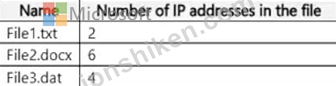
次の表に示すファイルを含む、Site1 という名前の Microsoft SharePoint Online サイトがあります。
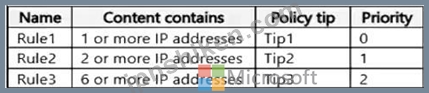
次の表に示す高度な DLP ルールを持つ、DLP1 という名前のデータ損失防止 (DLP) ポリシーがあります。
DLP1 を Site1 に適用します。
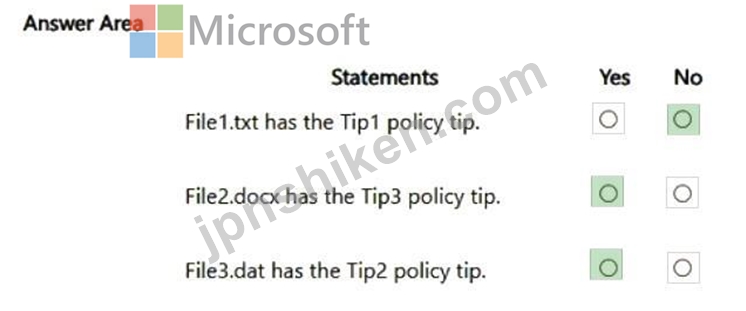
以下の各文について、正しい場合は「はい」を選択してください。そうでない場合は「いいえ」を選択してください。
注意: 正しい選択ごとに 1 ポイントが加算されます。

次の表に示すファイルを含む、Site1 という名前の Microsoft SharePoint Online サイトがあります。
次の表に示す高度な DLP ルールを持つ、DLP1 という名前のデータ損失防止 (DLP) ポリシーがあります。
DLP1 を Site1 に適用します。
以下の各文について、正しい場合は「はい」を選択してください。そうでない場合は「いいえ」を選択してください。
注意: 正しい選択ごとに 1 ポイントが加算されます。
正解:
Explanation:
Box 1: No
File1 has two IP addresses in it.
Both Tip2 and Tip3 rules matches. Tip2 has higher priority.
Note: For the hosted service workloads, like Exchange Online, SharePoint Online and OneDrive for Business, each rule is assigned a priority in the order in which it's created. That means, the rule created first has first priority, the rule created second has second priority, and so on.
When content is evaluated against rules, the rules are processed in priority order. If content matches multiple rules, the first rule evaluated that has the most restrictive action is enforced.
Box 2: Yes
File2 has six IP addresses in it.
Only Rule3 matches.
Box 3: Yes
File3 has four IP addresses in it.
Both Rule2 and Rule3 matches.
Rule2 has higher priority.
Reference:
https://learn.microsoft.com/en-us/microsoft-365/compliance/dlp-policy-reference

- 質問一覧「115問」
- 質問1 シミュレーション ユーザー名とパスワード 必要に応じて次のログ...
- 質問2 ユーザーにMicrosoft Purviewポータルでデータ損失防止(DLP)アラ...
- 質問3 Microsoft 365 サブスクリプションをお持ちです。 Policy1 とい...
- 質問4 ホットスポットに関する質問 Microsoft 365 ES サブスクリプショ...
- 質問5 ケーススタディ 1 - Contoso 社 概要 Contoso 社は、モントリオ...
- 質問6 シミュレーション ユーザー名とパスワード 必要に応じて次のログ...
- 質問7 Microsoft 365 E5 サブスクリプションをお持ちです。 Label1とい...
- 質問8 トレーニング可能な分類子をオプトインする Microsoft 365 テナ...
- 質問9 User1 という名前のユーザーを含む Microsoft Entra テナントに...
- 質問10 Microsoft Purview Message Encryption を使用する Microsoft 36...
- 質問11 Microsoft 365 E5 サブスクリプションをお持ちです。 Label1 と...
- 質問12 シミュレーション ユーザー名とパスワード 必要に応じて次のログ...
- 質問13 ホットスポットに関する質問 次の表に示すデバイスを含む Micros...
- 質問14 保持ラベル ポリシーを持つ Microsoft 365 テナントがあります。...
- 質問15 ホットスポットに関する質問 Site1 という名前の Microsoft Shar...
- 質問16 Label1 という名前の保持ラベルを持つ Microsoft 365 E5 テナン...
- 質問17 contoso.com という名前のドメインを使用する Microsoft 365 E5 ...
- 質問18 会社には Microsoft 365 テナントがあります。 当社では毎年従業...
- 質問19 User1 という名前のユーザーを含む Microsoft 365 E5 サブスクリ...
- 質問20 シミュレーション ユーザー名とパスワード 必要に応じて次のログ...
- 質問21 Microsoft Defender for Cloud Apps を使用する Microsoft 365 E...
- 質問22 Microsoft 365 E5 サブスクリプションをお持ちです。 ユーザーは...
- 質問23 注: この問題は、同じシナリオを提示する一連の問題の一部です。...
- 質問24 ケーススタディ 1 - Contoso 社 概要 Contoso 社は、モントリオ...
- 質問25 機密情報の種類に使用される単語のリストを含む電子メールを受信
- 質問26 ホットスポットに関する質問 Microsoft 365 E5 サブスクリプショ...
- 質問27 Microsoft 365 サブスクリプションをお持ちの場合、保持ポリシー...
- 質問28 Site1 という名前の Microsoft SharePoint Online サイトを含む ...
- 質問29 シミュレーション ユーザー名とパスワード 必要に応じて次のログ...
- 質問30 ホットスポットに関する質問 File1、File2、File3 という名前の ...
- 質問31 ホットスポットに関する質問 Microsoft Purviewとジャストインタ...
- 質問32 ホットスポットに関する質問 Microsoft 365 サブスクリプション...
- 質問33 ケーススタディ 1 - Contoso 社 概要 Contoso 社は、モントリオ...
- 質問34 社内でMicrosoft Purview Advanced Message Encryptionの機能を...
- 質問35 ホットスポットに関する質問 Microsoft Purview とジャストイン...
- 質問36 User1 という名前のユーザーを含む Microsoft 365 E5 サブスクリ...
- 質問37 ホットスポットに関する質問 Classifier1 という名前のトレーニ...
- 質問38 ホットスポットに関する質問 プロジェクト コードを使用する形式...
- 質問39 ホットスポットに関する質問 Microsoft 365 E5 サブスクリプショ...
- 質問40 User1 という名前のユーザーを含む Microsoft 365 E5 サブスクリ...
- 質問41 Site1 という名前の Microsoft SharePoint Online サイトを含む ...
- 質問42 ホットスポットに関する質問 トレーニング可能な分類子をサポー
- 質問43 プロジェクトの終了時に、多数のファイルを含むMicrosoft ShareP...
- 質問44 Microsoft 365 E5 サブスクリプションがあり、そこには User1 と...
- 質問45 ホットスポットに関する質問 Microsoft 365 サブスクリプション...
- 質問46 Microsoft Purview を使用する Microsoft 365 E5 サブスクリプシ...
- 質問47 ドラッグアンドドロップの質問 Microsoft Defender for Cloud Ap...
- 質問48 シミュレーション ユーザー名とパスワード 必要に応じて次のログ...
- 質問49 注: この問題は、同じシナリオを提示する一連の問題の一部です。...
- 質問50 Microsoft 365 コンテンツで参照される組織の製品コードを識別す...
- 質問51 注: この問題は、同じシナリオを提示する一連の問題の一部です。...
- 質問52 Microsoft 365 E5 サブスクリプションがあり、そこには Device1 ...
- 質問53 ホットスポットに関する質問 Microsoft 365 サブスクリプション...
- 質問54 ホットスポットに関する質問 label1 という名前の機密ラベルが含...
- 質問55 機密情報の種類に使用される単語のリストを含む電子メールを受信
- 質問56 Microsoft 365 サブスクリプションをお持ちです。 今後 3 年間、...
- 質問57 ホットスポットに関する質問 Microsoft 365 E5 サブスクリプショ...
- 質問58 Microsoft 365 E5 サブスクリプションをお持ちです。 Microsoft ...
- 質問59 EDM1 という名前の Microsoft Purview 完全データ一致 (EDM) 分...
- 質問60 ホットスポットに関する質問 Microsoft 365 サブスクリプション...
- 質問61 ホットスポットに関する質問 Microsoft Purview を使用する Micr...
- 質問62 Microsoft 365 テナントがあります。 次のものを作成します。 - ...
- 質問63 注: この問題は、同じシナリオを提示する一連の問題の一部です。...
- 質問64 ドラッグアンドドロップの質問 Microsoft 365 テナントがありま...
- 質問65 Microsoft 365 E5 サブスクリプションをお持ちです。 データ損失...
- 質問66 次の表に示すように、RP1 という名前のアイテム保持ポリシーが含...
- 質問67 ホットスポットに関する質問 次の表に示す機密情報の種類 (SIT) ...
- 質問68 ホットスポットに関する質問 次の表に示すユーザーを含む Micros...
- 質問69 ホットスポットに関する質問 Microsoft 365 E5 サブスクリプショ...
- 質問70 ホットスポットに関する質問 次の表に示すファイルを含む、Site1...
- 質問71 次の表に示すファイルを含む、Site1 という名前の Microsoft Sha...
- 質問72 ホットスポットに関する質問 次の表に示すユーザーを含む Micros...
- 質問73 Microsoft Purview Advanced Message Encryption を実装する予定...
- 質問74 ホットスポットに関する質問 contoso.com という名前の Microsof...
- 質問75 Microsoft Teams を使用し、User1 と User2 という 2 人のユーザ...
- 質問76 保持ラベル ポリシーを使用する Microsoft 365 サブスクリプショ...
- 質問77 Microsoft 365 E5 テナントがあります。 データ損失防止 (DLP) ...
- 質問78 Microsoft 365 E5 サブスクリプションをお持ちです。Microsoft P...
- 質問79 ユーザーが Microsoft OneDrive から社外のユーザーと機密文書を...
- 質問80 ホットスポットに関する質問 Microsoft 365 サブスクリプション...
- 質問81 次の表に示すファイルを含む Microsoft OneDrive フォルダーがあ...
- 質問82 ホットスポットに関する質問 Sensitivity1 という名前の公開され...
- 質問83 Site1 という Microsoft SharePoint Online サイトがあり、そこ...
- 質問84 Microsoft 365 E5 サブスクリプションをお持ちです。このサブス...
- 質問85 Microsoft 365 E5 サブスクリプションがあり、そこには Channel1...
- 質問86 シミュレーション ユーザー名とパスワード 必要に応じて次のログ...
- 質問87 User1 という名前のユーザーを含む Microsoft 365 E5 サブスクリ...
- 質問88 Microsoft 365 E5 サブスクリプションをお持ちです。このサブス...
- 質問89 ホットスポットに関する質問 Contoso Confidential という名前の...
- 質問90 Microsoft 365 サブスクリプションをお持ちです。 ユーザーは Wi...
- 質問91 次の表に示すように、Microsoft Defender for Endpoint にオンボ...
- 質問92 シミュレーション ユーザー名とパスワード 必要に応じて次のログ...
- 質問93 Microsoft Entra に参加している Windows デバイスでクレジット...
- 質問94 注: この質問は、同じシナリオを提示する一連の質問の一部です。...
- 質問95 ホットスポットに関する質問 Microsoft Purview Audit (Premium)...
- 質問96 Microsoft 365 E5 サブスクリプションをお持ちです。 次の表に示...
- 質問97 ホットスポットに関する質問 新しい Microsoft 365 E5 テナント...
- 質問98 ドラッグアンドドロップの質問 データ損失防止 (DLP) が実装され...
- 質問99 次の表に示すデバイスが含まれる Microsoft 365 サブスクリプシ...
- 質問100 ホットスポットに関する質問 次の表に示すオブジェクトを含む Mi...
- 質問101 Microsoft 365 サブスクリプションをお持ちです。 新しいトレー...
- 質問102 ホットスポットに関する質問 次の表に示すグループを含む Micros...
- 質問103 次の図に示すように、Alert2 という名前の Microsoft 365 アラー...
- 質問104 ホットスポットに関する質問 次の表に示すグループを含む Micros...
- 質問105 ホットスポットに関する質問 次の表に示すデバイスが含まれる Mi...
- 質問106 Microsoft 365 E5 サブスクリプションがあり、そこには User1、U...
- 質問107 ホットスポットに関する質問 Microsoft Teams を使用し、次の表...
- 質問108 ドラッグアンドドロップの質問 Microsoft 365 E5 サブスクリプシ...
- 質問109 Microsoft 365 E5 サブスクリプションをお持ちです。 次の場所に...
- 質問110 ホットスポットに関する質問 Microsoft 365 E5 サブスクリプショ...
- 質問111 ドラッグアンドドロップの質問 Microsoft 365 E5 サブスクリプシ...
- 質問112 ケーススタディ 1 - Contoso 社 概要 Contoso 社は、モントリオ...
- 質問113 Microsoft 365 E5 サブスクリプションがあり、そこには User1 と...
- 質問114 100 人のユーザーと Group1 という名前の Microsoft 365 グルー...
- 質問115 ホットスポットに関する質問 Microsoft Purview を使用する Micr...
