- ホーム
- Microsoft
- SC-401J - Administering Information Security in Microsoft 365 (SC-401日本語版)
- Microsoft.SC-401J.v2025-12-15.q72
- 質問5
有効的なSC-401J問題集はJPNTest.com提供され、SC-401J試験に合格することに役に立ちます!JPNTest.comは今最新SC-401J試験問題集を提供します。JPNTest.com SC-401J試験問題集はもう更新されました。ここでSC-401J問題集のテストエンジンを手に入れます。
SC-401J問題集最新版のアクセス
「299問、30% ディスカウント、特別な割引コード:JPNshiken」
Microsoft 365 E5 サブスクリプションをお持ちです。
1,000 件の顧客名のリストが含まれる Customer.csv という名前のファイルがあります。
Customer.csv を使用して、Microsoft SharePoint Online ライブラリに保存されているドキュメントを分類する予定です。
Microsoft Purview ポータルで何を作成する必要がありますか? また、どのタイプの要素を選択する必要がありますか? 回答するには、回答領域で適切なオプションを選択してください。
注意: 正しい選択ごとに 1 ポイントが付与されます。
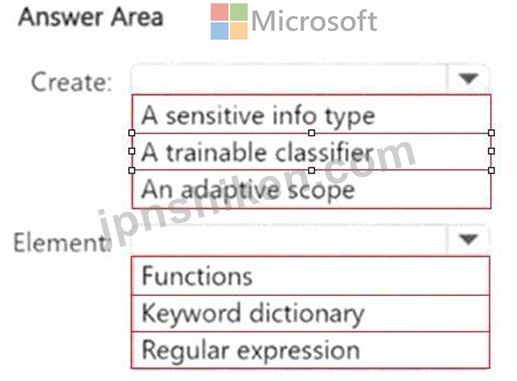
1,000 件の顧客名のリストが含まれる Customer.csv という名前のファイルがあります。
Customer.csv を使用して、Microsoft SharePoint Online ライブラリに保存されているドキュメントを分類する予定です。
Microsoft Purview ポータルで何を作成する必要がありますか? また、どのタイプの要素を選択する必要がありますか? 回答するには、回答領域で適切なオプションを選択してください。
注意: 正しい選択ごとに 1 ポイントが付与されます。
正解:
Explanation:
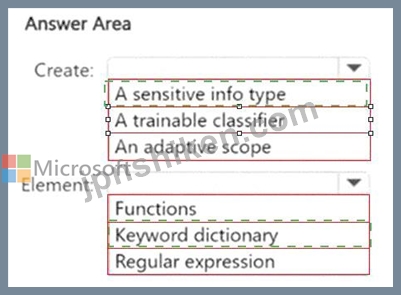
Create: # A sensitive info type
Element: # Keyword dictionary
You want to classify documents in SharePoint Online based on a list of customer names stored in Customer.
csv (1,000 entries).
In Microsoft Purview, there are several options for custom classification:
Sensitive info type (SIT):
Designed to detect predefined or custom patterns such as credit cards, IDs, or custom lists.
You can build a custom SIT using elements like keyword dictionary, regular expressions, and functions.
In this case, since you have a large CSV with 1,000 customer names, you upload that list as a keyword dictionary element.
Trainable classifier:
Used when you want AI to classify documents by training on examples of positive/negative samples (like contracts, resumes).
Not relevant here because you already have a structured list of customer names rather than needing machine learning classification.
Adaptive scope:
Determines where (users, groups, sites) policies apply, not what content is classified.
Not relevant here.
Correct pairing:
Create: A sensitive info type (SIT).
Element: Keyword dictionary (upload the Customer.csv file).
Reference:
Microsoft Learn: Create a custom sensitive information type
Microsoft Learn: Keyword dictionary for SITs
# Final Answer:
Create # A sensitive info type
Element # Keyword dictionary

- 質問一覧「72問」
- 質問1 Microsoft Purview を使用する Microsoft 365 E5 サブスクリプシ...
- 質問2 Site1とSite2という2つのMicrosoft SharePoint Onlineサイトを含...
- 質問3 注: この問題は、同じシナリオを提示する一連の問題の一部です。...
- 質問4 次の表に示すデバイスが含まれる Microsoft 36S ES サブスクリプ...
- 質問5 Microsoft 365 E5 サブスクリプションをお持ちです。 1,000 件の...
- 質問6 Microsoft 36S エンドポイント データ損失検出イベント モニタリ...
- 質問7 500 台の Windows デバイスを含む Microsoft 365 E5 サブスクリ...
- 質問8 次の要件を満たすデータ損失防止 (DIP) ポリシーを作成します。 ...
- 質問9 Microsoft 365 サブスクリプションをお持ちです。 Microsoft Pur...
- 質問10 Microsoft 365 E5 サブスクリプションがあり、User1、User2、Use...
- 質問11 label1 という名前の機密ラベルが含まれる Microsoft 365 E5 テ...
- 質問12 Contoso Confidential という名前の機密ラベルが含まれる Micros...
- 質問13 Microsoft 365 E5 サブスクリプションがあり、User1 というユー...
- 質問14 Microsoft 365 E5 サブスクリプションがあり、そこには User1、U...
- 質問15 Site1とSite2という2つのMicrosoft SharePoint Onlineサイトを含...
- 質問16 ホットスポット 機密文書の技術要件を満たす必要があります。 最...
- 質問17 Microsoft J65 ES サブスクリプションをお持ちです。 データ損失...
- 質問18 Microsoft 365 サブスクリプションをお持ちです。監査が有効にな...
- 質問19 トレーニング可能な分類子をオプトインする Microsoft 365 テナ...
- 質問20 Microsoft 365 E5 サブスクリプションをお持ちです。 次の場所に...
- 質問21 ネイト:この質問は同じシナリオを提示する一連の質問の一部です
- 質問22 Device1 という名前のデバイスが含まれる Microsoft 365 E5 サブ...
- 質問23 次の表に示すユーザーを含む Microsoft 365 E5 サブスクリプショ...
- 質問24 Microsoft 365 E5 サブスクリプションをお持ちです。 ユーザーが...
- 質問25 次の図に示す機密情報の種類 (SIT) が含まれる Microsoft 36S サ...
- 質問26 Microsoftで参照される組織の製品コードを識別するためのカスタ...
- 質問27 User1 という名前のユーザーを含む Microsoft 365 E5 サブスクリ...
- 質問28 Microsoft Purview を使用する Microsoft 365 E5 サブスクリプシ...
- 質問29 プロジェクトの終了時に、多数のファイルを含むMicrosoft ShareP...
- 質問30 次の図に示すように、エンドポイントに対してデータ損失防止 (DL...
- 質問31 ホットスポット Microsoft 365 E5 サブスクリプションをお持ちで...
- 質問32 Microsoft Purview Message Encryption を使用する Microsoft 36...
- 質問33 注: この問題は、同じシナリオを提示する一連の問題の一部です。...
- 質問34 ドメイン名が86s40q.ofimicrosoft.comであるMicrosoft 365 E5テ...
- 質問35 Contoso と Fabrikam という2つの Microsoft 365 サブスクリプシ...
- 質問36 Microsoft 365 E5 テナントがあります。 新しいキーワード辞書を...
- 質問37 Microsoft 365 E5 テナントに User1 というユーザーがいます。Us...
- 質問38 次の表に示すグループを含む Microsoft 365 5 ポンド サブスクリ...
- 質問39 Microsoft 36S ES サブスクリプションをお持ちです。 Microsoft ...
- 質問40 次の表に示すデバイスが含まれる Microsoft 36S ES サブスクリプ...
- 質問41 Microsoft 365 E5 サブスクリプションをお持ちです。 Label1 と...
- 質問42 Site1 という名前の Microsoft SharePoint Online サイトと、次...
- 質問43 ホットスポット Microsoft Purview を使用する Microsoft 365 E5...
- 質問44 次の表に示すように、Microsoft Defender for Endpoint にオンボ...
- 質問45 Microsoft 365 E5 サブスクリプションがあり、User1 というユー...
- 質問46 Microsoft 365 サブスクリプションをお持ちです。 サブスクリプ...
- 質問47 ドラッグ&ドロップ データ損失防止 (DLP) が実装された Microso...
- 質問48 Microsoft 36S ES サブスクリプションには、Devicel1 と Device2...
- 質問49 Microsoft 365 E5 サブスクリプションをお持ちです。 Label1とい...
- 質問50 ホットスポット 完全データ一致 (EDM) を使用するカスタムの機密...
- 質問51 次の表に示すデバイスが含まれる Microsoft 365 サブスクリプシ...
- 質問52 Site! という名前の Microsoft SharePoint Online サイトと、次...
- 質問53 Microsoft 365 サブスクリプションをお持ちの場合、保持ポリシー...
- 質問54 ホットスポット User1 という名前のユーザーを含む Microsoft 36...
- 質問55 ユーザーの Microsoft 365 データの保持要件を満たす必要があり...
- 質問56 ホットスポット Microsoft Purview とジャストインタイム (JIT) ...
- 質問57 Microsoft 365 E5 テナントがあります。 「機密ラベル」展示に示...
- 質問58 Site1 ドキュメントの技術要件を満たす必要があります。 順番に...
- 質問59 Microsoft Purview インサイダー リスク管理を使用し、User1、Us...
- 質問60 Microsoft 365 E5 サブスクリプションをお持ちです。 プロジェク...
- 質問61 次のラベルを含む Contoso_Policy という名前の保持ラベル ポリ...
- 質問62 社内でMicrosoft Purview Advanced Message Encryptionの機能を...
- 質問63 Microsoft 36515 サブスクリプションがあり、その中に Site1 と...
- 質問64 トレーニング可能な分類子に基づく機密情報タイプがあります。
- 質問65 Microsoft Purview を使用する Microsoft 365 E5 サブスクリプシ...
- 質問66 Microsoft 365 ES サブスクリプションをお持ちです。 セキュリテ...
- 質問67 Microsoft 365 E5 サブスクリプションをお持ちです。 インサイダ...
- 質問68 あなたの会社は複数の国にオフィスを持っています。 同社では、M...
- 質問69 次の表に示すデータ損失防止 (DLP) ポリシーが含まれる Microsof...
- 質問70 Microsoft 365 E5 サブスクリプションをお持ちです。 外部の受信...
- 質問71 Microsoft 365 サブスクリプションをお持ちです。 ユーザーが Mi...
- 質問72 DLP1 という名前のデータ損失防止 (DLP) ポリシーが含まれる Mic...
