- ホーム
- Microsoft
- SC-300J - Microsoft Identity and Access Administrator (SC-300日本語版)
- Microsoft.SC-300J.v2026-09-01.q150
- 質問115
有効的なSC-300J問題集はJPNTest.com提供され、SC-300J試験に合格することに役に立ちます!JPNTest.comは今最新SC-300J試験問題集を提供します。JPNTest.com SC-300J試験問題集はもう更新されました。ここでSC-300J問題集のテストエンジンを手に入れます。
SC-300J問題集最新版のアクセス
「385問、30% ディスカウント、特別な割引コード:JPNshiken」
Microsoft 365 E5 サブスクリプションをご利用です。このサブスクリプションには Windows を実行するデバイスが 500 台含まれており、これらのデバイスに Global Secure Access クライアントを展開します。
ユーザーがデバイスから httpsy/contoso.com にアクセスできないようにする必要があります。どの 3 つのアクションを順番に実行する必要がありますか? 回答するには、適切なアクションをアクション リストから回答領域に移動し、正しい順序で並べます。
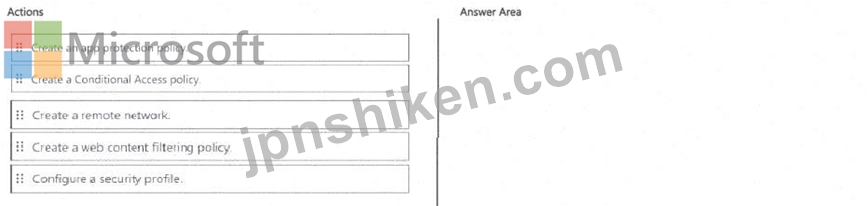
ユーザーがデバイスから httpsy/contoso.com にアクセスできないようにする必要があります。どの 3 つのアクションを順番に実行する必要がありますか? 回答するには、適切なアクションをアクション リストから回答領域に移動し、正しい順序で並べます。
正解:

Explanation:

In a Microsoft 365 E5 environment with Global Secure Access (Microsoft Entra Internet Access) deployed, to block users from accessing a specific website (for example, https://contoso.com ), the configuration process involves creating network, filtering, and security control components in sequence.
According to the Microsoft SC-300 Study Guide and official Microsoft Learn module "Configure Microsoft Entra Internet Access and Private Access", the required workflow is as follows:
* Create a remote network - This step establishes the connectivity fabric that links user devices (running the Global Secure Access client) with the Microsoft Entra Global Secure Access services. It defines network parameters and routes traffic through the Microsoft Entra inspection layer.
* Create a web content filtering policy - Within Microsoft Entra Internet Access, administrators can define filtering rules that control outbound web traffic. Here, you would add https://contoso.com as a blocked domain or URL category. This policy ensures that traffic destined for that domain is denied.
* Configure a security profile - Security profiles combine web content filtering policies, Conditional Access policies, and inspection settings. You then assign the security profile to the remote network or user group so the filtering rule applies to traffic from the enrolled devices.
These steps align with Microsoft's recommended process to "create a remote network, define filtering policy, and link via a security profile" for enforcing secure outbound access control through Global Secure Access.

- 質問一覧「150問」
- 質問1 contoso.com という名前の Azure Active Directory (Azure AD) ...
- 質問2 あなたの会社には、contosri.com という Azure Active Directory...
- 質問3 会社には、User 1 という名前のユーザーを含む Microsoft Entra ...
- 質問4 Microsoft 365 E3 ライセンスが割り当てられているユーザーが 2,...
- 質問5 Microsoft 365 テナントがあります。 ユーザーは、Microsoft 365...
- 質問6 営業部門のユーザーの問題を解決する必要があります。Azure ADテ...
- 質問7 Microsoft Entra テナントがあります。 アプリのサインインの継...
- 質問8 contoso.onmicrosoft.com というドメイン名を使用する新しい Mic...
- 質問9 User1 という名前のユーザーを含む Azure Active Directory (Azu...
- 質問10 注: この質問は、同じシナリオを示す一連の質問の一部です。この...
- 質問11 ゲストユーザーの招待に関する問題を解決する必要があります。Az...
- 質問12 Microsoft 365 サブスクリプションをお持ちです。 次の構成を持...
- 質問13 Microsoft 365 テナントがあります。 すべてのユーザーは携帯電...
- 質問14 オンプレミスの Linux デバイスがあります。 Microsoft 365 E5 ...
- 質問15 次の表に示すユーザーを含む Microsoft Entra テナントがありま...
- 質問16 Microsoft 365 テナントがあります。 Azure Monitor を使用して...
- 質問17 Azure Monitor を使用して、Azure Active Directory (Azure AD) ...
- 質問18 次の表に示すカスタム ロールを含む Azure サブスクリプションが...
- 質問19 タスク3 LinkedlnアプリケーションをSales and Marketingアクセ...
- 質問20 User1 という名前のユーザーを含む Azure AD テナントがあります...
- 質問21 お客様は、Groups1、Group2、Group3という名前の3つのグループと...
- 質問22 「Terms1」という名前の使用条件 (ToU) を含む Microsoft Entra ...
- 質問23 contoso.com という名前の Microsoft Entra テナントがあり、そ...
- 質問24 App1 という名前の Web アプリが含まれる Microsoft 365 E5 サブ...
- 質問25 次の表に示すリソースを含む Azure サブスクリプションがありま...
- 質問26 Azure Active Directory PremiumP2テナントがあります。 LogAnal...
- 質問27 お客様のネットワークには、Microsoft 365 E5 サブスクリプショ...
- 質問28 App1 の計画された変更と技術要件を満たす必要があります。 何を...
- 質問29 次のグループを含む Azure Active Directory (Azure AD) テナン...
- 質問30 fabrikam.comという名前のドメインを使用するMicrosoft365テナン...
- 質問31 Site1 という名前の Microsoft SharePoint Online サイトを含む ...
- 質問32 Microsoft 365 テナントがあります。 すべてのユーザーは、Micro...
- 質問33 ユーザー ID が侵害される可能性に関する技術要件を満たす必要が...
- 質問34 次の表に示すユーザーを含む Azure AD テナントがあります。 (Ex...
- 質問35 次の表に示すユーザーを含む Azure サブスクリプションがありま...
- 質問36 オンプレミスネットワークには、Azure AD Connect を使用して Az...
- 質問37 Azure Active Directory(Azure AD)テナントがあります。 リス...
- 質問38 Microsoft Defender for Cloud Apps を使用する Microsoft 365 E...
- 質問39 次の表に示すユーザーを含むハイブリッド Microsoft 365 サブス...
- 質問40 User1 という名前のユーザーが Microsoft Defender for Cloud Ap...
- 質問41 Site1 という名前の Microsoft SharePoint Online サイトと、次...
- 質問42 contoso.comのデフォルトドメイン名を使用するように新しいMicro...
- 質問43 監視要件を満たすには、多段階攻撃の検出を構成する必要がありま
- 質問44 Contoso という Azure AD テナントがあり、Terms1 という利用規...
- 質問45 次の内容が含まれる Microsoft 365 サブスクリプションがありま...
- 質問46 次の表に示すユーザーを含む Azure AD テナントがあります。 (Ex...
- 質問47 User1 というユーザーが、次の誤ったパスワードを入力してテナン...
- 質問48 新しい Microsoft 365 E5 テナントを作成します。 ユーザーが匿...
- 質問49 Azure サブスクリプションをお持ちです。このサブスクリプション...
- 質問50 Azure Active Directory (Azure AD) テナントに、User1、User2、...
- 質問51 次の表に示すリソースを含む contoso.com という名前の Azure AD...
- 質問52 Microsoft 365 E5 サブスクリプションをお持ちです。 ユーザーが...
- 質問53 次の表に示す管理単位を含む Microsoft 365 テナントがあります...
- 質問54 Sub1 という名前の Azure サブスクリプションがあります。 Micro...
- 質問55 注:この質問は、同じシナリオを提示する一連の質問の一部です。
- 質問56 Microsoft Office 365 Enterprise E3 ライセンスが割り当てられ...
- 質問57 ヘルプデスク管理者によるライセンス管理の技術要件を満たす必要
- 質問58 Microsoft 365 テナントがあります。 すべてのユーザーは、Micro...
- 質問59 Microsoft365テナントがあります。 すべてのユーザーは携帯電話...
- 質問60 Microsoft 365 E5 サブスクリプションをお持ちです。 Review1 と...
- 質問61 Azure Active Directory (Azure AD) テナントがあります。 過去...
- 質問62 User1 という名前のユーザーを含む Azure AD テナントがあります...
- 質問63 Microsoft 365 E5 サブスクリプションをご利用で、Microsoft Def...
- 質問64 タスク2 Salesforce アプリへのアクセス権を持つゲストユーザー...
- 質問65 Azure AD テナントがあります。 テンプレート ファイルをアップ...
- 質問66 User1 という名前のユーザーと、次の表に示す条件付きアクセス ...
- 質問67 次の表に示すユーザーを含む Microsoft Entra テナントがありま...
- 質問68 User1 という名前のユーザーを含む Azure Active Directory (Azu...
- 質問69 Azure サブスクリプションがあります。このサブスクリプションに...
- 質問70 Microsoft Entra テナントがあります。 セルフサービス パスワー...
- 質問71 Microsoft 365 E5 サブスクリプションをお持ちです。 Microsoft ...
- 質問72 contoso.comという名前のAzureActive Directory(Azure AD)テナ...
- 質問73 注:この質問は、同じシナリオを提示する一連の質問の一部です。
- 質問74 次の表に示すグループを含む Azure AD テナントがあります。 (Ex...
- 質問75 Microsoft 36S テナントがあります。 高リスク国のリストを含む...
- 質問76 ネットワークには、contoso.com というオンプレミスの Active Di...
- 質問77 あなたは、Automation1という名前のAzure Automationアカウント...
- 質問78 Microsoft Entra ID Premium ライセンスを使用する Microsoft En...
- 質問79 注:この質問は、同じシナリオを提示する一連の質問の一部です。
- 質問80 contoso.comという名前のAzureActive Directory(Azure AD)テナ...
- 質問81 あなたはMicrosoft 365 E5のサブスクリプションをお持ちです。 ...
- 質問82 次のオブジェクトを含むAzureActive Directory(Azure AD)テナ...
- 質問83 あなたの会社には、Contoso East と Contoso West という名前の ...
- 質問84 conto.so.com という Azure Active Directory (Azure AD) テナン...
- 質問85 多要素認証 (MFA) が適用され、セルフサービス パスワード リセ...
- 質問86 お客様のMicrosoft Entraテナントには、以下の表に示すユーザー...
- 質問87 次の表に示すユーザーを含む Azure AD テナントがあります。 (Ex...
- 質問88 Microsoft 365 E5 サブスクリプションがあり、その中に Site1 と...
- 質問89 タスク6 Sg-Executiveのメンバーが会社のアプリにアクセスする前...
- 質問90 I-.Group1の問題を解決する必要があります。まず何をすべきでし...
- 質問91 タスク7 サインイン試行が 10 回失敗したら、アカウントを 5 分...
- 質問92 contoso.com という名前の Microsoft 365 テナントがあります。 ...
- 質問93 次の表に示すグループを含む Microsoft 365 E5 サブスクリプショ...
- 質問94 次の表に示すユーザーを含む Azure AD テナントがあります。 (Ex...
- 質問95 Microsoft 365 テナントがあります。 すべてのユーザーは、Micro...
- 質問96 お客様は、Group1とGroup2という名前の2つのグループと、以下の...
- 質問97 次の表に示すユーザーを含む Microsoft Entra テナントがありま...
- 質問98 注:この質問は、同じシナリオを提示する一連の質問の一部です。
- 質問99 次の表に示すユーザーを含む Azure AD テナントがあります。 (Ex...
- 質問100 次の表に示すリソースを含む Azure サブスクリプションがありま...
- 質問101 Admin1 という名前のユーザーを含む Azure AD テナントがありま...
- 質問102 Azure Active Directory Premium Plan 2 ライセンスを持つ Azure...
- 質問103 User1 というユーザーを含む Azure サブスクリプションがありま...
- 質問104 Microsoft365テナントがあります。 すべてのユーザーは携帯電話...
- 質問105 Azure ADテナントをお持ちの場合 ユーザーの同意設定を構成して...
- 質問106 お客様にはcontoso.comという名前のMicrosoft Entraテナントがあ...
- 質問107 Group! と Group2 という 2 つのグループと、次の表に示すユーザ...
- 質問108 VM1 という名前の仮想マシンを含む Azure サブスクリプションが...
- 質問109 Microsoft365テナントがあります。 Azure Active Directory(Azu...
- 質問110 Azure AD テナントと、App1 という名前の Azure Web アプリがあ...
- 質問111 Microsoft 365 E5 サブスクリプションをお持ちです。 App1 とい...
- 質問112 Microsoft 365 E5 サブスクリプションがあり、そこには User1、U...
- 質問113 User1 という名前のユーザーを含む Microsoft 365 サブスクリプ...
- 質問114 Microsoft 365 E5 サブスクリプションがあります。 ユーザーは、...
- 質問115 Microsoft 365 E5 サブスクリプションをご利用です。このサブス...
- 質問116 次の表に示すリソースを含む Azure サブスクリプションがありま...
- 質問117 Automation1 という名前の Azure Automation アカウントと、Vaul...
- 質問118 次の表に示す Azure Active Directory (Azure AD) ユーザーを作...
- 質問119 タスク9 Sg-Operations グループのユーザーが My Apps ポータル...
- 質問120 展示に示されているように、Azure Active Directory(Azure AD)...
- 質問121 次の表に示すユーザーを含む Microsoft Entra テナントがありま...
- 質問122 デフォルトのアプリ登録設定を持つAzure Active Directory (Azur...
- 質問123 Azure AD Privileged Identity Management (PIM) を使用する Azu...
- 質問124 ネットワークには、contoso.com というオンプレミスの Active Di...
- 質問125 次の表に示すユーザーを含む Azure AD テナントがあります。 (Ex...
- 質問126 SSPR の計画された変更を実装します。 User3 が SSPR を使用しよ...
- 質問127 お客様は、User1、User2、User3 という名前の 3 人のユーザーと...
- 質問128 お客様は、Site1 という名前の Microsoft SharePoint Online サ...
- 質問129 あなたの会社には、contoso.com という Azure Active Directory ...
- 質問130 RG1 と RG2 という 2 つのリソース グループと、storage1 という...
- 質問131 Microsoft Entra テナントには、User1、User2、User3 という名前...
- 質問132 注:この質問は、同じシナリオを提示する一連の質問の一部です。
- 質問133 Microsoft Entra テナントをお持ちです。 次の外部 ID 機能を構...
- 質問134 タスク4 ユーザープロフィールの読み取り権限を必要とするアプリ...
- 質問135 ネットワークには、Azure AD テナントと同期するオンプレミスの ...
- 質問136 Identity Governance を使用してアプリケーションアクセスの割り...
- 質問137 Sub1 という名前の Azure サブスクリプションがあり、そこには U...
- 質問138 注: この質問は、同じシナリオを示す一連の質問の一部です。この...
- 質問139 Microsoft Defender for Cloud Apps および Yammer を使用する M...
- 質問140 User1 と User2 という 2 人のユーザーを含む Azure AD テナント...
- 質問141 次のクラウド プラットフォームのアカウントがあります。 * アズ...
- 質問142 委任要件を満たすには、Azure AD でアプリの登録を構成する必要...
- 質問143 ADatumユーザーの同期が必要です。ソリューションは技術要件を満...
- 質問144 AU1 という管理単位を含む Microsoft Entra テナントがあります...
- 質問145 Azure Monitor を使用して、Azure Active Directory (Azure AD) ...
- 質問146 ネットワークには、Azure AD テナントと同期するオンプレミスの ...
- 質問147 Azure AD Identity Protection を使用し、次の表に示すリソース...
- 質問148 次の表に示すユーザーを含む Azure AD テナントがあります。 (Ex...
- 質問149 あなたの会社は最近、Azure Active Directory(Azure AD)特権ID...
- 質問150 次の表に示すオブジェクトを含むAzureActive Directory(Azure A...
