- ホーム
- Microsoft
- SC-200J - Microsoft Security Operations Analyst (SC-200日本語版)
- Microsoft.SC-200J.v2025-12-01.q171
- 質問106
有効的なSC-200J問題集はJPNTest.com提供され、SC-200J試験に合格することに役に立ちます!JPNTest.comは今最新SC-200J試験問題集を提供します。JPNTest.com SC-200J試験問題集はもう更新されました。ここでSC-200J問題集のテストエンジンを手に入れます。
SC-200J問題集最新版のアクセス
「390問、30% ディスカウント、特別な割引コード:JPNshiken」
Microsoft Sentinel ワークスペースがあります。
Microsoft Defenderコネクタによって生成されたインシデントを一時的に抑制するには、Fusion分析ルールを構成する必要があります。ソリューションは以下の要件を満たしている必要があります。
* 多段階攻撃の検出能力への影響を最小限に抑えます。
* 管理上の労力を最小限に抑えます。
ルールをどのように設定すればよいですか? 回答するには、回答領域で適切なオプションを選択してください。
注意: 正しい選択ごとに 1 ポイントが付与されます。
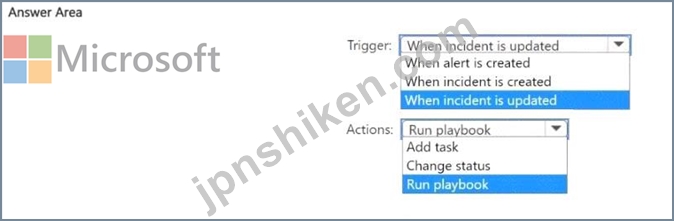
Microsoft Defenderコネクタによって生成されたインシデントを一時的に抑制するには、Fusion分析ルールを構成する必要があります。ソリューションは以下の要件を満たしている必要があります。
* 多段階攻撃の検出能力への影響を最小限に抑えます。
* 管理上の労力を最小限に抑えます。
ルールをどのように設定すればよいですか? 回答するには、回答領域で適切なオプションを選択してください。
注意: 正しい選択ごとに 1 ポイントが付与されます。
正解:
Explanation:

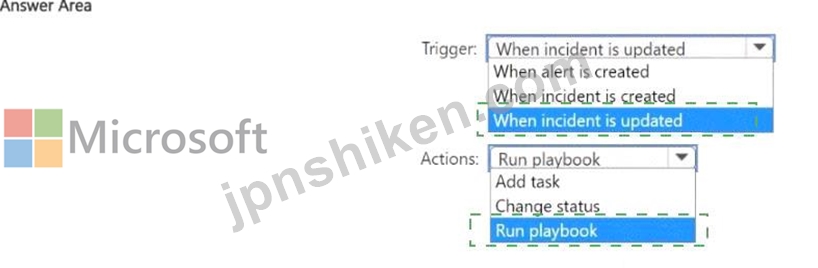
The Fusion analytics rule in Microsoft Sentinel automatically correlates alerts from multiple sources (including Microsoft Defender connectors) to detect multistage attacks. Because Fusion runs continuously and cannot be disabled without losing multi-stage detection, the best practice for temporarily suppressing incidents from a specific connector (like Microsoft Defender) is to use automation rules, not by disabling the Fusion rule itself.
An automation rule can be configured to trigger on specific conditions (such as "When incident is updated" or "When incident is created") and then perform an action like running a playbook that applies suppression logic.
Here's the reasoning:
* Trigger:
* Setting the trigger to "When incident is updated" ensures that the rule evaluates changes to existing incidents-such as enrichment or tagging from Fusion-and provides finer control over suppression, minimizing impact on the Fusion detection pipeline.
* Using "When incident is created" could interfere with Fusion's initial detection process.
* Action:
* The appropriate action is "Run playbook", which allows automated handling (for example, tagging or closing certain incidents from a specific connector). This requires minimal administrative effort and avoids turning off the Fusion rule.
This configuration ensures that Fusion continues to detect multistage attacks (so detection isn't impacted) while automation handles temporary suppression for specific connectors efficiently.

- 質問一覧「171問」
- 質問1 Azure サブスクリプションをお持ちです。 Microsoft Graph アク...
- 質問2 Azure Sentinel をデプロイします。 Azure で Microsoft Teams ...
- 質問3 100 台の Linux 仮想マシンを含む Azure サブスクリプションがあ...
- 質問4 次の表に示すユーザーを含む Azure サブスクリプションがありま...
- 質問5 Sub1 という名前の Azure サブスクリプションがあります。Sub1 ...
- 質問6 50 台の仮想マシンを含む Azure サブスクリプションがあります。...
- 質問7 次の環境があります。 アズールセンチネル Microsoft 365 サブス...
- 質問8 次の Advanced Security Information Model (ASIM) パーサーを含...
- 質問9 RG1 という名前のリソース グループを含む Azure サブスクリプシ...
- 質問10 ユーザーおよびエンティティの行動分析 (UEBA) が有効になってい...
- 質問11 Appl という名前のカスタム Web アプリを含むオンプレミス デー...
- 質問12 注: この質問は、同じシナリオを示す一連の質問の一部です。この...
- 質問13 Workspace1 という名前の Log Analytics ワークスペースを含む A...
- 質問14 Workspace1 という名前の Microsoft Sentinel ワークスペースが...
- 質問15 Microsoft Defender for Cloud を使用する Azure サブスクリプシ...
- 質問16 Microsoft 365 サブスクリプションをお持ちです。このサブスクリ...
- 質問17 注: この質問は、同じシナリオを示す一連の質問の一部です。この...
- 質問18 Microsoft Sentinel の要件を満たすには、どのルール設定を構成...
- 質問19 Defender for Cloud の要件を実装する必要があります。 Server2 ...
- 質問20 Microsoft 365 サブスクリプションをお持ちの場合 グループの変...
- 質問21 Azure サブスクリプションをお持ちです。 Microsoft Sentinel ワ...
- 質問22 Microsoft Defender XDR を使用し、Device1 という名前の Window...
- 質問23 Microsoft 365 Defender が有効になっている Microsoft 365 サブ...
- 質問24 アプリケーションの開発中に複数の Azure Functions アプリから...
- 質問25 注: この質問は、同じシナリオを示す一連の質問の一部です。この...
- 質問26 オンプレミス ネットワークには、Windows Server を実行する 100...
- 質問27 オンプレミスネットワークにはHyper-Vクラスターが含まれていま...
- 質問28 次のリソースを含む Microsoft 365 サブスクリプションをお持ち...
- 質問29 Microsoft 365 サブスクリプションをお持ちです。 サードパーテ...
- 質問30 あなたの会社では、Microsoft Office VBA マクロを含む基幹業務...
- 質問31 Azure Sentinel の要件を満たすテスト ルールを作成する必要があ...
- 質問32 contoso.com という名前の Microsoft Entra テナントにリンクさ...
- 質問33 経営陣の問題を調査するには、高度な検索クエリを作成する必要が
- 質問34 Microsoft 365 E5 サブスクリプションをお持ちです。 Windows デ...
- 質問35 あなたの会社では Azure Sentinel を使用しています。 新しいセ...
- 質問36 Microsoft 365 E5 サブスクリプションがあり、Device1 というデ...
- 質問37 Microsoft 365 Defender には次の高度な検索クエリがあります。 ...
- 質問38 vm1 と vm2 という 2 つの仮想マシンを含む Azure サブスクリプ...
- 質問39 Microsoft Defender XDR を使用する Microsoft 365 B5 サブスク...
- 質問40 注: この質問は、同じシナリオを示す一連の質問の一部です。この...
- 質問41 ワークブックのクエリを作成する必要があります。クエリは次の要
- 質問42 Microsoft Cloud App Security を構成しています。 米国に拠点を...
- 質問43 ハイブリッド Azure AD テナントにリンクされた Microsoft 365 E...
- 質問44 Microsoft Sentinel を使用する Azure サブスクリプションがあり...
- 質問45 Azure Defender を使用する Microsoft 365 サブスクリプションが...
- 質問46 Microsoft Defender for Endpoint にオンボードされているオンプ...
- 質問47 1,000 台の Windows 10 デバイスを含む Microsoft 365 サブスク...
- 質問48 Microsoft Defender for Endpoint プラン 2 を使用し、500 台の ...
- 質問49 Microsoft Defender for Endpoint プラン 2 を使用し、Device! ...
- 質問50 sub1 という名前の Azure サブスクリプションを作成します。 sub...
- 質問51 Microsoft Defender for Endpoint を使用し、次の表に示すデバイ...
- 質問52 Log Analytics ワークスペースを含む Azure サブスクリプション...
- 質問53 Microsoft Defender XDR を使用する Microsoft 365 サブスクリプ...
- 質問54 Azure Sentinel で脅威を検出するためのカスタム分析ルールを作...
- 質問55 サポートされているすべてのリソースの種類に対して Azure Defen...
- 質問56 Server1 のイベント監視を構成する必要があります。ソリューショ...
- 質問57 Workspace1 という名前の Log Analytics ワークスペースを含む A...
- 質問58 Microsoft Defender XOR を使用し、Oevice1 という名前の Window...
- 質問59 Azure Information Protection 要件を実装する必要があります。...
- 質問60 Microsoft Defender for Cloud Apps の要件を満たす必要がありま...
- 質問61 Microsoft 365 サブスクリプションをお持ちです。このサブスクリ...
- 質問62 Azure Sentinel から、次の図に示すように、重大度の高いインシ...
- 質問63 Microsoft 365 Defender を使用する Microsoft 365 サブスクリプ...
- 質問64 サードパーティのセキュリティ情報およびイベント管理 (SIEM) ソ...
- 質問65 Azure Defender を使用する Azure サブスクリプションがあります...
- 質問66 Microsoft Defender XDR を使用する Microsoft 365 サブスクリプ...
- 質問67 新しい Azure サブスクリプション用に Azure Sentinel をプロビ...
- 質問68 カスタム Kusto クエリを含む workspace1 という名前の Microsof...
- 質問69 workspace1 という名前の Microsoft Sentinel ワークスペースと ...
- 質問70 VM1 という名前の仮想マシンを含み、Azure Defender を使用する ...
- 質問71 Microsoft Sentinel ワークスペースがあります。 ユーザーおよび...
- 質問72 次の表に示すリソースがあります。 (Exhibit) SW1 で重複したイ...
- 質問73 新しい Azure サブスクリプションで Linux 仮想マシンをプロビジ...
- 質問74 次のインシデントを含む Microsoft Sentinel ワークスペースがあ...
- 質問75 Azure Sentinel データを視覚化し、サードパーティのデータ ソー...
- 質問76 Microsoft Defender for Endpoint を使用する Microsoft 365 E5 ...
- 質問77 次の表に示すリソースを含む Sub1 という名前の Azure サブスク...
- 質問78 WS1 という名前の Microsoft Sentinel ワークスペースと、Window...
- 質問79 次の表に示すリソースがあります。 (Exhibit) Mictosoft Defende...
- 質問80 Microsoft Defender XDR を使用する Microsoft 365 E5 サブスク...
- 質問81 User1 という名前のゲスト ユーザーと、workspace1 という名前の...
- 質問82 SW1 という名前の Microsoft Sentinel ワークスペースがあります...
- 質問83 Azure Defender for Key Vault のアラートに応答するのはお客様...
- 質問84 Microsoft Exchange Online と Microsoft Defender for Office 3...
- 質問85 app1 という名前の Azure ロジック アプリと、Azure AD コネクタ...
- 質問86 User1 と User2 という名前の 2 人のユーザーと、workspace1 と...
- 質問87 Microsoft Defender for Cloud が有効になっている Microsoft サ...
- 質問88 あなたは、新しいランサムウェアを導入する潜在的な攻撃を調査し
- 質問89 App1 の Microsoft Sentinel 要件を満たす必要があります。 App1...
- 質問90 Sub1 という Azure サブスクリプションがあり、その中に WS1 と...
- 質問91 Microsoft Sentinel ワークスペースがあります。 次の要件を満た...
- 質問92 SW1 という名前の Microsoft Sentinel ワークスペースがあります...
- 質問93 Microsoft Sentinel ワークスペースを含む Azure サブスクリプシ...
- 質問94 Azure Sentinel の要件を満たすには、イベントにメモを追加する...
- 質問95 あなたの会社は次のサービスを展開しています。 ID 用の Microso...
- 質問96 Microsoft Sentinel を使用しています。 Azure ストレージ アカ...
- 質問97 Microsoft Defender for Endpoint を使用し、Device1 という名前...
- 質問98 Microsoft 365 サブスクリプションをお持ちです。 サードパーテ...
- 質問99 Microsoft Defender for Cloud を使用し、RG1 という名前のリソ...
- 質問100 Microsoft Defender for Endpoint を使用する Microsoft 365 E5 ...
- 質問101 Microsoft 365 B5サブスクリプションがあり、User1というユーザ...
- 質問102 Device1 という名前のオンプレミスの Windows 11 Pro デバイスが...
- 質問103 Microsoft Defender XDR を使用する Microsoft 365 E5 サブスク...
- 質問104 Microsoft Sentinel ワークスペースがある Schema1 という名前の...
- 質問105 Microsoft Sentinel の要件を満たすハンティング クエリを実行で...
- 質問106 Microsoft Sentinel ワークスペースがあります。 Microsoft Defe...
- 質問107 次の表に示すリソースがあります。 (Exhibit) Microsoft Defende...
- 質問108 注: この質問は、同じシナリオを示す一連の質問の一部です。この...
- 質問109 Microsoft 365 E5 サブスクリプションがあり、User1 と User2 と...
- 質問110 Workspaces1 という名前の Microsoft Sentinel ワークスペースが...
- 質問111 Workspacel という Microsoft Sentinel ワークスペースがあり、...
- 質問112 Microsoft Defender for Cloud を使用する Sub1 という名前の Az...
- 質問113 Azure Security Center には、テストに使用される 10 台の仮想マ...
- 質問114 rulesquery1 に基づいて、インシデント生成のスケジュールされた...
- 質問115 Azure Sentinel を使用しています。 Azure ストレージ アカウン...
- 質問116 Azure Defender から Key Vault のアラートを受け取ります。 複...
- 質問117 Microsoft Defender for Endpoint に登録された 200 台の Window...
- 質問118 Microsoft 365 B5 サブスクリプションがあります。統合監査ログ...
- 質問119 Server1 のイベント監視を設定する必要があります。ソリューショ...
- 質問120 最近 Azure Sentinel をデプロイしました。 デフォルトの Fusion...
- 質問121 カスタム ブックを含む Microsoft Sentinel ワークスペースがあ...
- 質問122 Microsoft Sentinel を使用し、User1 という名前のユーザーを含...
- 質問123 Azure Active Directory (Azure AD) ユーザーをブロックするため...
- 質問124 Microsoft Defender XDR を使用する Azure サブスクリプションが...
- 質問125 ご使用の環境に影響を与える新しい共通脆弱性識別子 (CVE) の脆...
- 質問126 アプリケーションの開発中に複数の Azure Function App からアク...
- 質問127 あなたの会社は Azure Sentinel をデプロイしています。 Azure S...
- 質問128 HuntingQuery1 の構成が Microsoft Sentinel の要件を満たしてい...
- 質問129 Microsoft Defender for Endpoint を使用するオンプレミスの Win...
- 質問130 Microsoft 365 E5 サブスクリプションをお持ちです。 サードパー...
- 質問131 Azure Sentinel の要件を満たすように Azure Sentinel 統合を構...
- 質問132 Azure Resource Manager テンプレートを使用して、Azure Securit...
- 質問133 Microsoft Defender XDR を使用する Microsoft 365 E5 サブスク...
- 質問134 User1 という名前のユーザーと WS1 という名前の Microsoft Sent...
- 質問135 WS1 という名前の Microsoft Sentinel ワークスペースを含む Azu...
- 質問136 次の KQL クエリがあります。 (Exhibit)
- 質問137 WS1 という名前の Microsoft Sentinel ワークスペースを含む Azu...
- 質問138 Microsoft Defender XDR を使用する Microsoft 365 サブスクリプ...
- 質問139 SW1 という名前の Microsoft Sentinel ワークスペースがあります...
- 質問140 Azure Sentinel で脅威を検出するためのカスタム分析ルールがあ...
- 質問141 Microsoft Defender for Office 365 に安全な添付ファイル ポリ...
- 質問142 あなたの会社では Microsoft Sentinel を使用しています 新しい...
- 質問143 次のリソースを含む Azure サブスクリプションがあります。 * Wi...
- 質問144 Workspace1 という名前の Microsoft Sentinel ワークスペースと ...
- 質問145 カスタム ブックを含む Microsoft Sentinel ワークスペースがあ...
- 質問146 次の表に示すホストを含む Microsoft 365 E5 サブスクリプシ...
- 質問147 ネットワークには、Azure AD テナントと同期するオンプレミスの ...
- 質問148 Microsoft 365 Defender を使用してインシデントを調査していま...
- 質問149 Microsoft Defender for Cloud の要件とビジネス要件を満たすた...
- 質問150 Microsoft Defender XDR を使用する Azure サブスクリプションが...
- 質問151 User1 という名前のユーザーと WS1 という名前の Microsoft Sent...
- 質問152 Microsoft Defender for Cloud が有効になっている、強化された...
- 質問153 注: この質問は、同じシナリオを示す一連の質問の一部です。この...
- 質問154 Microsoft 365 Defender データ コネクタを使用する Microsoft S...
- 質問155 Azure Sentinel を構成しています。 サインイン リスク イベント...
- 質問156 Microsoft Sentinel ワークスペースで KQL クエリを作成する必要...
- 質問157 Microsoft Defender for Endpoint プラン 1 を使用し、Device1 ...
- 質問158 次の図に示すように、Cloud App Security ポータルを開きます。 ...
- 質問159 Microsoft Defender for Identity の誤検知アラートの調査に必要...
- 質問160 あなたの会社では Azure Security Center と Azure Defender を...
- 質問161 Microsoft Defender for Cloud を使用する Azure サブスクリプシ...
- 質問162 Azure Sentinel ワークスペースがあります。 Azure portal でプ...
- 質問163 Microsoft Purview を使用し、Site1 という名前の Microsoft Sha...
- 質問164 会社では、各プロジェクトのデータを異なるAzureサブスクリプシ...
- 質問165 Azure Sentinel の要件とビジネス要件を満たすには、ロールベー...
- 質問166 ネットワークには、Azure AD と同期するオンプレミスの Active D...
- 質問167 Microsoft Defender for Endpoint を使用し、user1 という名前の...
- 質問168 Microsoft Defender for DevOps を使用する Azure DevOps 組織が...
- 質問169 Microsoft Sentinel ワークスペースが 50 個あります。 Azure po...
- 質問170 Microsoft Sentinel ワークスペースがあります。 KQLクエリがあ...
- 質問171 Microsoft Defender for Cloud を使用する Azure サブスクリプシ...
