- ホーム
- Microsoft
- DP-300J - Administering Relational Databases on Microsoft Azure (DP-300日本語版)
- Microsoft.DP-300J.v2025-10-13.q200
- 質問122
有効的なDP-300J問題集はJPNTest.com提供され、DP-300J試験に合格することに役に立ちます!JPNTest.comは今最新DP-300J試験問題集を提供します。JPNTest.com DP-300J試験問題集はもう更新されました。ここでDP-300J問題集のテストエンジンを手に入れます。
DP-300J問題集最新版のアクセス
「434問、30% ディスカウント、特別な割引コード:JPNshiken」
ホットスポットに関する質問
Project1 と Project2 という 2 つのプロジェクトに取り組んでおり、それぞれオンプレミス アプリを Azure に移行します。Project1 は以下の要件を満たしている必要があります。
- アプリをホストするデータベース サーバーのオペレーティング システムにアクセスできる必要があります。
- 25 TB のストレージを備えています。
プロジェクト2は次の要件を満たす必要があります。
- 変更データ キャプチャ (CDC) を有効にします。
- インスタンス レベルの SQL 監査をサポートします。
- 管理されたバックアップをサポートします。
- 10 TB のストレージを備えています。
- レポートをオフロードします。
プロジェクトにAzure SQLソリューションを推奨する必要があります。ソリューションはコストを最小限に抑える必要があります。
各プロジェクトの推奨事項には何を含めるべきですか? 回答するには、回答エリアで適切なオプションを選択してください。
注意: 正しい選択ごとに 1 ポイントが付与されます。

Project1 と Project2 という 2 つのプロジェクトに取り組んでおり、それぞれオンプレミス アプリを Azure に移行します。Project1 は以下の要件を満たしている必要があります。
- アプリをホストするデータベース サーバーのオペレーティング システムにアクセスできる必要があります。
- 25 TB のストレージを備えています。
プロジェクト2は次の要件を満たす必要があります。
- 変更データ キャプチャ (CDC) を有効にします。
- インスタンス レベルの SQL 監査をサポートします。
- 管理されたバックアップをサポートします。
- 10 TB のストレージを備えています。
- レポートをオフロードします。
プロジェクトにAzure SQLソリューションを推奨する必要があります。ソリューションはコストを最小限に抑える必要があります。
各プロジェクトの推奨事項には何を含めるべきですか? 回答するには、回答エリアで適切なオプションを選択してください。
注意: 正しい選択ごとに 1 ポイントが付与されます。
正解:
Explanation:
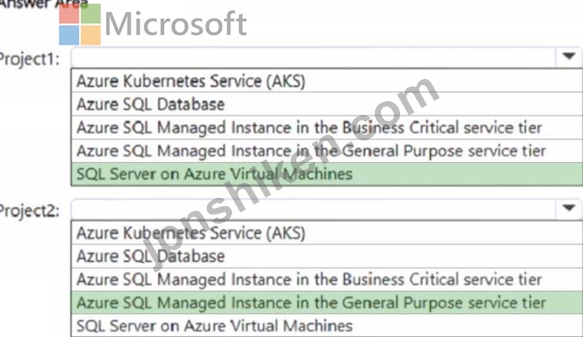
Box 1: SQL Server on Azure Virtual Machines
Project1 must meet the following requirements:
Have access to the operating system of the database server that hosts the app.
Have 25 TB of storage.
* SQL Server on Azure Virtual Machines
If your application needs access to the operating system (OS) of the database server, you should use Azure SQL Server on Azure Virtual Machines. This solution allows you to install and manage SQL Server within a virtual machine, giving you complete control over the OS and database engine.
Box 2: Azure SQL Managed Instance General Purpose Service
Project2 must meet the following requirements:
Have change data capture (CDC) enabled.
Support instance-level SQL auditing.
Support managed backups.
Have 10 TB of storage.
Offload reports.
Azure SQL Database and Azure SQL Managed Instance are Azure database solutions that support managed backups.
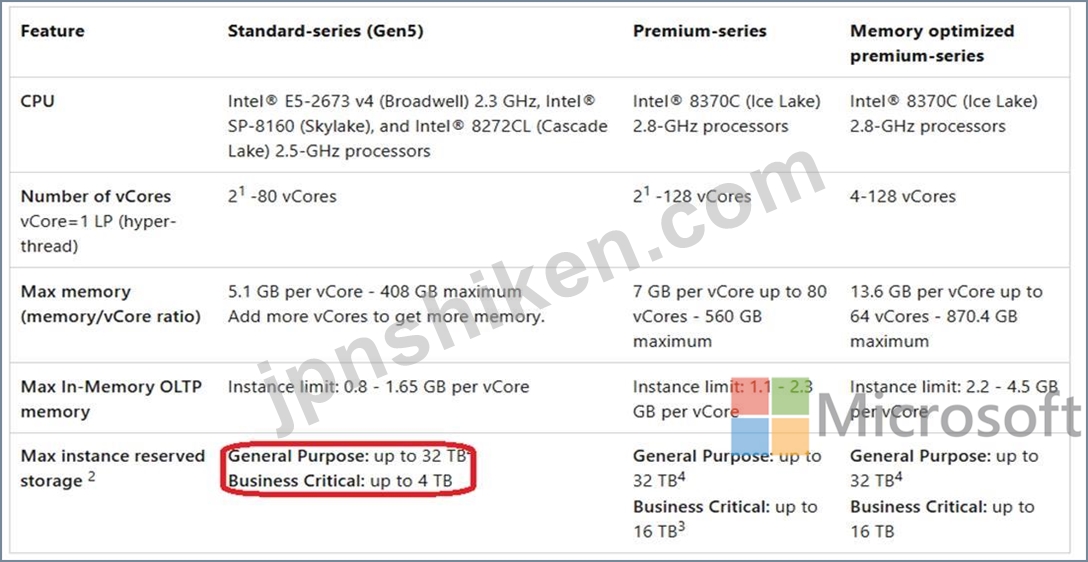
Azure SQL Managed Instance and Azure SQL Database Hyperscale both support 10 TB of storage. Azure SQL Managed Instance can store up to 32 TB, while Hyperscale can scale to 100 TB.
Azure SQL Managed Instance Max instance reserved storage
*-> General Purpose: up to 32 TB
Business Critical: up to 4 TB
Hardware generations have different characteristics, as described in the following table from
2025:
For Change Data Capture (CDC) within Azure, Azure SQL Database is a suitable choice, particularly when using Azure Data Factory or Azure Synapse Analytics. Both Azure SQL Database and SQL Server offer native CDC support.
Reference:
https://learn.microsoft.com/en-us/azure/azure-sql/virtual-machines/windows/sql-server-on-azure- vm-iaas-what-is-overview
https://learn.microsoft.com/en-us/azure/virtual-machines/disks-types
https://learn.microsoft.com/en-us/azure/azure-sql/managed-instance/resource-limits

- 質問一覧「200問」
- 質問1 Microsoft Azure 仮想マシンにフェールオーバー クラスターが展...
- 質問2 Azure SynapseAnalyticsでエンタープライズデータウェアハウスを...
- 質問3 ケーススタディ2 - Contoso社 概要 概要 Contoso株式会社は、従...
- 質問4 DB1 という名前の Azure SQL データベースがあります。DB1 には...
- 質問5 ドラッグアンドドロップの質問 SQLVM1 という名前の Azure 仮想...
- 質問6 ドラッグアンドドロップの質問 DB1 という名前の Azure SQL デー...
- 質問7 ケーススタディ1 - Litware, Inc. 概要 Litware, Inc.は、ボスト...
- 質問8 ケーススタディ5 - ADatum Corporation 概要 ADatum Corporation...
- 質問9 ドラッグアンドドロップの質問 Server1 という名前の Azure SQL ...
- 質問10 注: この問題は、同じシナリオを提示する一連の問題の一部です。...
- 質問11 ホットスポットに関する質問 複数のデータベースをホストする SQ...
- 質問12 Server1 と Server2 という名前の 2 つの Azure 仮想マシンがあ...
- 質問13 新しいAzureサブスクリプションがあります。 Server1という名前...
- 質問14 AzureSQLデータベースの可用性戦略を推奨する必要があります。戦...
- 質問15 ドラッグアンドドロップの質問 Azure SQL マネージド インスタン...
- 質問16 Azure SQL データベースがあります。 長時間実行されているクエ...
- 質問17 ドラッグアンドドロップの質問 Azureサブスクリプション内のすべ...
- 質問18 Azure Virtual Machines 上に SQL1 という名前の SQL Server の...
- 質問19 Hyperscale サービス レベルで SQLDB1 という名前の Azure SQL ...
- 質問20 DB1という名前のデータベースを含むAzure仮想マシン上にSQLServe...
- 質問21 Azure サブスクリプションをお持ちです。 Server1 という名前の ...
- 質問22 DB1 という名前のデータベースをホストするオンプレミスの Micro...
- 質問23 Azure Marketplace SQL Server 2019 Enterprise イメージを使用...
- 質問24 ホットスポットに関する質問 DB1 という Azure SQL データベース...
- 質問25 Azure SQL マネージド インスタンスがあります。 ジョブ通知を電...
- 質問26 可用性グループの Azure 仮想マシン上に SQL Server があります...
- 質問27 Azure SQL データベースと Azure Web アプリを含むアプリをデプ...
- 質問28 社内にMicrosoft SQL Serverのオンプレミスインスタンスがありま...
- 質問29 さまざまな量のデータを取り込むストリーミングデータソリューシ
- 質問30 ホットスポットに関する質問 次の表に示すように、ログを保存す
- 質問31 ケーススタディ5 - ADatum Corporation 概要 ADatum Corporation...
- 質問32 会社ではAzure SQL Databaseを作成したいと考えています。このデ...
- 質問33 Azure SynapseAnalytics専用のSQLプールでディメンションテーブ...
- 質問34 ケーススタディ5 - ADatum Corporation 概要 ADatum Corporation...
- 質問35 注: この問題は、同じシナリオを提示する一連の問題の一部です。...
- 質問36 ケーススタディ1 - Litware, Inc. 概要 Litware, Inc.は、ボスト...
- 質問37 ケーススタディ5 - ADatum Corporation 概要 ADatum Corporation...
- 質問38 ホットスポットに関する質問 db1 という名前の Azure SQL データ...
- 質問39 14 TB の Microsoft SQL Server データベースを含むオンプレミス...
- 質問40 注:この質問は、同じシナリオを提示する一連の質問の一部です。
- 質問41 ホットスポットに関する質問 Azure 仮想マシン上に SQL Server ...
- 質問42 次のデータベースレベルおよびインスタンスレベルの機能を使用す
- 質問43 標準料金階層にworkspace1という名前のAzureDatabricksワークス...
- 質問44 ホットスポットに関する質問 PipelineA と PipelineB という 2 ...
- 質問45 Azure サブスクリプションをお持ちです。 書き込みアクセラレー...
- 質問46 ホットスポットに関する質問 5 つのデータベースをホストする Mi...
- 質問47 Azure サブスクリプションには、Azure Virtual Machines 上の SQ...
- 質問48 シミュレーション db1 Azure SQL データベースの差分バックアッ...
- 質問49 ケーススタディ1 - Litware, Inc. 概要 Litware, Inc.は、ボスト...
- 質問50 ホットスポットに関する質問 Azure サブスクリプションをお持ち...
- 質問51 ホットスポットに関する質問 Azure サブスクリプションをお持ち...
- 質問52 ドラッグアンドドロップの質問 AzSQL1 という Azure SQL サーバ...
- 質問53 ホットスポットに関する質問 DB1 という名前の 50 TB の Microso...
- 質問54 データベースをAzureSQLDatabaseマネージドインスタンスにデプロ...
- 質問55 SQL1 という名前のオンプレミスの Microsoft SQL Server 2022 イ...
- 質問56 DB1 という名前の Azure SQL データベースがあります。 データセ...
- 質問57 DB1という名前のデータベースを持つAzure仮想マシン上のSQLServe...
- 質問58 オンプレミスの Microsoft SQL Server データベースのディザスタ...
- 質問59 ケーススタディ5 - ADatum Corporation 概要 ADatum Corporation...
- 質問60 注:この質問は、同じシナリオを提示する一連の質問の一部です。
- 質問61 4つのAzureサブスクリプションがあります。各サブスクリプション...
- 質問62 ケーススタディ2 - Contoso社 概要 概要 Contoso株式会社は、従...
- 質問63 ホットスポットに関する質問 Azure SQL データベースを使用する ...
- 質問64 ホットスポットに関する質問 Microsoft SQL Server インスタンス...
- 質問65 SQL1という名前のAzure仮想マシン上のSQLServerのインスタンスが...
- 質問66 ホットスポットに関する質問 オンプレミスの Microsoft SQL Serv...
- 質問67 ドラッグアンドドロップの質問 VNet1 という仮想ネットワークと...
- 質問68 DB1という名前のデータベースを含むAzure仮想マシン上にSQLServe...
- 質問69 ドラッグアンドドロップの質問 Vault1 という名前の Azure キー ...
- 質問70 DB1という名前のAzureSQLデータベースがあります。 DB1に接続し...
- 質問71 次の表に示すリソースを含む、SQLDb1 という名前の Azure SOI デ...
- 質問72 ホットスポットに関する質問 databasebackups という名前のスト...
- 質問73 Azure サブスクリプションがあります。 Azure SQL データベース...
- 質問74 ドラッグアンドドロップの質問 SQL1 という名前の新しい Azure S...
- 質問75 server1という名前のサーバー上にdb1という名前のAzureSQLデータ...
- 質問76 sqldb1という名前のAzureSQLデータベースがあります。 sqldb1の...
- 質問77 ホットスポットに関する質問 Azure SQL 論理サーバーがあります...
- 質問78 次のTransact-SQLクエリがあります。 (Exhibit) クエリによって...
- 質問79 SQLVMI という名前の Azure Virtual Machines インスタンス上の ...
- 質問80 5つのデータベースをホストするSQL1という名前のオンプレミスのM...
- 質問81 次の表に示すリソースを含む Azure サブスクリプションがありま...
- 質問82 AzureSQLデータベースがあります。データベースには、列ストアイ...
- 質問83 MI1という名前のAzureSQLマネージドインスタンスがあります。 MI...
- 質問84 Azure サブスクリプションがあります。このサブスクリプションに...
- 質問85 db1 という名前の Azure SQL データベースを含む Azure サブスク...
- 質問86 Azure SQL マネージド インスタンスがあります。 クエリ プラン...
- 質問87 Windows Server2019を実行するAzure仮想マシン上にSQLServer2019...
- 質問88 ホットスポットに関する質問 Azure サブスクリプションをお持ち...
- 質問89 DB1 という名前のオンプレミスの Microsoft SQL Server データベ...
- 質問90 ドラッグアンドドロップの質問 SQLVM1 という名前の Azure Virtu...
- 質問91 ホットスポットに関する質問 DB1 という Azure SQL データベース...
- 質問92 ホットスポットに関する質問 Server1 という名前の Azure SQL マ...
- 質問93 データエンジニアは、新しいアプリケーションの従業員情報を格納
- 質問94 注:この質問は、同じシナリオを提示する一連の質問の一部です。
- 質問95 ドラッグアンドドロップの質問 DB1 という名前の Azure SQL デー...
- 質問96 Azure サブスクリプションをお持ちです。 Azure Virtual Machine...
- 質問97 DB1 という名前の 60 TB の運用データベースをホストするオンプ...
- 質問98 SQLVM1 という名前の Azure Virtual Machines インスタンス上の ...
- 質問99 ホットスポットに関する質問 Bicep テンプレートを使用して、Azu...
- 質問100 注:この質問は、同じシナリオを提示する一連の質問の一部です。
- 質問101 オンライン注文のレコードを含むデータセットのスタースキーマを
- 質問102 Microsoft SQL Server 2022 がインストールされたオンプレミスサ...
- 質問103 AzureSQLデータベースとAzureWebアプリを含むアプリをデプロイす...
- 質問104 Windows Server 2019 を実行する Azure 仮想マシンに SQL Server...
- 質問105 DB1 という名前の Standard SKU Azure SQL データベースを含む A...
- 質問106 ホットスポットに関する質問 Table1 という名前のテーブルが含ま...
- 質問107 ホットスポットに関する質問 Microsoft SQL Server がインストー...
- 質問108 ケーススタディ1 - Litware, Inc. 概要 Litware, Inc.は、ボスト...
- 質問109 VNet1という名前の仮想ネットワーク上にVM1という名前のAzure仮...
- 質問110 MyDB1 は、Azure 仮想マシン (VM) データベース上の Azure SQL ...
- 質問111 ドラッグアンドドロップの質問 App1Dev というリソースグループ...
- 質問112 VM1 という名前の Linux Azure Virtual Machines インスタンス上...
- 質問113 Azure サブスクリプションをお持ちです。 Azure Virtual Machine...
- 質問114 DB1 という名前の 2 TB Microsoft SQL Server 2019 データベース...
- 質問115 ドラッグアンドドロップの質問 Azure Virtual Machines 上に SQL...
- 質問116 環境には、Microsoft Azure 仮想マシンと Azure SQL データベー...
- 質問117 ホットスポットに関する質問 次の Azure Resource Manager テン...
- 質問118 ドラッグアンドドロップの質問 Azure Synapse Analytics 専用 SQ...
- 質問119 注:この質問は、同じシナリオを提示する一連の質問の一部です。
- 質問120 Server1 という名前の Azure SQL マネージド インスタンスを含む...
- 質問121 ResourceGroup1という名前のリソースグループ内の同じAzureSQLデ...
- 質問122 ホットスポットに関する質問 Project1 と Project2 という 2 つ...
- 質問123 複数のデータベースをホストする、SQL1 という名前のオンプレミ...
- 質問124 ホットスポットに関する質問 Server1 という名前の SQL サーバー...
- 質問125 ケーススタディ2 - Contoso社 概要 概要 Contoso株式会社は、従...
- 質問126 次の表に示すリソースを含む Azure サブスクリプションがありま...
- 質問127 会社にはpass4testdbというAzure SQLデータベースがあります。こ...
- 質問128 ケーススタディ1 - Litware, Inc. 概要 Litware, Inc.は、ボスト...
- 質問129 ホットスポットに関する質問 Azure サブスクリプションがあり、A...
- 質問130 Azure SQLDatabaseのマネージドインスタンスがあります。 インス...
- 質問131 オンプレミスのデータセンターにMicrosoft SQL Server 2019イン...
- 質問132 ケーススタディ5 - ADatum Corporation 概要 ADatum Corporation...
- 質問133 ホットスポットに関する質問 次の図に示すように、Azure Portal ...
- 質問134 ホットスポットに関する質問 Hyperscaleサービス層にSQLDB1とSQL...
- 質問135 Azure StreamAnalyticsジョブを監視しています。 バックログ入力...
- 質問136 ケーススタディ3 - Contoso, Ltd 2 概要 Contoso, Ltd.はシアト...
- 質問137 ドラッグアンドドロップの質問 Microsoft SQL Server のインスタ...
- 質問138 ホットスポットに関する質問 次の表に示すプロジェクトがありま
- 質問139 会社では、Microsoft Azure仮想マシンでホストされているMicroso...
- 質問140 ホットスポットに関する質問 次の図に示すように、Azure Data Fa...
- 質問141 シミュレーション db1 に対して実行されたすべてのクエリがクエ...
- 質問142 ホットスポットに関する質問 Azure Virtual Machines インスタン...
- 質問143 Azure SQL マネージド インスタンスがあります。 SQL エージェン...
- 質問144 ホットスポットに関する質問 DB1 という名前の Azure SQL データ...
- 質問145 注:この質問は、同じシナリオを提示する一連の質問の一部です。
- 質問146 シミュレーション db1 に高可用性を構成する必要があります。ソ...
- 質問147 注:この質問は、同じシナリオを提示する一連の質問の一部です。
- 質問148 AzureIoTハブからデータをストリーミングするための異常検出ソリ...
- 質問149 ホットスポットに関する質問 ウェブサイト分析システムからは、
- 質問150 SQL Server がインストールされている Azure 仮想マシンが 10 台...
- 質問151 ドラッグアンドドロップの質問 Azure SQL データベースに Employ...
- 質問152 シミュレーション db1 のディザスタリカバリソリューションを構...
- 質問153 ドラッグアンドドロップの質問 3 つのノードを含むオンプレミス...
- 質問154 次の表に示すリソースを含む Azure サブスクリプションがありま...
- 質問155 ドラッグアンドドロップの質問 Server1 というサーバーに Databa...
- 質問156 Azure SQL マネージドインスタンスをデプロイする予定です。 リ...
- 質問157 factSalesという名前のテーブルを含むAzureSQLデータベースがあ...
- 質問158 ケーススタディ2 - Contoso社 概要 概要 Contoso株式会社は、従...
- 質問159 ケーススタディ3 - Contoso, Ltd 2 概要 Contoso, Ltd.はシアト...
- 質問160 MySQLデータベース用のバージョン8.0のAzureデータベースがあり...
- 質問161 ドラッグアンドドロップの質問 Azure 仮想マシンを構築していま...
- 質問162 あなたの会社には、pass4testdb という名前の Azure SQL データ...
- 質問163 注:この質問は、同じシナリオを提示する一連の質問の一部です。
- 質問164 ケーススタディ1 - Litware, Inc. 概要 Litware, Inc.は、ボスト...
- 質問165 Azure Virtual Machines インスタンス上の 2 つの SQL Server を...
- 質問166 シミュレーション db1 が最低 1 つの vCore、最大 4 つの vCore...
- 質問167 ドラッグアンドドロップの質問 次の表に示すリソースを含む Azur...
- 質問168 Azure Virtual Machines に SQL Server のインスタンスがありま...
- 質問169 10 の Azure リージョンにまたがる 100 の Azure SQL マネージド...
- 質問170 新しいAzureSQLデータベースがあります。データベースには、機密...
- 質問171 ホットスポットに関する質問 Azure サブスクリプションをお持ち...
- 質問172 2つの100GBデータベースをAzureに移動することを計画しています...
- 質問173 シミュレーション db1 の SalesLT.Customer テーブルの LastName...
- 質問174 DB1という名前のAzureSQLデータベースがあります。 タイプCHAR(...
- 質問175 1時間ごとにトリガーされるAzureDataFactoryパイプラインがあり...
- 質問176 ホットスポットに関する質問 Windows Server 2019 を実行し、AG1...
- 質問177 10個のデータベースをホストするSQLMI1という名前のAzureSQLマネ...
- 質問178 SQLVM1 という名前の Azure 仮想マシン上の SQL Server のインス...
- 質問179 MyDevData という名前の Azure SQL Managed Instance データベー...
- 質問180 DB1 という名前の Microsoft SQL Server 2022 データベースをホ...
- 質問181 シミュレーション sq12345678 上のすべてのデータベースについて...
- 質問182 DB3という名前のAzureSQLデータベースがあります。 展示に示され...
- 質問183 ファイルがAzureData Lake Storage Gen2コンテナーに到着したと...
- 質問184 ホットスポットに関する質問 Azure 仮想マシンに Always On フェ...
- 質問185 2つの100GBデータベースをAzureに移動することを計画しています...
- 質問186 Azure SynapseAnalytics専用のSQLプールで日付ディメンションテ...
- 質問187 vCore購入モデルを使用してプロビジョニングされた20のAzureSQL...
- 質問188 DB1 という名前の Azure SQL データベースがあります。 データセ...
- 質問189 server1 というサーバーに db1 という Azure SQL データベースが...
- 質問190 ケーススタディ1 - Litware, Inc. 概要 Litware, Inc.は、ボスト...
- 質問191 contoso.comという名前のドメインを使用するAzureサブスクリプシ...
- 質問192 ドラッグアンドドロップの質問 contoso.com という名前の Azure ...
- 質問193 会社には、Azure 仮想マシンでホストされた SQL Server 2019 イ...
- 質問194 ホットスポットに関する質問 RG1 と RG2 という 2 つのリソース ...
- 質問195 ホットスポットに関する質問 db1 という名前のデータベースをホ...
- 質問196 ホットスポットに関する質問 Azure SQL データベースに Customer...
- 質問197 ホットスポットに関する質問 Azure サブスクリプションをお持ち...
- 質問198 ドラッグアンドドロップの質問 Azure仮想マシンにSQL Serverがあ...
- 質問199 ケーススタディ2 - Contoso社 概要 概要 Contoso株式会社は、従...
- 質問200 Azure AD テナントと、複数の Azure SQL データベースをホストす...
