- ホーム
- Microsoft
- AZ-800J - Administering Windows Server Hybrid Core Infrastructure (AZ-800日本語版)
- Microsoft.AZ-800J.v2026-10-14.q159
- 質問159
有効的なAZ-800J問題集はJPNTest.com提供され、AZ-800J試験に合格することに役に立ちます!JPNTest.comは今最新AZ-800J試験問題集を提供します。JPNTest.com AZ-800J試験問題集はもう更新されました。ここでAZ-800J問題集のテストエンジンを手に入れます。
AZ-800J問題集最新版のアクセス
「342問、30% ディスカウント、特別な割引コード:JPNshiken」
<<前へ
質問 159/159
ドラッグアンドドロップ問題
Windows Serverコンテナホストをデプロイします。
Nano Serverのベースイメージをベースに、カスタムファイルを含むコンテナイメージを作成する必要があります。
どの4つのコマンドを順番に実行すればよいでしょうか?解答するには、コマンド一覧から適切なコマンドを解答欄に移動させ、正しい順序に並べ替えてください。
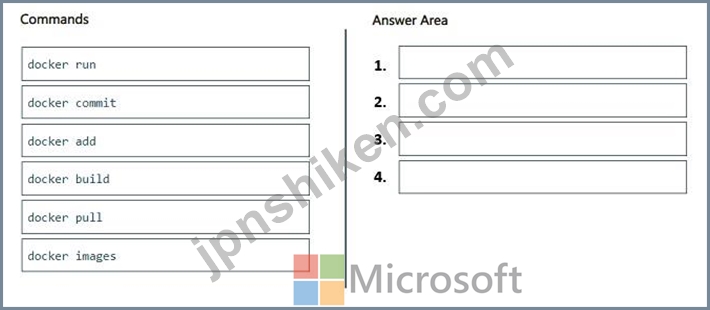
Windows Serverコンテナホストをデプロイします。
Nano Serverのベースイメージをベースに、カスタムファイルを含むコンテナイメージを作成する必要があります。
どの4つのコマンドを順番に実行すればよいでしょうか?解答するには、コマンド一覧から適切なコマンドを解答欄に移動させ、正しい順序に並べ替えてください。
正解:

Explanation:
Step 1: docker pull
Pull the Nano Server base image.
Step 2: docker add
Add the custom file.
The ADD command is used to copy files/directories into a Docker image. It can copy data in three ways: Copy files from the local storage to a destination in the Docker image. Copy a tarball from the local storage and extract it automatically inside a destination in the Docker image.
Step 3: docker build -
Build the image.
docker build creates the image by referring to a script,
Step 4: docker commit
Docker commit preserves an existing container into container image.
Note:
A Nano Server base image is an extremely small, stripped-down version of Windows Server used to build Windows containers. It contains only the essential components for running applications, resulting in a smaller footprint, faster deployment, and a reduced attack surface compared to Server Core or full Windows images.
Reference:
https://circleci.com/docs/guides/execution-managed/custom-images/

- 質問一覧「159問」
- 質問1 ホットスポットに関する質問 お客様のオンプレミスネットワーク
- 質問2 お客様のネットワークには、Active Directoryドメインサービス(A...
- 質問3 ホットスポットに関する質問 Server1という名前のWindows Server...
- 質問4 サイト間 VPN を使用して Azure 仮想ネットワークに接続されてい...
- 質問5 事例研究1 - ファブリカム社 概要 ファブリカム社は、ニューヨー...
- 質問6 お客様のネットワークには、Active Directoryドメインサービス(A...
- 質問7 Windows Serverを実行するServer1という名前のサーバーがありま...
- 質問8 事例研究1 - ファブリカム社 概要 ファブリカム社は、ニューヨー...
- 質問9 お客様のネットワークには、contoso.com という名前の単一ドメイ...
- 質問10 ホットスポットに関する質問 貴社はボストンとモントリオールに
- 質問11 Azure Active Directory (Azure AD) テナントと同期するオンプレ...
- 質問12 Windows Admin Center で新しいコンテナ イメージを作成する際に...
- 質問13 お客様のネットワークには、オンプレミスのActive Directoryドメ...
- 質問14 ホットスポットに関する質問 オンプレミスにWindows Serverを実...
- 質問15 注: この質問は、同じシナリオを提示する一連の質問の一部です。...
- 質問16 お客様のネットワークには、adatum.com という名前の Active Dir...
- 質問17 ドラッグアンドドロップ問題 Windows Serverを実行し、Hyper-Vサ...
- 質問18 注: この質問は、同じシナリオを提示する一連の質問の一部です。...
- 質問19 お客様のネットワークには、Active Directoryドメインサービス(A...
- 質問20 ホットスポットに関する質問 以下の表に示すサーバーをご利用い
- 質問21 Hyper-Vホストをお持ちです。 利用可能なスケジューラを評価して...
- 質問22 お客様はAzureサブスクリプションを所有しています。このサブス...
- 質問23 ホットスポットに関する質問 お客様のネットワークには、contoso...
- 質問24 お客様はAzureサブスクリプションをお持ちです。そのサブスクリ...
- 質問25 ホットスポットに関する質問 お客様のネットワークには、contoso...
- 質問26 ホットスポットに関する質問 お客様のネットワークには、contoso...
- 質問27 お客様のネットワークには、Active Directoryドメインサービス(A...
- 質問28 ホットスポットに関する質問 Dockerホストをお持ちです。 Python...
- 質問29 ドラッグアンドドロップ問題 Windows Serverを実行するServer1と...
- 質問30 ネットワークには、Active Directory ドメイン サービス (AD DS)...
- 質問31 Server1という名前のサーバーがあり、Windows Serverが動作して...
- 質問32 ホットスポットに関する質問 オンプレミスのActive Directoryド...
- 質問33 シミュレーション Azure ファイル共有を同期するには、SRV1 を登...
- 質問34 Windows Server を実行する Server1 という名前のオンプレミス ...
- 質問35 PowerShellで、仮想マシンに接続して手動で接続を構成することな...
- 質問36 Azure Active Directory (Azure AD) テナントと同期するオンプレ...
- 質問37 Windows Serverが動作するServer1という名前のサーバーがあり、...
- 質問38 注:この問題は、同じシナリオを提示する一連の問題の一部です。
- 質問39 次の表に示すドライブを含む VM1 という名前の Azure 仮想マシン...
- 質問40 ホットスポットに関する質問 お客様のオンプレミスネットワーク
- 質問41 オンプレミスの Windows デバイスがあります。 VNet1 という名前...
- 質問42 ホットスポットに関する質問 Windows Serverを実行するServer1と...
- 質問43 注:この問題は、同じシナリオを提示する一連の問題の一部です。
- 質問44 ホットスポットに関する質問 お使いのネットワークには、Mic...
- 質問45 ホットスポットに関する質問 お客様のネットワークには、contoso...
- 質問46 事例研究2 - コントソ社 概要 Contoso, Ltd.は、シアトルに本社...
- 質問47 お客様のネットワークには、Active Directoryドメインサービス(A...
- 質問48 シミュレーション DC2がcontoso.comのスキーママスターであるこ...
- 質問49 Windows Server を実行し、次の構成を持つ VM1 という名前の Azu...
- 質問50 お客様のネットワークには、contoso.com という名前の Active Di...
- 質問51 次の資料に示すように、VM1 という名前の仮想マシンを含む Azure...
- 質問52 New-AzVM コマンドレットを使用して仮想マシンを作成することに...
- 質問53 ホットスポットに関する質問 お客様のネットワークには、adatum....
- 質問54 ホットスポットに関する質問 お客様のネットワークには、Active ...
- 質問55 ホットスポットに関する質問 Active Directoryドメインサービス(...
- 質問56 お客様の環境には、Windows Serverが稼働しているオンプレミスサ...
- 質問57 注:この問題は、同じシナリオを提示する一連の問題の一部です。
- 質問58 注: この質問は、同じシナリオを提示する一連の質問の一部です。...
- 質問59 Windows Server を実行し、DHCP サーバーの役割がインストールさ...
- 質問60 事例研究2 - コントソ社 概要 Contoso, Ltd.は、シアトルに本社...
- 質問61 ホットスポットに関する質問 Host1という名前のWindows Server 2...
- 質問62 事例研究1 - ファブリカム社 概要 ファブリカム社は、ニューヨー...
- 質問63 事例研究1 - ファブリカム社 概要 ファブリカム社は、ニューヨー...
- 質問64 次の表に示すように、オンプレミス環境にはWindows Serverを実行...
- 質問65 事例研究2 - コントソ社 概要 Contoso, Ltd.は、シアトルに本社...
- 質問66 注: この質問は、同じシナリオを提示する一連の質問の一部です。...
- 質問67 シミュレーション DC1にfabrikam.comという名前の新しいプライマ...
- 質問68 注: この質問は、同じシナリオを提示する一連の質問の一部です。...
- 質問69 お客様のネットワークには、Active Directoryドメインサービス(A...
- 質問70 お客様のネットワークには、contoso.com という名前の Active Di...
- 質問71 Active Directoryドメイン内に、Server1という名前のファイルサ...
- 質問72 ホットスポットに関する質問 お客様のオンプレミスネットワーク
- 質問73 注:このセクションには、同じシナリオと問題に関する複数の質問
- 質問74 Windows Serverが動作するServer1という名前のサーバーがありま...
- 質問75 Windows Serverが動作するファイルサーバーが5台あります。 ファ...
- 質問76 ドラッグアンドドロップ問題 Windows Serverを実行するServer1と...
- 質問77 ケーススタディ3 - ADatum Corporation 概要 会社情報 ADatum Co...
- 質問78 お客様のオンプレミスネットワークのIPアドレス範囲は10.0.0.0/2...
- 質問79 ホットスポットに関する質問 お客様のネットワークには、次の図
- 質問80 ケーススタディ3 - ADatum Corporation 概要 会社情報 ADatum Co...
- 質問81 貴社は、オンプレミスのディレクトリサービスに関する要件なしに
- 質問82 ケーススタディ3 - ADatum Corporation 概要 会社情報 ADatum Co...
- 質問83 お客様のネットワークには、contoso.com という名前の Active Di...
- 質問84 以下のリストから、クラウド階層化を有効にした状態で、クールフ
- 質問85 次の表に示すドメイン コントローラーを含む Active Directory ...
- 質問86 注:この問題は、同じシナリオを提示する一連の問題の一部です。
- 質問87 シミュレーション MemberServersという名前のグループにのみ適用...
- 質問88 シミュレーション グループポリシー設定を使用して、\\dc1.conto...
- 質問89 あなたは管理者であり、AD DSパーティションを作成および管理す...
- 質問90 コントソ社のIT部門は、オンプレミス環境に新しいバージョンのMS...
- 質問91 お客様のネットワークには、複数サイトからなるActive Directory...
- 質問92 お使いのネットワークには、Active Directoryドメインサービ...
- 質問93 ドラッグアンドドロップ問題 contoso.com という名前の単一ドメ...
- 質問94 ホットスポットに関する質問 Azure サブスクリプションには、VNe...
- 質問95 WindowsコンテナをホストするServer1という名前のサーバーがあり...
- 質問96 シミュレーション SRV1からIPアドレスを取得するすべてのDHCPク...
- 質問97 あなたは、.NET Coreを必要とするコンテナ化されたアプリケーシ...
- 質問98 お客様のネットワークには、Active Directoryドメインサービス(A...
- 質問99 シミュレーション Azure File Sync を使用して、SRV1 上の C:\ap...
- 質問100 ドラッグアンドドロップ問題 お客様はAzureサブスクリプションを...
- 質問101 あなたは最近、Carla社に管理者として入社しました。チームリー...
- 質問102 ホットスポットに関する質問 お客様のネットワークには、contoso...
- 質問103 お客様のネットワークには、Active Directoryドメインサービス(A...
- 質問104 ホットスポットに関する質問 お客様のネットワークには、以下の
- 質問105 シミュレーション あなたはシアトルのサイトにあるDC3という名前...
- 質問106 Hyper-V サーバーの役割がインストールされている 2 つのサーバ...
- 質問107 Windows Server を実行する VM1 という名前の Azure 仮想マシン...
- 質問108 注: この質問は、同じシナリオを提示する一連の質問の一部です。...
- 質問109 事例研究1 - ファブリカム社 概要 ファブリカム社は、ニューヨー...
- 質問110 お客様のネットワークには、Active Directoryフォレストが含まれ...
- 質問111 注:この問題は、同じシナリオを提示する一連の問題の一部です。
- 質問112 シミュレーション SRV1上のVM1という名前の仮想マシンに対して、...
- 質問113 ネットワーク管理アプリケーションを実行する Server1 という名...
- 質問114 事例研究1 - ファブリカム社 概要 ファブリカム社は、ニューヨー...
- 質問115 ドラッグアンドドロップ問題 お客様のネットワークには、contoso...
- 質問116 シミュレーション SRV1上のWindows Admin Centerを使用してDC1を...
- 質問117 御社はニューヨークにオフィスを構えていますね。 このネットワ
- 質問118 ホットスポットに関する質問 Windows Server 2022が動作するServ...
- 質問119 シミュレーション SRV1のシステムイベントログからエラーを収集...
- 質問120 管理者は、ファイルの分類プロパティに基づいて、ファイルを自動
- 質問121 ケーススタディ3 - ADatum Corporation 概要 会社情報 ADatum Co...
- 質問122 ホットスポットに関する質問 Windows Serverが動作するサーバー...
- 質問123 ドラッグアンドドロップ問題 お客様のネットワークには、contoso...
- 質問124 ドラッグアンドドロップ問題 contoso.com という名前の新しい Ac...
- 質問125 注:この問題は、同じシナリオを提示する一連の問題の一部です。
- 質問126 ホットスポットに関する質問 お客様のネットワークには、contoso...
- 質問127 ホットスポットに関する質問 お客様のネットワークには、Azure A...
- 質問128 ホットスポットに関する質問 お客様のネットワークには、contoso...
- 質問129 注:この問題は、同じシナリオを提示する一連の問題の一部です。
- 質問130 Windows Server 2019 を実行する Server1 というサーバーがあり...
- 質問131 ホットスポットに関する質問 次の表に示すように、オンプレミス
- 質問132 ホットスポットに関する質問 お客様のネットワークには、Active ...
- 質問133 ネットワークには Active Domain Services (AD DS) フォレストが...
- 質問134 ホットスポットに関する質問 お客様のネットワークには、Active ...
- 質問135 Windows Serverが動作するサーバーをお持ちですね。 SMBダイレク...
- 質問136 ホットスポットに関する質問 Windows Serverを実行するAzure仮想...
- 質問137 ホットスポットに関する質問 お客様のオンプレミスネットワーク
- 質問138 ドラッグアンドドロップ問題 分散型クラスター展開を使用してい
- 質問139 ホットスポットに関する質問 あなたはAzureサブスクリプションと...
- 質問140 事例研究1 - ファブリカム社 概要 ファブリカム社は、ニューヨー...
- 質問141 ドラッグアンドドロップ問題 お客様はAzureサブスクリプションを...
- 質問142 事例研究1 - ファブリカム社 概要 ファブリカム社は、ニューヨー...
- 質問143 事例研究2 - コントソ社 概要 Contoso, Ltd.は、シアトルに本社...
- 質問144 お客様のオンプレミスデータセンターに、DC1 という名前が付けら...
- 質問145 ホットスポットに関する質問 お客様のネットワークには、クライ
- 質問146 あなたの会社には本店と支社があります。2 つのオフィスは、WAN ...
- 質問147 オンプレミスの Active Directory ドメイン サービス (AD DS) ド...
- 質問148 ケーススタディ3 - ADatum Corporation 概要 会社情報 ADatum Co...
- 質問149 Host1という名前のサーバーがあり、そのサーバーにはHyper-Vサー...
- 質問150 DNS サーバーの役割がインストールされているサーバーがあります...
- 質問151 お客様のネットワークには、Active Directoryドメインサービス(A...
- 質問152 ホットスポットに関する質問 お客様のネットワークには、contoso...
- 質問153 シミュレーション SRV1上のscope1という名前のDHCPスコープがク...
- 質問154 ホットスポットに関する質問 Azure File Syncを使用して、Server...
- 質問155 オンプレミス ネットワークには、contoso.com という名前の Acti...
- 質問156 シミュレーション BranchAdminsグループのメンバーのパスワード...
- 質問157 あなたは、既存のサーバーファームからメンバーホストを廃止する
- 質問158 ドラッグアンドドロップ問題 Windows Serverが動作するServer1と...
- 質問159 ドラッグアンドドロップ問題 Windows Serverコンテナホストをデ...
