- ホーム
- Microsoft
- AZ-800J - Administering Windows Server Hybrid Core Infrastructure (AZ-800日本語版)
- Microsoft.AZ-800J.v2026-10-07.q109
- 質問39
有効的なAZ-800J問題集はJPNTest.com提供され、AZ-800J試験に合格することに役に立ちます!JPNTest.comは今最新AZ-800J試験問題集を提供します。JPNTest.com AZ-800J試験問題集はもう更新されました。ここでAZ-800J問題集のテストエンジンを手に入れます。
AZ-800J問題集最新版のアクセス
「342問、30% ディスカウント、特別な割引コード:JPNshiken」
Server1という名前のWindows Serverコンテナホストがあります。
以下の表に示すように、Server1上でコンテナを起動します。

プロセスAとプロセスCのステータスを検証する必要があります。
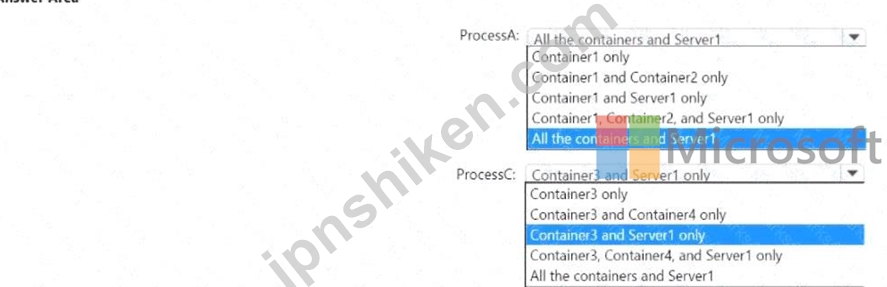
プロセスAとプロセスCが実行状態にあることを確認できる箇所はどこですか?回答するには、回答欄で適切なオプションを選択してください。
注:正解ごとに1ポイントが加算されます。
以下の表に示すように、Server1上でコンテナを起動します。
プロセスAとプロセスCのステータスを検証する必要があります。
プロセスAとプロセスCが実行状態にあることを確認できる箇所はどこですか?回答するには、回答欄で適切なオプションを選択してください。
注:正解ごとに1ポイントが加算されます。
正解:

Explanation:
* ProcessA : All the containers and Server1
* ProcessB : Container3 and Server1 only
Comprehensive and Detailed Explanation with all Administering Windows Server Hybrid Core Infrastructure documents : = Understand ing the visibility of processes within Windows Server containers depends entirely on the isolation mode used: Windows Server isolation (Process isolation) or Hyper-V isolation . According to official documents for Administering Windows Server Hybrid Core In frastructure, these two modes determine how the container ' s kernel and processes interact with the host system.
* Windows Server Isolation (Process Isolation) : In this mode, containers share the same kernel as the host. Processes running inside the container are essentially standard processes on the host, albeit isolated through namespaces and resource controls. Consequently, a process running in a process- isolated container (like Container1 and Container2 in the exhibit) is visible from the host ' s Task Manag er or Get-Process command, as well as from other containers sharing the same host kernel.
Therefore, ProcessA can be verified as running from All the containers and Server1 .
* Hyper-V Isolation : This mode provides a more secure and isolated environment by ru nning each container inside its own highly optimized virtual machine (utility VM). Because each container has its own private kernel, the host cannot " see " the internal processes of the container, and containers cannot see into each other. Container3 uses Hyper-V isolation. Therefore, ProcessC is only visible to the internal operating system of Container3 and, at a management level, to Server1 (the host). It is invisible to other containers (Container1, 2, and 4) because they are separated by kernel-level boundaries. Thus, you can verify ProcessC on Container3 and Server1 only .

- 質問一覧「109問」
- 質問1 お客様のネットワークには、adatum.com という名前の Active Dir...
- 質問2 グループ3とグループ5に追加できるグループはどれですか?回答す...
- 質問3 contoso.com という名前の Azure Active Directory Domain Servi...
- 質問4 グループ3とグループ4にどのグループを追加できますか?回答する...
- 質問5 サイトリンクの技術要件を満たす必要があります。どのユーザーが
- 質問6 Azure Active Directory Domain Services (Azure AD DS) ドメイ...
- 質問7 ユーザー1の技術要件を満たす必要があります。ソリューションは
- 質問8 御社はニューヨークにオフィスを構えていますね。 このネットワ
- 質問9 タスク4 SRV1 上で、mcrmicrosoft.com/windows/servercofe/iis ...
- 質問10 お客様のネットワークには、contoso.com と fabrikam.com という...
- 質問11 注: この質問は、同じシナリオを提示する一連の質問の一部です。...
- 質問12 ネットワーク要件を満たすDHCPの可用性ソリューションを実装する...
- 質問13 タスク6 SRV1上のWindows Admin Centerを使用してDC1を管理でき...
- 質問14 計画されている変更をサポートするために、Azure Arc の実装を計...
- 質問15 タスク9 グループ管理サービスアカウント(gMSA)を作成する予定で...
- 質問16 お客様のオンプレミスネットワークには、contoso.com という名前...
- 質問17 Windows Server 2019 を実行する Server1 という名前のサーバー...
- 質問18 contoso.com という名前の新しい Active Directory ドメイン サ...
- 質問19 Azure AD Connect を使用して Azure AD と同期する、contoso.com...
- 質問20 次の表に示すように、オンプレミスのファイルサーバーはWindows ...
- 質問21 Windows Serverを実行し、Hyper-Vサーバーの役割がインストール...
- 質問22 お客様のネットワークには、contoso.com という名前の Active Di...
- 質問23 お客様のネットワークには、contoso.com という名前の Active Di...
- 質問24 あなたの会社には本店と支社があります。2 つのオフィスは、WAN ...
- 質問25 Server1という名前のWindows Serverコンテナホストがあり、ディ...
- 質問26 オンプレミスの Active Directory ドメイン サービス (AD DS) ド...
- 質問27 お客様のネットワークには、contoso という名前のオンプレミスの...
- 質問28 Windows Server を実行し、UserData という名前の共有フォルダー...
- 質問29 ネットワークには Active Directory ドメイン サービス (AD DS) ...
- 質問30 お客様のオンプレミスネットワークには、Active Directoryドメイ...
- 質問31 タスク5 SRV1上のC:\appという名前のフォルダにコピーされたアプ...
- 質問32 お客様のネットワークには、contoso.com という名前の Active Di...
- 質問33 お客様のネットワークには、Active Directoryドメインサービス(A...
- 質問34 Windows Serverを実行し、Hyper-Vサーバーの役割がインストール...
- 質問35 お客様のオンプレミスデータセンターに、DC1 という名前が付けら...
- 質問36 お客様のネットワークには、contoso.com という名前の Active Di...
- 質問37 お使いのネットワークには、Active Directory ドメイン サー...
- 質問38 セキュリティ要件を満たすために、リモート管理を設定する必要が
- 質問39 Server1という名前のWindows Serverコンテナホストがあります。 ...
- 質問40 タスク7 Microsoft Defender for Cloudを使用して、DC1のセキュ...
- 質問41 Windows Serverを実行し、Hyper-Vサーバーの役割がインストール...
- 質問42 お客様のネットワークには、contoso.com という名前の Active Di...
- 質問43 注: この質問は、同じシナリオを提示する一連の質問の一部です。...
- 質問44 注: この質問は、同じシナリオを提示する一連の質問の一部です。...
- 質問45 VM1という名前のAzure仮想マシンがあり、そこでWindows Serverが...
- 質問46 Windows Serverが動作するServer1という名前のサーバーがありま...
- 質問47 タスク8 DO上に存在するfabnkam.comという名前のONSゾーンの管理...
- 質問48 Windows Server を実行し、DHCP サーバーの役割がインストールさ...
- 質問49 Server1という名前のWindowsサーバーがあります。 Server1に、Di...
- 質問50 お客様のネットワークには、オンプレミスのActive Directoryドメ...
- 質問51 オンプレミス環境には、Windows Serverが稼働し、インターネット...
- 質問52 注: この質問は、同じシナリオを提示する一連の質問の一部です。...
- 質問53 Windows Serverを実行し、Active Directoryフェデレーションサー...
- 質問54 タスク8 192.168.2.0 から 192.168.2.2 の IP アドレス範囲に関...
- 質問55 Azure サブスクリプションに、VNet1 という名前の仮想ネットワー...
- 質問56 お客様のネットワークには、contoso.com という名前の Active Di...
- 質問57 お客様のネットワークには、以下の図に示すように、3つのActive ...
- 質問58 ネットワークに Active Directory Domain Services (AD DS) ドメ...
- 質問59 タスク5 SRV1 上の scope! という名前の DHCP スコープがクライ...
- 質問60 お客様のネットワークには、adatum.com という名前の Active Dir...
- 質問61 Webapp1のセキュリティ要件を満たすために、どの3つのアクション...
- 質問62 お客様のネットワークには、次の図に示すように、2つのActive Di...
- 質問63 お客様のネットワークには、contoso という名前のオンプレミスの...
- 質問64 お客様のネットワークには、contoso.com という名前の Active Di...
- 質問65 Azure Virtual Desktop セッション ホストがセキュリティ要件を...
- 質問66 お客様のネットワークには、複数のサイトからなるActive Directo...
- 質問67 Windows Server を実行する VM1 という名前の Azure 仮想マシン...
- 質問68 Windows Serverが稼働し、10個の物理ディスクを搭載したサーバー...
- 質問69 タスク3 SRV1をDNSサーバーとして設定する必要があります。SRV1...
- 質問70 お客様のオンプレミスネットワークには、Active Directoryドメイ...
- 質問71 お客様のネットワークには、Active Directoryドメインサービス(A...
- 質問72 お客様のネットワークには、contoso.com と fabrikam.com という...
- 質問73 注: この質問は、同じシナリオを提示する一連の質問の一部です。...
- 質問74 お使いのネットワークには、Active Directory ドメイン サー...
- 質問75 お客様のネットワークには、contoso.com という名前の Azure AD ...
- 質問76 お客様のオンプレミスネットワークのIPアドレス範囲は10.0.0.0/2...
- 質問77 タスク9 ドメイン内のすべてのコンピュータが、adatum.com ゾー...
- 質問78 Azure サブスクリプションと、Windows 11 が動作する「Computed...
- 質問79 お客様のネットワークは、以下の表に示すセグメントで構成されて
- 質問80 お客様のネットワークには、Active Directoryドメインサービス(A...
- 質問81 お客様のネットワークには、adatum.com という名前の Active Dir...
- 質問82 ファイル共有の要件を満たすために、Azure File Sync を構成する...
- 質問83 タスク1 ドメインユーザーが「\\SRVl\Data」という名前の共有フ...
- 質問84 タスク1 gMSA1という名前のグループ管理サービスアカウント(gMSA...
- 質問85 マーケティングOUのユーザーがストレージ1にアクセスできること...
- 質問86 お客様のネットワークには、contoso という名前のオンプレミスの...
- 質問87 DC1が故障しました。 スキーママスターの技術要件を満たす必要が...
- 質問88 VM2の技術要件を満たす必要があります。 あなたはどうすべきでし...
- 質問89 お客様のネットワークには、conto.com という名前の単一ドメイン...
- 質問90 あなたはAzureサブスクリプションを所有しています。そのサブス...
- 質問91 タスク6 VM1 onSRV1という名前の仮想マシンに対して、ネストされ...
- 質問92 Windows Server を実行する Server! という名前のオンプレミスサ...
- 質問93 次の表に示すストレージ アカウントを含む Azure サブスクリプシ...
- 質問94 次の表に示すメンバーサーバーを含む、Active Directoryドメイン...
- 質問95 Active Directoryドメインサービス(AD DS)ドメインが存在します...
- 質問96 Windows Serverが動作するServer1という名前のサーバーがありま...
- 質問97 Windows Serverを実行するServer1という名前のファイルサーバー...
- 質問98 Windows Server を実行する Server 1 という名前のオンプレミス...
- 質問99 お客様はsub1という名前のAzureサブスクリプションと、Windows S...
- 質問100 Azure File Syncを使用して、Server1という名前のオンプレミスサ...
- 質問101 Server1という名前のサーバーがあります。 あなたはStorage Spac...
- 質問102 新しいAzureサブスクリプションを作成します。 Azure Active Dir...
- 質問103 タスク7 SRV1から推奨されるWindowsパフォーマンスカウンタをロ...
- 質問104 お客様のネットワークには、Contoso.com という名前の 2 つのド...
- 質問105 お客様のネットワークには、contoso.com という名前の Active Di...
- 質問106 オンプレミスのActive Directoryドメインサービス(AD DS)ドメイ...
- 質問107 ネットワークにはActive Directoryドメインサービス(AD DS)ド...
- 質問108 Windows Serverを実行するServer1とServer2という名前の2台のオ...
- 質問109 パスワードに関するセキュリティ要件を満たす必要があります。 A...
