- ホーム
- Microsoft
- AZ-800J - Administering Windows Server Hybrid Core Infrastructure (AZ-800日本語版)
- Microsoft.AZ-800J.v2026-10-07.q109
- 質問64
有効的なAZ-800J問題集はJPNTest.com提供され、AZ-800J試験に合格することに役に立ちます!JPNTest.comは今最新AZ-800J試験問題集を提供します。JPNTest.com AZ-800J試験問題集はもう更新されました。ここでAZ-800J問題集のテストエンジンを手に入れます。
AZ-800J問題集最新版のアクセス
「342問、30% ディスカウント、特別な割引コード:JPNshiken」
お客様のネットワークには、contoso.com という名前の Active Directory ドメイン サービス (AD DS) ドメインが含まれています。このドメインには、次の表に示す VPN サーバーが含まれています。
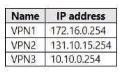
ネットワークポリシーサーバー(NPS)がインストールされたNPS1という名前のサーバーがあります。NPS1には以下のRADIUSクライアントがあります。

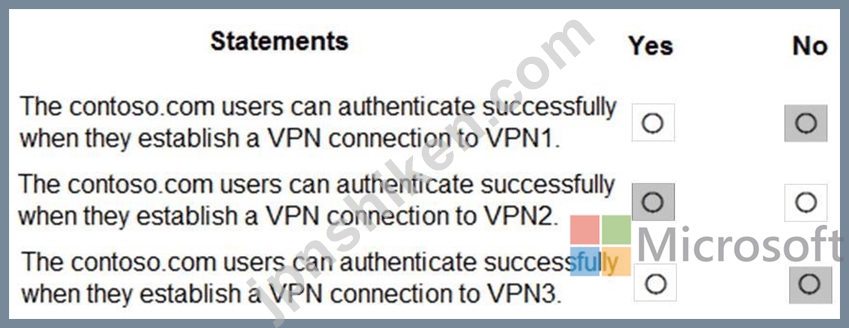
VPN1、VPN2、VPN3はRADIUS認証にNPS1を使用します。contoso.comのすべてのユーザーはVPN接続を確立できます。以下の各記述について、正しい場合は「はい」を選択してください。
それ以外の場合は、「いいえ」を選択してください。注:正解ごとに1ポイントが加算されます。

ネットワークポリシーサーバー(NPS)がインストールされたNPS1という名前のサーバーがあります。NPS1には以下のRADIUSクライアントがあります。
VPN1、VPN2、VPN3はRADIUS認証にNPS1を使用します。contoso.comのすべてのユーザーはVPN接続を確立できます。以下の各記述について、正しい場合は「はい」を選択してください。
それ以外の場合は、「いいえ」を選択してください。注:正解ごとに1ポイントが加算されます。
正解:

Explanation:
The Administering Windows Server Hybrid Core Infrastructure guidance for Network Policy Server (NPS) states that NPS processes requests only from configured and enabled RADIUS clients . The documentation explains that a RADIUS client entry must " identify the device by its IP address or DNS name ," and that " requests from devices not defined as RADIUS clients (or c lients that are disabled) are discarded ." It also notes that the " shared secret must match on the access server and on the RADIUS client definition
," and that enabling the client is required for NPS to accept authentication from that device.
Applying these rules:
* VPN1 (172.16.0.254) matches NPSClient1 by IP, but Enabled: False . Because disabled clients are rejected, users cannot authenticate to VPN1 through NPS1.
* VPN2 (131.10.15.254) matches NPSClient2 and is Enabled: True with the correct shared secret. Th erefore, users can authenticate successfully to VPN2.
* VPN3 (10.10.0.254) does not match any enabled RADIUS client entry. The only similar entry, NPSClient3 , is configured for 172.16.1.254 (wrong IP). Since NPS identifies clients by IP/FQDN and rejects unkn own devices, users cannot authenticate to VPN3.
Because "all users are allowed to establish VPN connections," user policy is not the blocker-the RADIUS client configuration (enabled state and correct IP mapping) determines success here.

- 質問一覧「109問」
- 質問1 お客様のネットワークには、adatum.com という名前の Active Dir...
- 質問2 グループ3とグループ5に追加できるグループはどれですか?回答す...
- 質問3 contoso.com という名前の Azure Active Directory Domain Servi...
- 質問4 グループ3とグループ4にどのグループを追加できますか?回答する...
- 質問5 サイトリンクの技術要件を満たす必要があります。どのユーザーが
- 質問6 Azure Active Directory Domain Services (Azure AD DS) ドメイ...
- 質問7 ユーザー1の技術要件を満たす必要があります。ソリューションは
- 質問8 御社はニューヨークにオフィスを構えていますね。 このネットワ
- 質問9 タスク4 SRV1 上で、mcrmicrosoft.com/windows/servercofe/iis ...
- 質問10 お客様のネットワークには、contoso.com と fabrikam.com という...
- 質問11 注: この質問は、同じシナリオを提示する一連の質問の一部です。...
- 質問12 ネットワーク要件を満たすDHCPの可用性ソリューションを実装する...
- 質問13 タスク6 SRV1上のWindows Admin Centerを使用してDC1を管理でき...
- 質問14 計画されている変更をサポートするために、Azure Arc の実装を計...
- 質問15 タスク9 グループ管理サービスアカウント(gMSA)を作成する予定で...
- 質問16 お客様のオンプレミスネットワークには、contoso.com という名前...
- 質問17 Windows Server 2019 を実行する Server1 という名前のサーバー...
- 質問18 contoso.com という名前の新しい Active Directory ドメイン サ...
- 質問19 Azure AD Connect を使用して Azure AD と同期する、contoso.com...
- 質問20 次の表に示すように、オンプレミスのファイルサーバーはWindows ...
- 質問21 Windows Serverを実行し、Hyper-Vサーバーの役割がインストール...
- 質問22 お客様のネットワークには、contoso.com という名前の Active Di...
- 質問23 お客様のネットワークには、contoso.com という名前の Active Di...
- 質問24 あなたの会社には本店と支社があります。2 つのオフィスは、WAN ...
- 質問25 Server1という名前のWindows Serverコンテナホストがあり、ディ...
- 質問26 オンプレミスの Active Directory ドメイン サービス (AD DS) ド...
- 質問27 お客様のネットワークには、contoso という名前のオンプレミスの...
- 質問28 Windows Server を実行し、UserData という名前の共有フォルダー...
- 質問29 ネットワークには Active Directory ドメイン サービス (AD DS) ...
- 質問30 お客様のオンプレミスネットワークには、Active Directoryドメイ...
- 質問31 タスク5 SRV1上のC:\appという名前のフォルダにコピーされたアプ...
- 質問32 お客様のネットワークには、contoso.com という名前の Active Di...
- 質問33 お客様のネットワークには、Active Directoryドメインサービス(A...
- 質問34 Windows Serverを実行し、Hyper-Vサーバーの役割がインストール...
- 質問35 お客様のオンプレミスデータセンターに、DC1 という名前が付けら...
- 質問36 お客様のネットワークには、contoso.com という名前の Active Di...
- 質問37 お使いのネットワークには、Active Directory ドメイン サー...
- 質問38 セキュリティ要件を満たすために、リモート管理を設定する必要が
- 質問39 Server1という名前のWindows Serverコンテナホストがあります。 ...
- 質問40 タスク7 Microsoft Defender for Cloudを使用して、DC1のセキュ...
- 質問41 Windows Serverを実行し、Hyper-Vサーバーの役割がインストール...
- 質問42 お客様のネットワークには、contoso.com という名前の Active Di...
- 質問43 注: この質問は、同じシナリオを提示する一連の質問の一部です。...
- 質問44 注: この質問は、同じシナリオを提示する一連の質問の一部です。...
- 質問45 VM1という名前のAzure仮想マシンがあり、そこでWindows Serverが...
- 質問46 Windows Serverが動作するServer1という名前のサーバーがありま...
- 質問47 タスク8 DO上に存在するfabnkam.comという名前のONSゾーンの管理...
- 質問48 Windows Server を実行し、DHCP サーバーの役割がインストールさ...
- 質問49 Server1という名前のWindowsサーバーがあります。 Server1に、Di...
- 質問50 お客様のネットワークには、オンプレミスのActive Directoryドメ...
- 質問51 オンプレミス環境には、Windows Serverが稼働し、インターネット...
- 質問52 注: この質問は、同じシナリオを提示する一連の質問の一部です。...
- 質問53 Windows Serverを実行し、Active Directoryフェデレーションサー...
- 質問54 タスク8 192.168.2.0 から 192.168.2.2 の IP アドレス範囲に関...
- 質問55 Azure サブスクリプションに、VNet1 という名前の仮想ネットワー...
- 質問56 お客様のネットワークには、contoso.com という名前の Active Di...
- 質問57 お客様のネットワークには、以下の図に示すように、3つのActive ...
- 質問58 ネットワークに Active Directory Domain Services (AD DS) ドメ...
- 質問59 タスク5 SRV1 上の scope! という名前の DHCP スコープがクライ...
- 質問60 お客様のネットワークには、adatum.com という名前の Active Dir...
- 質問61 Webapp1のセキュリティ要件を満たすために、どの3つのアクション...
- 質問62 お客様のネットワークには、次の図に示すように、2つのActive Di...
- 質問63 お客様のネットワークには、contoso という名前のオンプレミスの...
- 質問64 お客様のネットワークには、contoso.com という名前の Active Di...
- 質問65 Azure Virtual Desktop セッション ホストがセキュリティ要件を...
- 質問66 お客様のネットワークには、複数のサイトからなるActive Directo...
- 質問67 Windows Server を実行する VM1 という名前の Azure 仮想マシン...
- 質問68 Windows Serverが稼働し、10個の物理ディスクを搭載したサーバー...
- 質問69 タスク3 SRV1をDNSサーバーとして設定する必要があります。SRV1...
- 質問70 お客様のオンプレミスネットワークには、Active Directoryドメイ...
- 質問71 お客様のネットワークには、Active Directoryドメインサービス(A...
- 質問72 お客様のネットワークには、contoso.com と fabrikam.com という...
- 質問73 注: この質問は、同じシナリオを提示する一連の質問の一部です。...
- 質問74 お使いのネットワークには、Active Directory ドメイン サー...
- 質問75 お客様のネットワークには、contoso.com という名前の Azure AD ...
- 質問76 お客様のオンプレミスネットワークのIPアドレス範囲は10.0.0.0/2...
- 質問77 タスク9 ドメイン内のすべてのコンピュータが、adatum.com ゾー...
- 質問78 Azure サブスクリプションと、Windows 11 が動作する「Computed...
- 質問79 お客様のネットワークは、以下の表に示すセグメントで構成されて
- 質問80 お客様のネットワークには、Active Directoryドメインサービス(A...
- 質問81 お客様のネットワークには、adatum.com という名前の Active Dir...
- 質問82 ファイル共有の要件を満たすために、Azure File Sync を構成する...
- 質問83 タスク1 ドメインユーザーが「\\SRVl\Data」という名前の共有フ...
- 質問84 タスク1 gMSA1という名前のグループ管理サービスアカウント(gMSA...
- 質問85 マーケティングOUのユーザーがストレージ1にアクセスできること...
- 質問86 お客様のネットワークには、contoso という名前のオンプレミスの...
- 質問87 DC1が故障しました。 スキーママスターの技術要件を満たす必要が...
- 質問88 VM2の技術要件を満たす必要があります。 あなたはどうすべきでし...
- 質問89 お客様のネットワークには、conto.com という名前の単一ドメイン...
- 質問90 あなたはAzureサブスクリプションを所有しています。そのサブス...
- 質問91 タスク6 VM1 onSRV1という名前の仮想マシンに対して、ネストされ...
- 質問92 Windows Server を実行する Server! という名前のオンプレミスサ...
- 質問93 次の表に示すストレージ アカウントを含む Azure サブスクリプシ...
- 質問94 次の表に示すメンバーサーバーを含む、Active Directoryドメイン...
- 質問95 Active Directoryドメインサービス(AD DS)ドメインが存在します...
- 質問96 Windows Serverが動作するServer1という名前のサーバーがありま...
- 質問97 Windows Serverを実行するServer1という名前のファイルサーバー...
- 質問98 Windows Server を実行する Server 1 という名前のオンプレミス...
- 質問99 お客様はsub1という名前のAzureサブスクリプションと、Windows S...
- 質問100 Azure File Syncを使用して、Server1という名前のオンプレミスサ...
- 質問101 Server1という名前のサーバーがあります。 あなたはStorage Spac...
- 質問102 新しいAzureサブスクリプションを作成します。 Azure Active Dir...
- 質問103 タスク7 SRV1から推奨されるWindowsパフォーマンスカウンタをロ...
- 質問104 お客様のネットワークには、Contoso.com という名前の 2 つのド...
- 質問105 お客様のネットワークには、contoso.com という名前の Active Di...
- 質問106 オンプレミスのActive Directoryドメインサービス(AD DS)ドメイ...
- 質問107 ネットワークにはActive Directoryドメインサービス(AD DS)ド...
- 質問108 Windows Serverを実行するServer1とServer2という名前の2台のオ...
- 質問109 パスワードに関するセキュリティ要件を満たす必要があります。 A...
