- ホーム
- Microsoft
- AZ-800J - Administering Windows Server Hybrid Core Infrastructure (AZ-800日本語版)
- Microsoft.AZ-800J.v2026-02-16.q118
- 質問24
有効的なAZ-800J問題集はJPNTest.com提供され、AZ-800J試験に合格することに役に立ちます!JPNTest.comは今最新AZ-800J試験問題集を提供します。JPNTest.com AZ-800J試験問題集はもう更新されました。ここでAZ-800J問題集のテストエンジンを手に入れます。
AZ-800J問題集最新版のアクセス
「342問、30% ディスカウント、特別な割引コード:JPNshiken」
Windows Server を実行し、Hyper-V サーバー ロールがインストールされている Server1 という名前のサーバーがあります。
サーバー 1 をリモートで管理するときに、ヘルプデスク ユーザーが使用できる Hyper-V モジュール コマンドレットを 10 個に制限する必要があります。
Just Enough Administration (JEA) を構成し、ロール機能とセッション構成ファイルを正常に構築します。
PowerShell コマンドをどのように完了すればよいですか? 回答するには、回答領域で適切なオプションを選択してください。
注意: 正しい選択ごとに 1 ポイントが加算されます。

サーバー 1 をリモートで管理するときに、ヘルプデスク ユーザーが使用できる Hyper-V モジュール コマンドレットを 10 個に制限する必要があります。
Just Enough Administration (JEA) を構成し、ロール機能とセッション構成ファイルを正常に構築します。
PowerShell コマンドをどのように完了すればよいですか? 回答するには、回答領域で適切なオプションを選択してください。
注意: 正しい選択ごとに 1 ポイントが加算されます。
正解:

Explanation:
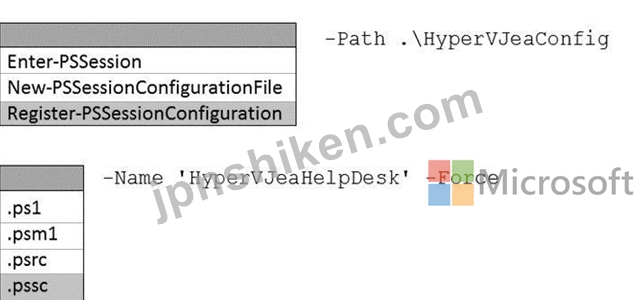
In Just Enough Administration (JEA), you restrict what remote users can do by publishing a PowerShell session endpoint that references a session configuration file and one or more role capability files. The AZ-
800 "Administering Windows Server Hybrid Core Infrastructure" materials explain that a JEA deployment follows this order: (1) create role capability files (.psrc) in a module's RoleCapabilities folder to enumerate allowed cmdlets, functions, and parameters; (2) author a session configuration file (.pssc)-typically with New-PSSessionConfigurationFile-that maps users or groups to the role capabilities; and (3) register the endpoint with Register-PSSessionConfiguration, supplying the .pssc path and a Name for the endpoint. Only after registration can helpdesk users connect to the constrained endpoint.
Critically, among the listed cmdlets, Register-PSSessionConfiguration is the one that accepts -Name and - Path to a .pssc file, which matches the prompt (-Path .\hypervJeaConfig __ -Name 'hypervJeaHelpDesk' - Force). Enter-PSSession is for connecting to an already published endpoint, and New- PSSessionConfigurationFile creates the .pssc but does not publish it. Likewise, file types .ps1 (script), .psm1 (module), and .psrc (role capability) are not valid for the -Path parameter when registering an endpoint.
Therefore, the correct completion is:
Register-PSSessionConfiguration -Path .\hypervJeaConfig.pssc -Name 'hypervJeaHelpDesk' -Force.

- 質問一覧「118問」
- 質問1 ネットワークには、contoso.com というオンプレミスの Active Di...
- 質問2 Windows Server を実行し、次の表に示すボリュームを含む Server...
- 質問3 ネットワークにはActive Directoryドメインサービス(AD DS)ドメ...
- 質問4 注: この質問は、同じシナリオを提示する一連の質問の一部です。...
- 質問5 contoso.com という名前の単一ドメイン Active Directory ドメイ...
- 質問6 次の表に示すように、Windows Server 2022 を実行するサーバーが...
- 質問7 オンプレミスの Windows デバイスがあります。 VNet1 という名前...
- 質問8 タスク1 DC2 が contoso.com のスキーマ マスターであることを確...
- 質問9 ネットワークには、conioso.com という名前の Active Directory ...
- 質問10 ネットワークには、contoso.com という名前の Active Directory ...
- 質問11 ディスクが1つ搭載された Server! というWindows Serverコンテナ...
- 質問12 ネットワークには Active Directory ドメイン サービス (AD DS) ...
- 質問13 ネットワークにはActive Directoryドメインサービス(AD DS)ドメ...
- 質問14 ネットワークには DHCP サーバーが含まれています。 新しいサブ...
- 質問15 contoso.com という名前の新しい Active Directory ドメイン サ...
- 質問16 ネットワークにはActive Directoryドメインサービス(AD DS)フォ...
- 質問17 Windows Server を実行し、次の構成を持つ VM1 という名前の Azu...
- 質問18 タスク 1 で使用できる 2 つの言語はどれですか。それぞれの正解...
- 質問19 タスク9 contosoxom という名前の DNS ゾーンの読み取り専用コピ...
- 質問20 ネットワークにはActive Directoryドメインサービス(AD DS)ドメ...
- 質問21 WindowsコンテナをホストするServer1というサーバーがあります。...
- 質問22 ネットワークには、adatum.com という Active Directory ドメイ...
- 質問23 タスク3 SRV1 上で、mcr.microsoft.com/windows/servercore/iis ...
- 質問24 Windows Server を実行し、Hyper-V サーバー ロールがインストー...
- 質問25 Marketing OU ユーザーの storage1 へのアクセスが技術要件を満...
- 質問26 Azure Active Directory (Azure AD) テナントと同期するオンプレ...
- 質問27 タスク9 グループ管理サービス アカウント (gMSA) を作成する予...
- 質問28 ネットワークには、adatum.com という名前の Active Directory ...
- 質問29 会社にはボストンとモントリオールにオフィスがあります。両オフ
- 質問30 パスワードのセキュリティ要件を満たす必要があります。 Azure A...
- 質問31 Host1 という名前の Windows Server 2022 コンテナー ホストがあ...
- 質問32 ネットワークには、contoso.com という名前の Active Directory ...
- 質問33 タスク10 グループポリシー設定を使用して、\\dd.contoso.com\in...
- 質問34 Windows Server を実行し、C、D、E という 3 つのボリュームを含...
- 質問35 Webapp1 のセキュリティ要件を満たすには、どの 3 つのアクショ...
- 質問36 Windows Server を実行し、Hyper-V サーバー ロールがインストー...
- 質問37 タスク6 VM1 onSRV1 という名前の仮想マシンに対してネストされ...
- 質問38 ネットワークにはActive Directoryドメインサービス(AD DS)ドメ...
- 質問39 HyperV1 の技術要件を満たす必要があります。 どのコマンドを実...
- 質問40 Azure Active Directory (Azure AD) テナントと同期するオンプレ...
- 質問41 Server4 の技術要件を満たす必要があります。 Server1 と Server...
- 質問42 オンプレミス ネットワークには、Active Directory ドメイン サ...
- 質問43 ネットワークには Active Domain Services (AD DS) フォレストが...
- 質問44 ネットワークには、adatum.com という Active Directory ドメイ...
- 質問45 タスク8 DC1にfabrikam.comという新しいプライマリDNSゾーンを展...
- 質問46 Azure File Sync を使用して、Server1 という名前のオンプレミス...
- 質問47 次の表に示すように、Windows Server を実行するオンプレミスの...
- 質問48 オンプレミスの Active Directory Domain Services (AD DS) ドメ...
- 質問49 オンプレミス ネットワークには、単一ドメインの Active Directo...
- 質問50 VM1 の技術要件を満たす必要があります。 最初にどのコマンドレ...
- 質問51 Windows Server を実行し、DHCP サーバーの役割がインストールさ...
- 質問52 オンプレミス ネットワークには、contoso.com という名前の Acti...
- 質問53 注: この質問は、同じシナリオを提示する一連の質問の一部です。...
- 質問54 ネットワークには、contoso.com という名前の Active Directory ...
- 質問55 ネットワークには、contoso.com と fabrikam.com という 2 つの ...
- 質問56 Windows Server 2022 を実行し、コンテナーホストとして構成され...
- 質問57 Windows Server を実行し、Share1 という名前のファイル共有を含...
- 質問58 ネットワークには、contoso.com と adatum.com という 2 つの Ac...
- 質問59 タスク5 SRV1 の C:\app というフォルダにコピーされたアプリケ...
- 質問60 ネットワークには、次の表に示すセグメントが含まれています。 (...
- 質問61 タスク7 Microsoft Defender for Cloud を使用して DC1 のセキュ...
- 質問62 ネットワークには、contoso.com という名前の Active Directory ...
- 質問63 タスク4 SRV1 上で mcrmicrosoft.com/windows/servercofe/iis イ...
- 質問64 sub1 という名前の Azure サブスクリプションと、Windows Server...
- 質問65 VM2 の技術要件を満たす必要があります。 何をすべきでしょうか?...
- 質問66 オンプレミス ネットワークの IP アドレス範囲は 10.0.0.0/23 で...
- 質問67 タスク5 SRV1 上の scope! という名前の DHCP スコープがクライ...
- 質問68 Windows Server を実行する Server1 という名前のサーバーがあり...
- 質問69 ネットワークには Active Directory ドメイン サービス (AD DS) ...
- 質問70 ネットワークには、contoso.com と fabrikam.com という 2 つの ...
- 質問71 Server1 という名前の Windows Server コンテナー ホストがあり...
- 質問72 タスク3 contoso.com に Admin1 という名前のユーザーを 3 人作...
- 質問73 Server1の技術要件を満たす必要があります。現在、必要なタスク...
- 質問74 Azure Virtual Desktop セッションホストがセキュリティ要件を満...
- 質問75 Azure Active Directory (Azure AD) テナントと同期するオンプレ...
- 質問76 次の資料に示すように、VM1 という名前の仮想マシンを含む Azure...
- 質問77 ネットワークには、adatum.com という名前の Active Directory ...
- 質問78 Windows Server を実行する Server1 というサーバーがあります。...
- 質問79 Azure Active Directory (Azure AD) テナントと同期するオンプレ...
- 質問80 Windows Server 2022 を実行し、次の表に示すネットワーク アダ...
- 質問81 次の表に示すように、Windows Server を実行するオンプレミス サ...
- 質問82 Windows Server を実行するタイル サーバーが 5 台あります。 フ...
- 質問83 タスク8192.168.2.0 ~ 192.168.2.255 の IP アドレス範囲に関連...
- 質問84 Windows Server を実行し、Active Directory フェデレーション ...
- 質問85 DC1 が失敗します。 スキーマ マスターの技術要件を満たす必要が...
- 質問86 ネットワークにはオンプレミスの Active Directory ドメイン サ...
- 質問87 Windows Server を実行できる Azure 仮想マシンをデプロイする計...
- 質問88 ネットワークにはActive Directoryドメインサービス(AD DS)フォ...
- 質問89 ネットワークに Active Directory Domain Services (AD DS) ドメ...
- 質問90 Windows Server を実行する Server1 という名前のサーバーがあり...
- 質問91 User1 の技術要件を満たす必要があります。ソリューションでは、...
- 質問92 単一のディスクを持つ Server1 という名前の Windows Server コ...
- 質問93 Windows Server を実行する Server1 と Servet2 という 2 つのオ...
- 質問94 タスク2 シアトルのサイトで DC3 という名前のドメイン コントロ...
- 質問95 Windows Server を実行し、UserData という名前の共有フォルダー...
- 質問96 Windows Server を実行する Server! という名前のオンプレミス ...
- 質問97 注: この質問は、同じシナリオを提示する一連の質問の一部です。...
- 質問98 分散型クラスター展開を使用しています。この展開には、Windows ...
- 質問99 Windows Server を実行する VM1 という Azure 仮想マシンがあり...
- 質問100 Windows Server を実行する Server1 というサーバーがあります。...
- 質問101 ネットワークには、contoso.com という名前の Active Directory ...
- 質問102 会社には本社と10の支社があり、それらはWANリンクで接続されて...
- 質問103 タスク6 Azure File Sync 10 を使用して、SRV1 上の C:\app の内...
- 質問104 Server 1 という名前の Windows Server コンテナー ホストと Ima...
- 質問105 新しい Azure サブスクリプションを作成します。 Azure Active D...
- 質問106 Server1 という名前の Windows Server コンテナー ホストと Azur...
- 質問107 次の表に示すストレージ アカウントを含む Azure サブスクリプシ...
- 質問108 注: この質問は、同じシナリオを提示する一連の質問の一部です。...
- 質問109 Windows Server を実行する Server1 という名前のオンプレミス ...
- 質問110 次の表に示すドメイン コントローラーを含む Active Directory ...
- 質問111 ネットワークには、Contoso.com という名前の 2 つのドメインか...
- 質問112 Microsoft Entra テナントと同期するオンプレミスの Active Dire...
- 質問113 Windows Server を実行する Server1 という名前のオンプレミス D...
- 質問114 注: この質問は、同じシナリオを提示する一連の質問の一部です。...
- 質問115 Azure AD Connect を使用して Azure AD と同期する、contoso.com...
- 質問116 ネットワークには Active Directory ドメイン サービス (AD DS) ...
- 質問117 タスク11 SRV1 から IP アドレスを取得するすべての DHCP クライ...
- 質問118 ネットワークには、contoso.com という Active Directory ドメイ...
