- ホーム
- Microsoft
- AZ-800J - Administering Windows Server Hybrid Core Infrastructure (AZ-800日本語版)
- Microsoft.AZ-800J.v2026-02-16.q118
- 質問15
有効的なAZ-800J問題集はJPNTest.com提供され、AZ-800J試験に合格することに役に立ちます!JPNTest.comは今最新AZ-800J試験問題集を提供します。JPNTest.com AZ-800J試験問題集はもう更新されました。ここでAZ-800J問題集のテストエンジンを手に入れます。
AZ-800J問題集最新版のアクセス
「342問、30% ディスカウント、特別な割引コード:JPNshiken」
contoso.com という名前の新しい Active Directory ドメイン サービス (AD DS) フォレストを展開します。このドメインには、DC1、DC2、DC3 という 3 つのドメイン コントローラーが含まれています。
Default-First-Site-Name の名前を Site1 に変更します。
DC1、DC2、DC3 を異なる場所にあるデータセンターに発送する予定です。
次の要件を満たすには、DC1、DC2、DC3 間のレプリケーションを構成する必要があります。
各ドメイン コントローラは、独自の Active Directory サイトに存在する必要があります。
各サイト間のレプリケーション スケジュールは個別に制御する必要があります。
レプリケーションの中断は最小限に抑える必要があります。
Active Directory サイトとサービス コンソールで順番に実行する必要がある 3 つのアクションはどれですか。回答するには、適切なアクションをアクション リストから回答領域に移動し、正しい順序に並べます。

Default-First-Site-Name の名前を Site1 に変更します。
DC1、DC2、DC3 を異なる場所にあるデータセンターに発送する予定です。
次の要件を満たすには、DC1、DC2、DC3 間のレプリケーションを構成する必要があります。
各ドメイン コントローラは、独自の Active Directory サイトに存在する必要があります。
各サイト間のレプリケーション スケジュールは個別に制御する必要があります。
レプリケーションの中断は最小限に抑える必要があります。
Active Directory サイトとサービス コンソールで順番に実行する必要がある 3 つのアクションはどれですか。回答するには、適切なアクションをアクション リストから回答領域に移動し、正しい順序に並べます。
正解:
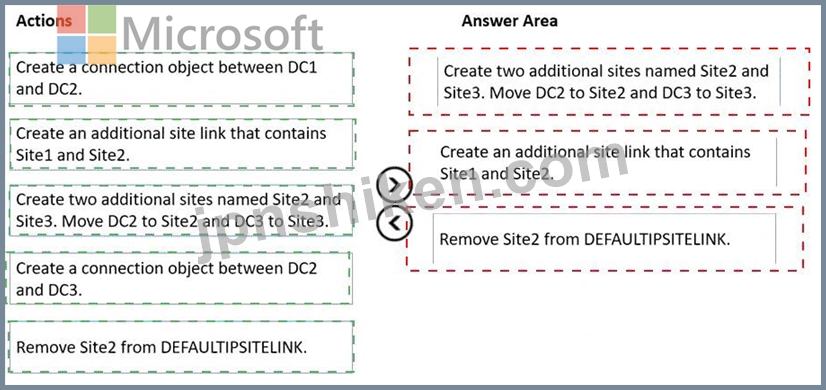
Explanation:
Create two additional sites named Site2 and Site3. Move DC2 to Site2 and DC3 to Site3.
Create an additional site link that contains Site1 and Site2.
Remove Site2 from DEFAULTIPSITELINK.
The Administering Windows Server Hybrid Core Infrastructure guidance for AD DS site design states that each physical location should be mapped to its own Active Directory site so that replication and logon traffic can be controlled and optimized per location. The documentation explains that when you deploy new sites, domain controllers must be moved into the corresponding site containers to ensure intrasite replication uses the local site topology and intersite replication follows site links. It also emphasizes that site links define replication cost, schedule, and frequency between sites; by creating separate site links for the pairs you want to manage, you can independently control replication schedules for those paths. The guides further note that new sites are placed in DEFAULTIPSITELINK by default, and that administrators can create additional site links and then remove a site from DEFAULTIPSITELINK to prevent it from inheriting the default schedule and cost-thereby isolating schedules per site pair. Finally, the KCC/ISTG automatically generate the required connection objects, so you generally should not create manual connection objects unless you have a specific exception. Following these principles: create Site2 and Site3 and move DCs, add a dedicated link (Site1-Site2) to set its own schedule, and remove Site2 from DEFAULTIPSITELINK so Site1-Site2 and Site1-Site3 replication can be controlled independently while minimizing replication interruptions.

- 質問一覧「118問」
- 質問1 ネットワークには、contoso.com というオンプレミスの Active Di...
- 質問2 Windows Server を実行し、次の表に示すボリュームを含む Server...
- 質問3 ネットワークにはActive Directoryドメインサービス(AD DS)ドメ...
- 質問4 注: この質問は、同じシナリオを提示する一連の質問の一部です。...
- 質問5 contoso.com という名前の単一ドメイン Active Directory ドメイ...
- 質問6 次の表に示すように、Windows Server 2022 を実行するサーバーが...
- 質問7 オンプレミスの Windows デバイスがあります。 VNet1 という名前...
- 質問8 タスク1 DC2 が contoso.com のスキーマ マスターであることを確...
- 質問9 ネットワークには、conioso.com という名前の Active Directory ...
- 質問10 ネットワークには、contoso.com という名前の Active Directory ...
- 質問11 ディスクが1つ搭載された Server! というWindows Serverコンテナ...
- 質問12 ネットワークには Active Directory ドメイン サービス (AD DS) ...
- 質問13 ネットワークにはActive Directoryドメインサービス(AD DS)ドメ...
- 質問14 ネットワークには DHCP サーバーが含まれています。 新しいサブ...
- 質問15 contoso.com という名前の新しい Active Directory ドメイン サ...
- 質問16 ネットワークにはActive Directoryドメインサービス(AD DS)フォ...
- 質問17 Windows Server を実行し、次の構成を持つ VM1 という名前の Azu...
- 質問18 タスク 1 で使用できる 2 つの言語はどれですか。それぞれの正解...
- 質問19 タスク9 contosoxom という名前の DNS ゾーンの読み取り専用コピ...
- 質問20 ネットワークにはActive Directoryドメインサービス(AD DS)ドメ...
- 質問21 WindowsコンテナをホストするServer1というサーバーがあります。...
- 質問22 ネットワークには、adatum.com という Active Directory ドメイ...
- 質問23 タスク3 SRV1 上で、mcr.microsoft.com/windows/servercore/iis ...
- 質問24 Windows Server を実行し、Hyper-V サーバー ロールがインストー...
- 質問25 Marketing OU ユーザーの storage1 へのアクセスが技術要件を満...
- 質問26 Azure Active Directory (Azure AD) テナントと同期するオンプレ...
- 質問27 タスク9 グループ管理サービス アカウント (gMSA) を作成する予...
- 質問28 ネットワークには、adatum.com という名前の Active Directory ...
- 質問29 会社にはボストンとモントリオールにオフィスがあります。両オフ
- 質問30 パスワードのセキュリティ要件を満たす必要があります。 Azure A...
- 質問31 Host1 という名前の Windows Server 2022 コンテナー ホストがあ...
- 質問32 ネットワークには、contoso.com という名前の Active Directory ...
- 質問33 タスク10 グループポリシー設定を使用して、\\dd.contoso.com\in...
- 質問34 Windows Server を実行し、C、D、E という 3 つのボリュームを含...
- 質問35 Webapp1 のセキュリティ要件を満たすには、どの 3 つのアクショ...
- 質問36 Windows Server を実行し、Hyper-V サーバー ロールがインストー...
- 質問37 タスク6 VM1 onSRV1 という名前の仮想マシンに対してネストされ...
- 質問38 ネットワークにはActive Directoryドメインサービス(AD DS)ドメ...
- 質問39 HyperV1 の技術要件を満たす必要があります。 どのコマンドを実...
- 質問40 Azure Active Directory (Azure AD) テナントと同期するオンプレ...
- 質問41 Server4 の技術要件を満たす必要があります。 Server1 と Server...
- 質問42 オンプレミス ネットワークには、Active Directory ドメイン サ...
- 質問43 ネットワークには Active Domain Services (AD DS) フォレストが...
- 質問44 ネットワークには、adatum.com という Active Directory ドメイ...
- 質問45 タスク8 DC1にfabrikam.comという新しいプライマリDNSゾーンを展...
- 質問46 Azure File Sync を使用して、Server1 という名前のオンプレミス...
- 質問47 次の表に示すように、Windows Server を実行するオンプレミスの...
- 質問48 オンプレミスの Active Directory Domain Services (AD DS) ドメ...
- 質問49 オンプレミス ネットワークには、単一ドメインの Active Directo...
- 質問50 VM1 の技術要件を満たす必要があります。 最初にどのコマンドレ...
- 質問51 Windows Server を実行し、DHCP サーバーの役割がインストールさ...
- 質問52 オンプレミス ネットワークには、contoso.com という名前の Acti...
- 質問53 注: この質問は、同じシナリオを提示する一連の質問の一部です。...
- 質問54 ネットワークには、contoso.com という名前の Active Directory ...
- 質問55 ネットワークには、contoso.com と fabrikam.com という 2 つの ...
- 質問56 Windows Server 2022 を実行し、コンテナーホストとして構成され...
- 質問57 Windows Server を実行し、Share1 という名前のファイル共有を含...
- 質問58 ネットワークには、contoso.com と adatum.com という 2 つの Ac...
- 質問59 タスク5 SRV1 の C:\app というフォルダにコピーされたアプリケ...
- 質問60 ネットワークには、次の表に示すセグメントが含まれています。 (...
- 質問61 タスク7 Microsoft Defender for Cloud を使用して DC1 のセキュ...
- 質問62 ネットワークには、contoso.com という名前の Active Directory ...
- 質問63 タスク4 SRV1 上で mcrmicrosoft.com/windows/servercofe/iis イ...
- 質問64 sub1 という名前の Azure サブスクリプションと、Windows Server...
- 質問65 VM2 の技術要件を満たす必要があります。 何をすべきでしょうか?...
- 質問66 オンプレミス ネットワークの IP アドレス範囲は 10.0.0.0/23 で...
- 質問67 タスク5 SRV1 上の scope! という名前の DHCP スコープがクライ...
- 質問68 Windows Server を実行する Server1 という名前のサーバーがあり...
- 質問69 ネットワークには Active Directory ドメイン サービス (AD DS) ...
- 質問70 ネットワークには、contoso.com と fabrikam.com という 2 つの ...
- 質問71 Server1 という名前の Windows Server コンテナー ホストがあり...
- 質問72 タスク3 contoso.com に Admin1 という名前のユーザーを 3 人作...
- 質問73 Server1の技術要件を満たす必要があります。現在、必要なタスク...
- 質問74 Azure Virtual Desktop セッションホストがセキュリティ要件を満...
- 質問75 Azure Active Directory (Azure AD) テナントと同期するオンプレ...
- 質問76 次の資料に示すように、VM1 という名前の仮想マシンを含む Azure...
- 質問77 ネットワークには、adatum.com という名前の Active Directory ...
- 質問78 Windows Server を実行する Server1 というサーバーがあります。...
- 質問79 Azure Active Directory (Azure AD) テナントと同期するオンプレ...
- 質問80 Windows Server 2022 を実行し、次の表に示すネットワーク アダ...
- 質問81 次の表に示すように、Windows Server を実行するオンプレミス サ...
- 質問82 Windows Server を実行するタイル サーバーが 5 台あります。 フ...
- 質問83 タスク8192.168.2.0 ~ 192.168.2.255 の IP アドレス範囲に関連...
- 質問84 Windows Server を実行し、Active Directory フェデレーション ...
- 質問85 DC1 が失敗します。 スキーマ マスターの技術要件を満たす必要が...
- 質問86 ネットワークにはオンプレミスの Active Directory ドメイン サ...
- 質問87 Windows Server を実行できる Azure 仮想マシンをデプロイする計...
- 質問88 ネットワークにはActive Directoryドメインサービス(AD DS)フォ...
- 質問89 ネットワークに Active Directory Domain Services (AD DS) ドメ...
- 質問90 Windows Server を実行する Server1 という名前のサーバーがあり...
- 質問91 User1 の技術要件を満たす必要があります。ソリューションでは、...
- 質問92 単一のディスクを持つ Server1 という名前の Windows Server コ...
- 質問93 Windows Server を実行する Server1 と Servet2 という 2 つのオ...
- 質問94 タスク2 シアトルのサイトで DC3 という名前のドメイン コントロ...
- 質問95 Windows Server を実行し、UserData という名前の共有フォルダー...
- 質問96 Windows Server を実行する Server! という名前のオンプレミス ...
- 質問97 注: この質問は、同じシナリオを提示する一連の質問の一部です。...
- 質問98 分散型クラスター展開を使用しています。この展開には、Windows ...
- 質問99 Windows Server を実行する VM1 という Azure 仮想マシンがあり...
- 質問100 Windows Server を実行する Server1 というサーバーがあります。...
- 質問101 ネットワークには、contoso.com という名前の Active Directory ...
- 質問102 会社には本社と10の支社があり、それらはWANリンクで接続されて...
- 質問103 タスク6 Azure File Sync 10 を使用して、SRV1 上の C:\app の内...
- 質問104 Server 1 という名前の Windows Server コンテナー ホストと Ima...
- 質問105 新しい Azure サブスクリプションを作成します。 Azure Active D...
- 質問106 Server1 という名前の Windows Server コンテナー ホストと Azur...
- 質問107 次の表に示すストレージ アカウントを含む Azure サブスクリプシ...
- 質問108 注: この質問は、同じシナリオを提示する一連の質問の一部です。...
- 質問109 Windows Server を実行する Server1 という名前のオンプレミス ...
- 質問110 次の表に示すドメイン コントローラーを含む Active Directory ...
- 質問111 ネットワークには、Contoso.com という名前の 2 つのドメインか...
- 質問112 Microsoft Entra テナントと同期するオンプレミスの Active Dire...
- 質問113 Windows Server を実行する Server1 という名前のオンプレミス D...
- 質問114 注: この質問は、同じシナリオを提示する一連の質問の一部です。...
- 質問115 Azure AD Connect を使用して Azure AD と同期する、contoso.com...
- 質問116 ネットワークには Active Directory ドメイン サービス (AD DS) ...
- 質問117 タスク11 SRV1 から IP アドレスを取得するすべての DHCP クライ...
- 質問118 ネットワークには、contoso.com という Active Directory ドメイ...
