- ホーム
- Microsoft
- AZ-104J - Microsoft Azure Administrator (AZ-104日本語版)
- Microsoft.AZ-104J.v2026-10-22.q188
- 質問48
有効的なAZ-104J問題集はJPNTest.com提供され、AZ-104J試験に合格することに役に立ちます!JPNTest.comは今最新AZ-104J試験問題集を提供します。JPNTest.com AZ-104J試験問題集はもう更新されました。ここでAZ-104J問題集のテストエンジンを手に入れます。
AZ-104J問題集最新版のアクセス
「481問、30% ディスカウント、特別な割引コード:JPNshiken」
次の表に示すリソースが含まれる、Subscription! という名前の Azure サブスクリプションがあります。
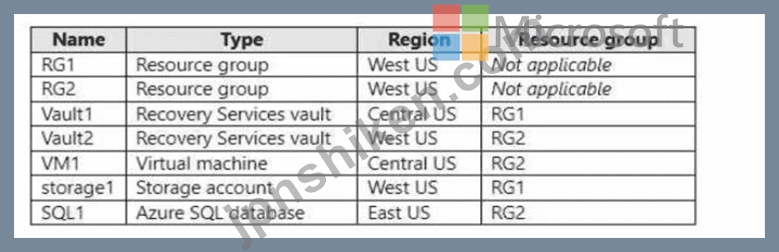
storage1 に、blob1 という名前の BLOB コンテナーと share1 という名前のファイル共有を作成します。
Vault1 と Vault2 にバックアップできるリソースはどれですか? 回答するには、回答領域で適切なオプションを選択してください。
注意: 正しい選択ごとに 1 ポイントが加算されます。

storage1 に、blob1 という名前の BLOB コンテナーと share1 という名前のファイル共有を作成します。
Vault1 と Vault2 にバックアップできるリソースはどれですか? 回答するには、回答領域で適切なオプションを選択してください。
注意: 正しい選択ごとに 1 ポイントが加算されます。
正解:

Explanation:

Azure Recovery Services vaults are used to store backup data and recovery points for supported workloads such as Azure VMs, Azure Files, and on-premises workloads. However, the configuration rules are strictly defined based on region and supported resource type.
From Microsoft Azure Administrator documentation and the official Azure Backup architecture, the following principles apply:
* Backup Region Dependency - A Recovery Services vault can only back up resources located in the same Azure region. For example, a vault in Central US can only back up Azure VMs, storage accounts, or workloads in Central US. It cannot back up resources in West US or East US.
* Vault1 (Central US, RG1)
* Located in Central US and can therefore back up only resources in Central US.
* From the table: VM1 is in Central US, and is eligible.
* storage1 (West US) and SQL1 (East US) cannot be backed up to Vault1 due to cross-region restrictions.
# Therefore, Vault1 can back up VM1 only.
* Vault2 (West US, RG2)
* Located in West US, and can only back up resources in West US.
* In West US, the only relevant resource is storage1, which contains a file share named share1.
Azure Backup supports Azure File share backup via Recovery Services vaults.
* Vault2 cannot back up VM1 (Central US) or SQL1 (East US) since they reside in different regions.
# Therefore, Vault2 can back up share1 only.
* Azure Backup Limitations Summary (From Microsoft Docs):
* Azure VMs # must be backed up to a vault in the same region.
* Azure File Shares # can be backed up using Recovery Services vaults in the same region as the storage account.
* Azure SQL Database # uses its own automated backup mechanism, not Recovery Services vaults.
Hence, by Azure documentation compliance and AZ-104 study guide principles:
* Vault1 backs up VM1 only.
* Vault2 backs up share1 only.
Final Verified Answer:
# Vault1 - VM1 only
# Vault2 - share1 only

- 質問一覧「188問」
- 質問1 次の図に示すストレージ アカウントを含む Azure サブスクリプシ...
- 質問2 次の表に示すユーザーを含む Azure AD のハイブリッド展開があり...
- 質問3 Subscription1 という名前の Azure サブスクリプションがありま...
- 質問4 App1とApp2という名前の2つのAzure App Service Webアプリがあり...
- 質問5 share1 という名前のファイル共有を含む、storage1 という名前の...
- 質問6 Azure サブスクリプションをお持ちです。このサブスクリプション...
- 質問7 ネットワークにはオンプレミスの Active Directory ドメイン サ...
- 質問8 お客様は、contoso2023 という名前のストレージ アカウントを含...
- 質問9 次の図に示すようにピアリングが構成されています。 (Exhibit) ...
- 質問10 注:この質問は、同じシナリオを提示する一連の質問の一部です。
- 質問11 次の表に示すリソースを含む Azure サブスクリプションがありま...
- 質問12 次の表に示すリソースが含まれる Subscription1 という名前の Az...
- 質問13 Windows Server 2019 を実行する VM1 という名前の Azure VM を...
- 質問14 10 個の Azure Web アプリをデプロイするために使用される、Temp...
- 質問15 注: この質問は、同じシナリオを提示する一連の質問の一部です。...
- 質問16 storage1 という名前の Azure ストレージ アカウントがあります...
- 質問17 storage1 という名前の Azure ストレージ アカウントと、次の表...
- 質問18 Azure Active Directory(Azure AD)テナントがあります。 Azure...
- 質問19 次の表に示すパブリック IP アドレスを使用する Azure サブスク...
- 質問20 Azureサブスクリプションに、storage1というストレージアカウン...
- 質問21 Microsoft 365 テナントと、contoso.com という名前の Azure Act...
- 質問22 次の表に示す仮想ネットワークを含む Azure サブスクリプション...
- 質問23 次の図に示すストレージ アカウントを含む Azure サブスクリプシ...
- 質問24 次の表に示すAzure Webアプリを作成する予定です。 (Exhibit) We...
- 質問25 技術要件とユーザー要件を満たすようにデバイス設定を構成する必
- 質問26 VM1 という名前の Azure 仮想マシンがあります。 Azure Backup ...
- 質問27 次の表に示すパブリック IP アドレスを持つ Azure サブスクリプ...
- 質問28 次の図に示すように、Azure ストレージ アカウントがあります。 ...
- 質問29 Azure ストレージ アカウントを作成します。 ストレージ アカウ...
- 質問30 お客様はMicrosoft Entraテナントをお持ちです。 新しい Microso...
- 質問31 次の図に示すように、Microsoft Entra テナントが構成されていま...
- 質問32 plan1 という App Service プランと、webapp1 という Azure Web ...
- 質問33 Subscroption1 という名前の Azure サブスクリプションがありま...
- 質問34 次の表に示すパブリック ロード バランサーを含む Azure サブス...
- 質問35 VM1 と VM2 という名前の 2 つの仮想マシンを含む Azure サブス...
- 質問36 注:この質問は、同じシナリオを提示する一連の質問の一部です。
- 質問37 Admin1 のユーザー要件を満たす必要があります。 何をすべきでし...
- 質問38 次の表に示す IP アドレスを使用する Cluster1 という名前の Azu...
- 質問39 VNet1 という仮想ネットワークを含む、Subscription1 という Azu...
- 質問40 アプリケーションを移動した後、App1 のバックアップ ソリューシ...
- 質問41 storage1 という名前の Azure ストレージ アカウントがあります...
- 質問42 storageaccount1 という名前の Azure ストレージ アカウントを含...
- 質問43 Windows Server 2016 Datacenter イメージを使用する仮想マシン ...
- 質問44 次の表に示す仮想ネットワークを含む Azure サブスクリプション...
- 質問45 VM1という名前のAzure仮想マシンをバックアップする予定です。 ...
- 質問46 8 台の仮想マシンと次の表に示すリソースを含む Azure サブスク...
- 質問47 VM1とVM2をLB1のバックエンドに追加する必要があります。まず何...
- 質問48 次の表に示すリソースが含まれる、Subscription! という名前の A...
- 質問49 注:この質問は、同じシナリオを提示する一連の質問の一部です。
- 質問50 VM1 という名前の Azure 仮想マシンがあります。VM1 は、ARMIjso...
- 質問51 Subscription1 と Subscription2 という 2 つのサブスクリプショ...
- 質問52 10 個の Azure サブスクリプションにリンクされている Azure AD ...
- 質問53 5,000 個のユーザー アカウントを含む Microsoft Entra テナント...
- 質問54 VNet1 と VNet2 という 2 つのピアリングされた仮想ネットワーク...
- 質問55 注:この質問は、同じシナリオを提示する一連の質問の一部です。
- 質問56 次の表に示すリソースが含まれる Sub1 という名前の Azure サブ...
- 質問57 storage1 という名前のAzure Storageアカウントがあります。 Use...
- 質問58 VM1 という名前の仮想マシンを含む Azure サブスクリプションが...
- 質問59 注: この質問は、同じシナリオを提示する一連の質問の一部です。...
- 質問60 Azure サブスクリプションをお持ちです。 次の Azure Resource M...
- 質問61 次の表に示すグループを含む Microsoft Entra テナントがありま...
- 質問62 次の表に示すリソースを含む Azure サブスクリプションがありま...
- 質問63 次の表に示すストレージ アカウントを含む Azure サブスクリプシ...
- 質問64 次の図に示すように、contoso2023 という名前の Azure コンテナ...
- 質問65 VM1 と VM2 という 2 つの Azure 仮想マシン上で実行される App1...
- 質問66 storage1 という名前のストレージ アカウントを含む Azure サブ...
- 質問67 Azure Container Instances を使用する Azure サブスクリプショ...
- 質問68 VM1 という名前の Azure 仮想マシンがあります。VM1 は、ARMIjso...
- 質問69 Azure ADテナントにリンクされたAzureサブスクリプションがあり...
- 質問70 次の表に示すリソースを含む Azure サブスクリプションがありま...
- 質問71 画像を保存する storage1 という名前の Azure ストレージ アカウ...
- 質問72 VM1という名前のAzure仮想マシンがあります。 AzureはVM1からイ...
- 質問73 次の表に示すリソースを含む Azure サブスクリプションがありま...
- 質問74 Subscription1 という名前の Azure サブスクリプションがありま...
- 質問75 RG1 という名前のリソース グループを含む Azure サブスクリプシ...
- 質問76 Workspace 1 と Workspace? という名前の 2 つの Log Analytics ...
- 質問77 次の表に示すグループを含む、adatum.com という名前の Microsof...
- 質問78 Azure ストレージ アカウントを含む Azure サブスクリプションが...
- 質問79 Azureストレージアカウントを含むAzureサブスクリプションがあり...
- 質問80 Azure サブスクリプションをお持ちです。 File1.bicep という名...
- 質問81 Azure サブスクリプションに、VM1 という名前の仮想マシンと App...
- 質問82 オンプレミス ネットワークがあります。 VNET1、VNET2、VNET3 と...
- 質問83 次の表に示すリソースを含む Azure サブスクリプションがありま...
- 質問84 財務部門の監査人にどのブレードを使用するように指示する必要が
- 質問85 次の図に示すネットワーク プロファイルを持つ Azure Kubernetes...
- 質問86 User1 という名前のユーザーと、次の表に示すリソースを含む Azu...
- 質問87 次の表に示すグループを含む Azure AD テナントがあります。 (Ex...
- 質問88 DB1 という名前の Azure SQL データベースを含む Azure サブスク...
- 質問89 技術要件を満たす識別ソリューションを推奨する必要があります。
- 質問90 VNet1 という名前の仮想ネットワークを含む Azure サブスクリプ...
- 質問91 次の表に示す BLOB コンテナーを含む Sub1 という名前の Azure ...
- 質問92 VNet1 という名前の仮想ネットワークを含む Azure サブスクリプ...
- 質問93 Windows Server を実行する Azure 仮想マシン「VM1」があります...
- 質問94 Sub1 と Sub2 という名前の 2 つの Azure サブスクリプションが...
- 質問95 RG1 という名前のリソース グループを含む Azure サブスクリプシ...
- 質問96 VM1 という名前の Azure 仮想マシンがあります。VM1 は、ARM1.js...
- 質問97 あなたは、それぞれ複数の仮想マシンを含む複数のAzureサブスク...
- 質問98 Sub1 という名前の Azure サブスクリプションがあり、その中に U...
- 質問99 Registry1 という名前の Anne コンテナ レジストリがあり、そこ...
- 質問100 VM1 という名前の仮想マシンを含む Azure サブスクリプションが...
- 質問101 App1という名前の分散型オンプレミスアプリをAzureサブスクリプ...
- 質問102 contoso.com という名前の Microsoft Entra テナントがあります...
- 質問103 図に示すように、VNet1 という名前の仮想ネットワークがあります...
- 質問104 DCR1 に計画されている変更を実装する必要があります。どのタイ...
- 質問105 注: この質問は、同じシナリオを提示する一連の質問の一部です。...
- 質問106 Subscription 1 と Subscription2 という名前の 2 つの Azure サ...
- 質問107 オンプレミス ネットワークがあります。 VNet1 と VNet2 という ...
- 質問108 次の表のリソースを含む Azure サブスクリプションがあります。 ...
- 質問109 Azure Resource Manager テンプレートを使用して、仮想マシン ス...
- 質問110 次の図に示すように構成される VM1 という名前の Azure 仮想マシ...
- 質問111 ストレージアカウントのコンテンツに計画されている変更を適用す
- 質問112 次の表のリソースを含む Azure サブスクリプションがあります。 ...
- 質問113 Microsoft Entra テナントがあり、External User という名前のユ...
- 質問114 Azure Blob Storage と Azure File Storage を使用する storage1...
- 質問115 contoso.com という名前の登録済み DNS ドメインがあります。 co...
- 質問116 VNet1 という名前の Azure 仮想ネットワークがあり、サイト間 VP...
- 質問117 Azure サブスクリプションをお持ちです。次の表に示すリソースを...
- 質問118 Sub1 と Sub2 という名前の 2 つの Azure サブスクリプションが...
- 質問119 次の表に示すコンテナーを含む Azure サブスクリプションがあり...
- 質問120 contoso.onmicrosoft.com という名前の Azure Active Directory ...
- 質問121 次の表に示す仮想ネットワークを含む Azure サブスクリプション...
- 質問122 storage1 という Azure Storage アカウントがあり、その中に con...
- 質問123 Azure サブスクリプションをお持ちです。 Azure Resource Manage...
- 質問124 次の表に示す Azure 仮想マシンがあります。 (Exhibit) VM1 と V...
- 質問125 次の表に示す Azure 仮想マシンを含む Azure サブスクリプション...
- 質問126 次の図に示すような Azure ポリシーがあります。 (Exhibit) この...
- 質問127 注: この質問は、同じシナリオを提示する一連の質問の一部です。...
- 質問128 初期ドメイン名を持つ Azure Active Directory (Azure AD) テナ...
- 質問129 ASP1 という名前の Azure App Service プランがあります。 ASP1 ...
- 質問130 storage1 という名前のストレージ アカウントを含む Azure サブ...
- 質問131 次の表に示すユーザーを含む contoso.onmicrosoft.com という名...
- 質問132 ストレージ アカウントを含む Azure サブスクリプションがありま...
- 質問133 Azureサブスクリプションには、storage1という名前のストレージ...
- 質問134 cont2 に対して計画された変更を実装します。 cont2 に作成でき...
- 質問135 注: この質問は、同じシナリオを提示する一連の質問の一部です。...
- 質問136 storage1という名前のAzureストレージアカウントがあります。 Az...
- 質問137 contoso.com という名前の Azure Active Directory (Azure AD) ...
- 質問138 Azureサブスクリプションがあり、その中には米国東部2リージョン...
- 質問139 VNET1 という名前の仮想ネットワークを含む Azure サブスクリプ...
- 質問140 次の表に示す Azure コンテナー レジストリを持つ Azure サブス...
- 質問141 注: この質問は、同じシナリオを示す一連の質問の一部です。この...
- 質問142 次の表に示すグループを含む、adatum.com という名前の Azure AD...
- 質問143 次の表に示すリソースを含む Azure サブスクリプションがありま...
- 質問144 次の表に示す仮想マシンを含む Azure サブスクリプションがあり...
- 質問145 Azureサブスクリプションに、storage1というストレージアカウン...
- 質問146 storage1 というストレージアカウントを含む Azure サブスクリプ...
- 質問147 次の表に示す Azure 仮想マシンがあります。 (Exhibit) VNET1 は...
- 質問148 LB1 という名前の Azure ロード バランサーがあります。 User1 ...
- 質問149 技術要件を満たすには、VM1 と VM2 のアラートを構成する必要が...
- 質問150 Standard レベルの Azure コンテナー レジストリがあります。 管...
- 質問151 VM1 という仮想マシンを含む Azure サブスクリプションがありま...
- 質問152 オンプレミスネットワークには、Share1という名前のSMB共有が含...
- 質問153 User1 という名前のユーザーを含む Azure サブスクリプションが...
- 質問154 VM1という名前のAzure仮想マシンを含むAzureサブスクリプション...
- 質問155 10台の仮想マシン、Vault 1というキーコンテナー、NSG1というネ...
- 質問156 App1のソリューションを推奨する必要があります。ソリューション...
- 質問157 RG1 という名前のリソース グループを含む Azure サブスクリプシ...
- 質問158 Windows Server を実行する VM1 という名前の Azure 仮想マシン...
- 質問159 お客様はAzureサブスクリプションをご利用中です。このサブスク...
- 質問160 Azure サブスクリプションをお持ちです。 50 台の仮想マシンを V...
- 質問161 Template1とTemplate2という名前の2つのAzure Resource Manager(...
- 質問162 Azureサブスクリプションがあります。 ユーザーは、ホームまたは...
- 質問163 Subscription1 という名前の Azure サブスクリプションがありま...
- 質問164 次の表に示す仮想ネットワークを含む Azure サブスクリプション...
- 質問165 storage1 という Azure Storage アカウントがあり、このアカウン...
- 質問166 Azure 仮想マシンを 3 つの Azure リージョンにデプロイします。...
- 質問167 次の表に示すストレージ アカウントを含む Azure サブスクリプシ...
- 質問168 storage 1 という名前のストレージ アカウントを含む Azure サブ...
- 質問169 VM1 という名前の仮想マシンを含む Azure サブスクリプションを...
- 質問170 Azure サブスクリプションをお持ちです。 次の表に示す Azure コ...
- 質問171 VM1 という名前の仮想マシンと、User1 および User2 という名前...
- 質問172 次の表に示すグループを含む Microsoft Entra テナントがありま...
- 質問173 財務部門のユーザー向け設定を自動化するソリューションを推奨す
- 質問174 VM1、VM2、VM3という3つの仮想マシンを含むAzureサブスクリプシ...
- 質問175 storage1 という名前の Azure Storage アカウントがあり、そこに...
- 質問176 RSV1 という名前の Recovery Services コンテナーがあります。RS...
- 質問177 VM1 という名前の仮想マシンを含む Azure サブスクリプションが...
- 質問178 Windows Server 2019 を実行する VM1 という名前の Azure 仮想マ...
- 質問179 Active Directory の問題を解決する必要があります。 何をすべき...
- 質問180 あなたは、webapp1 という名前の Web アプリを含む Azure サブス...
- 質問181 storage1 という名前のストレージ アカウントを含む Azure サブ...
- 質問182 Sub1 という名前の Azure サブスクリプションがあり、その中に R...
- 質問183 スコープ 1 の計画された変更を実装します。 スコープ 1 が技術...
- 質問184 次の表のリソースを含む Azure サブスクリプションがあります。 ...
- 質問185 VNet1という仮想ネットワークを含むSubscription1というAzureサ...
- 質問186 Traffic Analytics が構成された Azure サブスクリプションがあ...
- 質問187 2 つの実行中のインスタンスを含む App1 という名前の Azure App...
- 質問188 Azure サブスクリプションをお持ちです。 Templatejson という名...
