有効的なAB-730J問題集はJPNTest.com提供され、AB-730J試験に合格することに役に立ちます!JPNTest.comは今最新AB-730J試験問題集を提供します。JPNTest.com AB-730J試験問題集はもう更新されました。ここでAB-730J問題集のテストエンジンを手に入れます。
AB-730J問題集最新版のアクセス
「88問、30% ディスカウント、特別な割引コード:JPNshiken」
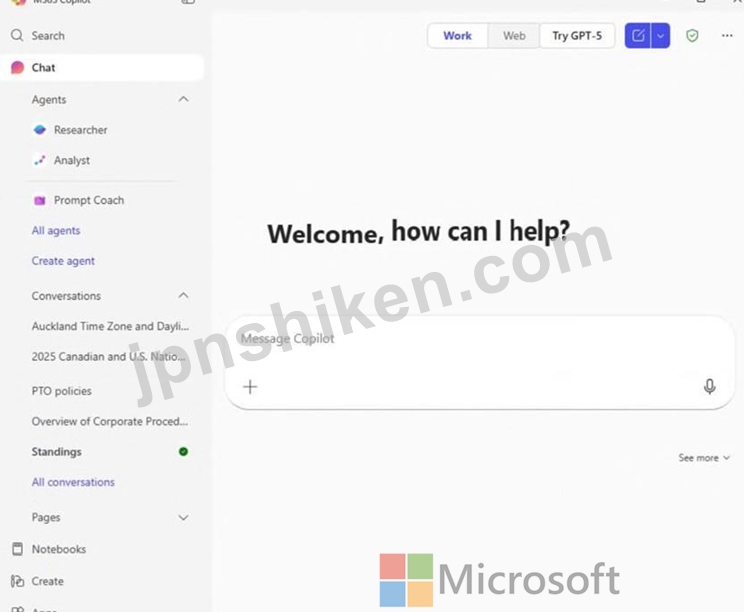
次の図に示すように、Microsoft 356 Copilot を開きます。
順位に関する会話から、どのようなことが推測できますか?
順位に関する会話から、どのようなことが推測できますか?
正解:A
The green shield icon is displayed.
In the Microsoft 365 Copilot app interface, the shield icon is a green shield located in the top right corner of the chat window.
Here are the key details about this icon:
Function: It indicates that Enterprise Data Protection (EDP) or Commercial Data Protection is active, meaning your chats, prompt inputs, and data are protected and not used to train the underlying AI models.
Appearance: It is a green shield icon, sometimes appearing as a solid green shape, often located next to the "New Chat" button or user profile icon.
Interaction: Hovering over or clicking the green shield displays a message confirming that commercial data protection applies to the conversation.
Context: It signifies that you are logged in with a work or school account (Microsoft Entra ID). If this icon is not present, you may be using the public version of Copilot, which does not have the same data protection.
Location: As of early 2024, this icon replaced the older, text-based "Protected" label in the user interface.
Reference:
https://m365admin.handsontek.net/updates-to-the-microsoft-copilot-for-microsoft-365-user- interface

- 質問一覧「48問」
- 質問1 ホットスポットに関する質問 文を正しく完成させる選択肢を選び
- 質問2 あなたは、自社と他社との提携に関する提案を要約する予定です。
- 質問3 保存済みのプロンプトを実行すると、次の応答が表示されます。「
- 質問4 AIにおけるレコメンデーションシステムの目的は何ですか?
- 質問5 Microsoft 365 Copilot の Researcher エージェントを使用してレ...
- 質問6 トレーニングプランを作成するには、Microsoft 365 Copilotを使...
- 質問7 あなたは社内のMicrosoft Teams会議に遅れて参加し、見逃した内...
- 質問8 ホットスポットに関する質問 文を正しく完成させる選択肢を選び
- 質問9 同僚から複数の画像が送られてくる。 あなたは、これらの画像がM...
- 質問10 ホットスポットに関する質問 文を正しく完成させる選択肢を選び
- 質問11 ホットスポットに関する質問 以下の各記述について、正しい場合
- 質問12 ホットスポットに関する質問 文を正しく完成させる選択肢を選び
- 質問13 ホットスポットに関する質問 以下の各記述について、正しい場合
- 質問14 ホットスポットに関する質問 以下の各記述について、正しい場合
- 質問15 ホットスポットに関する質問 あなたは、Microsoft Teamsを含むMi...
- 質問16 Microsoft 365 Copilot アプリでカスタム分析エージェントを作成...
- 質問17 WebブラウザーからMicrosoft 365 Copilotにアクセスする必要があ...
- 質問18 Microsoft 365 Copilot の会話が開いています。 会話中は、Agent...
- 質問19 ホットスポットに関する質問 以下の各記述について、正しい場合
- 質問20 Microsoft 365 Copilot の Researcher エージェントを使用してレ...
- 質問21 あなたは、自社のマーケティングチーム向けに、Microsoft 365 Co...
- 質問22 ホットスポットに関する質問 以下の各記述について、正しい場合
- 質問23 あなたはマーケティングアシスタントとして、上司との予算会議の
- 質問24 ホットスポットに関する質問 Microsoft 365 Copilot の研究者エ...
- 質問25 Microsoft 365 Copilot ノートブックを作成し、ローカルフォルダ...
- 質問26 あなたは、Microsoft 365 Copilot と Microsoft 365 Copilot Cha...
- 質問27 あなたはMicrosoft 365のサブスクリプションをお持ちです。 お客...
- 質問28 Microsoft 365 Copilot を使用して、Microsoft SharePoint ライ...
- 質問29 Microsoft 365 Copilotには、新製品開発のための調査に関連する...
- 質問30 あなたはMicrosoft 365 Copilotライセンスをお持ちです。 あなた...
- 質問31 Microsoft 365 Copilotで、提案に関する情報を取得するためのプ...
- 質問32 ホットスポットに関する質問 文を正しく完成させる選択肢を選び
- 質問33 「AIバイアス」とは何を指すのですか?
- 質問34 ビジネス運営においてAIを活用することの潜在的なメリットは何で...
- 質問35 あなたはMicrosoft 365 Copilotを使って旅行の計画を立てており...
- 質問36 あなたは医学研究者です。 Microsoft 365 Copilotが、あなたの専...
- 質問37 あなたは、Microsoft 365 Copilot と Microsoft 365 Copilot Cha...
- 質問38 他社の同僚が、あるプロンプトへのリンクを共有してくれた。 リ
- 質問39 ホットスポットに関する質問 あなたはMicrosoft 365 Copilotライ...
- 質問40 次の図に示すように、Microsoft 356 Copilot を開きます。 (Exhi...
- 質問41 ホットスポットに関する質問 文を正しく完成させる選択肢を選び
- 質問42 ホットスポットに関する質問 あなたはMicrosoft 365 Copilotライ...
- 質問43 プロンプトを作成し、Microsoft OneDriveから複数のファイルを追...
- 質問44 Microsoft 365 Copilot の会話におけるプロンプトの正確性を向上...
- 質問45 ホットスポットに関する質問 文を正しく完成させる選択肢を選び
- 質問46 ホットスポットに関する質問 文を正しく完成させる選択肢を選び
- 質問47 Microsoft 365 Copilot の会話が複数存在します。 会話をまとめ...
- 質問48 ホットスポットに関する質問 あなたはMicrosoft 365のサブスクリ...
