- ホーム
- Cisco
- 200-301J - Cisco Certified Network Associate Exam (200-301日本語版)
- Cisco.200-301J.v2026-09-26.q525
- 質問185
有効的な200-301J問題集はJPNTest.com提供され、200-301J試験に合格することに役に立ちます!JPNTest.comは今最新200-301J試験問題集を提供します。JPNTest.com 200-301J試験問題集はもう更新されました。ここで200-301J問題集のテストエンジンを手に入れます。
200-301J問題集最新版のアクセス
「1255問、30% ディスカウント、特別な割引コード:JPNshiken」
2 つのレイヤ 2 スイッチ間には物理的な接続が実装されています。
また、両者間のネットワーク接続を設定する必要があります。
I. LACP EtherChannel を設定し、番号を 44 とします。
スイッチ SWI と SW2 間で EthernetO/O インターフェースを使用し、
両端ともEthernet0/1ポートを使用している。LACPモードは両端で一致している必要がある。
2. EtherChannelをトランクリンクとして設定します。
3. トランクリンクを 802.Iq タグで構成します。
4. VLAN「MONITORING」をタグなしVLANとして設定します。
イーサチャネル。
ガイドライン
これは、仮想デバイス上でタスクを実行する実験課題です。
* この実験項目のタスクを確認するには、「タスク」タブを参照してください。
* デバイスコンソールにアクセスしてタスクを実行するには、「トポロジー」タブを参照してください。
* コンソールへのアクセスは、デバイスアイコンをクリックするか、コンソールウィンドウの上にあるタブを使用することで、必要なすべてのデバイスで利用できます。
必要な事前設定はすべて完了しました。
* デバイスの有効化パスワードやホスト名を変更しないでください。
次の項目に進む前に、設定をNVRAMに保存してください。
* 画面下部の「次へ」をクリックして、この実験を提出し、次の問題に進んでください。
* 「次へ」をクリックすると、ラボが閉じられ、再度開くことはできません。
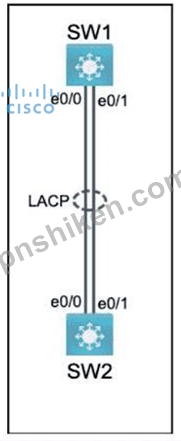
また、両者間のネットワーク接続を設定する必要があります。
I. LACP EtherChannel を設定し、番号を 44 とします。
スイッチ SWI と SW2 間で EthernetO/O インターフェースを使用し、
両端ともEthernet0/1ポートを使用している。LACPモードは両端で一致している必要がある。
2. EtherChannelをトランクリンクとして設定します。
3. トランクリンクを 802.Iq タグで構成します。
4. VLAN「MONITORING」をタグなしVLANとして設定します。
イーサチャネル。
ガイドライン
これは、仮想デバイス上でタスクを実行する実験課題です。
* この実験項目のタスクを確認するには、「タスク」タブを参照してください。
* デバイスコンソールにアクセスしてタスクを実行するには、「トポロジー」タブを参照してください。
* コンソールへのアクセスは、デバイスアイコンをクリックするか、コンソールウィンドウの上にあるタブを使用することで、必要なすべてのデバイスで利用できます。
必要な事前設定はすべて完了しました。
* デバイスの有効化パスワードやホスト名を変更しないでください。
次の項目に進む前に、設定をNVRAMに保存してください。
* 画面下部の「次へ」をクリックして、この実験を提出し、次の問題に進んでください。
* 「次へ」をクリックすると、ラボが閉じられ、再度開くことはできません。
正解:
Solution is given below explanation.
Explanation:
To configure an LACP EtherChannel and number it as 44, configure it between switches SW1 and SW2 using interfaces Ethernet0/0 and Ethernet0/1 on both sides, configure the EtherChannel as a trunk link, configure the trunk link with 802.1q tags, and configure VLAN 'MONITORING' as the untagged VLAN of the EtherChannel, you need to follow these steps:
On both SW1 and SW2, enter the global configuration mode by using the configure terminal command.
On both SW1 and SW2, select the two interfaces that will form the EtherChannel by using the interface range ethernet 0/0 - 1 command. This will enter the interface range configuration mode.
On both SW1 and SW2, set the protocol to LACP by using the channel-protocol lacp command.
On both SW1 and SW2, assign the interfaces to an EtherChannel group number 44 by using the channel- group 44 mode active command. This will create a logical interface named Port-channel44 and set the LACP mode to active on both ends. The LACP mode must match on both ends for the EtherChannel to form.
On both SW1 and SW2, exit the interface range configuration mode by using the exit command.
On both SW1 and SW2, enter the Port-channel interface configuration mode by using the interface port- channel 44 command.
On both SW1 and SW2, configure the Port-channel interface as a trunk link by using the switchport mode trunk command.
On both SW1 and SW2, configure the Port-channel interface to use 802.1q tags for VLAN identification by using the switchport trunk encapsulation dot1q command.
On both SW1 and SW2, configure VLAN 'MONITORING' as the untagged VLAN of the Port-channel interface by using the switchport trunk native vlan MONITORING command.
On both SW1 and SW2, exit the Port-channel interface configuration mode by using the exit command.
On both SW1 and SW2, save the configuration to NVRAM by using the copy running-config startup-config command.
Explanation:
To configure an LACP EtherChannel and number it as 44, configure it between switches SW1 and SW2 using interfaces Ethernet0/0 and Ethernet0/1 on both sides, configure the EtherChannel as a trunk link, configure the trunk link with 802.1q tags, and configure VLAN 'MONITORING' as the untagged VLAN of the EtherChannel, you need to follow these steps:
On both SW1 and SW2, enter the global configuration mode by using the configure terminal command.
On both SW1 and SW2, select the two interfaces that will form the EtherChannel by using the interface range ethernet 0/0 - 1 command. This will enter the interface range configuration mode.
On both SW1 and SW2, set the protocol to LACP by using the channel-protocol lacp command.
On both SW1 and SW2, assign the interfaces to an EtherChannel group number 44 by using the channel- group 44 mode active command. This will create a logical interface named Port-channel44 and set the LACP mode to active on both ends. The LACP mode must match on both ends for the EtherChannel to form.
On both SW1 and SW2, exit the interface range configuration mode by using the exit command.
On both SW1 and SW2, enter the Port-channel interface configuration mode by using the interface port- channel 44 command.
On both SW1 and SW2, configure the Port-channel interface as a trunk link by using the switchport mode trunk command.
On both SW1 and SW2, configure the Port-channel interface to use 802.1q tags for VLAN identification by using the switchport trunk encapsulation dot1q command.
On both SW1 and SW2, configure VLAN 'MONITORING' as the untagged VLAN of the Port-channel interface by using the switchport trunk native vlan MONITORING command.
On both SW1 and SW2, exit the Port-channel interface configuration mode by using the exit command.
On both SW1 and SW2, save the configuration to NVRAM by using the copy running-config startup-config command.

- 質問一覧「525問」
- 質問1 展示資料を参照してください。 (Exhibit) ルーターR14は現在設定...
- 質問2 PC がポートに接続されるとすぐにポートのどのコマンドがフォワ...
- 質問3 最近のセキュリティ侵害とRADIUS障害を受けて、エンジニアは各エ...
- 質問4 展示資料を参照してください。 (Exhibit) エンジニアが、ルータ...
- 質問5 コピー機能を使用しながら、エンジニアが 20 のネットワーク ル...
- 質問6 無線LANのニーズが最小限で、中央管理を必要としない小規模オフ...
- 質問7 展示資料を参照してください。 (Exhibit) ネットワークエンジニ...
- 質問8 WPA3で実装された機能強化とは何ですか?
- 質問9 (Exhibit) 図を参照してください。動的ルーティングプロトコルで...
- 質問10 FlexConnectモードで動作するAPに接続し、WLANがFlexローカルス...
- 質問11 展示資料を参照してください。 (Exhibit) R5 は現在ネットワーク...
- 質問12 Rapid PVST+ が設定されたスイッチで入力されるコマンドのうち、...
- 質問13 エンジニアがフローティングスタティックルートを設定する理由を
- 質問14 展示資料を参照してください。 (Exhibit) セキュリティ上の理由...
- 質問15 展示資料を参照してください。 (Exhibit) ルーターは192.168.12....
- 質問16 展示資料を参照してください。 (Exhibit) TenGigabitEthernet0/0...
- 質問17 (Exhibit) 図を参照してください。ルーター1は、ホスト10.10.13....
- 質問18 プライベートIPv4アドレスを使用する利点を2つ挙げてください。(...
- 質問19 どの操作の組み合わせが多要素認証の要件を満たしますか?
- 質問20 左側のIPv6アドレスの種類を、右側のそれぞれの説明にドラッグ&...
- 質問21 コミットされたアクセスレートを超えるトラフィックを破棄するQo...
- 質問22 管理、ローミング、および SSID 設定を中央コントローラに依存す...
- 質問23 (Exhibit) 図を参照してください。このSSIDは、無線クライアント...
- 質問24 攻撃者がシステム管理者の平文パスワードを傍受できた場合、パス
- 質問25 VRRP で仮想アドレスとして使用される MAC アドレスは何ですか?...
- 質問26 組織は、従業員のスマートフォンの認証アプリを使用して、多要素
- 質問27 (Exhibit)
- 質問28 仮想マシンをデプロイする前に考慮すべき事項は何ですか?
- 質問29 左側のHTTP用REST API呼び出しメソッドを、右側のそれらが実行す...
- 質問30 展示資料を参照してください。 (Exhibit) パケットが10.10.10.2...
- 質問31 ネットワークエンジニアが、SSH経由でリモートからアクセスでき...
- 質問32 サウスバウンドAPIの機能は何ですか?
- 質問33 WPA3 実装に適したセキュリティ プロトコルはどれですか?
- 質問34 セキュリティプログラムの要素を左側から右側の対応する説明にド
- 質問35 ルーターを DHCP サーバーとして実装する場合、どの 2 つの機能...
- 質問36 不正なDHCPサーバーを識別するために何が使用されますか?
- 質問37 展示資料を参照してください。 (Exhibit) 画像サーバーとクライ...
- 質問38 無線LANコントローラへの管理接続のセキュリティを強化するため...
- 質問39 WLCは不正なAPに関するアラームを送信し、ネットワーク管理者は...
- 質問40 グローバルに一意のアドレス クラスを維持するのに役立つ IPv4 ...
- 質問41 ルーターには、同じ OSPF プロセスの下で同じ宛先ネットワークへ...
- 質問42 どのタイプのネットワーク攻撃は、標的サーバーの半開き状態のTC...
- 質問43 エンジニアは、ISPに接続するように会社のPEルータのインターフ...
- 質問44 展示資料を参照してください。 (Exhibit) すべてのインターフェ...
- 質問45 (Exhibit) 図を参照してください。ホストIPアドレス10.30.0.1を...
- 質問46 ルーターで SSH 用の RSA キーを生成するには、どの構成が必要で...
- 質問47 ネットワーク エンジニアは、小規模なデータ センターをアップグ...
- 質問48 (Exhibit) 図を参照してください。SW1とSW2の間でVLAN 23が実装...
- 質問49 展示資料を参照してください。 (Exhibit) エンジニアがNAT変換を...
- 質問50 展示資料を参照してください。 (Exhibit) 以下のスイッチのMACア...
- 質問51 (Exhibit) 図を参照してください。ルータR1とR2は、それぞれLAN...
- 質問52 ネットワークエンジニアは、新しい Cisco IOS ルータにアクセス...
- 質問53 サブネット間の通信を提供し、インターネット上でルーティングで
- 質問54 (Exhibit) 図を参照してください。R3のループバックIPは、R1の2...
- 質問55 ネットワーク自動化のメリットを2つ挙げてください。(2つ選択し...
- 質問56 左側のデバイス管理の説明を、右側のデバイス管理の種類にドラッ
- 質問57 左側のCiscoワイヤレスLANコントローラのセキュリティ設定を、右...
- 質問58 Software-Defined Architecture で、Cisco ルーターを通過するト...
- 質問59 WPA3 に実装されている拡張機能はどれですか?
- 質問60 シンプルな品質と可用性の組み合わせを提供する WAN トポロジは...
- 質問61 (Exhibit) 図を参照してください。プライマリリンクが故障した場...
- 質問62 ある組織が新しいセキュリティポリシーを策定し、そのポリシーを
- 質問63 JSON に関する正しい選択肢はどれですか?
- 質問64 レイヤ2スイッチの特徴は何ですか?
- 質問65 左側のネットワークアーキテクチャの特徴を、右側のアーキテクチ
- 質問66 ワークステーションがDHCPアドレスを取得できない原因は何ですか...
- 質問67 展示資料を参照してください。 (Exhibit) ルーターR1でセキュア...
- 質問68 サイト間 VPN が構成されている場合、元の IP パケット全体のカ...
- 質問69 左側のトランスポート層プロトコルの特性を、右側の対応するプロ
- 質問70 展示資料を参照してください。 (Exhibit) ルーターAがOSPFエリア...
- 質問71 SNMP トラップと SNMP ポーリングの違いは何ですか?
- 質問72 展示資料を参照してください。 (Exhibit) ルーターR1がIPアドレ...
- 質問73 スパイン・アンド・リーフ・アーキテクチャは、追加のアクセスポ
- 質問74 スイッチでフレームフラッディングが発生する2つの理由は何です
- 質問75 展示資料を参照してください。 (Exhibit) R1はホスト10.10.13.10...
- 質問76 コントローラベースのアーキテクチャでエッジ デバイスとやり取
- 質問77 パケットをユニキャスト アドレスではなくマルチキャスト アドレ...
- 質問78 展示資料を参照してください。 (Exhibit) ルーターR1は現在、イ...
- 質問79 Cisco DNA Centerのどの2つの機能が、従来のキャンパスデバイス...
- 質問80 一元化され、ルーティングの決定を管理するネットワーク プレー
- 質問81 (Exhibit) 図を参照してください。このJSDNスキーマの2行目には...
- 質問82 展示資料を参照してください。 (Exhibit) ネットワーク管理者は...
- 質問83 展示資料を参照してください。 (Exhibit) ルータAがCisco Discov...
- 質問84 任意のインターフェースで LLDP を初期化するための遅延時間を秒...
- 質問85 パケットを転送するかどうかを決定するために、アクティブな接続
- 質問86 展示資料を参照してください。 (Exhibit) R1はホストAからホスト...
- 質問87 ネットワーク管理者は、別のスイッチのポートへのレイヤー 2 接...
- 質問88 スイッチにおけるMAC学習はどのように機能するのですか?
- 質問89 Ciscoのエンジニアが、工場出荷時のデフォルト設定のルーターに...
- 質問90 左側のSNMPコンポーネントを右側の説明にドラッグアンドドロップ...
- 質問91 展示資料を参照してください。 (Exhibit) アトランタルーターの...
- 質問92 ネットワーク エンジニアは、vlan 2000 インターフェイスに IPv6...
- 質問93 NAT デバイスのパブリック IP アドレスはどのタイプのアドレスで...
- 質問94 WLCにおけるインバンド無線ネットワーク管理のデフォルトインタ...
- 質問95 802.11b/g/n/ax 2.4GHz周波数帯において、重複しないチャネルの...
- 質問96 展示資料を参照してください。 (Exhibit) インターフェースGil/0...
- 質問97 展示資料を参照してください。 (Exhibit) このネットワークでOSP...
- 質問98 展示資料を参照してください。 (Exhibit) ルーターR1の設定を更...
- 質問99 Cisco DNA Centerは、従来のキャンパスデバイス管理と比較してど...
- 質問100 展示資料を参照してください。 (Exhibit) エンジニアは、新しい...
- 質問101 ネットワークにおけるSNMPの役割は何ですか?
- 質問102 左側のAAAサービスに関する記述を、右側の対応するAAAサービスに...
- 質問103 エンジニアは、Cisco スイッチとサードパーティ製スイッチの間の...
- 質問104 次世代IPSの機能とは何ですか?
- 質問105 ネットワーク エンジニアは、顧客環境内で 20 のネットワーク ル...
- 質問106 新しい多要素認証ソリューションを導入する際に、どの方法の組み
- 質問107 どのデバイスがセキュリティドメインごとにネットワークを分離し
- 質問108 左側の特性を右側のIPv6アドレスタイプにドラッグアンドドロップ...
- 質問109 社内セキュリティチームは、フィッシング攻撃の被害に遭う従業員
- 質問110 (Exhibit) 2台のスイッチ間の物理的なケーブル配線はすべて完了...
- 質問111 TCPとUDPは、クエリ・レスポンスモデルにどのように適合するので...
- 質問112 ネットワーク設計者は、どのような状況で、固有のローカルユニキ
- 質問113 展示資料を参照してください。 (Exhibit) R15へのセキュアシェル...
- 質問114 新しいネットワークにsyslogを実装する際に、エンジニアはどの事...
- 質問115 左側の特性を右側のIPv6アドレスタイプにドラッグアンドドロップ...
- 質問116 この出力では、どのインターフェース条件が発生していますか? (...
- 質問117 エンジニアが、ローカルユーザーデータベースが既に設定されてい
- 質問118 データ プレーン内で発生するネットワーク アクションはどれです...
- 質問119 展示資料を参照してください。 (Exhibit) どちらのスイッチがル...
- 質問120 プラグを差し込むとすぐにネットワーク接続を確立するスイッチ技
- 質問121 (Exhibit) 図を参照してください。エンジニアがCisco WLC GUIを...
- 質問122 コントロール ベースのネットワーク アーキテクチャにおけるサウ...
- 質問123 DHCP がルーターに設定されている場合、デフォルト ゲートウェイ...
- 質問124 データプレーンが提供する主要な機能は何ですか?
- 質問125 (Exhibit) 図を参照してください。エンジニアは、ネットワークに...
- 質問126 (Exhibit) 展示資料を参照してください。 ネットワーク管理者が...
- 質問127 エンジニアがIPサブネット10.139.58.0/28からルーターへのリモー...
- 質問128 SFP モジュールを使用する場合、カッパー インターフェイスとフ...
- 質問129 R1はIS-IS、OSPF、RIP、および内部EIGRPを介してルート192.168.1...
- 質問130 認証と認可の違いは?
- 質問131 インターフェイスで IPv6 を構成する場合、参加する 2 つの IPv6...
- 質問132 展示資料を参照してください。 (Exhibit)
- 質問133 PC1 は、新しくインストールされた PC2 にトラフィックを送信し...
- 質問134 RESTリクエストにおけるURI文字列の目的は何ですか?
- 質問135 レイヤ2スイッチの特徴は何ですか?
- 質問136 IPv6アドレスのうち、IPv4パブリックアドレスと同様にパブリック...
- 質問137 HTTP 内の put メソッドとは何ですか?
- 質問138 コラプスド コア アーキテクチャを使用する必要があるのは、どの...
- 質問139 SDN コントローラーの 2 つの機能は何ですか? (2つ選んでくださ...
- 質問140 ネットワーク エンジニアは、マネージド サービス クライアント...
- 質問141 フローティング スタティック ルートが設定されている場合、プラ...
- 質問142 ネットワーク上のサーバーの 2 つの機能は何ですか? (2つ選んで...
- 質問143 レイヤ 2 の到達可能性とレイヤ 3 のルーティング情報を提供する...
- 質問144 エンジニアは、コア ルーターに、バックアップ ルーター (10.200...
- 質問145 展示資料を参照してください。 (Exhibit) ネットワークエンジニ...
- 質問146 コントローラベースのネットワーク アーキテクチャでノースバウ
- 質問147 展示資料を参照してください。 (Exhibit) DHCPサーバーは、各サ...
- 質問148 (Exhibit) 図を参照してください。ルーターR1は、192.168.64.22...
- 質問149 組織がネットワークのパフォーマンスを検証し、問題をトラブルシ
- 質問150 展示資料を参照してください。 (Exhibit) JSONオブジェクトはい...
- 質問151 (Exhibit) 図を参照してください。初期構成テスト中に、Windows...
- 質問152 展示資料を参照してください (Exhibit) ネットワークエンジニア...
- 質問153 バックドア マルウェアの定義は?
- 質問154 左側のIPv6アドレスを右側のタイプにドラッグアンドドロップして...
- 質問155 左側のTCPまたはUDPの詳細を、右側の対応するプロトコルにドラッ...
- 質問156 コラプテッドコアアーキテクチャにおけるコア層とディストリビュ
- 質問157 認証の概念を承認およびアカウンティングと区別する特徴はどれで
- 質問158 Ciscoのエンジニアは、これらの要件を満たすために単一のスイッ...
- 質問159 TCPプロトコルとUDPプロトコルの違いは何ですか?
- 質問160 展示資料を参照してください。 (Exhibit) エンジニアは、ニュー...
- 質問161 NOCCという名前のDHCPプールが作成されました。このプールは192....
- 質問162 展示資料を参照してください。 (Exhibit) エンジニアは、ピアル...
- 質問163 展示資料を参照してください。 (Exhibit) ホストAはホストD宛て...
- 質問164 ネットワーク管理者は、syslogサーバーが受信メッセージを重要度...
- 質問165 個々のネットワークエンドポイントを攻撃から保護するための解決
- 質問166 展示資料を参照してください。 (Exhibit) VLAN 110のスパニング...
- 質問167 Cisco DNA Centerのどの2つの機能が、従来のキャンパスデバイス...
- 質問168 展示資料を参照してください。 (Exhibit) ルーター OldR は、ネ...
- 質問169 添付資料を参照してください。 (Exhibit) スイッチの設定後、ス...
- 質問170 展示資料を参照してください。 (Exhibit) インターフェース G0/0...
- 質問171 (Exhibit) 図を参照してください。R1からISPへの接続にはIPv6を...
- 質問172 どの出力がJSONデータ表現を表示しますか? (Exhibit)...
- 質問173 展示資料を参照してください。 (Exhibit) R1はOSPFのDR/BDR選出...
- 質問174 キャンパス内の異なる建物内にそれぞれ設置された2つの独立した
- 質問175 ローカルAPモードとFlexConnect APモードの違いは何ですか?...
- 質問176 エンドポイントの関数とは何ですか?
- 質問177 Wi-Fiにおけるノイズはどのように定義されますか?
- 質問178 3層ネットワークトポロジーを説明する2つの例を挙げてください。...
- 質問179 展示資料を参照してください。 (Exhibit) RTR-1のどの設定が、PC...
- 質問180 スイッチにおけるフレーム切り替えはどのように機能するのですか
- 質問181 展示資料を参照してください。 (Exhibit) ネットワーク2001:db8:...
- 質問182 展示資料を参照してください。 (Exhibit) R1 OSPF 設定で defaul...
- 質問183 展示資料を参照してください。 (Exhibit) エンジニアは、音声お...
- 質問184 展示資料を参照してください。 (Exhibit) 管理者は音声VLANの設...
- 質問185 2 つのレイヤ 2 スイッチ間には物理的な接続が実装されています...
- 質問186 SDN 環境でのネットワーク管理の自動化によってもたらされる 2 ...
- 質問187 展示資料を参照してください。 (Exhibit) 拡張ACLがルーターR2に...
- 質問188 SSIDS の仕様は何ですか?
- 質問189 仮想マシンの操作を説明するものは何ですか?
- 質問190 FHRPを使用するメリットは何ですか?
- 質問191 次世代 IPS 向け Cisco Advanced Malware Protection の機能は何...
- 質問192 スイッチは DHCP スヌーピング情報をどこに維持しますか?
- 質問193 WLCで使用した場合、どの機能を使用すると、WLCの配信システムポ...
- 質問194 展示資料を参照してください。 (Exhibit) エンジニアがHOルータ...
- 質問195 展示資料を参照してください。 (Exhibit) R1から送信された場合...
- 質問196 左側のDNSルックアップコンポーネントを、右側の関数にドラッグ...
- 質問197 左側のIPv6アドレスの詳細を、右側の対応するタイプにドラッグア...
- 質問198 リモートアクセスVPNの機能は何ですか?
- 質問199 展示資料を参照してください。 (Exhibit) 既存のVLAN 100のユー...
- 質問200 (Exhibit) 図を参照してください。支店のユーザーが、アプリケー...
- 質問201 左側のIPv6アドレスを、右側の対応するアドレスタイプにドラッグ...
- 質問202 展示資料を参照してください。 (Exhibit) パケットの送信元が10....
- 質問203 添付資料を参照してください。 (Exhibit) 受信した設定エラーメ...
- 質問204 WPA3 で使用される暗号化方式はどれですか?
- 質問205 クラウドベースのネットワーク トポロジの特徴は何ですか?
- 質問206 展示資料を参照してください。 (Exhibit) 10.0.1.5 をホストとす...
- 質問207 ルーターが通知レベルのメッセージをsyslogサーバーに送信した場...
- 質問208 ピュア IPsec で送信されるトラフィックの種類は?
- 質問209 単一のネットワーク デバイスでクライアント モードの信頼できる...
- 質問210 syslogメッセージを伝送するトランスポート層プロトコルはどれで...
- 質問211 (Exhibit) 図を参照してください。エンジニアがSW1とSW2の間に新...
- 質問212 展示資料を参照してください。 (Exhibit) ルーター R1 で設定し...
- 質問213 特定のネットワークからの管理アクセスを制限する Cisco Wireles...
- 質問214 WLC で LAG を設定または削除する際の要件は何ですか?
- 質問215 レイヤ3スイッチの機能は何ですか?
- 質問216 VLAN ホッピング攻撃はどのように軽減されますか?
- 質問217 CiscoワイヤレスLANコントローラにリンクアグリゲーションを実装...
- 質問218 展示資料を参照してください。 (Exhibit) LACP EtherChannelが設...
- 質問219 無線LANコントローラでWPA2-PSK無線LANを設定する場合、ASCII形...
- 質問220 軽量アクセスポイントがローカルモードで設定されている場合、有
- 質問221 ソフトウェア定義アーキテクチャでは、どのプレーンが分散され、
- 質問222 スイッチで VLAN を構成する Ansible スクリプトを作成するため...
- 質問223 展示資料を参照してください。 (Exhibit) どのような種類のJSDN...
- 質問224 ポイントツーマルチポイント ネットワーク トポロジでプライマリ...
- 質問225 HSRPグループ内のアクティブルーターが故障した場合、どのルータ...
- 質問226 Cisco WLC のコンソール接続によって提供される機能はどれですか...
- 質問227 サーバー仮想化でハイパーバイザーが各仮想マシンに提供する役割
- 質問228 展示資料を参照してください。 (Exhibit) ネットワークエンジニ...
- 質問229 展示資料を参照してください。 (Exhibit) R1は受信パケットに対...
- 質問230 左側のIPv6アドレスを右側のタイプにドラッグアンドドロップして...
- 質問231 (Exhibit) 3台のルーター間のIP接続は設定済みです。OSPF隣接関...
- 質問232 展示資料を参照してください。 (Exhibit) 隣接関係を確立せずにO...
- 質問233 エンジニアがNATを設定して、送信元サブネット10.10.0.0/24を3つ...
- 質問234 ネゴシエーション プロトコルを使用せずに 2 つのスイッチ間で E...
- 質問235 (Exhibit) 図を参照してください。企業内で IPv6 が実装されてい...
- 質問236 展示資料を参照してください。 (Exhibit) ルーターは、異なるル...
- 質問237 FHRP(ファーストホップ冗長プロトコル)を使用するメリットは何で...
- 質問238 セキュリティの観点から見て、SDN(ソフトウェア定義ネットワーク...
- 質問239 レイヤ2スイッチの特徴は何ですか?
- 質問240 従来のキャンパスデバイス管理とCisco DNA Centerデバイス管理は...
- 質問241 展示資料を参照してください。 (Exhibit) スイッチAccSw2がPC2と...
- 質問242 ID に基づいてセキュリティを提供するアクセス レイヤーの脅威軽...
- 質問243 展示資料を参照してください。 (Exhibit) 管理者は、スイッチ SW...
- 質問244 展示資料を参照してください。 (Exhibit) エンジニアは、クライ...
- 質問245 (Exhibit) 図を参照してください。左側の学習済み接頭辞を、右側...
- 質問246 左側のワイヤレスアーキテクチャの利点を、右側のアーキテクチャ
- 質問247 Microsoft Windows を実行しているワークステーションで、デバイ...
- 質問248 追加のアクセス ポートが必要な場合、スパイン アンド リーフ ア...
- 質問249 デバイスをNTPサーバーとして設定する場合、どのコマンドを入力...
- 質問250 展示資料を参照してください。 (Exhibit) 管理者は、10.0.0.0/30...
- 質問251 企業のセキュリティを向上させるために、組織はバッジ認証を実装
- 質問252 PortFast機能を使用するメリットを2つ挙げてください。(2つ選択...
- 質問253 スイッチが、最近期限切れとなった宛先MACアドレスを含むフレー...
- 質問254 MACアドレス学習の機能とは何ですか?
- 質問255 (Exhibit) 図を参照してください。どのルートがデフォルトの管理...
- 質問256 左側のTCP/IPプロトコルを右側の伝送プロトコルにドラッグアンド...
- 質問257 レイヤ 2 スイッチの 2 つの機能は何ですか? (2つ選んでください...
- 質問258 Cisco ワイヤレス LAN コントローラへの接続が失われた後もワイ...
- 質問259 (Exhibit) 展示資料を参照してください。 ルーターR1は、10.0.4....
- 質問260 仮想マシンの機能を識別するステートメントはどれですか?
- 質問261 SOHOネットワークの特徴は?
- 質問262 IPsecスイートに含まれるプロトコルを2つ挙げてください。(2つ選...
- 質問263 Aswitchは、宛先MACアドレス3C:5D:7E:9F:1A:2Bのフレームを受信...
- 質問264 ネットワーク管理者は、64 ビット アドレスを使用して新しい IPv...
- 質問265 展示資料を参照してください。 (Exhibit) すべてのインターフェ...
- 質問266 展示資料を参照してください。 (Exhibit) 各ルータには、割り当...
- 質問267 エンジニアは、コア ルーターにバックアップ ルーターへのフロー...
- 質問268 どのポートタイプが、追加設定なしでspanning-tree portfastコマ...
- 質問269 展示資料を参照してください。 (Exhibit) ルート172.16.4.0のサ...
- 質問270 左側のAnsible用語を右側にドラッグアンドドロップしてください...
- 質問271 展示資料を参照してください。 PC Aとファイルサーバー。他の通...
- 質問272 Perfect Forward Secrecy に依存するワイヤレス セキュリティ プ...
- 質問273 RSAの特徴は何ですか?
- 質問274 パケットの状態をチェックして、パケットが正当かどうかを判断す
- 質問275 OSPF は、ルーター R1 と R2 の間で構成する必要があります。 DR...
- 質問276 左側の脅威軽減策を、右側のそれらが軽減する脅威または攻撃の種
- 質問277 2 層アーキテクチャの折りたたまれたコア レイヤによって実行さ...
- 質問278 ネットワーク管理者は、新しい無線ネットワークを構成する際に、
- 質問279 展示資料を参照してください。 (Exhibit) ホストAのスイッチイン...
- 質問280 WLC上のどのインターフェースまたはポートが、インバンドデバイ...
- 質問281 軽量モードの無線アクセスポイントの設定を変更するにはどうすれ
- 質問282 左側のWLANコンポーネントを、右側のコンポーネント詳細にドラッ...
- 質問283 ネットワーク管理者は、ルーターR1へのリモートアクセス用にSSH...
- 質問284 宛先ネットワークへトラフィックを送信するために使用されるイン
- 質問285 どのデバイスがトラフィックのステートフル検査を実行しますか?
- 質問286 DNS ルックアップ操作とは何ですか?
- 質問287 SNMPv3 の使用を意味するコマンドはどれですか?
- 質問288 (Exhibit) 図を参照してください。ルーターR1、R2、R3は、プロト...
- 質問289 (Exhibit) 図を参照してください。WLAN上のクライアントは802.11...
- 質問290 (Exhibit) 図を参照してください。このACLは、クライアントがHTT...
- 質問291 (Exhibit) 図を参照してください。左側のサブネットマスクを、右...
- 質問292 Cisco Wireless LAN Controller を使用する利点は何ですか?...
- 質問293 環境における Opportunistic Wireless Encryption の機能は何で...
- 質問294 左側の802.11無線規格を右側の対応する説明文にドラッグアンドド...
- 質問295 エンジニアがVoIPハンドセットに接続されているスイッチポートを...
- 質問296 AireOS GUIを使用する際に、コントローラー管理ページを同時に閲...
- 質問297 エンジニアは、本社ルーターのシリアル 0/0 インターフェイスで ...
- 質問298 Cisco ONA Center が従来のキャンパス管理よりも優れているのは...
- 質問299 展示資料を参照してください。 (Exhibit) ルータ R1 はルータ A...
- 質問300 展示資料を参照してください。 (Exhibit) オブジェクト、キー、J...
- 質問301 展示資料を参照してください。 (Exhibit) このネットワークでOSP...
- 質問302 (Exhibit) 図を参照してください。VLAN間ルーティングはSW1で設...
- 質問303 展示資料を参照してください。 (Exhibit) JSONオブジェクトはい...
- 質問304 左側のネットワークトポロジーアーキテクチャタイプを、右側の対
- 質問305 Cisco DNA Centerの総合健全性ダッシュボードの機能は何ですか?...
- 質問306 展示資料を参照してください。 (Exhibit) エンジニアがルーター...
- 質問307 物理的な配線はすべて完了しています。ある企業は新たに32か所の...
- 質問308 Rapid PVST+における共有LANセグメント上のバックアップポートの...
- 質問309 Cisco ワイヤレス LAN コントローラの GUI で WPA2 PSK を使用し...
- 質問310 SDNコントローラによって集中管理されるのはどのプレーンですか...
- 質問311 ネットワーク操作における TFTP の機能は何ですか?
- 質問312 (Exhibit) 図を参照してください。エンジニアは、ホストAとホス...
- 質問313 ネットワーク上の異なるデバイスに対して、異なるレベルのsyslog...
- 質問314 展示資料を参照してください。 (Exhibit) 管理者は、暗号化ハッ...
- 質問315 (Exhibit)
- 質問316 ネットワーク管理者は自動化の導入を決定する際に何を考慮する必
- 質問317 ワイヤレス環境におけるオーバーラップしないチャネルの役割は何
- 質問318 展示資料を参照してください。 (Exhibit) ルーターが BGP から受...
- 質問319 スイッチがフレームをすべてのポートにフラッディングするのはな
- 質問320 認証と会計の違いを説明できる記述を2つ選びなさい。(2つ選択し...
- 質問321 ハブアンドスポーク型WANトポロジーの機能は何ですか?
- 質問322 左側のSNMPマネージャとエージェント識別子コマンドを右側の機能...
- 質問323 インターフェイスで PortFast を設定する利点は何ですか?...
- 質問324 SNMP操作におけるコミュニティ文字列の役割は何ですか?
- 質問325 アクセスポイントが固有のSSIDを1つ提供し、クライアントデータ...
- 質問326 展示資料を参照してください。 (Exhibit) 宛先が10.1.2.126であ...
- 質問327 AAA 認証と承認の主な違いは何ですか?
- 質問328 スパイン アンド リーフ トポロジのスイッチはどのように相互接...
- 質問329 展示資料を参照してください。 (Exhibit) エンジニアがCisco WLC...
- 質問330 展示資料を参照してください。 (Exhibit) JSONスキーマの2行目に...
- 質問331 左側のAAA機能を右側の適切なAAAサービスにドラッグアンドドロッ...
- 質問332 ネットワーク エンジニアは、ルーター ループバック インターフ...
- 質問333 PKI の一部を構成する 2 つのコンポーネントはどれですか? (2つ...
- 質問334 データプレーン上で発生するネットワーク機能はどれですか?
- 質問335 管理者が軽量APでWebベースの管理セッションを開く必要がある場...
- 質問336 展示資料を参照してください。 (Exhibit) どのような種類のJSDN...
- 質問337 ルーターはネットワークを通してパケットを転送する際に、どのよ
- 質問338 展示資料を参照してください。 (Exhibit) ネットワークエンジニ...
- 質問339 REST API は通信にどのプロトコルを使用しますか?
- 質問340 組織は、クラウド提供サービスの使用を開始することを決定しまし
- 質問341 VRRPはどのタイプのプロトコルですか?
- 質問342 組織のセキュリティプログラムの一環として、物理的なアクセス制
- 質問343 HSRPにおいて予測可能な結果は次のうちどれですか?(2つ選択して...
- 質問344 (Exhibit) 図を参照してください。ネットワークエンジニアが、We...
- 質問345 左側のアクセスポイントモードに関する記述を、右側の対応するモ
- 質問346 展示資料を参照してください。 (Exhibit) ルート172.16.4.0のサ...
- 質問347 展示資料を参照してください。 (Exhibit) WLANで802.11wを有効に...
- 質問348 DHCPクライアントとは何ですか?
- 質問349 管理者がアクセスポイントの認証と設定に使用するプロトコルはど
- 質問350 パスワードがルーターまたはスイッチの構成にプレーンテキストと
- 質問351 新しいCisco ISEサーバーをインストールした後、エンジニアはCis...
- 質問352 ネットワーク管理者が、プリンタに接続されたスイッチ インター
- 質問353 (Exhibit) 図を参照してください。設定を適用した後、2台のルー...
- 質問354 左側の攻撃軽減策を、右側の軽減対象となる攻撃の種類にドラッグ
- 質問355 展示資料を参照してください。 (Exhibit) エンジニアが、スイッ...
- 質問356 従来のキャンパスデバイス管理とCisco DNA Centerデバイス管理は...
- 質問357 展示資料を参照してください。 (Exhibit) Ciscoのエンジニアがla...
- 質問358 展示資料を参照してください。 (Exhibit) この設定による影響は...
- 質問359 (Exhibit) 図を参照してください。10.10.10.1 から送信されたパ...
- 質問360 事前共有キー モードで WPA2 に使用されるワイヤレス暗号化のタ...
- 質問361 パケットが同じポートを通過し、VLAN 間のトラフィックの分離を...
- 質問362 (Exhibit) 図を参照してください。HQCは以下の構成を使用する必...
- 質問363 展示資料を参照してください。 (Exhibit) ネットワークエンジニ...
- 質問364 エンジニアが、Wi-Fi ネットワーク上に静的 IP アドレスを持つ新...
- 質問365 展示資料を参照してください。 (Exhibit) すべてのリンクの速度...
- 質問366 (Exhibit) 図を参照してください。各ルータには、サブネット内で...
- 質問367 (Exhibit) 図を参照してください。ネットワークエンジニアがリモ...
- 質問368 展示資料を参照してください。 (Exhibit) ルーターR1はOSPFルー...
- 質問369 左側のネットワークの特徴を、右側のネットワークの種類にドラッ
- 質問370 展示資料を参照してください。 (Exhibit) ルーターR1が宛先IPア...
- 質問371 サービスポートインターフェースでサポートされているプロトコル
- 質問372 Cisco DNA Center Intent API でオブジェクトを更新する REST メ...
- 質問373 左側のデバイス動作を、右側の対応するHSRP状態にドラッグアンド...
- 質問374 ソフトウェア定義ネットワークには、次のうちどの2つの北向きAPI...
- 質問375 スイッチ ポートが前のフレームをアクティブに送信しているとき
- 質問376 VoIPなど、低遅延が求められるアプリケーションにおいて、UDPがT...
- 質問377 スイッチは Fa0/1 で受信した宛先 MAC アドレスのフレームをどの...
- 質問378 T1 ポイントツーポイント接続の最大帯域幅は?
- 質問379 アクセス ポイントがワイヤレス LAN コントローラに参加しようと...
- 質問380 中間者攻撃を防ぐために使用されるセキュリティ方法はどれですか
- 質問381 企業のネットワークの拡張性と信頼性を向上させるのに役立つWAN...
- 質問382 IPv6のリンクローカルアドレスとユニークローカルアドレスの違い...
- 質問383 展示資料を参照してください。 (Exhibit) LACPネイバーの状態に...
- 質問384 デバイスが Cisco DNA Center に追加されたときに自動的に発生す...
- 質問385 2 台のルータ間の単一エリアでユーザが設定した OSPF R1 と R2 ...
- 質問386 Cisco DNA Centerの機能は何ですか?
- 質問387 ルーターを DHCP クライアントにできるようにするコマンドはどれ...
- 質問388 左側のIPプロトコル伝送の説明を、右側のIPトラフィックの種類に...
- 質問389 (Exhibit) 図を参照してください。パケットが宛先アドレス10.10....
- 質問390 左側のTCPまたはUDPの詳細を、右側の対応するプロトコルにドラッ...
- 質問391 左側のデバイス管理技術の各特性を、右側の展開タイプにドラッグ
- 質問392 展示資料を参照してください。 (Exhibit) R1は、192 168.16.2宛...
- 質問393 左側のアプリケーションプロトコルを、右側のアプリケーションプ
- 質問394 展示資料を参照してください。 (Exhibit) ネットワーク環境が正...
- 質問395 崩壊型コアネットワークトポロジーの特徴は何ですか?
- 質問396 展示資料を参照してください。 (Exhibit) PC_AがPC_Bにデータを...
- 質問397 ワイヤレス LAN コントローラ GUI で WPA2 PSK を使用する WLAN ...
- 質問398 マネージャはネットワーク エンジニアに、従業員がたまにしか使
- 質問399 企業環境に新しいDHCPサーバーが導入され、リース期間が8時間に...
- 質問400 指定した IPv6 プレフィックスとインターフェイスの MAC アドレ...
- 質問401 従来型のネットワーク機器が担っていた機能のうち、ソフトウェア
- 質問402 展示資料を参照してください。 (Exhibit) 172.16.32 254 から送...
- 質問403 ソフトウェア定義ネットワークにおけるコントローラーの機能は何
- 質問404 展示資料を参照してください。 (Exhibit) SW1およびSW2のGi0/0ポ...
- 質問405 (Exhibit) 図を参照してください。プライマリリンクが故障した場...
- 質問406 Cisco IP Phone は、接続された PC からタグなしのデータ トラフ...
- 質問407 展示資料を参照してください。 (Exhibit) ユーザーは事前に設定...
- 質問408 展示資料を参照してください。 (Exhibit) ルーターR4は、サーバ...
- 質問409 Rapid PVST+の転送状態アクションを左から右へドラッグアンドド...
- 質問410 エンジニアが、ローカル ルーターでドメイン名、ユーザー名、お
- 質問411 展示資料を参照してください。 (Exhibit) ルーター1はホストAへ...
- 質問412 展示資料を参照してください。 (Exhibit) エンジニアが、R1がDHC...
- 質問413 展示資料を参照してください。 (Exhibit) R1は、192.168.16.2宛...
- 質問414 ドメイン ネーム サービス (DNS) の 2 つの役割は何ですか? (2つ...
- 質問415 ネットワークエンジニアが、認証サーバーの設定と動的インターフ
- 質問416 共有リンク上の2つのルーター間の接続を提供するために使用され
- 質問417 Cisco WLCへのHTTPアクセスを有効にするコマンドはどれですか?...
- 質問418 左側の関数を右側の適切なネットワークコンポーネントにドラッグ
- 質問419 (Exhibit) 図を参照してください。リモートアクセス用にVTYパス...
- 質問420 展示資料を参照してください。 (Exhibit) エンジニアがスイッチ1...
- 質問421 インターフェースの回線プロトコルのアップ/ダウンイベントを表
- 質問422 PCのアドレス10.1.1.1をパブリックルーティング可能なアドレスに...
- 質問423 (Exhibit) 図を参照してください。ルータR1は現在設定中です。ル...
- 質問424 左側のネットワークプロトコルを、右側の適切なトランスポートサ
- 質問425 エンドホストに接続されたスイッチポートでPortFastを設定する2...
- 質問426 信頼性が最も高い WAN トポロジはどれですか?
- 質問427 分割型MACアーキテクチャでは、リアルタイム制御機能はどこで処...
- 質問428 (Exhibit) 図を参照してください。すべてのルーターの基準帯域幅...
- 質問429 ネットワーク管理操作における FTP の機能は何ですか?
- 質問430 ルーター上で service password-encryption コマンドを入力しま...
- 質問431 インターフェースのMACアドレスから派生したグローバルユニキャ...
- 質問432 (Exhibit) 図を参照してください。初期構成テスト中に、Windows...
- 質問433 従業員のグループが1人だけのIDバッジを使用して建物に入ると、...
- 質問434 展示資料を参照してください。 (Exhibit) LDAPのドメイン認証情...
- 質問435 (Exhibit) 図を参照してください。ネットワークエンジニアは、17...
- 質問436 (Exhibit) 図を参照してください。PC1とPC2がインターネットにア...
- 質問437 左側の脅威軽減策を、右側のそれらが軽減する脅威または攻撃の種
- 質問438 (Exhibit) 図を参照してください。管理者は、SW_1とプリンタをネ...
- 質問439 ネットワーク自動化の必要性をサポートする主な要因はどれですか
- 質問440 IPv6アドレスタイプの特性を左側から右側へドラッグアンドドロッ...
- 質問441 展示資料を参照してください。 (Exhibit) WANから172.16.1.190の...
- 質問442 展示資料を参照してください。 (Exhibit) この設定による影響は...
- 質問443 展示資料を参照してください。 (Exhibit) VLANスパニングツリー...
- 質問444 展示資料を参照してください。 (Exhibit) ルーターR1がネットワ...
- 質問445 展示資料を参照してください。 (Exhibit) エンジニアは、既存の...
- 質問446 エンジニアは、2台のルーター間に/30サブネットを構成する必要が...
- 質問447 サーバーは仮想環境でネットワークにどのように接続しますか?
- 質問448 スイッチはフレームを転送する際に、CAMテーブル内で何を検索す...
- 質問449 左側のQoS輻輳管理用語を、右側の説明文にドラッグ&ドロップし...
- 質問450 展示資料を参照してください。 (Exhibit) 172.18.33.2 から送信...
- 質問451 左側のIPプロトコル伝送の説明を、右側のIPトラフィックの種類に...
- 質問452 R1をNTPサーバーとして使用する場合、以下の要件を満たす必要が...
- 質問453 ネットワーク管理者は、2 つのサイト間で DHCP サービスを有効に...
- 質問454 動的に割り当てられた IP アドレスを取得するために IPv4 ホスト...
- 質問455 VoIPなど、低遅延が求められるアプリケーションにおいて、UDPがT...
- 質問456 1分間に60回出現する信号周波数は?
- 質問457 展示資料を参照してください。 (Exhibit) この出力はどのコマン...
- 質問458 特定のサブネットで First Hop Redundancy Protocol を使用する...
- 質問459 展示資料を参照してください。 (Exhibit) パケットは192.168.10....
- 質問460 スイッチに入るフレームは、フレーム チェック シーケンスに失敗...
- 質問461 SDN環境におけるノースバウンドAPIの機能は何ですか?
- 質問462 これらの基準に基づいてルーターとスイッチを接続する場合、どの
- 質問463 光ファイバーケーブルと銅線ケーブルを区別する2つの事実は何で
- 質問464 宛先ネットワークへ トラフィックを送信するために使用されるイ
- 質問465 展示資料を参照してください。 (Exhibit) Rapid PVST+モードは、...
- 質問466 展示資料を参照してください。 (Exhibit) 指定されたWindows PC...
- 質問467 QoSにおいてネットワークトラフィックを分類する目的は何ですか...
- 質問468 展示資料を参照してください。 (Exhibit) OSPFネイバー関係は、...
- 質問469 アクセス ポイントが PoE スイッチ ポートに接続されている場合...
- 質問470 (Exhibit) 図を参照してください。ネットワーク内のすべてのルー...
- 質問471 ネットワーク エンジニアは、これらの要件を満たすために、アド
- 質問472 ルート ポートの選択プロセスで最初に使用される基準は何ですか?...
- 質問473 オフィスには 8 フロアがあり、1 フロアあたり約 30 ~ 40 人の...
- 質問474 ネットワーク上の過剰なトラフィックを調査したところ、インター
- 質問475 FHRP の利点を 2 つ挙げてください。(2つ選んでください。)...
- 質問476 Cisco WLCにおけるコンソールポートの主な目的は何ですか?...
- 質問477 既存のテーブルまたはビューを変更する CRUD 操作はどれですか?...
- 質問478 展示資料を参照してください。 (Exhibit) ネットワークエンジニ...
- 質問479 プライベートIPv4アドレスの範囲はどの機能を実行しますか?
- 質問480 ゼロデイエクスプロイトとは何ですか?
- 質問481 アクセスポイントが固有のSSIDを1つ提供し、クライアントデータ...
- 質問482 SNMPエージェントはどのような機能を実行しますか?
- 質問483 IT部門の管轄外にあるオフィススペースに設置されたネットワーク...
- 質問484 APIキーは、レート制限を実施するためにどのように使用されます...
- 質問485 オンサイトのサービスデスク技術者は、ユーザーのWindowsコンピ...
- 質問486 VRRP グループ 1 で使用される仮想 MAC アドレスはどれですか?...
- 質問487 左側の説明文を、右側の適切な構成管理技術にドラッグ&ドロップ
- 質問488 別添資料を参照してください。 (Exhibit) VLAN 200内のすべての...
- 質問489 左側のネットワークに関する記述を、右側の対応するネットワーク
- 質問490 左側のDHCPスヌーピングに関する用語を、右側の説明にドラッグ&...
- 質問491 管理対象ノードとの通信時にデフォルトで TCP ポート 22 を使用...
- 質問492 REST APIの基本認証において、認証情報を伝えるためにHTTPリクエ...
- 質問493 展示資料を参照してください。 (Exhibit) 隣接するデバイスがス...
- 質問494 左側のデバイス管理技術の特性を、右側の対応する展開タイプにド
- 質問495 展示資料を参照してください。 (Exhibit) 192.168.10.33 ホスト...
- 質問496 ネットワークエンジニアが、認証サーバーの設定と動的インターフ
- 質問497 (Exhibit) 図を参照してください。スイッチとPCの設定は完了して...
- 質問498 展示資料を参照してください 。 (Exhibit) CPE に新しい静的ルー...
- 質問499 WPA3が前世代の規格よりも高いセキュリティレベルを提供できるの...
- 質問500 (Exhibit) 図を参照してください。ルータR1とR2は、それぞれLAN...
- 質問501 ネットワーク上のエンドポイントの機能は何ですか?
- 質問502 展示資料を参照してください。 (Exhibit) どの設定であれば、ル...
- 質問503 左側のAAA機能を、右側の対応するAAAセキュリティサービスにドラ...
- 質問504 エンジニアは、スイッチのデフォルト VLAN に構成されている未使...
- 質問505 RFC 1918 アドレス空間が定義されたのはなぜですか?
- 質問506 多要素認証の主な機能は何ですか?
- 質問507 組織のセキュリティプログラムの一環として、物理的なアクセス制
- 質問508 通常のアクセス ポイント トラフィックを通過させるためにスイッ...
- 質問509 展示資料を参照してください。 (Exhibit) R1が172.161.1宛てのパ...
- 質問510 CAPWAP(Control and Provisioning of Wireless Access Points)プ...
- 質問511 ポートが err-disabled ステートになる原因は何ですか?...
- 質問512 展示資料を参照してください。 (Exhibit) PC1とスイッチ間のリン...
- 質問513 RESTベースのAPIによって実行されるアクションに適したHTTPメソ...
- 質問514 展示資料を参照してください。 (Exhibit) 出力にはどのような構...
- 質問515 機械学習はネットワークセキュリティにどのような利点をもたらし
- 質問516 重複しない Wi-Fi チャネルの要件は何ですか?
- 質問517 展示資料を参照してください。 (Exhibit) ルーターR1がIPアドレ...
- 質問518 SSIDで使用できる文字の最大長はどれくらいですか?
- 質問519 10GBase-SRインターフェースと10GBase-LRインターフェースに共通...
- 質問520 クライアントが同じ SSID のアクセス ポイント間をローミングす...
- 質問521 SDNネットワークにおいて、制御プレーンとデータプレーンを分離...
- 質問522 デバッグ プロセスがオンになっているデバイスによって異常に多
- 質問523 QoSにおいてネットワークトラフィックを分類する目的は何ですか...
- 質問524 SDNコントローラとネットワーク上で動作するアプリケーション間...
- 質問525 1000BASE-LX/LH と 1000BASE-ZX インターフェースの違いは何です...
