- ホーム
- Microsoft
- SC-401J - Administering Information Security in Microsoft 365 (SC-401日本語版)
- Microsoft.SC-401J.v2026-02-04.q83
- 質問25
有効的なSC-401J問題集はJPNTest.com提供され、SC-401J試験に合格することに役に立ちます!JPNTest.comは今最新SC-401J試験問題集を提供します。JPNTest.com SC-401J試験問題集はもう更新されました。ここでSC-401J問題集のテストエンジンを手に入れます。
SC-401J問題集最新版のアクセス
「299問、30% ディスカウント、特別な割引コード:JPNshiken」
次の図に示すように、Alert2 という名前の Microsoft 365 アラートがあります。
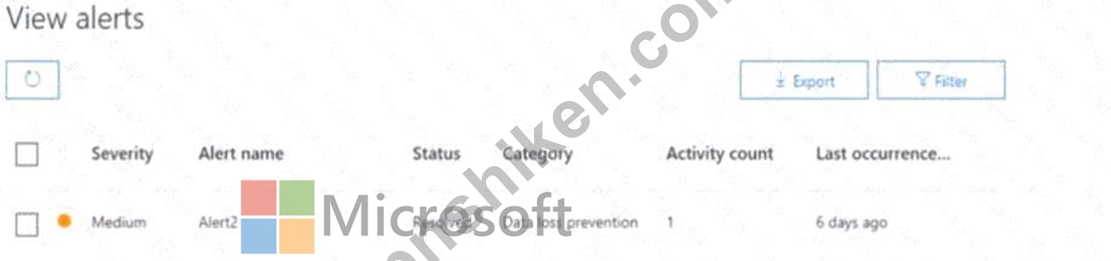
Alertのステータスを管理する必要がありますか?Aletteをどのステータスに変更できますか?
Alertのステータスを管理する必要がありますか?Aletteをどのステータスに変更できますか?
正解:E
Step 1 - Scenario
The alert in the exhibit is named Alert2.
Current status = Resolved.
The task is to identify which statuses you can change the alert to.
Step 2 - Microsoft 365 Alert Lifecycle
In Microsoft 365 compliance and security alerts, an alert can move between multiple statuses depending on investigation and remediation. The available statuses are:
Active - The alert is new and not yet acted upon.
Investigating - The alert is under review.
Resolved - The alert has been addressed.
Dismissed - The alert is ignored or deemed not relevant.
Step 3 - Status changes from "Resolved"
If an alert is in the Resolved state, administrators can reopen or reclassify it. According to Microsoft documentation, from Resolved, you can change it to:
Active
Investigating
Dismissed
This allows flexibility in continuing investigations if needed or dismissing false positives.
Step 4 - Microsoft Reference
From Microsoft Docs: "You can change the status of an alert between Active, Investigating, Resolved, and Dismissed to reflect its current stage in the triage process." Reference: Manage alerts in the Microsoft 365 security and compliance center
The alert in the exhibit is named Alert2.
Current status = Resolved.
The task is to identify which statuses you can change the alert to.
Step 2 - Microsoft 365 Alert Lifecycle
In Microsoft 365 compliance and security alerts, an alert can move between multiple statuses depending on investigation and remediation. The available statuses are:
Active - The alert is new and not yet acted upon.
Investigating - The alert is under review.
Resolved - The alert has been addressed.
Dismissed - The alert is ignored or deemed not relevant.
Step 3 - Status changes from "Resolved"
If an alert is in the Resolved state, administrators can reopen or reclassify it. According to Microsoft documentation, from Resolved, you can change it to:
Active
Investigating
Dismissed
This allows flexibility in continuing investigations if needed or dismissing false positives.
Step 4 - Microsoft Reference
From Microsoft Docs: "You can change the status of an alert between Active, Investigating, Resolved, and Dismissed to reflect its current stage in the triage process." Reference: Manage alerts in the Microsoft 365 security and compliance center

- 質問一覧「83問」
- 質問1 Microsoft 365 E5 サブスクリプションをお持ちです。このサブス...
- 質問2 Site1 という名前の Microsoft SharePoint Online サイトと、次...
- 質問3 Sensitivity1 という名前の機密ラベルを持つ Microsoft 365 E5 ...
- 質問4 ドメイン名が86s40q.ofimicrosoft.comであるMicrosoft 365 E5テ...
- 質問5 ホットスポット Microsoft Purview とジャストインタイム (JIT) ...
- 質問6 次の表に示すユーザーを含む Microsoft 365 E5 サブスクリプショ...
- 質問7 Microsoft 365 E5 サブスクリプションがあり、そこには User1、U...
- 質問8 保持ラベル ポリシーを使用する Microsoft 365 E5 サブスクリプ...
- 質問9 Microsoft 365 E5 テナントがあります。 新しいキーワード辞書を...
- 質問10 次の表に示す機密情報の種類 (SIT) が含まれる Microsoft 365 E5...
- 質問11 次の表に示すファイルがあります。 (Exhibit) 展示に示されてい...
- 質問12 注: この問題は、同じシナリオを提示する一連の問題の一部です。...
- 質問13 Microsoft 365 E5 サブスクリプションをお持ちです。 ユーザーが...
- 質問14 Microsoft 36S ES サブスクリプションをお持ちです 次の要件を満...
- 質問15 Microsoft 365 E5 サブスクリプションをお持ちです。 Microsoft ...
- 質問16 次の表に示すように、Microsoft Defender for Endpoint にオンボ...
- 質問17 Microsoft 365 の 5 ポンドのサブスクリプションをお持ちです。 ...
- 質問18 次の表に示すデバイスが含まれる Microsoft 36S ES サブスクリプ...
- 質問19 Microsoft Defender for Cloud Apps を使用する Microsoft 365 E...
- 質問20 ホットスポット Microsoft 365 E5 サブスクリプションがあり、そ...
- 質問21 ホットスポット 次のファイルを含む Microsoft SharePoint Onlin...
- 質問22 注: この問題は、同じシナリオを提示する一連の問題の一部です。...
- 質問23 Microsoft 365 サブスクリプションをお持ちです。監査が有効にな...
- 質問24 Microsoft 36515 サブスクリプションがあり、その中に Site1 と...
- 質問25 次の図に示すように、Alert2 という名前の Microsoft 365 アラー...
- 質問26 Microsoft 365 サブスクリプションをお持ちです。 Policy1 とい...
- 質問27 Microsoft 365 E5 サブスクリプションをお持ちです。 個人情報 (...
- 質問28 Microsoft 36S サブスクリプションをお持ちです。 Microsoft Exc...
- 質問29 Microsoft 365 E5 サブスクリプションがあり、User! と User2 と...
- 質問30 注: この問題は、同じシナリオを提示する一連の問題の一部です。...
- 質問31 EDM1 という名前の Microsoft Purview 完全データ一致 (EDM) 分...
- 質問32 Microsoft 365 サブスクリプションをお持ちです。 ユーザーは Wi...
- 質問33 ホットスポット 次の表に示すデバイス構成を含む Microsoft 365 ...
- 質問34 次の表に示す機密情報の種類 (SIT) が含まれる Microsoft 365 E5...
- 質問35 Microsoft J65 ES サブスクリプションをお持ちです。 データ損失...
- 質問36 ホットスポット 機密文書の技術要件を満たす必要があります。 最...
- 質問37 ホットスポット Microsoft 365 E5 サブスクリプションをお持ちで...
- 質問38 Microsoft Entra に参加している Windows デバイスでクレジット...
- 質問39 File1、File2、File3 という名前の 3 つの DOCX ファイルが含ま...
- 質問40 ホットスポット Microsoft 365 E5 サブスクリプションをお持ちで...
- 質問41 ユーザーが Microsoft OneDrive から社外のユーザーと機密文書を...
- 質問42 ホットスポット SharePoint Online 環境のポリシーを確認してい...
- 質問43 注: この問題は、同じシナリオを提示する一連の問題の一部です。...
- 質問44 次の表に示すように、RP1 という名前のアイテム保持ポリシーが含...
- 質問45 Microsoft 365 E5 サブスクリプションがあり、そこには User1、U...
- 質問46 ホットスポット Microsoft Purview を使用する Microsoft 365 E5...
- 質問47 User1 という名前のユーザーを含む Microsoft 365 E5 サブスクリ...
- 質問48 Microsoft 365 E5 テナントがあります。 「機密ラベル」展示に示...
- 質問49 ホットスポット データ損失防止 (DLP) が実装された Microsoft 3...
- 質問50 Microsoft 365 E5 サブスクリプションをお持ちです。 データ損失...
- 質問51 Microsoft 365 の 5 ポンドのサブスクリプションをお持ちです。 ...
- 質問52 機密ラベルを作成するための技術要件を満たす必要があります。
- 質問53 Microsoft 365 テナントがあります。 顧客の詳細を保存するデー...
- 質問54 Microsoft 365 E5 サブスクリプションをお持ちです。 Microsoft ...
- 質問55 次の表に示すユーザーを含む Microsoft 365 E5 サブスクリプショ...
- 質問56 Site! という名前の Microsoft SharePoint Online サイトがあり...
- 質問57 Microsoft 365 ES サブスクリプションをお持ちです。 セキュリテ...
- 質問58 Microsoft Teams を使用する Microsoft 365 テナントがあります...
- 質問59 Microsoft S65 E5 サブスクリプションがあり、そこには User! と...
- 質問60 注: この問題は、同じシナリオを提示する一連の問題の一部です。...
- 質問61 Microsoft の 65 ドルのサブスクリプションをお持ちです。 今後 ...
- 質問62 Microsoft 365 E5 サブスクリプションをお持ちです。 Microsoft ...
- 質問63 contoso.com という名前の Microsoft 365 テナントに Microsoft ...
- 質問64 ホットスポット DLPpolicy1 をオンにした後、User1 と User2 は ...
- 質問65 Microsoft 365 E5 サブスクリプションをお持ちです。 インサイダ...
- 質問66 注: この問題は、同じシナリオを提示する一連の問題の一部です。...
- 質問67 Microsoft 36S エンドポイント データ損失検出イベント モニタリ...
- 質問68 次の図に示す機密情報の種類 (SIT) が含まれる Microsoft 36S サ...
- 質問69 Fabric および Power BI ワークスペースを除くすべての利用可能...
- 質問70 Microsoft Defender for Cloud Apps を使用する Microsoft 365 E...
- 質問71 DLP1 という名前のデータ損失防止 (DLP) ポリシーが含まれる Mic...
- 質問72 Microsoft 365 E5 サブスクリプションをお持ちです。 次の表に示...
- 質問73 Microsoft 36S エンドポイント データ損失検出イベント モニタリ...
- 質問74 Microsoft 365 E5 サブスクリプションがあり、そこには User! と...
- 質問75 Microsoft 365 E5 サブスクリプションをお持ちです。このサブス...
- 質問76 Microsoft 365 テナントがあります。 新しい規制要件では、特許I...
- 質問77 User1 という名前のユーザーを含む Microsoft J65 E5 サブスクリ...
- 質問78 contoso.com という名前のドメインを使用する Microsoft 365 E5 ...
- 質問79 Microsoftで参照される組織の製品コードを識別するためのカスタ...
- 質問80 新しい Microsoft 365 E5 テナントがあります。 製品注文フォー...
- 質問81 Site1とSite2という2つのMicrosoft SharePoint Onlineサイトを含...
- 質問82 Microsoft Purview Message Encryption を使用する Microsoft 36...
- 質問83 次の図に示すように、エンドポイントに対してデータ損失防止 (DL...
