- ホーム
- Microsoft
- SC-300J - Microsoft Identity and Access Administrator (SC-300日本語版)
- Microsoft.SC-300J.v2026-02-23.q141
- 質問28
有効的なSC-300J問題集はJPNTest.com提供され、SC-300J試験に合格することに役に立ちます!JPNTest.comは今最新SC-300J試験問題集を提供します。JPNTest.com SC-300J試験問題集はもう更新されました。ここでSC-300J問題集のテストエンジンを手に入れます。
SC-300J問題集最新版のアクセス
「390問、30% ディスカウント、特別な割引コード:JPNshiken」
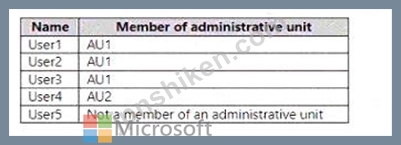
次の表に示すユーザーを含む Microsoft 365 E5 サブスクリプションがあります。
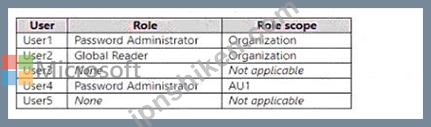
ユーザーには、次の表に示すロールが割り当てられます。
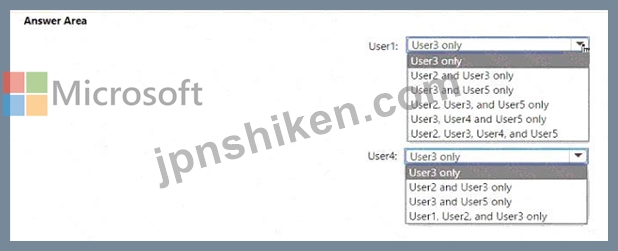
User1 と User4 はどのユーザーのパスワードをリセットできますか? 回答するには、回答領域で適切なオプションを選択してください。
注意: 正しい選択ごとに 1 ポイントが付与されます。
ユーザーには、次の表に示すロールが割り当てられます。
User1 と User4 はどのユーザーのパスワードをリセットできますか? 回答するには、回答領域で適切なオプションを選択してください。
注意: 正しい選択ごとに 1 ポイントが付与されます。
正解:

Explanation:
User
Can Reset Passwords For
User1
User3 and User5 only
User4
User3 only
According to the Microsoft SC-300: Microsoft Identity and Access Administrator Study Guide and official Microsoft Learn documentation on role-based access control (RBAC) and administrative units (AUs), the scope of administrative privileges determines which users an administrator can manage.
Role Review:
* Password Administrator (Organization scope):Can reset passwords for non-administrators and users with lesser privileges across the entire organization. They cannot reset passwords for Global Administrators or users with equal/higher roles.
* Global Reader (Organization scope):Read-only access-cannot perform administrative actions (including password resets).
* Password Administrator (Scoped to AU1):Can reset passwords for users within AU1 who are non- administrators and whose roles are less privileged than their own.
User
Role
Scope
Members in Administrative Unit
User1
Password Administrator
Organization
AU1
User2
Global Reader
Organization
AU1
User3
None
N/A
AU1
User4
Password Administrator
AU1
AU2
User5
None
N/A
None
User1's permissions apply organization-wide, allowing resets for:
* Users without admin roles, including those in or outside any AU.
* Cannot reset passwords for users with equal or higher roles (e.g., Global Reader, Password Administrator).
# Therefore, User1 can reset passwords for:
* User3 (no role, AU1)
* User4 (Password Administrator in AU2) - # cannot reset equal role
* User5 (no role, no AU) #
Final for User1 # User3 and User5 only
User4's permissions apply only within AU1 and to users with lesser privileges.
Within AU1:
* User1 (Org Password Admin) - # higher privilege
* User2 (Global Reader) - # higher privilege
* User3 (no role) - # can reset
Final for User4 # User3 only

- 質問一覧「141問」
- 質問1 Azure Active Directory Premium Plan 2 ライセンスを持つ Azure...
- 質問2 注: この問題は、同じシナリオを提示する一連の問題の一部です。...
- 質問3 User1 という名前のユーザーが含まれる Sub1 という名前の Azure...
- 質問4 db1 という名前の Azure SQL データベースを含む Azure サブスク...
- 質問5 次の表に示すユーザーを含む Microsoft Entra テナントがありま...
- 質問6 Microsoft 365 E5 サブスクリプションをお持ちです。 ユーザーが...
- 質問7 Microsoft 365 テナントがあります。 すべてのユーザーは、Micro...
- 質問8 Active Directoryフォレストと同期するAzure Active Directory (...
- 質問9 Azure Active Directory (Azure AD) テナントがあります。 次の...
- 質問10 タスク9 Sg-Operations グループのユーザーが My Apps ポータル...
- 質問11 次の内容が含まれる Microsoft 365 サブスクリプションがありま...
- 質問12 ボストンオフィスから接続するユーザーに対して、MFA設定を構成...
- 質問13 Microsoft 365 E5 サブスクリプションをお持ちです。 アプリ ガ...
- 質問14 次の表に示すユーザーを含む Microsoft Entra テナントがありま...
- 質問15 Microsoft365テナントがあります。 Azure Active Directory(Azu...
- 質問16 ネットワークには、Azure AD テナントと同期するオンプレミスの ...
- 質問17 あなたの会社には、Contoso East と Contoso West という名前の ...
- 質問18 注:この質問は、同じシナリオを提示する一連の質問の一部です。
- 質問19 次の表に示すユーザーを含む Azure Active Directory (Azure AD)...
- 質問20 タスク8 Microsoft Entra ID への認証時に、すべてのユーザーが...
- 質問21 次の表に示すリソースを含む Azure サブスクリプションがありま...
- 質問22 次のグループを含む Azure Active Directory (Azure AD) テナン...
- 質問23 Sub1 という名前の Azure サブスクリプションがあり、そこには R...
- 質問24 Microsoft 365 E5 サブスクリプションがあり、そこには User1、U...
- 質問25 注:この質問は、同じシナリオを提示する一連の質問の一部です。
- 質問26 Automation1 という名前の Azure Automation アカウントと、Vaul...
- 質問27 Microsoft 365 テナントがあります。 すべてのユーザーは携帯電...
- 質問28 次の表に示すユーザーを含む Microsoft 365 E5 サブスクリプショ...
- 質問29 Microsoft Defender for Cloud Apps を使用する Microsoft 365 E...
- 質問30 Microsoft365テナントがあります。 Azure Active Directory(Azu...
- 質問31 contoso.com の SMTP アドレス スペースを使用するオンプレミス...
- 質問32 Microsoft Entra テナントがあります。 サインイン失敗回数が 10...
- 質問33 Microsoft 365 E5 テナントがあります。 App1 という名前のクラ...
- 質問34 Microsoft 365 ES サブスクリプションがあり、その中に User1 と...
- 質問35 ユーザー ID が侵害される可能性に関する技術要件を満たす必要が...
- 質問36 次の表に示すデバイスを含む Microsoft Entra テナントがありま...
- 質問37 Azure AD テナントがあります。 テンプレート ファイルをアップ...
- 質問38 ActiveDirectoryドメインに同期するAzureActive Directory(Azur...
- 質問39 Microsoft 365 E5 サブスクリプションをお持ちです。 Gateway1 ...
- 質問40 次の表に示すユーザーを含む Azure Ad テナントがあります。 (Ex...
- 質問41 Azure Monitor を使用して、Azure Active Directory (Azure AD) ...
- 質問42 Microsoft Entra テナントがあります。 アプリのサインインの継...
- 質問43 User1 という名前のユーザーと App1 という名前の登録済みアプリ...
- 質問44 VM1 という名前の仮想マシンを含む Azure サブスクリプションが...
- 質問45 Microsoft 365 E5 サブスクリプションをお持ちです。 Review1 と...
- 質問46 Sub1 という名前の Azure サブスクリプションがあり、そこには U...
- 質問47 Azure サブスクリプションをお持ちです。 権限を自動的に監視し...
- 質問48 Microsoft 365 サブスクリプションをお持ちです。 ユーザーが企...
- 質問49 Groups1、Group2、Group3 という 3 つのグループと、次の表に示...
- 質問50 多要素認証 (MFA) が適用され、セルフサービス パスワード リセ...
- 質問51 ゲストユーザーの招待に関する問題を解決する必要があります。Az...
- 質問52 次の表に示す ID を含む Microsoft Entra テナントがあります。 ...
- 質問53 Microsoft Entra ID P1 ライセンスを持つ Microsoft Entra テナ...
- 質問54 Azure Active Directory(Azure AD)テナントがあります。 リス...
- 質問55 クラウドベースのエンタープライズアプリを含むAzureActive Dire...
- 質問56 fabrikam.comという名前のドメインを使用するMicrosoft365テナン...
- 質問57 Microsoft 365 E5 サブスクリプションをお持ちです。 ユーザー ...
- 質問58 ネットワークには、Azure Active Directory (Azure AD) テナント...
- 質問59 RG1 と RG2 という 2 つのリソース グループと、storage1 という...
- 質問60 ネットワークには、Azure AD Connect を使用して contoso.com と...
- 質問61 Microsoft365テナントがあります。 すべてのユーザーは、Windows...
- 質問62 contoso.comのSMTPのアドレス空間を使用するMicrosoftExchange組...
- 質問63 タスク3 LinkedlnアプリケーションをSales and Marketingアクセ...
- 質問64 ユーザーが 70 歳以上のサインイン アラートをトリガーしたとき...
- 質問65 Azure AD Privileged Identity Management (PIM) を使用する Azu...
- 質問66 次の表に示すグループを含む Azure AD テナントがあります。 (Ex...
- 質問67 Microsoft 365 E5 サブスクリプションをお持ちです。 Microsoft ...
- 質問68 次の表に示すキー コンテナーを含む Azure サブスクリプションが...
- 質問69 contoso.com という名前の Azure Active Directory (Azure AD) ...
- 質問70 タスク10 Auditというグループを作成する必要があります。ソリュ...
- 質問71 User1 という名前のユーザーを含む Microsoft 365 サブスクリプ...
- 質問72 contoso.comという名前のAzureActive Directory(Azure AD)テナ...
- 質問73 注:この質問は、同じシナリオを提示する一連の質問の一部です。
- 質問74 Microsoft 365 サブスクリプションをお持ちです。 次の構成を持...
- 質問75 A Datum から新規ユーザーにライセンスを割り当てる必要がありま...
- 質問76 「Terms1」という名前の使用条件 (ToU) を含む Microsoft Entra ...
- 質問77 次の表に示す Azure リソースがあります。 (Exhibit) RG1 の Con...
- 質問78 Azure Active Directory(Azure AD)テナントがあります。 次の...
- 質問79 計画された変更をサポートし、MFA の技術要件を満たす必要があり...
- 質問80 A Datumユーザー向けのライセンスを特定する必要があります。ソ...
- 質問81 Litware ユーザーへの Azure AD ライセンスの割り当てを構成する...
- 質問82 App1 という名前の登録済みアプリを含む Azure サブスクリプショ...
- 質問83 ネットワークには、contoso.com というオンプレミスの Active Di...
- 質問84 Microsoft Entra テナントにリンクされた Azure サブスクリプシ...
- 質問85 Microsoft 365 テナントがあります。 Microsoft Entra ID で、利...
- 質問86 次の表に示すグループを含むAzureActive Directory(Azure AD)...
- 質問87 contoso.com という名前の Azure AD テナントがあり、ゲスト用の...
- 質問88 監視要件を満たすには、多段階攻撃の検出を構成する必要がありま
- 質問89 Group3 というグループと Department1 という管理単位を含む Mic...
- 質問90 Microsoft 365 テナントがあります。 Azure Active Directory (A...
- 質問91 Site1 という名前の Microsoft SharePoint Online サイトと、次...
- 質問92 Microsoft365テナントがあります。 すべてのユーザーは携帯電話...
- 質問93 次の表に示すユーザーを含む Microsoft 365 E5 サブスクリプショ...
- 質問94 Azure AD テナントがあります。 次の表に示すタスクを実行します...
- 質問95 タスク1 多要素認証(MFA)を導入する必要があります。ソリュー...
- 質問96 contoso.comという名前のAzureActive Directory(Azure AD)テナ...
- 質問97 オンプレミス ネットワークには、Active Directory ドメイン サ...
- 質問98 Microsoft 365 テナントがあります。 Azure Monitor を使用して...
- 質問99 Microsoft 365 テナントと、adatum.com という名前の Active Dir...
- 質問100 contoso.com という名前の Azure Active Directory (Azure AD) ...
- 質問101 Group! と Group2 という 2 つのグループと、次の表に示すユーザ...
- 質問102 ネットワークには、Azure Active Directory(Azure AD)テナント...
- 質問103 条件付きアクセス ポリシーを使用する Azure Active Directory (...
- 質問104 Microsoft Defender for Cloud Apps を使用する Microsoft 365 ...
- 質問105 Microsoft 365 テナントがあります。 現在、基本認証を使用する...
- 質問106 次の表に示すユーザーを含む Azure AD テナントがあります。 (Ex...
- 質問107 Azure Active Directory PremiumP2テナントがあります。 LogAnal...
- 質問108 Microsoft 365 E5 サブスクリプションがあります。 ユーザーは、...
- 質問109 次の表に示すユーザーを含む Azure AD テナントがあります。 (Ex...
- 質問110 次の表に示すユーザーを含む Azure AD テナントがあります。 (Ex...
- 質問111 contoso.com の SMTP アドレス スペースを使用する Microsoft Ex...
- 質問112 Microsoft Entra Permissions Management を使用する Sub1 とい...
- 質問113 次のクラウド プラットフォームのアカウントがあります。 * アズ...
- 質問114 Microsoft 365 E5 テナントがあります。 App1 という名前のクラ...
- 質問115 次の表に示すユーザーを含む Azure Active Directory (Azure AD)...
- 質問116 User1 という名前のユーザーを含む contoso.com という名前の Az...
- 質問117 ネットワークには、Azure Active Directory (Azure AD) テナント...
- 質問118 Azure サブスクリプションをお持ちです。 エンタイトルメント管...
- 質問119 I-.Group1の問題を解決する必要があります。まず何をすべきでし...
- 質問120 Microsoft Entra テナントがあります。 特定の外部ドメインのユ...
- 質問121 Azure AD Identity Protection を使用し、次の表に示すリソース...
- 質問122 App1 という名前の Web アプリが含まれる Microsoft 365 E5 サブ...
- 質問123 Group1 と Group2 という 2 つのグループと、次の表に示すユーザ...
- 質問124 Azure AD テナントと App1 という名前の .NET Web アプリがあり...
- 質問125 Azure Active Directory (Azure AD) テナントに、User1、User2、...
- 質問126 User1 という名前のユーザーと、次の表に示すグループを含む Azu...
- 質問127 あなたの会社にはMicrosoft365テナントがあります。 同社には300...
- 質問128 User1 という名前のユーザーを含む Azure Active Directory (Azu...
- 質問129 User1 という名前のユーザーと、次の表に示す条件付きアクセス ...
- 質問130 あなたの会社には、contosri.com という Azure Active Directory...
- 質問131 次の表に示すユーザーを含むハイブリッド Microsoft 365 サブス...
- 質問132 新しい Microsoft 365 E5 テナントを作成します。 ユーザーが匿...
- 質問133 次の表に示すオブジェクトを含む Azure Active Directory (Azure...
- 質問134 次の表に示すリソースを含む Azure サブスクリプションがありま...
- 質問135 ネットワークには、Azure Active Directory (Azure AD) テナント...
- 質問136 Microsoft 365 テナントをお持ちの場合 現在、基本認証を使用す...
- 質問137 User1 という名前のユーザーが Microsoft Defender for Cloud Ap...
- 質問138 Microsoft 365 E5 サブスクリプションをご利用で、Microsoft Def...
- 質問139 ネットワークには、Azure AD テナントと同期するオンプレミスの ...
- 質問140 セキュリティの既定値が無効になっている Azure Active Director...
- 質問141 Microsoft Entra テナントにリンクされた Azure サブスクリプシ...
