- ホーム
- Microsoft
- SC-200J - Microsoft Security Operations Analyst (SC-200日本語版)
- Microsoft.SC-200J.v2026-08-11.q182
- 質問73
有効的なSC-200J問題集はJPNTest.com提供され、SC-200J試験に合格することに役に立ちます!JPNTest.comは今最新SC-200J試験問題集を提供します。JPNTest.com SC-200J試験問題集はもう更新されました。ここでSC-200J問題集のテストエンジンを手に入れます。
SC-200J問題集最新版のアクセス
「415問、30% ディスカウント、特別な割引コード:JPNshiken」
お客様の環境に影響を与える新たな共通脆弱性識別子(CVE)の脆弱性についてお知らせします。
既知の脆弱性が存在する場合は、Microsoft Defender Security Center を使用して、影響を受けるシステムを担当するチームに修復を依頼する必要があります。
どの3つの行動を順番に実行すべきでしょうか?回答するには、行動リストから適切な行動を回答欄に移動させ、正しい順序に並べ替えてください。
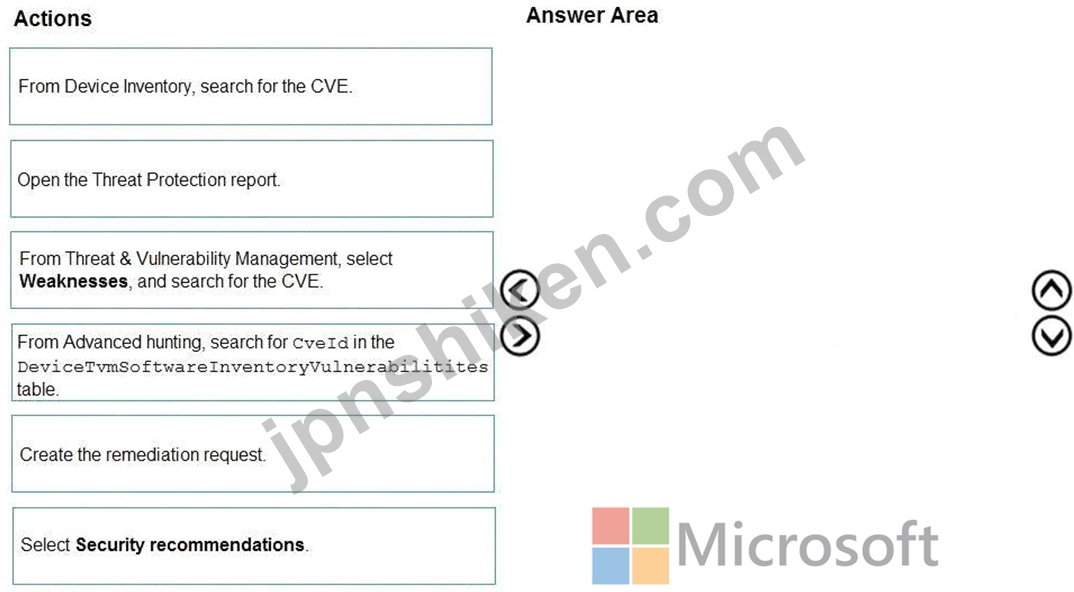
既知の脆弱性が存在する場合は、Microsoft Defender Security Center を使用して、影響を受けるシステムを担当するチームに修復を依頼する必要があります。
どの3つの行動を順番に実行すべきでしょうか?回答するには、行動リストから適切な行動を回答欄に移動させ、正しい順序に並べ替えてください。
正解:

Explanation:

According to official Microsoft Defender Vulnerability Management (TVM) documentation, when a new CVE is announced, analysts can use Microsoft 365 Defender Security Center to investigate exposure and initiate remediation workflows. The proper sequence to handle such a case is:
* From Threat & Vulnerability Management (TVM), select Weaknesses and search for the CVE. In Microsoft 365 Defender, all known vulnerabilities are cataloged under the Weaknesses tab. Searching for the CVE there allows security teams to determine whether any managed assets are affected and to view metadata such as severity, exploitability, and exposure score.
* Select Security recommendations. Once the CVE is located, associated Security recommendations appear. These recommendations include actionable steps like "Update software" or "Remove vulnerable version." Each recommendation aggregates affected devices, user exposure, and related CVEs.
* Create the remediation request. From the recommendation, analysts can create a remediation request directly in the Defender portal. This task is automatically assigned to the appropriate remediation group or IT operations team, with a due date and priority based on the risk assessment.
This workflow minimizes administrative effort, ensures alignment with the principle of least privilege , and leverages Defender's built-in Threat & Vulnerability Management (TVM) automation to move from detection to remediation efficiently.
# Final Sequence:
(1) From Threat & Vulnerability Management # Weaknesses
(2) Select # Security recommendations
(3) Create # Remediation request

- 質問一覧「182問」
- 質問1 あなたはMicrosoft 365 E5のサブスクリプションをお持ちです。 M...
- 質問2 お客様の環境に影響を与える新たな共通脆弱性識別子(CVE)の脆弱...
- 質問3 以下の表に示すリソースが利用可能です。 (Exhibit) SW1では、重...
- 質問4 お客様は、Microsoft Defenderを使用するMicrosoft 365 E5サブス...
- 質問5 Azure Sentinel でハンティング クエリを作成します。 ハンティ...
- 質問6 Microsoft Sentinelワークスペースに、Workbook1という名前のカ...
- 質問7 Azure Active Directory (Azure AD) ユーザーをブロックするため...
- 質問8 VM1 という名前の仮想マシンを含み、Azure Defender を使用する ...
- 質問9 あなたはMicrosoft 365 B5サブスクリプションをお持ちです。統合...
- 質問10 お客様は、Microsoft Defender XDR および Microsoft Defender f...
- 質問11 お客様は、以下の表に示すホストを含む Microsoft 365 E5 サ...
- 質問12 Microsoft 365 Defender を使用する Microsoft 365 E5 サブスク...
- 質問13 Azure Functions アプリがあり、通常の活動に対して毎日数千件の...
- 質問14 Azure Sentinel から、次の図に示すように、重大度の高いインシ...
- 質問15 Microsoft Sentinelを使用するAzureサブスクリプションがあり、...
- 質問16 あなたはMicrosoft 365のサブスクリプションをお持ちです。 グル...
- 質問17 Microsoft 365 Defender が有効になっている Microsoft 365 サブ...
- 質問18 Azure Sentinelの要件とビジネス要件を満たすには、admin1にロー...
- 質問19 DNS関連のアクティビティを調査するためのクエリを作成する必要...
- 質問20 お客様の環境には、Windows Serverを実行するオンプレミスサーバ...
- 質問21 Azure Sentinelをデプロイします。 Azure Sentinelにコネクタを...
- 質問22 次の図に示すように、クラウドアプリセキュリティポータルを開き
- 質問23 あなたはMicrosoft 365 Defenderを使用してインシデントを調査し...
- 質問24 クラウドアプリセキュリティの要件を満たすには、異常検知ポリシ
- 質問25 以下のSQLクエリがあります。 (Exhibit)
- 質問26 ある企業は Azure Sentinel を使用しています。 自動化された脅...
- 質問27 注: この質問は、同じシナリオを示す一連の質問の一部です。この...
- 質問28 Azure Defender から Key Vault のアラートを受け取ります。 複...
- 質問29 技術要件を満たすためには、ログイン失敗に関するクエリを完了す
- 質問30 オンプレミスの仮想マシン VM1 があり、Windows Server が稼働し...
- 質問31 Microsoft 365 E5 サブスクリプションと Microsoft Sentinel ワ...
- 質問32 AzureActivity テーブルを含む Workspace1 という名前の Microso...
- 質問33 Microsoft Defender for Endpoint Plan 2 を使用する Microsoft ...
- 質問34 Microsoft Defender for Endpoint の要件を満たすために、CUENT1...
- 質問35 Microsoft Sentinelワークスペースをお持ちです。 監査ログとサ...
- 質問36 Microsoft Defender XOR を使用する Microsoft 365 サブスクリプ...
- 質問37 お客様は、Microsoft Defender XDR を使用する Azure サブスクリ...
- 質問38 異常な Azure Active Directory (Azure AD) サインイン アクティ...
- 質問39 Microsoft Defender for Cloud を使用する Azure サブスクリプシ...
- 質問40 イメージ ファイルを使用した潜在的な攻撃に関するセキュリティ
- 質問41 あなたは、User1とUser2という2人のユーザーを含むMicrosoft 365...
- 質問42 Defender for Cloudの要件を満たす必要があります。 Group1には...
- 質問43 Microsoft Defender for Cloud が有効になっている Microsoft サ...
- 質問44 お客様は、User1とUser2という2人のユーザーを含むMicrosoft 365...
- 質問45 あなたはAzureサブスクリプションをお持ちです。 以下の要件を満...
- 質問46 Defender for Cloudの要件を満たす必要があります。 Server2には...
- 質問47 注: この質問は、同じシナリオを示す一連の質問の一部です。この...
- 質問48 Microsoft 365 Defenderデータコネクタを使用するMicrosoft Sent...
- 質問49 お客様は、100台のLinux仮想マシンを含むAzureサブスクリプショ...
- 質問50 新しいAzureサブスクリプションを作成し、Azure Monitor用のログ...
- 質問51 ユーザー「Userl」と「workspace1」という名前のMicrosoft Senti...
- 質問52 お客様は、Microsoft Defender XDRを使用するMicrosoft 365 E5サ...
- 質問53 Microsoft Copilot for Security を使用する Microsoft 365 E5 ...
- 質問54 Sub1 という名前の Azure サブスクリプションと、AzDO1 という名...
- 質問55 Azure Defender を使用しています。 機密情報を含む Azure スト...
- 質問56 Microsoft Sentinel ワークスペースがあります。 組み込みの Adv...
- 質問57 Microsoft Sentinelワークスペースをお持ちです。 Microsoft Sen...
- 質問58 お客様は、Microsoft Defender for Endpointを使用するMicrosoft...
- 質問59 Azure Defenderの要件とビジネス要件を満たすためには、Azure De...
- 質問60 お客様は、Microsoft Defender for Endpointを使用するMicrosoft...
- 質問61 Microsoft 365 B5 サブスクリプションには、Group! と Group2 と...
- 質問62 アプリケーション開発中に複数のAzure Functionsアプリからアク...
- 質問63 Microsoft Defender for Servers Plan 1 を使用し、Server1 とい...
- 質問64 あなたはAzureサブスクリプションをお持ちです。 Microsoft Grap...
- 質問65 Azure Sentinel は、Azure の異常なアクティビティを監視するた...
- 質問66 指定された緊急時対応アカウントを監視するには、Microsoft Sent...
- 質問67 組織内の他のユーザーがサインインに使用したことのない場所から
- 質問68 お客様は、Microsoft Defender for Endpointを使用するMicrosoft...
- 質問69 Azure サブスクリプションには、RG1 という名前のリソース グル...
- 質問70 注: この質問は、同じシナリオを示す一連の質問の一部です。この...
- 質問71 ユーザー「User1」と「WS1」という名前のMicrosoft Sentinelワー...
- 質問72 Microsoft Sentinel ワークスペースで KQL クエリを作成する必要...
- 質問73 お客様の環境に影響を与える新たな共通脆弱性識別子(CVE)の脆弱...
- 質問74 カスタム Kusto クエリを含む workspace1 という名前の Microsof...
- 質問75 rulequery1によって生成されたインシデントの処理が、Microsoft ...
- 質問76 Workspacel という名前の Microsoft Sentinel ワークスペースが...
- 質問77 あなたの会社はイスタンブールに 1 つのオフィスを持ち、Microso...
- 質問78 sub1という名前のAzureサブスクリプションを作成します。 sub1で...
- 質問79 お客様はMicrosoft 365サブスクリプションをご利用中です。この...
- 質問80 お客様は、Microsoft Defender for Endpoint Plan Zを使用するMi...
- 質問81 お客様は、WS1という名前のMicrosoft Sentinelワークスペースと...
- 質問82 あなたは、Microsoft Copilot for Security を使用する Microsof...
- 質問83 お客様は、Microsoft Defender for Cloudが有効になっているAzur...
- 質問84 あなたはMicrosoft 365のサブスクリプションをお持ちです。以下...
- 質問85 貴社では、各プロジェクトのデータをそれぞれ異なるAzureサブス...
- 質問86 Microsoft Defender for Cloudを使用するAzureサブスクリプショ...
- 質問87 次の環境があります。 アズールセンチネル Microsoft 365 サブス...
- 質問88 お客様は、Microsoft Sentinelを使用するAzureサブスクリプショ...
- 質問89 Azure Sentinelがデプロイされています。 疑わしい認証情報アク...
- 質問90 Workspace1 という名前の Log Analytics ワークスペースを含む A...
- 質問91 Azure Sentinel データを視覚化し、サードパーティのデータ ソー...
- 質問92 お客様は、Microsoft Defender for Endpointに登録された200台の...
- 質問93 お客様は、Microsoft Exchange Onlineを使用するMicrosoft 365 E...
- 質問94 sws1 という名前の Microsoft Sentinel ワークスペースがありま...
- 質問95 Azure サブスクリプションには、app1 という名前の Azure ロジッ...
- 質問96 Microsoft Sentinelワークスペースをお持ちです。 KQLクエリがあ...
- 質問97 お客様のAzureサブスクリプションには、以下の表に示すユーザー...
- 質問98 Amazon Web Services (AWS) のログから特定の条件を検索し、イン...
- 質問99 Microsoft SharePoint Online を使用する Microsoft 365 E5 サブ...
- 質問100 サポートされているすべてのリソースの種類に対して Azure Defen...
- 質問101 Sub1 という名前の Azure サブスクリプションがあり、そこには次...
- 質問102 あなたの会社では Azure Sentinel を使用しています。 新しいセ...
- 質問103 Sub1という名前のAzureサブスクリプションがあり、そこではMicro...
- 質問104 Azure Sentinel に Playbook があります。 プレイブックをトリガ...
- 質問105 オンプレミス ネットワークがあります。 Microsoft Defender for...
- 質問106 Microsoft Defender for Endpoint Plan 2 を使用する Microsoft ...
- 質問107 Microsoft Defender for Endpoint を使用する Microsoft 365 E5 ...
- 質問108 お客様は、Microsoft Defender XDRを使用するMicrosoft 365 E5サ...
- 質問109 100 台の Linux デバイスを含む Microsoft 365 E5 サブスクリプ...
- 質問110 Azure セキュリティ センターを使用します。 セキュリティ セン...
- 質問111 Microsoft 365 Defenderには、以下の高度なハンティングクエリが...
- 質問112 ゲストユーザー「User1」とMicrosoft Sentinelワークスペース「w...
- 質問113 Microsoft Sentinelの要件を満たすには、どのルール設定を構成す...
- 質問114 お客様は、Microsoft Copilot for Security を使用する Microsof...
- 質問115 お客様は、Microsoft Defender XDRを使用するMicrosoft 365 E5サ...
- 質問116 Azureサブスクリプションを作成します。 サブスクリプションに対...
- 質問117 お客様は、Microsoft Defender XDRを使用するMicrosoft 365サブ...
- 質問118 User1 という名前のユーザーを含む Azure サブスクリプションが...
- 質問119 お客様は、Microsoft Defender for Cloudを使用するAzureサブス...
- 質問120 お客様は4つのAzureサブスクリプションをお持ちです。そのうちの...
- 質問121 ハイブリッド Azure AD テナントにリンクされた Microsoft 365 E...
- 質問122 Azure Sentinelの要件を満たすように、Azure Sentinelとの統合を...
- 質問123 ビジネス要件を満たすようにDC1を設定する必要があります。 どの...
- 質問124 貴社では、Microsoft Office VBAマクロを含む業務アプリケーショ...
- 質問125 Microsoft Sentinelワークスペースをお持ちです。 Microsoft Def...
- 質問126 Microsoft Sentine1ワークスペースに、Workbook1という名前のカ...
- 質問127 SW1という名前のMicrosoft Sentinelワークスペースがあります。 ...
- 質問128 お客様は、Microsoft Sentinelを使用するAzureサブスクリプショ...
- 質問129 Azure Security Center が特定のセキュリティ警告を受信したとき...
- 質問130 Sub1 という名前の Azure サブスクリプションがあり、その中に W...
- 質問131 お客様のオンプレミスネットワークには、contoso という名前の A...
- 質問132 お客様のネットワークには、Azure ADテナントと同期するオンプレ...
- 質問133 お客様は、Microsoft Sentinelを使用するAzureサブスクリプショ...
- 質問134 AzureとGoogle Cloudにリソースがあります。 Google Cloud Platf...
- 質問135 お客様の施設には、500台のオンプレミスデバイスがあります。 お...
- 質問136 Microsoft Sentinelの要件を満たすために、ハンティングクエリを...
- 質問137 お客様はMicrosoft 365サブスクリプションをご利用中です。この...
- 質問138 Workspace1 という名前の Log Analytics ワークスペースを含む A...
- 質問139 お客様は、Microsoft Defender XDR を使用する Microsoft 365 サ...
- 質問140 新しいAzureサブスクリプションを作成し、Azure Monitor用のログ...
- 質問141 以下のKQLクエリがあります。 (Exhibit)
- 質問142 オンプレミスのLinuxサーバーがあり、そのサーバーはApp1という...
- 質問143 Microsoft Defender for Cloud による強化されたセキュリティ機...
- 質問144 Azure Security Center によって生成されたセキュリティ アラー...
- 質問145 あなたの会社では、Azure Sentinel を使用して 10,000 台を超え...
- 質問146 セキュリティ管理者は、ストレージ アカウントにアップロードさ
- 質問147 Group1のメンバーがMicrosoft Sentinelの要件を満たしていること...
- 質問148 お客様は、Microsoft Defender for Endpointを使用するAzureサブ...
- 質問149 Microsoft Sentinel の要件を満たすように、Microsoft Sentinel ...
- 質問150 脅威インテリジェンスリストを更新して、これらのエンティティを
- 質問151 お客様は、Microsoft Defender XDRを使用するMicrosoft 365サブ...
- 質問152 Microsoft Defender for Cloud の要件を満たすには、Account! に...
- 質問153 あなたはMicrosoft 365のサブスクリプションをお持ちです。 サー...
- 質問154 sws1 という名前の Microsoft Sentinel ワークスペースがありま...
- 質問155 Microsoft Defender for DevOps を使用する Azure DevOps 組織が...
- 質問156 Microsoft Defender for Endpointの要件を満たすには、CLIENT1上...
- 質問157 ユーザーおよびエンティティ行動分析(UEBA)が有効になっているMi...
- 質問158 お客様は、Microsoft Defender XDRを使用するMicrosoft 365サブ...
- 質問159 SW1という名前のMicrosoft Sentinelワークスペースがあります。 ...
- 質問160 Azure Sentinel の要件を満たすテスト ルールを作成する必要があ...
- 質問161 ユーザー User1 という名前のユーザーを含む Microsoft 365 B5 ...
- 質問162 注: この質問は、同じシナリオを示す一連の質問の一部です。この...
- 質問163 お客様は、Microsoft Defender XDRを使用するMicrosoft 365 E5サ...
- 質問164 サードパーティのセキュリティ情報およびイベント管理 (SIEM) ソ...
- 質問165 あなたの会社では、プロジェクトごとのデータが別の Azure サブ...
- 質問166 お客様はAzure Defenderを使用するAzureサブスクリプションをお...
- 質問167 新しい Azure サブスクリプション用に Azure Sentinel をプロビ...
- 質問168 あなたはMicrosoft 365 E5のサブスクリプションをお持ちです。 W...
- 質問169 あなたはMicrosoft 365 Defenderを使用してインシデントを調査し...
- 質問170 Microsoft Defender for Endpoint を使用する Microsoft 365 E5 ...
- 質問171 お客様はMicrosoft 365サブスクリプションをご利用中です。この...
- 質問172 Microsoft Defender for Cloud Apps の要件を満たす必要がありま...
- 質問173 Microsoft Defender for Cloudを使用するAzureサブスクリプショ...
- 質問174 App1 の Microsoft Sentinel 要件を満たす必要があります。App1 ...
- 質問175 注: この質問は、同じシナリオを示す一連の質問の一部です。この...
- 質問176 注: この質問は、同じシナリオを示す一連の質問の一部です。この...
- 質問177 お客様は、contoso.com という名前の Microsoft Entra テナント...
- 質問178 お客様は、Windows 11およびLinux CentOSデバイスを含むMicrosof...
- 質問179 注: この質問は、同じシナリオを示す一連の質問の一部です。この...
- 質問180 Microsoft Sentinel を使用する Azure サブスクリプションがあり...
- 質問181 お客様は、Microsoft Defender for Cloudが有効になっているAzur...
- 質問182 あなたはMicrosoft 365のサブスクリプションをお持ちです。 サー...
