- ホーム
- Microsoft
- MS-900-JPN - Microsoft 365 Fundamentals (MS-900日本語版)
- Microsoft.MS-900-JPN.v2022-12-22.q117
- 質問43
有効的なMS-900-JPN問題集はJPNTest.com提供され、MS-900-JPN試験に合格することに役に立ちます!JPNTest.comは今最新MS-900-JPN試験問題集を提供します。JPNTest.com MS-900-JPN試験問題集はもう更新されました。ここでMS-900-JPN問題集のテストエンジンを手に入れます。
MS-900-JPN問題集最新版のアクセス
「432問、30% ディスカウント、特別な割引コード:JPNshiken」
ホットスポットの質問
指示: 次の各ステートメントについて、ステートメントが正しい場合は [はい] を選択します。それ以外の場合は、[いいえ] を選択します。
注: それぞれの正しい選択は 1 ポイントの価値があります。
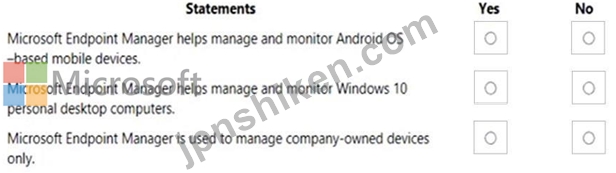
指示: 次の各ステートメントについて、ステートメントが正しい場合は [はい] を選択します。それ以外の場合は、[いいえ] を選択します。
注: それぞれの正しい選択は 1 ポイントの価値があります。
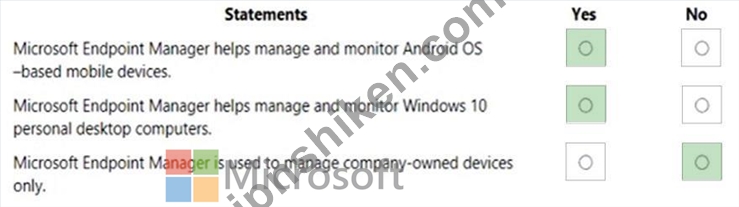
正解:
Explanation:
Box 1: Yes
You can manage Android devices in Microsoft Intune.
Use the Microsoft Endpoint Manager admin center Dashboard to display overall details about the devices and client apps in your Intune tenant. Dashboards provide a way for you to create a focused and organized view in the Microsoft Endpoint Manager admin center. Use dashboards as a workspace where you can quickly launch tasks for day-to-day operations and monitor resources.
Note: Microsoft Intune, which is a part of Microsoft Endpoint Manager, provides the cloud infrastructure, the cloud-based mobile device management (MDM), cloud-based mobile application management (MAM), and cloud-based PC management for your organization.
Box 2: Yes
Microsoft intune is not just for mobile devices, it can be used for laptop and desktop management as well.
Box 3: No
Microsoft Intune enables mobile device management for:
Personal devices, including personally owned phones, tablets, and PCs.
Corporate-owned devices, including phones, tablets, and PCs owned by your organization and distributed to employees and students for use at work or school.
Reference:
https://docs.microsoft.com/en-us/mem/intune/fundamentals/deployment-guide-platform-android
https://docs.microsoft.com/en-us/mem/intune/fundamentals/tutorial-walkthrough-endpoint- manager

- 質問一覧「117問」
- 質問1 質問をドラッグ アンド ドロップ あなたは会社の Microsoft 365 ...
- 質問2 あなたは会社のMicrosoft 365管理者です。 いくつかのユーザーは...
- 質問3 オンプレミス サーバーでセキュリティ侵害が発生した後、企業は
- 質問4 ホットスポットの質問 次の各ステートメントについて、該当する
- 質問5 質問をドラッグ アンド ドロップ Microsoft 365 のサービスと機...
- 質問6 会社がMicrosoft 365 Enterpriseライセンスを購入する予定です。...
- 質問7 質問をドラッグ アンド ドロップ あなたは会社の Microsoft 365 ...
- 質問8 ホットスポットの質問 指示: 次の各ステートメントについて、ス...
- 質問9 ホットスポットの質問 指示: 次の各ステートメントについて、ス...
- 質問10 会社にはExchangeServer環境があります。同社はクラウドへの移行...
- 質問11 ホットスポットの質問 あなたは会社の Microsoft Office 365 管...
- 質問12 あなたは組織のMicrosoft 365管理者です。 社外の従業員とユーザ...
- 質問13 ある企業が Microsoft 365 を評価しています。 Microsoft 365 ア...
- 質問14 ホットスポットの質問 次の各ステートメントについて、該当する
- 質問15 質問をドラッグ アンド ドロップ 企業は Microsoft 365 を所有し...
- 質問16 どのタイプのクラウドモデルがMicrosoftOfficeアプリへのアクセ...
- 質問17 ホットスポットの質問 次の各ステートメントについて、該当する
- 質問18 ホットスポットの質問 次の各ステートメントについて、該当する
- 質問19 あなたは会社のMicrosoft 365管理者です。 Microsoft Yammerの使...
- 質問20 ホットスポットの質問 次の各ステートメントについて、該当する
- 質問21 会社が Microsoft 365 への移行を計画しています。 この会社は、...
- 質問22 注: この質問は、同一の設定を示す多数の質問に含まれています。...
- 質問23 質問をドラッグ アンド ドロップ あなたは会社の Azure 管理者で...
- 質問24 あなたは会社のMicrosoft 365管理者です。 すべてのスタッフは、...
- 質問25 ホットスポットの質問 ある企業が Microsoft クラウド サービス...
- 質問26 ホットスポットの質問 次の各ステートメントについて、該当する
- 質問27 質問をドラッグ アンド ドロップ 組織は、すべての従業員に Micr...
- 質問28 ホットスポットの質問 ある企業が Microsoft Dynamics 365 を評...
- 質問29 ホットスポットの質問 指示: 次の各ステートメントについて、ス...
- 質問30 この質問では、下線付きのテキストを評価して、それが正しいかど
- 質問31 マイクロソフトのクラウド サービスの利用を検討している企業。 ...
- 質問32 会社には、Officeアプリを含むMicrosoft 365サブスクリプション...
- 質問33 あなたは会社の Microsoft 365 管理者です。従業員は、Microsoft...
- 質問34 ホットスポットの質問 会社は Microsoft 365 を購読しています。...
- 質問35 ある企業が Microsoft 365 を評価しています。 ゼロ トラストの...
- 質問36 会社は Microsoft 365 を展開します。 この会社は、次の要件を満...
- 質問37 質問をドラッグ アンド ドロップ あなたは会社の Microsoft 365 ...
- 質問38 あなたは会社の Microsoft 365 管理者です。 あなたの会社は、英...
- 質問39 ホットスポットの質問 次の各ステートメントについて、該当する
- 質問40 ホットスポットの質問 指示: 次の各ステートメントについて、ス...
- 質問41 次のうち、Microsoft 365 管理センターの製品のサポートを提供す...
- 質問42 ある会社は、サービスとしての Windows (WaaS) 戦略を開発してい...
- 質問43 ホットスポットの質問 指示: 次の各ステートメントについて、ス...
- 質問44 注: この質問は、同一の設定を示す多数の質問に含まれています。...
- 質問45 質問をドラッグ アンド ドロップ 会社は、Microsoft 365 でコン...
- 質問46 あなたの会社には Microsoft Office 365 サブスクリプションがあ...
- 質問47 質問をドラッグ アンド ドロップ あなたは会社の Microsoft 365 ...
- 質問48 ホットスポットの質問 コンプライアンス マネージャーを実装しま...
- 質問49 注: この質問は、同一の設定を示す多数の質問に含まれています。...
- 質問50 あなたは会社のMicrosoft Office 365管理者です。 新しい更新プ...
- 質問51 ある会社がMicrosoft365を展開しています。 一部のMicrosoft365...
- 質問52 あなたの会社は、Microsoft 365 サブスクリプションを取得する予...
- 質問53 ホットスポットの質問 次の各ステートメントについて、該当する
- 質問54 注: この質問は、同一の設定を示す多数の質問に含まれています。...
- 質問55 質問をドラッグ アンド ドロップ Azure クラウド サービスを実装...
- 質問56 ホットスポットの質問 次の各ステートメントについて、該当する
- 質問57 ホットスポットの質問 レポート メッセージ アドインを Microsof...
- 質問58 この質問では、下線付きのテキストを評価して、それが正しいかど
- 質問59 オンプレミス展開から移行するためのハイブリッド機能を提供する
- 質問60 ITチームがユーザーサポートに費やす時間を削減する必要がありま...
- 質問61 会社はMicrosoft365を使用しています。 ユーザーにライセンスを...
- 質問62 質問をドラッグ アンド ドロップ 組織は、ハイブリッド シナリオ...
- 質問63 ホットスポットの質問 次の各ステートメントについて、該当する
- 質問64 注: この質問は、同一の設定を示す多数の質問に含まれています。...
- 質問65 質問をドラッグ アンド ドロップ あなたの会社は、ビジネス サポ...
- 質問66 ホットスポットの質問 組織には Microsoft 365 サブスクリプショ...
- 質問67 質問をドラッグ アンド ドロップ あなたは会社の Microsoft 365 ...
- 質問68 質問をドラッグ アンド ドロップ 会社は、Microsoft 365 の使用...
- 質問69 ホットスポットの質問 指示: 次の各ステートメントについて、ス...
- 質問70 会社は、マネージャーが承認する自動化されたワークフローを展開
- 質問71 ホットスポットの質問 ある会社は、オンプレミス サーバーのサポ...
- 質問72 質問をドラッグ アンド ドロップ 会社は Microsoft 365 の展開を...
- 質問73 会社には250人の従業員がいます。 すべてのユーザーをMicrosoft ...
- 質問74 ある企業が仮想化サービスを評価しています。 Microsoft 365 と ...
- 質問75 あなたは会社の Microsoft 365 管理者です。 5 つのデバイスに M...
- 質問76 会社は Microsoft 365 を使用しています。 会社は、従来のアドオ...
- 質問77 会社はMicrosoft 365に移行する予定です。 従業員は、Microsoft ...
- 質問78 ホットスポットの質問 次の各ステートメントについて、該当する
- 質問79 ホットスポットの質問 次の各ステートメントについて、該当する
- 質問80 ホットスポットの質問 ある会社は、Microsoft Intune の展開を計...
- 質問81 ある企業が Microsoft の仮想化サービスを評価しています。 Wind...
- 質問82 会社がMicrosoft Azure ADを展開します。多要素認証を有効にしま...
- 質問83 会社が Microsoft 365 への移行を計画しています。 Microsoft が...
- 質問84 あなたの会社には Microsoft Office 365 サブスクリプションがあ...
- 質問85 質問をドラッグ アンド ドロップ Microsoft 365 を使用する会社...
- 質問86 あなたは会社のMicrosoft 365管理者です。 ユーザーがSharePoint...
- 質問87 ホットスポットの質問 あなたは Microsoft 365 管理者です。 シ...
- 質問88 ホットスポットの質問 次の各ステートメントについて、ステート
- 質問89 会社は Microsoft 365 を使用しています。 会社は、デバイスをリ...
- 質問90 組織は、Microsoft 365 のライセンスを調査しています。 組織は...
- 質問91 ホットスポットの質問 会社は、Microsoft 365 アプリの展開を計...
- 質問92 ホットスポットの質問 あなたの会社は、Platform-as-a-Service (...
- 質問93 ホットスポットの質問 企業は、会議からの重要な情報の検索機能
- 質問94 会社はMicrosoft365を使用しています。 同社は、ユーザーがフェ...
- 質問95 質問をドラッグ アンド ドロップ 組織は、リソースをクラウドに...
- 質問96 あなたは会社の Microsoft 365 管理者です。 あなたの会社は、Mi...
- 質問97 ビデオをMicrosoft 365テナントに移動し、コンテンツが自動的に...
- 質問98 組織は、Microsoft Office 2019 または Office 365 ProPlus の導...
- 質問99 ホットスポットの質問 会社は Microsoft 365 を使用しています。...
- 質問100 ホットスポットの質問 あなたは会社向けの Microsoft Azure AD ...
- 質問101 すべてのユーザーにユーザー中心のライセンス ソリューションを
- 質問102 ホットスポットの質問 指示: 次の各ステートメントについて、ス...
- 質問103 質問をドラッグ アンド ドロップ 会社が Microsoft 365 に移行し...
- 質問104 質問をドラッグ アンド ドロップ あなたは会社の Microsoft 365 ...
- 質問105 会社は Microsoft 365 を使用しています。 同社は、Microsoft の...
- 質問106 ホットスポットの質問 企業は、Microsoft 365 Business を使用し...
- 質問107 あなたの会社には Microsoft 365 E3 サブスクリプションがありま...
- 質問108 質問をドラッグ アンド ドロップ 会社は Microsoft 365 を使用し...
- 質問109 ある会社は、Windows10コンピューターを管理するためのソリュー...
- 質問110 50 人の従業員を抱える企業が、Microsoft 365 Business サブスク...
- 質問111 あなたは会社の Microsoft 365 管理者です。 Microsoft は、Micr...
- 質問112 ホットスポットの質問 指示: 次の各ステートメントについて、ス...
- 質問113 あなたの会社は、その環境で Microsoft 365 を利用しています。 ...
- 質問114 会社は電子メールにMicrosoft365を使用しています。会社は退職す...
- 質問115 ホットスポットの質問 次の各ステートメントについて、該当する
- 質問116 ある会社がWindows10をすべてのデバイスに展開しています。 サー...
- 質問117 Microsoft 365 E5 サブスクリプションを取得したら、セキュリテ...

[×]
Download PDF File
Enter your email address to download Microsoft.MS-900-JPN.v2022-12-22.q117.pdf