- ホーム
- Microsoft
- MS-102J - Microsoft 365 Administrator (MS-102日本語版)
- Microsoft.MS-102J.v2026-11-25.q295
- 質問292
有効的なMS-102J問題集はJPNTest.com提供され、MS-102J試験に合格することに役に立ちます!JPNTest.comは今最新MS-102J試験問題集を提供します。JPNTest.com MS-102J試験問題集はもう更新されました。ここでMS-102J問題集のテストエンジンを手に入れます。
MS-102J問題集最新版のアクセス
「598問、30% ディスカウント、特別な割引コード:JPNshiken」
ホットスポット
Microsoft 365 テナントを作成します。
Microsoft Entra Connect Sync は、次の図に示すように実装します。

図に示された情報に基づいて、各記述を完成させる選択肢をドロップダウンメニューを使用して選択してください。
注:正解ごとに1ポイントが加算されます。

Microsoft 365 テナントを作成します。
Microsoft Entra Connect Sync は、次の図に示すように実装します。
図に示された情報に基づいて、各記述を完成させる選択肢をドロップダウンメニューを使用して選択してください。
注:正解ごとに1ポイントが加算されます。
正解:
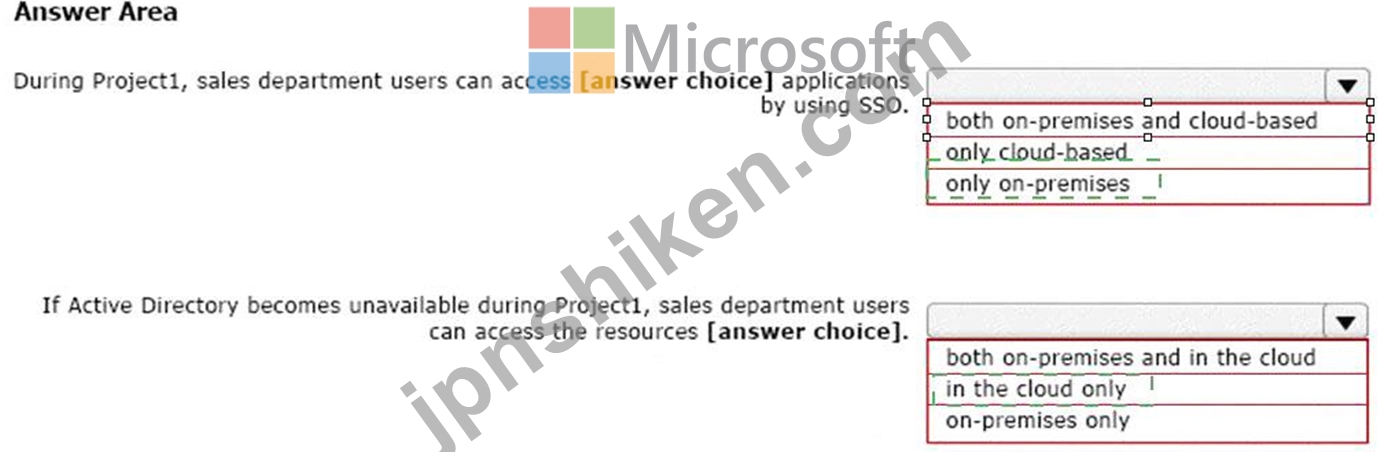
Explanation:

Box 1: only on-pr emises
In the exhibit, seamless single sign-on (SSO) is disabled. Therefore, as SSO is disabled in the cloud, the Sales department users can access only on-premises applications by using SSO.
In the exhibit, directory synchronization is enabled and active. This means that the on-premises Active Directory user accounts are synchronized to Microsoft Entra ID user accounts. If the on-premises Active Directory becomes unavailable, the users can access resources in the cloud by authenticating to Microsoft Entra ID. They will not be able to access resources on-premises if the on-premises Active Directory becomes unavailable as they will not be able to authenticate to the on-premises Active Directory.
Box 2: in the cloud only
Topic 5, Litware, IrkLitware, Irk. is a consulting company that has a
main office in Montreal and a branch office in Seattle?
Ltware collaborates with a third-party company named A. Datum Corporation.
The network of Litware contains an Active Directory domain named litware.com. The dom ain contains three organizational units (OUs) named LitwareAdmins, Montreal Users, and Seattle Users and the users shown in the following table.

The domain contains 2,000 Windows 10 Pro devices and 100 servers that run Windows Server 2019.
Litware ha s a pilot Microsoft 365 subscription that includes Microsoft Office 365 Enterprise E3 licenses and Microsoft Entra ID Premium P2 licenses.
The subscription contains a verified DNS domain named litware.com.
Microsoft Entra Connect Sync is installed and has the following configurations:
* Password hash synchronization is enabled.
* Synchronization is enabled for the UtwareAdmins OU only.
Users are assigned the roles shown in the following table.

Self-service password reset (SSPR) is enabled.
The Microso ft Entra tenant has Security defaults enabled.
Litware identifies the following issues:
* Admin1 cannot create conditional access policies.
* Admin4 receives an error when attempting to use SSPR.
* Users access new Office 365 service and feature updates before the updates are reviewed by Admin2.
Litware plans to implement the following changes:
* Implement Microsoft Intune.
* Implement Microsoft Teams.
* Implement Microsoft Defender for Office 365.
* Ensure that users can install Office 365 apps on their device.
* Convert all the Windows 10 Pro devices to Windows 10 Enterprise E5.
* Configure Microsoft Entra Connect Sync to sync the Montreal Users OU and the Seattle Users OU.
Litware identifies the following technical requirements:
* Administrators must be able to specify which version of an Office 365 desktop app will be available to users and to roll back to previous versions.
* Only Admin2 must have access to new Office 365 service and feature updates before they are released to the company.
* Litware us ers must be able to invite A. Datum users to participate in the following activities:
o Join Microsoft Teams channels,
o Join Microsoft Teams chats,
o Access shared files.
* Just in time access to critical administrative roles must be required.
* Microsoft 365 incidents and advisories must be reviewed monthly.
* Office 365 service status notifications must be sent to Admin2.
* The principle of least privilege must be used.

- 質問一覧「295問」
- 質問1 Windows 10 デバイスが 2,500 台あり、Microsoft 365 E5 テナン...
- 質問2 ネットワークには、contoso.com という名前のオンプレミスの Act...
- 質問3 Microsoft 365 E5 サブスクリプションがあり、Microsoft Defende...
- 質問4 あなたは Contoso, Ltd. という名前の会社で働いています。 Cont...
- 質問5 Microsoft 365 サブスクリプションをお持ちです。 次の要件を満...
- 質問6 Office 365 サービスのステータス通知を構成し、サービスと機能...
- 質問7 ビジネス向け Microsoft Store にサインアップした Microsoft 36...
- 質問8 セキュリティ管理者向けに解決策を提案する必要があります。その
- 質問9 あなたのネットワークには、オンプレミスの Active Directory ド...
- 質問10 Microsoft 365 テナントがあります。 Microsoft Intune に登録す...
- 質問11 セキュリティとセキュリティを使用する Microsoft 365 サブスク...
- 質問12 Microsoft 365 E5 テナントがあります。 クレジット カード番号...
- 質問13 次の表に示す ID を含む Microsoft 365 E5 サブスクリプションが...
- 質問14 ログ分析の技術要件を満たす必要があります。 Microsoft Cloud A...
- 質問15 Microsoft Defender for Endpoint と Microsoft Intune を使用す...
- 質問16 Microsoft Defender for Cloud Apps を使用する Microsoft 365 E...
- 質問17 注: この質問は、同じシナリオを示す一連の質問の一部です。この...
- 質問18 Microsoft 365 E5 サブスクリプションをお持ちです。 すべてのユ...
- 質問19 AU1 と AU2 という 2 つの管理単位を含む Microsoft 365 サブス...
- 質問20 Microsoft 365 サブスクリプションをお持ちです。 Microsoft Exc...
- 質問21 次の図に示すように、フィッシング対策ポリシーを構成します。 (...
- 質問22 Microsoft 365 E5 サブスクリプションをお持ちです。 次の図に示...
- 質問23 あなたはMicrosoft 365 E5のサブスクリプションをお持ちです。 M...
- 質問24 あなたはMicrosoft 365のサブスクリプションをお持ちです。 Site...
- 質問25 注: このセクションには、同じシナリオと問題に関する 1 つ以上...
- 質問26 Microsoft Defender for Office 365 を使用する Microsoft 365 E...
- 質問27 次の表に示すコンプライアンス ポリシーを含む Microsoft 365 テ...
- 質問28 Microsoft Intune に登録された 200 台の Android デバイスを含...
- 質問29 あなたの会社には Microsoft E5 テナントがあります。 企業は IS...
- 質問30 Azure Sentinel と Microsoft Cloud App Security を使用する予...
- 質問31 Microsoft 365 サブスクリプションをお持ちです。 次の図に示す...
- 質問32 注:この問題は、同じシナリオを提示する一連の問題の一部です。
- 質問33 Microsoft 365 E5 テナントがあります。 異常な Microsoft Offic...
- 質問34 Microsoft 365 テナントがあります。 Microsoft Defender XDR を...
- 質問35 ホットスポット 次の表に示すユーザーを含む Microsoft 365 E5 ...
- 質問36 お客様はMicrosoft 365 E5サブスクリプションと、contoso.comと...
- 質問37 貴社はcontoso.comという名前のMicrosoft Entraテナントを所有し...
- 質問38 ユーザー1が技術要件を満たすデバイスを登録できるようにする必
- 質問39 注: この質問は、同じシナリオを示す一連の質問の一部です。この...
- 質問40 あなたはMicrosoft 365のサブスクリプションをお持ちです。 この...
- 質問41 Microsoft 365 サブスクリプションをお持ちです。 データ損失防...
- 質問42 あなたの会社では Microsoft Defender for Endpoint を使用して...
- 質問43 あなたの会社では Microsoft Defender for Endpoint を使用して...
- 質問44 お客様は、contoso.com という名前の Microsoft Entra テナント...
- 質問45 お客様は、Microsoft 365 Multi-Geo を使用する Microsoft 365 ...
- 質問46 ホットスポット あなたの会社では、100 人のユーザーを含む従来...
- 質問47 ホットスポット あなたは、User1という名前のユーザーを含むMicr...
- 質問48 お客様は、contoso.com という名前の Microsoft Entra テナント...
- 質問49 Group1とGroup2という2つのセキュリティグループを含むMicrosoft...
- 質問50 次の表のユーザーを含む Microsoft 365 サブスクリプションがあ...
- 質問51 Microsoft 365 E5 テナントがあります。 業界規制により、テナン...
- 質問52 あなたはMicrosoft 365 E5のサブスクリプションをお持ちです。 S...
- 質問53 Microsoft 365 テナントがあります。 Endpoint Protection デバ...
- 質問54 Microsoft 365 サブスクリプションをお持ちです。 機密データが...
- 質問55 Microsoft J65 E5 サブスクリプションをお持ちです。 Microsoft ...
- 質問56 Microsoft Defender for Endpoint Plan 1 を使用する Microsoft ...
- 質問57 Microsoft 365 IS サブスクリプションがあり、Microsoft Defende...
- 質問58 お客様はMicrosoft 365 E5テナントをご利用中です。 テナントのM...
- 質問59 ネットワークには、Active Directory ドメインと Microsoft Entr...
- 質問60 次の表に示すデバイスを含む Microsoft 365 サブスクリプション...
- 質問61 次の図に示すドメインを含む Microsoft 365 サブスクリプション...
- 質問62 site1 という名前の Microsoft SharePoint サイトを含む Microso...
- 質問63 ホットスポット contoso.com という名前の Microsoft Entra テナ...
- 質問64 User1 という名前のユーザーと次の表に示す管理者を含む Microso...
- 質問65 貴社には本社が3つと支店が1つあります。支店は研究目的で使用さ...
- 質問66 Microsoft Intune に登録された 1,000 台の iOS デバイスを含む ...
- 質問67 Microsoft Defender for Office 365 を使用する Microsoft 365 ...
- 質問68 Microsoft 365 E5 サブスクリプションをお持ちです。 次の要件を...
- 質問69 Microsoft 365 E5 サブスクリプションをお持ちです。 サポートさ...
- 質問70 お客様のネットワークには、オンプレミスのActive Directoryドメ...
- 質問71 Microsoft 365 E5 サブスクリプションをお持ちです。 Microsoft ...
- 質問72 あなたは、User1という名前のユーザーを含むMicrosoft 365 E5サ...
- 質問73 ドラッグドロップ Group1 と Group2 という 2 つのグループを含...
- 質問74 御社はロンドンにオフィスを構えています。 あなたはMicrosoft 3...
- 質問75 あなたはMicrosoft 365 E5のサブスクリプションをお持ちです。 ...
- 質問76 注:この問題は、同じシナリオを提示する一連の問題の一部です。
- 質問77 「機密財務データ」というフッターを適用するには、「機密財務」
- 質問78 次の表に示すリソースを含む Microsoft 365 E5 テナントがありま...
- 質問79 Microsoft 365 E5 サブスクリプションをお持ちです。サブスクリ...
- 質問80 あなたはMicrosoft 365 E3のサブスクリプションをお持ちです。 ...
- 質問81 次のアクティブな電子情報開示ケースを含む Microsoft 365 E5 サ...
- 質問82 あなたの会社には 3 つの本社と 1 つの支社があります。支社は研...
- 質問83 Microsoft 365 テナントがあります。 Microsoft 365 セキュリテ...
- 質問84 Microsoft 365 E5 テナントがあります。 機密ラベルを構成します...
- 質問85 ホットスポット Microsoft 365 E5 サブスクリプションをお持ちで...
- 質問86 Microsoft 365 E5 テナントがあります。 ユーザーは次の場所にデ...
- 質問87 注:この問題は、同じシナリオを提示する一連の問題の一部です。
- 質問88 注:この問題は、同じシナリオを提示する一連の問題の一部です。
- 質問89 Microsoft Defender XDR を使用する Microsoft 365 サブスクリプ...
- 質問90 会社には Microsoft 365 E5 サブスクリプションがあります。 会...
- 質問91 次の表に示す ID を含む Microsoft 365 E5 サブスクリプションが...
- 質問92 技術要件を満たすように情報ガバナンス設定を構成する必要があり
- 質問93 次の図に示す機密ラベルがあります。 (Exhibit) ユーザーはコン...
- 質問94 あなたはMicrosoft 365テナントをお持ちです。 Microsoft Defend...
- 質問95 ホットスポット お客様のネットワークには、オンプレミスのActiv...
- 質問96 次の表に示すユーザーを含む Microsoft 365 E5 サブスクリプショ...
- 質問97 ホットスポット Microsoft 365 サブスクリプションをお持ちです...
- 質問98 注:この問題は、同じシナリオを提示する一連の問題の一部です。
- 質問99 Microsoft 365 E5 サブスクリプションをお持ちです。 サブスクリ...
- 質問100 次の表に示すように、Microsoft エンドポイント マネージャーに ...
- 質問101 Microsoft Intune を使用する Microsoft 365 E5 テナントがあり...
- 質問102 あなたはMicrosoft 365 E5のサブスクリプションをお持ちです。 P...
- 質問103 ネットワークには Active Directory フォレストが含まれています...
- 質問104 Microsoft 365 E5 サブスクリプションをお持ちです。サブスクリ...
- 質問105 Microsoft 365 E5 サブスクリプションをお持ちです。 Microsoft ...
- 質問106 メール内のURL https://contoso.com の書き換えを防止するには、...
- 質問107 1,000 台の Windows 10 デバイスを含む Microsoft 365 テナント...
- 質問108 大量のドキュメントを検索するための技術要件を満たす必要があり
- 質問109 Microsoft 365 E5 テナントがあります。 顧客データに関する欧州...
- 質問110 お客様は、Microsoft IntuneとMicrosoft Purviewを使用するMicro...
- 質問111 500 台の Windows 10 デバイスと Microsoft エンドポイント マネ...
- 質問112 Microsoft 365 サブスクリプションをお持ちです。 Microsoft Pur...
- 質問113 あなたの会社には Microsoft 365 テナントがあります Engineerin...
- 質問114 Microsoft 365 サブスクリプションをお持ちです。 次の例に示す...
- 質問115 Microsoft intune を使用する Microsoft 365 E5 サブスクリプシ...
- 質問116 Microsoft 365 E5 テナントがあります。 機密ラベルは、機密ラベ...
- 質問117 あなたの会社には Microsoft 365 E5 テナントがあります。 ユー...
- 質問118 注:この問題は、同じシナリオを提示する一連の問題の一部です。
- 質問119 あなたの会社は Microsoft 365 サブスクリプションを持っていま...
- 質問120 Microsoft 365 E5 サブスクリプションをお持ちです。 すべてのユ...
- 質問121 Microsoft 365 E5 サブスクリプションをお持ちです。 ユーザーは...
- 質問122 次の図に示すように、DLP1 という名前のデータ損失防止 (DLP) ポ...
- 質問123 次の表に示すユーザーを含む Microsoft 365 E5 テナントがありま...
- 質問124 Microsoft 365 E5 サブスクリプションをお持ちです。 ユーザーは...
- 質問125 次の表に示すユーザーを含む Microsoft 365 E5 サブスクリプショ...
- 質問126 Microsoft 365 E5 サブスクリプションをお持ちです。このサブス...
- 質問127 Microsoft Intune に登録されたデバイスを含む Microsoft 365 テ...
- 質問128 Microsoft 365 E5 サブスクリプションをお持ちです。 Microsoft ...
- 質問129 注:この問題は、同じシナリオを提示する一連の問題の一部です。
- 質問130 ホットスポット お客様のネットワークには、オンプレミスのActiv...
- 質問131 Microsoft 365 E5 サブスクリプションがあり、Microsoft Defende...
- 質問132 Microsoft 365 E5 サブスクリプションがあり、その中に user1@co...
- 質問133 注: このセクションには、同じシナリオと問題に関する 1 つ以上...
- 質問134 Microsoft Defender for Cloud Apps を使用する Microsoft 365 E...
- 質問135 (Microsoft 365 E5 サブスクリプションをお持ちです。 クラウド ...
- 質問136 お客様のネットワークには、contoso という名前のオンプレミスの...
- 質問137 あなたの会社には、次の表に示すユーザーが含まれる Microsoft 3...
- 質問138 注: この質問は、同じシナリオを示す一連の質問の一部です。この...
- 質問139 Site1 という名前の Microsoft SharePoint Online サイトを含む ...
- 質問140 セキュリティとセキュリティからコンプライアンス管理センターで
- 質問141 User1 という名前のユーザーと次の表に示す管理者を含む Microso...
- 質問142 お客様のネットワークには、オンプレミスのActive Directoryドメ...
- 質問143 100 台の Windows 10 デバイスを含む Microsoft 365 E5 テナント...
- 質問144 御社はモントリオール、シアトル、ニューヨーク市にオフィスを構
- 質問145 お客様のネットワークには、3つのActive Directoryフォレストが...
- 質問146 Microsoft Intune と Microsoft Defender XDR が含まれる Micros...
- 質問147 Microsoft Intune を使用する Microsoft 365 E5 テナントがあり...
- 質問148 あなたの会社はアプリケーションにデジタル署名を行っています。
- 質問149 次の表に示すユーザーを含む Microsoft 365 サブスクリプション...
- 質問150 あなたはMicrosoft 365のサブスクリプションをお持ちです。 すべ...
- 質問151 機密データが10件以上検出された場合に、ユーザーがポリシーの制...
- 質問152 あなたはMicrosoft 365のサブスクリプションをお持ちです。 あな...
- 質問153 Microsoft 365 E5 サブスクリプションをお持ちです。Microsoft D...
- 質問154 Microsoft 365 サブスクリプションをお持ちです。 レポートを確...
- 質問155 あなたの会社には、次の表に示すユーザーを含む Microsoft Entra...
- 質問156 Microsoft 365 テナントがあります。 Microsoft 365 セキュリテ...
- 質問157 次の表に示すユーザーを含む Microsoft 365 E5 テナントがありま...
- 質問158 次の表に示すユーザーを含む Microsoft 365 サブスクリプション...
- 質問159 ネットワークには Contoso という名前の Active Directory フォ...
- 質問160 Microsoft 365 のインシデントと勧告を毎月確認する必要がありま...
- 質問161 お客様は、contoso.onmicrosoft.com という名前の Microsoft Ent...
- 質問162 Microsoft 365 E5 テナントがあります。 ユーザーがマルウェアを...
- 質問163 Microsoft Defender for Office 365 を使用する Microsoft 365 ...
- 質問164 モバイル デバイス管理用に登録されたデバイスを含む Microsoft ...
- 質問165 お客様は、Contoso.com という名前の Microsoft Entra ID (Micro...
- 質問166 ホットスポット 新しい Microsoft 365 E5 テナントがあります。 ...
- 質問167 お客様はMicrosoft 365 Enterprise E5のサブスクリプションをご...
- 質問168 次の表に示すユーザーを含む Microsoft 365 E5 サブスクリプショ...
- 質問169 Microsoft 365 サブスクリプションをお持ちです。 サービス デス...
- 質問170 Microsoft 365 E5 サブスクリプションをお持ちです。 次の要件を...
- 質問171 ネットワークには contoso.local という名前の Active Directory...
- 質問172 あなたの会社は Microsoft 365 サブスクリプションを持っていま...
- 質問173 User1 という名前のユーザーを含む Microsoft 365 E5 サブスクリ...
- 質問174 次の表に示すユーザーを含む Microsoft Entra のハイブリッド展...
- 質問175 Microsoft 365 E5 サブスクリプションがあり、その中には Micros...
- 質問176 お客様は、以下の表に示すユーザーを含む Microsoft 365 E5 サブ...
- 質問177 Azure サブスクリプションとオンプレミスの Active Directory ド...
- 質問178 Microsoft 365 E5 サブスクリプションをお持ちです。 Microsoft ...
- 質問179 ホットスポット お客様のネットワークには、fabrikam.com という...
- 質問180 ホットスポット Microsoft 365 テナントがあります。 保持ラベル...
- 質問181 お客様はMicrosoft 365 E5テナントをご利用中です。 ユーザーか...
- 質問182 あなたはMicrosoft 365のサブスクリプションをお持ちです。 Adop...
- 質問183 次の表に示すグループを含む Microsoft 365 E5 サブスクリプショ...
- 質問184 米国、ヨーロッパ、アジアのユーザーを含む Microsoft 365 E5 サ...
- 質問185 Microsoft 365 E5 サブスクリプションをお持ちです。 メールが有...
- 質問186 Sitel という名前の Microsoft SharePoint サイトを含む Microso...
- 質問187 Azure ATP センサーはどのサーバーにインストールする必要があり...
- 質問188 あなたは、User1という名前のユーザーを含むMicrosoft 365 E5サ...
- 質問189 注: この質問は、同じシナリオを示す一連の質問の一部です。この...
- 質問190 注:この問題は、同じシナリオを提示する一連の問題の一部です。
- 質問191 次のユーザーを含む Microsoft 365 E5 サブスクリプションがあり...
- 質問192 Site1 という名前の SharePoint サイトを含む Microsoft 365 E5 ...
- 質問193 注: この質問は、同じシナリオを示す一連の質問の一部です。この...
- 質問194 お客様のネットワークには、contoso.com という名前のオンプレミ...
- 質問195 Microsoft 365 E5 サブスクリプションをお持ちです。 サインイン...
- 質問196 注:この問題は、同じシナリオを提示する一連の問題の一部です。
- 質問197 3 月の時点で、各オフィスのコンピューターはいつまで Microsoft...
- 質問198 貴社は、User1という名前のユーザーを含むMicrosoft 365 E5テナ...
- 質問199 次の表に示すように、Microsoft Intune に登録された 4 台のデバ...
- 質問200 あなたは、Label1 と Label2 という名前の 2 つの機密ラベルを含...
- 質問201 Microsoft 365 E5 サブスクリプションをお持ちです。 クラウド ...
- 質問202 ビジネス向け Microsoft Store にサインアップした Microsoft 36...
- 質問203 営業部門のすべてのユーザーが Project1 と Project2 中に正常に...
- 質問204 次の図に示すグループを含む Microsoft 365 E5 サブスクリプショ...
- 質問205 注:この問題は、同じシナリオを提示する一連の問題の一部です。
- 質問206 多要素認証 (MFA) の使用を評価しています。 次の各ステートメン...
- 質問207 あなたはMicrosoft 365 E5のサブスクリプションをお持ちです。 M...
- 質問208 サードパーティの多要素認証 (MFA) 製品を使用する Microsoft 36...
- 質問209 あなたはMicrosoft 365のサブスクリプションをお持ちです。 お客...
- 質問210 Microsoft 365 E5 テナントがある データ投げ捨て防止 (DLP) ポ...
- 質問211 Microsoft 365 サブスクリプションをお持ちです。 contoso.com ...
- 質問212 注:この問題は、同じシナリオを提示する一連の問題の一部です。
- 質問213 次の表に示す管理単位を含む Microsoft 365 サブスクリプション...
- 質問214 あなたはMicrosoft E5サブスクリプションをお持ちです。 Microso...
- 質問215 オンプレミス ネットワークには Active Directory ドメインが含...
- 質問216 あなたの会社は、次の図に示すドメインを含む Microsoft 365 サ...
- 質問217 人事部のユーザーが、人事部のMicrosoft SharePoint Onlineサイ...
- 質問218 Azure サブスクリプションと Microsoft 365 E5 サブスクリプショ...
- 質問219 Microsoft 365 サブスクリプションをお持ちです。 Exchange 管理...
- 質問220 Microsoft 365 E5 サブスクリプションがあり、そこには Label1 ...
- 質問221 次の表に示すデバイス コンプライアンス ポリシーがあります。 (...
- 質問222 Microsoft 365 E5 サブスクリプションをお持ちです。 貴社の Mic...
- 質問223 あなたはMicrosoft 365 E5のサブスクリプションをお持ちです。 M...
- 質問224 Microsoft 365 E5 サブスクリプションをお持ちです。 Microsoft ...
- 質問225 ネットワークには Active Directory ドメインが含まれています。...
- 質問226 貴社はMicrosoft 365のハイブリッド展開を行っています。 User1...
- 質問227 Microsoft 365 E5 サブスクリプションをお持ちです。 Microsoft ...
- 質問228 Microsoft Defender for Endpoint を使用し、次の表に示すデバイ...
- 質問229 注:この問題は、同じシナリオを提示する一連の問題の一部です。
- 質問230 次の表に示すデバイスを含む Microsoft 365 E5 テナントがありま...
- 質問231 あなたはMicrosoft 365のサブスクリプションをお持ちです。 お客...
- 質問232 SharePoint 管理者の技術要件を満たす必要があります。あなたは...
- 質問233 次の表に示すデバイスを含む Microsoft 365 E5 サブスクリプショ...
- 質問234 注: この質問は、同じシナリオを示す一連の質問の一部です。この...
- 質問235 Sitel という名前の Microsoft SharePoint サイトを含む Microso...
- 質問236 Microsoft 365 E5 テナントがあります。 次の図に示すように、デ...
- 質問237 500 台の Windows 10 デバイスと Windows 10 コンプライアンス ...
- 質問238 ハイブリッド型の Microsoft Entra ID (Microsoft Entra ID) テ...
- 質問239 Microsoft 365 E5 サブスクリプションがあり、Microsoft Defende...
- 質問240 Site1 と Site2 という名前の 2 つの Microsoft SharePoint Onli...
- 質問241 Windows 11 デバイスを含む Microsoft 365 E5 サブスクリプショ...
- 質問242 お客様は、以下の表に示すユーザーを含む、Microsoft Entra ID ...
- 質問243 Microsoft 365 サブスクリプションをお持ちです。 ネットワーク...
- 質問244 お客様は、以下の表に示すユーザーを含む Microsoft 365 E5 サブ...
- 質問245 Microsoft 365 E5 サブスクリプションをお持ちです。Microsoft E...
- 質問246 Microsoft 365 サブスクリプションをお持ちです。 Group! という...
- 質問247 Microsoft Defender for Endpoint に接続する Microsoft 365 E5 ...
- 質問248 Microsoft 365 サブスクリプションをお持ちです。 Enterprise Mo...
- 質問249 Microsoft 365 E5 サブスクリプションをお持ちです。 Policy1 と...
- 質問250 Office 365 では Microsoft Defender を使用します。 攻撃シミュ...
- 質問251 ビジネス向け Microsoft ストアを作成する必要があります。どの...
- 質問252 Intune で自動登録を構成する必要があります。ソリューションは...
- 質問253 コンプライアンス要件を満たすには、条件付きアクセス ポリシー
- 質問254 ホットスポット あなたはMicrosoft 365 E5のサブスクリプション...
- 質問255 Microsoft 365 E5 テナントがあります。 機密の個人データを含む...
- 質問256 Microsoft 365 E5 サブスクリプションがあります。サブスクリプ...
- 質問257 Microsoft 365 E5 サブスクリプションがあり、Microsoft Purview...
- 質問258 お客様のネットワークには、contoso.local という名前のオンプレ...
- 質問259 お客様のネットワークには、Microsoft Entra IDと同期されている...
- 質問260 Microsoft 365 E5 サブスクリプションがあります。DLP1 という名...
- 質問261 お客様は、以下の表に示すユーザーを含む Microsoft 365 E5 サブ...
- 質問262 お客様のオンプレミスネットワークには、Active Directoryドメイ...
- 質問263 Microsoft 365 サブスクリプションには、「すべてのユーザー」、...
- 質問264 Microsoft Defender for Office 365 を使用する Microsoft 365 E...
- 質問265 Microsoft 365 E5 サブスクリプションをお持ちで、Microsoft Def...
- 質問266 次の表に示すデバイスを含む Microsoft 365 E5 サブスクリプショ...
- 質問267 Microsoft 365 ES テナントがあります。 次の図に示すアラートが...
- 質問268 Microsoft 365 E5 サブスクリプションをお持ちです。Microsoft D...
- 質問269 お客様のネットワークには、contoso という名前のオンプレミスの...
- 質問270 Microsoft 365 E5 サブスクリプションをお持ちです。 次の要件を...
- 質問271 ホットスポット Microsoft 365 E5 サブスクリプションをお持ちで...
- 質問272 Microsoft Endpoint Managerには、複数のデバイスが登録されてい...
- 質問273 技術要件を満たすためには、ジャストインタイムアクセスを設定す
- 質問274 ホットスポット あなたはMicrosoft 365のサブスクリプションをお...
- 質問275 お客様は、contoso.com という名前の Microsoft Entra テナント...
- 質問276 User1 という名前のユーザーを含む Microsoft 365 E5 サブスクリ...
- 質問277 ホットスポット あなたの会社には Microsoft 365 E5 サブスクリ...
- 質問278 ホットスポット あなたはMicrosoft 365 E5のサブスクリプション...
- 質問279 お客様は、以下の表に示すグループを含む Microsoft 365 E5 サブ...
- 質問280 ホットスポット ネットワークにはオンプレミスの Active Directo...
- 質問281 Microsoft 365 E5 テナントがあります。 次の要件を満たす監視ソ...
- 質問282 お客様のネットワークには、Microsoft Entra Connect Sync Expre...
- 質問283 次の表に示すユーザーを含む Microsoft 365 サブスクリプション...
- 質問284 次の表に示す使用が含まれる Microsoft 365 ES サブスクリプショ...
- 質問285 Microsoft 365 E5 サブスクリプションをお持ちです。 次の表に示...
- 質問286 あなたはMicrosoft 365 E5のサブスクリプションをお持ちです。 ...
- 質問287 次の図に示すように、3 つの自動保持ポリシーを持つ Microsoft 3...
- 質問288 次の表に示すユーザーを含む Microsoft 365 E5 テナントがありま...
- 質問289 あなたは、User1という名前のユーザーを含むMicrosoft 365サブス...
- 質問290 Microsoft 365 サブスクリプションをお持ちです。 Microsoft Def...
- 質問291 Microsoft 365 E5 サブスクリプションをお持ちです。 次の要件を...
- 質問292 ホットスポット Microsoft 365 テナントを作成します。 Microsof...
- 質問293 User1 にどの役割を割り当てるべきですか? 利用可能な選択肢 (正...
- 質問294 Microsoft 365 サブスクリプションをお持ちです。 Microsoft Ent...
- 質問295 2,000 人を超えるゲスト ユーザーを含む Microsoft 365 サブスク...
