- ホーム
- Microsoft
- MS-102J - Microsoft 365 Administrator (MS-102日本語版)
- Microsoft.MS-102J.v2026-09-01.q281
- 質問245
有効的なMS-102J問題集はJPNTest.com提供され、MS-102J試験に合格することに役に立ちます!JPNTest.comは今最新MS-102J試験問題集を提供します。JPNTest.com MS-102J試験問題集はもう更新されました。ここでMS-102J問題集のテストエンジンを手に入れます。
MS-102J問題集最新版のアクセス
「598問、30% ディスカウント、特別な割引コード:JPNshiken」
御社はロンドンにオフィスを構えています。
あなたはMicrosoft 365のサブスクリプションをお持ちです。
以下の要件を満たす、Policy1という名前の条件付きアクセス ポリシーを作成する必要があります。
認証には、FIDO2セキュリティキー、Windows Hello for Business、および証明書のみがサポートされる必要があります。
* ロンドンオフィスは信頼できる場所としてマークし、ポリシー1から除外する必要があります。
Policy1はどのように設定すればよいですか?

あなたはMicrosoft 365のサブスクリプションをお持ちです。
以下の要件を満たす、Policy1という名前の条件付きアクセス ポリシーを作成する必要があります。
認証には、FIDO2セキュリティキー、Windows Hello for Business、および証明書のみがサポートされる必要があります。
* ロンドンオフィスは信頼できる場所としてマークし、ポリシー1から除外する必要があります。
Policy1はどのように設定すればよいですか?
正解:
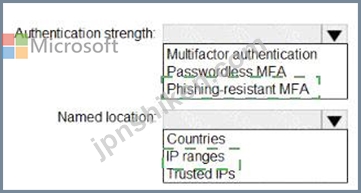
Explanation:
Setting
Correct selection
Authentication strength
Phishing-resistant MFA
Named location
IP ranges
The correct authentication strength is Phishing-resistant MFA. Microsoft Entra authentication strengths let administrators control which authentication methods satisfy a Conditional Access policy. The built-in phishing-resistant MFA strength is designed for methods such as FIDO2/passkeys, Windows Hello for Business, and certificate-based authentication, which matches the requirement exactly. Regular "Multifactor authentication" would allow broader MFA methods such as push notification, SMS, voice, or OTP, so it is too permissive. "Passwordless MFA" is also not exact because passwordless methods can include methods that are not necessarily the same phishing-resistant set required here.
The correct named location type is IP ranges. To mark a physical office such as London as trusted, you define the office's public egress IP addresses as a Conditional Access named location and mark that IP range as trusted. Microsoft's Conditional Access location guidance states that named locations can be created as countries/regions or IP ranges, and that when you select IP ranges, you can optionally Mark as trusted location.
Therefore, configure Policy1 with Phishing-resistant MFA and exclude a trusted named location created from the London office IP ranges.

- 質問一覧「281問」
- 質問1 Microsoft Defender for Office 365 を使用する Microsoft 365 E...
- 質問2 Microsoft 365 ES サブスクリプションをお持ちです。 Microsoft ...
- 質問3 Microsoft J65 E5 サブスクリプションをお持ちです。 Microsoft ...
- 質問4 Microsoft Defender for Cloud Apps を使用する Microsoft 365 ...
- 質問5 Microsoft 365 E5 サブスクリプションをお持ちです。 Microsoft ...
- 質問6 User1 にどの役割を割り当てるべきですか? 利用可能な選択肢 (正...
- 質問7 注:この問題は、同じシナリオを提示する一連の問題の一部です。
- 質問8 (Microsoft 365 E5 サブスクリプションをお持ちです。 クラウド ...
- 質問9 Microsoft Defender for Office 365 を使用する Microsoft 365 ...
- 質問10 Microsoft 365 サブスクリプションをお持ちです。 Microsoft Ent...
- 質問11 Microsoft Defender for Endpoint と Microsoft Intune を使用す...
- 質問12 Microsoft 365 E5 サブスクリプションをお持ちです。 Mailbox1 ...
- 質問13 Microsoft 365 テナントがあります。 Microsoft Intune に登録す...
- 質問14 あなたの会社は、App1 という名前のクラウド アプリを購入します...
- 質問15 次の図に示す公開された機密ラベルを持つ Microsoft 365 E5 サブ...
- 質問16 次の表に示すユーザーを含む Microsoft 365 E5 テナントがありま...
- 質問17 ホットスポット Microsoft 365 サブスクリプションをお持ちです...
- 質問18 次の表に示すユーザーを含む Microsoft 365 サブスクリプション...
- 質問19 お客様は、以下の表に示すユーザーを含む Microsoft 365 E5 サブ...
- 質問20 あなたは、User1、User2、User3という名前の3人のユーザーを含む...
- 質問21 Microsoft 365 サブスクリプションをお持ちです。 contoso.com ...
- 質問22 次の図に示すように、ネットワークには Microsoft Entra テナン...
- 質問23 Windows 11 デバイスを含む Microsoft 365 E5 サブスクリプショ...
- 質問24 お客様は、以下のサービスを利用するMicrosoft 365サブスクリプ...
- 質問25 Site1 という名前の Microsoft SharePoint Online サイトを含む ...
- 質問26 あなたはMicrosoft 365 E5のサブスクリプションをお持ちです。 S...
- 質問27 お客様はMicrosoft 365 E5テナントをご利用中です。 テナントのM...
- 質問28 ネットワークにはcontoso.comというActive Directoryドメインが...
- 質問29 ユーザー「User1」を含む Microsoft Entra ID (Microsoft Entra ...
- 質問30 ホットスポット Site1 という名前の Microsoft SharePoint サイ...
- 質問31 次の図に示すように、DLP1 という名前のデータ損失防止 (DLP) ポ...
- 質問32 次の表に示すアラートを含む Microsoft 365 サブスクリプション...
- 質問33 Montreal Users および Seattle Users OU の計画された変更をサ...
- 質問34 Azure サブスクリプションと Microsoft 365 E5 サブスクリプショ...
- 質問35 Microsoft 365 E5 サブスクリプションをお持ちです。 ユーザーは...
- 質問36 モバイル デバイス管理用に登録されたデバイスを含む Microsoft ...
- 質問37 お客様は、Contoso.com という名前の Microsoft Entra ID (Micro...
- 質問38 次の表に示すユーザーを含む Microsoft 365 サブスクリプション...
- 質問39 次の表に示すユーザーを含む Microsoft Entra のハイブリッド展...
- 質問40 ホットスポット 次の表に示すユーザーを含む Microsoft 365 E5 ...
- 質問41 Microsoft 365 テナントがあります。 カスタム コンプライアンス...
- 質問42 あなたはMicrosoft 365のサブスクリプションをお持ちです。 Cont...
- 質問43 次の表に示すユーザーを含む Microsoft 365 E5 サブスクリプショ...
- 質問44 あなたの会社にはシアトルとデンバーにオフィスがあります。 Mic...
- 質問45 お客様のネットワークには、Active DirectoryドメインとMicrosof...
- 質問46 Microsoft 365 E5 サブスクリプションをお持ちです。 次の要件を...
- 質問47 注:この問題は、同じシナリオを提示する一連の問題の一部です。
- 質問48 Microsoft 365 IS サブスクリプションがあり、Microsoft Defende...
- 質問49 あなたのネットワークには、オンプレミスの Active Directory ド...
- 質問50 あなたはMicrosoft 365のサブスクリプションをお持ちです。 この...
- 質問51 Microsoft 365 E5 サブスクリプションをお持ちです。 多要素認証...
- 質問52 注:この問題は、同じシナリオを提示する一連の問題の一部です。
- 質問53 Microsoft 365 E5 サブスクリプションをお持ちです。 ユーザーが...
- 質問54 Microsoft 365 E5 サブスクリプションをお持ちです。 複数のユー...
- 質問55 注: この質問は、同じシナリオを示す一連の質問の一部です。この...
- 質問56 Microsoft 365 E5 テナントがあります。 クレジット カード番号...
- 質問57 Microsoft Intune に登録された 500 台の Android デバイスを含...
- 質問58 Microsoft Entra ID Protectionの週刊ダイジェストメールを有効...
- 質問59 1,000 台の Windows 10 デバイスを含む Microsoft 365 テナント...
- 質問60 Microsoft および SharePoint Online に対して秘密度ラベルのサ...
- 質問61 どのサーバーで Defender for ID センサーを使用する必要があり...
- 質問62 次の表に示すように、Microsoft Intune に登録された 5 台のデバ...
- 質問63 Microsoft Intune に登録されたデバイスを含む Microsoft 365 テ...
- 質問64 Microsoft 365 E5 サブスクリプションをお持ちです。 Microsoft ...
- 質問65 Azure Sentinel と Microsoft Cloud App Security を使用する予...
- 質問66 お客様は、Contoso.com という名前の Microsoft Entra ID (Micro...
- 質問67 あなたの会社では Microsoft Defender for Endpoint を使用して...
- 質問68 お客様は、以下の表に示すデバイスを含む Microsoft 365 E5 サブ...
- 質問69 新しい Microsoft 365 E5 テナントがあります。 Microsoft Excha...
- 質問70 Microsoft 365 サブスクリプションには、「すべてのユーザー」、...
- 質問71 Microsoft 365 E5 サブスクリプションをお持ちです。 次の表に示...
- 質問72 お客様のオンプレミスネットワークには、Active Directoryドメイ...
- 質問73 Group1とGroup2という2つのセキュリティグループを含むMicrosoft...
- 質問74 Intune の技術要件と計画された変更を満たす必要があります。 あ...
- 質問75 Microsoft 365 E5 サブスクリプションをお持ちで、Microsoft Def...
- 質問76 お客様は、100台のWindows 10デバイスを含むMicrosoft 365 E5テ...
- 質問77 次の表に示すユーザーを含む Microsoft 365 E5 テナントがありま...
- 質問78 Microsoft 365 サブスクリプションをお持ちです。 すべてのユー...
- 質問79 次のユーザーを含む Microsoft 365 E5 サブスクリプションがあり...
- 質問80 あなたの会社はアプリケーションにデジタル署名を行っています。
- 質問81 Microsoft 365 サブスクリプションをお持ちです。 いくつかの Mi...
- 質問82 User1 と User2 という名前の 2 人のユーザーと、次の表に示すグ...
- 質問83 User1 という名前のユーザーを含む Microsoft 365 E5 サブスクリ...
- 質問84 Microsoft Defender for Endpoint を使用する Microsoft 365 E5 ...
- 質問85 ホットスポット Microsoft 365 E5 サブスクリプションをお持ちで...
- 質問86 Microsoft Defender for Office 365 を使用する Microsoft 365 ...
- 質問87 あなたは、Label1 と Label2 という名前の 2 つの機密ラベルを含...
- 質問88 Microsoft 365 E5 サブスクリプションをお持ちです。 あなたは、...
- 質問89 あなたはMicrosoft 365のサブスクリプションをお持ちです。 App1...
- 質問90 お客様は、Microsoft IntuneとMicrosoft Purviewを使用するMicro...
- 質問91 Microsoft Defender for Endpoint を使用する Microsoft 365 E5 ...
- 質問92 お客様は、contoso.com という名前の Microsoft Entra テナント...
- 質問93 Sitel という名前の Microsoft SharePoint サイトを含む Microso...
- 質問94 注: この質問は、同じシナリオを示す一連の質問の一部です。この...
- 質問95 お客様は、Contoso.com という名前の Microsoft Entra ID (Micro...
- 質問96 注:この問題は、同じシナリオを提示する一連の問題の一部です。
- 質問97 あなたはMicrosoft 365のサブスクリプションをお持ちです。 すべ...
- 質問98 Microsoft Intune を使用する Microsoft 365 E5 サブスクリプシ...
- 質問99 次の表に示すコンプライアンス ポリシーを含む Microsoft 365 テ...
- 質問100 ホットスポット Microsoft 365 E5 サブスクリプションをお持ちで...
- 質問101 Microsoft 365 サブスクリプションをお持ちです。 Enterprise Mo...
- 質問102 Microsoft 365 E5 サブスクリプションをお持ちです。 Microsoft ...
- 質問103 Microsoft Defender for Endpoint を使用する Microsoft 365 E5 ...
- 質問104 Microsoft 365 E5 サブスクリプションがあり、Microsoft Defende...
- 質問105 あなたはMicrosoft 365 E5サブスクリプションをご利用で、Office...
- 質問106 Microsoft 365 E5 テナントがあります。 機密ラベルは、機密ラベ...
- 質問107 Microsoft 365 テナントがあります。 Endpoint Protection デバ...
- 質問108 お客様は、以下の表に示すユーザーを含む、Microsoft 365 のハイ...
- 質問109 次の図に、Microsoft Defender XDR レポートのスケジュールを示...
- 質問110 Microsoft 365 E5 サブスクリプションをお持ちです。Microsoft E...
- 質問111 お客様は、以下の表に示すユーザーを含む Microsoft 365 E5 サブ...
- 質問112 ホットスポット Microsoft 365 テナントがあります。 次の図に示...
- 質問113 Microsoft Defender for Endpoint を使用します。 次の表に示す ...
- 質問114 注:この問題は、同じシナリオを提示する一連の問題の一部です。
- 質問115 Microsoft 365 E5 サブスクリプションがあり、Microsoft Defende...
- 質問116 注:この問題は、同じシナリオを提示する一連の問題の一部です。
- 質問117 あなたはMicrosoft 365のサブスクリプションをお持ちです。 企業...
- 質問118 注: この質問は、同じシナリオを示す一連の質問の一部です。この...
- 質問119 お客様は、Microsoft Defender for Endpoint を使用する Microso...
- 質問120 次の表に示すリソースを含む Microsoft 365 E5 サブスクリプショ...
- 質問121 お客様は、以下の表に示すユーザーを含む Microsoft 365 E5 サブ...
- 質問122 次の表に示すように、Microsoft エンドポイント マネージャーに ...
- 質問123 次の図に示すように、3 つの自動保持ポリシーを持つ Microsoft 3...
- 質問124 お客様のネットワークには、オンプレミスのActive Directoryドメ...
- 質問125 Microsoft 365 E5 サブスクリプションをお持ちです。 次の表に示...
- 質問126 次の表に示すデバイスを含む Microsoft 365 E5 サブスクリプショ...
- 質問127 次の表に示すグループを含む Microsoft 365 E5 サブスクリプショ...
- 質問128 注:この問題は、同じシナリオを提示する一連の問題の一部です。
- 質問129 ネットワークにはオンプレミスの Active Directory ドメイン サ...
- 質問130 (1,000 台の Windows デバイスを含む Microsoft 365 E5 サブスク...
- 質問131 次の表に示すデバイスを含む Microsoft 365 E5 テナントがありま...
- 質問132 ホットスポット Group1 という名前の Microsoft 365 グループを...
- 質問133 あなたはMicrosoft 365 ESのサブスクリプションをお持ちです。 M...
- 質問134 Microsoft 365 サブスクリプションをお持ちです。 Microsoft Def...
- 質問135 次の図に示すドメインを含む Microsoft 365 サブスクリプション...
- 質問136 500 台の Windows 10 デバイスと Windows 10 コンプライアンス ...
- 質問137 次の表に示すグループを含む Microsoft 365 E5 サブスクリプショ...
- 質問138 Microsoft 365 E5 テナントがあります。 機密の個人データを含む...
- 質問139 Microsoft 365 サブスクリプションをお持ちです。 あなたの会社...
- 質問140 あなたは、User1という名前のユーザーを含むMicrosoft 365サブス...
- 質問141 あなたは、User1という名前のユーザーを含むMicrosoft 365サブス...
- 質問142 Microsoft 365 E5 サブスクリプションをお持ちです。 次の要件を...
- 質問143 Microsoft J65 E5 サブスクリプションをお持ちです。 Microsoft ...
- 質問144 お客様のネットワークには、オンプレミスのActive Directoryドメ...
- 質問145 大量のドキュメントを検索するための技術要件を満たす必要があり
- 質問146 お客様はMicrosoft 365 Enterprise E5のサブスクリプションをご...
- 質問147 Microsoft 365 E5 サブスクリプションをお持ちです。 Policy1 と...
- 質問148 会社には、contoso.com という名前の Microsoft Entra テナント...
- 質問149 御社はモントリオール、シアトル、ニューヨーク市にオフィスを構
- 質問150 Microsoft Defender XDR ポータルでアラートを確認しています。 ...
- 質問151 次の表に示す ID を含む Microsoft 365 E5 サブスクリプションが...
- 質問152 あなたはMicrosoft 365 E5のサブスクリプションをお持ちです。 c...
- 質問153 次の表に示すユーザーを含む Microsoft 365 E5 サブスクリプショ...
- 質問154 Microsoft Defender for Office 365 を使用する Microsoft 365 E...
- 質問155 あなたの会社には、次の表に示すユーザーを含む Microsoft Entra...
- 質問156 Microsoft intune を使用する Microsoft 365 E5 サブスクリプシ...
- 質問157 次の表に示すラベルを含む Microsoft 365 E5 サブスクリプション...
- 質問158 注: このセクションには、同じシナリオと問題に関する 1 つ以上...
- 質問159 ホットスポット あなたはMicrosoft 365のサブスクリプションをお...
- 質問160 あなたはMicrosoft 365 E5のサブスクリプションをお持ちです。 ...
- 質問161 あなたはMicrosoft 365 E5のサブスクリプションをお持ちです。 ...
- 質問162 あなたはMicrosoft 365 E5のサブスクリプションをお持ちです。 M...
- 質問163 技術要件を満たすには、安全な添付ファイル ポリシーを作成する
- 質問164 注: この質問は、同じシナリオを示す一連の質問の一部です。この...
- 質問165 Azure ATP センサーはどのサーバーにインストールする必要があり...
- 質問166 あなたは、User1という名前のユーザーを含むMicrosoft 365 E5サ...
- 質問167 次の表に示すセキュリティ グループを含む Microsoft 365 E5 サ...
- 質問168 ホットスポット 次の表に示すユーザーを含む Microsoft 365 E5 ...
- 質問169 あなたはMicrosoft 365 E5のサブスクリプションをお持ちです。 M...
- 質問170 Device1 という名前の Windows 10 デバイスと、次の表に示す Mic...
- 質問171 Microsoft Defender for Endpoint を使用し、次の表に示すデバイ...
- 質問172 お客様は、Microsoft Entra IDansidential Threat Protection (A...
- 質問173 User1 という名前のユーザーと次の表に示す管理者を含む Microso...
- 質問174 User1 という名前のユーザーと、次の表に示す管理者を含む Micro...
- 質問175 Admin1 と Admin2 という名前の 2 人のユーザーを含む Microsoft...
- 質問176 Microsoft Defender XDR を使用する Microsoft 365 サブスクリプ...
- 質問177 お客様のネットワークには、オンプレミスのActive Directoryドメ...
- 質問178 Admin1 という名前のユーザーを含む Microsoft 365 E5 サブスク...
- 質問179 Microsoft 365 E5 サブスクリプションをお持ちです。 サブスクリ...
- 質問180 Microsoft 365 ES テナントがあります。 次の図に示すアラートが...
- 質問181 Microsoft 365 E5 テナントがあります。 異常な Microsoft Offic...
- 質問182 Microsoft 365 サブスクリプションをお持ちです。 Group! という...
- 質問183 Microsoft 365 E5 テナントがあります。 業界規制により、テナン...
- 質問184 貴社はMicrosoft 365のハイブリッド展開を行っています。 User1...
- 質問185 技術要件を満たすように Office on the Web を構成する必要があ...
- 質問186 Microsoft 365 E5 サブスクリプションをお持ちです。 サインイン...
- 質問187 次の表のユーザーを含む Microsoft 365 サブスクリプションがあ...
- 質問188 次の表に示すユーザーを含む Microsoft 365 E5 サブスクリプショ...
- 質問189 Microsoft 365 E5 サブスクリプションをお持ちです。 ユーザーは...
- 質問190 Microsoft 365 E5 サブスクリプションをお持ちです。 すべての企...
- 質問191 お客様のネットワークには、contoso.com という名前のオンプレミ...
- 質問192 お客様は、contoso.com という名前の Microsoft Entra テナント...
- 質問193 Microsoft 365 E5 サブスクリプションをお持ちです。 次の図に示...
- 質問194 Microsoft Intune を使用する Microsoft 365 E5 テナントがあり...
- 質問195 Admin4 が SSPR を使用できることを確認する必要があります。 ど...
- 質問196 次の表に示すユーザーを含む Microsoft 365 E5 サブスクリプショ...
- 質問197 Microsoft 365 E5 サブスクリプションをお持ちです。 アプリが M...
- 質問198 お客様のネットワークには、オンプレミスの Active Directory ド...
- 質問199 あなたはMicrosoft 365 E5サブスクリプションをご利用で、Office...
- 質問200 お客様のネットワークには、Microsoft Entra IDと同期されている...
- 質問201 お客様は、Microsoft Defender XDRを使用するMicrosoft 365サブ...
- 質問202 ネットワークにはActive Directoryドメインサービス(AD DS)ド...
- 質問203 Microsoft Purview の eDiscovery Manager ロールグループに Lyn...
- 質問204 User1 という名前のユーザーと次の表に示す管理者を含む Microso...
- 質問205 ビジネス向け Microsoft ストアを作成する必要があります。どの...
- 質問206 お客様には、contoso.com という名前の Microsoft Entra ID (Mic...
- 質問207 法務部門の要件を満たす必要があります。 「セキュリティとセキ
- 質問208 お客様のネットワークには、オンプレミスのActive Directoryドメ...
- 質問209 Microsoft 365 サブスクリプションをお持ちです。 次の図に示す...
- 質問210 あなたはMicrosoft 365 E5のサブスクリプションをお持ちです。 ...
- 質問211 ネットワークには、Active Directory ドメインと Microsoft Entr...
- 質問212 Microsoft 365 E5 サブスクリプションがあり、Microsoft Defende...
- 質問213 Microsoft Defender for Office 365 を使用する Microsoft 365 ...
- 質問214 注:この問題は、同じシナリオを提示する一連の問題の一部です。
- 質問215 あなたの会社には Microsoft 365 テナントがあります Engineerin...
- 質問216 Microsoft 365 E5 サブスクリプションがあり、その中には Micros...
- 質問217 ホットスポット Microsoft 365 サブスクリプションをお持ちです...
- 質問218 貴社はcontoso.comという名前のMicrosoft Entraテナントを所有し...
- 質問219 Windows 10 デバイスのコンプライアンス要件を満たす必要があり...
- 質問220 あなたの会社には Microsoft 365 E5 テナントがあります。 会社...
- 質問221 User1 という名前のユーザーと Site1 という名前の Microsoft Sh...
- 質問222 Microsoft 365 E5 サブスクリプションをお持ちです。 すべてのデ...
- 質問223 Microsoft 365 E5 サブスクリプションをお持ちです。 サポートさ...
- 質問224 機密データが10件以上検出された場合に、ユーザーがポリシーの制...
- 質問225 Microsoft 365 E5 サブスクリプションをお持ちです。 Microsoft ...
- 質問226 技術要件を満たすために DLP ポリシーを作成する必要があります...
- 質問227 Microsoft 365 コンプライアンス センターから、Site1 という名...
- 質問228 Microsoft 365 E5 サブスクリプションがあり、Microsoft Defende...
- 質問229 Microsoft 365 E5 サブスクリプションがあります。サブスクリプ...
- 質問230 ホットスポット 次の表に示すユーザーを含む Microsoft 365 サブ...
- 質問231 Microsoft Intune と Microsoft Defender XDR が含まれる Micros...
- 質問232 Group1 と Group2 という 2 つのセキュリティ グループを含む Mi...
- 質問233 ホットスポット 次の表に示すグループを含む Microsoft 365 E5 ...
- 質問234 お客様は、contoso.com という名前の Microsoft Entra テナント...
- 質問235 Windows 10 デバイスの Intune 要件を満たす必要があります。 あ...
- 質問236 注: このセクションには、同じシナリオと問題を扱う1つ以上の質...
- 質問237 注: この質問は、同じシナリオを示す一連の質問の一部です。この...
- 質問238 次の表に示すリソースを含む Microsoft 365 E5 テナントがありま...
- 質問239 あなたはMicrosoft 365のサブスクリプションをお持ちです。 お客...
- 質問240 Microsoft エンドポイント マネージャーを使用して管理されてい...
- 質問241 Microsoft 365 E5 サブスクリプションをお持ちです。 メールが有...
- 質問242 貴社はオンプレミスサーバーとMicrosoft Entraテナントを所有し...
- 質問243 Microsoft 365 E5 サブスクリプションをお持ちです。 次の要件を...
- 質問244 次の表に示すデバイスを含む Microsoft 365 E5 テナントがありま...
- 質問245 御社はロンドンにオフィスを構えています。 あなたはMicrosoft 3...
- 質問246 Windows 10 デバイスが 2,500 台あり、Microsoft 365 E5 テナン...
- 質問247 adatum.com というドメイン名を使用する Microsoft 365 サブスク...
- 質問248 500 台の Windows 10 デバイスを含む Microsoft 365 E5 テナント...
- 質問249 ネットワークには contoso.local という名前の Active Directory...
- 質問250 ホットスポット Site1 という名前の Microsoft SharePoint Onlin...
- 質問251 次の表に示すユーザーを含む Microsoft 365 E5 テナントがありま...
- 質問252 外部ユーザーとのクレジット カード情報の共有を保護するデータ
- 質問253 Microsoft 365 E5 サブスクリプションをお持ちです。 貴社の Mic...
- 質問254 計画された変更をサポートするために、エンドポイント保護デバイ
- 質問255 ホットスポット Microsoft 365 E5 サブスクリプションをお持ちで...
- 質問256 Microsoft Endpoint Managerには、複数のデバイスが登録されてい...
- 質問257 SharePoint 管理者の技術要件を満たす必要があります。あなたは...
- 質問258 あなたは、Group1とGroup2という名前の2つのグループを含むMicro...
- 質問259 Microsoft 365 E5 サブスクリプションがあります。DLP1 という名...
- 質問260 Microsoft 365 E5 サブスクリプションがあり、その中に user1@co...
- 質問261 貴社には1万人のユーザーがおり、彼らは社内データセンターから
- 質問262 Microsoft 365 テナントがあります。 Microsoft 365 セキュリテ...
- 質問263 3 月の時点で、各オフィスのコンピューターはいつまで Microsoft...
- 質問264 ネットワークには Active Directory ドメインが含まれています。...
- 質問265 Microsoft Defender for Office 365 を使用する Microsoft 365 ...
- 質問266 注:この問題は、同じシナリオを提示する一連の問題の一部です。
- 質問267 注: この質問は、同じシナリオを示す一連の質問の一部です。この...
- 質問268 注: この質問は、同じシナリオを示す一連の質問の一部です。この...
- 質問269 お客様のMicrosoft Entraテナントには、以下の表に示すユーザー...
- 質問270 Microsoft Defender for Office 365 を使用し、User1 という名前...
- 質問271 Microsoft 365 E5 サブスクリプションをお持ちです。 すべてのユ...
- 質問272 お客様のネットワークには、以下の図に示すように、Microsoft En...
- 質問273 次の表に示すユーザーを含む Microsoft 365 E5 サブスクリプショ...
- 質問274 Microsoft 365 サブスクリプションをお持ちです。 次の表に示す...
- 質問275 ホットスポット Microsoft 365 サブスクリプションをお持ちです...
- 質問276 お客様のオンプレミスネットワークには、Active Directoryドメイ...
- 質問277 Intune で自動登録を構成する必要があります。ソリューションは...
- 質問278 お客様はMicrosoft EntraテナントとMicrosoft 365 E5サブスクリ...
- 質問279 次の表に示すユーザーを含む Microsoft 365 E5 テナントがありま...
- 質問280 Microsoft 365 E5 サブスクリプションをお持ちです。サブスクリ...
- 質問281 Microsoft 365 E5 サブスクリプションをお持ちです。 Microsoft ...
