- ホーム
- Microsoft
- MS-102J - Microsoft 365 Administrator (MS-102日本語版)
- Microsoft.MS-102J.v2024-03-26.q164
- 質問8
有効的なMS-102J問題集はJPNTest.com提供され、MS-102J試験に合格することに役に立ちます!JPNTest.comは今最新MS-102J試験問題集を提供します。JPNTest.com MS-102J試験問題集はもう更新されました。ここでMS-102J問題集のテストエンジンを手に入れます。
MS-102J問題集最新版のアクセス
「598問、30% ディスカウント、特別な割引コード:JPNshiken」
Microsoft 365 E5 サブスクリプションをお持ちです。
Mailbox1 という名前のメールボックスを使用して、悪意のある電子メール メッセージを分析する予定です。
次の要件を満たすように Microsoft Defender for Office 365 を構成する必要があります。
* 受信メールが Mailbox1 でフィルタリングされていないことを確認してください。
* サブスクリプション内の他のすべてのメールボックスに対するなりすましおよびスプーフィング攻撃を検出します。
どの 2 つの設定を構成する必要がありますか?回答するには、回答領域で適切な設定を選択します。

Mailbox1 という名前のメールボックスを使用して、悪意のある電子メール メッセージを分析する予定です。
次の要件を満たすように Microsoft Defender for Office 365 を構成する必要があります。
* 受信メールが Mailbox1 でフィルタリングされていないことを確認してください。
* サブスクリプション内の他のすべてのメールボックスに対するなりすましおよびスプーフィング攻撃を検出します。
どの 2 つの設定を構成する必要がありますか?回答するには、回答領域で適切な設定を選択します。
正解:
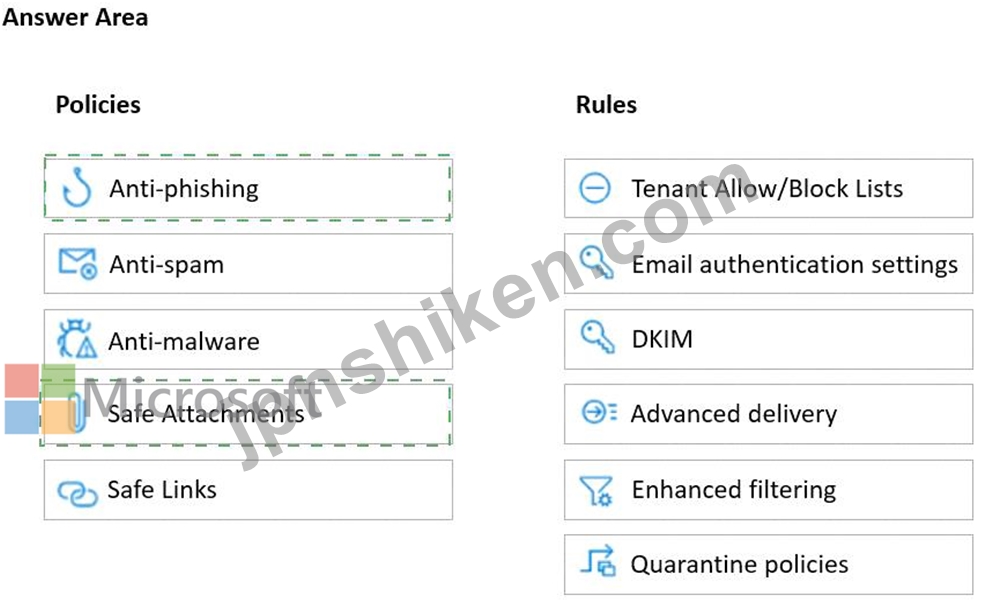
Safe Attachments policy: This policy allows you to specify how to handle email attachments that might contain malware. You can create a custom policy for Mailbox1 and set the action to Do not scan attachments. This will ensure that incoming email is not filtered for Mailbox1. You can also enable the Redirect attachment option to send a copy of the original attachment to another mailbox for analysis1.
Anti-phishing policy: This policy helps you protect your organization from impersonation and spoofing attacks. You can create a default policy for all other mailboxes in the subscription and enable the following features: Impersonation protection, Spoof intelligence, and Domain authentication. These features will help you detect and block emails that try to impersonate your users, domains, or trusted senders2.

- 質問一覧「164問」
- 質問1 注: この質問は、同じシナリオを示す一連の質問の一部です。この...
- 質問2 (Exhibit) SP800 評価には、次の表に示す改善アクションがありま...
- 質問3 contoso.com という名前の Azure AD テナントを使用する Microso...
- 質問4 次の表に示すユーザーを含む Microsoft 365 E5 テナントがありま...
- 質問5 Azure AD Identity Protection の週次ダイジェスト電子メールを...
- 質問6 ビジネス向け Microsoft Store にサインアップした Microsoft 36...
- 質問7 ビジネス向け Microsoft ストアを作成する必要があります。どの...
- 質問8 Microsoft 365 E5 サブスクリプションをお持ちです。 Mailbox1 ...
- 質問9 Windows 10 バージョン 21H1 がプレインストールされている新し...
- 質問10 Microsoft 365 サブスクリプションをお持ちです。 あなたの会社...
- 質問11 User1 という名前のユーザーと次の表に示す管理者を含む Microso...
- 質問12 Microsoft 365 テナントがあります。 Microsoft Intune にデバイ...
- 質問13 次の図に示すグループを含む Microsoft 365 E5 サブスクリプショ...
- 質問14 ホットスポット 次の表に示すユーザーを含む Microsoft 365 サブ...
- 質問15 Microsoft Defender for Endpoint を使用する Microsoft 365 E5 ...
- 質問16 注: この質問は、同じシナリオを示す一連の質問の一部です。この...
- 質問17 計画された DLP ポリシーを作成します。 技術要件を満たすように...
- 質問18 ネットワークには、contoso.com という名前のオンプレミスの Act...
- 質問19 Microsoft 365 サブスクリプションをお持ちです。 過去 1 週間に...
- 質問20 Microsoft 365 E5 テナントがあります。 顧客データに関する欧州...
- 質問21 次の表に示すユーザーを含む Microsoft 365 E5 テナントがありま...
- 質問22 次の図に示すように、3 つの自動保持ポリシーを持つ Microsoft 3...
- 質問23 次の表に示すグループを含む Microsoft 365 E5 サブスクリプショ...
- 質問24 User1 と User2 という名前の 2 人のユーザーを含む Microsoft 3...
- 質問25 ホットスポット Microsoft 365 サブスクリプションをお持ちです...
- 質問26 部門内のユーザーが部門の Microsoft SharePoint Online サイト...
- 質問27 次の図に示すドメインを含む Microsoft 365 サブスクリプション...
- 質問28 次の表に示すユーザーを含む Microsoft 365 E5 サブスクリプショ...
- 質問29 Microsoft 365 サブスクリプションをお持ちです。 サービス デス...
- 質問30 User1 という名前のユーザーを含む Microsoft 365 サブスクリプ...
- 質問31 次の表に示すユーザーを含む Microsoft 365 サブスクリプション...
- 質問32 ホットスポット あなたの会社では Microsoft Defender for Endpo...
- 質問33 注: この質問は、同じシナリオを示す一連の質問の一部です。この...
- 質問34 注: この質問は、同じシナリオを示す一連の質問の一部です。この...
- 質問35 Microsoft 365 F5 サブスクリプションをお持ちです。 あなたは 1...
- 質問36 Microsoft Azure Advanced Threat Protection (Azure ATP) を実...
- 質問37 次の表に示すデバイスを含む Microsoft 365 E5 サブスクリプショ...
- 質問38 Microsoft E5 サブスクリプションをお持ちです。 Microsoft Exch...
- 質問39 Microsoft Defender for Cloud Apps を使用する Microsoft 365 ...
- 質問40 Microsoft Defender for Endpoint が Microsoft Endpoint Manage...
- 質問41 Microsoft 365 E5 サブスクリプションをお持ちです。 すべてのユ...
- 質問42 オンプレミス ネットワークには Active Directory ドメインが含...
- 質問43 ホットスポット contoso.com という名前の Azure AD テナントが...
- 質問44 ネットワークには 3 つの Active Directory フォレストが含まれ...
- 質問45 User1 という名前のユーザーと Site1 という名前の Microsoft Sh...
- 質問46 Microsoft 365 テナントがあります。 Endpoint Protection デバ...
- 質問47 Microsoft 365 E5 テナントがあります。 機密の個人データを含む...
- 質問48 Microsoft 365 E5 サブスクリプションをお持ちです。 次の設定を...
- 質問49 Microsoft 365 E5 テナントがあります。 次の要件を満たすコンプ...
- 質問50 Device1 という名前の Windows 10 デバイスと、次の表に示す Mic...
- 質問51 あなたの会社には、contoso.com という名前の Azure AD テナント...
- 質問52 注: この質問は、同じシナリオを示す一連の質問の一部です。この...
- 質問53 ホットスポット Microsoft 365 E5 サブスクリプションをお持ちで...
- 質問54 Microsoft Defender for Endpoint を使用します。 次の表に示す ...
- 質問55 ホットスポット 次の表に示す管理単位を含む Azure AD テナント...
- 質問56 Microsoft 365 サブスクリプションをお持ちです。 Microsoft 365...
- 質問57 次の表に示すユーザーを含む Azure AD テナントがあります。 (Ex...
- 質問58 次の表に示すリソースを含む Microsoft 365 E5 テナントがありま...
- 質問59 Device1 という名前の Windows 10 デバイスと、次の表に示す Mic...
- 質問60 ネットワークには、Azure Active Directory (Azure AD) と同期す...
- 質問61 ホットスポット ネットワークには、contoso.com という名前のオ...
- 質問62 Azure Advanced Threat Protection (ATP) を使用する Microsoft ...
- 質問63 次の表に示すユーザーを含む Microsoft 365 のハイブリッド展開...
- 質問64 User1 にどの役割を割り当てるべきですか? 利用可能な選択肢 (正...
- 質問65 技術要件を満たすように情報ガバナンス設定を構成する必要があり
- 質問66 注: この質問は、同じシナリオを示す一連の質問の一部です。この...
- 質問67 Microsoft Intune を使用する Microsoft 365 E5 サブスクリプシ...
- 質問68 サポート技術者がモントリオール オフィスのモバイル デバイスの...
- 質問69 ホットスポット ネットワークには、fabrikam.com という名前の A...
- 質問70 次の表に示すユーザーを含む Microsoft 365 E5 サブスクリプショ...
- 質問71 あなたの会社は、App1 という名前のクラウド アプリを購入します...
- 質問72 User1 という名前のユーザーを含む Microsoft 365 E5 サブスクリ...
- 質問73 ホットスポット ネットワークには、オンプレミスの Active Direc...
- 質問74 ホットスポット Microsoft 365 サブスクリプションをお持ちです...
- 質問75 Intune の技術要件と計画された変更を満たす必要があります。 あ...
- 質問76 次の表に示すグループを含む Microsoft 365 テナントがあります...
- 質問77 技術要件を満たすようにジャスト イン タイム アクセスを構成す...
- 質問78 Microsoft 365 E5 テナントがあります。 ユーザーは次の場所にデ...
- 質問79 Microsoft Defender for Endpoint を使用する Microsoft 365 サ...
- 質問80 Microsoft 365 E5 サブスクリプションをお持ちです。 メールが有...
- 質問81 Microsoft 365 E5 テナントがあります。 ISO 27001:2013 テンプ...
- 質問82 次の表に示すユーザーを含む Microsoft 365 E5 サブスクリプショ...
- 質問83 Windows 10 デバイスのコンプライアンス要件を満たす必要があり...
- 質問84 コンプライアンス要件を満たすには、条件付きアクセス ポリシー
- 質問85 次の表に示すグループを含む Microsoft 365 E5 サブスクリプショ...
- 質問86 Azure サブスクリプションとオンプレミスの Active Directory ド...
- 質問87 次の図に示す機密ラベルがあります。 (Exhibit) ユーザーはコン...
- 質問88 ホットスポット Microsoft 365 E5 サブスクリプションをお持ちで...
- 質問89 次の表に示すグループを含む Microsoft 365 テナントがあります...
- 質問90 Sitel という名前の Microsoft SharePoint サイトを含む Microso...
- 質問91 Microsoft Intune を使用する Microsoft 365 E5 サブスクリプシ...
- 質問92 Project1 に必要なプロセスを評価しています。 プロジェクトのド...
- 質問93 次の表に示すデバイス コンプライアンス ポリシーがあります。 (...
- 質問94 Azure AD テナントと Microsoft 365 E5 サブスクリプションがあ...
- 質問95 次の表に示すユーザーを含む Microsoft 365 E5 サブスクリプショ...
- 質問96 Microsoft Defender for Office 365 を使用する Microsoft 365 ...
- 質問97 Microsoft Purview コンプライアンス ポータルから、Policy 1 と...
- 質問98 あなたの会社は Microsoft 365 サブスクリプションを持っていま...
- 質問99 Microsoft 365 サブスクリプションをお持ちです。 機密データが...
- 質問100 Office 365 サービスのステータス通知を構成し、サービスと機能...
- 質問101 次のアクティブな電子情報開示ケースを含む Microsoft 365 E5 サ...
- 質問102 Microsoft 365 ES テナントがあります。 次の図に示すアラートが...
- 質問103 次の表に示すユーザーを含む Microsoft 365 E5 サブスクリプショ...
- 質問104 次の図に示す公開された機密ラベルを持つ Microsoft 365 E5 サブ...
- 質問105 注: この質問は、同じシナリオを示す一連の質問の一部です。この...
- 質問106 Microsoft 365 E5 テナントがあります。 機密情報の種類を含む電...
- 質問107 Microsoft intune を使用する Microsoft 365 E5 サブスクリプシ...
- 質問108 Microsoft 365 E5 サブスクリプションをお持ちです。 次の図に示...
- 質問109 法務部門の要件を満たす必要があります。 「セキュリティとセキ
- 質問110 Microsoft 365 E5 サブスクリプションをお持ちです。 過去 7 日...
- 質問111 Microsoft 365 テナントがあります。 会社のポリシーでは、すべ...
- 質問112 ビジネス向け Microsoft Store にサインアップした Microsoft 36...
- 質問113 Microsoft Intune に登録された 1,000 台の iOS デバイスを含む ...
- 質問114 セキュリティとセキュリティからコンプライアンス管理センターで
- 質問115 Microsoft 365 サブスクリプションをお持ちです。 次の要件を満...
- 質問116 Azure Active Directory (Azure AD) テナントにリンクされた Mic...
- 質問117 Sitel という名前の Microsoft SharePoint サイトを含む Microso...
- 質問118 Microsoft Intune を使用する Microsoft 365 E5 テナントがあり...
- 質問119 あなたの会社はアプリケーションにデジタル署名を行っています。
- 質問120 Microsoft Intune に登録された 500 台の Android デバイスを含...
- 質問121 ホットスポット Group1 という名前の Microsoft 365 グループを...
- 質問122 Microsoft 365 E5 テナントがあります。 次の例に示すように、Re...
- 質問123 Microsoft 365 サブスクリプションをお持ちです。 Microsoft 365...
- 質問124 Microsoft および SharePoint Online に対して秘密度ラベルのサ...
- 質問125 次の表に示すユーザーを含む Microsoft 365 サブスクリプション...
- 質問126 500 台の Windows 10 デバイスを含む Microsoft 365 E5 テナント...
- 質問127 注: この質問は、同じシナリオを示す一連の質問の一部です。この...
- 質問128 次のユーザーを含む Microsoft 365 E5 サブスクリプションがあり...
- 質問129 Microsoft 365 E5 サブスクリプションをお持ちです。 貴社の Mic...
- 質問130 次の表に示すユーザーを含む Microsoft 365 E5 サブスクリプショ...
- 質問131 オンプレミス ネットワークには、Contoso.com という名前の Acti...
- 質問132 Microsoft エンドポイント マネージャーに複数のデバイスが登録...
- 質問133 注: この質問は、同じシナリオを示す一連の質問の一部です。この...
- 質問134 Azure Active Directory (Azure AD) で [セキュリティの有効化] ...
- 質問135 大量のドキュメントを検索するための技術要件を満たす必要があり
- 質問136 ホットスポット Microsoft 365 サブスクリプションをお持ちです...
- 質問137 Microsoft 365 サブスクリプションをお持ちです。 [ヘッダーの設...
- 質問138 ログ分析の技術要件を満たす必要があります。 Microsoft Cloud A...
- 質問139 User1 と User2 という名前の 2 人のユーザーと、次の表に示すグ...
- 質問140 ネットワークには、contoso.com という名前のオンプレミスの Act...
- 質問141 注: この質問は、同じシナリオを示す一連の質問の一部です。この...
- 質問142 技術要件を満たすには、安全な添付ファイル ポリシーを作成する
- 質問143 セキュリティとセキュリティを使用する Microsoft 365 サブスク...
- 質問144 100 台の Windows 10 デバイスを含む Microsoft 365 E5 テナント...
- 質問145 User1 という名前のユーザーを含む Microsoft 365 サブスクリプ...
- 質問146 外部ユーザーとのクレジット カード情報の共有を保護するデータ
- 質問147 次の表に示すユーザーを含む Microsoft 365 E5 サブスクリプショ...
- 質問148 2,500 台の Windows 10 デバイスと、User1 と User2 という名前...
- 質問149 ホットスポット ネットワークにはオンプレミスの Active Directo...
- 質問150 contoso.onmicrosoft.com という名前の Azure Active Directory ...
- 質問151 ニューヨーク事務所の監査人はどの報告書を参照すべきでしょうか
- 質問152 Site1 という名前の Microsoft SharePoint Online サイトを含む ...
- 質問153 Microsoft 365 サブスクリプションをお持ちです。 レポートを確...
- 質問154 あなたの会社には contoso.com という名前の Azure AD テナント...
- 質問155 Montreal Users OU と Seattle Users OU の計画された変更をサポ...
- 質問156 注: この質問は、同じシナリオを示す一連の質問の一部です。この...
- 質問157 次の表に示すように、Microsoft エンドポイント マネージャーに ...
- 質問158 あなたの会社には、次の表に示すユーザーが含まれる Microsoft 3...
- 質問159 Microsoft 365 E5 サブスクリプションをお持ちです。 すべての企...
- 質問160 技術要件を満たすために DLP ポリシーを作成する必要があります...
- 質問161 Azure AD テナントがあります。 Windows 10 Pro を実行し、Azure...
- 質問162 次の表に示すユーザーを含む Microsoft 365 サブスクリプション...
- 質問163 contoso.com という名前の Azure AD テナントを含む Microsoft 3...
- 質問164 Microsoft エンドポイント マネージャーに複数のデバイスが登録...
