- ホーム
- Microsoft
- DP-600J - Implementing Analytics Solutions Using Microsoft Fabric (DP-600日本語版)
- Microsoft.DP-600J.v2026-10-03.q90
- 質問38
有効的なDP-600J問題集はJPNTest.com提供され、DP-600J試験に合格することに役に立ちます!JPNTest.comは今最新DP-600J試験問題集を提供します。JPNTest.com DP-600J試験問題集はもう更新されました。ここでDP-600J問題集のテストエンジンを手に入れます。
DP-600J問題集最新版のアクセス
「215問、30% ディスカウント、特別な割引コード:JPNshiken」
Fabricワークスペース内に、DW1という名前のウェアハウスがあります。DW1には、以下のテーブルと列が含まれています。
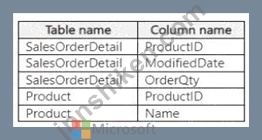
注文数量を年別、製品別に集計する必要があります。解答には、各行にすべての製品の年間注文数量の合計を含める必要があります。
T-SQLステートメントをどのように完成させるべきですか?回答するには、回答欄で適切なオプションを選択してください。
注:正解ごとに1ポイントが加算されます。

注文数量を年別、製品別に集計する必要があります。解答には、各行にすべての製品の年間注文数量の合計を含める必要があります。
T-SQLステートメントをどのように完成させるべきですか?回答するには、回答欄で適切なオプションを選択してください。
注:正解ごとに1ポイントが加算されます。
正解:

Explanation:
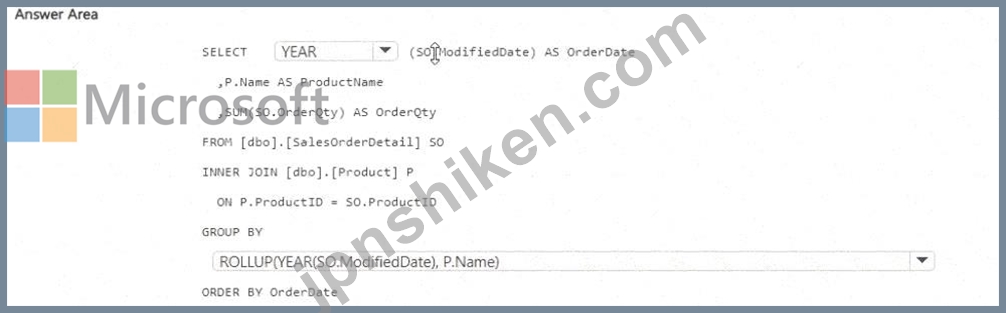
Comprehensive Detailed Explanation
We need to write a query that summarizes order quantities by year and product , and also include the yearly total for all products in each row.
Step 1: What the query needs
Extract the year from SalesOrderDetail.ModifiedDate .
Join with the Product table to get the product name.
Aggregate with SUM(OrderQty) .
Return grouped data by year and product , with an additional subtotal row per year (all products combined).
Step 2: Evaluate the SELECT Clause
We must extract the year using:
YEAR (so.ModifiedDate) AS OrderDate
This converts the ModifiedDate column into a year value for grouping.
Step 3: Evaluate the GROUP BY options
CUBE(YEAR, P.Name) # Produces all combinations of year totals, product totals, and grand totals. Too many combinations, not required.
GROUPING SETS # Could achieve the result but requires explicitly listing the sets. Less direct.
ROLLUP(YEAR, P.Name) # Produces grouping by (Year, Product) and then a subtotal per Year. Exactly what is required.
YEAR only # Would group only by year, losing per-product breakdown.
Correct: ROLLUP(YEAR(so.ModifiedDate), P.Name)
Step 4: Completed Query
SELECT
YEAR (so.ModifiedDate) AS OrderDate,
p.Name,
SUM (so.OrderQty) AS OrderQty
FROM dbo.SalesOrderDetail so
INNER JOIN dbo.Product p
ON p.ProductID = so.ProductID
GROUP BY ROLLUP ( YEAR (so.ModifiedDate), p.Name);
Why This Works
YEAR(so.ModifiedDate) extracts year for grouping.
ROLLUP(YEAR, P.Name) provides both product-level totals and yearly subtotals.
Ensures the requirement: "include the yearly sum of order quantities for all the products in each row." References GROUP BY ROLLUP in T-SQL Aggregate functions in Microsoft Fabric warehouses

- 質問一覧「90問」
- 質問1 注:この問題は、同じシナリオを提示する一連の問題の一部です。
- 質問2 あなたはLakehouse1という名前のFabric製の湖畔の家を持っており...
- 質問3 Fabric テナントには Workspace^ という名前のワークスペースが...
- 質問4 FabricテナントにはWarehouse1という名前のウェアハウスがありま...
- 質問5 次の図に示すようなPythonコードと出力を含むFabricノートブック...
- 質問6 Fabricテナントには、Development、Test、QA、Productionという...
- 質問7 Fabricテナントには、Lakehouse1という名前のテイクアウトハウス...
- 質問8 以下のようなテーブルを含むデータウェアハウスがあります。 (Ex...
- 質問9 Fabricテナントには、Workspace1とWorkspace2という名前の2つの...
- 質問10 お客様のFabricテナントには、以下の表に示すワークスペースが含...
- 質問11 Fabric の Warehouse には Warehousel という名前で、その中に T...
- 質問12 倉庫を含む Fabric テナントがあります。 一日に何度も。すべて...
- 質問13 Fabric テナントには Workspace " ! という名前のワークスペース...
- 質問14 AnalyticsPOCワークスペースでは、どのタイプのデータストアを推...
- 質問15 FabricワークスペースにWorkspace1、ウェアハウスにWarehouse1と...
- 質問16 OneLakeに新しいセマンティックモデルを含むFabricテナントをお...
- 質問17 「Model 1」という名前のセマンティックモデルがあります。Model...
- 質問18 T-SQLステートメントを使用してAzure SQLデータベースからデータ...
- 質問19 あなたはFabricテナントを所有しています。 次の表に示すユーザ...
- 質問20 Workspace1 という名前の Fabric ワークスペースがあり、その中...
- 質問21 Fabricテナントには、Workspace1という名前のワークスペースと、...
- 質問22 以下の図に示すようなソースデータモデルがあります。 (Exhibit)...
- 質問23 Watehousel という名前の Fabric ウェアハウスがあり、その中に ...
- 質問24 Fabricテナントには、Workspace1という名前のワークスペースが含...
- 質問25 AnatyticsPOCワークスペースのデータストアに顧客データを取り込...
- 質問26 Microsoft Power BLのセマンティックモデルをお持ちです。 計算...
- 質問27 Model1という名前のFabricセマンティックモデルがあり、その中に...
- 質問28 セマンティックモデルを含むFabricテナントをお持ちです。このモ...
- 質問29 Fabricテナントには、Lakehouse1という名前の湖畔の家が含まれて...
- 質問30 Microsoft Power BI セマンティック モデルに Date という名前の...
- 質問31 以下のT-SQIステートメントがあります。 (Exhibit)...
- 質問32 倉庫を含む Fabric テナントがあります。ウェアハウスは行レベル...
- 質問33 セマンティックモデルを含むFabricテナントをお持ちです。このモ...
- 質問34 タイプ 1 のゆっくりと変化するディメンション (SCD) のデータ読...
- 質問35 Microsoft Power BL レポートと、Direct Lake モードを使用する...
- 質問36 あなたは、湖畔の家が2軒あるFabricテナントを所有しています。 ...
- 質問37 Fabricワークスペースに「Workspace1」という名前があります。 ...
- 質問38 Fabricワークスペース内に、DW1という名前のウェアハウスがあり...
- 質問39 以下のKQLクエリがあります。 (Exhibit) 以下の各設問について、...
- 質問40 FabricワークスペースにWorkspace1という名前があり、その中にLa...
- 質問41 Fabricテナントには、Modellという名前のセマンティックモデルが...
- 質問42 Repo1 という名前の Azure Repos Git リポジトリと、ファブリッ...
- 質問43 Fabricテナントには、Model1という名前のセマンティックモデルが...
- 質問44 注:この問題は、同じシナリオを提示する一連の問題の一部です。
- 質問45 お客様は、倉庫を含むFabricテナントを所有しています。 顧客デ...
- 質問46 Fabricイベントハウス内にKQLデータベースがあります。このデー...
- 質問47 セマンティック モデルを含むファブリック テナントがあります。...
- 質問48 Fabricテナントには、Model1という名前のセマンティックモデルが...
- 質問49 definition.pbir という名前のファイルを含む Microsoft Power B...
- 質問50 Fabricワークスペースに「Workspace1」という名前があり、ユーザ...
- 質問51 Fabricの倉庫には、DimDateとTripsという名前の2つのテーブルが...
- 質問52 レイクハウスを含むファブリック テナントがあります。 SQL エン...
- 質問53 デフォルトの Spark スターター プールとランタイム バージョン ...
- 質問54 Microsoft Power BI のセマンティック モデルに、TotalSalesAmou...
- 質問55 Fabricテナントには、Workspace1という名前のワークスペースとUs...
- 質問56 あなたは湖畔の家を含むFabricテナントを所有しています。 あな...
- 質問57 Fabric ウェアハウスには Sales.Orders という名前のテーブルが...
- 質問58 オンライン販売部門の注文テーブルを更新する必要があります。解
- 質問59 Tenant! という名前の Fabric テナントがあり、その中に Lakehou...
- 質問60 Fabric のイベントハウス「Eventhousel」には、「Weatherdata」...
- 質問61 研究部門のデータ分析要件を満たすファブリック容量SKUの種類を...
- 質問62 Fabricテナントをお持ちです。 高速なレポートレンダリングを実...
- 質問63 Fabricテナントには、Report 1という名前のMicrosoft Power Blレ...
- 質問64 複雑なセマンティック モデルを含む Fabric テナントがあります...
- 質問65 storage! という名前の Azure Data Lake Storage Gen2 アカウン...
- 質問66 あなたは、LH1という名前の湖畔の家とノートブックを含むFabric...
- 質問67 あなたはFabricを使ってデータを保存する予定です。 以下の機能...
- 質問68 Fabricワークスペース「Workspace1」には、「Lakehouse1」という...
- 質問69 AnalyticsPOCワークスペース内のデータストアに対して権限を割り...
- 質問70 Fabricウェアハウスに、CustomersとProductsという名前の2つのデ...
- 質問71 Fabricテナントには、DW1という名前のデータウェアハウスが含ま...
- 質問72 Fabricテナントには、lakehouse1という名前のテイクハウスが含ま...
- 質問73 注:このセクションには、同じシナリオと問題に関する複数の質問
- 質問74 Workspace1 という名前の Fabric ワークスペースと storage " ! ...
- 質問75 Microsoft Tower Bl Premium 容量を使用する Fabric テナントが...
- 質問76 ローカル コンピューター上のフォルダーにソース データがありま...
- 質問77 FabricテナントにLakehouselという名前のlakehouseが含まれてい...
- 質問78 Fabricワークスペースには、Warehouse!という名前の倉庫が含まれ...
- 質問79 Fabricテナントには、Workspace1という名前のワークスペースが含...
- 質問80 Workspace1 と Workspace2 という名前の 2 つのワークスペースを...
- 質問81 Fabricテナントに、Report 1という名前のMicrosoft Power BLレポ...
- 質問82 Workspace1という名前のFabricワークスペースがあり、それがCapa...
- 質問83 Fabricワークスペース「Workspace1」には、「Dataflow1」という...
- 質問84 あなたは、Lakehouse1という名前の湖畔の家を含むFabricテナント...
- 質問85 Fabricワークスペースに「Workspace-!」という名前があります。G...
- 質問86 Workspace1という名前のFabricワークスペースがあり、その中に以...
- 質問87 注:この問題は、同じシナリオを提示する一連の問題の一部です。
- 質問88 以下のT-SQLステートメントがあります。 (Exhibit) 以下の各記述...
- 質問89 definition.pbir という名前のファイルを含む Microsoft Power B...
- 質問90 注:この問題は、同じシナリオを提示する一連の問題の一部です。
