- ホーム
- Microsoft
- DP-300J - Administering Relational Databases on Microsoft Azure (DP-300日本語版)
- Microsoft.DP-300J.v2026-09-30.q183
- 質問111
有効的なDP-300J問題集はJPNTest.com提供され、DP-300J試験に合格することに役に立ちます!JPNTest.comは今最新DP-300J試験問題集を提供します。JPNTest.com DP-300J試験問題集はもう更新されました。ここでDP-300J問題集のテストエンジンを手に入れます。
DP-300J問題集最新版のアクセス
「434問、30% ディスカウント、特別な割引コード:JPNshiken」
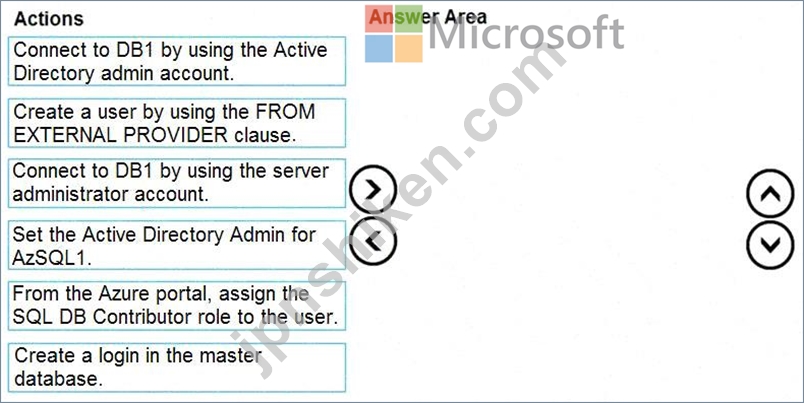
AzSQL1 という名前の Azure SQL サーバーに、DB1 という名前の新しい Azure SQL データベースがあります。
作成された唯一のユーザーはサーバー管理者です。
認証に Azure Active Directory (Azure AD) を使用する包含データベース ユーザーを DB1 に作成する必要があります。
順番に実行する必要がある 3 つのアクションはどれですか。回答するには、適切なアクションをアクション リストから回答領域に移動し、正しい順序に並べます。
作成された唯一のユーザーはサーバー管理者です。
認証に Azure Active Directory (Azure AD) を使用する包含データベース ユーザーを DB1 に作成する必要があります。
順番に実行する必要がある 3 つのアクションはどれですか。回答するには、適切なアクションをアクション リストから回答領域に移動し、正しい順序に並べます。
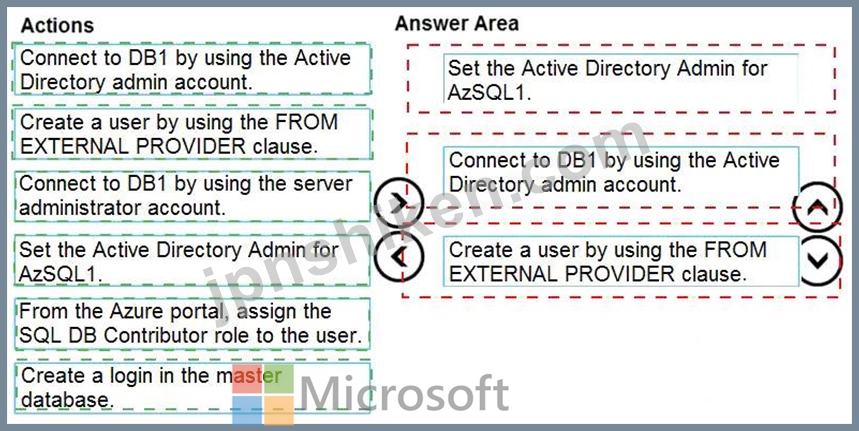
正解:
Explanation:
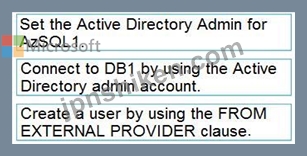
Step 1: Set up the Active Directory Admin for AzS QL1.
Step 2: Connect to DB1 by using the server administrator.
Sign into your managed instance with an Azure AD login granted with the sysadmin role.
Step 3: Create a user by using the FROM EXTERNAL PROVIDER clause.
FROM EXTERNAL PROVIDER is available fo r creating server-level Azure AD logins in SQL Database managed instance. Azure AD logins allow database-level Azure AD principals to be mapped to server-level Azure AD logins. To create an Azure AD user from an Azure AD login use the following syntax:
CR EATE USER [AAD_principal] FROM LOGIN [Azure AD login]
Reference:
https://docs.m icrosoft.com/en- us/sql/t-sql/stat ements/create-user-transact-sql

- 質問一覧「183問」
- 質問1 注:この質問は、同じシナリオを提示する一連の質問の一部です。
- 質問2 注:この質問は、同じシナリオを提示する一連の質問の一部です。
- 質問3 ハイパースケール サービス層 SQLD81 に SQLDB1 という名前の Az...
- 質問4 次の図に示すように、Azure Portal で Azure SQL データベースを...
- 質問5 オンプレミス ネットワークには、DB 1 という名前の 60 TB のデ...
- 質問6 注:この質問は、同じシナリオを提示する一連の質問の一部です。
- 質問7 Azure SQL データベースがあります。 次の図に示すように、パフ...
- 質問8 DB1 という名前の 50 TB の Microsoft SQL Server データベース...
- 質問9 General Purpose サービス レベルに DB 1 という名前の Azure SQ...
- 質問10 オンプレミスの Microsoft SQL Server データベースを Azure に...
- 質問11 あなたは、オンプレミスのアプリケーションをそれぞれAzureに移...
- 質問12 同じ論理サーバー上に 5 つの Azure SQL Database インスタンス...
- 質問13 Azure サブスクリプションをお持ちです。 書き込みアクセラレー...
- 質問14 AG1 という名前の Always On 可用性グループを含む Azure サブス...
- 質問15 Azure 仮想マシン上に SQL Server があります。 命名規則に準拠...
- 質問16 Azure サブスクリプションをお持ちです。 4 つのデータベースを...
- 質問17 注:この質問は、同じシナリオを提示する一連の質問の一部です。
- 質問18 Azure Data Lake Storage Gen2 コンテナーがあります。 データは...
- 質問19 SVR1からInstance1にデータベースを移行する際に使用するサービ...
- 質問20 SalesSQLDb1 のパフォーマンス問題の原因を特定する必要がありま...
- 質問21 db1 という名前の Azure SQL データベースを含む Azure サブスク...
- 質問22 contoso.comという名前のドメインを使用するAzureサブスクリプシ...
- 質問23 Microsoft SQL Server 2017 サーバーがあります。 サーバーを Az...
- 質問24 D61 という名前の Azure SQL データベースがあります。 DB1 に割...
- 質問25 リモート開発者がDB1とDB2にアクセスできるようにするソリューシ...
- 質問26 Db1 という名前のデータベースを含む Azure 仮想マシン上に SQL ...
- 質問27 AzureIoTハブからデータをストリーミングするための異常検出ソリ...
- 質問28 Azure SQL データベースには Customers という名前のテーブルが...
- 質問29 5つのデータベースをホストするSQL1という名前のオンプレミスのM...
- 質問30 Azure SQL Databaseへの移行後、DB3を監視するためのevent_file...
- 質問31 次の表に示すように、ログを保存する account1 という名前の Azu...
- 質問32 Always On 可用性グループを使用する高可用性構成で、Azure 仮想...
- 質問33 次の図に示すように、Azure SQL データベースのバックアップを構...
- 質問34 Windows Server 2022 を実行する Server1 という名前の Azure 仮...
- 質問35 DB1 という名前の 10 TB の SQL データベースをホストする Azure...
- 質問36 Azure サブスクリプションをお持ちです。 Microsoft SQL Server ...
- 質問37 SQL Server 2019 または Windows Server 2019 を実行する Azure ...
- 質問38 SERVER1データベースの移行を計画しています。ソリューションは...
- 質問39 注:この質問は、同じシナリオを提示する一連の質問の一部です。
- 質問40 FileTablesおよびFilestream機能を使用するオンプレミスのMicros...
- 質問41 Azure サブスクリプションをお持ちです。 Azure コマンド ライン...
- 質問42 5 つのデータベースをホストする Microsoft SQL Server 2017 サ...
- 質問43 PipelineA と PipelineB という名前の 2 つのパイプラインを持つ...
- 質問44 DB3という名前のAzureSQLデータベースがあります。 展示に示され...
- 質問45 MySQLデータベース用のバージョン8.0のAzureデータベースがあり...
- 質問46 VNet1という名前の仮想ネットワーク上にVM1という名前のAzure仮...
- 質問47 DB1 という名前の Azure SQL データベースがあります。 DB1を暗...
- 質問48 ResearchDB1 のすべてのテーブルとビューを作成します。 Researc...
- 質問49 1時間ごとにトリガーされるAzureDataFactoryパイプラインがあり...
- 質問50 SalesSQLDb1 の統計メンテナンスを実装する必要があります。ソリ...
- 質問51 Azure SQL データベースを含む Azure サブスクリプションがあり...
- 質問52 Azure サブスクリプションをお持ちです。 Azure Virtual Machine...
- 質問53 次の Azure Resource Manager テンプレートがあります。 (Exhibi...
- 質問54 Pool1 という名前の Azure Synapse Analytics 専用 SQL プールと...
- 質問55 SalesSQLDb1 のフェイルオーバー後に、データベースが SalesSQLD...
- 質問56 注:この質問は、同じシナリオを提示する一連の質問の一部です。
- 質問57 FG1 という名前のフェールオーバー グループを含む Azure SQL マ...
- 質問58 Azure SQL データベースがあります。 次の要件を満たす災害復旧...
- 質問59 Azure 仮想マシンに Always On フェールオーバー クラスター イ...
- 質問60 Azure SQL データベースを含む Azure サブスクリプションがあり...
- 質問61 リモート開発者がDB1とDB2にアクセスできるソリューションを提案...
- 質問62 DB1という名前のデータベースを含むAzure仮想マシン上にSQLServe...
- 質問63 VM1 という名前の Azure Virtual Machines 上に SQL Server のイ...
- 質問64 注:この質問は、同じシナリオを提示する一連の質問の一部です。
- 質問65 db1 という名前の Azure SQL データベースがあります。 過去 1 ...
- 質問66 タスク5 db1 にディザスタリカバリソリューションを構成する必要...
- 質問67 Azure SQL マネージド インスタンス、db1 という名前のデータベ...
- 質問68 Azure SQL Databaseへの移行後、DB3を監視するためのevent_file...
- 質問69 AzureSQLデータベースのAzureMonitorから多数のアラートを受け取...
- 質問70 Azure StreamAnalyticsジョブがあります。 ジョブに十分なストリ...
- 質問71 あなたの会社は、Azure StreamAnalyticsを使用してデバイスを監...
- 質問72 AzureSQLデータベースがあります。データベースには、列ストアイ...
- 質問73 DB1 という名前の 60 TB の運用データベースをホストするオンプ...
- 質問74 Azure Virtual Machines 上に SQL1 という名前の SQL Server イ...
- 質問75 Azure SQL データベースは 25 個あります。 Transact-SQL を使用...
- 質問76 Server 1 という名前の Azure SQL マネージド インスタンスを含...
- 質問77 10 の Azure リージョンにまたがる 100 の Azure SQL マネージド...
- 質問78 sqldbmi1 という名前の Azure SQL マネージド インスタンスがあ...
- 質問79 DB1という名前のデータベースを含むAzure仮想マシン上にSQLServe...
- 質問80 50個のAzureSQLデータベースがあります。 Azureでデータベースの...
- 質問81 Table1 という名前のテーブルを含む DB1 という名前の Microsoft...
- 質問82 Azure仮想マシン上に、それぞれ20個のデータベースを含むSQL Ser...
- 質問83 複数の会社をサポートするAzureSynapseAnalytics専用SQLプールの...
- 質問84 Azure SynapseAnalytics専用のSQLプールがあります。 PDW_SHOWSP...
- 質問85 sqldb1 という名前の Azure SQL データベースがあります。 クエ...
- 質問86 SQL Server がインストールされている Azure 仮想マシンが 10 台...
- 質問87 あなたはAzureサブスクリプションをお持ちです。 BACPACファイル...
- 質問88 Azure サブスクリプションには、SQLMi1 という Azure SQL マネー...
- 質問89 PaaS ソリューションの災害復旧要件を満たすには何を実装する必...
- 質問90 Instance1への移行後、App1からDB1およびDB2へのアクセスに必要...
- 質問91 AzureSQLデータベースとAzureWebアプリを含むアプリをデプロイす...
- 質問92 db1 という名前のデータベースをホストする、SQL1 という名前の...
- 質問93 DB1 という Azure SQL データベースがあり、Sales という秘密証...
- 質問94 Azure サブスクリプションをお持ちです。 Azure Resource Manage...
- 質問95 次の表に示すリソースを含む Azure サブスクリプションがありま...
- 質問96 Azure サブスクリプションに、SQLMI1 という名前の Azure SQL マ...
- 質問97 df1という名前のAzureData Factoryバージョン2(V2)データファ...
- 質問98 Server1 というサーバーに DatabaseA という Azure SQL Database...
- 質問99 次の表に示すリソースを含む Azure サブスクリプションがありま...
- 質問100 SQL1 という名前の Azure SQL マネージド インスタンスを含む Az...
- 質問101 Azure サブスクリプションをお持ちです。 Azure Resource Manage...
- 質問102 SQLMI1 と SQLMI2 という 2 つの Azure SQL マネージド インスタ...
- 質問103 user1 という名前のユーザーと OBI という名前の Azure SQL デー...
- 質問104 次の表に示すリソースを含む Azure サブスクリプションがありま...
- 質問105 Azure サブスクリプションには、SQLVM1 という名前の Azure Virt...
- 質問106 DB1 という名前の Azure SQL データベースを含む Azure サブスク...
- 質問107 お客様は、DB1という名前のBasic SKU Azure SQLデータベースを含...
- 質問108 Azure サブスクリプションをお持ちです。 Always On 可用性グル...
- 質問109 オンプレミスのデータセンターにMicrosoft SQL Server 2019イン...
- 質問110 タスク8 db1 のパフォーマンス テストを実行する予定です。 db1 ...
- 質問111 AzSQL1 という名前の Azure SQL サーバーに、DB1 という名前の新...
- 質問112 2つの100GBデータベースをAzureに移動することを計画しています...
- 質問113 ResearchDB1のデータ保持を設定するための実装計画を提供する必...
- 質問114 Azure サブスクリプションをお持ちです。 Bicep テンプレートを...
- 質問115 タスク6 パッチを通じてクエリ オプティマイザーに加えられた機...
- 質問116 SQL1 という名前の Azure SQL データベースを含む Azure サブス...
- 質問117 DB1という名前のオンプレミスMicrosoftSQL Server2016データベー...
- 質問118 タスク9 db1 の CPU 使用率が平均より高い場合は、admin@contoso...
- 質問119 Microsoft SQL Server 2022 Enterprise がインストールされてい...
- 質問120 contoso.com という Azure AD テナントにリンクされた Azure サ...
- 質問121 管理者に通知するためのソリューションを実装する必要があります
- 質問122 役割の割り当てを評価しています。 以下の各文について、正しい
- 質問123 R を主要言語としてサポートするが、Scala と SQL もサポートす...
- 質問124 次のリソースを含む Azure サブスクリプションがあります。 * DB...
- 質問125 DB1という名前のオンプレミスのMicrosoft SQL Server 2022データ...
- 質問126 注:この質問は、同じシナリオを提示する一連の質問の一部です。
- 質問127 db1 という名前の Azure SQL データベースがあり、そこには user...
- 質問128 DB1という名前のAzure SQLデータベースがあります。DB1の自動チ...
- 質問129 リソース ガバナーが有効になっており、App1 と App2 という 2 ...
- 質問130 SalesSQLDb1の監視を実装する必要があります。ソリューションは...
- 質問131 Azure Virtual Machines 上の SQL Server のインスタンスが 3 つ...
- 質問132 General Purpose サービス レベルに DB1 という名前の Azure SQL...
- 質問133 次のスクリプトを使用して Instance1 をデプロイする予定です。 ...
- 質問134 Azure サブスクリプションをお持ちです。 PowerShell を使用して...
- 質問135 contoso.com という名前の Azure Active Directory (Azure AD) ...
- 質問136 Microsoft SQL Server インスタンスをホストする Azure 仮想マシ...
- 質問137 Azure Synapse Analytics 専用 SQL プールにテーブルを作成する...
- 質問138 Azure サブスクリプションをお持ちです。 2つのAzureリージョン...
- 質問139 DB1という名前のオンプレミスのMicrosoft SQL Serverデータベー...
- 質問140 Azure SQL データベースを使用する 2 つのプロジェクトに取り組...
- 質問141 注:この質問は、同じシナリオを提示する一連の質問の一部です。
- 質問142 SQL1 という名前の新しい Azure SQL マネージド インスタンスを...
- 質問143 VM1という名前のカスタムイメージに基づくAzure仮想マシンがあり...
- 質問144 Azure Databricks を使用して、「Purchases」という名前のデータ...
- 質問145 ファイルがAzureData Lake Storage Gen2コンテナーに到着したと...
- 質問146 SQL1という名前のAzureSQLマネージドインスタンスと、App1および...
- 質問147 Azure SQL データベースに Customer というテーブルが含まれてい...
- 質問148 DB1 という名前のデータベースが含まれる、Server1 という名前の...
- 質問149 次の表に示すリソースを含む Azure サブスクリプションがありま...
- 質問150 DB1 という名前の Azure SQL データベースがあります。 User 1 ...
- 質問151 Azure サブスクリプションをお持ちです。 Azure Resource Manage...
- 質問152 オンプレミスの Microsoft SQL Server があり、FileTables およ...
- 質問153 次のデータベースレベルおよびインスタンスレベルの機能を使用す
- 質問154 VM1 という名前の Azure Virtual Machines に SQL Server のイン...
- 質問155 タスク11 Microsoft SQL Server 2012 用に作成されたレガシー ア...
- 質問156 PaaS プロトタイプに基づいて、どの Azure SQL Database コンピ...
- 質問157 ResourceGroup1という名前のリソースグループ内の同じAzureSQLデ...
- 質問158 あなたは、Server1という名前の仮想マシン上にSQL Serverインス...
- 質問159 Azure 仮想マシンを構築しています。 仮想マシンに、1 TiB、P30 ...
- 質問160 Azure サブスクリプションがあり、Azure Virtual Machines 上の ...
- 質問161 server1という名前のサーバー上にdb1という名前のAzureSQLデータ...
- 質問162 注:この質問は、同じシナリオを提示する一連の質問の一部です。
- 質問163 DB1という名前のAzure SQLデータベースがあり、厳格な監査要件が...
- 質問164 server1という名前のサーバー上にdb1という名前のAzureSQLデータ...
- 質問165 Azure SQL マネージド インスタンスと、バックアップを実行する...
- 質問166 可用性グループの Azure 仮想マシン上に SQL Server があります...
- 質問167 SQL1 という名前の新しい Azure SQL マネージド インスタンスを...
- 質問168 タスク1 db1 という名前の Azure SQL データベースで、SalesLT.S...
- 質問169 注:この質問は、同じシナリオを提示する一連の質問の一部です。
- 質問170 SQLMI1 という名前の Azure SQL マネージド インスタンスと Work...
- 質問171 SQL1という名前のAzure仮想マシン上のSQLServerのインスタンスが...
- 質問172 データベースをAzureSQLDatabaseマネージドインスタンスにデプロ...
- 質問173 オンプレミスのMicrosoftSQLServerデータベースをAzureSQLDataba...
- 質問174 SOL1 という名前の Azure SQL データベースがあります。 SQL1 の...
- 質問175 DB1 という Azure SQL データベースがあり、そこには Orders と...
- 質問176 DB1 という名前の Azure SQL データベースがあります。DB1 には...
- 質問177 AzureSQLデータベースがあります。 プランキャッシュが、一度だ...
- 質問178 Azure SQL Database マネージド インスタンスのフェールオーバー...
- 質問179 Microsoft SQL Server のインスタンスをホストする VMI という名...
- 質問180 DB1 という名前の Azure SQL データベースを含む Azure サブスク...
- 質問181 VNet1という名前の仮想ネットワーク上にVM1という名前のAzure仮...
- 質問182 注:この質問は、同じシナリオを提示する一連の質問の一部です。
- 質問183 注:この質問は、同じシナリオを提示する一連の質問の一部です。
