- ホーム
- Microsoft
- AZ-500J - Microsoft Azure Security Technologies (AZ-500日本語版)
- Microsoft.AZ-500J.v2026-10-01.q208
- 質問25
有効的なAZ-500J問題集はJPNTest.com提供され、AZ-500J試験に合格することに役に立ちます!JPNTest.comは今最新AZ-500J試験問題集を提供します。JPNTest.com AZ-500J試験問題集はもう更新されました。ここでAZ-500J問題集のテストエンジンを手に入れます。
AZ-500J問題集最新版のアクセス
「520問、30% ディスカウント、特別な割引コード:JPNshiken」
次の表に示すユーザーを含む Azure Active Directory (Azure AD) テナントがあります。

Azure AD Privileged Identity Management (PIM) から、次の図に示すように、セキュリティ管理者ロールの設定を構成します。
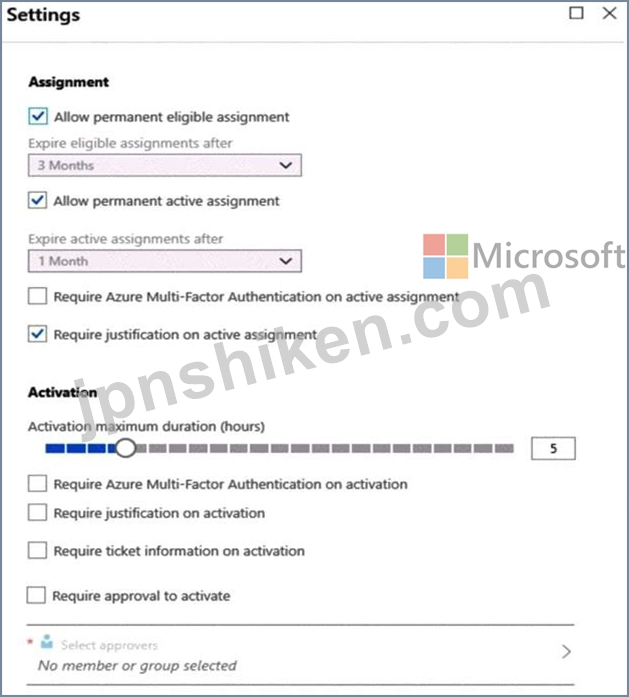
PIM から、次のグループにセキュリティ管理者ロールを割り当てます。
* グループ1: アクティブな割り当てタイプ、永続的に割り当て
* グループ2: 適格な割り当てタイプ、永久に適格
以下の各文について、正しい場合は「はい」を選択してください。そうでない場合は「いいえ」を選択してください。
注意: 正しい選択ごとに 1 ポイントが付与されます。

Azure AD Privileged Identity Management (PIM) から、次の図に示すように、セキュリティ管理者ロールの設定を構成します。
PIM から、次のグループにセキュリティ管理者ロールを割り当てます。
* グループ1: アクティブな割り当てタイプ、永続的に割り当て
* グループ2: 適格な割り当てタイプ、永久に適格
以下の各文について、正しい場合は「はい」を選択してください。そうでない場合は「いいえ」を選択してください。
注意: 正しい選択ごとに 1 ポイントが付与されます。
正解:
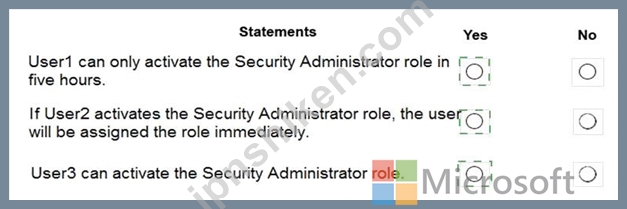
Explanation:

Box 1: Yes
Eligible Type: A role assignment that requires a user to perform one or more actions to use the role. If a user has been made eligible for a role, that means they can activate the role when they need to perform privileged tasks. There ' s no difference in the access given to someone with a permanent versus an eligible role assignment. The only difference is that some people don ' t need that access all the time.
You can choose from two assignment duration options for each assignment type (eligible and active) when you configure settings for a role. These options become the default maximum duration when a user is assigned to the role in Privileged Identity Management.
Use the Activation maximum duration slider to set the maximum time, in hours, that a role stays active before it expires. This value can be from one to 24 hours.
Box 2: Yes
Active Type: A role assignment that doesn ' t require a user to perform any action to use the role. Users assigned as active have the privileges assigned to the role Box 3: Yes User3 is member of Group2.
Reference:
https://docs.microsoft.com/en-us/azure/active-directory/privileged-identity-management/pim-configure
https://docs.microsoft.com/bs-cyrl-ba/azure/active-directory/privileged-identity-management/pim-resource-roles-configure-role-settings

- 質問一覧「208問」
- 質問1 あなたは、新しいレビューのコレクションに割り当てることを計画
- 質問2 WebApp1という名前のWebアプリがあります。 WAF1という名前のWeb...
- 質問3 RG1という名前のリソースグループを含むAzureサブスクリプション...
- 質問4 月曜日に、Azure Security Center で電子メール通知を構成して、...
- 質問5 Sub 1 という Azure サブスクリプションがあり、contoso.com と...
- 質問6 Sub1 という名前の Azure サブスクリプションが含まれる MG1 と...
- 質問7 RT1 という名前のルート テーブルを含む Azure サブスクリプショ...
- 質問8 User1 という名前のユーザーを含む contoso.com という名前の Mi...
- 質問9 注:この質問は、同じシナリオを提示する一連の質問の一部です。
- 質問10 次の表に示すリソースを含む Azure サブスクリプションがありま...
- 質問11 App1という名前のWebアプリとVault1という名前のAzureキーボール...
- 質問12 Contoso.com という名前の Microsoft Entra テナントおよび RG1 ...
- 質問13 Microsoft Defender for Cloud を使用する Azure サブスクリプシ...
- 質問14 次の表に示す Azure Firewall ポリシーが含まれる Azure サブス...
- 質問15 Microsoft Defender for Cloud を使用する Azure サブスクリプシ...
- 質問16 VM1という名前のAzure仮想マシンがあります。 Azure Security Ce...
- 質問17 Microsoft 365 E5 サブスクリプションをお持ちです。 Microsoft ...
- 質問18 Microsoft Entra Permissions Management を使用し、次の表に示...
- 質問19 SQLdb1 に対して計画された変更を実装する必要があります。 実行...
- 質問20 次の表に示すユーザーを含む Azure Active Directory (Azure AD)...
- 質問21 Contoso.comという名前のAzureActive Directory(Azure AD)テナ...
- 質問22 Azure AD テナントと App1 という名前のアプリケーションがあり...
- 質問23 次の図に示すように、App1 という名前の Azure App Service Web ...
- 質問24 次のリソースを含むAzureサブスクリプションがあります。 * Azur...
- 質問25 次の表に示すユーザーを含む Azure Active Directory (Azure AD)...
- 質問26 プラットフォーム保護の要件を満たすには、AKS1 をデプロイする...
- 質問27 Policy1という名前のAzureポリシー定義を含むAzureサブスクリプ...
- 質問28 Azure Container Registryに接続するAzure Kubernetes Service(...
- 質問29 次の表に示す Azure キー コンテナーが含まれる Sub1 という名前...
- 質問30 次の表に示すリソースを含む Azure サブスクリプションがありま...
- 質問31 Sub1という名前のAzureサブスクリプションがあります。 Azure Se...
- 質問32 ストレージ アカウントと App1 という名前の Azure Web アプリを...
- 質問33 注: このセクションには、同じシナリオと問題を扱う1つ以上の質...
- 質問34 Azure Key Vault を含む Azure サブスクリプションをお持ちです...
- 質問35 Windows Server2019を実行するオンプレミスサーバーが10台ありま...
- 質問36 Windows Server2019を実行するVM1およびVM2という名前の2つの仮...
- 質問37 AKS1 という名前の Azure Kubernetes Service (AKS) クラスター...
- 質問38 User2がPIMを実装できることを確認する必要があります。 最初に...
- 質問39 注:この質問は、同じシナリオを提示する一連の質問の一部です。
- 質問40 container1という名前のコンテナーを持つstorage1という名前のAz...
- 質問41 次の表に示すAzure仮想マシンがあります。 (Exhibit) 米国東部リ...
- 質問42 次の表に示すリソースが含まれる Sub1 という名前の Azure サブ...
- 質問43 Sub1という名前のAzureサブスクリプションがあります。 Sub1には...
- 質問44 次の表に示すユーザーを含む Azure Active Directory (Azure AD)...
- 質問45 次の表に示すように、Microsoft Entraテナントが2つのAzureサブ...
- 質問46 Sub1 という名前の Azure サブスクリプションがあります。 1つの...
- 質問47 Azure Active Directory (Azure AD) コネクタ、Query1 という名...
- 質問48 会社には、contoso.comという名前のAzure Active Directory Azur...
- 質問49 Azure Active Directory(Azure AD)テナントとUser1という名前...
- 質問50 次の表に示すリソースを含む Azure Active Directory (Azure AD)...
- 質問51 オンプレミス ネットワークには、次の表に示すサーバーが含まれ
- 質問52 You have an Azure subscription that contains the resources s...
- 質問53 Azure SQL データベースがあります。 Always Encrypted を実装し...
- 質問54 contoso.comという名前のAzure Active Directory(Azure AD)テ...
- 質問55 技術要件を満たすには、関数アプリを実装する必要があります。
- 質問56 次の表に示すユーザーを含む contoso.com という名前の Azure Ac...
- 質問57 You have an Azure subscription that contains an Azure SQL da...
- 質問58 ユーザーがVM0にアクセスできることを確認する必要があります。...
- 質問59 次の表に示すユーザーを含むAzureサブスクリプションがあります...
- 質問60 次の表に示す仮想マシンを含むAzureサブスクリプションがありま...
- 質問61 次のデータコネクタを持つAzureSentinelワークスペースがありま...
- 質問62 次の展示に示すAzureリソースの階層があります。 (Exhibit) RG1...
- 質問63 次の表に示す仮想ネットワークを含む Azure サブスクリプション...
- 質問64 Azure Active Directory(Azure AD)のハイブリッド構成がありま...
- 質問65 RG2の作成とRG1の権限の管理を委任する必要があります。どのユー...
- 質問66 Azure Active Directory(Azure AD)テナントにリンクされている...
- 質問67 Azure Securityから、カスタムアラートルールを作成します。 ア...
- 質問68 image1という名前のコンテナーイメージを含むContReg1という名前...
- 質問69 WebApp1 という名前の Azure App Services Web アプリと、Vault1...
- 質問70 次の表に示すストレージ アカウントを含む Sub1 という名前の Az...
- 質問71 次の表に示すユーザーを含む、contoso1812.onmicrosoft.com とい...
- 質問72 次の Azure ファイアウォールを含む Azure サブスクリプションが...
- 質問73 EASM1 という名前の Microsoft Defender 外部攻撃対象領域管理 (...
- 質問74 100台の仮想マシンを含みAzureSecurityCentを含むAzureサブスク...
- 質問75 User1、User2、User3 という名前の 3 人のユーザーを含む Micros...
- 質問76 仮想ネットワークを含むAzureサブスクリプションがあります。仮...
- 質問77 AzureキーコンテナーとAzureストレージアカウントを含むAzureサ...
- 質問78 Subscription1 という名前の Azure サブスクリプションがあり、...
- 質問79 DB1 という名前の Azure SQL データベースがあり、Table という...
- 質問80 お客様は、以下のリソースを含むマルチクラウド環境をお持ちです
- 質問81 AzureStorageアカウントのセキュリティ問題のトラブルシューティ...
- 質問82 注:この質問は、同じシナリオを提示する一連の質問の一部です。
- 質問83 お客様は、3つのストレージアカウント、SQL1という名前のAzure S...
- 質問84 Azure Kubernetes Service(AKS)クラスターをテストしています...
- 質問85 次の表に示すユーザーを含む contoso.com という名前の Azure Ac...
- 質問86 sub1という名前のAzureサブスクリプションを含むGroup1という名...
- 質問87 ラボのタスク タスク1 インターネットから VNET1\subnet0 への接...
- 質問88 contoso2023 という名前のストレージ アカウントを含む Azure サ...
- 質問89 注: この問題は、同じシナリオを提示する一連の問題の一部です。...
- 質問90 Azure Active Directory(Azure AD)テナントを含むAzureサブス...
- 質問91 次の表に示すリソースを含む Azure 480z サブスクリプションがあ...
- 質問92 あなたの会社は、部門ごとに個別のサブスクリプションを作成する
- 質問93 注:この質問は、同じシナリオを提示する一連の質問の一部です。
- 質問94 次の表に示す Azure キー コンテナーが含まれる Sub1 という名前...
- 質問95 Server1 という名前のオンプレミス サーバーがあります。 Sentin...
- 質問96 Azureコンテナーインスタンスを展開する予定です。 クレジットカ...
- 質問97 お客様は、以下の Azure App Service Web アプリを含む Azure サ...
- 質問98 contoso.onmicrosoft.comという名前のAzure Active Directory(A...
- 質問99 次の表に示す仮想ネットワークを含むAzureサブスクリプションが...
- 質問100 ネットワーク環境を構成および保護しています。 ネットワークト
- 質問101 アクセスレビューを設定する必要があります。レビューは新しいレ
- 質問102 オンプレミスのデータセンターがあります。 VM1 という名前の仮...
- 質問103 次の設定を持つアラート ルールを作成します。 * リソース: RG1 ...
- 質問104 MG1 という名前の管理グループがあり、その中に Sub1 という名前...
- 質問105 Azure サブスクリプションには、RG1 という名前のリソース グル...
- 質問106 次の内容を含む File1.yaml という名前のファイルがあります。 (...
- 質問107 仮想マシンを含む Azure サブスクリプションがあります。 すべて...
- 質問108 Azure AD Premium P1 ライセンスを持つ contoso.com という名前...
- 質問109 注:質問は、同じ設定を表すいくつかの質問に含まれています。た
- 質問110 MicrosoftSentinelを使用するAzureサブスクリプションがあります...
- 質問111 ラボのタスク 必要に応じて、次のログイン資格情報を使用します
- 質問112 注: このセクションには、同じシナリオと問題を扱う1つ以上の質...
- 質問113 ラボのタスク 必要に応じて、次のログイン資格情報を使用します
- 質問114 ラボのタスク 必要に応じて、次のログイン資格情報を使用します
- 質問115 セキュリティ運用要件を満たしていることを確認する必要がありま
- 質問116 現在の状態でUser2がSub1のどの仮想ネットワークを変更および削...
- 質問117 Azure環境があります。 ISO27001標準に準拠していないAzure構成...
- 質問118 ネットワークには、contoso.comという名前のオンプレミスのActiv...
- 質問119 Vault1 という名前の Azure キー コンテナーと VM1 という名前の...
- 質問120 Azure サブスクリプションがあります。 Role1 と Role2 という名...
- 質問121 次の表に示すユーザーを含む Azure AD テナントがあります。 (Ex...
- 質問122 ラボのタスク 必要に応じて、次のログイン資格情報を使用します
- 質問123 contoso.comという名前のAzure Active Directory(Azure AD)テ...
- 質問124 次の表に示すリソースを含む Azure サブスクリプションがありま...
- 質問125 20個のAzureサブスクリプションと、Group1という名前のセキュリ...
- 質問126 次の表に示す Azure Active Directory (Azure AD) リソースを含...
- 質問127 Azure 環境があります。 ISO 27001:2013 標準に準拠していない A...
- 質問128 次の表に示す仮想ネットワークを含む Azure サブスクリプション...
- 質問129 Azure Security Centerから、SecPol1をデプロイする必要がありま...
- 質問130 VM1という名前の仮想マシンを含むAzureサブスクリプションをお持...
- 質問131 storage 1 という名前の Azure Storage アカウントを作成する予...
- 質問132 Azure サブスクリプションに、SQL1 という名前の Azure SQL デー...
- 質問133 WebApp1という名前のWebアプリがあります。 WAF1という名前のWeb...
- 質問134 Microsoft Entra テナントにリンクされた Azure サブスクリプシ...
- 質問135 Group1のIDおよびアクセス要件を満たす必要があります。 あなた...
- 質問136 RG1 という名前のリソース グループに 15 台の Azure 仮想マシン...
- 質問137 ネットワークには、Azure Active Directory (Azure AD) と同期す...
- 質問138 WAF1 に対して計画された変更を実装する必要があります。 ソリュ...
- 質問139 contoso.com という Microsoft Entra テナントにリンクされた Az...
- 質問140 次の表に示す項目が含まれる KeyVault1 という名前の Azure キー...
- 質問141 あなたの会社には、contoso.comという名前のAzure Active Direct...
- 質問142 Azure サブスクリプションには、storage1、storage2、storage3 ...
- 質問143 オンプレミス ネットワークには、VM1 という名前の Hyper-V 仮想...
- 質問144 注:この質問は、同じシナリオを提示する一連の質問の一部です。
- 質問145 次の表に示すAzure仮想マシンがあります。 (Exhibit) どの仮想マ...
- 質問146 プラットフォーム保護要件を満たすには、Role1 を作成する必要が...
- 質問147 Azure サブスクリプションをお持ちです。 複数のデータ ソースを...
- 質問148 ASG1およびASG2の計画された変更を実装します。 どのNSGでASG1を...
- 質問149 次の表に示すリソースを格納する、Vault1 という名前の Azure キ...
- 質問150 contoso.com という名前の Azure Active Directory (Azure AD) ...
- 質問151 contoso.com という名前の Azure Active Directory (Azure AD) ...
- 質問152 次のリソースを含むAzureサブスクリプションがあります。 * Subn...
- 質問153 storage1 という名前の Azure Data Lake Storage Gen2 アカウン...
- 質問154 次の表に示すリソースを含む Azure サブスクリプションがありま...
- 質問155 500 人のユーザーと AU1 という名前の管理単位を含む Azure AD ...
- 質問156 Identityという名前の管理されたIDを持ち、Azure Active Directo...
- 質問157 次の表に示すリソースを含む Azure サブスクリプションがありま...
- 質問158 Azure サブスクリプションをお持ちです。 次の要件を満たすには...
- 質問159 あなたは、contoso.com という名前の Microsoft Entra テナント...
- 質問160 AzFWL という名前の Azure Firewall Standard のインスタンスを...
- 質問161 Azureサブスクリプションがあります。 ストレージアカウントを作...
- 質問162 User1 という名前のユーザーを含む Microsoft Entra テナントが...
- 質問163 注:この質問は、同じシナリオを提示する一連の質問の一部です。
- 質問164 次の表に示すリソースが含まれる Subscription1 という名前の Az...
- 質問165 単一のネットワークセキュリティグループ(NSG)を持つ単一のサ...
- 質問166 会社はAzure DevOpsを使用しています。 コードが会社の品質基準...
- 質問167 OU2とUser1に対して計画された変更を実行する必要があります。 ...
- 質問168 あなたの会社には、シアトルとニューヨークに2つのオフィスがあ
- 質問169 次の表に示すリソースを含む Azure サブスクリプションがありま...
- 質問170 次の表に示す仮想マシンを含む Azure サブスクリプションがあり...
- 質問171 AzureSentinelがデプロイされています。 Rule1という名前のスケ...
- 質問172 ラボのタスク 必要に応じて、次のログイン資格情報を使用します
- 質問173 次の表に示すユーザーを含む Microsoft Entra テナントがありま...
- 質問174 Azure Active Directory (Azure AD) テナントがあります。テナン...
- 質問175 container! というBLOBコンテナーとApp1というクライアントアプ...
- 質問176 次の表に示すユーザーを含む Azure Active Directory (Azure AD)...
- 質問177 次の表に示すリソースを含むSub1という名前のAzureサブスクリプ...
- 質問178 SQL1 という名前の Azure SQL データベースを含む Azure サブス...
- 質問179 storage1 という名前のストレージ アカウントと複数の仮想マシン...
- 質問180 JITVMアクセスを実装することを計画しています。どの仮想マシン...
- 質問181 Microsoft Sentinel ワークスペースを含む Azure サブスクリプシ...
- 質問182 User1という名前のユーザーを含むcontoso.comという名前のAzureA...
- 質問183 Azure サブスクリプションをお持ちです。 次のカスタム ロールベ...
- 質問184 Azure Key Vaultを含むAzureサブスクリプションをお持ちです。 s...
- 質問185 contoso.com という名前の Azure AD テナントに関連付けられた S...
- 質問186 Azure サブスクリプションがあります。 VNet1 という名前の新し...
- 質問187 Azure Active Directory (Azure AD) データ コネクタを備えた Az...
- 質問188 VNet1 という名前の仮想ネットワークを含む Azure サブスクリプ...
- 質問189 次の表に示す仮想ネットワークを含む、Sub1 および Sub2 という...
- 質問190 注:この質問は、同じシナリオを提示する一連の質問の一部です。
- 質問191 ContosoKey1 という名前の Azure キー コンテナーを含む Azure ...
- 質問192 Azure仮想マシンの展開に使用するAzure Resource Managerテンプ...
- 質問193 データとアプリケーションの要件を満たすようにSQLDB1を構成する...
- 質問194 オンプレミス ネットワークと Azure サブスクリプションがありま...
- 質問195 Azureサブスクリプションがあります。 別のAzure Active Directo...
- 質問196 ネットワークには、Azure Active Directory(Azure AD)と同期す...
- 質問197 次の表に示すリソースを含むSubcription1という名前のAzureサブ...
- 質問198 あなたは Sub! という名前の Azure サブスクリプションと、AWS1 ...
- 質問199 Azure AD テナントにリンクされ、次の表に示す仮想マシンが含ま...
- 質問200 Vault1 という名前の Azure キー コンテナーと VM1 という名前の...
- 質問201 ラボのタスク タスク 4 管理者が Azure Resource Manager テンプ...
- 質問202 次の表に示すユーザーを含む Microsoft Entra テナントがありま...
- 質問203 次の表に示す仮想マシンを含むAzureサブスクリプションがありま...
- 質問204 お客様のAzureサブスクリプションには、EASM1という名前のMicros...
- 質問205 Sub1という名前のAzureサブスクリプションがあります。 ITチーム...
- 質問206 Sub1 という名前の Azure サブスクリプションがあり、Microsoft ...
- 質問207 次の表に示すリソースを含む Azure サブスクリプションがありま...
- 質問208 Defender for Cloud の計画された変更を実装するには、ユーザー...
