- ホーム
- Microsoft
- AZ-305J - Designing Microsoft Azure Infrastructure Solutions (AZ-305日本語版)
- Microsoft.AZ-305J.v2026-09-23.q194
- 質問92
有効的なAZ-305J問題集はJPNTest.com提供され、AZ-305J試験に合格することに役に立ちます!JPNTest.comは今最新AZ-305J試験問題集を提供します。JPNTest.com AZ-305J試験問題集はもう更新されました。ここでAZ-305J問題集のテストエンジンを手に入れます。
AZ-305J問題集最新版のアクセス
「374問、30% ディスカウント、特別な割引コード:JPNshiken」
ホットスポットに関する質問
あなたはAzureサブスクリプションをお持ちです。
Microsoft SQL Server フェールオーバー クラスター インスタンス (FCI) ソリューションを設計しています。このソリューションは、以下の要件を満たす必要があります。
- FCIにWindowsを実行する仮想マシンが3台含まれていることを確認してください。
サーバー2025。
- 仮想マシンとストレージリソースを 3 つの場所に配置する
可用性ゾーンを設定することで、99.99%の可用性SLAを提供します。
- ストレージの読み書きレイテンシを最小限に抑え、
仮想マシンの可用性に関するSLA。
ネットワークロードバランサーも分散ネットワーク名(DNN)も不要であることを確認してください。
・管理業務の手間を最小限に抑える。
FCIで使用するストレージの種類と、必要なサブネットの最小数を推奨する必要があります。
何を推奨しますか?回答するには、回答欄で適切な選択肢を選んでください。
注:正解ごとに1ポイントが加算されます。
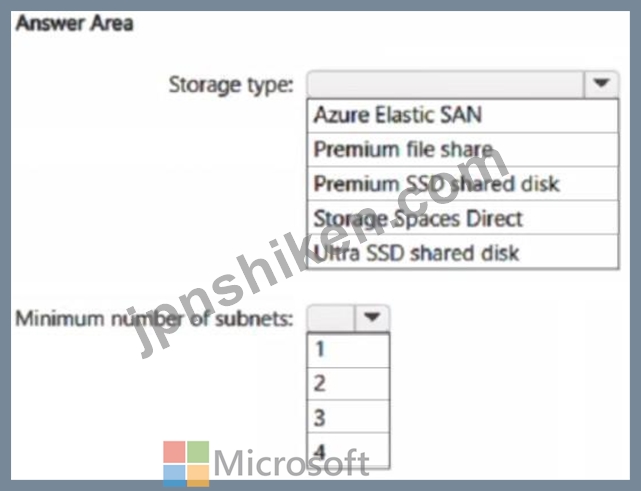
あなたはAzureサブスクリプションをお持ちです。
Microsoft SQL Server フェールオーバー クラスター インスタンス (FCI) ソリューションを設計しています。このソリューションは、以下の要件を満たす必要があります。
- FCIにWindowsを実行する仮想マシンが3台含まれていることを確認してください。
サーバー2025。
- 仮想マシンとストレージリソースを 3 つの場所に配置する
可用性ゾーンを設定することで、99.99%の可用性SLAを提供します。
- ストレージの読み書きレイテンシを最小限に抑え、
仮想マシンの可用性に関するSLA。
ネットワークロードバランサーも分散ネットワーク名(DNN)も不要であることを確認してください。
・管理業務の手間を最小限に抑える。
FCIで使用するストレージの種類と、必要なサブネットの最小数を推奨する必要があります。
何を推奨しますか?回答するには、回答欄で適切な選択肢を選んでください。
注:正解ごとに1ポイントが加算されます。
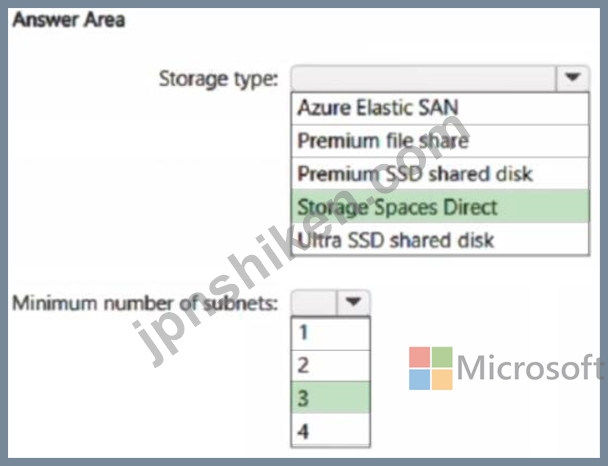
正解:
Explanation:
The storage can use Fibre Channel, iSCSI, FCoE, or SAS for shared disk storage, or use locally attached storage with Storage Spaces Direct (S2D).
Box 1: Storage Spaces Direct
* Storage Spaces Direct
Storage Spaces Direct requires 2 and up to 16 Microsoft-approved servers with direct-attached SATA, SAS, NVMe, or persistent memory drives that are physically attached to just one server each. Each server must have at least two solid-state drives, and at least four more drives. The SATA and SAS devices should be behind a host-bus adapter (HBA) and SAS expander.
Box 2: 3
For a single application or service requiring high availability across three availability zones, you need a minimum of three subnets, with one subnet in each availability zone. This setup ensures that if one availability zone experiences an outage, your application can still operate from the remaining availability zones, maintaining its availability and fault tolerance.
Reference:
https://learn.microsoft.com/en-us/azure/azure-sql/virtual-machines/windows/failover-cluster-instance-storage-spaces-direct-manually-configure?
https://learn.microsoft.com/en-us/azure/azure-sql/virtual-machines/windows/performance-guidelines-best-practices-storage
https://learn.microsoft.com/en-us/azure/virtual-machines/disks-enable-ultra-ssd
https://learn.microsoft.com/en-us/azure/azure-sql/virtual-machines/windows/availability-group-manually-configure-tutorial-multi-subnet

- 質問一覧「194問」
- 質問1 ホットスポットに関する質問 あなたには以下のプロジェクトがあ
- 質問2 AzureBlobStorageにデータファイルがあります。 ファイルを変換...
- 質問3 注:このセクションには、同じシナリオと問題に関する複数の質問
- 質問4 6,000人のユーザーが休暇申請を検証するために使用するアプリケ...
- 質問5 あなたはAzure上でデータ分析ソリューションを設計しています。 ...
- 質問6 あなたはAzureサブスクリプションをお持ちです。 あなたは、1日...
- 質問7 お客様は、account1 という名前の Azure Cosmos DB for NoSQL ア...
- 質問8 ホットスポットに関する質問 貴社には、以下の表に示すような部
- 質問9 ホットスポットに関する質問 App1という名前のオンプレミスアプ...
- 質問10 ホットスポットに関する質問 あなたは、単一の地理的リージョン
- 質問11 App1という名前のAzure App Service Webアプリがあります。 App1...
- 質問12 サードパーティ製のスケジューラを使用する高性能コンピューティ
- 質問13 注:この質問は、同じシナリオを提示する一連の質問の一部です。
- 質問14 注:この質問は、同じシナリオを提示する一連の質問の一部です。
- 質問15 ケーススタディ1 - Litware 既存の環境 Azure環境 Litwareは、Li...
- 質問16 ホットスポットに関する質問 機密データ用のAzureストレージソリ...
- 質問17 事例研究2 - ファブリカム社 概要 ファブリカム社は、ヨーロッパ...
- 質問18 複数のAzureリージョンで複数の書き込み可能なレプリカをホスト...
- 質問19 ドラッグアンドドロップ問題 お客様のオンプレミスネットワーク
- 質問20 ホットスポットに関する質問 お客様は、ASP1 という名前の Azure...
- 質問21 ホットスポットに関する質問 Subscription1という名前のAzureサ...
- 質問22 あなたの会社は、米国、ヨーロッパ、アジア、オーストラリアにオ
- 質問23 10個のオンプレミスSQLServerデータベースを宛先として使用する...
- 質問24 お客様は、Namespace1 という名前の Azure Service Bus Premium ...
- 質問25 Windows App Service プラン上で実行され、コードとしてデプロイ...
- 質問26 5台のAzure仮想マシンで実行されるApp1という名前のアプリケーシ...
- 質問27 ホットスポットに関する質問 Azure 上でホストされ、Azure Monit...
- 質問28 ホットスポットに関する質問 あなたは、Azure Linux仮想マシンを...
- 質問29 ホットスポットに関する質問 あなたは、App1 という名前のアプリ...
- 質問30 Azureガバナンスソリューションの設計を食べました。 すべてのAz...
- 質問31 注: この質問は、同じシナリオを示す一連の質問の一部です。この...
- 質問32 複数の Azure サブスクリプションを含むランディングゾーンがあ...
- 質問33 ホットスポットに関する質問 Azure Cosmos DBとAzure Synapseを...
- 質問34 Azure仮想マシンを使用して、バックエンドでAzureSQLデータベー...
- 質問35 Standard App Service プランの App1 という名前の Azure App Se...
- 質問36 お客様は複数のオンプレミス拠点をお持ちです。これらの拠点には
- 質問37 ホットスポットに関する質問 contoso.comという名前のMicrosoft ...
- 質問38 あなたの会社には、プレミアムアプリサービスプランを介して実行
- 質問39 App1という名前のWebアプリケーションをオンプレミスのデータセ...
- 質問40 あなたの会社は、Azure API Managementを使用して、サービスのAP...
- 質問41 御社は北米とヨーロッパにオフィスを構えています。 Azureへの移...
- 質問42 お客様は、store1 という名前の Azure Blob Storage アカウント...
- 質問43 Contoso, Ltd.という会社は、Microsoft 365と統合されたAzure Ac...
- 質問44 事例研究2 - ファブリカム社 概要 ファブリカム社は、ヨーロッパ...
- 質問45 ホットスポットに関する質問 以下の機能を実装するAzureポリシー...
- 質問46 お客様は、マネージドディスクを使用する複数の仮想マシンを含む
- 質問47 ホットスポットに関する質問 以下の表に示すAzureサブスクリプシ...
- 質問48 あなたは、複数のAzureクラウドサービスを含み、トランザクショ...
- 質問49 あなたは2つのコンポーネントを含むアプリを設計しています。こ
- 質問50 次の表に示すAzureリソースがあります。 (Exhibit) すべてのAzur...
- 質問51 ホットスポットに関する質問 複数のAzure SQL Databaseインスタ...
- 質問52 ホットスポットに関する質問 お客様はAzureサブスクリプションを...
- 質問53 storage1 という名前のストレージアカウントを含む Azure リソー...
- 質問54 注:この問題は、同じシナリオを提示する一連の問題の一部です。
- 質問55 お客様は、App1 という名前のサードパーティ製アプリ サービス ...
- 質問56 ホットスポットに関する質問 IoTデバイスを使用して監視されてい...
- 質問57 貴社はAzure Kubernetes ServiceとAzure Container Registryを運...
- 質問58 ホットスポットに関する質問 あなたは、RESTコールとWebhookをサ...
- 質問59 DB1 という名前のオンプレミスの Microsoft SQL Server 2016 デ...
- 質問60 オンプレミス環境のアプリケーションが、複数のデータベースから
- 質問61 WebアクセスログデータをAzureBlobストレージに保存します。 ア...
- 質問62 ストレージアカウントを含むAzureサブスクリプションをお持ちで...
- 質問63 お客様は、storage1 という名前の Azure Data Lake Storage Gen2...
- 質問64 ホットスポットに関する質問 オンプレミスネットワークをお持ち
- 質問65 お客様の敷地内には、Site1という名前のデータセンターがあり、...
- 質問66 ドラッグアンドドロップ問題 お客様のオンプレミスネットワーク
- 質問67 ホットスポットに関する質問 お客様は、KV1 という名前の Azure ...
- 質問68 複数の場所に展開され、Standard レベルの Azure Databricks ワ...
- 質問69 以下の要件を満たすデータストレージソリューションを推奨する必
- 質問70 ホットスポットに関する質問 あなたはAzureサブスクリプションを...
- 質問71 ホットスポットに関する質問 あなたはAzureサブスクリプションを...
- 質問72 ホットスポットに関する質問 次の表に示すように、お客様は5つの...
- 質問73 以下の要件を満たす、可用性の高いAzure SQLデータベースを設計...
- 質問74 ホットスポットに関する質問 貴社には、社内で開発されたWeb API...
- 質問75 ホットスポットに関する質問 Azure仮想マシン上にSQL Serverのイ...
- 質問76 貴社には、以下の表に示すような部門があります。 (Exhibit) Sub...
- 質問77 あなたは、Azure Kubernetes Service (AKS) クラスターでホスト...
- 質問78 Azure Kubernetes Service(AKS)クラスターで実行されるコンテ...
- 質問79 ある企業は、Azureサブスクリプション内に10台の仮想マシンを作...
- 質問80 あなたは、Oracleデータベースを使用するApp1という名前のオンプ...
- 質問81 あなたは、ユーザー向けにコンテンツを集約するアプリケーション
- 質問82 ホットスポットに関する質問 お客様のオンプレミスネットワーク
- 質問83 お客様は、10個のWebアプリを含むAzureサブスクリプションを所有...
- 質問84 ホットスポットに関する質問 ProdとDevという名前の2つのAzureサ...
- 質問85 AzureWebアプリの2つのインスタンスをデプロイします。1つのイン...
- 質問86 ホットスポットに関する質問 機密データ用のAzureストレージソリ...
- 質問87 お客様はAzureサブスクリプションを所有しています。このサブス...
- 質問88 あなたはAzureサブスクリプションをお持ちです。 Windows Server...
- 質問89 Azure Event Grid にルーティングされたイベントに応じてカスタ...
- 質問90 データ資産を保存するために、Azure Storageアカウントを使用す...
- 質問91 ホットスポットに関する質問 お客様はAzureサブスクリプションを...
- 質問92 ホットスポットに関する質問 あなたはAzureサブスクリプションを...
- 質問93 ホットスポットに関する質問 あなたはAzure App ServiceのWebア...
- 質問94 あなたはSQLデータベースソリューションを設計しています。この...
- 質問95 10TBのオンプレミスデータファイルをAzureにアーカイブすること...
- 質問96 ホットスポットに関する質問 あなたは、Azure Batchを使用してLi...
- 質問97 ホットスポットに関する質問 App1という名前のオンプレミスアプ...
- 質問98 あなたは、サーバーサイドレンダリングを必要としない、Reactベ...
- 質問99 ケーススタディ1 - Litware 既存の環境 Azure環境 Litwareは、Li...
- 質問100 アプリケーションを実行するコンテナーをデプロイするためのソリ
- 質問101 注:このセクションには、同じシナリオと問題に関する複数の質問
- 質問102 ケーススタディ3 - コントソ 既存環境:技術環境 オンプレミスネ...
- 質問103 ホットスポットに関する質問 LB1という名前のAzureロードバラン...
- 質問104 あなたはSQLデータベースソリューションを設計しています。この...
- 質問105 お客様の社内データセンターには、100個のネットワーク共有が含...
- 質問106 注:この問題は、同じシナリオを提示する一連の問題の一部です。
- 質問107 APIM1という名前のAzure API Managementインスタンスがあります...
- 質問108 ホットスポットに関する質問 あなたはAzureサブスクリプションを...
- 質問109 ドラッグアンドドロップ問題 ある企業は、ワークロードをクラウ
- 質問110 ホットスポットに関する質問 次の表に示すように、複数のインス
- 質問111 ホットスポットに関する質問 Azure Active Directory (Azure AD)...
- 質問112 ホットスポットに関する質問 あなたはデータベースプラットフォ
- 質問113 貴社は新しいAzure Webアプリケーションをデプロイしたいと考え...
- 質問114 新しい IPSCustomers データベースがワークロードの需要に合わせ...
- 質問115 Azureサブスクリプションがあります。 オンプレミスネットワーク...
- 質問116 あなたはAzureサブスクリプションをお持ちです。 あなたは、複数...
- 質問117 あなたは12個のAzureサブスクリプションと3つのプロジェクトを持...
- 質問118 注:この問題は、同じシナリオを提示する一連の問題の一部です。
- 質問119 お客様は、エラスティックプール内に10個のAzure SQLデータベー...
- 質問120 複数のAzureリージョンに複数のインスタンスを持つAzureAppServi...
- 質問121 Web アプリケーションをサポートするマイクロサービス アーキテ...
- 質問122 何年もの間、AzureBlobストレージにデータを保存することを計画...
- 質問123 貴社には、以下の表に示すような部門があります。 (Exhibit) Sub...
- 質問124 ドラッグアンドドロップ問題 あなたは、高性能アプリケーション
- 質問125 注:この質問は、同じシナリオを提示する一連の質問の一部です。
- 質問126 ホットスポットに関する質問 あなたは、ビジネス上重要なデータ
- 質問127 ケーススタディ1 - Litware 既存の環境 Azure環境 Litwareは、Li...
- 質問128 ホットスポットに関する質問 Azure ADテナントには、MG1という名...
- 質問129 あなたは、Azure Table Storage REST APIを使用して構造化データ...
- 質問130 ホットスポットに関する質問 あなたはAzureサブスクリプションを...
- 質問131 contoso.com という名前の Microsoft Entra テナントがあります...
- 質問132 ホットスポットに関する質問 ファイル共有をホストするAzureスト...
- 質問133 あなたはAzure上でホストされるアプリケーションを設計していま...
- 質問134 あなたの会社には世界中に 50 の事業部があります。事業部は、現...
- 質問135 お客様は、VirtualWAN1 という名前の基本 Azure 仮想 WAN と、次...
- 質問136 データをAzureに移行することを計画しています。 会社のIT部門は...
- 質問137 ホットスポットに関する質問 あなたはAzureサブスクリプションを...
- 質問138 Windows Server 2019 を実行する VM1 という名前の Azure 仮想マ...
- 質問139 ドラッグアンドドロップ問題 貴社は、Azure仮想マシン上で動作す...
- 質問140 ホットスポットに関する質問 あなたはAzure Webアプリを設計して...
- 質問141 ケーススタディ1 - Litware 既存の環境 Azure環境 Litwareは、Li...
- 質問142 ドラッグアンドドロップ問題 オンプレミス環境に15台のHyper-V仮...
- 質問143 以下の要件を満たす、可用性の高いAzure SQLデータベースを設計...
- 質問144 ホットスポットに関する質問 Azure サブスクリプションには、VNE...
- 質問145 ケーススタディ3 - コントソ 既存環境:技術環境 オンプレミスネ...
- 質問146 10個のアプリケーションをAzureにデプロイすることを計画してい...
- 質問147 注:この質問は、同じシナリオを提示する一連の質問の一部です。
- 質問148 貴社には、以下の表に示すような部門があります。 (Exhibit) Sub...
- 質問149 ホットスポットに関する質問 オンプレミス環境にあるデータベー
- 質問150 あなたは、米国西部AzureリージョンにあるKeyVault1という名前の...
- 質問151 ある企業は、アプリケーションのWebアクセスログをAzure Blobス...
- 質問152 ホットスポットに関する質問 御社はニューヨーク、シドニー、パ
- 質問153 ホットスポットに関する質問 SQL1という名前のオンプレミスのMic...
- 質問154 ホットスポットに関する質問 お客様は、Windows Server 2016を実...
- 質問155 ホットスポットに関する質問 オンプレミスのWebサーバーファーム...
- 質問156 ある企業は、Azure Web Appサービスを使用してWebアプリケーショ...
- 質問157 ホットスポットに関する質問 App1という名前のAzure Webアプリと...
- 質問158 ホットスポットに関する質問 Application1とApplicationsという...
- 質問159 ホットスポットに関する質問 ルート管理グループと10個の子管理...
- 質問160 ドラッグアンドドロップ問題 お客様はAzureサブスクリプションを...
- 質問161 注:この問題は、同じシナリオを提示する一連の問題の一部です。
- 質問162 ある企業がLogic Appを作成し、「domain-logicapp」という名前を...
- 質問163 ホットスポットに関する質問 お客様は5つのAzureサブスクリプシ...
- 質問164 ホットスポットに関する質問 お客様の環境には、Windows Server...
- 質問165 従量課金プランでホストされている、App1 という名前の Azure Fu...
- 質問166 App1という名前のアプリがあり、このアプリはDB1とDB2という名前...
- 質問167 Azure サブスクリプションには、Azure DevOps パイプラインと Az...
- 質問168 ホットスポットに関する質問 オンプレミスの Microsoft SQL Serv...
- 質問169 ホットスポットに関する質問 複数のAzure App Service Webアプリ...
- 質問170 オンプレミスにDB1という名前のOracleデータベースがあります。 ...
- 質問171 App1という名前のアプリがあり、そのアプリはDB1という名前のオ...
- 質問172 ドラッグアンドドロップ問題 お客様はAzureサブスクリプションを...
- 質問173 Azure Blob Storageにパフォーマンスデータを書き込むデバイスが...
- 質問174 ドラッグアンドドロップ問題 お客様は、以下の表に示す仮想マシ
- 質問175 ある企業が、リレーションシップデータをAzure Cosmos DBに移行...
- 質問176 Azure サブスクリプションをお持ちです。 次の内容を含む監視ソ...
- 質問177 ホットスポットに関する質問 オンプレミスの Microsoft SQL Serv...
- 質問178 ホットスポットに関する質問 contoso.com と fabrikam.com とい...
- 質問179 ドラッグアンドドロップ問題 あなたはAzureサブスクリプションを...
- 質問180 複数のAzureクラウドサービスを含み、トランザクションのさまざ...
- 質問181 ホットスポットに関する質問 お客様はAzureサブスクリプションを...
- 質問182 ホットスポットに関する質問 あなたは、以下の図に示すバックア
- 質問183 AzureStorageアカウントを使用するアプリをデプロイすることを計...
- 質問184 あなたは、Azure Event Hubsのイベントを処理するためにAzure Fu...
- 質問185 ホットスポットに関する質問 ある企業は、Webアプリをサポートす...
- 質問186 ホットスポットに関する質問 貴社は、複数のLinuxおよびWindows...
- 質問187 貴社は複数のAzure Cosmos DBアカウントを保有しています。アプ...
- 質問188 Azure サブスクリプションには、App1 と App2 という 2 つのアプ...
- 質問189 App1という名前のアプリケーションがあります。App1は、5年間ア...
- 質問190 ドラッグアンドドロップ問題 オンプレミスネットワークでは、172...
- 質問191 Azure サブスクリプションをお持ちです。そのサブスクリプション...
- 質問192 ホットスポットの質問 ある企業は、IoTデバイスから大量のデータ...
- 質問193 お客様は、storage1 という名前のストレージアカウントを含む Az...
- 質問194 ホットスポットに関する質問 お客様は、以下の表に示すリソース
