- ホーム
- Microsoft
- AZ-305J - Designing Microsoft Azure Infrastructure Solutions (AZ-305日本語版)
- Microsoft.AZ-305J.v2025-11-12.q202
- 質問190
有効的なAZ-305J問題集はJPNTest.com提供され、AZ-305J試験に合格することに役に立ちます!JPNTest.comは今最新AZ-305J試験問題集を提供します。JPNTest.com AZ-305J試験問題集はもう更新されました。ここでAZ-305J問題集のテストエンジンを手に入れます。
AZ-305J問題集最新版のアクセス
「431問、30% ディスカウント、特別な割引コード:JPNshiken」
ホットスポットに関する質問
Azureサブスクリプションをお持ちです。このサブスクリプションには、Windows Serverを実行し、フェールオーバークラスタリングのワークロードをホストする複数の仮想マシンが含まれています。各クラスターには、次の表に示すドライブが含まれています。
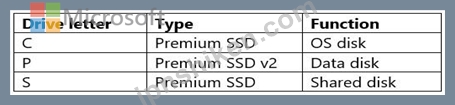
ドライブ P と S のバックアップ ソリューションを推奨する必要があります。
ソリューションは次の要件を満たす必要があります。
- ドライブ P のバックアップはアプリケーション整合性が保たれている必要があります。
- ドライブ S のバックアップはクラッシュ整合性が保たれている必要があります。
- コストを最小限に抑える必要があります。
各ディスクの推奨事項には何を含める必要がありますか? 回答するには、回答領域で適切なオプションを選択してください。
注意: 正しい選択ごとに 1 ポイントが付与されます。
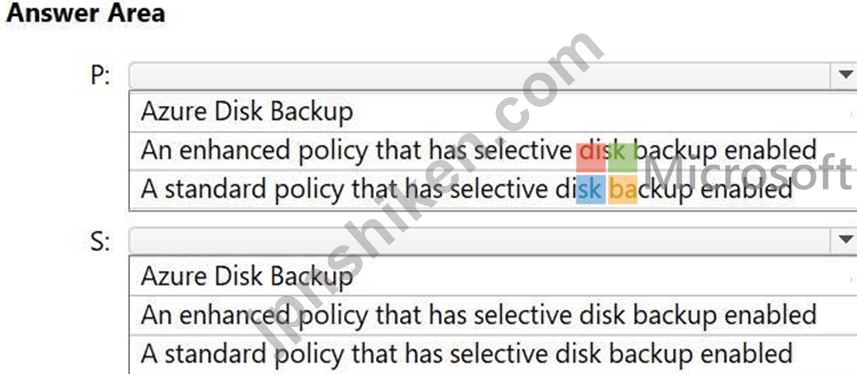
Azureサブスクリプションをお持ちです。このサブスクリプションには、Windows Serverを実行し、フェールオーバークラスタリングのワークロードをホストする複数の仮想マシンが含まれています。各クラスターには、次の表に示すドライブが含まれています。
ドライブ P と S のバックアップ ソリューションを推奨する必要があります。
ソリューションは次の要件を満たす必要があります。
- ドライブ P のバックアップはアプリケーション整合性が保たれている必要があります。
- ドライブ S のバックアップはクラッシュ整合性が保たれている必要があります。
- コストを最小限に抑える必要があります。
各ディスクの推奨事項には何を含める必要がありますか? 回答するには、回答領域で適切なオプションを選択してください。
注意: 正しい選択ごとに 1 ポイントが付与されます。
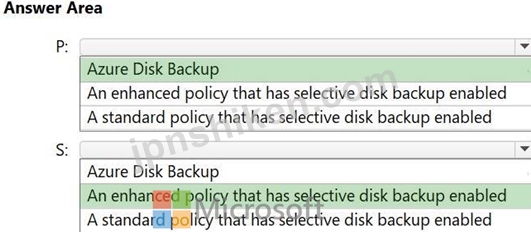
正解:
Explanation:
Box 1: Azure Backup
The backup of drive P must be application-consistent.
Azure Backup can be used for application-consistent backups of Azure VMs. Azure Backup creates recovery points that ensure all data required to restore the backup is available, including application data, Box 2: An enhanced policy that has selective disk backup enabled.
The backup of drive S must be crash-consistent.
For Azure crash-consistent backups, utilize the agentless multi-disk restore points feature of Azure Backup. This feature, available with the Enhanced VM backup policy, allows for backups of all disks attached to a VM without requiring agents or quiescing VM I/O for extended periods.
Azure Backup supports agentless VM backups by using multi-disk crash-consistent restore points (preview). The Enhanced VM backup policy now enables you to configure the consistency type of the backups (application-consistent restore points or crash-consistent restore points preview) for Azure VMs.
Reference:
https://learn.microsoft.com/en-us/azure/backup/backup-azure-vms-introduction
https://learn.microsoft.com/en-us/azure/backup/backup-azure-vms-agentless-multi-disk-crash- consistent-overview

- 質問一覧「202問」
- 質問1 2つのコンポーネントを含むアプリを設計しています。これらのコ
- 質問2 Web アプリケーションをサポートするマイクロサービス アーキテ...
- 質問3 ホットスポットに関する質問 Azure サブスクリプションをお持ち...
- 質問4 注: この問題は、同じシナリオを提示する一連の問題の一部です。...
- 質問5 ホットスポットに関する質問 Azure App Service Web アプリを設...
- 質問6 複数のデータベースからデータを利用するオンプレミスアプリケー
- 質問7 Azure サブスクリプションをお持ちです。 Windows Server 2019 ...
- 質問8 Azure仮想マシン上にSQLServerがあります。データベースは、バッ...
- 質問9 オンプレミス ネットワークが複数あります。 複数のAzureサブス...
- 質問10 ある企業には次のようなオンプレミス データ ストアがあります。...
- 質問11 ドラッグアンドドロップの質問 Site1 というオンプレミスデータ...
- 質問12 ホットスポットに関する質問 Azure サブスクリプションをお持ち...
- 質問13 米国西部 Azure リージョンに KeyVault1 という名前の Azure キ...
- 質問14 あなたの会社には北米全域に複数の支店があります。 Azure サブ...
- 質問15 現在、ある企業には次のようなオンプレミス インフラストラクチ
- 質問16 ケーススタディ3 - Contoso 既存環境: 技術環境 オンプレミス ネ...
- 質問17 ホットスポットに関する質問 ルート管理グループと10個の子管理...
- 質問18 ケーススタディ3 - Contoso 既存環境: 技術環境 オンプレミス ネ...
- 質問19 注: この問題は、同じシナリオを提示する一連の問題の一部です。...
- 質問20 Azure仮想マシンを使用して、バックエンドでAzureSQLデータベー...
- 質問21 会社にはAzure Kubernetes ServiceとAzure Container Registryが...
- 質問22 注: この問題は、同じシナリオを提示する一連の問題の一部です。...
- 質問23 会社では、新しいAzure Webアプリケーションを導入したいと考え...
- 質問24 ホットスポットに関する質問 App1 という名前の Azure Web アプ...
- 質問25 ホットスポットに関する質問 次の表に示すストレージ アカウント...
- 質問26 ケーススタディ1 - Litware 既存の環境 Azure環境 Litware には...
- 質問27 ケーススタディ1 - Litware 既存の環境 Azure環境 Litware には...
- 質問28 Standard App Service プランの App1 という名前の Azure App Se...
- 質問29 ホットスポットに関する質問 次の表に示す Azure リソースがあり...
- 質問30 ケーススタディ1 - Litware 既存の環境 Azure環境 Litware には...
- 質問31 Server1 という名前の Azure Database for MySQL フレキシブル ...
- 質問32 注: この問題は、同じシナリオを提示する一連の問題の一部です。...
- 質問33 ホットスポットに関する質問 Azure Webアプリを設計しています。...
- 質問34 ホットスポットに関する質問 貴社には次の表に示す部門がありま
- 質問35 注: この問題は、同じシナリオを提示する一連の問題の一部です。...
- 質問36 ホットスポットに関する質問 Azure Active Directory Premium Pl...
- 質問37 ホットスポットに関する質問 オンプレミスのデータセンターとAzu...
- 質問38 ホットスポットに関する質問 Contoso, Ltd. という Microsoft ボ...
- 質問39 ホットスポットに関する質問 Azure SQL をデータベース プラット...
- 質問40 ケーススタディ3 - Contoso 既存環境: 技術環境 オンプレミス ネ...
- 質問41 DB1 という名前のオンプレミスの Microsoft SQL Server 2016 デ...
- 質問42 App1という名前のWebアプリケーションをオンプレミスのデータセ...
- 質問43 ホットスポットに関する質問 Azure サブスクリプションをお持ち...
- 質問44 Azure Active Directory (Azure AD) テナントがあります。 Azure...
- 質問45 次の表に示すAzureリソースがあります。 (Exhibit) すべてのAzur...
- 質問46 企業は、アプリケーション用にAzureで作成されたデータストアを...
- 質問47 ドラッグアンドドロップの質問 オンプレミスネットワークには、V...
- 質問48 複数のAzureクラウドサービスを含み、トランザクションのさまざ...
- 質問49 IoTデバイスを使用して監視されている生産ラインがあります。こ...
- 質問50 Azure Kubernetes Service (AKS) クラスターでホストされている...
- 質問51 ドラッグアンドドロップの質問 Azure サブスクリプションをお持...
- 質問52 ある企業では、アプリケーションのWebアクセスログをAzure Blob...
- 質問53 ホットスポットに関する質問 5 つの Azure Kubernetes Service (...
- 質問54 ホットスポットに関する質問 複数のエンタープライズ アプリを含...
- 質問55 多数のサブスクリプションを含む大規模な Azure 環境を設計して...
- 質問56 オンプレミス ネットワークと Azure サブスクリプションがあり、...
- 質問57 App1 という名前のサードパーティ製アプリ サービス アプリを含...
- 質問58 50,000 台の IoT デバイスを含む Azure IoT Hub ソリューション...
- 質問59 ホットスポットに関する質問 ある企業は、IoT デバイスから大量...
- 質問60 ホットスポットに関する質問 ファイル共有をホストするAzureスト...
- 質問61 10個のアプリケーションをAzureにデプロイすることを計画してい...
- 質問62 あなたの会社には次の表に示すインフラストラクチャがあります。
- 質問63 App1 という名前の多層アプリと、SQL1 という名前の Azure SQL ...
- 質問64 仮想アプライアンスを展開するオンプレミスネットワークがありま
- 質問65 複数のAzureクラウドサービスを含み、トランザクションのさまざ...
- 質問66 ユーザー向けにコンテンツを集約するアプリケーションを設計して
- 質問67 ケーススタディ2 - Fabrikam, Inc 概要 Fabrikam, Inc.は、ヨー...
- 質問68 ユーザーにストリーミングビデオを提供するWebアプリケーション...
- 質問69 Web アプリケーションをサポートするマイクロサービス アーキテ...
- 質問70 ホットスポットに関する質問 次の表に示すリソースを含む Azure ...
- 質問71 ホットスポットに関する質問 Azure サブスクリプションをお持ち...
- 質問72 注: この問題は、同じシナリオを提示する一連の問題の一部です。...
- 質問73 Azure Functions を使用して Azure Event Hubs イベントを処理す...
- 質問74 ホットスポットに関する質問 次のプロジェクトがあります: - プ...
- 質問75 次の要件を満たす、可用性の高い Azure SQL データベースを設計...
- 質問76 Azure サブスクリプション内のすべての新しい Azure Resource Ma...
- 質問77 複数のAzureリージョンに複数のインスタンスを持つAzureAppServi...
- 質問78 ホットスポットに関する質問 次のプロジェクトがあります: - プ...
- 質問79 ある企業では、Azure サブスクリプションに 10 台の仮想マシンの...
- 質問80 複数のAzureクラウドサービスを含み、トランザクションのさまざ...
- 質問81 サードパーティのスケジューラを使用する高パフォーマンス コン
- 質問82 注: この問題は、同じシナリオを提示する一連の問題の一部です。...
- 質問83 ホットスポットに関する質問 次の表に示すオブジェクトを含む RG...
- 質問84 オンプレミスの Active Directory ドメインと同期する Azure Act...
- 質問85 ホットスポットに関する質問 Azure サブスクリプションは 5 つあ...
- 質問86 VM1という名前のAzure仮想マシンがあり、Windows Server 2019が...
- 質問87 サーバー側レンダリングを必要としない 100 個の React ベースの...
- 質問88 VirtualWAN1 という名前の Basic Azure 仮想 WAN と、次の表に示...
- 質問89 Azure DevOps パイプラインと Azure Repos リポジトリを含む Azu...
- 質問90 ホットスポットに関する質問 機械学習アプリケーションをサポー
- 質問91 注: この問題は、同じシナリオを提示する一連の問題の一部です。...
- 質問92 Contoso、Ltdという名前の会社は、HTTPトリガーを持ついくつかの...
- 質問93 あるチームは、Resource Manager テンプレートを使用して Azure ...
- 質問94 ホットスポットに関する質問 Azure サブスクリプションをお持ち...
- 質問95 ケーススタディ3 - Contoso 既存環境: 技術環境 オンプレミス ネ...
- 質問96 ホットスポットに関する質問 ビジネスに不可欠なデータを保存す
- 質問97 アプリケーションを実行するコンテナーをデプロイするためのソリ
- 質問98 ある企業は、オンプレミスからクラウドにワークロードを移行した
- 質問99 ホットスポットに関する質問 複数のストレージ アカウントを含む...
- 質問100 従量課金プランでホストされている、App1 という名前の Azure Fu...
- 質問101 ホットスポットに関する質問 SQL1 という名前のオンプレミスの M...
- 質問102 マネージド ディスクを使用する複数の仮想マシンを含む Azure サ...
- 質問103 ホットスポットに関する質問 Azure サブスクリプションをお持ち...
- 質問104 AKS1 という名前の Azure Kubernetes Service (AKS) インスタン...
- 質問105 ドラッグアンドドロップの質問 Azure AD には、App1 と App2 と...
- 質問106 ケーススタディ3 - Contoso 既存環境: 技術環境 オンプレミス ネ...
- 質問107 ケーススタディ2 - Fabrikam, Inc 概要 Fabrikam, Inc.は、ヨー...
- 質問108 ドラッグアンドドロップの質問 あなたの会社には、Azure 仮想マ...
- 質問109 ホットスポットに関する質問 Azure サブスクリプションをお持ち...
- 質問110 ユーザー向けのコンテンツを集約するアプリケーションを設計して
- 質問111 ホットスポットに関する質問 Azure サブスクリプションをお持ち...
- 質問112 Azure Kubernetes Service (AKS) クラスター上のコンテナーで実...
- 質問113 注: この問題は、同じシナリオを提示する一連の問題の一部です。...
- 質問114 ドラッグアンドドロップの質問 Azure Storage を使用してデータ...
- 質問115 オンプレミス ネットワークと Azure サブスクリプションがあり、...
- 質問116 Azureサブスクリプションがあります。 Linuxノードを使用するAzu...
- 質問117 注: この問題は、同じシナリオを提示する一連の問題の一部です。...
- 質問118 ケーススタディ3 - Contoso 既存環境: 技術環境 オンプレミス ネ...
- 質問119 DB1 という名前のオンプレミス Oracle データベースがあります。...
- 質問120 ホットスポットに関する質問 KV1 という名前の Azure キー コン...
- 質問121 会社用にdb1という名前のAzureSQLデータベースをデプロイする必...
- 質問122 Azure サブスクリプションをお持ちです。 コードベースの Web ア...
- 質問123 ホットスポットに関する質問 次の表に示すリソースを含む Azure ...
- 質問124 ホットスポットに関する質問 ある企業は、ウェブアプリをサポー
- 質問125 ホットスポットに関する質問 頻繁に使用される大量のデータを保
- 質問126 ある企業には、2つのAzure AD管理者ユーザーアカウントと2つの仮...
- 質問127 app1data という名前の Azure Blob Storage コンテナーを使用す...
- 質問128 Azureサブスクリプションへのリソースのデプロイを自動化するこ...
- 質問129 ある企業は、一連のアプリケーションを一連の Azure Kubernetes ...
- 質問130 ホットスポットに関する質問 オンプレミスネットワークには、Act...
- 質問131 ホットスポットに関する質問 Windows Server 2016 を実行し、SQL...
- 質問132 ケーススタディ3 - Contoso 既存環境: 技術環境 オンプレミス ネ...
- 質問133 ホットスポットに関する質問 2 TB のデータ ファイルを保存する...
- 質問134 注:この質問は、同じシナリオを提示する一連の質問の一部です。
- 質問135 6,000人のユーザーが休暇申請を検証するために使用するアプリケ...
- 質問136 dv1 という名前の Microsoft Dataverse インスタンスと db1 とい...
- 質問137 ホットスポットに関する質問 次の表に示すように、複数のインス
- 質問138 ホットスポットに関する質問 会社にはニューヨークとロサンゼル
- 質問139 オンプレミスのストレージ ソリューションがあります。 ソリュー...
- 質問140 注: この問題は、同じシナリオを提示する一連の問題の一部です。...
- 質問141 会社のデータエンジニアリングソリューションを設計する必要があ
- 質問142 次の表に示すリソースがあります。 (Exhibit) CDB1 は、継続的に...
- 質問143 ドラッグアンドドロップの質問 次の構成を含むインフラストラク
- 質問144 ビジネス クリティカルなワークロードのデータ層をホストする Az...
- 質問145 Azureサブスクリプションへのリソースのデプロイを自動化するこ...
- 質問146 ケーススタディ1 - Litware 既存の環境 Azure環境 Litware には...
- 質問147 マルチノード Azure Kubernetes Service (AKS) クラスターでホス...
- 質問148 ケーススタディ2 - Fabrikam, Inc 概要 Fabrikam, Inc.は、ヨー...
- 質問149 ホットスポットに関する質問 Azure サブスクリプションをお持ち...
- 質問150 Azure サブスクリプションをお持ちです。 複数の仮想マシンでホ...
- 質問151 ホットスポットに関する質問 Azure サブスクリプションには、sto...
- 質問152 会社には、次の表に示すオンプレミスの Microsoft SQL Server デ...
- 質問153 貴社は北米とヨーロッパにオフィスを構えています。 Azure への...
- 質問154 ホットスポットに関する質問 オンプレミスネットワークには、Act...
- 質問155 ある企業では現在、オンプレミス環境で次のシステムを実行してい
- 質問156 ホットスポットに関する質問 App1 という名前のサードパーティの...
- 質問157 ホットスポットに関する質問 オンプレミス ネットワークがありま...
- 質問158 ドラッグアンドドロップの質問 172.16.0.0/16 の IP アドレス空...
- 質問159 ホットスポットに関する質問 単一の地理的リージョン内のユーザ
- 質問160 次の要件を満たすデータ ストレージ ソリューションを推奨する必...
- 質問161 Azureサブスクリプションを所有しています。このサブスクリプシ...
- 質問162 オンプレミスのUbuntu仮想マシンで実行されるメッセージアプリケ...
- 質問163 ドラッグアンドドロップの質問 オンプレミスの Hyper-V 仮想マシ...
- 質問164 DB1 と DB2 という 2 つのオンプレミスの Microsoft SQL Server ...
- 質問165 Azure Cosmos DB を使用して複数の国からの売上を集計するアプリ...
- 質問166 Azure サブスクリプションをお持ちです。 毎日の最高気温を保存...
- 質問167 ホットスポットに関する質問 Azure サブスクリプションをお持ち...
- 質問168 Azure サブスクリプションをお持ちです。 次の内容を含む監視ソ...
- 質問169 注: この問題は、同じシナリオを提示する一連の問題の一部です。...
- 質問170 あなたの会社には世界中に 50 の事業部があります。事業部は、現...
- 質問171 次の要件を満たす高可用性 Azure SQL データベースを設計する必...
- 質問172 ドラッグアンドドロップの質問 172.16.0.0/16 の IP アドレス空...
- 質問173 注: このセクションには、同じシナリオと問題を扱う1つ以上の質...
- 質問174 ホットスポットに関する質問 Azure RBAC ロールの割り当てを実装...
- 質問175 store1 という名前の Azure Blob Storage アカウントを含む Azur...
- 質問176 注:この質問は、同じシナリオを提示する一連の質問の一部です。
- 質問177 複数の場所に展開され、Standard レベルの Azure Databricks ワ...
- 質問178 Azureサブスクリプションがあります。 オンプレミスネットワーク...
- 質問179 WindowsVirtualDesktopテナントを含むAzureサブスクリプションが...
- 質問180 ある企業は、Azure Web App サービスを使用して Web アプリケー...
- 質問181 ホットスポットに関する質問 Azure でホストされ、Azure Monitor...
- 質問182 ホットスポットに関する質問 Azure Cosmos DB と Azure Synapse ...
- 質問183 ホットスポットに関する質問 貴社はニューヨーク、シドニー、パ
- 質問184 ドラッグアンドドロップの質問 ある企業は、ワークロードをクラ
- 質問185 貴社には次の表に示す部門があります。 (Exhibit) Sub1には、App...
- 質問186 1,000 個のリソースを含む Azure サブスクリプションがあります...
- 質問187 Azure サブスクリプションには、Azure Cosmos DB for NoSQL アカ...
- 質問188 次の詳細を持つ次の可用性セットを作成します。 (Exhibit) 合計 ...
- 質問189 Azure Event Gridにルーティングされたイベントに応答してカスタ...
- 質問190 ホットスポットに関する質問 Azureサブスクリプションをお持ちで...
- 質問191 ホットスポットに関する質問 同じサブスクリプション内の 10 台...
- 質問192 ケーススタディ3 - Contoso 既存環境: 技術環境 オンプレミス ネ...
- 質問193 1,000個の10MBCSVファイルとsql1という名前のAzureSynapseAnalyt...
- 質問194 ホットスポットに関する質問 Azureサブスクリプションをお持ちで...
- 質問195 ホットスポットに関する質問 システム割り当てマネージド ID を...
- 質問196 DB1 という名前の Azure SQL データベースを含む Azure サブスク...
- 質問197 ホットスポットに関する質問 ASP1 という名前の Azure App Servi...
- 質問198 注: この問題は、同じシナリオを提示する一連の問題の一部です。...
- 質問199 ドラッグアンドドロップの質問 オンプレミス環境からAzureにデー...
- 質問200 ケーススタディ2 - Fabrikam, Inc 概要 Fabrikam, Inc.は、ヨー...
- 質問201 次の表に示すリソースを含む Azure サブスクリプションがありま...
- 質問202 2 つのコンポーネントを含むアプリを設計しています。コンポーネ...
