- ホーム
- Microsoft
- AZ-140J - Configuring and Operating Microsoft Azure Virtual Desktop (AZ-140日本語版)
- Microsoft.AZ-140J.v2026-09-11.q170
- 質問12
有効的なAZ-140J問題集はJPNTest.com提供され、AZ-140J試験に合格することに役に立ちます!JPNTest.comは今最新AZ-140J試験問題集を提供します。JPNTest.com AZ-140J試験問題集はもう更新されました。ここでAZ-140J問題集のテストエンジンを手に入れます。
AZ-140J問題集最新版のアクセス
「380問、30% ディスカウント、特別な割引コード:JPNshiken」
ホットスポットに関する質問
Azure Virtual Desktop デプロイメントには、Pool1 という名前のホストプールが含まれています。Pool1 には、Windows 11 Enterprise マルチセッションを実行する Computer1 という名前のセッションホストが含まれています。
あなたはFSLogixを使用して、コンピュータ1のユーザープロファイルを管理する予定です。
ローカルグループポリシーエディターを使用して、fslogix.admxおよびfslogix.admlグループポリシー管理テンプレートファイルの英語(米国)バージョンを使用して、コンピューター1上でFSLogixを構成する必要があります。
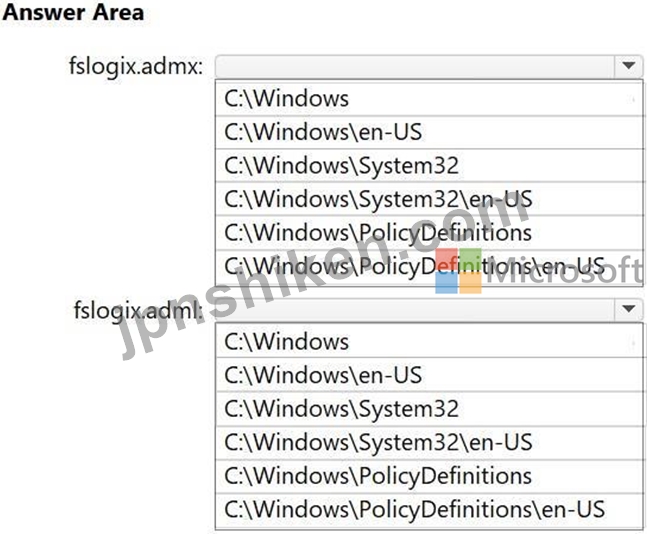
コンピュータ1のどのフォルダにファイルをコピーすればよいですか?回答するには、回答欄で適切なオプションを選択してください。
注:正解ごとに1ポイントが加算されます。
Azure Virtual Desktop デプロイメントには、Pool1 という名前のホストプールが含まれています。Pool1 には、Windows 11 Enterprise マルチセッションを実行する Computer1 という名前のセッションホストが含まれています。
あなたはFSLogixを使用して、コンピュータ1のユーザープロファイルを管理する予定です。
ローカルグループポリシーエディターを使用して、fslogix.admxおよびfslogix.admlグループポリシー管理テンプレートファイルの英語(米国)バージョンを使用して、コンピューター1上でFSLogixを構成する必要があります。
コンピュータ1のどのフォルダにファイルをコピーすればよいですか?回答するには、回答欄で適切なオプションを選択してください。
注:正解ごとに1ポイントが加算されます。
正解:

Explanation:
Box 1: C:\Windows\policyDefinitions
The fslogix.admx file, which contains language-neutral Group Policy settings, should be copied to the %systemroot%\\policyDefinitions folder.
Box 2: C:\Windows\policyDefinitions\en-US
The corresponding fslogix.adml file, which contains the language-specific settings, should be copied to the %systemroot%\\policyDefinitions[MUIculture] folder. For example, the English language-specific file should be copied to %systemroot%\\policyDefinitions\\en-US.
These locations allow the Group Policy Management tool to correctly load and use the FSLogix settings when configuring user profiles in Azure Virtual Desktop.
Reference:
https://learn.microsoft.com/en-us/fslogix/how-to-use-group-policy-templates

- 質問一覧「170問」
- 質問1 事例研究1 - Contoso, Ltd 概要 Contoso, Ltd.は、モントリオー...
- 質問2 ホットスポットに関する質問 お客様は、以下の表に示す仮想マシ
- 質問3 ユーザーを仮想マシンに自動的に割り当てるようにホストプールを
- 質問4 友人の一人がFSLogixについて教えてくれ、その話を聞いた後、あ...
- 質問5 お客様は、contoso.com という名前の Microsoft Entra ハイブリ...
- 質問6 あなたはAzure仮想デスクトップワークスペースを管理するための...
- 質問7 ホットスポットに関する質問 Server1という名前のオンプレミスの...
- 質問8 Azure Virtual Desktop デプロイメントには、Pool1 という名前の...
- 質問9 あなたの会社はオフィスが1つで、従業員は40人です。 Azure Virt...
- 質問10 オンプレミス ネットワークには、20 台の Windows 10 デバイスが...
- 質問11 お客様は、米国東部リージョンにAzure Virtual Desktopホストプ...
- 質問12 ホットスポットに関する質問 Azure Virtual Desktop デプロイメ...
- 質問13 あなたは、最新版のAzure Virtual Desktop(AVD)における条件付き...
- 質問14 Azure Virtual Desktop デプロイメントには、Pool1 という名前の...
- 質問15 Azure Virtual Desktop がデプロイされています。 仮想マシンへ...
- 質問16 ホットスポットに関する質問 User1とUser2という2人のユーザーと...
- 質問17 ホットスポットに関する質問 Pool1という名前のAzure Virtual De...
- 質問18 Azure Virtual Desktop デプロイメントには、Pool1 という名前の...
- 質問19 ホットスポットに関する質問 あなたはAzureサブスクリプションを...
- 質問20 Azure Virtual Desktop ホストプールをお持ちです。 ホストプー...
- 質問21 お客様は、以下の表に示すユーザーを含む Microsoft Entra ハイ...
- 質問22 ドラッグアンドドロップ問題 Azure Virtual Desktop をデプロイ...
- 質問23 ホットスポットに関する質問 Azure サブスクリプションには、Azu...
- 質問24 ドラッグアンドドロップ問題 お客様のオンプレミスネットワーク
- 質問25 お客様のネットワークには、オンプレミスの Active Directory ド...
- 質問26 ユーザー User1 と Azure Virtual Desktop ホスト プール Pool1 ...
- 質問27 Host1という名前のAzure Virtual Desktopセッションホストがあり...
- 質問28 お客様は、Pool1 という名前の Azure Virtual Desktop ホスト プ...
- 質問29 お客様は、Pool1 という名前の Azure Virtual Desktop ホスト プ...
- 質問30 ホットスポットに関する質問 Azure Virtual Desktop をデプロイ...
- 質問31 ホットスポットに関する質問 Azure Virtual Desktop をデプロイ...
- 質問32 Sub1という名前のAzureサブスクリプションをお持ちです。 Sub1に...
- 質問33 ホットスポットに関する質問 Azure Virtual Desktop デプロイメ...
- 質問34 お客様は、Gallery1 という名前の Azure Compute Gallery と Tem...
- 質問35 ホットスポットに関する質問 あなたはAzureサブスクリプションを...
- 質問36 貴社は本社と2つの支店を有しています。各支店はインターネット
- 質問37 Azure Virtual Desktop のデプロイがあり、次の表に示すユーザー...
- 質問38 Azure Virtual Desktop デプロイメントには、Pool1 という名前の...
- 質問39 ホットスポットに関する質問 オンプレミスネットワークをお持ち
- 質問40 ホットスポットに関する質問 オンプレミスのHyper-Vホスト(名前...
- 質問41 contoso.com という名前の Azure Active Directory ドメイン サ...
- 質問42 注:このセクションには、同じシナリオと問題に関する複数の質問
- 質問43 次の表に示す仮想マシンを作成します。 (Exhibit) 新しい Azure ...
- 質問44 次の表に示すホストプールを含む Azure Virtual Desktop デプロ...
- 質問45 次の表に示すリソースを含むAzureサブスクリプションがあります...
- 質問46 Azure Virtual Desktop がデプロイされています。 Hyper-Vを使用...
- 質問47 次の表に示すデバイスがあります。 (Exhibit) リモート仮想化ア...
- 質問48 Azure Virtual Desktop デプロイメントには、Pool1 という名前の...
- 質問49 500 人のユーザーを含む Azure サブスクリプションがあります。...
- 質問50 Pool1という名前のAzure Virtual Desktopホストプールがあります...
- 質問51 Pool1 という名前のホスト プールを含む Azure Virtual Desktop ...
- 質問52 あなたは所属組織のセキュリティ担当者です。所属組織ではAzure ...
- 質問53 ホットスポットに関する質問 ユーザー User1 と Azure Virtual D...
- 質問54 ホットスポットに関する質問 次の表に示すリソースを含む Azure ...
- 質問55 注:この問題は、同じシナリオを提示する一連の問題の一部です。
- 質問56 Azure Virtual Desktop がデプロイされています。 RemoteAppアプ...
- 質問57 ホットスポットに関する質問 Azure Virtual Desktop デプロイメ...
- 質問58 お客様は、Host1 という名前の Azure Virtual Desktop セッショ...
- 質問59 ドラッグアンドドロップ問題 お客様のオンプレミスネットワーク
- 質問60 ホットスポットに関する質問 お客様は、Microsoft IntuneとMicro...
- 質問61 ホットスポットに関する質問 お客様は、以下の表に示すリソース
- 質問62 ネットワークには、contoso.com というオンプレミスの Active Di...
- 質問63 ホットスポットに関する質問 お客様のネットワークには、オンプ
- 質問64 Azure Virtual Desktop のデプロイがあります。 Azure Monitor ...
- 質問65 ホットスポットに関する質問 Azure Virtual Desktop デプロイメ...
- 質問66 Azure サブスクリプションには、Azure Virtual Desktop のデプロ...
- 質問67 ドラッグアンドドロップ問題 Azure Virtual Desktop デプロイメ...
- 質問68 ホットスポットに関する質問 次の図に示すように、Azure Virtual...
- 質問69 ドラッグアンドドロップ問題 Azure Virtual Desktop デプロイメ...
- 質問70 ドラッグアンドドロップ問題 Azure Virtual Desktop がデプロイ...
- 質問71 Azure Virtual Desktop デプロイメントを含む Azure サブスクリ...
- 質問72 Azure Virtual Desktop デプロイメントには、Pool1 と Pool2 と...
- 質問73 お客様のオンプレミスネットワークには、Microsoft Entraテナン...
- 質問74 ホットスポットに関する質問 Azure Virtual Desktop デプロイメ...
- 質問75 Device1という名前のオンプレミスのWindowsデバイスがあります。...
- 質問76 事例研究3 - ノースウィンド・トレーダーズ 概要 ノースウィンド...
- 質問77 事前構成済みのマスターイメージに基づいて、Azure Virtual Desk...
- 質問78 次の表に示す一般化されたWindows10ディスクイメージを含むAzure...
- 質問79 ドラッグアンドドロップ問題 お客様は、Pool1 という名前の Azur...
- 質問80 Pool1という名前のAzure Virtual Desktopホストプールがあり、そ...
- 質問81 ホットスポットに関する質問 Azureサブスクリプションにリンクさ...
- 質問82 Azure Virtual Desktop 環境には、5 つのセッション ホストが含...
- 質問83 事例研究1 - Contoso, Ltd 概要 Contoso, Ltd.は、モントリオー...
- 質問84 Azure Virtual Desktop デプロイメントには、Pool1 という名前の...
- 質問85 Pool1という名前のAzure仮想デスクトップホストプールと、Storag...
- 質問86 ホストプールを含む Azure Virtual Desktop デプロイメントがあ...
- 質問87 オンプレミスネットワークとAzureサブスクリプションをお持ちで...
- 質問88 Pool1という名前のAzure Virtual Desktopホストプールがあり、そ...
- 質問89 Azure コンピューティング ギャラリーには、次の表に示す Window...
- 質問90 ホットスポットに関する質問 Azure Virtual Desktop がデプロイ...
- 質問91 Azure Virtual Desktop をデプロイする予定です。デプロイには既...
- 質問92 注:この問題は、同じシナリオを提示する一連の問題の一部です。
- 質問93 ホットスポットに関する質問 Azure Compute Galleryには、次の表...
- 質問94 注:このセクションには、同じシナリオと問題に関する複数の質問
- 質問95 Azure Virtual Desktop のデプロイがあります。 サーバーベース...
- 質問96 Azure Virtual Desktop がデプロイされています。 Azure ファイ...
- 質問97 ドラッグアンドドロップ問題 お客様のネットワークには、Domain1...
- 質問98 ホットスポットに関する質問 Subscription1という名前のAzureサ...
- 質問99 注:この質問は、同じシナリオを提示する一連の質問の一部です。
- 質問100 ホットスポットに関する質問 contoso.com という名前のハイブリ...
- 質問101 Azure AD テナントに、RG1 という名前のリソースグループが含ま...
- 質問102 ホットスポットに関する質問 Azure Virtual Desktop デプロイメ...
- 質問103 ホットスポットに関する質問 Azure Virtual Desktop がデプロイ...
- 質問104 あなたはSub1という名前のAzureサブスクリプションと、Microsoft...
- 質問105 事例研究3 - ノースウィンド・トレーダーズ 概要 ノースウィンド...
- 質問106 PowerShellで新しい空のRemoteAppアプリグループを作成するには...
- 質問107 事例研究2 - Litware, Inc. 概要 Litware, Inc.は、米国ボストン...
- 質問108 ホットスポットに関する質問 ジャストインタイム (JIT) VM アク...
- 質問109 ドラッグアンドドロップ問題 Azure Virtual Desktop の個人ホス...
- 質問110 チームリーダーから、既存のAzure Virtual Desktop実装のセキュ...
- 質問111 Azure VirtualDesktopを展開しています。 セッションホストは、c...
- 質問112 ドラッグアンドドロップ問題 次の表に示すリソースを含む Azure ...
- 質問113 Microsoft Teamsを含むMicrosoft 365クラウドサービスを利用する...
- 質問114 ベースイメージに複数の言語を追加し、そのイメージを使用してセ
- 質問115 Azure Virtual Desktop デプロイメントには、Pool1 という名前の...
- 質問116 以下を含むPool1という名前のAzureVirtualDesktopホストプールが...
- 質問117 ホットスポットに関する質問 Azure Virtual Desktop デプロイメ...
- 質問118 Azure Virtual Desktop がデプロイされています。 10個のセッシ...
- 質問119 ドラッグアンドドロップ問題 Azure サブスクリプションには、Azu...
- 質問120 事例研究2 - Litware, Inc. 概要 Litware, Inc.は、米国ボストン...
- 質問121 Azure Virtual Desktop がデプロイされています。 あなたはApp1...
- 質問122 注:この問題は、同じシナリオを提示する一連の問題の一部です。
- 質問123 Hotspot の質問:Azure Virtual Desktop をデプロイしています。...
- 質問124 Azure Virtual Desktop がデプロイされています。 あなたは、以...
- 質問125 HostPool1 という名前の Azure Virtual Desktop ホスト プールが...
- 質問126 ホットスポットに関する質問 Azure Virtual Desktop がデプロイ...
- 質問127 東アメリカAzureリージョンにAzure仮想デスクトップのデプロイメ...
- 質問128 注:この質問は、同じシナリオを提示する一連の質問の一部です。
- 質問129 ホットスポットに関する質問 Azure Virtual Desktop デプロイメ...
- 質問130 事例研究1 - Contoso, Ltd 概要 Contoso, Ltd.は、モントリオー...
- 質問131 事例研究3 - ノースウィンド・トレーダーズ 概要 ノースウィンド...
- 質問132 ユーザー User1 と Azure Virtual Desktop デプロイメントを含む...
- 質問133 ホットスポットに関する質問 Azure Virtual Desktop デプロイメ...
- 質問134 お客様は、VM1 という名前の Azure Virtual Desktop セッション ...
- 質問135 Azure Virtual Desktop デプロイメントには、Pool1 という名前の...
- 質問136 次の表に示すホストプールを含む Azure Virtual Desktop デプロ...
- 質問137 ホットスポットに関する質問 Azure Virtual Desktop がデプロイ...
- 質問138 Pool1という名前のAzure Virtual Desktopホストプールをデプロイ...
- 質問139 Sub1 という名前の Azure サブスクリプションがあり、その中に V...
- 質問140 事例研究1 - Contoso, Ltd 概要 Contoso, Ltd.は、モントリオー...
- 質問141 ドラッグアンドドロップ問題 Pool1という名前のAzure Virtual De...
- 質問142 お客様のネットワークには、オンプレミスの Active Directory ド...
- 質問143 ホスト プールを含む Azure Virtual Desktop のデプロイがありま...
- 質問144 次の表に示すリソースを含む Azure サブスクリプションがありま...
- 質問145 ホットスポットに関する質問 Azure Virtual Desktop がデプロイ...
- 質問146 ホットスポットに関する質問 VM1という名前のAzure仮想マシンが...
- 質問147 Azure Virtual Desktop がデプロイされています。 あなたはFSLog...
- 質問148 Azure Active Directory Domain Services (Azure AD DS) を使用...
- 質問149 使用されなくなったホストプールを削除する必要があります。しか
- 質問150 Azure Virtual Desktopを使用する新しいAzureサブスクリプション...
- 質問151 ホットスポットに関する質問 contoso.com という名前の Microsof...
- 質問152 注:この問題は、同じシナリオを提示する一連の問題の一部です。
- 質問153 お客様のネットワークには、Azure Active Directory (Azure AD) ...
- 質問154 ホットスポットに関する質問 HostPool1 という名前のホストプー...
- 質問155 あなたはAzureサブスクリプションをお持ちです。 20台のWindows ...
- 質問156 あなたはチームミーティングの議長を務めており、チームメンバー
- 質問157 ドラッグアンドドロップ問題 新しい質問はトピック別に並べ替え
- 質問158 Azure VirtualDesktopを展開しています。 Azureの営業時間外のVM...
- 質問159 あなたはSub1という名前のAzureサブスクリプションと、Microsoft...
- 質問160 ホットスポットに関する質問 お客様は、以下の表に示す仮想マシ
- 質問161 Azure Virtual Desktop デプロイメントには、Pool1 という名前の...
- 質問162 ホットスポットに関する質問 HostPool1という名前のAzure Virtua...
- 質問163 注:この問題は、同じシナリオを提示する一連の問題の一部です。
- 質問164 Pool1 という名前の Azure Virtual Desktop ホスト プールがあり...
- 質問165 ホットスポットに関する質問 Azure Virtual Desktop デプロイメ...
- 質問166 事例研究2 - Litware, Inc. 概要 Litware, Inc.は、米国ボストン...
- 質問167 事例研究1 - Contoso, Ltd 概要 Contoso, Ltd.は、モントリオー...
- 質問168 ホットスポットに関する質問 Azure サブスクリプションには、Poo...
- 質問169 Azure Virtual Desktop をデプロイする予定です。 FSLogix プロ...
- 質問170 ドラッグアンドドロップ問題 お客様のオンプレミスネットワーク
