- ホーム
- Microsoft
- AZ-104J - Microsoft Azure Administrator (AZ-104日本語版)
- Microsoft.AZ-104J.v2026-10-19.q391
- 質問387
有効的なAZ-104J問題集はJPNTest.com提供され、AZ-104J試験に合格することに役に立ちます!JPNTest.comは今最新AZ-104J試験問題集を提供します。JPNTest.com AZ-104J試験問題集はもう更新されました。ここでAZ-104J問題集のテストエンジンを手に入れます。
AZ-104J問題集最新版のアクセス
「481問、30% ディスカウント、特別な割引コード:JPNshiken」
ホットスポットに関する質問
以下の評価プロパティを持つ Azure Migrate プロジェクトがあります。
対象地域:米国東部
ストレージ冗長性:ローカル冗長構成。
快適度:2.0
パフォーマンス履歴:1ヶ月
利用率パーセンタイル:95パーセンタイル
価格帯:スタンダード
特典:従量課金制
あなたは以下の2つの仮想マシンを発見しました。
Windows Server 2016 を実行する VM1 という名前の仮想マシンには 10 台のコンピューターがあります。
CPUコアの使用率は20%
Windows Server 2012 を実行する VM2 という名前の仮想マシンには、4 つの
CPUコアの使用率は50%
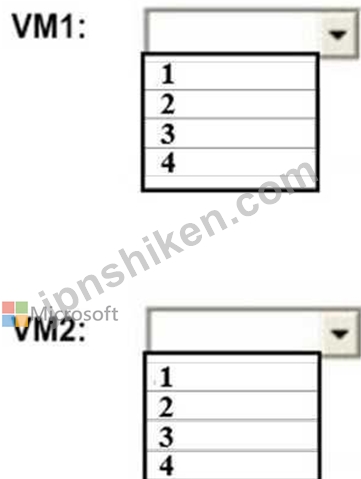
Azure Migrateは、各仮想マシンにいくつのCPUコアを推奨しますか?回答するには、回答欄で適切なオプションを選択してください。
注:正解ごとに1ポイントが加算されます。
以下の評価プロパティを持つ Azure Migrate プロジェクトがあります。
対象地域:米国東部
ストレージ冗長性:ローカル冗長構成。
快適度:2.0
パフォーマンス履歴:1ヶ月
利用率パーセンタイル:95パーセンタイル
価格帯:スタンダード
特典:従量課金制
あなたは以下の2つの仮想マシンを発見しました。
Windows Server 2016 を実行する VM1 という名前の仮想マシンには 10 台のコンピューターがあります。
CPUコアの使用率は20%
Windows Server 2012 を実行する VM2 という名前の仮想マシンには、4 つの
CPUコアの使用率は50%
Azure Migrateは、各仮想マシンにいくつのCPUコアを推奨しますか?回答するには、回答欄で適切なオプションを選択してください。
注:正解ごとに1ポイントが加算されます。
正解:

Explanation:
Box 2: 4
4 *0.50 * 0.95* 2 = 3.8
Note: The number of cores in the machines must be equal to or less than the maximum number of cores (128 cores) supported for an Azure VM.
If performance history is available, Azure Migrate considers the utilized cores for comparison. If a comfort factor is specified in the assessment settings, the number of utilized cores is multiplied by the comfort factor.
If there's no performance history, Azure Migrate uses the allocated cores, without applying the comfort factor.
References:
https://docs.microsoft.com/en-us/azure/migrate/concepts-assessment-calculation

- 質問一覧「391問」
- 質問1 ホットスポットに関する質問 以下の要件を満たすAzureストレージ...
- 質問2 ドラッグアンドドロップ問題 本番環境と開発環境用に複数のAzure...
- 質問3 AZPT1 という名前の Azure サブスクリプションがあり、以下の表...
- 質問4 Sub1とSub2という名前の2つのAzureサブスクリプションがあり、そ...
- 質問5 あなたはAzureサブスクリプションをお持ちです。 あなたは以下の...
- 質問6 ホットスポットに関する質問 お客様は、以下の表に示す仮想ネッ
- 質問7 Azure サブスクリプションには、VNet1 と VNet2 という名前の 2 ...
- 質問8 注:この問題は、全く同じ設定を描いた複数の問題の中に含まれて
- 質問9 ホットスポットに関する質問 オンプレミスのデータセンターとAzu...
- 質問10 開発チームから、彼らが使用するためのAzureストレージアカウン...
- 質問11 App1という名前のAzure Logic Appがあります。App1は、HTTP POST...
- 質問12 注:この問題は、同じシナリオを提示する一連の問題の一部です。
- 質問13 お客様は、以下の表に示すリソースを含む Azure サブスクリプシ...
- 質問14 注:この問題は、同じシナリオを提示する一連の問題の一部です。
- 質問15 次の表に示すAzure Webアプリを作成する予定です。 (Exhibit) We...
- 質問16 ホットスポットに関する質問 お客様は、以下の表に示すファイル
- 質問17 注:この問題は、同じシナリオを提示する一連の問題の一部です。
- 質問18 VM1という名前のAzure仮想マシンがあり、そこでWindows Server 2...
- 質問19 次の図に示すように構成される、VM1という名前のAzure仮想マシン...
- 質問20 注:この問題は、同じシナリオを提示する一連の問題の一部です。
- 質問21 Azure Application Gateway のパフォーマンス問題のトラブルシュ...
- 質問22 Azure Event Gridに接続するためのカスタムAzure関数アプリを構...
- 質問23 ホットスポットに関する質問 複数の仮想マシンと、Workspace1と...
- 質問24 ケーススタディ1 - 巨大保険会社 概要 ヒューモンガス・インシュ...
- 質問25 ドラッグアンドドロップ問題 VM1という名前の仮想マシンを含むAz...
- 質問26 ケーススタディ1 - 巨大保険会社 概要 ヒューモンガス・インシュ...
- 質問27 あなたはテストに使用するVM1という名前のAzure仮想マシンを持っ...
- 質問28 お客様のオンプレミスネットワークには、Azure Active Directory...
- 質問29 VNET1 という名前の仮想ネットワークを含む Azure サブスクリプ...
- 質問30 ホットスポットに関する質問 お客様のAzureサブスクリプションに...
- 質問31 事例研究3 - コントソ社 概要 Contoso, Ltd.は、モントリオール...
- 質問32 お客様は、GW1 という名前のポリシーベースの仮想ネットワークゲ...
- 質問33 App1という名前の分散型オンプレミスアプリをAzureサブスクリプ...
- 質問34 あなたは、App1という名前の分散型オンプレミスアプリをAzureサ...
- 質問35 あなたは、App1 という名前の Azure App Service をホストする A...
- 質問36 ホットスポットに関する質問 お客様は、米国東部2リージョンにVN...
- 質問37 ホットスポットに関する質問 お客様は、以下の表に示す仮想ネッ
- 質問38 オンプレミスネットワークには、Share1という名前のSMB共有が含...
- 質問39 あなたはAzureサブスクリプションをお持ちです。 ContReg1 とい...
- 質問40 Windows Server 2019 を実行する Azure 仮想マシンがあり、以下...
- 質問41 ホットスポットに関する質問 以下の表に示すウェブアプリをご利
- 質問42 事例研究5 - コントソ社 概要 概要 Contoso, Ltd.は、モントリオ...
- 質問43 あなたは最近、Admin1という名前のユーザーを含む新しいAzureサ...
- 質問44 ドラッグアンドドロップ問題 VM1とVM2という名前の2つのAzure仮...
- 質問45 注:この問題は、同じシナリオを提示する一連の問題の一部です。
- 質問46 ケーススタディ1 - 巨大保険会社 概要 ヒューモンガス・インシュ...
- 質問47 オンプレミス ネットワークがあります。 VNET1、VNET2、VNET3 と...
- 質問48 ホットスポットに関する質問 お客様のMicrosoft Entraテナントに...
- 質問49 storage1 という名前の Azure Storage アカウントがあり、その中...
- 質問50 VM1 という名前の仮想マシンと App1 という名前の Azure 関数を...
- 質問51 お客様は、ContReg1 という名前の Standard SKU Azure コンテナ...
- 質問52 注:この質問は、同じシナリオを提示する一連の質問の一部です。
- 質問53 ホットスポットに関する質問 Sub1とSub2という名前のAzureサブス...
- 質問54 ホットスポットに関する質問 お客様は、storage1 という名前のス...
- 質問55 VM1という名前のAzure仮想マシンを含むAzureサブスクリプション...
- 質問56 ホットスポットに関する質問 次の図に示すネットワークプロファ
- 質問57 ホットスポットに関する質問 お客様には、以下のカスタムロール
- 質問58 ホットスポットに関する質問 お客様は、以下の表に示すリソース
- 質問59 ホットスポットに関する質問 Subscriptionという名前のAzureサブ...
- 質問60 お客様はAzureサブスクリプションをお持ちです。そのサブスクリ...
- 質問61 次の表に示すグループを含む Azure AD テナントがあります。 (Ex...
- 質問62 Subscription1という名前のAzureサブスクリプションをお持ちです...
- 質問63 Subscription1という名前のAzureサブスクリプションがあり、その...
- 質問64 Azure サブスクリプションをお持ちです。 サブスクリプション内...
- 質問65 注:この問題は、全く同じ設定を描いた複数の問題の中に含まれて
- 質問66 ドラッグアンドドロップ問題 あなたは、WebApp1 という名前の Az...
- 質問67 以下の表に示すAzure仮想マシンが利用可能です。 (Exhibit) VNET...
- 質問68 サブスクリプションでは、以下のリソースを作成します。 - Regis...
- 質問69 ホットスポットに関する質問 お客様は、以下の表に示すリソース
- 質問70 storage1という名前のAzureストレージアカウントを作成する必要...
- 質問71 貴社はAzure上にブログソリューションを導入したいと考えていま...
- 質問72 ホットスポットに関する質問 以下の表に示すAzure仮想マシンが利...
- 質問73 ホットスポットに関する質問 お客様は、以下の表に示すコンテナ
- 質問74 オンプレミスネットワークからAzureへサービスを移行する予定で...
- 質問75 貴社はAzureにアカウントとサブスクリプションを保有しています...
- 質問76 ホットスポットに関する質問 あなたは、Azure BlobストレージとA...
- 質問77 お客様のAzureサブスクリプションには、VNet1、VNet2、VNet3とい...
- 質問78 ホットスポットに関する質問 User1という名前のAzure ADユーザー...
- 質問79 注:この問題は、全く同じ設定を描いた複数の問題の中に含まれて
- 質問80 ホットスポットに関する質問 App1 という名前の Azure Web アプ...
- 質問81 ホットスポットに関する質問 次の図に示すように、Policy1 とい...
- 質問82 contoso.com という名前の Azure Active Directory (Azure AD) ...
- 質問83 ホットスポットに関する質問 Scale1という名前の仮想マシン・ス...
- 質問84 お客様は、以下の表に示すリソースを含む Azure サブスクリプシ...
- 質問85 ホットスポットに関する質問 AKS1 という名前の Azure Kubernete...
- 質問86 シミュレーション 概要 試験の次のセクションは実習です。このセ...
- 質問87 以下の表に示すAzure仮想ネットワークが利用可能です。 (Exhibit...
- 質問88 お客様は、storage1 という名前のストレージ アカウントを含む A...
- 質問89 お客様は、Windows Server 2008 R2 を搭載した物理サーバーを 5 ...
- 質問90 お客様は、米国西部、米国中部、米国東部のAzureリージョンにWeb...
- 質問91 貴社には、可用性セットに含まれる仮想マシン(VM)が3台あります...
- 質問92 注:この問題は、同じシナリオを提示する一連の問題の一部です。
- 質問93 Azure Resource Managerテンプレートを使用して、仮想マシンのス...
- 質問94 Azure Resource Managerテンプレートを使用して、仮想マシンのス...
- 質問95 チームがスケールセットをAzureにデプロイする必要があります。...
- 質問96 ホットスポットに関する質問 お客様のMicrosoft Entraテナントに...
- 質問97 注:この問題は、同じシナリオを提示する一連の問題の一部です。
- 質問98 注: この質問は、同じシナリオを提示する一連の質問の一部です。...
- 質問99 貴社は、オンプレミスのActive Directoryドメインとのハイブリッ...
- 質問100 ホットスポットに関する質問 WebApp1という名前のAzure Webアプ...
- 質問101 注: この質問は、同じシナリオを示す一連の質問の一部です。この...
- 質問102 contoso.com という名前の Azure AD テナントをお持ちです。 お...
- 質問103 お客様はMicrosoft Entraテナントをお持ちです。 あなたは、社内...
- 質問104 ホットスポットに関する質問 以下の図に示す役割割り当てファイ
- 質問105 ホットスポットに関する質問 次の図に示すように、Azure Storage...
- 質問106 事例研究5 - コントソ社 概要 概要 Contoso, Ltd.は、モントリオ...
- 質問107 お客様は、以下の表に示すパブリックIPアドレスを使用するAzure...
- 質問108 以下の表に示すAzure仮想マシンが利用可能です。 (Exhibit) VM1...
- 質問109 ホットスポットに関する質問 お客様は、以下の表に示す仮想ネッ
- 質問110 あなたは、adatum.com という名前の Azure Active Directory (Az...
- 質問111 貴社には、オンプレミスの Active Directory ドメインとのハイブ...
- 質問112 事例研究5 - コントソ社 概要 概要 Contoso, Ltd.は、モントリオ...
- 質問113 ホットスポットに関する質問 診断ログが有効になっており、ログ
- 質問114 事例研究5 - コントソ社 概要 概要 Contoso, Ltd.は、モントリオ...
- 質問115 注:この問題は、同じシナリオを提示する一連の問題の一部です。
- 質問116 ホットスポットに関する質問 オンプレミスネットワークをお持ち
- 質問117 VM1という名前のAzure仮想マシンがあります。 Azure Backupを使...
- 質問118 App1という名前のAzure Webアプリがあり、ユーザーにビデオコン...
- 質問119 あなたはAzureサブスクリプションをお持ちです。 Azure仮想マシ...
- 質問120 お客様は、以下の表に示す仮想ネットワークを含む Azure サブス...
- 質問121 お客様は、以下の表に示すリソースを含む Azure サブスクリプシ...
- 質問122 あなたは、単一のデータディスクを持つAzure仮想マシン(VM)を持...
- 質問123 ホットスポットに関する質問 あなたはAzureサブスクリプションを...
- 質問124 App1という名前のAzure App Service Webアプリがあります。 App1...
- 質問125 ホットスポットに関する質問 Admin1、Admin2、Admin3という名前...
- 質問126 お客様は、100台の仮想マシンを含むAzureサブスクリプションを所...
- 質問127 ドラッグアンドドロップ問題 オンプレミスネットワーク内に、SQL...
- 質問128 ホットスポットに関する質問 Azure Active Directory (Azure AD)...
- 質問129 ホットスポットに関する質問 お客様は、以下の表に示すリソース
- 質問130 注:この問題は、同じシナリオを提示する一連の問題の一部です。
- 質問131 注:この質問は、同じシナリオを提示する一連の質問の一部です。
- 質問132 ホットスポットに関する質問 以下の表に示すAzureリソースが利用...
- 質問133 お客様のAzureサブスクリプションには、ContReg1という名前のAzu...
- 質問134 注:この問題は、同じシナリオを提示する一連の問題の一部です。
- 質問135 ケーススタディ6 - ADatum Corporation 概要 ADatum Corporation...
- 質問136 Sub1とSub2という名前の2つのAzureサブスクリプションがあり、そ...
- 質問137 ホットスポットに関する質問 お客様は、米国東部2リージョンにVN...
- 質問138 ホットスポットに関する質問 お客様は、米国東部2リージョンにVN...
- 質問139 オンプレミス ネットワーク向けに Azure AD Connect を構成して ...
- 質問140 お客様は、以下の表に示すリソースを含む Azure サブスクリプシ...
- 質問141 注:この質問は、同じシナリオを提示する一連の質問の一部です。
- 質問142 貴社はドメイン名domain.comを登録します。 次に、domain.com と...
- 質問143 ホットスポットに関する質問 イメージを保存するための、storage...
- 質問144 Subscription1という名前のAzureサブスクリプションをお持ちです...
- 質問145 ホットスポットに関する質問 お客様は、以下の表に示す仮想ネッ
- 質問146 ホットスポットに関する質問 Subscription1という名前のAzureサ...
- 質問147 ホットスポットに関する質問 お客様は、以下の表に示す App Serv...
- 質問148 contoso.com という名前の Active Directory フォレストがありま...
- 質問149 あなたはAzureサブスクリプションをお持ちです。 Template.json ...
- 質問150 注:この問題は、全く同じ設定を描いた複数の問題の中に含まれて
- 質問151 Traffic Analyticsが構成されたAzureサブスクリプションをお持ち...
- 質問152 ホットスポットに関する質問 Azure ADテナントにリンクされたAzu...
- 質問153 ホットスポットに関する質問 Subscription1とSubscription2とい...
- 質問154 ドラッグアンドドロップ問題 お客様は、VNET1 という名前の仮想...
- 質問155 注:この問題は、同じシナリオを提示する一連の問題の一部です。
- 質問156 ホットスポットに関する質問 Azure ADテナントをお持ちです。 テ...
- 質問157 ドラッグアンドドロップ問題 オンプレミスネットワークがあり、
- 質問158 IT管理者がAzure上にdomain-appという名前のWebアプリを設定...
- 質問159 ホットスポットに関する質問 お客様のネットワークには、adatum....
- 質問160 ホットスポットに関する質問 次の図に示すAzureリソースが利用可...
- 質問161 お客様は、以下の表に示す仮想ネットワークを含む Azure サブス...
- 質問162 ホットスポットに関する質問 Subscription1という名前のAzureサ...
- 質問163 注:この問題は、同じシナリオを提示する一連の問題の一部です。
- 質問164 Azureストレージアカウントを含むAzureサブスクリプションがあり...
- 質問165 ホットスポットに関する質問 お客様のMicrosoft Entraテナントに...
- 質問166 注:この質問は、同じシナリオを提示する一連の質問の一部です。
- 質問167 ある企業がAzureアカウントを保有しており、現在Azureプレミアム...
- 質問168 ケーススタディ6 - ADatum Corporation 概要 ADatum Corporation...
- 質問169 注:この問題は、全く同じ設定を描いた複数の問題の中に含まれて
- 質問170 ホットスポットに関する質問 あなたはAzureサブスクリプションを...
- 質問171 注:この問題は、同じシナリオを提示する一連の問題の一部です。
- 質問172 Subscription1という名前のAzureサブスクリプションがあり、その...
- 質問173 VM1、VM2、VM3という名前の3台の仮想マシンを含むAzureサブスク...
- 質問174 お客様は、VNet1 という名前の重要なネットワークを含む Azure ...
- 質問175 注:この問題は、全く同じ設定を描いた複数の問題の中に含まれて
- 質問176 ホットスポットに関する質問 contoso.com という名前の Azure Ac...
- 質問177 ホットスポットに関する質問 あなたはAzureサブスクリプションを...
- 質問178 Azure サブスクリプションには、VNet1 という名前の仮想ネットワ...
- 質問179 Azure サブスクリプションには、RG1 という名前のリソース グル...
- 質問180 Subscription1という名前のAzureサブスクリプションがあり、その...
- 質問181 Windows Server 2016を実行するAzure仮想マシンが5台あります。...
- 質問182 Sub1とSub2という名前のAzureサブスクリプションが2つあります。...
- 質問183 お客様は、以下の表に示すリソースを含む Azure サブスクリプシ...
- 質問184 あなたはAzureサブスクリプションをお持ちです。 VM1という名前...
- 質問185 VNet1という名前のAzure仮想ネットワークがあり、以下の設定が含...
- 質問186 ホットスポットに関する質問 お客様は、以下の図に示すストレー
- 質問187 ホットスポットに関する質問 お客様は、以下の表に示すリソース ...
- 質問188 お客様は、以下の表に示すリソースを含む Azure サブスクリプシ...
- 質問189 ホットスポットに関する質問 お客様は、以下の表に示すAzure仮想...
- 質問190 ホットスポットに関する質問 Subscription1という名前のAzureサ...
- 質問191 事例研究3 - コントソ社 概要 Contoso, Ltd.は、モントリオール...
- 質問192 Azure サブスクリプションには、VNet1 という名前の仮想ネットワ...
- 質問193 注:この問題は、全く同じ設定を描いた複数の問題の中に含まれて
- 質問194 あなたはAzureサブスクリプションをお持ちです。 Azureコンテナ...
- 質問195 注:この問題は、同じシナリオを提示する一連の問題の一部です。
- 質問196 ホットスポットに関する質問 あなたは、以下の Azure Resource M...
- 質問197 Subscription1という名前のAzureサブスクリプションをお持ちです...
- 質問198 次の表に示す仮想ネットワークを含む Azure サブスクリプション...
- 質問199 Subscription1という名前のAzureサブスクリプションをお持ちです...
- 質問200 シミュレーション 概要 試験の次のセクションは実習です。このセ...
- 質問201 ドラッグアンドドロップ問題 VM1という名前の仮想マシンを含むAz...
- 質問202 あなたは、VM1という名前の仮想マシンと、User1とUser2という名...
- 質問203 あなたは、adatum.com という名前の Azure Active Directory (Az...
- 質問204 注:この問題は、同じシナリオを提示する一連の問題の一部です。
- 質問205 ホットスポットに関する質問 adatum.com という名前の Azure AD ...
- 質問206 ホットスポットに関する質問 VNet1 という名前の Azure 仮想ネッ...
- 質問207 Subscription1という名前のAzureサブスクリプションと、それに関...
- 質問208 ホットスポットに関する質問 storage1 という名前の Azure スト...
- 質問209 お客様のオンプレミスネットワークにはVPNゲートウェイが含まれ...
- 質問210 ホットスポットに関する質問 Subscription1という名前のAzureサ...
- 質問211 お客様は、VNet1 という名前の仮想ネットワークを含む Azure サ...
- 質問212 事例研究5 - コントソ社 概要 概要 Contoso, Ltd.は、モントリオ...
- 質問213 ウェブ開発者がAzure Web Appsにアプリをデプロイしました。 こ...
- 質問214 貴社はAzure Active Directory(Azure AD)のサブスクリプションを...
- 質問215 あなたはAzureサブスクリプションをお持ちです。 貴社には3つの...
- 質問216 storage1 という名前の Azure ストレージ アカウントを作成し、...
- 質問217 あなたはAzureサブスクリプションをお持ちです。 次の表に示すAz...
- 質問218 Windows Server 2016 Datacenterイメージを使用する仮想マシン ...
- 質問219 ホットスポットに関する質問 お客様はAzureサブスクリプションを...
- 質問220 ホットスポットに関する質問 お客様は、以下の表に示すリソース
- 質問221 あなたのチームは、アプリケーション用のCDNプロファイルとエン...
- 質問222 ドラッグアンドドロップ問題 test-migration という名前のリソー...
- 質問223 複数のオンプレミス拠点とAzure仮想ネットワーク間で、ルートベ...
- 質問224 以下の表に示すAzure仮想ネットワークが利用可能です。 (Exhibit...
- 質問225 お客様は、20台の仮想マシン、NSG1という名前のネットワークセキ...
- 質問226 ホットスポットに関する質問 お客様は、以下の表に示すコンテナ
- 質問227 Azure Resource Managerテンプレートを使用して、仮想マシンのス...
- 質問228 ホットスポットに関する質問 Sub1 という名前の Azure サブスク...
- 質問229 ドラッグアンドドロップ問題 Sub1という名前のAzureサブスクリプ...
- 質問230 注:この問題は、同じシナリオを提示する一連の問題の一部です。
- 質問231 事例研究2 - コントソ社 概要 Contoso, Ltd.は、世界中にオフィ...
- 質問232 ドラッグアンドドロップ問題 お客様は、storage1 という名前のス...
- 質問233 ホットスポットに関する質問 次の図に示すカスタムロールを設定
- 質問234 Azure Resource Managerテンプレートを使用して、仮想マシンのス...
- 質問235 Subscription1という名前のAzureサブスクリプションと、Tenant1...
- 質問236 ホットスポットに関する質問 お客様は、以下の表に示す仮想マシ
- 質問237 事例研究3 - コントソ社 概要 Contoso, Ltd.は、モントリオール...
- 質問238 ある企業はAzureサブスクリプションを所有しており、オンプレミ...
- 質問239 注:この問題は、全く同じ設定を描いた複数の問題の中に含まれて
- 質問240 ホットスポットに関する質問 Subscription1という名前のAzureサ...
- 質問241 Subscription1という名前のAzureサブスクリプションがあり、その...
- 質問242 ホットスポットに関する質問 お客様は、以下の表に示す仮想ネッ
- 質問243 ホットスポットに関する質問 WebApp1という名前のAzure Webアプ...
- 質問244 お客様は、storage1 という名前のストレージアカウントを含む Az...
- 質問245 注:この問題は、同じシナリオを提示する一連の問題の一部です。
- 質問246 注:この問題は、同じシナリオを提示する一連の問題の一部です。
- 質問247 ホットスポットに関する質問 Azure サブスクリプションには、Bac...
- 質問248 注:この問題は、同じシナリオを提示する一連の問題の一部です。
- 質問249 ドラッグアンドドロップ問題 Azure Backupによって保護されてい...
- 質問250 ホットスポットに関する質問 あなたはAzureサブスクリプションを...
- 質問251 ホットスポットに関する質問 お客様は、contoso101とcontoso102...
- 質問252 注:この問題は、同じシナリオを提示する一連の問題の一部です。
- 質問253 ホットスポットに関する質問 お客様は、以下の表に示すリソース
- 質問254 ホットスポットに関する質問 Azure サブスクリプションには、VNe...
- 質問255 ホットスポットに関する質問 仮想ネットワークサブネットに5台の...
- 質問256 注:この問題は、同じシナリオを提示する一連の問題の一部です。
- 質問257 Group1 という名前のコンテナー グループを含む Azure サブスク...
- 質問258 ホットスポットに関する質問 contoso.onmicrosoft.com という名...
- 質問259 Windows Server 2016を実行するAzure仮想マシンが5台あります。...
- 質問260 貴社はロンドンに本社を構えており、そこには100台のクライアン...
- 質問261 ドラッグアンドドロップ問題 Subscription1という名前のAzureサ...
- 質問262 Plan1という名前の標準Azure App Serviceプランをお持ちです。 ...
- 質問263 ホットスポットに関する質問 お客様は、storage1 という名前のス...
- 質問264 注:この質問は、同じシナリオを提示する一連の質問の一部です。
- 質問265 ホットスポットに関する質問 app1という名前のAzure App Service...
- 質問266 ホットスポットに関する質問 あなたは、以下の Azure Resource M...
- 質問267 ホットスポットに関する質問 あなたはSubscription1という名前の...
- 質問268 storage1という名前のAzureストレージアカウントをお持ちです。 ...
- 質問269 次の図に示すように、Microsoft Entra テナントが構成されていま...
- 質問270 10 個の Azure サブスクリプションにリンクされている Azure AD ...
- 質問271 ホットスポットに関する質問 次の表に示すように、Azure仮想マシ...
- 質問272 contoso.comとfabrikam.comという名前の2つのAzure Active Direc...
- 質問273 IT管理者がAzure Webアプリをサービスプランにデプロイしま...
- 質問274 注:この質問は、同じシナリオを提示する一連の質問の一部です。
- 質問275 お客様は、User1 という名前のユーザーアカウントを含む Azure ...
- 質問276 ホットスポットに関する質問 Subscription1 という名前の Azure ...
- 質問277 Azure サブスクリプションをお持ちです。 50 台の仮想マシンを V...
- 質問278 貴社は、オンプレミスのVMware仮想マシンをAzureに移行すること...
- 質問279 注:この問題は、全く同じ設定を描いた複数の問題の中に含まれて
- 質問280 以下の表に示すAzure仮想マシンが利用可能です。 (Exhibit) VM1...
- 質問281 ある企業が、オンプレミスのサーバー群をAzureに移行するためにA...
- 質問282 webapp1 という名前の Azure Web アプリがあります。 VNET1とい...
- 質問283 ホットスポットに関する質問 Subscription1という名前のAzureサ...
- 質問284 お客様は、Job1 という名前の Azure Stream Analytics ジョブを...
- 質問285 注:この問題は、同じシナリオを提示する一連の問題の一部です。
- 質問286 あなたはAzureサブスクリプションをお持ちです。 以下の要件を満...
- 質問287 注:この問題は、同じシナリオを提示する一連の問題の一部です。
- 質問288 貴社のローカル環境は、単一のActive Directoryドメインサービス...
- 質問289 注:この問題は、同じシナリオを提示する一連の問題の一部です。
- 質問290 ある企業がAzureアカウントとサブスクリプションを開設しました...
- 質問291 Plan1という名前のApp Serviceプランと、webapp1という名前のAzu...
- 質問292 Subscription1という名前のAzureサブスクリプションがあります。...
- 質問293 注:この質問は、同じシナリオを提示する一連の質問の一部です。
- 質問294 注:この問題は、全く同じ設定を描いた複数の問題の中に含まれて
- 質問295 お客様は、以下の表に示すリソースを含む Azure サブスクリプシ...
- 質問296 Subscription1という名前のAzureサブスクリプションがあり、その...
- 質問297 あなたはAzureサブスクリプションをお持ちです。 あなたは、以下...
- 質問298 あなたは、App1 という名前の Azure App Service をホストする A...
- 質問299 ドラッグアンドドロップ問題 お客様は、以下のリソースを含む Az...
- 質問300 お客様は、以下の表に示すリソースを含む Azure サブスクリプシ...
- 質問301 IT管理者は、サービスバスキューを作成するよう指示されまし...
- 質問302 あなたは15個のAzureサブスクリプションを所有しています。 Azur...
- 質問303 ドラッグアンドドロップ問題 ストレージアカウントを含むAzureサ...
- 質問304 Subscription1という名前のAzureサブスクリプションと、オンプレ...
- 質問305 あなたは、webapp1 という名前の Azure Web アプリ上で動作する ...
- 質問306 contoso.onmicrosoft.com という名前の Azure Active Directory ...
- 質問307 ホットスポットに関する質問 あなたはAzure Container Instances...
- 質問308 ドラッグアンドドロップ問題 初期ドメイン名を持つAzure Active ...
- 質問309 ハイブリッドインフラストラクチャには、contoso.onmicrosoft.co...
- 質問310 お客様は、10台の仮想マシンを含む既存のAzureサブスクリプショ...
- 質問311 お客様のAzureテナントには、Subscription1とSubscription2とい...
- 質問312 Azure Active Directory(Azure AD)テナントがあります。 Azure...
- 質問313 次の表に示すストレージ アカウントを含む Azure サブスクリプシ...
- 質問314 あなたは、複数のSQL ServerデータベースをホストするAzure Wind...
- 質問315 ホットスポットに関する質問 お客様のMicrosoft Entraテナントに...
- 質問316 ケーススタディ1 - 巨大保険会社 概要 ヒューモンガス・インシュ...
- 質問317 webapp1 という名前の Azure Web アプリがあります。 VNET1とい...
- 質問318 ホットスポットに関する質問 VM1という名前の仮想マシンを含むAz...
- 質問319 お客様は、以下の表に示すデバイスを含む Azure サブスクリプシ...
- 質問320 ホットスポットに関する質問 お客様は、以下の表に示すリソース ...
- 質問321 お客様は、storage1 という名前のストレージアカウントを含む Az...
- 質問322 注:この問題は、同じシナリオを提示する一連の問題の一部です。
- 質問323 貴社はMicrosoft Azure上に仮想マシン(VM)をホストしています。...
- 質問324 注:この問題は、全く同じ設定を描いた複数の問題の中に含まれて
- 質問325 お客様は、以下の表に示すリソースを含む Azure サブスクリプシ...
- 質問326 ホットスポットに関する質問 仮想マシン スケール セットを含む ...
- 質問327 ホットスポットに関する質問 LB1という名前のAzureロードバラン...
- 質問328 お客様は、以下の表に示すリソースを含む Azure サブスクリプシ...
- 質問329 ホットスポットに関する質問 Subscription1という名前のAzureサ...
- 質問330 注:この問題は、全く同じ設定を描いた複数の問題の中に含まれて
- 質問331 注:この質問は、同じシナリオを提示する一連の質問の一部です。
- 質問332 RG1 という名前のリソース グループがあります。RG1 には、stora...
- 質問333 ホットスポットに関する質問 contoso2024 という名前の Azure ス...
- 質問334 ホットスポットに関する質問 Sub1 という名前の Azure サブスク...
- 質問335 ドラッグアンドドロップ問題 RG1 という名前のリソース グループ...
- 質問336 注:この質問は、同じシナリオを提示する一連の質問の一部です。
- 質問337 オンプレミスネットワーク上に、Host1という名前のHyper-Vホスト...
- 質問338 次の図に示すように、Azure ポリシーが設定されています。 (Exhi...
- 質問339 MFAサーバーブレードから、図に示すように「ユーザーのブロック/...
- 質問340 お客様はMicrosoft Entraテナントをお持ちです。 あなたはユーザ...
- 質問341 Azure Active Directory (Azure AD) テナントをお持ちです。 Pol...
- 質問342 Azure AD 特権 ID 管理が構成された Azure Active Directory (Az...
- 質問343 お客様は、以下の表に示すリソースを含む Azure サブスクリプシ...
- 質問344 Azure Resource Managerテンプレートを使用して、仮想マシンのス...
- 質問345 注:この問題は、同じシナリオを提示する一連の問題の一部です。
- 質問346 Azure Resource Managerテンプレートを使用して、仮想マシンのス...
- 質問347 ホットスポットに関する質問 VNet1という名前の仮想ネットワーク...
- 質問348 注:この問題は、同じシナリオを提示する一連の問題の一部です。
- 質問349 お客様のオンプレミスネットワークにはVPNゲートウェイが含まれ...
- 質問350 注:この問題は、同じシナリオを提示する一連の問題の一部です。
- 質問351 注: この質問は、同じシナリオを示す一連の質問の一部です。この...
- 質問352 Windows Server2016を実行するAzure仮想マシンが5つあります。仮...
- 質問353 ケーススタディ6 - ADatum Corporation 概要 ADatum Corporation...
- 質問354 事例研究5 - コントソ社 概要 概要 Contoso, Ltd.は、モントリオ...
- 質問355 ホットスポットに関する質問 あなたはAzureサブスクリプションを...
- 質問356 あなたはAzureサブスクリプションをお持ちです。 cont1という名...
- 質問357 ホットスポットに関する質問 Azureロードバランサーを作成してい...
- 質問358 ホットスポットに関する質問 Subscription1という名前のAzureサ...
- 質問359 事例研究3 - コントソ社 概要 Contoso, Ltd.は、モントリオール...
- 質問360 ホットスポットに関する質問 WebApp1 という名前の新しい Azure ...
- 質問361 事例研究2 - コントソ社 概要 Contoso, Ltd.は、世界中にオフィ...
- 質問362 contoso.onmicrosoft.com という名前の Azure Active Directory ...
- 質問363 ホットスポットに関する質問 貴社は新しいAzureサブスクリプショ...
- 質問364 注:この問題は、同じシナリオを提示する一連の問題の一部です。
- 質問365 ホットスポットに関する質問 Subscription1という名前のAzureサ...
- 質問366 お客様は、10台の仮想マシンを含むAzureサブスクリプションを所...
- 質問367 ホットスポットに関する質問 Subscription1という名前のAzureサ...
- 質問368 Azure Active Directory (Azure AD) テナントをお持ちです。 す...
- 質問369 注:この問題は、全く同じ設定を描いた複数の問題の中に含まれて
- 質問370 お客様は、10台の仮想マシンと、以下の表に示すリソースを含むAz...
- 質問371 ホットスポットに関する質問 お客様はAzureサブスクリプションを...
- 質問372 お客様はMicrosoft 365サブスクリプションと、Azure Active Dire...
- 質問373 注:この問題は、同じシナリオを提示する一連の問題の一部です。
- 質問374 お客様は、以下の表に示すストレージアカウントを含むAzureサブ...
- 質問375 Subscription1という名前のAzureサブスクリプションがあり、その...
- 質問376 ホットスポットに関する質問 Subscription1という名前のAzureサ...
- 質問377 注:この問題は、同じシナリオを提示する一連の問題の一部です。
- 質問378 Azure Application Gateway をデプロイします。 https://adatum....
- 質問379 事例研究5 - コントソ社 概要 概要 Contoso, Ltd.は、モントリオ...
- 質問380 注:この問題は、同じシナリオを提示する一連の問題の一部です。
- 質問381 ホットスポットに関する質問 お客様は、VNET1、VNET2、VNET3とい...
- 質問382 Azure Active Directory(Azure AD)Premiumにサインアップしま...
- 質問383 VM1という名前のAzure仮想マシンがあります。 VM1のネットワーク...
- 質問384 ドラッグアンドドロップ問題 新しいAzureサブスクリプションが作...
- 質問385 お客様は、以下のリソースを含む Azure サブスクリプションをお...
- 質問386 注:この問題は、同じシナリオを提示する一連の問題の一部です。
- 質問387 ホットスポットに関する質問 以下の評価プロパティを持つ Azure ...
- 質問388 ホットスポットに関する質問 お客様はAzureサブスクリプションを...
- 質問389 御社には3つのオフィスがあります。オフィスはマイアミ、ロサン
- 質問390 Subscription1という名前のAzureサブスクリプションがあります。...
- 質問391 ケーススタディ6 - ADatum Corporation 概要 ADatum Corporation...

