- ホーム
- Microsoft
- AZ-104J - Microsoft Azure Administrator (AZ-104日本語版)
- Microsoft.AZ-104J.v2026-09-30.q195
- 質問155
有効的なAZ-104J問題集はJPNTest.com提供され、AZ-104J試験に合格することに役に立ちます!JPNTest.comは今最新AZ-104J試験問題集を提供します。JPNTest.com AZ-104J試験問題集はもう更新されました。ここでAZ-104J問題集のテストエンジンを手に入れます。
AZ-104J問題集最新版のアクセス
「481問、30% ディスカウント、特別な割引コード:JPNshiken」
Subscription1 という名前の Azure サブスクリプションがあります。
contosostorage という名前の Azure ストレージ アカウントを作成し、次に data という名前のファイル共有を作成します。
データファイル共有のファイルを参照するスクリプトには、どのUNCパスを含めるべきですか?答えは、適切な値を正しいターゲットにドラッグすることです。各値は、1回、複数回、または全く使用されない場合があります。コンテンツを表示するには、ペイン間の分割バーをドラッグするか、スクロールする必要がある場合があります。
注意: 正しい選択ごとに 1 ポイントが加算されます。
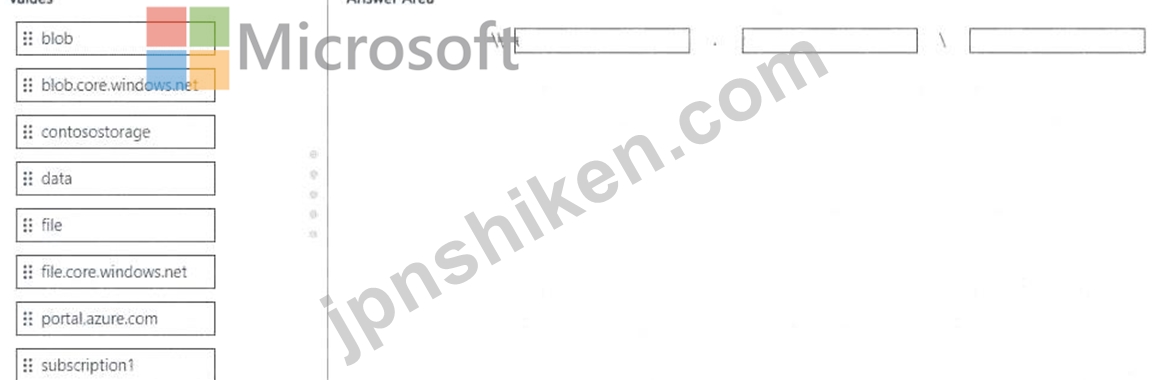
contosostorage という名前の Azure ストレージ アカウントを作成し、次に data という名前のファイル共有を作成します。
データファイル共有のファイルを参照するスクリプトには、どのUNCパスを含めるべきですか?答えは、適切な値を正しいターゲットにドラッグすることです。各値は、1回、複数回、または全く使用されない場合があります。コンテンツを表示するには、ペイン間の分割バーをドラッグするか、スクロールする必要がある場合があります。
注意: 正しい選択ごとに 1 ポイントが加算されます。
正解:

Explanation:

Azure File Shares are accessed using a UNC (Universal Naming Convention) path, which follows a strict and well-defined format in Microsoft Azure. When you create an Azure Storage account and then create a file share within that account, the file share is exposed over the SMB protocol and can be mounted or referenced just like a traditional Windows file share.
According to Microsoft Azure Administrator documentation and study guides, the UNC path format for an Azure file share is:
\\ < storage-account-name > .file.core.windows.net\ < file-share-name > In this scenario:
* The Azure subscription name (Subscription1) is not part of the UNC path.
* The storage account name is contosostorage.
* The file share name is data.
* Azure Files always uses the file.core.windows.net endpoint for SMB-based file shares.
* Blob endpoints (blob.core.windows.net) are used only for Blob Storage and are not valid for file shares.
Putting these components together results in the correct UNC path that can be used inside scripts, PowerShell, batch files, or application configurations to reference files stored in the Azure file share.

- 質問一覧「195問」
- 質問1 次の表に示すパブリック IP アドレスを持つ Azure サブスクリプ...
- 質問2 appl という名前の Azure App Service Web アプリがあります。次...
- 質問3 storage1 という名前のストレージ アカウントを含む Azure サブ...
- 質問4 2 つの実行中のインスタンスを含む App1 という名前の Azure App...
- 質問5 Azure ネットワーク インフラストラクチャの計画された実装後に...
- 質問6 storage1という名前のAzureストレージアカウントがあります。 Az...
- 質問7 10 個の Azure サブスクリプションにリンクされている Azure AD ...
- 質問8 storage1 という名前のストレージ アカウントを含む Azure サブ...
- 質問9 contoso.com という名前の Azure Active Directory (Azure AD) ...
- 質問10 VM1 と VM2 という名前の 2 つの仮想マシンを含む Azure サブス...
- 質問11 contoso.com という名前の Azure Active Directory (Azure AD) ...
- 質問12 次の表に示す Azure 仮想マシンがあります。 (Exhibit) VM1 と V...
- 質問13 VM1 という名前の Azure 仮想マシンと、Vault1 という名前の Rec...
- 質問14 財務部門の監査人にどのブレードを使用するように指示する必要が
- 質問15 adatum.com という名前の Azure Active Directory (Azure AD) テ...
- 質問16 注:この質問は、同じシナリオを提示する一連の質問の一部です。
- 質問17 次の表に示す仮想マシンを含む従量課金制の Azure サブスクリプ...
- 質問18 App1 という名前の Azure App Services Web アプリがあります。 ...
- 質問19 ライセンスを再度割り当てる前に、ライセンスの問題を解決する必
- 質問20 注:この質問は、同じシナリオを提示する一連の質問の一部です。
- 質問21 Azure サブスクリプションには、Vault1 という名前の Recovery S...
- 質問22 次のカスタム ロールベース アクセス制御 (RBAC) ロールがありま...
- 質問23 複数のユーザーがアクセスする 5,000 個の BLOB を含む Azure ス...
- 質問24 次の表に示すストレージ アカウントを含む Azure サブスクリプシ...
- 質問25 Azureストレージアカウントを含むAzureサブスクリプションがあり...
- 質問26 次の表に示すリソースを含む Azure サブスクリプションがありま...
- 質問27 D:\Folder1 という名前のフォルダーを含むオンプレミス サーバー...
- 質問28 VM1 という名前の仮想マシンを含む Azure サブスクリプションが...
- 質問29 次の表に示すパブリック ロード バランサーを含む Azure サブス...
- 質問30 共有アクセス署名(SAS)を生成する必要があります。ソリューシ...
- 質問31 注: この質問は、同じシナリオを提示する一連の質問の一部です。...
- 質問32 Azure サブスクリプションをお持ちです。 storage1 という名前の...
- 質問33 次の表に示すリソースが含まれる、Subscription! という名前の A...
- 質問34 VM1 という名前の仮想マシンを含む Azure サブスクリプションが...
- 質問35 北ヨーロッパ A2ure リージョンに storage 1 という名前のストレ...
- 質問36 10台の仮想マシン、Vault 1というキーコンテナー、NSG1というネ...
- 質問37 Subscription 1 と Subscription2 という名前の 2 つの Azure サ...
- 質問38 VM1、VM2、VM3という3つの仮想マシンを含むAzureサブスクリプシ...
- 質問39 DCR1 に計画されている変更を実装する必要があります。どのタイ...
- 質問40 次の図に示すように、contoso2023 という名前の Azure コンテナ...
- 質問41 Azure 仮想マシンを 3 つの Azure リージョンにデプロイします。...
- 質問42 次の図に示すストレージ アカウントを含む Azure サブスクリプシ...
- 質問43 storage1 という名前の Azure ストレージ アカウントがあります...
- 質問44 次の表のリソースを含む Azure サブスクリプションがあります。 ...
- 質問45 次の図に示すストレージ アカウントを含む Azure サブスクリプシ...
- 質問46 次の表に示す仮想ネットワークを含む Azure サブスクリプション...
- 質問47 次の表に示す仮想ネットワークを含む Azure サブスクリプション...
- 質問48 次の図に示すようなロール割り当てファイルがあります。 (Exhibi...
- 質問49 スコープ 1 の計画された変更を実装します。 スコープ 1 が技術...
- 質問50 storage1 という名前の Azure Storage アカウントがあり、そこに...
- 質問51 注:この質問は、同じシナリオを提示する一連の質問の一部です。
- 質問52 オンプレミス ネットワークがあります。 VNet1 と VNet2 という ...
- 質問53 次の図に示すようにピアリングが構成されています。 (Exhibit) ...
- 質問54 Azureサブスクリプションがあります。 ユーザーは、ホームまたは...
- 質問55 Azure サブスクリプションをお持ちです。 Azure Resource Manage...
- 質問56 次の表に示すリソースを含む Azure サブスクリプションがありま...
- 質問57 リソースグループを作成し、そのリソースグループにAzureストレ...
- 質問58 Azure 仮想マシンをデプロイするために使用される Azure Resourc...
- 質問59 次の図に示す階層を含む Azure サブスクリプションがあります。 ...
- 質問60 Azure Blob Storage と Azure File Storage を使用する storage1...
- 質問61 米国西部 Azure リージョンに複数の仮想マシンが含まれる Azure ...
- 質問62 storage1 という名前の Azure ストレージ アカウントと、次の表...
- 質問63 Subscription1 という名前の Azure サブスクリプションがありま...
- 質問64 次の表に示す Azure コンテナー レジストリを持つ Azure サブス...
- 質問65 次の表に示す Azure サブスクリプションにリンクされた Microsof...
- 質問66 次の表のリソースを含む Azure サブスクリプションがあります。 ...
- 質問67 次の表に示すサブネットを含む VNETI という名前の仮想ネットワ...
- 質問68 Azure AD テナントがあります。 フランスのマーケティング部門の...
- 質問69 次の表に示すコンテナーを含む Azure サブスクリプションがあり...
- 質問70 Active Directory の問題を解決する必要があります。 何をすべき...
- 質問71 仮想マシンの暗号化を設定する必要があります。ソリューションは
- 質問72 contoso.com という名前の Microsoft Entra テナントがあります...
- 質問73 VM1とVM2をLB1のバックエンドに追加する必要があります。まず何...
- 質問74 User1 に対して計画された変更を実装する必要があります。 User1...
- 質問75 注: この質問は、同じシナリオを提示する一連の質問の一部です。...
- 質問76 VM1 という名前の仮想マシンと App1 という名前の Azure 関数を...
- 質問77 VNet1 という名前の仮想ネットワークを含む Azure サブスクリプ...
- 質問78 VNet1 という名前の Azure 仮想ネットワークがあり、サイト間 VP...
- 質問79 次の表に示すリソースを含む Azure サブスクリプションがありま...
- 質問80 次の図に示すストレージ アカウントを含む Azure サブスクリプシ...
- 質問81 次の表に示すリソース グループを含む Azure サブスクリプション...
- 質問82 会社が新しい Azure サブスクリプションを購入します。 次の図に...
- 質問83 次の表に示すコンテナーを含む Azure サブスクリプションがあり...
- 質問84 次の表に示す Azure 仮想マシンがあります。 (Exhibit) VM1 に D...
- 質問85 注:この質問は、同じシナリオを提示する一連の質問の一部です。
- 質問86 ファイル共有と仮想マシンをバックアップするには、Azure Backup...
- 質問87 Backup1 という名前の Azure Backup コンテナー、Recovery1 とい...
- 質問88 contoso101 と contoso102 という名前の 2 つのストレージ アカ...
- 質問89 Contoso ストレージという名前の Azure ストレージ アカウントを...
- 質問90 Azure サブスクリプションをお持ちです。 複数のデータ ディスク...
- 質問91 Azureサブスクリプションをお持ちの場合 新しいストレージアカウ...
- 質問92 次の表に示す仮想ネットワークを含む Azure サブスクリプション...
- 質問93 VNet1 という仮想ネットワークに接続する VM1 という Azure 仮想...
- 質問94 認証要件を満たす環境を準備する必要があります。 実行すべき 2 ...
- 質問95 Registry1 という名前の Anne コンテナ レジストリがあり、そこ...
- 質問96 次の表に示す仮想ネットワークを含む Azure サブスクリプション...
- 質問97 storage 1 という名前のストレージ アカウントを含む Azure サブ...
- 質問98 Azure ストレージ アカウントを含む Azure サブスクリプションが...
- 質問99 RG1 という名前のリソース グループを含む Azure サブスクリプシ...
- 質問100 contoso.com という名前の Azure Directory (Azure AD) テナント...
- 質問101 Server2 の Azure 仮想サーバーに適切なサイズが必要です。 どう...
- 質問102 Azure ストレージ アカウントを作成します。 ストレージ アカウ...
- 質問103 VM1 という名前の Azure 仮想マシンがあります。VM1 は、ARM1.js...
- 質問104 RG1 という名前のリソース グループを含む Azure サブスクリプシ...
- 質問105 次の表に示すリソースが含まれる contoso2024 という名前の Azur...
- 質問106 container1 と share1 を作成する必要があります。 各リソースに...
- 質問107 次の図に示すように、Microsoft Entra テナントが構成されていま...
- 質問108 10 個の仮想ネットワークを含む Azure サブスクリプションがあり...
- 質問109 account1 という名前のストレージ アカウントを含む Azure サブ...
- 質問110 次の表に示す仮想ネットワークを含む Azure サブスクリプション...
- 質問111 次の表に示すパブリック IP アドレスを持つ Azure サブスクリプ...
- 質問112 RG26 という名前のリソース グループを含む Azure サブスクリプ...
- 質問113 計画されたインフラストラクチャをサポートするには、Azure AD ...
- 質問114 www.contoso.com をホストするには、contoso.azurewebsites.net ...
- 質問115 Windows Server2016を実行するAzure仮想マシンが5つあります。仮...
- 質問116 Microsoft Entra テナントがあります。 テナントのデフォルトの...
- 質問117 次の表に示すパブリック IP アドレスを使用する Azure サブスク...
- 質問118 お客様は、以下の表に示すリソース グループを含む Azure サブス...
- 質問119 RSV1 という名前の Recovery Services コンテナーがあります。RS...
- 質問120 Plan1 という名前の標準 Azure App Service プランがあります。 ...
- 質問121 Azure サブスクリプションをお持ちです。 次の表に示す Azure コ...
- 質問122 次の表に示すストレージ アカウントを含む Azure サブスクリプシ...
- 質問123 お客様は、storage1 という名前のストレージ アカウントを含む A...
- 質問124 storage 1 という名前のストレージ アカウントを含む Azure サブ...
- 質問125 VM1 という名前の仮想マシンと、User1 および User2 という名前...
- 質問126 アプリケーションを移動した後、App1 のバックアップ ソリューシ...
- 質問127 Subscription1 という名前の Azure サブスクリプションがありま...
- 質問128 20 台の仮想マシン、NSG1 という名前のネットワーク セキュリテ...
- 質問129 実行中のインスタンスが 2 つ含まれる、Appl という名前の Azure...
- 質問130 お客様はAzureサブスクリプションをご利用中です。このサブスク...
- 質問131 VNet1 という仮想ネットワークを含む、Subscription1 という Azu...
- 質問132 米国東部および米国西部の Azure リージョンにオフィスがある Az...
- 質問133 次の表に示すリソースを含む Azure サブスクリプションがありま...
- 質問134 注: この質問は、同じシナリオを示す一連の質問の一部です。この...
- 質問135 仮想ネットワーク サブネットに 5 台の仮想マシンを展開する予定...
- 質問136 storage1 という名前の Azure ストレージ アカウントがあります...
- 質問137 次の表に示す App Service プランがあります。 (Exhibit) 次の表...
- 質問138 オンプレミス ネットワークがあります。 VNET1、VNET2、VNET3 と...
- 質問139 storage1 というストレージアカウントを含む Azure サブスクリプ...
- 質問140 VNET1、VNET2、VNET3 という名前の 3 つの仮想ネットワークを含...
- 質問141 次の表に示すストレージ アカウントを含む Azure サブスクリプシ...
- 質問142 Azure AD テナントにリンクされている、Sub1、Sub2、Sub3 という...
- 質問143 次の表に示す Azure 仮想ネットワークがあります。 (Exhibit) VN...
- 質問144 計画されたインフラストラクチャをサポートするには、Azure AD ...
- 質問145 次の図に示すネットワーク プロファイルを持つ Azure Kubernetes...
- 質問146 storageacct1234 という名前のストレージ アカウントと、User1 ...
- 質問147 注: この質問は、同じシナリオを提示する一連の質問の一部です。...
- 質問148 仮想マシン名 VM1 を含む Azure サブスクリプションがあります。...
- 質問149 Subscroption1 という名前の Azure サブスクリプションがありま...
- 質問150 次の表に示すリソース グループを含む Azure サブスクリプション...
- 質問151 次の表に示すグループを含む Microsoft Entra テナントがありま...
- 質問152 RG1 という名前のリソース グループを含む Azure サブスクリプシ...
- 質問153 次の表に示すAzure Webアプリを作成する予定です。 (Exhibit) We...
- 質問154 VM1 という名前の仮想マシンを含む Azure サブスクリプションが...
- 質問155 Subscription1 という名前の Azure サブスクリプションがありま...
- 質問156 Azure Resource Manager テンプレートを使用して、仮想マシン ス...
- 質問157 次の表に示す Azure リソースが含まれる Sub1 という名前の Azur...
- 質問158 Windows Server を実行する VM1 という名前の Azure 仮想マシン...
- 質問159 VNet1 という名前の仮想ネットワークを含む Azure サブスクリプ...
- 質問160 Microsoft 365 テナントと、contoso.com という名前の Azure Act...
- 質問161 次の表に示すリソースを含む Azure サブスクリプションがありま...
- 質問162 次の表に示すグループを含む Microsoft Entra テナントがありま...
- 質問163 次の表に示すリソースを含む Azure サブスクリプションがありま...
- 質問164 10 個の Azure Web アプリをデプロイするために使用される、Temp...
- 質問165 Windows Serverを実行するAzure仮想マシンがあり、以下の構成に...
- 質問166 Windows Server 2019 を実行し、次の表のように構成されている A...
- 質問167 Azure ネットワーク インフラストラクチャの計画された実装後に...
- 質問168 注: この質問は、同じシナリオを提示する一連の質問の一部です。...
- 質問169 Azure Resource Manager テンプレートを使用して、仮想マシン ス...
- 質問170 Subscription1 という名前の新しい Azure サブスクリプションを...
- 質問171 App1という名前の分散型オンプレミスアプリをAzureサブスクリプ...
- 質問172 Sub1 という名前の Azure サブスクリプションがあり、その中に R...
- 質問173 注:この質問は、同じシナリオを提示する一連の質問の一部です。
- 質問174 次の図に示す Azure リソースがあります。 (Exhibit) リソースの...
- 質問175 ユーザー1がイニシアチブ定義を作成し、ユーザー4がRG2にイニシ...
- 質問176 次の表に示すストレージ アカウントを含む Azure サブスクリプシ...
- 質問177 VM1 という名前の仮想マシンを含む Azure サブスクリプションが...
- 質問178 次の表に示すリソースを含む Azure サブスクリプションがありま...
- 質問179 バックアップのテストに使用するRecovery Serviceボルトがありま...
- 質問180 お客様はMicrosoft Entraテナントをお持ちです。 新しい Microso...
- 質問181 次の表に示すリソースを含む Azure サブスクリプションがありま...
- 質問182 webapp1 という名前の Azure Web アプリ上で実行される App1 と...
- 質問183 WebApp1 という名前の Azure App Service アプリがあり、このア...
- 質問184 Azure Backup によって保護されている Azure Linux 仮想マシンが...
- 質問185 注:この質問は、同じシナリオを提示する一連の質問の一部です。
- 質問186 次の表に示すユーザーを含む Azure サブスクリプションがありま...
- 質問187 storage1 という名前のAzure Storageアカウントがあります。 Use...
- 質問188 Contoso.com という名前の Azure Active Directory テナントがあ...
- 質問189 財務部門のユーザー向け設定を自動化するソリューションを推奨す
- 質問190 注: この質問は、同じシナリオを提示する一連の質問の一部です。...
- 質問191 VNet1 と VNet2 という名前の 2 つの Azure 仮想ネットワークが...
- 質問192 Subscription1 という名前の Azure サブスクリプションがありま...
- 質問193 App1という名前のAzure Webアプリがあります。 App1には、次の表...
- 質問194 VM1 という名前の Azure 仮想マシンがあります。VM1 は、ARMIjso...
- 質問195 Azure サブスクリプションをお持ちです。 Azure 仮想マシンが 10...
