- ホーム
- Microsoft
- AZ-104J - Microsoft Azure Administrator (AZ-104日本語版)
- Microsoft.AZ-104J.v2021-11-02.q146
- 質問42
有効的なAZ-104J問題集はJPNTest.com提供され、AZ-104J試験に合格することに役に立ちます!JPNTest.comは今最新AZ-104J試験問題集を提供します。JPNTest.com AZ-104J試験問題集はもう更新されました。ここでAZ-104J問題集のテストエンジンを手に入れます。
AZ-104J問題集最新版のアクセス
「454問、30% ディスカウント、特別な割引コード:JPNshiken」
Azureロードバランサーを作成しています。
IPv6ロードバランシングルールをロードバランサーに追加する必要があります。
Azure PowerShellスクリプトをどのように完了する必要がありますか?回答するには、回答領域で適切なオプションを選択します。
注:それぞれの正しい選択は1ポイントの価値があります。
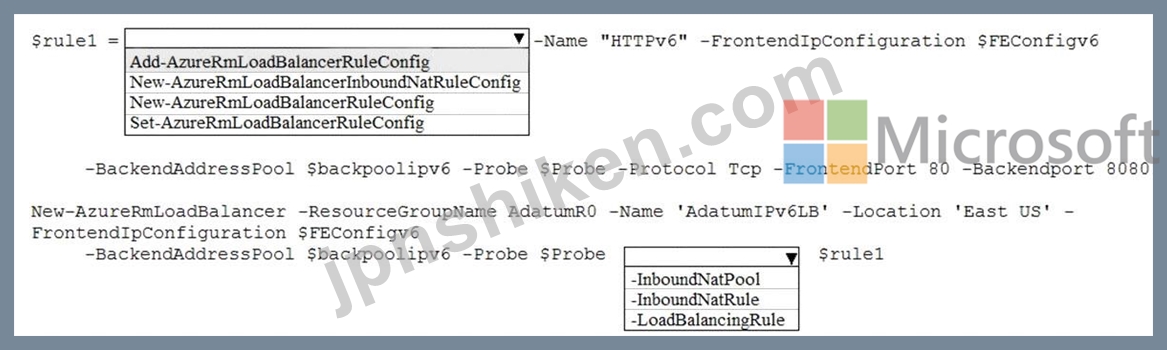
IPv6ロードバランシングルールをロードバランサーに追加する必要があります。
Azure PowerShellスクリプトをどのように完了する必要がありますか?回答するには、回答領域で適切なオプションを選択します。
注:それぞれの正しい選択は1ポイントの価値があります。
正解:

Explanation

Powershell command to create a load balancer rule (AzureRm module new version is AZ as given in below command):
$lbrule1v6 = New-AzLoadBalancerRuleConfig
-Name "HTTPv6"
-FrontendIpConfiguration $FEIPConfigv6
-BackendAddressPool $backendpoolipv6
-Probe $healthProbe
-Protocol Tcp
-FrontendPort 80
-BackendPort 8080
Powershell command to create the load balancer using the previously created objects :
New-AzLoadBalancer
-ResourceGroupName NRP-RG
-Name 'myNrpIPv6LB'
-Location 'West US'
-FrontendIpConfiguration $FEIPConfigv6
-InboundNatRule $inboundNATRule1v6
-BackendAddressPool $backendpoolipv6
-Probe $healthProbe
-LoadBalancingRule $lbrule1v6
References:
https://docs.microsoft.com/en-us/azure/load-balancer/load-balancer-ipv6-internet-ps

- 質問一覧「146問」
- 質問1 contoso.comという名前のAzure Directory(Azure AD)テナントを...
- 質問2 contoso.onmicrosoft.comという名前のAzure Active Directoryテ...
- 質問3 5,000のユーザーアカウントを含むAzure Active Directory(Azure...
- 質問4 注:この質問は、同じシナリオを提示する一連の質問の一部です。
- 質問5 account1という名前のストレージアカウントを含むAzureサブスク...
- 質問6 App1という名前の分散型オンプレミスアプリをAzureサブスクリプ...
- 質問7 注:この質問は、同じシナリオを提示する一連の質問の一部です。
- 質問8 注:この質問は、同じシナリオを提示する一連の質問の一部です。
- 質問9 次の表に示すリソースを含むAZPT1という名前のAzureサブスクリプ...
- 質問10 あなたの会社はロンドンに100のクライアントコンピューターを含...
- 質問11 contoso.onmicrosoft.comという名前のAzure Active Directoryテ...
- 質問12 contoso.onmicrosoft.comという名前のAzure Active Directory(A...
- 質問13 RG1という名前のリソースグループがあります。 RG1には、storage...
- 質問14 次の表に示すリソースグループを含むSubscriptionという名前のAz...
- 質問15 Windows Server2016を実行するAzure仮想マシンが5つあります。仮...
- 質問16 次の表に示すAzure仮想マシンがあります。 (Exhibit) DNSサービ...
- 質問17 財務部門のユーザー向けに構成を自動化するソリューションを推奨
- 質問18 注:この質問は、同じシナリオを提示する一連の質問の一部です。
- 質問19 Subscription1という名前のAzureサブスクリプションがあります。...
- 質問20 複数のAzure WebアプリをホストするAdatumASP1という名前のAzure...
- 質問21 Windows Server 2019を実行し、次の構成を持つAzure仮想マシンが...
- 質問22 Scale1という名前の仮想マシンスケールセットを作成します。 Sca...
- 質問23 注:この質問は、同じシナリオを提示する一連の質問の一部です。
- 質問24 Azureネットワークインフラストラクチャの計画的な実装後に、仮...
- 質問25 技術要件とユーザー要件を満たすようにデバイス設定を構成する必
- 質問26 次の表に示すユーザーを含むcontoso.comという名前のAzure Activ...
- 質問27 注:この質問は、同じシナリオを提示する一連の質問の一部です。
- 質問28 注:この質問は、同じシナリオを提示する一連の質問の一部です。
- 質問29 ホットスポット 次の表に示すファイル共有を含むAzureサブスクリ...
- 質問30 D:\ Folder1という名前のフォルダーを含むオンプレミスサーバー...
- 質問31 アプリケーションを移動した後、App1のバックアップソリューショ...
- 質問32 Windows Server 2019を実行するVM1という名前のAzure VMを作成し...
- 質問33 10台の仮想マシンを含む既存のAzureサブスクリプションがありま...
- 質問34 VMware vSphereオンプレミスインフラストラクチャは、600台の仮...
- 質問35 次の表に示すIDを含むAzureサブスクリプションがあります。 (Exh...
- 質問36 App1という名前のAzure Webアプリがあり、ProductionとStagingと...
- 質問37 VNet1、VNet2、VNet3という名前の3つの仮想ネットワークを含むAz...
- 質問38 WebApp1という名前のAzure Webアプリを作成します。 WebApp1には...
- 質問39 Azure virtual for Server2の適切なサイズが必要です。 あなたは...
- 質問40 ストレージアカウントを含むAzureサブスクリプションがあります...
- 質問41 あなたの会社はニューヨークとロサンゼルスにオフィスを構えてい
- 質問42 Azureロードバランサーを作成しています。 IPv6ロードバランシン...
- 質問43 注:この質問は、同じシナリオを提示する一連の質問の一部です。
- 質問44 VNet1という名前のAzure仮想ネットワークを含むSubscription1と...
- 質問45 Azure AppServicesで実行されている.NETCoreアプリケーションが...
- 質問46 注:この質問は、同じシナリオを提示する一連の質問の一部です。
- 質問47 オンプレミスのActive Directoryと同期し、次の表に示すユーザー...
- 質問48 Admin1、Admin2、およびAdmin3という名前の3人のグローバル管理...
- 質問49 test-migrationという名前のリソースグループにTestMigという名...
- 質問50 contoso.comとfabrikam.comという名前の2つのAzureActive Direct...
- 質問51 contoso.comという名前のAzure Active Directory(Azure AD)テ...
- 質問52 Active Directoryドメインに同期されているcontoso.comという名...
- 質問53 次の表の仮想ネットワークを含むSubscription1という名前のAzure...
- 質問54 Subscription1という名前のAzureサブスクリプションがあります。...
- 質問55 既存の仮想マシンに基づいてAzure Resource Managerテンプレート...
- 質問56 注:この質問は、同じシナリオを提示する一連の質問の一部です。
- 質問57 RG26という名前のリソースグループを含むAzureサブスクリプショ...
- 質問58 VM4の技術要件を満たす必要があります。 何を作成して構成する必...
- 質問59 100のAzureサブスクリプションがあります。すべてのサブスクリプ...
- 質問60 Windows Server 2019を実行するVM1という名前のAzure仮想マシン...
- 質問61 Azure仮想マシンのデプロイに使用されるTemplate1という名前のAz...
- 質問62 次の表に示すリソースを含むAzureサブスクリプションがあります...
- 質問63 5つのインスタンスを含むAzure仮想マシンスケールセットをできる...
- 質問64 VM1、VM2、およびVM3という名前の3つの仮想マシンを含むAS1とい...
- 質問65 注:この質問は、同じシナリオを提示する一連の質問の一部です。
- 質問66 次の表に示すストレージアカウントを含むAzureサブスクリプショ...
- 質問67 次の表に示すユーザーを含むAzureActive Directory(Azure AD)...
- 質問68 VM1という名前のAzure仮想マシンがあります。 Azure Backupを使...
- 質問69 次の表に示すリソースを含むAzureサブスクリプションがあります...
- 質問70 注:この質問は、同じシナリオを提示する一連の質問の一部です。
- 質問71 Azureでサーバーレスコンピューティングを構成しています。 リソ...
- 質問72 Web開発者が、Azure Webアプリとして展開する予定のWebアプリケ...
- 質問73 Subscription1という名前のAzureサブスクリプションがあります。...
- 質問74 次の表に示すリソースを含むSubscription1という名前のAzureサブ...
- 質問75 Kubernetesクラスターにサービスがデプロイされています。 別の...
- 質問76 Subscription1という名前のAzureサブスクリプションがあります。...
- 質問77 User1という名前のユーザーアカウントを含むAzureサブスクリプシ...
- 質問78 次の表に示すリソースを含むAzureサブスクリプションがあります...
- 質問79 Azure Active Directory(Azure AD)テナントがあります。 Azure...
- 質問80 次の図に示す構成を持つVNet1という名前の仮想ネットワークがあ...
- 質問81 Azure BlobストレージとAzure Fileストレージを使用するstorage1...
- 質問82 次の表のリソースを含むSubscription1という名前のAzureサブスク...
- 質問83 Subscription1という名前のAzureサブスクリプションがあります。...
- 質問84 サブスクリプションで次のリソースを作成します。 * Registry1と...
- 質問85 次の展示に示すように構成するVM1という名前のAzure仮想マシンを...
- 質問86 バックアップのテストに使用するRecovery Serviceボルトがありま...
- 質問87 ネットワークにActive Directoryドメインが含まれています。ドメ...
- 質問88 contoso.onmicrosoft.comという名前のAzure Active Directory(A...
- 質問89 注:この質問は、同じシナリオの目標を提示する一連の質問の一部
- 質問90 Subscription1とSubscription2という名前の2つのサブスクリプシ...
- 質問91 注:この質問は、同じシナリオを提示する一連の質問の一部です。
- 質問92 あなたの会社はcontoso.comのドメイン名を登録します。 contoso....
- 質問93 次の要件を満たすAzureストレージアカウントを作成する必要があ...
- 質問94 Azureサブスクリプションがあります。 Azure Resource Managerテ...
- 質問95 財務部門の監査人にどのブレードを使用するように指示する必要が
- 質問96 Azureサブスクリプションで次のリソースを作成します。 * Regist...
- 質問97 あなたの会社にはオーストラリアに本社があり、アジアにいくつか
- 質問98 100個の仮想マシンを含むAzureサブスクリプションがあります。 ...
- 質問99 次の表に示すAzure仮想ネットワークがあります。 (Exhibit) VNet...
- 質問100 contoso.onmicrosoft.comという名前のAzure Active Directoryテ...
- 質問101 VNet1という名前の仮想を含むAzureサブスクリプションがあります...
- 質問102 container1という名前のプライベートコンテナを持つstorageaccou...
- 質問103 AzureKubernetesクラスターが配置されています。 AzureContainer...
- 質問104 Subscription1という名前のAzureサブスクリプションがあります。...
- 質問105 注:この質問は、同じシナリオを提示する一連の質問の一部です。
- 質問106 注:この質問は、同じシナリオを提示する一連の質問の一部です。
- 質問107 サブスクリプションIDがc276fc76-9cd4-44c9-99a7-4fd71546436eの...
- 質問108 次のユーザーを含むContoso.comという名前のAzure Active Direct...
- 質問109 次の表に示すパブリックロードバランサーを含むAzureサブスクリ...
- 質問110 contoso.comおよびfabrikam.comという名前の2つのAzure Active D...
- 質問111 Subcription1.hasという名前のAzureサブスクリプションがある Su...
- 質問112 Admin1のユーザー要件を満たす必要があります。 あなたは何をす...
- 質問113 認証要件を満たすように環境を準備する必要があります。 どの2つ...
- 質問114 注:この質問は、同じシナリオを提示する一連の質問の一部です。
- 質問115 App1のAzureへの移行を計画しています。 ネットワークセキュリテ...
- 質問116 あなたは、adatum.comという名前のAzure Active Directory(Azur...
- 質問117 Subscription1とSubscription2という名前の2つのAzureサブスクリ...
- 質問118 VM1が実行され、NIC1とDisk1に接続します。 NIC1はVNET1に接続し...
- 質問119 次の表のリソースを含むAzureサブスクリプションがあります。 (E...
- 質問120 注:この質問は、同じシナリオを提示する一連の質問の一部です。
- 質問121 VM1とVM2という名前の2つのAzure仮想マシンがあります。 VM1には...
- 質問122 GW1という名前のポリシーベースの仮想ネットワークゲートウェイ...
- 質問123 注:この質問は、同じシナリオを提示する一連の質問の一部です。
- 質問124 Subscription1という名前のAzureサブスクリプションがあります。...
- 質問125 Microsoft 365テナントとcontoso.comという名前のAzure Active D...
- 質問126 次の表に示すエンドポイントを持つ同期グループがあります。 (Ex...
- 質問127 VNet1という名前の仮想ネットワーク上にいくつかのAzure仮想マシ...
- 質問128 サブスクリプション1という名前のAzureサブスクリプションと、Mi...
- 質問129 展示に示すように、VNet1という名前の仮想ネットワークがありま...
- 質問130 最近、Admin1という名前のユーザーを含む新しいAzureサブスクリ...
- 質問131 RG1という名前のリソースグループを含むSubcription1という名前...
- 質問132 テストに使用するVM1という名前のAzure仮想マシンがあります。 V...
- 質問133 注:この質問は、同じシナリオを提示する一連の質問の一部です。
- 質問134 Workspace1という名前のAzureLogAnalyticsワークスペースを含むS...
- 質問135 サイト間VPNを使用してオンプレミスネットワークに接続するVNet1...
- 質問136 VM1、VM2、およびVM3という名前の3つのAzure仮想マシンをデプロ...
- 質問137 VM1とVM2という名前の2つのAzure仮想マシンで実行されるApp1とい...
- 質問138 Azure Application Gatewayのパフォーマンスの問題をトラブルシ...
- 質問139 注:この質問は、同じシナリオを提示する一連の質問の一部です。
- 質問140 Azure AD Connect for Azure Active Directoryシームレスシング...
- 質問141 Azure Service Busがあります。 Queue1という名前のキューを作成...
- 質問142 次の表に示す仮想マシンを含むAzureサブスクリプションがありま...
- 質問143 App1という名前のAzure App ServiceをホストするAzure App Servi...
- 質問144 次の表のリソースを含むAzureサブスクリプションがあります。 (E...
- 質問145 Azureサブスクリプションがあります。 すべてのユーザーに対して...
- 質問146 App1という名前のApp Serviceプランとwebapp1という名前のAzure ...
