- ホーム
- CompTIA
- N10-009J - CompTIA Network+ Certification Exam (N10-009日本語版)
- CompTIA.N10-009J.v2026-10-22.q332
- 質問162
有効的なN10-009J問題集はJPNTest.com提供され、N10-009J試験に合格することに役に立ちます!JPNTest.comは今最新N10-009J試験問題集を提供します。JPNTest.com N10-009J試験問題集はもう更新されました。ここでN10-009J問題集のテストエンジンを手に入れます。
N10-009J問題集最新版のアクセス
「608問、30% ディスカウント、特別な割引コード:JPNshiken」
シミュレーション
ネットワーク管理者は、サーバーとストレージデバイス間の接続に問題があることを示すチケットを受け取ります。管理者は、問題を特定し、適切な解決策を実施する必要があります。
説明書
各アクセススイッチとコアスイッチをクリックします。ターミナルにコマンドを入力して問題を特定し、適切な解決策を選択します。各ターミナルで「help」と入力すると、使用可能なコマンドの一覧が表示されます。
シミュレーションを初期状態に戻したい場合は、「すべてリセット」ボタンをクリックしてください。


ネットワーク管理者は、サーバーとストレージデバイス間の接続に問題があることを示すチケットを受け取ります。管理者は、問題を特定し、適切な解決策を実施する必要があります。
説明書
各アクセススイッチとコアスイッチをクリックします。ターミナルにコマンドを入力して問題を特定し、適切な解決策を選択します。各ターミナルで「help」と入力すると、使用可能なコマンドの一覧が表示されます。
シミュレーションを初期状態に戻したい場合は、「すべてリセット」ボタンをクリックしてください。
正解:
Access Switch 1
Commands entered:
show interface GigabitEthernet0/2 status
show interface GigabitEthernet0/2
show interface GigabitEthernet0/2 switchport
Problem discovered: Err-disabled interface
Solution: Disable BPDU Guard
Core Switch 1
Commands entered:
show interface GigabitEthernet0/1 status
show interface GigabitEthernet0/2 status
Problem discovered: No problem found
Solution: None required
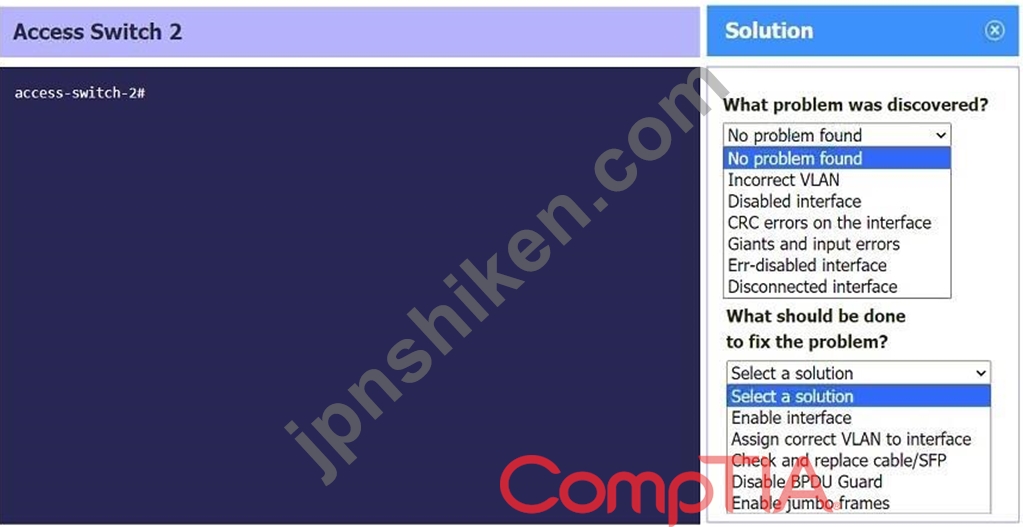
Access Switch 2
Commands entered:
show interface GigabitEthernet0/4 status
show interface GigabitEthernet0/4
show interface GigabitEthernet0/4 switchport
Problem: Giants and input errors
Solution: Enable jumbo frames
Commands entered:
show interface GigabitEthernet0/2 status
show interface GigabitEthernet0/2
show interface GigabitEthernet0/2 switchport
Problem discovered: Err-disabled interface
Solution: Disable BPDU Guard
Core Switch 1
Commands entered:
show interface GigabitEthernet0/1 status
show interface GigabitEthernet0/2 status
Problem discovered: No problem found
Solution: None required
Access Switch 2
Commands entered:
show interface GigabitEthernet0/4 status
show interface GigabitEthernet0/4
show interface GigabitEthernet0/4 switchport
Problem: Giants and input errors
Solution: Enable jumbo frames

- 質問一覧「332問」
- 質問1 システム管理者は、ユーザーがブラウザで Linux Web サーバーに...
- 質問2 ユーザーから、オンプレミスのコードリポジトリに接続できないと
- 質問3 ネットワーク アクセス制御にエンタープライズ認証を使用できる
- 質問4 トラブルシューティング方法論の次のステップのうち、現在のスル
- 質問5 ネットワーク管理者は、プライマリ ルートに障害が発生した場合
- 質問6 VoIP 電話がポートに接続されていますが、通話を受信できません...
- 質問7 顧客が電話システムをアナログから、ビデオ機能を統合した新しい
- 質問8 OSIモデルのどの層がGUIを介した入力の受け入れを担当しています...
- 質問9 PCからのDHCP Discoverリクエストは、次のうちどのトラフィック...
- 質問10 ISP は、事前設定されたモデムと 5 つのパブリック静的 IP アド...
- 質問11 次のプロトコルのうち、デフォルトの管理距離値が 90 であるもの...
- 質問12 次のネットワーク ケーブルのうち、保護被覆から光を反射するも
- 質問13 ある企業では最近、顧客向けアプリケーションの一つに障害が発生
- 質問14 設置用ラックのサイズを決定する上で、最も影響が大きいと考えら
- 質問15 ネットワーク技術者が、特定のユーザーがサーバーにアクセスでき
- 質問16 災害発生後、データセンターのサービスを迅速に復旧させ、アクセ
- 質問17 ネットワークエンジニアは、デバイスへのアップデートが引き続き
- 質問18 ネットワーク設計者が、リモートワーカー向けにVPNソリューショ...
- 質問19 ネットワークエンジニアは、コアスイッチ間の新しい接続を実装し
- 質問20 ユーザー認証で最もよく使用されるポートは次のうちどれですか?
- 質問21 会社がオフィスにフロアを追加した後、ネットワーク管理者はネッ
- 質問22 システム管理者は、2台のノートパソコンをWi-Fi経由でプリンタに...
- 質問23 ネットワーク管理者は、会社のウェブサイトへの受信トラフィック
- 質問24 組織のアーキテクチャに OT デバイスを追加するときに、ネットワ...
- 質問25 ネットワーク技術者は、ネットワークの容量を増やすために新しい
- 質問26 ネットワーク管理者がドメインを別のプロバイダーに移行しようと
- 質問27 ネットワーク上の新しいマシンに対するDHCPDISCOVER呼び出し要求...
- 質問28 ネットワークエンジニアが、オンプレミスサーバーをクラウドサー
- 質問29 企業ネットワークを複数の論理ネットワークに分割するために使用
- 質問30 小規模なコーヒーショップが、複数の2.4GHz無線アクセスポイント...
- 質問31 システム管理者は、ユーザーが不適切なウェブサイトにアクセスで
- 質問32 ネットワーク管理者は、以下の機能を備えたトンネルを確立する必
- 質問33 クラウドベースの環境において、顧客に最も大きな責任を負わせる
- 質問34 ハッシュが提供するものは次のどれですか?
- 質問35 次のうち、有線ネットワーク上で悪意のあるデフォルトゲートウェ
- 質問36 ネットワーク管理者が最近、レイヤー 3 スイッチの設定を更新し...
- 質問37 技術者が会社の支社に新しいネットワークハードウェアを導入しよ
- 質問38 ログイン情報や属性など、ユーザーに関する機密情報をプロバイダ
- 質問39 ある組織は、不正なデバイスがネットワークに接続することを懸念
- 質問40 次のうち、パケット配信にコネクションレスプロトコルを使用する
- 質問41 イスラエル国防軍(IDF)における将来的な装備の増強を考慮する際...
- 質問42 IPS と IDS の主な違いは次のどれですか?
- 質問43 異なる場所にある2つのネットワークスイッチが、10マイル(16km...
- 質問44 次のどれが、ボット ネットワークの一部となる侵害されたシステ
- 質問45 次のうち、ネットワークの中核となるのはどれですか?
- 質問46 静電気放電の発生確率を低減する最良の方法はどれですか?
- 質問47 データセンターで火災が発生した後、経営幹部は再入力しなければ
- 質問48 ある企業が情報漏洩の被害に遭い、予防策を講じたいと考えている
- 質問49 顧客はローカルネットワークを8つのセクションに分割し、各セク
- 質問50 ネットワーク技術者がリモートでファイルを安全に転送する必要が
- 質問51 ISP は会社に 98.174.235.142/28 の IP 範囲を提供しました。ネ...
- 質問52 ネットワーク エンジニアが新しいメール サーバーへの移行を実行...
- 質問53 ユーザーが会社の資格情報を使用してワイヤレス ネットワークに
- 質問54 以下のSD-WAN機能のうち、ルーターを設置場所に直接配送でき、サ...
- 質問55 管理者が、仮想マシン間のネットワークトラフィックを可視化する
- 質問56 次のネットワークトポロジーのうち、すべてのトラフィックを単一
- 質問57 データ センター間でインターネット経由で安全な通信リンクを構
- 質問58 トラブルシューティング方法論では、最初の問題が解決されたこと
- 質問59 企業ネットワークのデータ帯域幅要件を削減するために使用するの
- 質問60 ネットワーク管理者は、システム イベントを相関させるために SI...
- 質問61 ある研究施設では、近い将来に世界的なネットワーク トラフィッ
- 質問62 ネットワーク管理者は、同じサブネット上の VM の一時ポート間で...
- 質問63 ネットワーク管理者は、企業ネットワークにセキュリティ ゾーン
- 質問64 邪悪な双子が達成する目的は次のどれですか?
- 質問65 攻撃者がエンドポイントのhostsファイルにアクセスし、変更しま...
- 質問66 会社のネットワークでは、ピーク時に大きな遅延とパケット損失が
- 質問67 機器を設置するときに、設置者は左舷側の排気口を次のどの方向に
- 質問68 ネットワークエンジニアが、使用可能なIPアドレスを100個持つ新...
- 質問69 セキュリティ管理者は、ゼロデイ攻撃が会社のネットワークで悪用
- 質問70 管理者は、顧客がアクセスできるオフィスのエリアに設置されるス
- 質問71 パスワードに加えて、MFA のためにユーザーに要求できるのは次の...
- 質問72 ネットワーク アナリストが企業環境にワイヤレス ネットワークを...
- 質問73 ネットワーク スイッチを密閉されたエンクロージャ内に設置する
- 質問74 技術者が理論を確認するために実行する必要があるトラブルシュー
- 質問75 ネットワーク技術者は、別の問題に取り組んでいるときに新しいチ
- 質問76 最近のセキュリティ評価中に、評価者は組織のヘルプデスクのふり
- 質問77 ネットワーク管理者は無線アクセスポイントをアップグレードし、
- 質問78 次の IP 送信タイプのうち、送信されるデータをすべて暗号化する...
- 質問79 仮想マシンは以下の構成になっています。 - IPv4アドレス: 169.2...
- 質問80 人が通りすがりに他のユーザーのPC上の許可されていない情報を閲...
- 質問81 次の攻撃のうち、複数のネットワーク タグを含むネットワーク パ...
- 質問82 次の技術のうち、VIPを使用して2つのルーター間のゲートウェイ冗...
- 質問83 ネットワーク管理者は、断続的にエラーが発生している2台のスイ
- 質問84 予防措置を講じた後、トラブルシューティング方法論で次に実行す
- 質問85 このネットワークでは、コンピュータAはコンピュータBにアクセス...
- 質問86 早朝、管理者は新しい DHCP サーバーをインストールします。午後...
- 質問87 ネットワーク技術者が、ある機器がサポート終了(EOL)を迎えてい...
- 質問88 ルーターがホストに対してより優れたルーティングゲートウェイを
- 質問89 HTTPS を使用する際に転送中の暗号化を実装するために最も利用さ...
- 質問90 以下の図のうち、光ファイバーコネクタの種類に関する仕様が最も
- 質問91 ネットワーク管理者は、SNMP を介してスイッチのリンク状態が変...
- 質問92 ある刑事が、身元盗難事件を捜査しています。この事件では、RFID...
- 質問93 ネットワーク管理者は、MDFからサーバールームへマルチモードフ...
- 質問94 次のうち、中央アクセスポイントを使用せずに2つのノード間でポ
- 質問95 従業員がセキュリティで保護されたIDFのネットワークジャックに...
- 質問96 次のコネクタのうち、単一の QSFP トランシーバーで複数の物理接...
- 質問97 ネットワーク管理者は、認証と暗号化によってSNMPアクセスを保護...
- 質問98 ネットワーク技術者は、従業員が外部プロキシサーバーを使用して
- 質問99 正常に起動しなかったネットワーク機器へのリモートアクセスを取
- 質問100 観光客が公共の場所で、携帯端末を使ってオンラインバンキングサ
- 質問101 ネットワーク技術者は、ネットワークのアクセス層で STP をサポ...
- 質問102 リモート ユーザー向けの従来の VPN の代わりとして最もよく使用...
- 質問103 技術者がイーサネットケーブルをスイッチに接続して新しいデバイ
- 質問104 ネットワークエンジニアは、すべてのWebサーバーがイベントデー...
- 質問105 OSI モデルの次のレイヤーのうち、エンドツーエンドの暗号化を担...
- 質問106 ネットワーク管理者が最近、自律型無線APを設定し、comptiaspeed...
- 質問107 プライベートネットワークとパブリックネットワーク間のセキュリ
- 質問108 安全な電子メールに使用されるポートは次のどれですか?
- 質問109 ネットワーク管理者は、断続的なネットワーク接続に関する苦情を
- 質問110 ネットワーク インターンがスイッチを接続した後、建物内の多数
- 質問111 データセンター管理者は、ストレージ環境におけるジャンボフレー
- 質問112 以下のクラウドサービスモデルのうち、顧客がサービスプロバイダ
- 質問113 あるメディア企業がグローバルストリーミングサービスを導入しよ
- 質問114 管理者は、特定の日にインフラストラクチャ全体のトラフィックの
- 質問115 トラブルシューティング手法の以下の段階のうち、複数のアプロー
- 質問116 攻撃者が、従業員がバッジでセキュリティが確保されたドアを通過
- 質問117 ユーザーの VoIP 電話とワークステーションは、インライン ケー...
- 質問118 次のどれが回避、受容、緩和、移転と関連していますか?
- 質問119 ネットワーク技術者が、NICに不具合のあるPCの修理を行っていま...
- 質問120 クラウドコンピューティングは、短期間でコンピューティングイン
- 質問121 新しいバックアップシステムでは、毎晩新しいSANにファイルをコ...
- 質問122 組織には、すべてのネットワーク接続をユーザーまで追跡できると
- 質問123 ルータが優先ルートを決定するために使用するものは次のどれです
- 質問124 社内ネットワークで、会社の共有ドライブへのアクセス時に著しい
- 質問125 ネットワーク技術者が新しい施設のLANを設計しています。会社は3...
- 質問126 次のトラフィックタイプのうち、一度に単一の送信元と通信する必
- 質問127 ネットワーク管理者が既存の電話システムをVoIPに移行しようとし...
- 質問128 ユーザーがウェブサイトにアクセスできず、そのIP情報を確認した...
- 質問129 セキュリティアナリストは、サイトの評判と分類に基づいてインタ
- 質問130 ネットワーク管理者は、スペクトラムアナライザを使用して特定の
- 質問131 次のうち、ウェブベースの顧客ポータルの可用性に影響を与えるも
- 質問132 新しいスタッフがネットワークに接続できません。ITサポートスタ...
- 質問133 電子メール サービスをホストするための最もコスト効率の高い方
- 質問134 シミュレーション 最近の停電後、ユーザーからアプリケーション
- 質問135 あるオフィスで、断続的な接続問題が発生しています。ネットワー
- 質問136 ネットワーク技術者が、会社のネットワークで使用されている100M...
- 質問137 IDF のコンセント容量を安全に拡張するための最も費用対効果の高...
- 質問138 ある企業が、ビデオ監視録画で、権限のない人物が自社の安全な施
- 質問139 複数の論理ネットワークを相互接続し、遅延を最小限に抑えながら
- 質問140 ネットワーク要件として、キャンパスネットワーク内の特定の部署
- 質問141 ある企業がデータセンターをオンプレミスからクラウドに移行しよ
- 質問142 ネットワーク管理者は、分類されたサービスとアプリケーションの
- 質問143 内部BGPルートの管理距離は次のうちどれですか?
- 質問144 ネットワーク管理者は、ネットワーク スイッチへの暗号化ログイ
- 質問145 次のルーティング プロトコルのうち、WAN を相互接続するために...
- 質問146 ネットワーク管理者は、断続的なネットワーク接続の問題に関する
- 質問147 信頼ゾーンに新しいサーバーがデプロイされ、すべての適切なサー
- 質問148 ネットワーク技術者が最近購入した商用スイッチのセキュリティ強
- 質問149 ネットワーク管理者は、外部 DNS レコードがホストされている場...
- 質問150 DHCPネットワーク上に新しいコンピュータ群を導入する際、ネット...
- 質問151 ネットワーク管理者は、ネットワークに新しく追加されたワークス
- 質問152 新しくオープンした小売店では、新しいタブレット、PC、プリンタ...
- 質問153 次のうち、プレナムケーブルの使用が推奨される場所はどれですか
- 質問154 ユーザーからヘルプデスクに電話があり、アプリケーションはサー
- 質問155 以下のアーキテクチャタイプのうち、東西方向のトラフィックに最
- 質問156 ある企業が、ユーザーが重要なアプリケーションにアクセスするた
- 質問157 ネットワーク管理者は、会社のアプリケーションをクラウドでホス
- 質問158 以下の構成のうち、インターネットへのトラフィックがVPNを経由...
- 質問159 次のソース管理機能のうち、管理者がプライマリ構成を変更せずに
- 質問160 顧客は、インターネットから完全にダウンロードするページ数を減
- 質問161 ネットワーク管理者は、ユーザーがネットワーク上のリソースにア
- 質問162 シミュレーション ネットワーク管理者は、サーバーとストレージ
- 質問163 以下のうち、災害復旧計画の中で、インシデント発生後に最初に復
- 質問164 次のどれがサブインターフェースの使用を必要とする可能性が高い
- 質問165 次のどの種類の標的型攻撃が、複数のコンピューターまたはボット
- 質問166 ある医療クリニックが最近、既存のルーターにゲスト用無線ネット
- 質問167 中規模企業のネットワーク管理チームは、財務チームとマーケティ
- 質問168 次のクラウド展開モデルのうち、マルチテナントと最も一般的に関
- 質問169 ネットワーク技術者が2台のスイッチ間の接続問題のトラブルシュ
- 質問170 ネットワーク技術者が、組織のオフィスビルにある6台のアクセス
- 質問171 次のツールのうち、ネットワーク ホストに到達可能かどうかを判
- 質問172 デバイスが無線ネットワークから切断される問題が発生しています
- 質問173 ネットワーク エンジニアは、スイッチと LAN に接続されたルータ...
- 質問174 ファイアウォール管理者は、サーバーの内部 IP アドレスをパブリ...
- 質問175 疑いを持たない攻撃者を誘い込み、攻撃者の活動を調査するために
- 質問176 トラブルシューティング方法の最初のステップとして実行する必要
- 質問177 安全な VPN を実装するときに最も頻繁に使用されるのは次のどれ...
- 質問178 ネットワーク管理者は、オーディオおよびビデオのブロードキャス
- 質問179 掃除機で損傷したケーブルの代わりに、新しく圧着された 26 フィ...
- 質問180 ネットワークエンジニアがdigコマンドを使ってホスト名を照会し...
- 質問181 技術者は、ホット アイル/コールド アイル換気を実践しているデ...
- 質問182 次のどれが PaaS 環境のユースケースですか?
- 質問183 ネットワーク管理者は、複数の場所に最近設置されたファイアウォ
- 質問184 ネットワーク管理者は、インターネットへのアクセスをフィルタリ
- 質問185 次のネットワーク トラフィック タイプのうち、ネットワーク上の...
- 質問186 ネットワーク技術者が、マーケティング部門のユーザーのために経
- 質問187 ネットワーク管理者は、有線デバイスと無線デバイスの両方にアク
- 質問188 システム管理者が組織のDNSサーバーへの接続問題を解決していま...
- 質問189 ユーザーからネットワークのパフォーマンスに関する問題が報告さ
- 質問190 次のうち、ネットワーク管理者が共有のセキュアなワークステーシ
- 質問191 ネットワーク管理者は新しいネットワーク検出ツールを設定しよう
- 質問192 最近の合併後、非常に高い使用率に関するアラートが大量に発生し
- 質問193 ある企業が高密度環境でワイヤレス ソリューションを実装してい
- 質問194 以下のうち、FC接続で動作する可能性が最も高く、拡張性も高いの...
- 質問195 OSIモデルの以下の層のうち、ホストにIPアドレスを割り当てる役...
- 質問196 情報システムが中断した場合に備えて、ウォーム サイトの最適な
- 質問197 BYODポリシーの導入後、高密度環境の一部のユーザーから無線接続...
- 質問198 ネットワーク管理者は、IPアドレスの無駄を最小限に抑えながら、...
- 質問199 次のレイヤ 1 デバイスのうち、SFP 対応スイッチ上の光ファイバ...
- 質問200 次のどれがスプリットトンネル VPN の例ですか?
- 質問201 OSPF を運用している企業が、ルーティングテーブルにスタティッ...
- 質問202 ネットワーク管理者は、顧客サイトに新しいワイヤレスソリューシ
- 質問203 顧客からヘルプデスクに電話があり、リソースにアクセスできなく
- 質問204 ネットワークスイッチを密閉型筐体内に設置する場合、以下の物理
- 質問205 ネットワーク管理者がユーザーのIPアドレスに関する問題のトラブ...
- 質問206 財務部門のユーザーでインターネットアプリケーションがタイムア
- 質問207 次のうち、アプリケーション配信に焦点を当てているのはどれです
- 質問208 ネットワーク管理者はユーザーからチケットを受け取りました。ユ
- 質問209 ネットワーク管理者は、すべてのネットワークポートが認証済みデ
- 質問210 ヨーロッパにおける個人データのセキュリティと取り扱いについて
- 質問211 ネットワーク アーキテクトは、公共安全車両に信頼性の高いサー
- 質問212 IT マネージャーは、メッシュ ネットワークで 10 個のサイトを接...
- 質問213 次の VPN 構成のうち、リモート ユーザーが企業ネットワーク経由...
- 質問214 インシデントのトラブルシューティングを行う際に、アプローチを
- 質問215 次のコネクタのうち、スイッチへのコンソール アクセスを提供す
- 質問216 ある組織は、無線ネットワークを用いた効果的なカバレッジの確保
- 質問217 次のうち、ネットワーク機器へのアクセスにシンプルな認証機能を
- 質問218 証券取引所のブローカーのネットワークアーキテクトが、災害復旧
- 質問219 ネットワーク管理者は、以前はローカルネットワーク上に存在して
- 質問220 次のケーブル タイプのうち、トランシーバーを必要とせずに QSFP...
- 質問221 ネットワーク管理者は、複数のベンダー製デバイスを使用する大規
- 質問222 スプリット トンネル VPN のコスト効率の面での利点は次のどれで...
- 質問223 ネットワーク管理者が、PCが接続されているスイッチインターフェ...
- 質問224 組織が複数の内部デバイスを単一の外部向け IP アドレスにマッピ...
- 質問225 ある企業のサーバーがマルウェア攻撃を受け、ネットワーク障害が
- 質問226 ネットワークエンジニアが新しいPoE対応無線APを設置しています...
- 質問227 ネットワーク管理者は、以前はローカルネットワーク上に存在して
- 質問228 管理者はIoTデバイスに/21サブネットマスクを設定する必要があり...
- 質問229 3 つのアクセス ポイントには、天井を通るイーサネットがありま...
- 質問230 顧客はオフィス内の複数のコンピュータにイーサネットを分配する
- 質問231 シミュレーション ネットワーク技術者は、PC 1 で作業している従...
- 質問232 以下のルーティングプロトコルのうち、管理距離が110に分類され...
- 質問233 シミュレーション ネットワーク技術者は、顧客のSOHOネットワー...
- 質問234 ある会社が、従業員が私用端末をオフィスに持ち込んで無線ネット
- 質問235 システム管理者が組織のDNSサーバーへの接続問題を解決していま...
- 質問236 ユーザーがPC上でifconfigを実行すると、以下のアドレス情報が表...
- 質問237 異なる顧客を同じパブリック クラウド データ センターに収容す...
- 質問238 ネットワークエンジニアがipconfigを実行し、デフォルトゲートウ...
- 質問239 ネットワーク エンジニアは、リモート ブランチのルーターを含む...
- 質問240 ネットワーク管理者は、オーディオおよびビデオのブロードキャス
- 質問241 障害発生から、影響を受けたリソースが完全に機能状態に戻るまで
- 質問242 シミュレーション あなたは、ルーターに以下のACLを実装するよう...
- 質問243 標準ユーザーが 1 つのアカウントで複数のリソースにログインで...
- 質問244 停電時にデバイスの電源をオンにしておくための最適な方法はどれ
- 質問245 サイト間VPNを暗号化するために、技術者は次のどのプロトコルを...
- 質問246 サポート エージェントは、リモート ユーザーの有線デバイスが頻...
- 質問247 ネットワークエンジニアは、接続をより効率的に利用するために、
- 質問248 次のアプライアンスのうち、指定された WLAN 内の複数のデバイス...
- 質問249 技術者がデフォルト設定の新しいSD-WANデバイスを導入しています...
- 質問250 次のうち、トラフィック量に基づいてデバイス間でネットワークト
- 質問251 ネットワークコンサルタントは、イーサネットアップリンクを実行
- 質問252 大企業のジュニア ネットワーク技術者は、サブネットあたり 14 ...
- 質問253 チケット管理プロセスの最終ステップは次のどれですか?
- 質問254 次のどれがオンパス攻撃の機会を提供しますか?
- 質問255 OSIモデルの第2層の機能を最もよく表しているのは、次のうちどれ...
- 質問256 ユーザーは、リモート ファイル サーバーにアクセスできなくなっ...
- 質問257 ネットワーク技術者がネットワーク遅延のトラブルシューティング
- 質問258 ユーザーは、IPアドレス10.249.3.76の内部Webサイトに接続できま...
- 質問259 エッジサーバーを使用して地理的に分散した方法でクライアントに
- 質問260 ある企業が無線ネットワークのアップグレードを行っています。現
- 質問261 ネットワーク管理者は、2.4GHz帯の産業機器に干渉が発生している...
- 質問262 企業のオフィスにいる従業員が、転送された電子メール内のリンク
- 質問263 ある企業のネットワークで、不審なネットワークトラフィックが大
- 質問264 次のどれがリモート ユーザーがネットワークに接続することを可
- 質問265 ある企業が最近複数のサイトを買収しましたが、関連文書は一切提
- 質問266 ネットワークに接続するユーザーやデバイスの認証に使用される方
- 質問267 根本原因理論のテストに成功した後に実行する次のステップはどれ
- 質問268 VoIP通話中に、ユーザーは音声の不安定さに気づき、インシデント...
- 質問269 ザンビアの小規模拠点では、ユーザーがオフィス内を移動すると無
- 質問270 デバイスの平均寿命を推定するために使用されるのは次のどれです
- 質問271 セキュリティ管理者が、IPアドレス192.168.100.1/25を持つデバイ...
- 質問272 組織はネットワークの可視性を向上させたいと考えています。組織
- 質問273 次の用語のうち、パブリッククラウドにおいて必要に応じてコンピ
- 質問274 ある企業で、管理されていないスイッチをネットワークに接続した
- 質問275 BYODポリシーの導入後、高密度環境の一部のユーザーから無線接続...
- 質問276 本社付近に設置された複数の無許可アクセスポイントが、類似のSS...
- 質問277 ネットワーク管理者は、大学の DHCP サーバーの問題をトラブルシ...
- 質問278 ネットワーク管理者が無線環境のリフレッシュ作業を行っています
- 質問279 最近、VXLAN を使用したデータ センター相互接続が実装されまし...
- 質問280 クラウドサービスがオンデマンドでリソースを調整できる機能を説
- 質問281 MDF内部で一般的に使用される光ファイバーコネクタは、次のうち...
- 質問282 組織内の複数のユーザーから、ビデオ会議中に接続の問題や遅延が
- 質問283 次のルーティング技術のうち、不均等コスト負荷分散とポート88を...
- 質問284 ネットワーク管理者は新しいスイッチを構成しており、割り当てら
- 質問285 ネットワーク エンジニアが新しい建物でワイヤレス インストール...
- 質問286 次のプロトコルのうち、アクティブ/パッシブ構成のファイアウォ
- 質問287 ある企業が、すべてのデバイスがIPv6アドレスを使用する新しい社...
- 質問288 技術者は、会社の現在の規模、コンピューティング能力、およびス
- 質問289 ネットワーク管理者は、Telnetプロトコルを使用して、192.168.1....
- 質問290 ネットワーク エンジニアは、HTTPS 経由でリアルタイムの可視性...
- 質問291 ある会社では、特定のグループに参加しているすべてのコンピュー
- 質問292 セキュリティ エンジニアが 12 ポートの PoE スイッチにカメラを...
- 質問293 ユーザーのデスクにはワークステーションと IP 電話があります。...
- 質問294 ネットワーク管理者は、ネットワーク内の 2 つのレイヤー 2 スイ...
- 質問295 次の災害復旧の概念のうち、総稼働時間を総ユニット数で割って計
- 質問296 ネットワークエンジニアが公共オフィスのネットワークポートを設
- 質問297 ユーザーがVPN接続後にクライアントの外部サーバーにアクセスで...
- 質問298 以下のソーシャルエンジニアリングの種類のうち、攻撃手段として
- 質問299 次のファイバー コネクタ タイプのうち、ネットワーク インター...
- 質問300 VoIP電話機は電源が入るものの、着信も発信もできない状態です。...
- 質問301 次のデバイスのうち、OSI モデルの複数のレイヤーで動作できるの...
- 質問302 ネットワーク管理者は、組織のネットワークへの一時的なアクセス
- 質問303 ネットワーク管理者は、特定の隔離されたポートを使用してネット
- 質問304 管理者は、ユーザーが悪意のあるウェブサイトにアクセスできない
- 質問305 無線技術者は、ユーザー デバイスが利用可能な最適な周波数標準
- 質問306 VoIP ハンドセット接続のトラブルシューティング中に、技術者の...
- 質問307 ルーターは、経路選択プロセスにおいて、次のうちどれを最初に優
- 質問308 ルータが 1 台しかない環境で、ネットワーク エンジニアが追加の...
- 質問309 コネクションレス通信上のトランスポート層で発生する伝送形式を
- 質問310 次の攻撃のうち、企業の Web サイトにアクセスしようとしている...
- 質問311 認証情報を検証するための最も適切な解決策は次のうちどれですか
- 質問312 ある企業は、一般公開されている会議室のネットワークジャックか
- 質問313 以下の802.11規格のうち、6GHz帯域とより広い320MHzのチャネル帯...
- 質問314 壊滅的な災害発生時に最も迅速な復旧を可能にするのは、次のうち
- 質問315 パブリック IP アドレス空間で 1 つの IP アドレスを共有する多...
- 質問316 次のどれを使用すると、ネットワーク管理者は待ち時間に影響を与
- 質問317 メール交換サーバー間でデータを転送するために使用されるポート
- 質問318 ネットワーク監査を実施中に、管理者はVLAN 300のスパニングツリ...
- 質問319 以下のケーブルの種類の中で、最も高い伝送速度を実現できるのは
- 質問320 技術者は、ホット アイル/コールド アイル換気を実践しているデ...
- 質問321 ネットワーク管理者は、スイッチに接続されているデバイスのネッ
- 質問322 組織がポートアドレス変換を何のために使用するのかを最もよく表
- 質問323 従業員がVPNを使用して自宅から会社のネットワークに接続します...
- 質問324 ある会社が最近、大量の帯域幅を使用するビデオ会議システムを導
- 質問325 ネットワーク技術者が、Web アプリケーションのパフォーマンス低...
- 質問326 ネットワーク管理者が本番環境のWebサーバーを点検している際に...
- 質問327 データセンター内の電力調整を管理、制御、支援できるのは、次の
- 質問328 MDF製のクローゼットを設計する際に、ハードウェアへの不正な改...
- 質問329 技術者が、オフィスビルの新しい別館で働くユーザーのコンピュー
- 質問330 IDSをIPSよりも使用する利点として、次のうちどれが挙げられます...
- 質問331 顧客が隣接する建物間にファイバー接続を追加しています。技術者
- 質問332 特定のサブネットのルーティングテーブルを作成する際に、以下の
