- ホーム
- CompTIA
- 220-1102J - CompTIA A+ Certification Exam: Core 2 (220-1102日本語版)
- CompTIA.220-1102J.v2025-11-01.q337
- 質問236
有効的な220-1102J問題集はJPNTest.com提供され、220-1102J試験に合格することに役に立ちます!JPNTest.comは今最新220-1102J試験問題集を提供します。JPNTest.com 220-1102J試験問題集はもう更新されました。ここで220-1102J問題集のテストエンジンを手に入れます。
220-1102J問題集最新版のアクセス
「845問、30% ディスカウント、特別な割引コード:JPNshiken」
アプリケーションをアップグレードするために最近ソフトウェアを展開した後、テスト プログラムが使用できなくなったとユーザーから報告がありました。
ただし、他の従業員はテスト プログラムを正常に使用できます。
説明書
各タブの情報を確認し、展開の結果を確認して、検出された問題を解決するには、以下を選択します。
* イベントビューアの問題のインデックス番号
* 問題を解決するための最初のコマンド
* 問題を解決するための2番目のコマンド
ブルースクリーン
コマンド:
イベントビューアー:
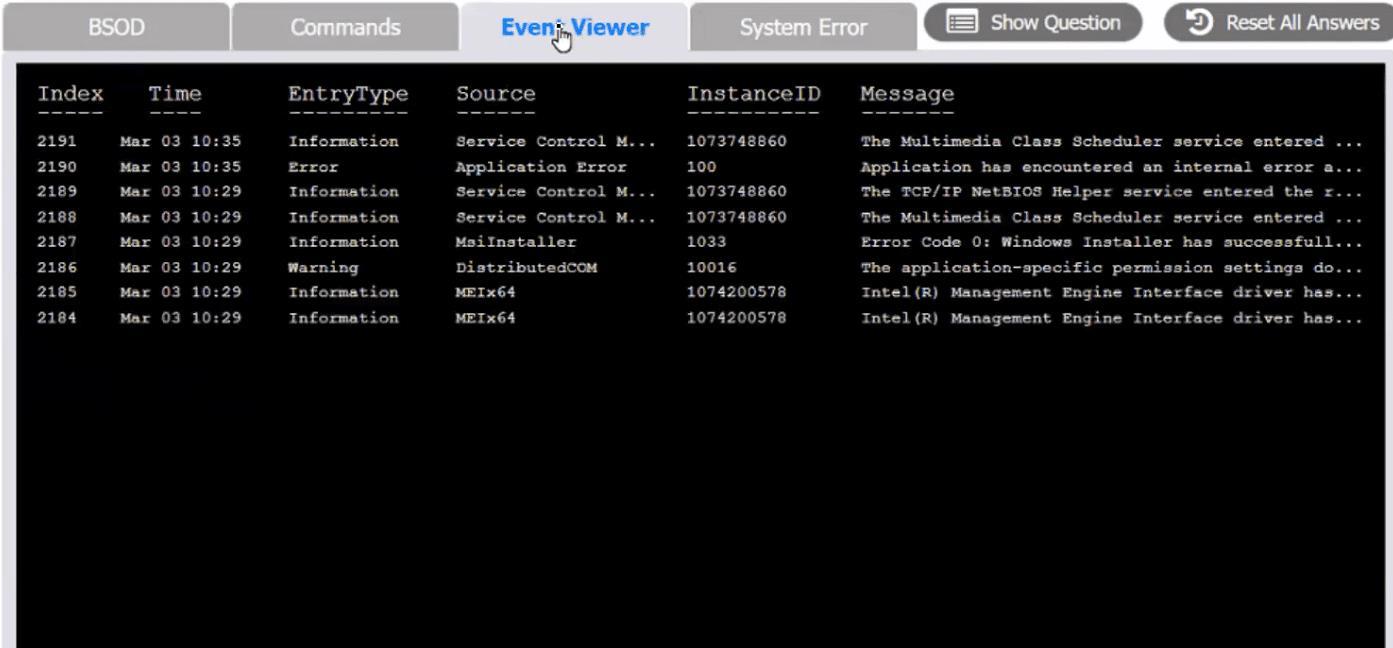
システムエラー:
ただし、他の従業員はテスト プログラムを正常に使用できます。
説明書
各タブの情報を確認し、展開の結果を確認して、検出された問題を解決するには、以下を選択します。
* イベントビューアの問題のインデックス番号
* 問題を解決するための最初のコマンド
* 問題を解決するための2番目のコマンド
ブルースクリーン
コマンド:
イベントビューアー:
システムエラー:
正解:
see the answer below in explanation.
Explanation:
The user is experiencing a system error that prevents them from using the Testing program. The error message indicates that the file MSVCP100.dll is missing from the computer. This file is part of the Microsoft Visual C++ 2010 Redistributable Package, which is required by some applications to run properly. The error may have occurred due to a corrupted or incomplete software deployment.
To resolve this issue, the user needs to restore the missing file and register it in the system. One possible way to do this is to copy the file from another computer that has the Testing program installed and working, and then use the regsvr32 command to register it. The steps are as follows:
* On another computer (User-PC02) that has the Testing program installed and working, locate the file MSVCP100.dll in the folder C:\Program Files\Testing.
* Share the folder C:\Windows\System32 on User-PC02 by right-clicking on it, selecting Properties, then Sharing, then Advanced Sharing, then checking Share this folder, then clicking OK.
* On the user's computer (User-PC01), open a command prompt as an administrator by clicking Start, typing cmd, right-clicking on Command Prompt, and selecting Run as administrator.
* In the command prompt, type the following command to copy the file MSVCP100.dll from User-PC02 to User-PC01: copy "C:\Program Files\Testing\msvcp100.dll" "\\User-PC02\C$\Windows\System32"
* After the file is copied, type the following command to register it in the system: regsvr32 msvcp100.dll
* Restart the user's computer and try to run the Testing program again.
Therefore, based on the instructions given by the user, the correct answers are:
Select Event Viewer Issue: 2187
Select First Command: copy "C:\Program Files\Testing\msvcp100.dll" "\\User-PC02\C$\Windows\System32" Select Second Command: regsvr32 msvcp100.dll
Explanation:
The user is experiencing a system error that prevents them from using the Testing program. The error message indicates that the file MSVCP100.dll is missing from the computer. This file is part of the Microsoft Visual C++ 2010 Redistributable Package, which is required by some applications to run properly. The error may have occurred due to a corrupted or incomplete software deployment.
To resolve this issue, the user needs to restore the missing file and register it in the system. One possible way to do this is to copy the file from another computer that has the Testing program installed and working, and then use the regsvr32 command to register it. The steps are as follows:
* On another computer (User-PC02) that has the Testing program installed and working, locate the file MSVCP100.dll in the folder C:\Program Files\Testing.
* Share the folder C:\Windows\System32 on User-PC02 by right-clicking on it, selecting Properties, then Sharing, then Advanced Sharing, then checking Share this folder, then clicking OK.
* On the user's computer (User-PC01), open a command prompt as an administrator by clicking Start, typing cmd, right-clicking on Command Prompt, and selecting Run as administrator.
* In the command prompt, type the following command to copy the file MSVCP100.dll from User-PC02 to User-PC01: copy "C:\Program Files\Testing\msvcp100.dll" "\\User-PC02\C$\Windows\System32"
* After the file is copied, type the following command to register it in the system: regsvr32 msvcp100.dll
* Restart the user's computer and try to run the Testing program again.
Therefore, based on the instructions given by the user, the correct answers are:
Select Event Viewer Issue: 2187
Select First Command: copy "C:\Program Files\Testing\msvcp100.dll" "\\User-PC02\C$\Windows\System32" Select Second Command: regsvr32 msvcp100.dll

- 質問一覧「337問」
- 質問1 ある会社では、従業員のコラボレーション プロセスの一環として
- 質問2 ユーザーが問題を報告するために電話をかけると、技術者がユーザ
- 質問3 ユーザーは最近、Android デバイスに無料のゲーム アプリケーシ...
- 質問4 最近、ある中小企業に新しいスパム ゲートウェイが導入されまし
- 質問5 コンピューターでプライバシー スクリーンを使用すると、次の脅
- 質問6 承認されたシステム パッチで最近更新された Windows ワークステ...
- 質問7 ユーザーは、個人の自宅のラップトップで使用されているアプリケ
- 質問8 ある会社が新しいファイアウォールに移行しているときに、サーバ
- 質問9 ユーザーのワークステーションは、AV システムが検出した新たに...
- 質問10 技術者は、会社のワークステーションのローカル ストレージを増
- 質問11 コール センターは、複数の医療施設の請求に関する問い合わせを
- 質問12 次のうち、データ セントー サーバー ルームへの物理的なアクセ...
- 質問13 技術者は、ユーザー サポート リクエストを処理する際に、チケッ...
- 質問14 紛失または盗難にあったモバイル デバイスでデータが回復不可能
- 質問15 ユーザーがいくつかのファイルを開こうとすると、ファイルが暗号
- 質問16 技術者は企業と協力して、ビジネスを行う際に機密性の高い個人情
- 質問17 技術者は、動作が遅く、ポップアップが頻繁に表示されるユーザー
- 質問18 技術者は、起動時に不要なアプリケーションが起動する Windows 1...
- 質問19 ユーザーのコンピュータの動作が通常より遅くなり、起動に時間が
- 質問20 ロールバック計画を最もよく説明しているものは次のうちどれです
- 質問21 ユーザーが最新のパッチ ノートを表示するためにゲーム ベンダー...
- 質問22 ユーザーがパスワードの長さの要件に従っていることを確認するた
- 質問23 ユーザーは、オフィスのコンピューターからスポーツ チームの We...
- 質問24 Microsoft Windows 10 を実行しているキオスクでは、顧客がチケ...
- 質問25 ネットワーク管理者は、ユーザーのワークステーションでの USB ...
- 質問26 データセンターにとってフィルタシステムが重要である理由として
- 質問27 ユーザーは、電話を使用して店舗で購入しようとしています。ユー
- 質問28 アプリケーションのインストールに使用する Linux コマンドは次...
- 質問29 技術者がワークステーションに Windows 10 をインストールしまし...
- 質問30 技術者は、信頼性の低い接続を介して多数のファイルを転送する必
- 質問31 技術者がユーザーのデバイスからウイルスを除去しました。ユーザ
- 質問32 技術者は、会社の新しいセキュリティ ポリシーによって、支社で
- 質問33 次の物理的なセキュリティ制御のうち、ラップトップの盗難を防ぐ
- 質問34 ユーザーの携帯電話のバッテリーが長持ちせず、ナビゲーションが
- 質問35 ウイルス対策ソフトウェアは、ワークステーションが隔離できない
- 質問36 技術者がワークステーションのセキュリティ設定を構成しており、
- 質問37 部門マネージャーは、複数のユーザーがプリンターにアクセスでき
- 質問38 技術者は、ルートキットがインストールされており、削除する必要
- 質問39 ある企業が DDoS 攻撃を受けています。いくつかの内部ワークステ...
- 質問40 従業員の新しい携帯電話のバッテリー寿命が予想より大幅に短いよ
- 質問41 ユーザーはヘルプデスクに電話して、スマートフォンの問題を報告
- 質問42 X社の従業員が、[email protected] から、社内IT管理者...
- 質問43 ホテルのWi-Fiが企業のノートパソコンの情報を盗むために悪用さ...
- 質問44 次のどれが予防的な物理的セキュリティ制御ですか?
- 質問45 顧客が最近コンピューターを最新の Windows バージョンにアップ...
- 質問46 技術者は、ネットワークにアクセスできない場所でデスクトップの
- 質問47 数人のユーザーが非常に単純なパスワードの使用を認めたため、技
- 質問48 ユーザーがコンピューターを起動しようとすると、次のエラーが表
- 質問49 変更の実装中に発生する可能性のある問題を説明するために使用さ
- 質問50 技術者は、32 ビット OS で実行されているレガシー システムを、...
- 質問51 ユーザーが企業管理のモバイル デバイスに関するチケットをオー
- 質問52 技術者が、無料ソフトウェアのダウンロードを宣伝するポップアッ
- 質問53 Windows ユーザーは、ポップアップがセキュリティの問題を示して...
- 質問54 HDD を搭載したユーザーの Windows 10 ワークステーションの動作...
- 質問55 FAT に代わって Microsoft Windows OS の優先ファイルシステムと...
- 質問56 クライアントのデバイスは最近、他の複数のユーザーによって使用
- 質問57 従業員がスマートフォンを紛失し、ヘルプデスクにその旨を報告し
- 質問58 技術者が、互換性のある正常なマザーボードを新しいラップトップ
- 質問59 複数のユーザーが簡単にアクセスできる領域にログイン情報を定期
- 質問60 ユーザーのワークステーション モニターに BSOD が表示されます...
- 質問61 ユーザーは Web ベースのアプリケーションにアクセスできません...
- 質問62 ある組織がキオスク マシンのモニターを更新しています。アップ
- 質問63 サーバールームの環境を維持する際に考慮すべき事項は次のどれで
- 質問64 組織は、カスタマイズ可能なオペレーティング システムを導入し
- 質問65 ユーザーから、セキュリティ保護されていないネットワークが通常
- 質問66 公開組織にとってフィッシング メールのクリック数を減らすため
- 質問67 ネットワーク管理者は、組織内のすべてのデバイスの Wi-Fi アク...
- 質問68 ユーザーが現在どのディレクトリで操作しているかを特定するのに
- 質問69 セキュリティ ソフトウェアが、環境内のすべてのサーバーから誤
- 質問70 技術者が Linux ディストリビューションの MAC アドレスを取得す...
- 質問71 技術者は、コンピューターを開く前にデスクトップ コンピュータ
- 質問72 ある企業は古いワークステーションを廃止する予定で、すべてのハ
- 質問73 企業は、リモートで作業する従業員が企業のイントラネットに安全
- 質問74 次のシステム環境設定項目のうち、macOS 11 でサードパーティ製...
- 質問75 ヘルプ デスク チャット アプリケーションを通じて連絡を受けま...
- 質問76 次のシナリオのうち、リモート ワイプ機能が使用される可能性が
- 質問77 ユーザーのスマートフォンから機密データが流出しました。技術者
- 質問78 ユーザーの iPhone は、ログイン試行が数回失敗した後、永久にロ...
- 質問79 技術者が、ログインの期待事項を詳しく説明する Windows スプラ...
- 質問80 ゲーム対応と宣伝されていたユーザーの新しいラップトップは、最
- 質問81 技術者は新しくインストールした SSD を構成する必要があります...
- 質問82 Active Directory アカウント作成のスクリプト作成に使用される...
- 質問83 技術者は新しいワークステーションに RAM を取り付けているため...
- 質問84 技術者が新しいアプリケーションをワークステーションにインスト
- 質問85 ユーザーがテキスト文書を開いた後、職場の PC 上のファイルにア...
- 質問86 ユーザーは、Windows コマンド ラインを介してドライブをマップ...
- 質問87 ユーザーの Android スマートフォンがランダムに再起動していま...
- 質問88 ユーザーが特別に用意された悪意のある Web サイトにアクセスし...
- 質問89 ある会社は、複数の地理的な場所から多数のコンピューターが非常
- 質問90 次のデフォルトのシステム ツールのうち、技術者がユーザーと同
- 質問91 技術者は、暗号化された本番データ ファイルに関する通知を受け
- 質問92 システム管理者は、オフラインになったハイパーバイザーにアクセ
- 質問93 技術者が社内のすべてのワークステーションのデフォルトのホーム
- 質問94 技術者は、Windows コンピューター上でフォレンジック調査の証拠...
- 質問95 次の記述のうち、スクリプト言語の目的を説明しているものはどれ
- 質問96 技術者が新しく組み立てたコンピューターを売りに出しています。
- 質問97 技術者は外部 SSD を持っています。技術者は、Mac と Windows PC...
- 質問98 顧客から、Android スマートフォンでは非接触型電子決済が利用で...
- 質問99 ユーザーがヘルプ デスクに電話して、コンピューター上のマルウ
- 質問100 次のうち、MFA の例はどれですか?
- 質問101 警察官は、一度に数分間ワークステーションを離れることがよくあ
- 質問102 ユーザーがヘルプ デスクに電話し、ワークステーションが悪意の
- 質問103 次のどれが Active Directory でネイティブに使用されますか?...
- 質問104 ヘルプ デスクの技術者がスクリプト Inventory.py を実行します...
- 質問105 最も弱いワイヤレス セキュリティ プロトコルは次のうちどれです...
- 質問106 技術者は、サード パーティ製の Windows 10 VoIP アプリケーショ...
- 質問107 ユーザーから、PC の動作が通常よりも遅いように見えるとの報告...
- 質問108 ユーザーが不審なメール内のリンクをクリックすると、デバイスに
- 質問109 エンドユーザー情報に関する政府のポリシーによって保護されてい
- 質問110 技術者は新しいデジタル証明書をインポートし、適切な場所に配置
- 質問111 標準化された一連のソフトウェアがインストールされている組織で
- 質問112 イメージング ラボでコンピューターをアップグレードした後、ア
- 質問113 コンピューターが自動的に再起動し、次のエラー メッセージが表
- 質問114 従業員は、Windows 10 ラップトップを家に持ち帰ったときにワイ...
- 質問115 次のうち、EULA に含まれている可能性が最も高いのはどれですか?...
- 質問116 次のコマンドライン ツールのうち、ディレクトリを削除するのは
- 質問117 技術者はブルートフォース攻撃に対するセキュリティ管理を強化す
- 質問118 ユーザーが外付けハードドライブを接続しましたが、ファイルの保
- 質問119 スマートフォン用に設計されたオペレーティング システムは次の
- 質問120 顧客は会社のロビーにある公共キオスクにアクセスしています。顧
- 質問121 アプリケーションのパフォーマンスが低下し、エラーが表示されず
- 質問122 ある小規模な企業が、雑居ビルにオフィスを構えています。従業員
- 質問123 次のアプリケーションのうち、macOS でバックアップを作成できる...
- 質問124 追加のセキュリティ層を必要とするアプリケーションまたはシステ
- 質問125 ユーザーが会社支給のスマートフォンを使用してメールを開こうと
- 質問126 管理者は、今後のサーバー展開の変更要求に対する承認を受け取り
- 質問127 ユーザーが誤って間違ったワープロ アプリケーションを iMac に...
- 質問128 企業ネットワークからインターネットにアクセスするには、プロキ
- 質問129 ユーザーは Windows コンピュータからストレージ容量が少ないこ...
- 質問130 Android モバイル デバイスの起動に時間がかかり、起動時にすべ...
- 質問131 Windows ユーザーが最近コンピューターを交換した ユーザーはコ...
- 質問132 サーバー ルームへのアクセスが侵害された後、技術者は不正アク
- 質問133 次の種類の悪意のあるソフトウェアのうち、暗号通貨での支払いを
- 質問134 技術者が新しい Windows 10 ワークステーションを保護しており、...
- 質問135 新しいベンダーがオフィスを訪れた後、ユーザーは小さな USB ド...
- 質問136 ユーザーが銀行の Web サイトにアクセスすると、次のエラーが表...
- 質問137 次のうち、変化の範囲を定義するものはどれですか?
- 質問138 会社所有のモバイルデバイスに大量の広告が表示され、データ使用
- 質問139 次に行うべきことは次のうちどれですか?
- 質問140 お客様の携帯電話の Web ブラウジング速度は数週間ごとに遅くな...
- 質問141 CYOD ポリシーの一環として、システム管理者は各ユーザーの Wind...
- 質問142 ワークステーションがプリンタを認識しません。ただし、前日、プ
- 質問143 ワークステーションのハード ドライブから大きな音が聞こえ、ア
- 質問144 技術者がユーザー権限を変更するために使用する必要があるコマン
- 質問145 複数の世代の Microsoft オペレーティング システム間で USB フ...
- 質問146 技術者は、ワークステーションで見つかったトロイの木馬ウイルス
- 質問147 ユーザーは、ヘルプ デスクがリモート管理ツールを使用してユー
- 質問148 次のうち、建物の物理的なセキュリティを強化するために展開され
- 質問149 技術者は、ドメインに参加しているすべてのコンピューターに適用
- 質問150 悪意のあるユーザーが、会社の Web サイト上のフィールドに特定...
- 質問151 ユーザーはインターネットにアクセスできませんが、ネットワーク
- 質問152 ユーザーから、システムのパフォーマンスが異常で、5分ごとに未
- 質問153 デバイスの紛失や盗難の際にデータへの不正アクセスを防ぐために
- 質問154 技術者が検証済みのセキュリティ ツールをダウンロードし、a58e8...
- 質問155 MDM レポートによると、ユーザーの会社の携帯電話に許可されてい...
- 質問156 リモート デスクトップ経由のリモート アクセスを可能にする Win...
- 質問157 ユーザーがワークステーションにログインできません。ユーザーか
- 質問158 ユーザーは、テクニカル サポート エージェントを名乗る人物から...
- 質問159 リモート ユーザーがラップトップで企業電子メール アカウントに...
- 質問160 コンピューター技術者が、起動していないコンピューターを調査し
- 質問161 次のファイル拡張子のうち、macOS マシンにアプリケーションをイ...
- 質問162 企業は、最小限のコストで全従業員に多要素認証を実装したいと考
- 質問163 下級管理者は、組織内の大規模なコンピューター グループにソフ
- 質問164 技術者は、優れた慣行とセキュリティ基準に準拠しながら、2 つの...
- 質問165 顧客は、写真やビデオを共有するために古いデスクトップに安価な
- 質問166 コントロール パネルでネットワーク設定を変更した後、ネットワ
- 質問167 中小企業の経営者は、新しく購入したソフトウェアをネットワーク
- 質問168 技術者はシステムを完全に起動することができません。デスクトッ
- 質問169 予期せぬ支払い期限切れの請求書のメール添付ファイルを開こうと
- 質問170 ユーザーは、Windows Hello の顔認識機能を使用するのが難しいと...
- 質問171 技術者が Windows 10 オペレーティング システムのベアメタル イ...
- 質問172 システム管理者は、PKI を使用してラップトップから企業ネットワ...
- 質問173 次のうち、技術者が使用済みのプリンタ消耗品を廃棄する適切な方
- 質問174 次のうち、macOS でパスワード マネージャーとして使用されてい...
- 質問175 コール センターの技術者が、ユーザーから Windows の更新方法を...
- 質問176 Web 開発者は、新しい外部 Web サーバーをインストールして起動...
- 質問177 先日、ある技術者が中小企業向けに新しいルーターを設置しました
- 質問178 技術者がワークステーションに Windows 10 をインストールしまし...
- 質問179 次のうち、ネイティブ ファイル システムとして NTFS を使用する...
- 質問180 ユーザーは、子供がインターネットに費やす時間を制限しようとし
- 質問181 ユーザーは、特定のユーザー グループにのみアクセスを許可する
- 質問182 顧客サービス担当者は、リモートの支社にあるプリンタにジョブを
- 質問183 Linux デスクトップのブートボリュームに使用される可能性が最も...
- 質問184 以前に PI I が含まれていたハード ドライブは、パブリック アク...
- 質問185 組織全体で広く使用されている Web サイトにユーザーがアクセス...
- 質問186 技術者は、Windows 10 マシン上のプログラムが起動時に読み込ま...
- 質問187 サージ サプレッサーが重要と考えられる状況は次のうちどれです
- 質問188 静的に定義された IP を持つデバイスがインターネットに接続でき...
- 質問189 次のオペレーティング システムのうち、ext4 ファイルシステム ...
- 質問190 次のうち、独自の Cisco AAA プロトコルはどれですか?...
- 質問191 最近、スマートフォンのモバイル OS をアップグレードした後、ユ...
- 質問192 マネージャーは、スタッフ メンバーがモバイル デバイスやアプリ...
- 質問193 技術者が新しい SOHO ワイヤレス ルーターをインストールし、そ...
- 質問194 ネットワーク管理者がSOHO無線ネットワークのセキュリティを設定...
- 質問195 次のデバイス タイプのうち、技術者がセキュリティ上の懸念と見
- 質問196 最新の Windows アップデートに続いて、PDF ファイルが Adob...
- 質問197 技術者がユーザーのワークステーションにソフトウェアをインスト
- 質問198 技術者は、アプリケーション フォルダーを Windows 10 検索によ...
- 質問199 次のセキュリティ方式のうち、セキュリティを犠牲にすることなく
- 質問200 最近、新しい従業員が採用されました。新しい従業員がネットワー
- 質問201 開発者のタイプ 2 ハイパーバイザーは、新しいソース コードをコ...
- 質問202 スマートフォンの画面を最近修理した顧客から、デバイスが Wi-Fi...
- 質問203 管理者の変更が変更管理レビュー委員会によって承認されました。
- 質問204 顧客が技術者にワークステーションの問題について説明していると
- 質問205 技術者は、Windows ワークステーションを使用しているユーザーと...
- 質問206 技術者はストレージ ドライブを安全に処分したいと考えています
- 質問207 顧客は、Web サイトからダウンロードした実行可能ファイルを検証...
- 質問208 ある組織の最高財務責任者 (CFO) は、ランサムウェアのアウトブ...
- 質問209 次の環境のうち、変更による悪影響を受けるリスクなしに重要なシ
- 質問210 管理者は、今後のサーバー展開の変更要求を送信しました。変更が
- 質問211 ある企業は古いハードドライブをリサイクルしており、再利用のた
- 質問212 次の変更管理ドキュメントのうち、パッチをアンインストールする
- 質問213 技術者は、迅速に復元する必要があるバックアップおよびリカバリ
- 質問214 警察署の証拠室にあったラップトップが行方不明です。保管過程の
- 質問215 ユーザーが電子メール内のリンクをクリックします。ユーザーのブ
- 質問216 Windows 10 の次のエディションのうち、180 日ごとに再アクティ...
- 質問217 Active Directory を使用している企業は、すべてのユーザーの「...
- 質問218 変更諮問委員会が変更要求を承認しました。変更プロセスの次のス
- 質問219 次の macOS ユーティリティのうち、起動ディスクの暗号化に AES-...
- 質問220 Linux で YUM コマンドをいつ使用するべきかを最もよく説明して...
- 質問221 ユーザーが独自のソフトウェアを使用しようとしていますが、断続
- 質問222 技術者は、ユーザーの PC に「OS が見つかりません」というエラ...
- 質問223 オフィスでは、社内 Wi-Fi への接続試行が頻繁に発生しています...
- 質問224 Fictional Company. LLC のヘルプデスクスタッフとして初日を迎...
- 質問225 ユーザーがヘルプデスクの技術者にシングル サインオン エラーを...
- 質問226 ある銀行は、顧客が簡単にアクセスできるようにしながら、車両が
- 質問227 ユーザーがネットワークにログインできません。ネットワークは 8...
- 質問228 顧客のコンピューターに USB 専用プリンターが接続されています...
- 質問229 ある技術者が SOHO に新しいネットワーク機器を設置しており、イ...
- 質問230 技術者は、ユーザーのドキュメント フォルダー内のすべてのファ
- 質問231 技術者がユーザーのために Bluetooth ヘッドセットをインストー...
- 質問232 セキュリティ イベントの後、技術者は影響を受けるラップトップ
- 質問233 技術者は、BSOD が発生した Windows 10 PC のトラブルシューティ...
- 質問234 機密情報を含む SSD を破棄するには、データ センターが必要です...
- 質問235 技術者は、ワークステーションを使用して 3D プロモーション ム...
- 質問236 アプリケーションをアップグレードするために最近ソフトウェアを
- 質問237 ドライバーは現在使用されているため、技術者はシステム ドライ
- 質問238 フィールド技術者は、ネットワーク内のすべてのワークステーショ
- 質問239 最近、クライアントが Windows 10 マシンを Windows 11 にアップ...
- 質問240 携帯電話のユーザーが、モバイル デバイスでの支払いを可能にす
- 質問241 技術者は、ユーザーがシステムに接続しているときに、ユーザーの
- 質問242 ユーザーのノートパソコンは、カバーを閉じるたびにシャットダウ
- 質問243 技術者が Windows ワークステーションを手動で更新しています。...
- 質問244 技術者は、ユーザーのコンピューターがウイルスに感染しているこ
- 質問245 次のオペレーティング システムのうち、工場で在庫管理システム
- 質問246 ワイヤレス ネットワークはセットアップされていますが、近くに
- 質問247 独自の作業が行われたユーザーの会社のラップトップの情報がコー
- 質問248 週末にネットワークが侵害されました システム ログは、辞書攻撃...
- 質問249 技術者はDNSをオーバーライドし、IPアドレスとURLを別の場所にマ...
- 質問250 技術者は、起動時の OS の読み込みに問題がある Windows システ...
- 質問251 技術者は、コンピュータがマルウェアに感染していることを確認し
- 質問252 次の OS タイプのうち、使いやすいブラウザベースのインターフェ...
- 質問253 ユーザーが 2 台目のモニターを追加し、そのモニターまでディス...
- 質問254 管理者は、複数のユーザーがファイルにアクセスできるように、別
- 質問255 macOS でコマンド ラインへのアクセスを許可するのは次のうちど...
- 質問256 応答を停止したアプリケーションをユーザーが閉じるのに役立つ m...
- 質問257 ユーザーは、Windows ワークステーションのドキュメント処理ソフ...
- 質問258 ヘルプ デスク技術者は、顧客と同じ制御を可能にする安全なセッ
- 質問259 ユーザーの Windows コンピューターは、一日の初めは正常に動作...
- 質問260 ホテルに滞在中、ユーザーはホテルの Wi-Fi に接続しようとしま...
- 質問261 ウイルス対策ソフトウェアがコンピューターがウイルスに感染して
- 質問262 ユーザーが職務を遂行するために適切なレベルのアクセス権を持っ
- 質問263 ある技術者は、業界内で起きている捕鯨攻撃の件数が大幅に増加し
- 質問264 技術者は、POS 取引に使用されるワークステーションの設置を任さ...
- 質問265 安全な内部ネットワークにアクセスしようとすると、「この Web ...
- 質問266 ある組織では、特定のワークステーションのバックアップを毎日実
- 質問267 ユーザーがスマートフォンをコーヒー ショップの公衆 Wi-Fi に接...
- 質問268 会社でハードウェアのアップグレードを行っている技術者に、コン
- 質問269 ユーザーが初めてコンピュータをセットアップし、プライマリ ロ
- 質問270 技術者が SOHO デバイスを構成しています。会社のポリシーでは、...
- 質問271 ユーザーの会社の電話が盗まれました。技術者が次に行うべきこと
- 質問272 ユーザーは、ラップトップの画面が数分間シルトした後すぐにオフ
- 質問273 技術者がオフィスに新しい Wi-Fi ソリューションを導入し、ユー...
- 質問274 技術者は、IP アドレスを隠し、すべてのネットワーク トラフィッ...
- 質問275 Windows ユーザーは、システムに物理的にアクセスできる攻撃者か...
- 質問276 技術者は、最新のポリシー変更を受け取っていないワークステーシ
- 質問277 技術者は、集合住宅の隣にある診療所で Wi-Fi ネットワークの問...
- 質問278 PC から抽出された証拠が法廷で認められることを保証するのに役...
- 質問279 Windows 10 アップデートが失敗した後、ユーザーはコンピュータ...
- 質問280 ユーザーがワイヤレス ヘッドフォンを使用して動き回ると、ユー
- 質問281 ユーザーは Windows デスクトップから会議を主催することが多く...
- 質問282 ユーザーのウイルス対策ソフトウェアが、削除できない感染を報告
- 質問283 技術者が、電源装置のショートが疑われるコンピューターのトラブ
- 質問284 サポート エージェントのチームは、ワークステーションを使用し
- 質問285 ユーザーが新しい Windows 10 ラップトップをセットアップしてい...
- 質問286 技術者は、視覚障害のあるユーザー用にコンピューターを構成する
- 質問287 フラッシュ ドライブが接続されているときに、悪意のあるファイ
- 質問288 ユーザーは、Windows 10 コンピューターのデスクトップの壁紙を...
- 質問289 ユーザーは、Windows PC にソフトウェアをインストールする際に...
- 質問290 技術者は Windows ワークステーションを経理部門から営業部門に...
- 質問291 次のファイルタイプのうち、ゴミ箱に入れるだけで macOS からソ...
- 質問292 次のオペレーティング システムのうち、組み込みシステムで最も
- 質問293 次の機能のうち、技術者が Windows 10 Professional デスクトッ...
- 質問294 IT セキュリティ チームは、3 分後にコンピュータをログイン状態...
- 質問295 ウイルス対策ソフトウェアは、ワークステーションが隔離できない
- 質問296 ユーザーはスマートフォンの Bluetooth で次の問題を経験してい...
- 質問297 ユーザーから、Windows が 1 日中に数回クラッシュしたという報...
- 質問298 技術者は Windows クライアントをドメインに参加させる必要があ...
- 質問299 技術者は午後 10 時から時間外サービスを実行する必要があります...
- 質問300 ある企業は、ネットワーク上で新しいコンピュータを起動するとき
- 質問301 次のどれが、あなたが知っているもの、あなたが持っているもの、
- 質問302 システム管理者は、組織がコンテンツ フィルタリングを提供する
- 質問303 ラップトップ ユーザーは視覚障害があるため、別のカーソルの色
- 質問304 ユーザーが感染した電子メールを開いた。セキュリティ管理者は悪
- 質問305 技術者が顧客のオフィスで作業しているときに、技術者の家族から
- 質問306 ユーザーが Windows オペレーティング システムを最新の機能リリ...
- 質問307 システムドライブがほぼいっぱいになり、技術者が空き容量を確保
- 質問308 バークの最高経営責任者は最近、銀行がサポートに使用しているリ
- 質問309 顧客がデスクトップ サポートに電話をかけ、技術者に怒鳴り始め
- 質問310 データセンター内で最も重要な環境問題は次のうちどれですか?
- 質問311 Windows OS を実行しているコンピューターでディスク暗号化を提...
- 質問312 ユーザーの職場の PC が複数のフィッシング攻撃の標的になりまし...
- 質問313 技術者は、USB デバイスがオペレーティング システムによって一...
- 質問314 エンド ユーザーは、職務上特別な責任があるため、Windows シス...
- 質問315 顧客から、スマートフォンでのデータ使用量が多く、各請求サイク
- 質問316 ユーザーは、適切な端末エミュレーション プログラムを使用して
- 質問317 リモートの従業員は、会社のローカル サーバーにホストされてい
- 質問318 ある会社は、数台のデスクトップ PC を更新したばかりです。ハー...
- 質問319 技術者が PC 上の 1 つのフォルダーを暗号化しようとしています...
- 質問320 証拠の一部を扱う場合、法医学的証拠のライフサイクル全体で維持
- 質問321 技術者がヘルプデスクチケットを担当し、問題を解決しました。他
- 質問322 技術者が、落としたモバイル デバイスのトラブルシューティング
- 質問323 次のデータのうち、規制される可能性が最も高いのはどれですか?
- 質問324 インターネットの閲覧中に、ウイルス対策保護が機能しなくなった
- 質問325 技術者は、機密情報を含むコンピューターの問題をトラブルシュー
- 質問326 次の Windows 10 エディションのうち、コンピューターにリモート...
- 質問327 アナリストは、macOS サーバーで実行されているサーバー ソフト...
- 質問328 技術者は、ユーザーのコンピュータから発信された悪意のあるトラ
- 質問329 技術者は、企業内のすべてのコンピューターに Windows の新しい...
- 質問330 イベントの記録を維持しながら、制限エリアへの物理的なアクセス
- 質問331 技術者は、合計 16 GB の RAM を搭載した PC に Windows 10 のイ...
- 質問332 Windows 10 が既定の構成でインストールされている自宅の PC で...
- 質問333 Windows 10 コンピューターに更新プログラムがインストールされ...
- 質問334 次のスクリプト言語のうち、Windows オペレーティング システム...
- 質問335 ユーザーの会社所有の iPhone に問題が発生し、ユーザーが休暇中...
- 質問336 技術者は、macOS を実行しているコンピューターの内部ストレージ...
- 質問337 ある会社では、従業員のコラボレーション プロセスの一環として
