- ホーム
- CompTIA
- 220-1002J - CompTIA A+ Certification Exam: Core 2 (220-1002日本語版)
- CompTIA.220-1002J.v2021-07-24.q169
- 質問6
有効的な220-1002J問題集はJPNTest.com提供され、220-1002J試験に合格することに役に立ちます!JPNTest.comは今最新220-1002J試験問題集を提供します。JPNTest.com 220-1002J試験問題集はもう更新されました。ここで220-1002J問題集のテストエンジンを手に入れます。
220-1002J問題集最新版のアクセス
「850問、30% ディスカウント、特別な割引コード:JPNshiken」
ユーザーがコンピューターラボのコンピューターの1つに2つの新しいドライブをインストールし、コマンドプロンプトからDisk1をフォーマットできませんでした。
ラボでは、Disk1が2つのパーティションで構成されたダイナミックディスクである必要があります。最初のパーティションのサイズは256,000MBで、ドライブFにマップされている必要があります。
2番目のパーティションのサイズは512,000MBで、ドライブGにマップされている必要があります。
新しいパーティションは、ユーザーのファイルを他のユーザーから保護できるようにフォーマットする必要があり、ディスクは将来の冗長性を考慮して構成する必要があります。
一貫性のあるファイルシステムを維持するようにしてください。
指示:
これらのタスクを実行するには、ディスクマネージャー内で必要な手順を実行します。
シミュレーションの初期状態に戻したい場合は、いつでも[すべてリセット]ボタンをクリックしてください。
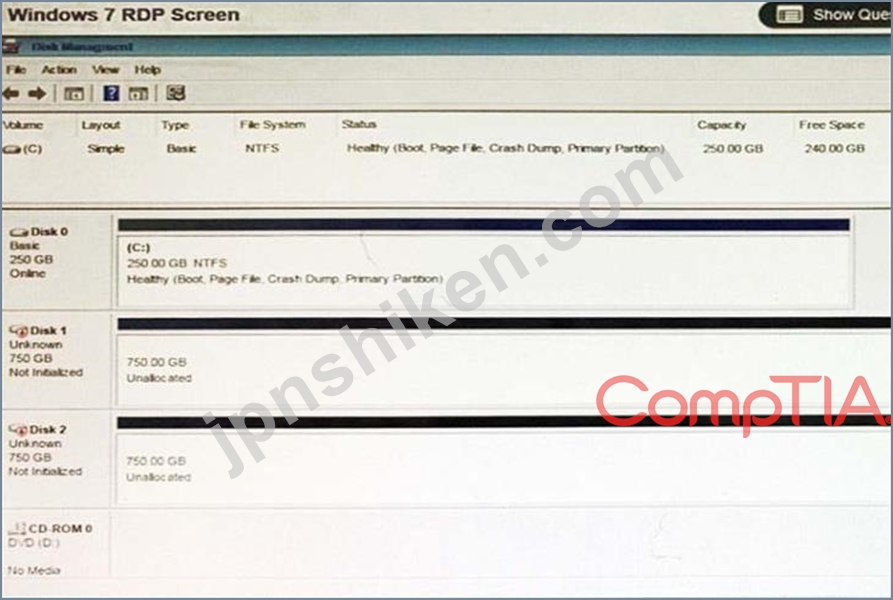
ラボでは、Disk1が2つのパーティションで構成されたダイナミックディスクである必要があります。最初のパーティションのサイズは256,000MBで、ドライブFにマップされている必要があります。
2番目のパーティションのサイズは512,000MBで、ドライブGにマップされている必要があります。
新しいパーティションは、ユーザーのファイルを他のユーザーから保護できるようにフォーマットする必要があり、ディスクは将来の冗長性を考慮して構成する必要があります。
一貫性のあるファイルシステムを維持するようにしてください。
指示:
これらのタスクを実行するには、ディスクマネージャー内で必要な手順を実行します。
シミュレーションの初期状態に戻したい場合は、いつでも[すべてリセット]ボタンをクリックしてください。
正解:
Please review explanation for detailed answer.
Right click on disk 1, click on initialize
Choose disk and option as MBR. Hit ok.
Again, right click on disk 1 and choose convert to dynamic disk.
Now right click on disk 1 and choose new simple volume.
Specify storage as 256000 and assign a drive letter F and choose file system as NTFS and click finish.
Do the same thing for rest of space of disk 1, assigning 512000MB and using Disc G Here are the screen shots showing this process:


Right click on disk 1, click on initialize
Choose disk and option as MBR. Hit ok.
Again, right click on disk 1 and choose convert to dynamic disk.
Now right click on disk 1 and choose new simple volume.
Specify storage as 256000 and assign a drive letter F and choose file system as NTFS and click finish.
Do the same thing for rest of space of disk 1, assigning 512000MB and using Disc G Here are the screen shots showing this process:

- 質問一覧「169問」
- 質問1 従業員は、不審な個人がごみ箱を覗いていると報告しました。次の
- 質問2 顧客は、次の仕様でコンピューターを作成しました。 シングルヘ
- 質問3 次のOSタイプのうち、使いやすいブラウザベースのインターフェイ...
- 質問4 スマートフォンユーザーは、ユーザーの使用行動が前の期間と変わ
- 質問5 アプリケーションはワークステーションにローカルにインストール
- 質問6 ユーザーがコンピューターラボのコンピューターの1つに2つの新し...
- 質問7 Webページのユーザーエンドで表示されるスクリプトの種類は次の...
- 質問8 システム上のファイルの永続的な保存を許可せずにインターネット
- 質問9 顧客のアンは技術者に電話をかけ、インターネットの閲覧中に自宅
- 質問10 サーバールームに最高のセキュリティを提供するのは次のうちどれ
- 質問11 技術者は最近、マルチコードCPU、32GB DDR4メモリ、1TBSSDを搭載...
- 質問12 技術者はWebサイトに接続できますが、別のWebサイトに交互にアク...
- 質問13 技術者がユーザーのシステムでマルウェアを特定しました。マルウ
- 質問14 技術者は、Windowsシステムでインストールが行われたときに、ユ...
- 質問15 技術者は、最近発見されたトロイの木馬アプリケーションをユーザ
- 質問16 技術者は、2つの州に3つのオフィスがある会社にディザスタリカバ...
- 質問17 技術者がコンピューターでサービスを実行していて、応答が非常に
- 質問18 技術者が、従業員30人の小さな会社で使用されている家庭用WiFiル...
- 質問19 技術者がワークステーションからマルウェアを削除しています。こ
- 質問20 ユーザーのジョーは、自分のコンピュータがマルウェアに感染して
- 質問21 組織は、災害発生時に災害復旧計画が効果的であることを確認する
- 質問22 Ultrabookを購入した後。アン。ホームユーザーは、技術者を自宅...
- 質問23 ユーザーがコンピュータネットワーク上で許可されていることは、
- 質問24 ユーザーの会社のメールには、ユーザーが休暇に入る前に存在して
- 質問25 技術者は、安全なターミナルアプリケーションを使用してサーバー
- 質問26 従業員のアンは最近、スマートフォンが奇妙な動作をしていること
- 質問27 会社の従業員であるAnnは、ヘルプディスクを呼び出して、ベンダ...
- 質問28 技術者が同時に複数のワークステーションに使用するOSインストー...
- 質問29 技術者がMacOSXオペレーティングシステムをインストールしていま...
- 質問30 最高経営責任者(CEO)が業界会議でプレゼンテーションを行って...
- 質問31 複数のモバイルユーザーが、倉庫内のWLANへの接続の問題を報告し...
- 質問32 ユーザーのワークステーションでのマルウェアの問題を解決するた
- 質問33 ある技術者がPCをリサイクルして、中学校で再利用しています。デ...
- 質問34 OSのアップデートをインストールしてから、顧客のスマートフォン...
- 質問35 OSのインストールに応答ファイルを使用する必要があるインストー...
- 質問36 次のWindows OSテクノロジーのどれが、ユーザーアクセスのために...
- 質問37 次のセキュリティ概念のうち、ソーシャルエンジニアリングによっ
- 質問38 キーを使用してディスク上でデータが暗号化されるときに使用され
- 質問39 企業のVPNに接続した後、ユーザーのワークステーションはインタ...
- 質問40 技術者は、Windows OSを最新バージョンにアップグレードした後、...
- 質問41 ユーザーがアプリケーションをインストールしようとして、アプリ
- 質問42 マネージャーは、営業時間外および週末にサーバーへのリモートア
- 質問43 PC上のウイルスについて技術者に警告します。技術者はPCをネット...
- 質問44 ジョー。ユーザーは自動返信を受信していますが、それらの受
- 質問45 SOHOのお客様は最近、大きなハリケーンを経験しました。顧客には...
- 質問46 SOHOの技術者は最近、あるサーバーから別のサーバーにデータを移...
- 質問47 ユーザーは、ネットワークへのファストイーサネット接続のみを提
- 質問48 Windowsシステムのゲストアカウントを説明するベストは次のうち...
- 質問49 MOSTセキュアワイヤレスセキュリティプロトコルは次のうちどれで...
- 質問50 ユーザーがアプリケーションをインストールしましたが、Lull機能...
- 質問51 Windows XPを実行しているユーザーが技術者を呼び出して、コンピ...
- 質問52 技術者が次の症状のあるコンピューターで作業しています *インタ...
- 質問53 技術者は、マルウェアに感染した最高経営責任者(CEO)のWindows...
- 質問54 Macユーザーは、シリアル接続を使用してネットワークデバイスを...
- 質問55 技術者は、医師が会議に持ち込むための新しいラップトップをセッ
- 質問56 OSの新しいバージョンが市場にリリースされてから6か月後、エン...
- 質問57 ユーザーが人気のある電子メールWebサイトにアクセスしようとし...
- 質問58 ワイヤレスアクセスポイントは、混雑した建物内にある小さなオフ
- 質問59 技術者が以前に特定されていない問題に遭遇した技術者は、いくつ
- 質問60 ジョー。 ネットワークパスワードを変更したばかりのエンドユー
- 質問61 交換用スマートフォンを受け取った後。企業ユーザーは一部の電子
- 質問62 ユーザーの個人設定は保存されておらず、技術者はユーザーのロー
- 質問63 ユーザーは、午前中に開始された新しいWindowsの問題に関してヘ...
- 質問64 ユーザーであるジョーは、技術者であるアンに、画面に表示されて
- 質問65 大企業は、ワイヤレスネットワークをセキュリティで保護して、従
- 質問66 技術者がリモートの場所からWindowsをインストールできるのは、...
- 質問67 エンドユーザーがITスペシャリストに新しいソフトウェアをワーク...
- 質問68 オフィスビルが停電し、発電機が始動した。複数のフロアのユーザ
- 質問69 オフィスの数人のユーザーは、コンピュータが過去1時間に不規則
- 質問70 管理者は、Linuxサーバー上のファイルでプラス記号(+)を検索し...
- 質問71 技術者は、指定されたローカル宛先にWebサイトアドレスを解決す...
- 質問72 ジョー、ユーザー。ただし、ユーザー名またはパスワードが正しく
- 質問73 企業のファイル共有は、複数の部門のファイルを保持します。各部
- 質問74 ユーザーの電話には、顧客のPIIが含まれています。データは非常...
- 質問75 企業は、すべてのモバイルデバイスに影響を与えるデータ侵害を経
- 質問76 技術者は、すべてのブラウザーをフィッシングWebサイトにリダイ...
- 質問77 次の機能のうち、Windows 7からWindows 10への最も重要な変更を...
- 質問78 フード平原にある中小企業は、災害後数日以内に別の場所でハエを
- 質問79 情報の取得を試みる際に、個人情報を使用する脅威は次のうちどれ
- 質問80 顧客がWindows 7 PCで使用するために3TB HDDを購入し、ドライブ...
- 質問81 ユーザーが懐中電灯アプリケーションを電話にインストールします
- 質問82 ユーザーのPCの動作が遅い。 PCに変更はなかったとユーザーが言...
- 質問83 開いているプログラムが1つだけの場合でも、ユーザーのコンピュ
- 質問84 新しいビジネスでは、物理的な場所でのクレジットカードとWebプ...
- 質問85 ビデオカードに含まれているWindowsドライバーに必要な機能がな...
- 質問86 ユーザーがWindowsラップトップでお気に入りのWebサイトを閲覧す...
- 質問87 システム管理者は、ユーザープロファイルに新しいフォルダを作成
- 質問88 技術者が、サーバーを持たない医療機関にSOHOワイヤレスネットワ...
- 質問89 キーボードやマウスが5分間アクティブでなくなるたびに、ユーザ
- 質問90 アン。 外部ユーザーが、会社から「from」フィールドの内部ユー...
- 質問91 技術者が2要素認証ソリューションを実装してサーバールームをセ
- 質問92 ユーザーであるジョーは、前週にコンピューターでウイルス駆除を
- 質問93 アップグレード後にラップトップからメモリチップを安全に保存す
- 質問94 ユーザーは、携帯電話アプリケーションのロードが遅く、正しく機
- 質問95 セキュリティチームは、会社のネットワークログを監査しており、
- 質問96 ユーザーがファイルを1つのNTFSディスクから別のNTFSディスクに...
- 質問97 ユーザーのコンピューターが黒い画面を表示しています。技術者は
- 質問98 ユーザーが自宅のデスクトップコンピューターを持ち込み、掃除し
- 質問99 技術者は、コンピューターをPXEブートします。次のうち、MOSTが...
- 質問100 Windowsユーザーがローカルプリンターをインストールしようとし...
- 質問101 正しい認証が受信されるまで、ユーザーがUSBドライブ上のファイ...
- 質問102 最近のパスワード変更後、ユーザーはAppleコンピューターに正常...
- 質問103 技術者は、ファイルの終わりまでデータを1行ずつチェックするス
- 質問104 ユーザーは内部のWebサイトにアクセスできませんが、一部の外部...
- 質問105 ユーザーは、新しい更新プログラムが適用された後の待機時間に問
- 質問106 ユーザーは、次のどのファイル拡張子タイプでコマンドが表示され
- 質問107 ジョー。技術者は、ネットワーク上の運用データファイルの共有が
- 質問108 最近、ネットワーク管理者は、ユーザーがファイアウォールによっ
- 質問109 停電の場合に電力を供給するコンピュータIDに接続される可能性が...
- 質問110 ユーザーが企業のヘルプデスクに電話して、ユーザーの画面に表示
- 質問111 ユーザーが手動でウイルス対策スキャンを実行するたびに、ワーク
- 質問112 ユーザーのアンは、新しいAndroid携帯電話を購入し、パブリック...
- 質問113 企業の最高経営責任者(CEO)は、地元の銀行からメールを受け取...
- 質問114 技術者がコンピューターを修理しています。 コンピューターを偶
- 質問115 架空の会社としての最初の日へようこそ。 LLCヘルプデスクの従業...
- 質問116 エンドユーザーのアンは、テーブルのスタイルを利用しています。
- 質問117 従業員は、在宅勤務中にオフィス内のネットワークフォルダを表示
- 質問118 テクノロジーチームは、会社提供のソフトウェア、機器、インター
- 質問119 技術者は、企業のWebサービスに影響を与えるLinuxディストリビュ...
- 質問120 技術者はSOHOワイヤレスルーターをセットアップしており、次の要...
- 質問121 小売店のリモート管理されたセルフチェックアウトマシンはWindow...
- 質問122 ネットワーク管理者が、ネットワーク上のユーザーのログイン資格
- 質問123 次のWindowsテクノロジのうち、ファイルの作成者以外の人がMeを...
- 質問124 ある会社は最近、許可されていないユーザーがUSBフラッシュドラ...
- 質問125 次のオペレーティングシステムのうち、発行者がコントロールパネ
- 質問126 技術者は、ワークステーションにウイルスがあると主張するユーザ
- 質問127 Windows 10を実行しているユーザーがマシンにログインし、共有ド...
- 質問128 MACユーザーのオペレーティングシステムが破損し、マルウェアの...
- 質問129 ビジネスユニットは、ローン処理ソフトウェアの現在のバージョン
- 質問130 次のインストール方法のうち、技術者がインストールの実行中に発
- 質問131 顧客がコンピューター上の複数のファイルを開くのに問題がありま
- 質問132 最近、Windows7からWindows10にアップグレードした顧客。顧客は...
- 質問133 ユーザーがOutlookを開こうとしていますが、Outlookが無効なユー...
- 質問134 デスクトップ技術者は、300人のエンドユーザーのOS移行を担当し...
- 質問135 ユーザーがコンピューターを使用して近くのラップトップ上のファ
- 質問136 Linuxユーザーは、アプリケーションが開かず、一度に実行できる...
- 質問137 ユーザーのコンピューターのソフトウェアエラーのトラブルシュー
- 質問138 ユーザーのジョーは、休憩中に誰かが自分のコンピューターを使用
- 質問139 技術者は、企業が802.1Xを使用するようにスイッチを構成します。...
- 質問140 技術者がBitLockerを使用して会社のラップトップを暗号化してい...
- 質問141 技術者がマルウェアに感染したWindowsコンピューターを修復しよ...
- 質問142 Macでの作業中に、技術者がWiFi接続に問題を抱えています。技術...
- 質問143 従業員のアンは、海外旅行中に会社が発行したモバイルデバイスを
- 質問144 次のうち、安全なクライアントサーバー通信で最も使用される可能
- 質問145 ユーザーのモバイルデバイスのデータ速度が遅い。ユーザーは、大
- 質問146 技術者は、ダウンタイムがゼロの施設に新しいシステムを設置して
- 質問147 コンピュータ内部のコンポーネントを取り扱う際にESD関連の損傷...
- 質問148 ユーザーは技術者に電話して、ベンダーのWebサイトにログインす...
- 質問149 会社は年に数回請負業者を持ち込んで在庫管理を行い、請負業者は
- 質問150 以下の大量のこぼれを安全に掃除するには、特別なタイプのESD販...
- 質問151 組織内のデータ漏洩を防ぐためにコンテンツフィルタリングを採用
- 質問152 組織内の部門は、インターネットステージを管理するためにプロキ
- 質問153 ユーザーは、極端な気象条件の場合に少なくとも1時間の稼働時間
- 質問154 次のタイプのソーシャルエンジニアリング攻撃のうち、個人情報や
- 質問155 技術者はハードウェアデバイスを取得し、仮想デスクトップを備え
- 質問156 技術者が倉庫といくつかの古いCRTモニターとUPSユニットを掃除し...
- 質問157 顧客のジョーは、技術者に電話をかけて、リモートコンピューター
- 質問158 技術者は、Windowsコンピューターの実行速度が遅いことに気づき...
- 質問159 ユーザーが、会社が承認した新しいアプリケーションをWindowsPC...
- 質問160 次のオペレーティングシステムのうち、UNIXソースコードに基づい...
- 質問161 モバイルデバイスユーザーのJoeは、現在の請求サイクルの約半分...
- 質問162 技術者がワークステーションへのセカンダリOSのインストールを完...
- 質問163 技術者がプライベートPCをパブリックワークスペースにインストー...
- 質問164 技術者は、すべての会社のスイッチのファームウェアを同時に、営
- 質問165 技術者は最近、オフィス内のすべてのコンピューターのプリンター
- 質問166 技術者が最近、Windows 10デスクトップに新しいセカンダリハード...
- 質問167 ドメインネットワーク上の数百人のユーザーに影響する問題につい
- 質問168 メーカーの設計に基づいて、接地線が取り付けられている可能性が
- 質問169 以前のワイヤレス暗号化プロトコルと比較して、データセキュリテ
