- ホーム
- Cisco
- 300-410J - Implementing Cisco Enterprise Advanced Routing and Services (300-410日本語版)
- Cisco.300-410J.v2021-12-09.q75
- 質問75
有効的な300-410J問題集はJPNTest.com提供され、300-410J試験に合格することに役に立ちます!JPNTest.comは今最新300-410J試験問題集を提供します。JPNTest.com 300-410J試験問題集はもう更新されました。ここで300-410J問題集のテストエンジンを手に入れます。
300-410J問題集最新版のアクセス
「800問、30% ディスカウント、特別な割引コード:JPNshiken」
<<前へ
質問 75/75
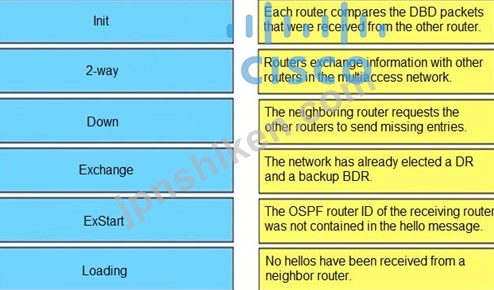
OSPF隣接状態を左側から右側の正しい説明にドラッグアンドドロップします。
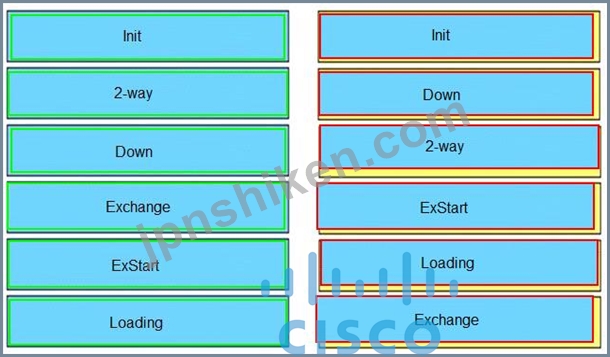
正解:
This state specifies that the router has received a hello packet from its neighbor, but the receiving router's ID was not included in the hello packet. When a router receives a hello packet from a neighbor, it should list the sender's router ID in its hello packet as an acknowledgment that it received a valid hello packet.
2-Way
Reference:
+ Each router compares the DBD packets that were received from the other router: Exchange
+ Routers exchange information with other routers in the multiaccess network: Exstart
+ The neighboring router requests the other routers to send missing entries: Loading
+ The network has already elected a DR and a backup BDR: 2-way
+ The OSPF router ID of the receiving router was not contained in the hello message: Init
+ No hellos have been received from a neighbor router: Down
When OSPF adjacency is formed, a router goes through several state changes before it becomes fully adjacent with its neighbor. The states are Down -> Attempt (optional) -> Init -> 2-Way -> Exstart -> Exchange -> Loading -> Full. Short descriptions about these states are listed below:
Down: no information (hellos) has been received from this neighbor.
Attempt: only valid for manually configured neighbors in an NBMA environment. In Attempt state, the router sends unicast hello packets every poll interval to the neighbor, from which hellos have not been received within the dead interval.
Init: specifies that the router has received a hello packet from its neighbor, but the receiving router's ID was not included in the hello packet
2-Way: indicates bi-directional communication has been established between two routers.
Exstart: Once the DR and BDR are elected, the actual process of exchanging link state information can start between the routers and their DR and BDR.
Exchange: OSPF routers exchange and compare database descriptor (DBD) packets Loading: In this state, the actual exchange of link state information occurs. Outdated or missing entries are also requested to be resent.
Full: routers are fully adjacent with each other
(Reference: http://www.cisco.com/en/US/tech/tk365/technologies_tech_note09186a0080093f0e.shtml)

- 質問一覧「75問」
- 質問1 展示を参照してください。 (Exhibit) エンジニアがデバイスのBGP...
- 質問2 エンジニアは、デフォルトの属性でBGPを使用して、2つの異なるサ...
- 質問3 VRFインスタンスの2つの特徴は何ですか? (2つ選択してください...
- 質問4 展示を参照してください。 (Exhibit) mGREモードでMVPNを有効に...
- 質問5 出品物をご参照ください。 (Exhibit) ルーティングプロトコルは...
- 質問6 エンジニアがCiscoIP PhoneのDHCPサーバを設定してTFTPサーバか...
- 質問7 ネットワーク管理者は、User1ラップトップからインターネットに...
- 質問8 展示を参照してください。ネットワーク管理者は、統一されたタイ
- 質問9 IPv6ルーターアドバタイズメントガード機能を使用する代わりに、...
- 質問10 展示を参照してください。 (Exhibit) ルータS1にIP SLAが設定さ...
- 質問11 SNMPV3で使用される暗号化および認証プロトコルを表示するSNMP検...
- 質問12 DHCPメッセージを左から右の正しい用途にドラッグアンドドロップ...
- 質問13 展示品をご覧ください。 (Exhibit) DMVPNが構成されている場合、...
- 質問14 次の出力を参照してください。 Router#show ip nhrp detail 10....
- 質問15 展示を参照してください。ネットワーク管理者は、E 0/0インター...
- 質問16 展示を参照してください。ロサンゼルスとニューヨークのルーター
- 質問17 展示を参照してください。 (Exhibit) ネットワーク管理者は、シ...
- 質問18 MPLSレイヤ3VPNの2つの機能は何ですか? (2つ選択してください...
- 質問19 展示を参照してください。 (Exhibit) エンジニアがコンソールラ...
- 質問20 展示を参照してください。 (Exhibit) エンジニアは、ISP1およびI...
- 質問21 インストール中に、エンジニアがCisco DNA Centerエンタープライ...
- 質問22 展示を参照してください。 (Exhibit) R1はGigabitEthernet0 / 0...
- 質問23 展示を参照してください。 (Exhibit) スポークBルーターで動的DM...
- 質問24 示す: (Exhibit) 認証の問題を解決するアクションはどれですか...
- 質問25 展示を参照してください。エンジニアはRouter2をRouter1に構成し...
- 質問26 エンジニアは、ソフトウェアイメージの操作中に、Cisco DNA Cent...
- 質問27 MPLS LDP自動設定機能でサポートされているIGPはどれですか?...
- 質問28 左側のアドレスを右側の正しいIPv6フィルターの目的にドラッグア...
- 質問29 別紙を参照してください。 ネットワーク管理者は、ハブと2つのス...
- 質問30 展示を参照してください。 (Exhibit) ネットワーク管理者がR1ル...
- 質問31 MPLS LDPルーターIDについて正しい説明はどれですか。
- 質問32 別紙を参照してください。 (Exhibit) ネットワーク管理者は、E0 ...
- 質問33 展示を参照してください。 (Exhibit) 管理者は、失敗したログイ...
- 質問34 エンジニアがネットワークを構成しており、ルーティングテーブル
- 質問35 複数のスポークデバイスからの複数の接続をサポートするために、
- 質問36 展示を参照してください。 (Exhibit) この構成を適用した結果は...
- 質問37 ユーザーは、ローカルDHCPサーバーからリモートの企業DHCPサーバ...
- 質問38 OSPFv3アドレスファミリ構成のOSPFv3プロセスにIPv4インターフェ...
- 質問39 展示を参照してください。 (Exhibit) ネットワーク操作は、操作...
- 質問40 IPv6ソースガードの2つの機能は何ですか? (2つ選択してくださ...
- 質問41 展示を参照してください。 (Exhibit) ルーティングプロトコル間...
- 質問42 LDPセッションの形成に使用されるトランスポート層プロトコルは...
- 質問43 展示を参照してください。ネットワーク管理者は、インターネット
- 質問44 展示を参照してください。 (Exhibit) R5からのトレースルートの...
- 質問45 サービスプロバイダーがLVPNMPLSアプリケーションを利用するため...
- 質問46 ALS2のクライアントはIPv4およびIPv6アドレスを受け取りますが、...
- 質問47 Cisco IOSデバイスのSNMP属性を左側から右側の正しいSNMPv2cまた...
- 質問48 展示を参照してください。 OSPFネイバー関係が確立されていませ...
- 質問49 IPv6検査について正しい説明はどれですか?
- 質問50 展示を参照してください。 (Exhibit) SanFranciscoルーターとBos...
- 質問51 MPLSの概念を左から右の説明にドラッグアンドドロップします。 (...
- 質問52 MPLSはトラフィックエンジニアリングをサポートするためにどのプ...
- 質問53 ネットワーク内のリンクが共通のファイバーを介して接続されてい
- 質問54 示す: (Exhibit) エンジニアは、R2とR5をルートリフレクタとし...
- 質問55 ラベルエッジルーターが実行するラベル操作はどれですか。
- 質問56 出品物をご覧ください。 (Exhibit) SNMPトラップパケットで観察...
- 質問57 IPv6 ND検査の機能とは?
- 質問58 示す: (Exhibit) NTPは、ネットワークインフラストラクチャとCi...
- 質問59 展示を参照してください。 DHCPクライアントがDHCPサーバーからI...
- 質問60 ブランチオフィスから本社オフィスへの安全な接続を提供するため
- 質問61 システムがサポートできるかどうかを判断する場合、制御パケット
- 質問62 ネットワークエンジニアが、NTPサーバーと同期しているコアスイ...
- 質問63 展示を参照してください。 (Exhibit) IP SLAは、プライマリがダ...
- 質問64 IPv6ソースガードは、IPv6ソースアドレスを転送する必要があるか...
- 質問65 展示を参照してください。 (Exhibit) エンジニアはルーターに静...
- 質問66 エンジニアは、ルートに影響を与えるポリシーでアクセスリストNO...
- 質問67 サービス拒否攻撃を最小限に抑えるのに役立つIpv6ファーストホッ...
- 質問68 別紙をご参照ください。 (Exhibit) BGPからOSPFプロセス10への再...
- 質問69 エンジニアは、EIGRPルートを要約し、特にループバックをアドバ...
- 質問70 オプションで大量のトラフィックを受信する疑いがある場合にIP S...
- 質問71 VRF-Lite構成に関する説明として正しいものはどれですか。 (2つ...
- 質問72 展示を参照してください。管理者は、デフォルトルートのみを使用
- 質問73 パケットタイプを左から右側の正しい説明にドラッグアンドドロッ
- 質問74 MPLSレイヤ3VPNサービスはどのように展開されますか?
- 質問75 OSPF隣接状態を左側から右側の正しい説明にドラッグアンドドロッ...
