- ホーム
- Microsoft
- AI-102J - Designing and Implementing a Microsoft Azure AI Solution (AI-102日本語版)
- Microsoft.AI-102J.v2026-01-21.q205
- 質問133
有効的なAI-102J問題集はJPNTest.com提供され、AI-102J試験に合格することに役に立ちます!JPNTest.comは今最新AI-102J試験問題集を提供します。JPNTest.com AI-102J試験問題集はもう更新されました。ここでAI-102J問題集のテストエンジンを手に入れます。
AI-102J問題集最新版のアクセス
「416問、30% ディスカウント、特別な割引コード:JPNshiken」
ホットスポットに関する質問
Resource1 という名前の Azure AI Language リソースを含む Azure サブスクリプションがあります。
次の cURL コマンドを実行し、Output.mp3 ファイルを再生します。
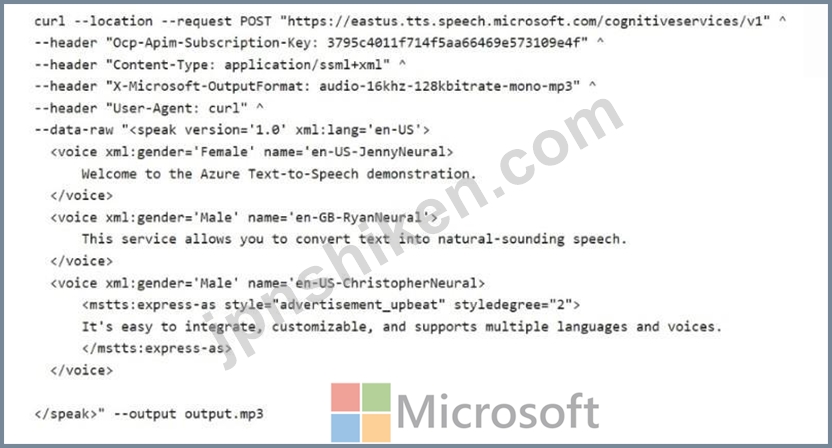
以下の各文について、正しい場合は「はい」を選択してください。そうでない場合は「いいえ」を選択してください。
注意: 正しい選択ごとにポイントが加算されます。
Resource1 という名前の Azure AI Language リソースを含む Azure サブスクリプションがあります。
次の cURL コマンドを実行し、Output.mp3 ファイルを再生します。
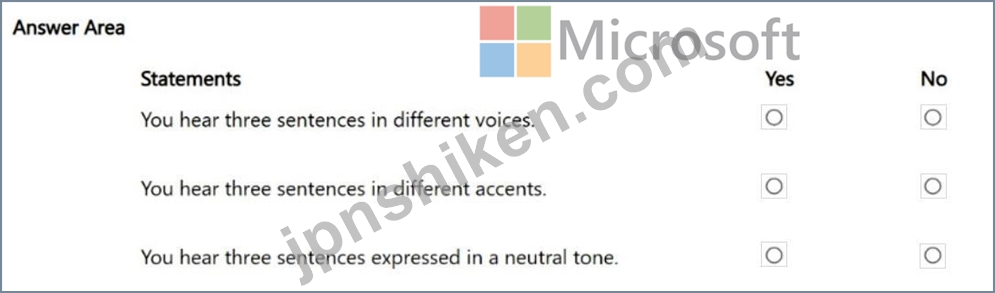
以下の各文について、正しい場合は「はい」を選択してください。そうでない場合は「いいえ」を選択してください。
注意: 正しい選択ごとにポイントが加算されます。
正解:
Explanation:
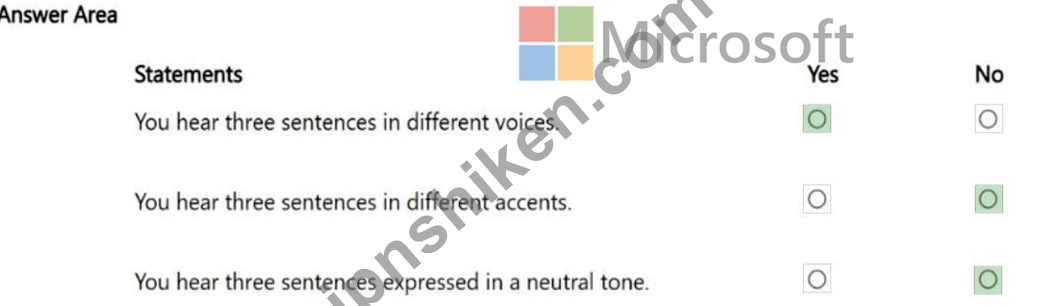
Box 1: Yes
There are three voice elements, each with a different voice.
Note: Use voice elements
At least one voice element must be specified within each SSML speak element. This element determines the voice that's used for text to speech.
You can include multiple voice elements in a single SSML document. Each voice element can specify a different voice. You can also use the same voice multiple times with different settings, such as when you change the silence duration between sentences.
Box 2: No
There are two accents only: two voices using en-US, and one voice using en-GB.
Note: Adjust speaking languages
By default, multilingual voices can autodetect the language of the input text and speak in the language of the default locale of the input text without using SSML. Optionally, you can use the
<lang xml:lang> element to adjust the speaking language for these voices to set the preferred accent such as en-GB for British English.
Box 3: No
The third voice is configured with style advertisement_upbeat and styledegree set to 2.
Reference:
https://learn.microsoft.com/en-us/azure/ai-services/speech-service/speech-synthesis-markup- voice

- 質問一覧「205問」
- 質問1 ホットスポットに関する質問 Microsoft Entra テナントにリンク...
- 質問2 ドラッグアンドドロップの質問 ドイツ語の Microsoft Word 文書...
- 質問3 Azure サブスクリプションをお持ちです。 地理的な場所を認識す...
- 質問4 次のデータ ソースがあります。 - 財務: オンプレミスの Microso...
- 質問5 Azure AI Vision クライアントライブラリを使用するメソッドを開...
- 質問6 ホットスポットに関する質問 Computer Vision API の呼び出しか...
- 質問7 ホットスポットに関する質問 Azure AI Language サービスを使用...
- 質問8 プログラムで Azure AI サービス リソースを作成するための次の ...
- 質問9 AI1 という名前の Azure OpenAI リソースを含む Azure サブスク...
- 質問10 ケーススタディ 2 - Contoso 社 概要 Contoso, Ltd.は、フランス...
- 質問11 Azure OpenAI リソースを含む Azure サブスクリプションがありま...
- 質問12 既存のナレッジベース内の質問に、マルチターンコンテキストを追
- 質問13 ドラッグアンドドロップの質問 それぞれ独自の言語理解モデルを
- 質問14 ホットスポットに関する質問 Azure AI Vision クライアントライ...
- 質問15 ホットスポットに関する質問 文を正しく完成させる答えを選択し
- 質問16 チャットボットを構築しています。 チャットボットがユーザー入
- 質問17 クライアント アプリケーションには、認知サービス エンドポイン...
- 質問18 生産ライン上の不良品を識別するための Azure AI ソリューション...
- 質問19 ストリーミングワークロードの例はどのシナリオですか?
- 質問20 ホットスポットに関する質問 カスタム API を使用して、特定の場...
- 質問21 ソーシャル メディア メッセージング アプリを構築しています。 ...
- 質問22 機械から一連のデータを受信するAzure IoTハブがあります。以下...
- 質問23 多言語チャットボットを構築しています。 ポジティブメッセージ
- 質問24 Azure Stream Analyticsのストリーム処理ジョブでクエリを定義す...
- 質問25 ホットスポットに関する質問 英語(英国)で行われた講義を録画
- 質問26 あなたは旅行代理店用のチャットボットを構築しています。チャッ
- 質問27 ホットスポットに関する質問 次のアクションを実行する通話処理
- 質問28 注: この問題は、同じシナリオを提示する一連の問題の一部です。...
- 質問29 シミュレーション https://docs.microsoft.com/en-us/azure/bot-...
- 質問30 シミュレーション 必要に応じて次のログイン資格情報を使用しま
- 質問31 注: この問題は、同じシナリオを提示する一連の問題の一部です。...
- 質問32 ホットスポットに関する質問 Azure AI Language のカスタム質問...
- 質問33 Azure サブスクリプションをお持ちです。 ドキュメントの意味的...
- 質問34 あなたの会社には、レポートをページングした植え替えソリューシ
- 質問35 ホットスポットに関する質問 言語翻訳を含むアプリケーションを
- 質問36 ホットスポットに関する質問 カスタム ニューラル音声を使用する...
- 質問37 Azure Machine Learning を使用して機械学習モデルをトレーニン...
- 質問38 注: この問題は、同じシナリオを提示する一連の問題の一部です。...
- 質問39 あなたの会社は、従業員が経費報告書に領収書を記入するのにかか
- 質問40 ホットスポットに関する質問 Microsoft Bot Framework Composer ...
- 質問41 テキストに転記する音声入力がオーディオ ファイル内にあること
- 質問42 注: この問題は、同じシナリオを提示する一連の問題の一部です。...
- 質問43 ドラッグアンドドロップの質問 Azure サブスクリプションには、D...
- 質問44 次の Python メソッドがあります。 (Exhibit) Azureリソースを米...
- 質問45 ホットスポットに関する質問 Resource1 という名前の Azure AI ...
- 質問46 ホットスポットに関する質問 Azure AI Language のカスタム質問...
- 質問47 ドラッグアンドドロップの質問 ドラッグアンドドロップの質問 モ...
- 質問48 Azure AI Video Indexer サービスを使用するアプリを構築してい...
- 質問49 シミュレーション 米国東部 Azure リージョンに QNA12345678 と...
- 質問50 ホットスポットに関する質問 Resource1 という名前の Azure AI S...
- 質問51 Azure AI Search を使用して、個人を特定できる情報 (PII) を認...
- 質問52 ドラッグアンドドロップの質問 食品用の段ボール包装を生産する
- 質問53 AI1 という名前の Azure OpenAI リソースを含む Azure サブスク...
- 質問54 AI1 という名前の Azure OpenAI リソースと User1 という名前の...
- 質問55 ドラッグアンドドロップの質問 顧客サポート チャットボットを構...
- 質問56 ホットスポットに関する質問 DI1 という名前の Azure AI Documen...
- 質問57 ホットスポットに関する質問 PDF ファイルとして保存されたプレ...
- 質問58 ローカル ドライブに保存されている File1.avi という名前の 20 ...
- 質問59 Azure AI Computer Vision API を使用して画像を分析するアプリ...
- 質問60 File1.avi という名前の 20 GB のビデオ ファイルを含む Microso...
- 質問61 ホットスポットに関する質問 受信メールを処理し、フランス語ま
- 質問62 ドラッグアンドドロップの質問 Azure Cosmos DB API と適切なデ...
- 質問63 テキスト入力の意図を識別する Model1 という名前の Azure AI サ...
- 質問64 あなたの組織では、ウェブサイト上のレビューを監視し、否定的な
- 質問65 ホットスポットに関する質問 以下の各文について、正しい場合は
- 質問66 Azure サブスクリプションをお持ちです。このサブスクリプション...
- 質問67 ホットスポットに関する質問 Azure AI Language サービスを使用...
- 質問68 Windowsサーバー上の共有フォルダーにデータを保存するアプリケ...
- 質問69 URL からアクセスできる領収書があります。 Azure AI Document I...
- 質問70 ケーススタディ1 - ワイドワールドインポーターズ 概要 既存の環...
- 質問71 ホットスポットに関する質問 注文状況に関する顧客からの電話に
- 質問72 ホットスポットに関する質問 チャットボットで使用する会話フロ
- 質問73 シミュレーション 必要に応じて次のログイン資格情報を使用しま
- 質問74 Microsoft Bot Framework SDK を使用して、フライト予約ボットを...
- 質問75 会話型言語理解モデルを構築しています。 アクティブラーニング
- 質問76 ホットスポットに関する質問 PDF ファイルとして保存されたプレ...
- 質問77 ホットスポットに関する質問 Azure AI Speech SDK と MP3 エンコ...
- 質問78 音声リソースと、Microsoft Bot Framework Composer を使用して...
- 質問79 ドラッグアンドドロップの質問 コンテナ ベース イメージを含む ...
- 質問80 次のデータ ソースがあります。 - 財務: オンプレミスの Microso...
- 質問81 カスタム Azure AI Document Intelligence モデルを構築します。...
- 質問82 ホットスポット Azure サブスクリプションをお持ちです。 Azure ...
- 質問83 次の表に示すファイルを含むローカル フォルダーがあります。 (E...
- 質問84 あなたは、公開されているWebサイトからのビデオとテキストを処...
- 質問85 Azure AI Search ソリューションと、ソーシャル メディアの投稿...
- 質問86 Azure AI Translator API を使用するアプリケーションのメソッド...
- 質問87 ユーザーサポートシステムの言語理解モデルをトレーニングしてい
- 質問88 注:この質問は、同じシナリオを提示する一連の質問の一部です。
- 質問89 ケーススタディ 2 - Contoso 社 概要 Contoso, Ltd.は、フランス...
- 質問90 ケーススタディ1 - ワイドワールドインポーターズ 概要 既存の環...
- 質問91 URL の配列からナレッジ ベースを作成する Azure Weblob を構築...
- 質問92 あなたの会社では、Azure AI Services ソリューションを使用して...
- 質問93 電子メールと Web チャットの両方を通じて会話型の顧客サポート ...
- 質問94 Azure サブスクリプションと 10,000 個の ASCII ファイルがあり...
- 質問95 ホットスポットに関する質問 DI1 という名前の Azure AI Documen...
- 質問96 電子商取引チャットボット用の会話型言語理解モデルを構築してい
- 質問97 ケーススタディ1 - ワイドワールドインポーターズ 概要 既存の環...
- 質問98 Azure AI Language サービスを使用してドキュメントを分析するア...
- 質問99 ホットスポットに関する質問 文を正しく完成させる答えを選択し
- 質問100 Microsoftボットフレームワークを使用して構築されたチャットボ...
- 質問101 トランザクションワークロードのどのプロパティが、各トランザク
- 質問102 カスタム ニューラル音声を使用する小売キオスク システムを構築...
- 質問103 Azure AI Language サービスを使用して機密性の高い顧客データを...
- 質問104 ホットスポットに関する質問 セマンティックカーネルを使用して
- 質問105 Azure AI Search ソリューションと、JPEG ファイルとして保存さ...
- 質問106 印刷されたフォームを管理するモバイル アプリがあります。 関連...
- 質問107 ケーススタディ1 - ワイドワールドインポーターズ 概要 既存の環...
- 質問108 カスタム Azure OpenAI モデルがあります。 次の表に示すファイ...
- 質問109 分類子を構築するには、Azure AI Custom Vision サービスを使用...
- 質問110 チャットボットの音声機能を有効にする必要があります。 実行す
- 質問111 注: この問題は、同じシナリオを提示する一連の問題の一部です。...
- 質問112 Microsoft Bot Framework を使用してボットを構築しています。 ...
- 質問113 ソーシャル メディア メッセージング アプリを構築しています。 ...
- 質問114 ホットスポットに関する質問 言語学習ソリューションを構築して
- 質問115 ホットスポットに関する質問 テキスト処理ソリューションを開発
- 質問116 経営幹部にデータを提供するためのソリューションを開発する必要
- 質問117 ホットスポット cu1 という名前の Azure AI Content Understandi...
- 質問118 ユーザーがフィードバックコメントを投稿できるブログを運営して
- 質問119 ホットスポットに関する質問 言語翻訳を含むアプリケーションを
- 質問120 ホットスポットに関する質問 Azure AI Search を使用するエンリ...
- 質問121 ホットスポットに関する質問 文書は 100,000 件あります。 Azure...
- 質問122 ホットスポットに関する質問 Azure AI Translator サービスを使...
- 質問123 ホットスポットに関する質問 次の方法を使用して、Azure AI Serv...
- 質問124 シミュレーション 必要に応じて次のログイン資格情報を使用しま
- 質問125 ホットスポットに関する質問 文を正しく完成させる答えを選択し
- 質問126 会社の製品のレビューに基づいてワード クラウドを生成するソリ
- 質問127 ホットスポットに関する質問 CS1 という名前の Azure AI コンテ...
- 質問128 ホットスポットに関する質問 テキスト処理ソリューションを開発
- 質問129 Azure AI を使用してワークスペースの安全規制コンプライアンス...
- 質問130 ドラッグアンドドロップの質問 工場の生産ラインで製造された不
- 質問131 ホットスポットに関する質問 一般的な AI 用語の定義をユーザー...
- 質問132 ケーススタディ 2 - Contoso 社 概要 Contoso, Ltd.は、フランス...
- 質問133 ホットスポットに関する質問 Resource1 という名前の Azure AI L...
- 質問134 App1 という名前の Azure App Service アプリを含む Azure サブ...
- 質問135 ホットスポットに関する質問 resource1 という名前の Azure AI ...
- 質問136 ホットスポットに関する質問 DI1 という名前の Azure AI Documen...
- 質問137 シミュレーション 必要に応じて次のログイン資格情報を使用しま
- 質問138 インターネットベースのトレーニングソリューションを構築してい
- 質問139 Azure AI Language サービス リソースを含む Azure サブスクリプ...
- 質問140 CS1 という名前の Azure AI コンテンツ セーフティ リソースを含...
- 質問141 ホットスポットに関する質問 Azure AI Video Indexer アカウント...
- 質問142 ホットスポットに関する質問 文を正しく完成させる答えを選択し
- 質問143 ホットスポットに関する質問 Azure AI Document Intelligence を...
- 質問144 ドラッグアンドドロップの質問 AI1 という名前の Azure OpenAI ...
- 質問145 ホットスポットに関する質問 Resource1 という名前の Azure AI S...
- 質問146 ホットスポットに関する質問 Azure AI エージェント サービスを...
- 質問147 予期しないオペレーティングシステムの再起動時にデータベースへ
- 質問148 ホットスポットに関する質問 CS1 という名前の Azure AI コンテ...
- 質問149 ドラッグアンドドロップの質問 ワークロードの種類と適切なシナ
- 質問150 Microsoft Bot Framework SDK を使用してボットを構築します。 ...
- 質問151 Microsoft Bot Framework を使用して構築され、Azure にデプロイ...
- 質問152 ホットスポットに関する質問 Azure サブスクリプションをお持ち...
- 質問153 Azure サブスクリプションをお持ちです。 ユーザーが画像を共有...
- 質問154 注: この問題は、同じシナリオを提示する一連の問題の一部です。...
- 質問155 ホットスポットに関する質問 Azure サブスクリプションをお持ち...
- 質問156 ホットスポットに関する質問 Microsoft Translator サービスを使...
- 質問157 Azure Blob StorageからBLOBを自動的に削除するには、何を使用す...
- 質問158 Microsoft Bot Framework SDK と Azure Bot Service を使用して...
- 質問159 ホットスポットに関する質問 米国西部 Azure リージョンでホスト...
- 質問160 Translator1 という名前のマルチサービス Azure AI Translator ...
- 質問161 ホットスポットに関する質問 何千もの画像を含むライブラリがあ
- 質問162 ドラッグアンドドロップの質問 タスク追跡をサポートするチャッ
- 質問163 製品サポートマニュアルがあります。 マニュアルに基づいた製品
- 質問164 ドラッグアンドドロップの質問 Face APIの呼び出しを開発してい...
- 質問165 製品サポートマニュアルがあります。 マニュアルに基づいた製品
- 質問166 ケーススタディ1 - ワイドワールドインポーターズ 概要 既存の環...
- 質問167 Azure AI Language を使用してテキスト メッセージから意味を抽...
- 質問168 ホットスポットに関する質問 Azure サブスクリプションをお持ち...
- 質問169 ドラッグアンドドロップの質問 音声翻訳を実行する App1 という...
- 質問170 ドラッグアンドドロップの質問 Azure AI Anomaly Detector サー...
- 質問171 シミュレーション 必要に応じて次のログイン資格情報を使用しま
- 質問172 注: この問題は、同じシナリオを提示する一連の問題の一部です。...
- 質問173 RG1 という名前の新しいリソース グループに QnA Maker サービス...
- 質問174 Speech and Language API を使用するアプリを開発しています。 ...
- 質問175 シミュレーション fr12345678 という名前の Azure AI Document I...
- 質問176 注: この問題は、同じシナリオを提示する一連の問題の一部です。...
- 質問177 ホットスポットに関する質問 画像内のオブジェクトを検出するモ
- 質問178 ボットを構築します。 Azure Bot リソースを作成します。 ボット...
- 質問179 Azure AI Search の AI エンリッチメント パイプラインを含む Az...
- 質問180 ケーススタディ 2 - Contoso 社 概要 Contoso, Ltd.は、フランス...
- 質問181 ホットスポットに関する質問 iOS アプリの一部として展開される...
- 質問182 テキストを音声に変換するソーシャルメディア拡張機能を構築して
- 質問183 ホットスポットに関する質問 言語理解を使用するボットを構築し
- 質問184 Azure AI Studio では、GPT-35 Turbo モデルで Completions プレ...
- 質問185 ドラッグアンドドロップの質問 オブジェクト検出を実行するAzure...
- 質問186 ホットスポットに関する質問 テキスト処理ソリューションを開発
- 質問187 Azure AI を使用して、ユーザーが性的に露骨な画像を共有するの...
- 質問188 Microsoft Bot Framework Composer を使用して、ユーザーがアイ...
- 質問189 Decision API と Language API を使用するアプリを開発していま...
- 質問190 bot1という名前の会話型ボットを作成します。 QnAMakerアプリケ...
- 質問191 ドラッグアンドドロップの質問 AI1 という名前の Azure OpenAI ...
- 質問192 ドラッグアンドドロップの質問 コンテナーにデプロイされている ...
- 質問193 ホットスポットに関する質問 感情分析と光学式文字認識(OCR)を...
- 質問194 Search1 という名前の Azure AI Search リソースがあります。 Se...
- 質問195 ホットスポットに関する質問 Microsoft Bot Framework SDK を使...
- 質問196 非リレーショナルデータベースの特徴は何ですか?
- 質問197 注: この問題は、同じシナリオを提示する一連の問題の一部です。...
- 質問198 Microsoft Bot Framework Composer を使用して 5 つのボットを作...
- 質問199 ドラッグアンドドロップの質問 音声翻訳を実行する App1 という...
- 質問200 ホットスポットに関する質問 文を正しく完成させる答えを選択し
- 質問201 言語理解モデルを使用してテキスト ファイルを分析するアプリを
- 質問202 ホットスポットに関する質問 テキスト処理ソリューションを開発
- 質問203 Azure AI Document Intelligence を使用してスキャンされたドキ...
- 質問204 Language Understanding サービスを使用して言語モデルを構築し...
- 質問205 次のことを実行する言語サービス リソースがあります。 - 感情分...
